
...
1.3 In Scope Functional Modules
| TB Modules | Enlisted in the PRD |
| NCD modules | Enlisted in the PRD |
| Integration of Digital XRAY | External technical dependency |
| Integration of AI assessment tool | External technical dependency |
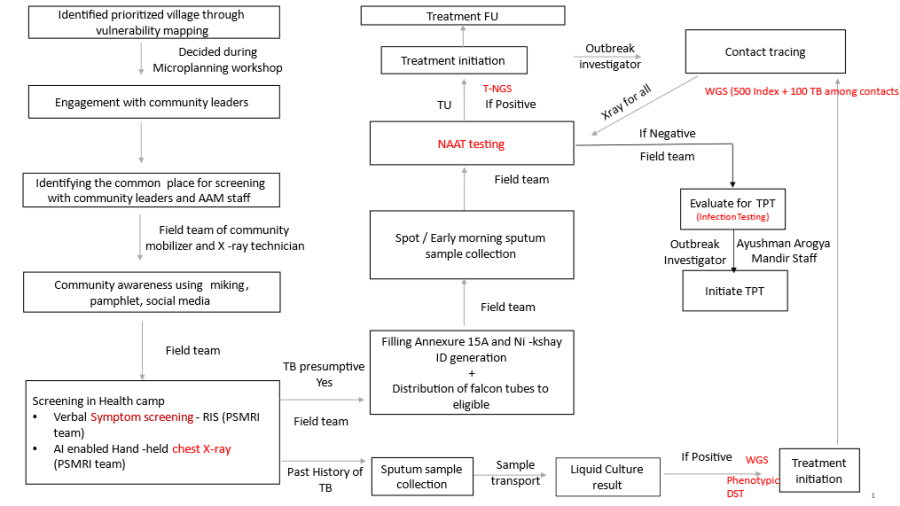
1.4 Workflow
2. Login Page
...
- It must be followed by "STOP TB" Logo.
- It must have both Online and Offline capabilities. ("Offline capabilities feature to exchange data between Mobile devices in a closed environment in real-time without internet")
- It must have Multilingual Feature with English, Hindi and other Indian languages enabled, and must be configurable to accommodate all the Indian languages as and when required in future.The landing page should have:
UI Field Name
Field Type
Options
Validations
STOP TB Logo
<Placeholder>
Please Select your Language
Radio Button
- English
- Hindi
- The fields and labels must populate in the language selected by the user
Username
Textbox
Password
Textbox
Remember Me
Checkbox
- When 'Remember Me' checkbox is selected, next time directly allow user to login just by authenticating with fingerprint
Powered by Piramal Foundation
Text
- Display on the bottom of the screen
2.1 Landing page
- This page must have a hamburger icon (side drawer), "Stop TB" text, sync button, and "Language Translation" button on the Top row.
- There should be a hamburger icon on the left side, which on clicking should have following details-
...
- Landing page should have 2 tabs- "Home" and "Dashboard".
- In home tab floating "Registration" button.
2.2 Home Page- Home
- Flip feature between "Home" and "Dashboard".
- Should contain four modules/ Cards- All Beneficiaries, TB screening, NCD screening, Referrals written on these cards.
- On clicking "All Beneficiaries" card- open the "Beneficiary module" form documented below for registering the beneficiary by giving the floating "Registration" button in the right corner. Fill the form for registering the beneficiary.
...
- On clicking "Referrals"- This should show the line listing of "TB suspected cases" and "NCDs referred list" when they are referred to facilities for further check up.
2.3 Home Page- Dashboard
- Flip feature between "Home" and "Dashboard".
- Put a field for filter with 2 selection options-
...
Field Name | Field Type | Options | Validation |
Filter/ Selection option | Dropdown | The Dropdown Values are
| If this filter is selected, then show all the values of the dashboard indicators pertaining to the time period selected. |
Filter/ Selection option | Dropdown | Village/ Hamlet names to be put here | If this filter is selected, then show all the values of the dashboard indicators pertaining to the particular village selected. |
Total TB screenings | Card must be yellow in colour | It must auto populate based on the filter selected. | |
Total TB suspected cases | Card must be yellow in colour | It must auto populate based on the filter selected. | |
Total TB confirmed cases | Card must be yellow in colour | It must auto populate based on the filter selected. | |
NIKSHAY IDs | Card must be yellow in colour | Total number of NIKSHAY IDs made in the selected time period or Village | |
ABHA IDs | Card must be yellow in colour | Total number of ABHA IDs made in the selected time period or Village |
Module 1 - Beneficiary Registration
On clicking Registration button the user will be navigated to Beneficiary Registration Page
This page has Beneficiary Registration Text displayed on top with "Home" Icon on the right corner to Navigate to Home page in the 1st row
The Page will end with "Cancel" and "Submit" button at the bottom
Give Edit option with Pencil icon on "Beneficiary Status", "Marital Status".
The card below should be visible after the registration of beneficiary.
If the beneficiary does not have ABHA ID, give one clickable button on the ABHA ID area of the card to initiate ABHA ID generation
...
Module 3- NCD Screening- Please refer to the Community Based Assessment Checklist (CBAC) Form from NCD module (disease control) from BRD for FLW App in confluence.
Note: The common questions in CBAC Part B1 and TB screening form, if either of the form is filled and submitted first, then responses in the other form should be automatically selected.
2.3 Home Page- Dashboard
- Flip feature between "Home" and "Dashboard".
- Put a field for filter with 2 selection options-
- Time Period- based on "today and previous months" This filter should show all the data cards in the dashboard pertaining to the time period selected. (eg: today, Jan, Feb etc)
- Village Name- Dropdown options to be populated with names of village/ hamlets
- Module cards should be placed below the filter selection option.
Field Name | Field Type | Options | Validation |
Filter/ Selection option | Dropdown | The Dropdown Values are
| If this filter is selected, then show all the values of the dashboard indicators pertaining to the time period selected. |
Filter/ Selection option | Dropdown | Village/ Hamlet names to be put here | If this filter is selected, then show all the values of the dashboard indicators pertaining to the particular village selected. |
Total TB screenings | Card must be yellow in colour | It must auto populate based on the filter selected. | |
Total TB suspected cases | Card must be yellow in colour | It must auto populate based on the filter selected. | |
Total TB confirmed cases | Card must be yellow in colour | It must auto populate based on the filter selected. | |
NIKSHAY IDs | Card must be yellow in colour | Total number of NIKSHAY IDs made in the selected time period or Village | |
ABHA IDs | Card must be yellow in colour | Total number of ABHA IDs made in the selected time period or Village |