Versions Compared

Key

  • This line was added.
  • This line was removed.
  • Formatting was changed.

...

S.No

 Offline Functionality with cross device communication including online functionalities to communicate with central server (AMRIT).External dependency
 Role based user access (with actions and privileges) 
 Beneficiary Registration ModuleEnlisted in the PRD

TB Screening, tracking and conformation, treatment follow up and TPT (TB Preventive treatment) modules.Enlisted in the PRD
 General Examination and General OPD modulesEnlisted in the PRD
 User Dashboard indicatorsEnlisted in the PRD
   Integration of NIKSHAY application External technical dependency
 Integration of portable digital chest Xray device (AI enabled)External technical dependency
 Integration of Lab testing device (sputum testing and others)External technical dependency

Integration of AMRIT inventory management module integrationmodule External dependency


 Pre Camp Work Plan Preparation Module

Subjected to requirement

...

Field Name

Field Type

Value/ Options

Validation/ Logic

Date of registration


Should be auto selected and updated when the volunteer logs in the application to do the screening.

Beneficiary ID (AMRIT ID)


Unique ID auto generated by the system

Photo

Camera

Optional

  • Should have face detection/ Facial recognition
  • Camera should identify & capture human face but not any objects
  • Show an Alert if Photo is not captured, just as reminder but Not Mandatory
  • Alert: "Do you like to Take Photo", Yes or No If "Yes", open Camera; If "No", go to next

First Name

Text


  • Mandatory
  • Speech to text feature

Last Name


  • Optional
  • Speech to text feature

Beneficiary Status

Radio Button

·       Alive

·       Death

·       Enable only in the “Edit” Beneficiary screen

·       Auto-populate, if ‘Death’ is reported from any module

·       Default value is “Alive”

·       If “Death” is selected, enable below four fields and mark it mandatory-

1. Date of Death

2. Time of Death

3. Reason for Death

4. Place of Death or Other Place of Death

Date of Death

Date picker


·       Enable if “Beneficiary status”= “Death”

·       Mandatory if enabled

·       By default, date is null

·       Not greater than Today’s Date

·       Accept ‘Date of Death’ after date of registration

·       Auto-populate, if ‘Death’ is reported from any module (eg: Tuberculosis)

Time of Death

Time picker


·       Show only if above value is “Death”

·       Optional

Reason for Death

(Type of Death)


·       Maternal Death

·       Natural Death

·       Accident

·       Infectious Disease

·       Animal Bite Death

·       Suicide

·       Undetermined

·       Enable if “Beneficiary status”= “Death”

·       Mandatory if enabled

  • Show only above value is “Death” and it is Mandatory
  • If Gender is Female, and Age is 15-49 Years, show “Maternal Death” in dropdown list otherwise hide

Place of Death


  • Home
  • Subcenter
  • PHC
  • CHC
  • District Hospital
  • Medical College Hospital
  • Private Hospital
  • In Transit
  • Other Place of Death

·       Enable if “Beneficiary status”= “Death”

·       Mandatory if enabled

  • If ‘Place of Death’ is selected as “Other Place of Death” then enable below field “Other Place of Death” and is mandatory. 

Other Place of Death

Textbox


  • Enable if “Beneficiary status”= “Death”
  •  Mandatory if enabled

Age

Number (Years)


  • Mandatory
  • If DOB unknown, approximate age allowed

Date of Birth

Date Picker


  • Populate automatically if entered
  • Auto Calculate 'Date of Birth' based on the Age entered

Gender

Dropdown

  • Male
  • Female
  • Transgender
  • Prefer not to say
  • Mandatory

Mobile number not available

Checkbox


  • If this check box is selected, disable mobile number field.

Mobile Number

Number


  • Mandatory
  • Speech to text feature
  • In case mobile number is not available, consider this number (9999999999) as mobile number

Whose mobile number

dropdown


  •  Default select "Self" option.

Marital Status

dropdown

  • Unmarried
  • Married
  • Divorced
  • Separated
  • Widow
  • Widower
  • Conditionally Mandatory if gender= female, age>= 15 years and single selection allowed
  • Not Applicable for Newborn/ Child/ Adolescent (Age 0 to less than 15 Years)
  • Based on the 'Gender' values in this dropdown list should change as follows:
  • In case of 'Gender' = "Female" show "Widow" and hide "Widower"
  • In case of 'Gender' = "Male" show "Widower" and hide "Widow"

Are you Pregnant

 radio button

  • Yes
  • No
  • Enabled if "Marital status"= "Married"
  • Mandatory if enabled
  • If ""Are you pregnant"= "Yes", then referral to Truenat and not digital chest x-ray.

Husband's/ Wife's Name

Textbox


  • Input method: Speech to Text feature
  • Optional
  • Should be enabled if "Marital status"= Married
  • Based on the Gender show label name as: 'Husband's' or 'Wife's Name'
  • Accept alphabets only
  • Character limit 50
  • All letter should be in caps

Father's Name

Textbox


  • Input method: Speech to Text feature
  • Optional
  • Accept alphabets only
  • Character limit 50
  • All letter should be in caps

Mother's Name

Textbox


  • Input method: Speech to Text feature
  • Optional
  • Accept alphabets only
  • Character limit 50
  • All letter should be in caps

Community

radio button

  • General
  • SC
  • ST
  • OBC
  • OC
  • Not Given


  • should be editable
  • optional

Religion

radio button

  • Hindu
  • Muslim
  • Christian
  • Sikhism
  • Buddhism
  • Jainism
  • Parsi
  • Other
  • Not disclosed


  • should be editable
  • optional

Economic Status

radio button

  • APL
  • BPL
  • Don't know
  • optional

Type of Residential area

radio button

  • Rural
  • Urban
  • Tribal
  • Tea Garden
  • Other
  • optional

Other Type of Residential area

Textbox


  • Enable if other is selected above
  • Allow Alphanumeric Character and special Characters
  • Character limit 100

Occupation

free text


  • Default value is unknown
  • Optional

Village/ Hamlet

dropdown


  • Single selection allowed
  • This must auto fetch the dropdown values (Villages) with which the user is aligned.

Sub Centre

dropdown

 
  •  Single selection

Capture Geolocation


  • Capture current location details (latitude, longitude, address)

Cancel

Button

  • Yes
  • No
  • If cancel is selected, a pop up message "Are you Sure?" with options "Yes" and "No" will come.
  • If selected "yes" navigate back to home page
  • If selected "no" then do not erase the patient health data and let the page remain open so it can be submitted by volunteer as sometime by mistake cancel button is clicked.

Submit


  • On clicking this, it must display the Pop up msg "Patient Registered successfully"
  • This must store the data of the patient and display the required fields over the Beneficiary card.
  •  Continue next to "TB Screening" Screen

...

Fields

Validation

Anthropometric (Optional)


Weight (Kgs) 

- 

Height (cms) 

- 

BMI=Weight/(Height/100) ²  

Should be auto calculated if height and weight details are entered

Vitals (Optional)


Temperature (Degree Fahrenheit) 

  • Also give free textbox for manual entry.
  • Give predefined options (Normal range= 97-99 F)

a) 97.5

b) 98.5

c) 99.5

d)>= 100

If option d)>= 100 is chosen, show alert "Refer to Health and Wellness Centre" and show such beneficiaries in "Referral" card in Home

Pulse Rate (beats per minute) 

  • Also give free textbox for manual entry.

Give predefined options (Normal range= 60-90 BPM)

a) less than 60

b) 60-70

c) 70-80

d) More than 90

If "less than 60" or "more than 90" option is chosen, show alert "Refer to Health and Wellness Centre" and show such beneficiaries in "Referral" card in Home

Systolic Blood Pressure (mmHg)

  •  Give space to write measurement
  • If >=140 mmHg (High BP) or <90 mmHg (low BP) show alert "Refer to Health and Wellness Centre" and show such beneficiaries in "Referral" card in Home

 Diastolic Blood Pressure (mmHg)

  • Give space to write measurement
  • If >=90 mmHg (High BP) or <60 mmHg (low BP) show alert "Refer to Health and Wellness Centre" and show such beneficiaries in "Referral" card in Home

Random Blood sugar (mg/dl)

  • Give space to write measurement
  • If >=100 mm/dl show alert "Refer to Health and Wellness Centre" and show such beneficiaries in "Referral" card in Home


Skip Button


Submit Button

 Continue next to "Diagnostics" Screen

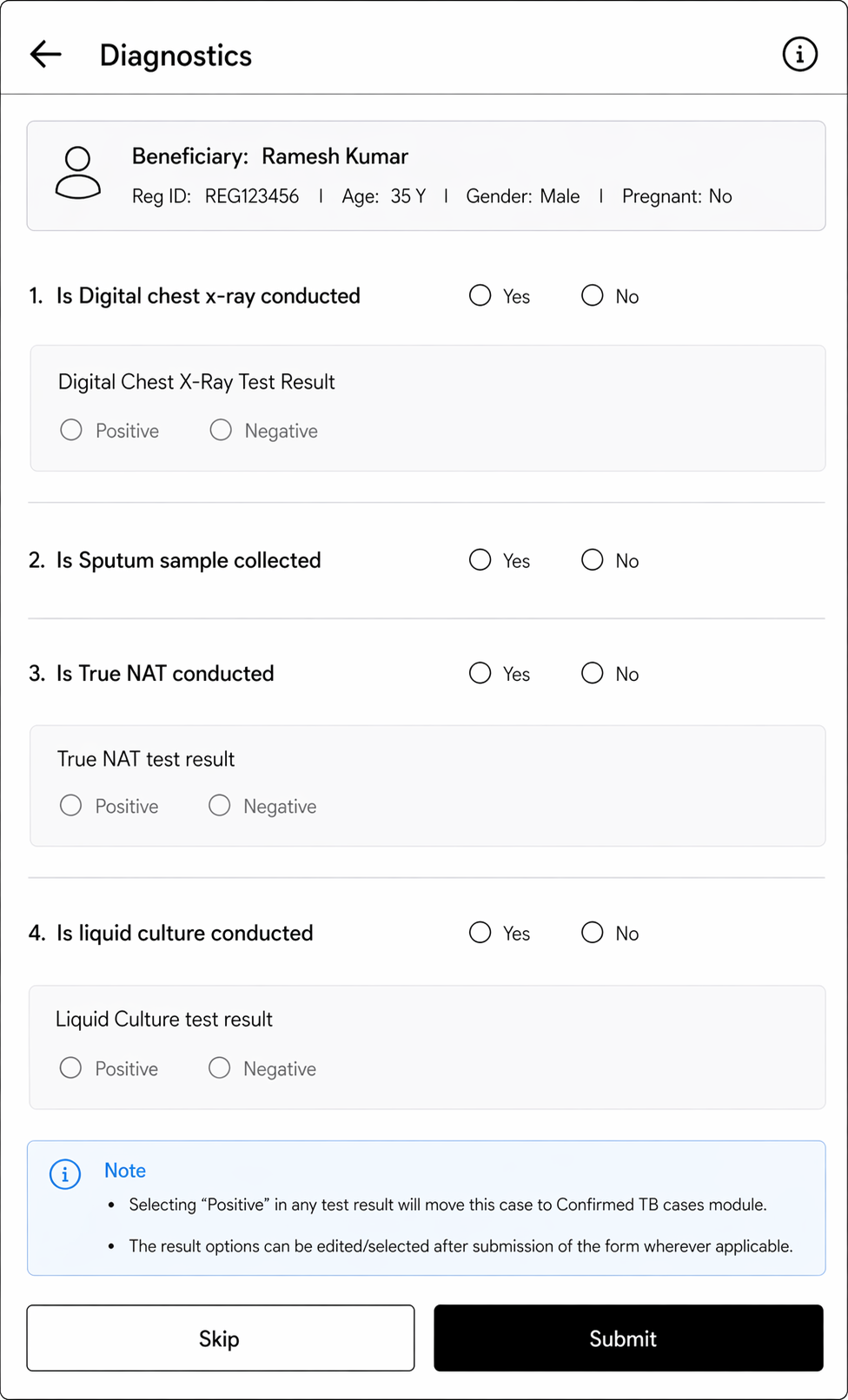
Diagnostics


Diagnostics 


Referred to Digital chest x-ray


  • Yes
  • No
  • Default selection should be Yes.
  • Do not show for Pregnant woman

Is Digital chest x-ray conducted


  • Yes
  • No
  • To be enabled for everyone except "Are you pregnant" = "Yes"

Digital Chest X-Ray Test Result 


  • Positive
  • Negative
  • Enable only if "Is Digital Chest X-ray conducted"=“Yes”
  • If "Positive" is selected, move this case to Confirmed TB cases module and also enable sputum test fields for further testing.

Is Sputum sample collected


  • Yes
  • No
  • To be enabled in the following conditions-
  1. If "History of TB" = "Yes"
  2. If "Are you pregnant= yes"
  3. If "Are you currently taking Anti TB drugs" = "yes"

Recommended for Truenat test


  • Yes
  • No
  • To be enabled if "Are you pregnant= yes" 

Truenat test result

 radio button 

  • Positive
  • Negative
  • Enable only if "Is Truenat conducted"=“Yes”
  • Option to edit/ select after submission of the form
  • If "Positive" is selected, move this case to Confirmed TB cases module.

Recommended for liquid culture test


  • Yes
  • No
  • To be enabled only if "History of TB" = "Yes", "Currently on Anti-TB drugs" = "Yes"

Liquid Culture test result

 radio button 

  • Positive
  • Negative
  • If "Positive" is selected, move this case to Confirmed TB cases module.
  • Option to edit/ select after submission of the form

Submit


2.2.2.b Suspected TB cases  
This section should contain all beneficiaries in the following scenario-

...