
...
- Enable end-to-end beneficiary flow management — from registration through treatment follow-up
- Support role-based data entry and access with clearly separated module privileges
- Capture clinical, anthropometric, diagnostic, and screening data.
- Implement conditional workflows based on test outcomes (X-ray, TruenatNAAT, Liquid Culture)
- Generate actionable outputs: referral lists, line lists, dashboard indicators, and reports
- Integrate with Nikshay, AMRIT, ABDM, portable digital X-ray device, and Truenat NAAT device
- Operate fully offline with cross-device synchronization via a local server, and auto-sync when online
...
Term | Definition |
ABHA | Ayushman Bharat Health Account — unique digital health ID under ABDM |
ABDM | Ayushman Bharat Digital Mission — national digital health initiative |
ACF | Active Case Finding — proactive screening of high-risk populations for TB |
AMRIT | Application for Managing and Recording Information in Telehealth — central platform |
BPaL | Bedaquiline, Pretomanid, Linezolid TB drug regimen |
CHC | Community Health Centre |
DMC | Designated Microscopy Centre |
DOTS | Directly Observed Treatment Short-course — standard TB treatment strategy |
DH | District Hospital |
DPDP | Digital Personal Data Protection Act, 2023 — India's data privacy legislation |
DS-TB | Drug-Sensitive Tuberculosis |
HWC | Health and Wellness Centre |
INH Mono | Isoniazid Monotherapy TB prevention regimen |
LFU | Lost to Follow-up |
NAAT | Nucleic Acid Amplification Test |
Nikshay | National TB Information System — India's web-based TB patient management portal |
NPVTG | Non-Particularly Vulnerable Tribal Group |
NPY | Nikshay Poshan Yojana — DBT scheme of Rs. 500/month for TB patients |
NTEP | National TB Elimination Programme — India's programme to eliminate TB by 2025 |
PHC | Primary Health Centre |
PVTG | Particularly Vulnerable Tribal Group |
SC | Sub-Centre |
TPT | TB Preventive Treatment — given to close contacts of DS-TB cases at risk of active TB |
TruenatNAAT | Portable PCR-based molecular diagnostic device for TB (Molbio Diagnostics) |
TU | Tuberculosis Unit — administrative health unit in NTEP structure |
...
Card | On Click — Opens | Sub-Cards |
All Beneficiaries | Beneficiary Registration module with floating Registration button in right corner | List of all registered beneficiaries; Registration button initiates new registration |
TB (Tuberculosis) | Tuberculosis module; next screen shows 3 cards | TB Screening | Suspected TB Cases | Confirmed TB Cases |
Referrals | Referrals module; next screen shows 4 cards | Digital Chest X-ray | NAAT Truenat | Liquid Culture | Health and Wellness Centre |
...
Referral Card routing rules: Pregnant beneficiaries → shown directly in Truenat NAAT card. All non-pregnant beneficiaries (all genders, all ages) → shown in Digital Chest X-ray card. If abnormality detected on chest X-ray → referred further to TruenatNAAT. Beneficiaries with high BP or high Random Blood Sugar → shown in Health and Wellness Centre card in addition to Digital Chest X-Ray/ Truenat NAAT cards.
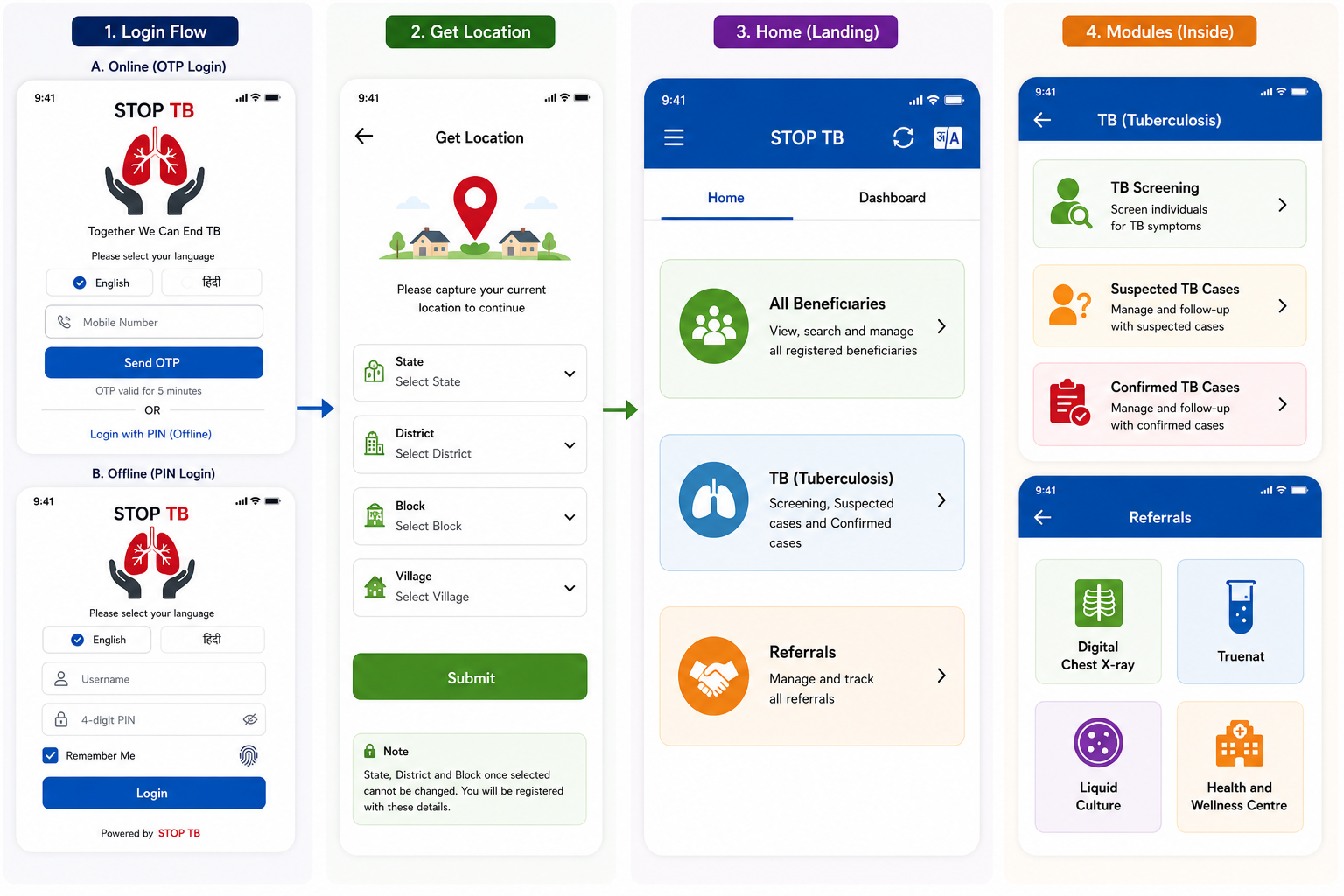
Disclaimer: Application screen needs to resemble with the mock ups in all the sections of the PRD to highlight the flow and content required in the application.
...
Field Name | Input Type | Options / Values | Logic & Validations |
Date of Registration |
| ||
Beneficiary ID (AMRIT ID) |
| ||
Photo | Camera | Optional |
|
I want to add a person from* | Radio | · Public Sector
| · Mandatory · Single select
|
Type of Case Finding* | Radio | · Passive (Routine programme)
| · Mandatory · Single select
|
First Name* | Text Input | · Free text | · Mandatory · Only English letters
|
Middle & Last Name* | Text Input |
| · Mandatory · Only English letters
|
Beneficiary Status | Radio Button | · Alive · Death | · Enable only in the “Edit” Beneficiary screen · Auto-populate, if ‘Death’ is reported from any module · Default value is “Alive” · If “Death” is selected, enable below four fields and mark it mandatory- 1. Date of Death 2. Time of Death 3. Reason for Death
|
Date of Death | Date picker | · Enable if “Beneficiary status”= “Death” · Mandatory if enabled · By default, date is null · Not greater than Today’s Date · Accept ‘Date of Death’ after date of registration
| |
Time of Death | Time picker | · Show only if above value is “Death”
| |
Reason for Death (Type of Death) |
· Natural Death · Accident · Infectious Disease · Animal Bite Death · Suicide · Undetermined | · Enable if “Beneficiary status”= “Death” · Mandatory if enabled
| |
Place of Death |
| · Enable if “Beneficiary status”= “Death” · Mandatory if enabled
| |
Other Place of Death | Textbox |
| |
Age* | Number Input | 1–99 | · Required. · Numeric. Min 1 Max 99 in years
|
Date of Birth | Date Picker |
| |
Gender* | Radio | · Male · Female · Transgender | · Mandatory
|
Mobile number not available | Checkbox |
| |
Primary Phone* | Number |
| |
Whose mobile number | dropdown | · Self · Husband · Mother · Father · Family Head
|
|
Address* | Text |
|
|
State* | Dropdown |
| |
District* | Dropdown |
| |
TU* | Dropdown |
| |
Health Facility* | Dropdown | · Required. Must select. · Cascaded | |
Village* | Dropdown |
| |
Caste* | Radio | · SC · ST · Other | · Mandatory
|
Religion | radio button |
|
|
Area* | Radio | · Tribal-NPVTG · Tribal-PVTG · Rural · Urban · Urban Slum · Unknown | · Mandatory Default Unknown. |
Marital Status* | Radio | · Single · Married · Unknown | · Mandatory · Default Unknown. |
Are you Pregnant* | radio button |
|
|
Husband's/ Wife's Name | Textbox | · Optional
All letter should be in caps | |
Father's Name | Textbox | · |
|
Mother's Name | Textbox | · |
|
Occupation* | Dropdown | · Unknown · Student · Unemployed · Homemaker · Farmer · Laborer / Daily Wage Worker · Self-employed / Business · Government Employee · Private Employee · Health Care Worker · Retired / Pensioner · Other | · Mandatory · Default Unknown. |
Socioeconomic Status* | Radio | · APL · BPL · Unknown | · Mandatory
|
Cancel | Button |
· No |
· If selected "no" then do not erase the patient health data and let the page remain open so it can be submitted by volunteer as sometime by mistake cancel button is clicked. |
Submit |
Continue next to "Anthropometry" Screen |
...
Field Name | Input Type | Options / Values | Logic & Validations |
Date | Calendar / Date Picker | Date | Mandatory. Default: Today's Date. Not greater than Today's Date. Accept date >= Date of beneficiary registration. Not editable once submitted. |
Coughing More than 2 weeks * | Radio button | Yes | No | Mandatory. |
Blood in Sputum * | Radio button | Yes | No | Mandatory. |
Fever > 2 weeks * | Radio button | Yes | No | Mandatory. |
Rise of fever in evening * | Radio button | Yes | No | Mandatory. |
Loss of Appetite * | Radio button | Yes | No | Mandatory. |
Loss of Weight * | Radio button | Yes | No | Mandatory. |
Night Sweats * | Radio button | Yes | No | Mandatory. |
History of TB * | Radio button | Yes | No | Mandatory. |
Are you currently taking Anti-TB drugs ** | Radio button | Yes | No | Mandatory. |
Anyone in Family Currently Suffering from TB ** | Radio button | Yes | No | Mandatory. |
Referred for digital chest x-ray | Radio button | Yes | No | · Default: Yes. · Do NOT show for pregnant women. · Mandatory. · Move beneficiary to Referral list titled 'Digital Chest X-ray'. |
Referred for Sputum Collection | Radio button | Yes | No | · Enabled if: Ø History of TB = Yes Ø Are you pregnant = Yes Ø Currently taking Anti-TB drugs = Yes Ø Key Population / Risk Factors = Pregnancy · Default: Yes (when enabled). Mandatory when enabled. |
Sputum Sample submitted at | Dropdown | DMC | DH | CHC | PHC | SC | · Optional. · Kept available in case Truenat NAAT device is non-functional. |
Recommended for Truenat NAAT test | Radio button | Yes | No | · Enabled if Referred for Sputum Collection = Yes. · Mandatory if enabled. · Move beneficiary to Referral list titled 'TruenatNAAT'. |
Recommended for liquid culture test | Radio button | Yes | No | · Enabled if: Referred for Sputum Collection = Yes AND History of TB = Yes AND Currently on Anti-TB drugs = Yes. · Mandatory if enabled. · Move beneficiary to Referral list titled 'Liquid Culture'. |
Reason for denial for getting tested | Dropdown (multi-select) | · Fear and anxiety · Misconceptions · Social stigma · Cultural and gender-related barriers · Prior negative experiences with healthcare staff · Privacy concerns · Long waiting times at the camp · Loss of daily wages · Lack of trust in government programs or camp organizers · Others | · Multi-select. · Optional. |
Submit | Button | — | Continue to General OPD module. If skipped → move directly to Diagnostics Results screen. |
...
AC-TB-02: Given beneficiary is pregnant (Pregnant = Yes from Registration), When TB Screening screen loads, Then the 'Referred for digital chest x-ray' field is hidden, 'Referred for Sputum Collection' is enabled with default Yes, and the beneficiary appears in the Truenat NAAT referral card.
AC-TB-03: Given 'Anyone in Family Currently Suffering from TB = Yes', When submitted, Then the system generates and displays an advisory: 'Advise tracing and screening of all family members'.
...
This screen is visible in the Nurse module and is auto-populated via results from the Digital Chest X-ray and Truenat NAAT devices through cross-device sync. All results display here automatically.
...
Field Name | Input Type | Options / Values | Logic & Validations |
Date | Calendar / Date Picker | Date | Mandatory. Default: Today's Date. Not greater than Today's Date. Accept date >= Date of beneficiary registration. Not editable once submitted. |
Name | Textbox (read-only) | Auto-filled | Auto-fill from Beneficiary details. Shows First Name + Last Name. Read only. |
Age | Textbox (read-only) | Auto-filled | Auto-fill from Beneficiary details. Read only. |
Gender | Textbox (read-only) | Auto-filled | Auto-fill from Beneficiary details. Read only. |
Nikshay ID | Textbox | Auto-populated | Auto-populated after all mandatory fields per Nikshay application are filled. |
Is Digital Chest X-ray conducted | Radio / Auto | Yes | No | Enabled for everyone EXCEPT 'Are you pregnant = Yes' and Key Population / Risk Factors = Pregnancy. Auto-populated by cross-device sync between STOP TB app and digital chest X-ray device. |
Digital Chest X-Ray Test Result | Radio / Auto | Positive | Negative | Enabled only if 'Is Digital Chest X-ray conducted = Yes'. Auto-populated by cross-device sync. If Positive → move case to Confirmed TB cases module AND show patient in Truenat NAAT referral list for further testing. |
Is Truenat NAAT test conducted | Radio / Auto | Yes | No | Enabled if 'Are you pregnant = Yes', Key Population / Risk Factors = Pregnancy and "Digital Chest X-Ray Test Result"= "Positive" Auto-populated by cross-device sync between STOP TB app and Truenat NAAT device. |
Truenat NAAT test result | Radio button / Auto | Positive | Negative | Enabled only if 'Is Truenat NAAT conducted = Yes'. Auto-populated by cross-device sync. If Positive → move case to Confirmed TB cases module. |
Recommended for liquid culture test | Radio | Yes | No | Enabled only if History of TB = Yes AND Currently on Anti-TB drugs = Yes. |
Liquid Culture test result | Radio button | Positive | Negative | If Positive → move case to Confirmed TB cases module. Option to edit/select after form submission as results come after 40-45 days. |
Submit | Button | — | Save diagnostics data. |
...
AC-DIAG-02: Given Digital Chest X-Ray Test Result = Positive is recorded, When saved, Then the beneficiary record is moved to 'Confirmed TB Cases' module AND the beneficiary appears in the Truenat NAAT referral list.
AC-DIAG-03: Given Truenat NAAT test result = Positive is recorded, When saved, Then the beneficiary record is moved to 'Confirmed TB Cases' module.
...
- Scenario 1: If NO symptom is reported 'Yes' in TB Screening but chest X-ray is Positive → show case here.
- Scenario 2: If ANY symptom is reported 'Yes' in TB Screening → show case here, even if chest X-ray / Truenat NAAT is negative.
Field Name | Field Type | Options / Values | Validation / Logic / Condition |
Date | Calendar / Date Picker | Date | Mandatory. Default: Today's Date. Not greater than Today's Date. Accept date >= Date of beneficiary registration. Not editable once submitted. |
Name | Textbox (read-only) | Auto-filled | Auto-fill from Beneficiary details. Shows First Name + Last Name. Read only. |
Age | Textbox (read-only) | Auto-filled | Auto-fill from Beneficiary details. Read only. |
Gender | Textbox (read-only) | Auto-filled | Auto-fill from Beneficiary details. Read only. |
Nikshay ID | Textbox | Auto/Manual | Enable if 'Is Sputum sample collected = Yes'; OR 'Digital Chest X-ray conducted = Yes'; OR 'NAT conducted = Yes'. |
Is Digital Chest X-ray conducted | Radio / Auto | Yes | No | Auto-selected 'Yes' if 'Is Digital chest x-ray conducted = Yes' in Diagnostics screen. |
Digital Chest X-Ray Test Result | Radio / Auto | Positive | Negative | Enabled only if 'Digital Chest X-ray conducted = Yes'. Auto-select if already captured in Diagnostics screen; also allow manual selection. If Positive → move to Confirmed TB cases AND enable Sputum test fields. |
Sputum Test (section) | Section | — | Enabled if: a) Digital Chest X-Ray Result = Positive; b) History of TB = Yes; c) Are you pregnant = Yes; d) Currently taking Anti-TB drugs = Yes. |
Is Sputum sample collected? | Radio button | Yes | No | Auto-selected 'Yes' if already captured as Yes. |
Sputum Sample submitted at | Dropdown | DMC | DH | CHC | PHC | SC | Optional. |
Is Truenat NAAT conducted | Radio button | Yes | No | Auto-selected 'Yes' if: Is Truenat NAAT conducted = Yes AND Sputum Sample Collected = Yes; OR Digital Chest X-Ray Result = Positive. |
Truenat NAAT test result | Radio button | Positive | Negative | Enabled only if Is Truenat NAAT conducted = Yes. Option to edit/select after submission. Auto-select if already captured in Diagnostics screen; allow manual selection. If Positive → move to Confirmed TB cases. |
Is Liquid culture conducted | Radio button | Yes | No | Auto-selected 'Yes' if: Is liquid culture conducted = Yes AND Sputum Sample Collected = Yes. Enabled only if History of TB = Yes AND Currently on Anti-TB drugs = Yes. |
Liquid Culture test result | Radio button | Positive | Negative | Auto-select if already captured in Diagnostics screen; allow manual selection. If Positive → move to Confirmed TB cases. Option to edit/select after submission. |
Capture Geolocation | Auto capture | — | Capture current location details: latitude, longitude, address. |
Submit | Button | — | Save record. |
...
Field Name | Input Type | Options / Values | Logic & Validations |
Counselling Date | Date picker | Date | Mandatory. Default: Today. Not > Today. Must be >= Registration date. |
Counselling Officer Name | Auto-filled (read-only) | Logged-in user | Auto-filled from logged-in Counselling Officer account. Read only. |
— PATIENT HEADER (AUTO-FILLED, READ-ONLY) — | |||
Beneficiary Name | Textbox (read-only) | Auto-filled | First Name + Last Name from beneficiary record. |
Beneficiary ID (AMRIT ID) | Textbox (read-only) | Auto-filled | From beneficiary record. |
Nikshay ID | Textbox (read-only) | Auto-filled | From Diagnostics screen. Read only. |
Age / Gender | Textbox (read-only) | Auto-filled | Age (years) and Gender from beneficiary record. |
Diagnosis | Textbox (read-only) | Auto-filled | X-ray Result | Truenat NAAT Result | Liquid Culture Result — populated from diagnostic records. Read only. |
SECTION A: DISEASE AWARENESS | |||
TB disease explained to patient | Radio button | Yes/ No | Mandatory. Must be checked before proceeding. Confirms counsellor has explained TB to the patient. |
Transmission route explained | Radio button | Yes/ No | Mandatory. |
Symptoms explained | Radio button | Yes/ No | Mandatory. |
Treatment duration explained | Radio button | Yes/ No | Mandatory. |
Disease awareness notes | Free text | — | Optional. Max 500 chars. |
SECTION B: DO'S AND DON'TS | |||
Cover mouth while coughing — advised | Radio button | Yes/ No | Mandatory. |
Complete full treatment course — advised | Radio button | Yes/ No | Mandatory. |
Regular follow-up attendance — advised | Radio button | Yes/ No | Mandatory. |
Nutritional guidance provided | Radio button | Yes/ No | Mandatory. |
No smoking / alcohol — advised | Radio button | Yes/ No | Mandatory. |
Isolation precautions explained | Radio button | Yes/ No | Mandatory. |
Do's & Don'ts notes | Free text | — | Optional. Max 500 chars. |
SECTION C: GOVERNMENT SCHEMES | |||
Nikshay Poshan Yojana (NPY) eligibility explained | Radio button | Yes/ No | NPY: DBT of Rs. 500/month for duration of treatment. |
DOTS free treatment explained | Radio button | Yes/ No | Confirm patient understands treatment is free under NTEP. |
Schemes notes | Free text | — | Optional. Max 300 chars. |
SECTION D: TREATMENT REGIMEN | |||
Regimen explained to patient | Radio button | Yes/ No | Mandatory. |
Medication names explained | Radio button | Yes/ No | Mandatory. |
Side effects explained | Radio button | Yes/ No | Mandatory. |
Importance of adherence explained | Radio button | Yes/ No | Mandatory. |
Treatment regimen notes | Free text | — | Optional. Max 300 chars. |
SECTION E: COUNSELLING COMPLETION | |||
Counselling completion status | Radio button | Complete | Refused | Mandatory. Make all the above sections obsolete if “Counselling completion status” = “Refused” If Refused → enable 'Reason for refusal' field. |
Reason for refusal | Free text | — | Mandatory if Counselling status = Refused. Max 300 chars. |
Counsellor remarks | Free text | — | Optional. Max 500 chars. |
SECTION E: Follow Up to TU | To be done within 15 days Editable | ||
Has the patient started the prescribed TB treatment regimen? | Radio button | Yes/ No | If No is selected, then enable “Reason for not starting the prescribed TB treatment regimen” |
Reason for not starting the prescribed TB treatment regimen | Free text | To be enabled if “Has the patient started the prescribed TB treatment regimen” = “No” Up to 500 characteristics | |
Has the patient visited the DOTS centre / referred health facility for treatment collection? | Radio button | Yes/ No | |
Has the patient reported side effects to the treating doctor or DOTS centre? | Radio button | Yes/ No | |
Submit | Button | — | Save counselling record. If status = Complete → Nikshay record updated; case marked 'Counselled'. |
...
This screen manages treatment initiation and ongoing follow-up for beneficiaries confirmed as TB positive via Digital Chest X-ray, TruenatNAAT, or Liquid Culture.
Field Name | Field Type | Options / Values | Validation / Logic / Condition |
Regimen Type | Radio button | 1.DS-TB (6 Months) 2.Shorter Regimen (9–12 Months) 3.Longer Regimen (18–24 Months) 4.BPaL Regimen (6 Months) 5.INH Mono (6 Month) | · If DS-TB (6 Months) selected → open TPT module. · Alert volunteer to screen all household members / contacts if DS-TB case is selected. |
Treatment Start Date | Date picker | Date | · Mandatory. Must be >= TB Identification and Diagnosis Visit Date. Not greater than Today's Date. |
Expected Treatment Completion Date | Label (read-only) | Auto-calculated | Auto calculate this date based on below condition form ‘Treatment Start Date’: 1. If ‘Regimen Type’ is “1”, “4”, “5” then add 6 months 2. If ‘Regimen Type’ is “2”, then, Treatment duration is 9–12 months (show 9–12 range dates) 3. If ‘Regimen Type’ is “3”, then, Treatment duration is 18–24 months (show 18–24 range dates) |
— FOLLOW-UP & ADHERENCE SECTION — | |||
Follow-up Date | Date picker | Date | · Greater than or equal to Treatment Start Date or greater than Last Follow up Date · Mandatory · Minimum date is Treatment Start Date · Accept date greater than Last Follow up Date · Allow 1 Follow up visit in a month (i.e. monthly 1 Follow up) · Not greater than Today's Date |
Monthly follow-up done | Label (read-only) | Month-1 to Month-12 | Incremental based on monthly follow-up visits completed. |
Adherence to Medicines | Radio button | Regular | Irregular | — |
Any discomfort | Radio button | Yes | No | — |
— TREATMENT COMPLETION SECTION — | |||
Did the patient complete the full course of treatment? | Radio button | Yes | No | Enable these below filed based on below conditions: 1. If ‘Regimen Type’ is “1”, “4”, “5” then enable after 5 Monthly follow up visits 2. If ‘Regimen Type’ is “2”, then enable after 9 Monthly follow up visits 3. If ‘Regimen Type’ is “3”, then enable after 18 Monthly follow up visits |
Actual Treatment Completion Date | Date picker | Date | Enabled if 'Yes' selected above. Must be > Last Follow-up Date. |
TB Treatment Outcomes | Dropdown | Cured | Failed | Lost to Follow-up (LFU) | Death | If Death selected → update Beneficiary Status = Death in Beneficiary record; Enable Date of Death, Place of Death, and Reason for Death fields. |
Date of Death | Date picker | Date | Enable only if TB Treatment Outcomes = Death. Mandatory if enabled. Default: null. Not greater than Today's Date. >= Treatment Start Date or > Last Follow-up Date. |
Place of Death | Dropdown | Home | Subcenter | PHC | CHC | District Hospital | Medical College Hospital | Private Hospital | Other Place | Enable only if TB Treatment Outcomes = Death. |
Reason for Death | Label (read-only) | Tuberculosis | Enable only if TB Treatment Outcomes = Death. Pre-filled as 'Tuberculosis'. Read only. |
Reason for non-completion of treatment | Textbox | Free text | Enable if 'No' selected for 'Did the patient complete full treatment?' |
Capture Geolocation | Auto capture | — | Capture current location: latitude, longitude, address. |
Submit | Button | — | Save record. |
Follow-up visit history | Table (read-only) | — | Maintain and display complete follow-up visit history. |
...
Referral Card | Population Listed | Routing Rule |
Digital Chest X-ray | All beneficiaries who are not pregnant and are referred for X-ray from TB Screening | All non-pregnant beneficiaries (all genders, all ages) who have any * symptom = Yes in TB Screening |
TruenatNAAT | a) Pregnant beneficiaries (direct referral, skipping X-ray) b) Beneficiaries with positive Digital Chest X-ray result | Pregnancy → direct to TruenatNAAT. Positive X-ray → referred to Truenat NAAT for further testing. |
Liquid Culture | Beneficiaries recommended for liquid culture test | History of TB = Yes AND Currently on Anti-TB drugs = Yes AND Referred for Sputum = Yes |
Health and Wellness Centre | Beneficiaries with abnormal vitals | Auto-referred: Pulse < 60 or > 90; Systolic BP >= 140 or < 90; Diastolic BP >= 90 or < 60; Random Blood Sugar >= 100; Temperature >= 100°F |
...
AC-REF-01: Given a beneficiary is pregnant and TB Screening is submitted, When the Referrals screen is opened, Then the beneficiary appears in the Truenat NAAT card with Referral Reason = 'Pregnant' and does NOT appear in the Digital Chest X-ray card.
AC-REF-02: Given Digital Chest X-ray result = Positive is recorded in Diagnostics, When the Truenat NAAT referral list is refreshed, Then the beneficiary appears in the Truenat NAAT list with Referral Reason = 'X-ray Positive'.
...
Dashboard Card | Colour | Breakdown Required | Logic / Condition |
Total TB Screenings (Total Positives / Negatives) | Yellow card | Male — Positives / Negatives Female — Positives / Negatives Children (<15 yrs) — Positives / Negatives Others | Auto-populate based on filter selected. Total shown in bold. |
Total TB Suspected Cases (Total Positives / Negatives) | Yellow card | Male — Positives / Negatives Female — Positives / Negatives Children (<15 yrs) — Positives / Negatives Others | Auto-populate based on filter selected. Total shown in bold. |
Total TB Confirmed Cases (Total Positives / Negatives) | Yellow card | Male — Positives / Negatives Female — Positives / Negatives Children (<15 yrs) — Positives / Negatives Others | Auto-populate based on filter selected. Total shown in bold. |
Total Digital Chest X-Rays conducted (Total Positives / Negatives) | — | Male — Positive / Negative Female — Positive / Negative Children (<15 yrs) — Positives / Negatives Others Age >= 60 years — Positives / Negatives | Auto-populate based on filter selected. Total shown in bold. |
Total Sputum collections conducted (Total Positives / Negatives) | — | Male — Positives / Negatives Female — Positives / Negatives Children (<15 yrs) — Positives / Negatives Others Age >= 60 years — Positives / Negatives | Auto-populate based on filter selected. Total shown in bold. |
Total Truenat NAAT tests conducted | — | Male — Positives / Negatives Female — Positives / Negatives Children (<15 yrs) — Positives / Negatives Others Age >= 60 years — Positives / Negatives | Auto-populate based on filter selected. Total shown in bold. |
Total sputum samples sent for liquid culture | — | Male — Positives / Negatives Female — Positives / Negatives Children (<15 yrs) — Positives / Negatives Others Age >= 60 years — Positives / Negatives | Auto-populate based on filter selected. Total shown in bold. |
Total cases referred to Health and Wellness Centres | — | Male Female Children (<15 yrs) Others Age >= 60 years | Auto-populate based on filter selected. Total shown in bold. |
NIKSHAY IDs | Yellow card | Total count | Total number of Nikshay IDs created in selected time period or village. |
ABHA IDs | Yellow card | Total count | Total number of ABHA IDs created in selected time period or village. |
...