
...
Disclaimer: Application screen needs to resemble with the mock ups in all the sections of the PRD to highlight the flow and content required in the application.
New Household Registration Form
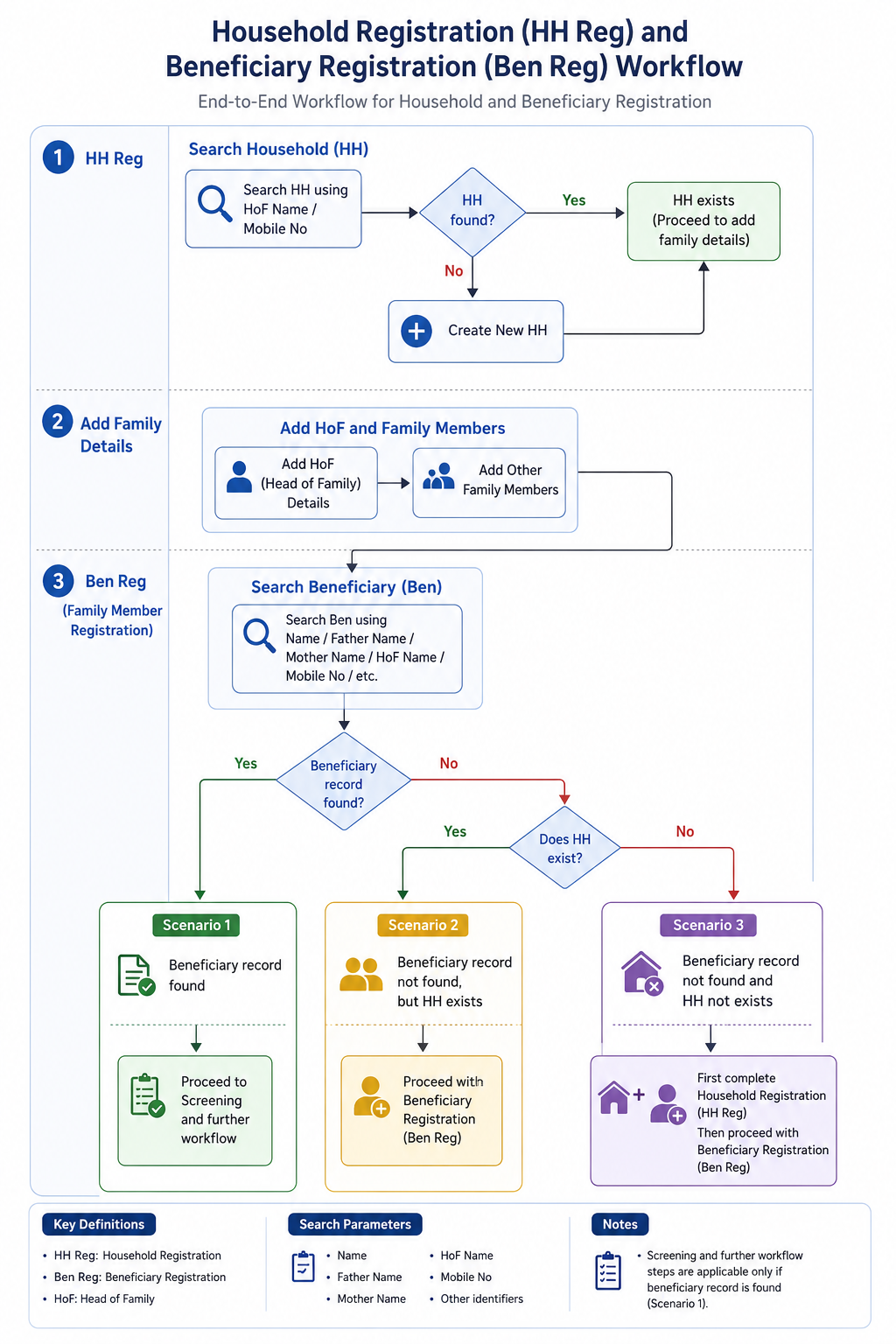
- Household Registration (HH Reg)
- Search for Household using:
- HoF (Head of Family) Name
- Mobile Number
- If Household does not exist, create a new Household (HH).
- Search for Household using:
- Add Family Details
- Add HoF details.
- Add other family members to the Household.
- Beneficiary Registration (Ben Reg / Family Member Registration)
- Search Beneficiary using:
- Name
- Father’s Name
- Mother’s Name
- HoF Name
- Mobile Number
- Other available identifiers
- Search Beneficiary using:
- Scenarios
- Scenario 1: If Beneficiary record is found → Proceed to Screening and further workflow.
- Scenario 2: If Beneficiary record is not found, but Household exists → Proceed with Beneficiary Registration (Ben Reg).
- Scenario 3: If neither Beneficiary record nor Household exists → First complete Household Registration (HH Reg), then proceed with Beneficiary Registration (Ben Reg).
Family Details
S No | Name of Data Field | Field Type | Value/ Options | Validation/ Logic/ Condition |
1 | First Name of Head of the family | Textbox | Is Mandatory | · Input method: Speech to Text feature · Accept alphabets only · Character limit 50 · All letter should be in caps |
2 | Last Name/ Surname | Textbox | · Input method: Speech to Text feature · Accept alphabets only · Character limit 50 · All letter should be in caps | |
3 | Mobile No of Head of the family | Textbox | Is Mandatory | · Accept numeric (integer) value only · Accept 10 digits only · Should not start form zero · Should start with digit 6, 7, 8 or 9 · Should Not accept all same digits |
4 | House No | Textbox | · Allow Alphanumeric Character and special Characters · Character limit 100 | |
5 | Ward No | Textbox | · Allow Alphanumeric Character and special Characters · Character limit 100 | |
6 | Ward Name | Textbox | · Allow Alphanumeric Character and special Characters · Character limit 100 | |
7 | Mohalla Name | Textbox | · Allow Alphanumeric Character and special Characters · Character limit 100 | |
8 | Economic Status | Spinner | Is Mandatory · APL · BPL · Don't know |
House Hold Details
S No | Name of Data Field | Field Type | Value/ Options | Validation/ Logic/ Condition |
1 | Type of Residential area | Spinner | Choose: · Rural · Urban · Tribal · Tea Garden · Other | |
2 | Other Type of Residential area | Textbox | · Enable if other is selected above · Is Mandatory if other is selected above · Allow Alphanumeric Character and special Characters · Character limit 100 | |
3 | Type of House | Spinner | Is Mandatory · Kuchha · Pucca · None · Other | |
4 | House ownership | Spinner | Is Mandatory · Yes · No |
House Hold Amenities
S No | Name of Data Field | Field Type | Value/ Options | Validation/ Logic/ Condition |
1 | Separate Kitchen | Spinner | Is Mandatory · Yes · No | |
2 | Type of Fuel used for cooking | Spinner | Is Mandatory | |
3 | Other type of fuel used for cooking | Textbox | · Enable if other is selected above · Is Mandatory if other is selected above · Allow Alphanumeric Character and special Characters · Character limit 100 | |
4 | Primary Source of water | Spinner | Is Mandatory | |
5 | Other Source of Water | Textbox | · Enable if other is selected above · Is Mandatory if other is selected above · Allow Alphanumeric Character and special Characters · Character limit 100 | |
6 | Availability of Electricity | Spinner | Is Mandatory | |
7 | Other Availability of electricity | Textbox | · Enable if other is selected above · Is Mandatory if other is selected above · Allow Alphanumeric Character and special Characters · Character limit 100 | |
8 | Availability of Toilet | Spinner | Is Mandatory | |
9 | Other Availability of Toilet | Textbox | · Enable if other is selected above · Is Mandatory if other is selected above · Allow Alphanumeric Character and special Characters · Character limit 100 | |
After Household registration is completed, show below alert in pop: |
4. Registration Officer Flow
...