
Table of Contents outline true
| outline | true |
|---|
...
Getting Started
Teams Vs WhatsApp
In today’s digital workplace, choosing the right communication platform is crucial for productivity and collaboration. This section compares Microsoft Teams and WhatsApp, focusing on their suitability for Piramal Foundation use.
- Microsoft Teams
- Purpose: Designed for workplace collaboration and communication
- Target Users: Businesses and organizations of all sizes
- WhatsApp
- Purpose: Originally for personal messaging, with some business features added
- Target Users: Primarily individuals, with a separate WhatsApp Business app
Detailed Comparison
|
...
Key Advantages of Microsoft Teams
- Comprehensive Collaboration Tools
- Unified platform for chat, video calls, and document collaboration
- Seamless transition between communication methods
- Professional Environment
- Clear separation between work and personal communication
- Features designed specifically for business use
- Enhanced Productivity
- Deep integration with Microsoft 365 suite
- Ability to work on documents without leaving the app
- Superior Organization
- Channel-based structure for topic-specific discussions
- Easy file organization and retrieval
- Compliance and Control
- Robust administrative controls
- Compliance with industry regulations (GDPR, HIPAA, etc.)
- Scalability
- Supports large organizations with complex structures
- Facilitates external collaboration
- Advanced Security
- Enterprise-grade security features
- Multi-factor authentication and encryption
Limitations of WhatsApp
- Limited file sharing capabilities
- Lack of advanced organizational features
- Potential for mixing personal and professional communication
- Insufficient administrative controls for organizations resulting Data Privacy Issues
- Not designed for handling sensitive business data
...
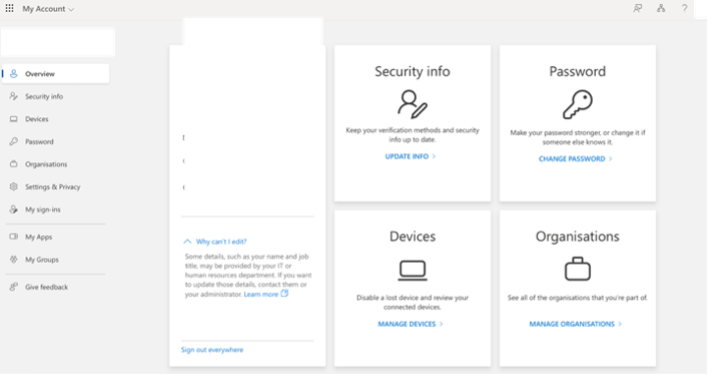
Click on “View account” which will take you to browser and you are able to modify Password and change security info. Please reach out to HR if you require changes in Location, Company, Job Title etc. in your profile.
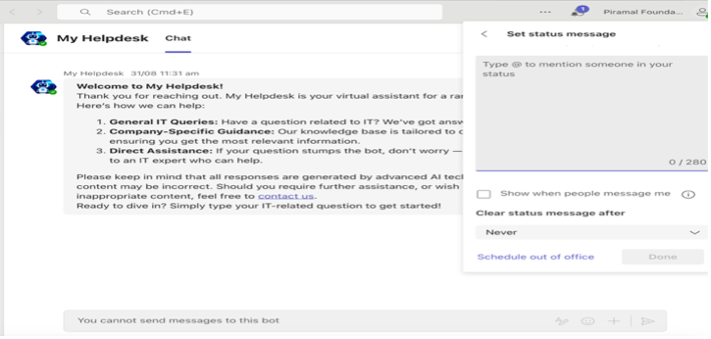
Set Status Message
Best Practices for profile: -
- Use a clear, professional profile picture
- Ensure your display name is easily recognizable
- Keep your job title and department up to date
Teams and Channels
Channels
...
- Visible to all team members: Everyone in the team can see and participate in the conversations, files, and content shared in these channels.
- Default general channel: Every team in Microsoft Teams starts with a "General" channel. You can create more standard channels to categorize conversations by specific projects, tasks, or subjects.
- Private Channels
- Restricted access: These channels are only visible to specific members of the team who have been given access. This is useful for sensitive discussions, or when a subgroup of the team needs a focused space.
- Private communication: Although it's part of the main team, it is a secure, dedicated area where only selected members can access conversations and files.
...