
This document provides step-by-step instructions to set up Elasticsearch on Linux and Windows, along with common operations such as creating an index, syncing data, and searching data.
1. Prerequisites
Common Requirements
Overview
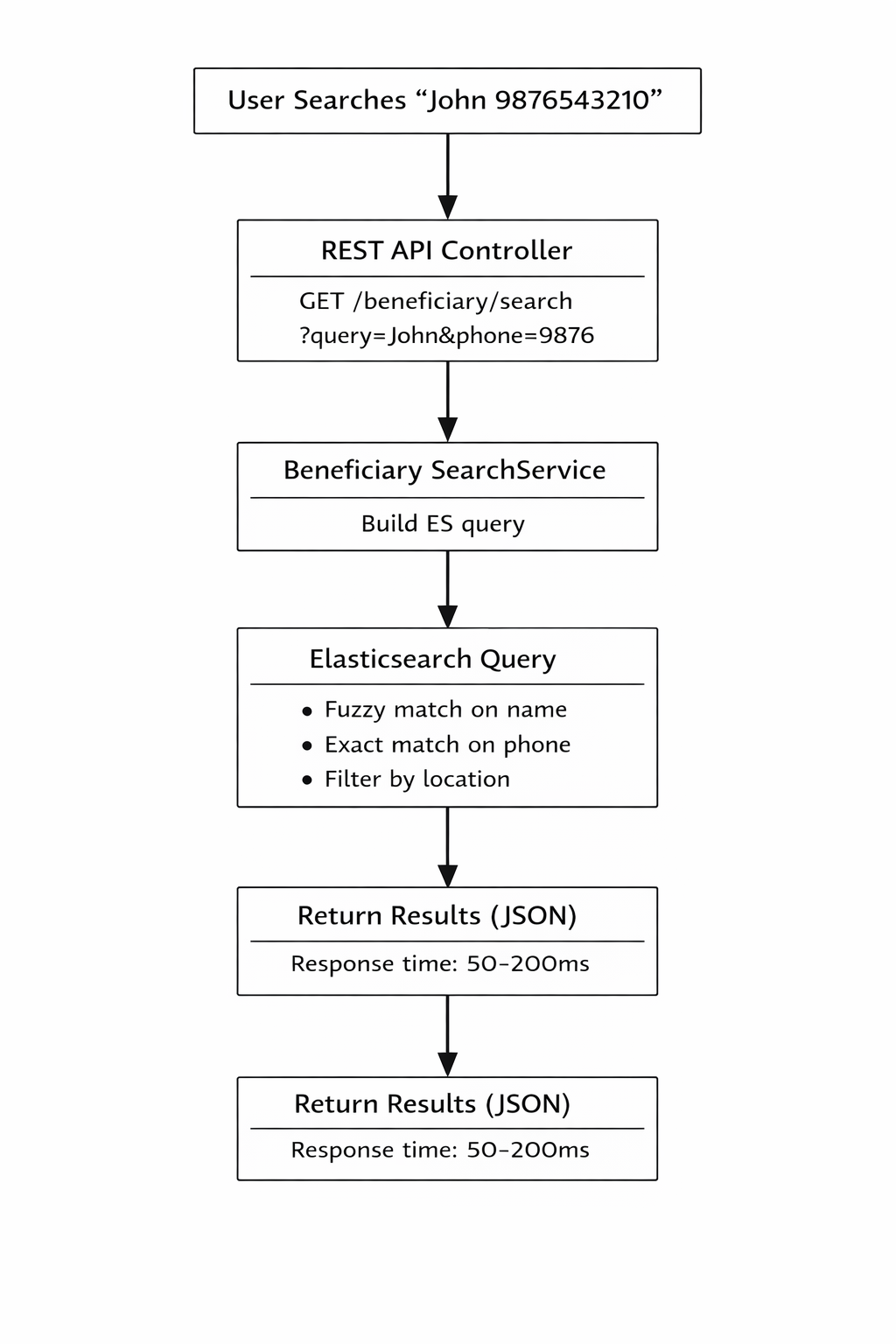
The Elasticsearch implementation provides a high-performance search solution for beneficiary data. It enables fast, fuzzy, and flexible searching across millions of beneficiary records with sub-second response times.
Key Features
- Lightning-fast search: Sub-second queries even with millions of records
- Fuzzy matching: Find beneficiaries even with spelling mistakes
- Flexible filtering: Search by multiple criteria simultaneously
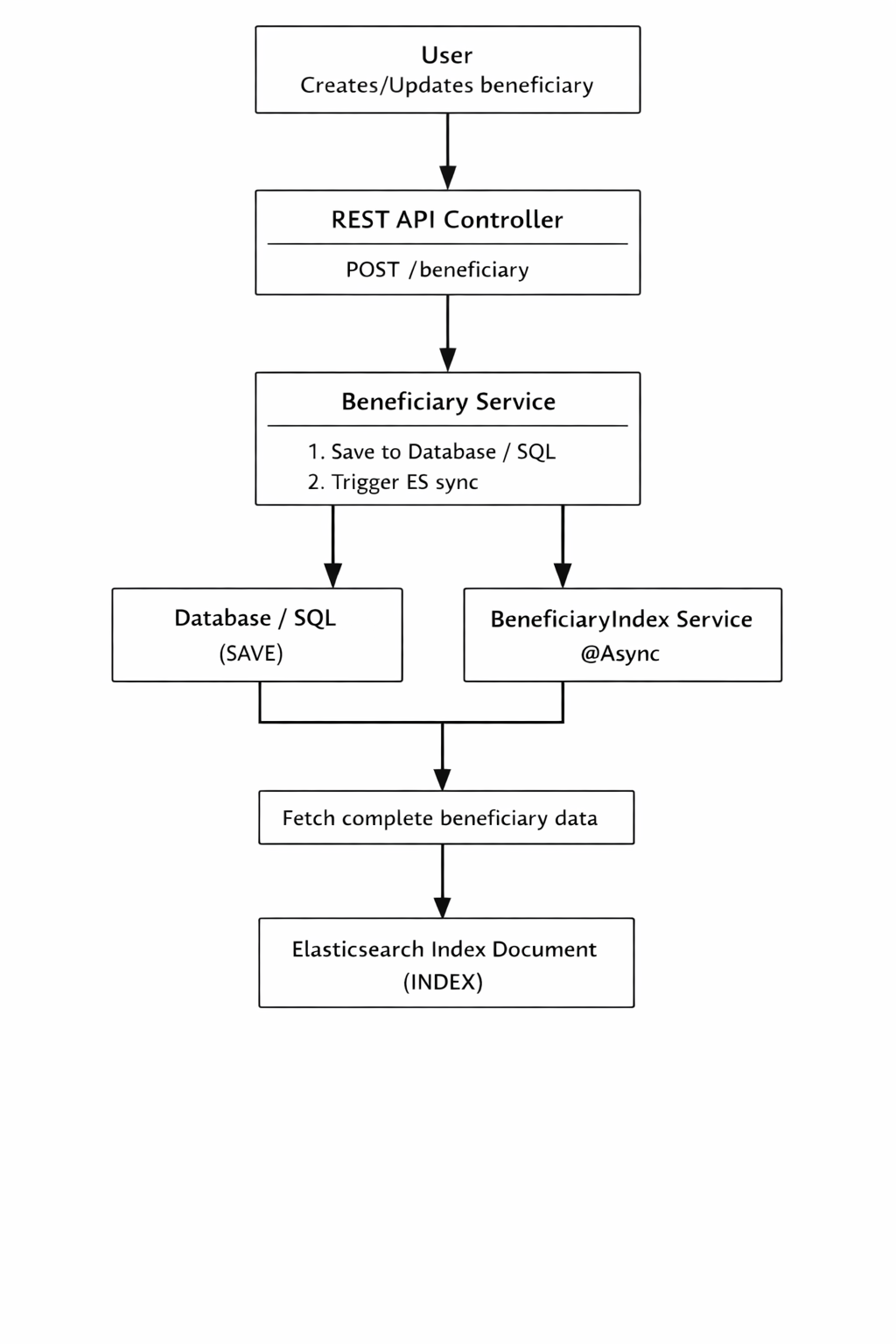
- Real-time sync: Automatic indexing when beneficiaries are created/updated
- Scalable: Handles growing data volumes efficiently
Why Elasticsearch?
Business Problem
The existing database search was experiencing performance issues:
- Slow queries: Complex searches taking 5-15 seconds on large datasets
- Limited fuzzy matching: Exact matches required, causing missed results
- Database load: Heavy search queries impacting transactional operations
- Poor user experience: Users waiting too long for search results
Prerequisites
Java (Elasticsearch 8.x comes with bundled JDK – no separate Java install required)
Minimum 4 GB RAM (recommended)
- Database with beneficiary data
Open ports: 9200 (HTTP), 9300 (Transport)
...
Elasticsearch Installation
...
Linux Setup (Ubuntu / RHEL)
Step 1: Download Elasticsearch
wget https://artifacts.elastic.co/downloads/elasticsearch/elasticsearch-8.x.x-linux-x86_64.tar.gz
Step 2: Extract the Archive
tar -xzf elasticsearch-8.x.x-linux-x86_64.tar.gz
cd elasticsearch-8.x.x
Step 3: Configure Elasticsearch
Edit config/elasticsearch.yml
cluster.name: elasticsearch-cluster
node.name: node-1
network.host: 0.0.0.0
http.port: 9200
discovery.type: single-node
Step 4: Start Elasticsearch
./bin/elasticsearchStep 5: Verify Installation
curl http://localhost:9200Windows Setup
Step 1: Download Elasticsearch
Download the Windows ZIP from Elastic official site
Step 2: Extract ZIP File
Extract to a directory (example:
C:\elasticsearch)
Step 3: Configure Elasticsearch
Edit config\elasticsearch.yml
cluster.name: elasticsearch-cluster
node.name: node-1
network.host: localhost
http.port: 9200
discovery.type: single-node
Step 4: Start Elasticsearch
bin\elasticsearch.batStep 5: Verify Installation
Open browser or Postman:
http://localhost:9200
Docker Setup
Step 1: Create docker-compose.yml
version: '3.8'
services:
elasticsearch:
image: docker.elastic.co/elasticsearch/elasticsearch:8.11.0
container_name: amrit-elasticsearch
environment:
- discovery.type=single-node
- xpack.security.enabled=true
- xpack.security.http.ssl.enabled=false
- ELASTIC_PASSWORD=Password
- "ES_JAVA_OPTS=-Xms1g -Xmx1g"
ports:
- "9200:9200"
- "9300:9300"
volumes:
- es-data:/usr/share/elasticsearch/data
networks:
- elastickibana:
image: docker.elastic.co/kibana/kibana:8.11.0
container_name: amrit-kibana
environment:
- ELASTICSEARCH_HOSTS=http://elasticsearch:9200
- ELASTICSEARCH_USERNAME=elastic
- ELASTICSEARCH_PASSWORD=Password
ports:
- "5601:5601"
depends_on:
- elasticsearch
networks:
- elasticvolumes:
es-data:
driver: localnetworks:
elastic:
driver: bridge
Step 2: Start Elasticsearch Container
docker compose up -dStep-3: Verify Elasticsearch is running
curl -u elastic:Password http://localhost:9200