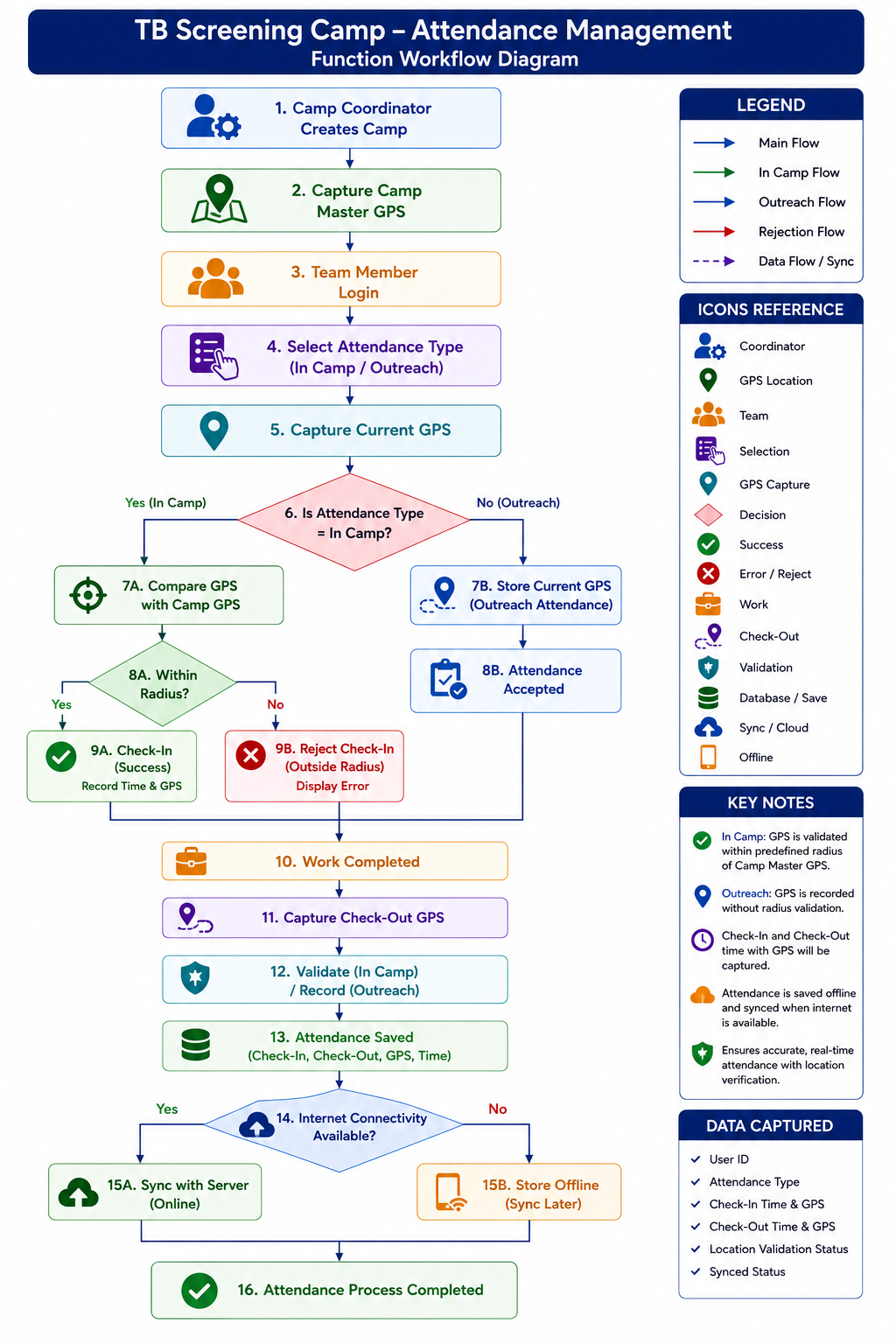
1. Purpose
The purpose of the Camp Team Attendance Module is to provide a GPS-enabled attendance system for all TB Screening Camp team members by recording Check-In and Check-Out activities during Camp and Outreach operations.
The module shall ensure reliable attendance tracking by capturing user identity, activity type, timestamp, GPS coordinates, and linkage to a specific camp location.
2. Background
The existing TB Screening Mobile Application provides authenticated access only for the following operational roles:
- Registration Officer
- Nurse
- Counselling Officer
However, TB Screening Camps involve several additional personnel who currently do not have access to the application but whose attendance must also be recorded.
Therefore, a dedicated Attendance Module shall be made available directly from the application's login screen, enabling all camp team members to record attendance without requiring access to the operational workflows of the TB Screening application.
3. Camp Team Members
The Attendance Module shall support the following user roles.
Sl. No | Role |
1 | Registration Officer |
2 | Nurse |
3 | Radiographer |
4 | Lab Technician |
5 | Counselling Officer |
6 | Camp Coordinator |
7 | Community Mobilizer |
8 | Surveillance Officer |
9 | Other Authorized Roles |
4. Business Objectives
The Attendance Module shall:
- Provide a common attendance interface for all camp team members.
- Record attendance using GPS-enabled Check-In and Check-Out.
- Support both Camp and Outreach activities.
- Validate attendance against the designated camp location where applicable.
- Operate in offline mode with synchronization when connectivity becomes available.
- Generate attendance reports for monitoring and evaluation.
5. Scope
In Scope
- GPS-based attendance
- Camp master GPS configuration
- Check-In / Check-Out
- Camp attendance validation
- Outreach attendance
- Offline support
- Attendance reports
- Administrative reset of camp GPS
Out of Scope
- Payroll processing
- Leave management
- Shift scheduling
- Human Resource Management
Functional Design Document (FDD)
1. Functional Overview
The Attendance Module shall be accessible independently from the application's login screen and shall allow all authorized camp personnel to record attendance regardless of whether they are registered users of the TB Screening workflow.
2. Module Components
Component 1
Attendance Login:
Accessible from Application Login Screen
TB Screening Login:
Attendance Module
Users shall only provide
- Employee ID
No application login credentials shall be required unless organizational security policies mandate authentication.
Component 2
Camp Master Location Configuration
Purpose
To establish a precise GPS reference point for each village camp.
Configuration Screen
Settings Screen:
Camp Master Location
Required Information
S No | Name of Data Field | Field Type | Value/ Options | Validation/ Logic/ Condition |
1 | State | Dropdown | ||
2 | District | Dropdown | ||
3 | Block | Dropdown | ||
4 | Village | Dropdown | ||
5 | Camp Name | Auto create | No required on UI, backend data element | |
6 | Camp ID | Auto create | No required on UI, backend data element | |
7 | Camp Start Date | Date picker | Select date Mandatory | |
8 | Camp End Date | Date picker | Select date Optional | Update with camp end date |
9 | Camp Duration | In days | Auto calculate based on data. | |
10 | Get GPS Coordinates | Button | ||
11 | Submit | Button |
System shall capture
- Latitude
- Longitude
- GPS Accuracy
- Timestamp
This shall be performed once at the beginning of each camp.
Component 3
Reset Camp Location
Only Administrator or Camp Coordinator shall have permission to reset the Camp Master GPS location.
Reset shall require confirmation.
Component 4
Attendance Screen
User shall enter
- Employee ID
- Attendance Type
Select Attendance Types form Radio button:
- In Camp
- Outreach
Buttons:
- Check-In (enable only after successful Check-Out)
- Check-Out (enable only after successful Check-In)
Component 5
Check-In Process
System captures
- Timestamp
- Latitude
- Longitude
- GPS Accuracy
- Device ID
- Address (optional, when internet is available)
Component 6
Check-Out Process
Same information shall be captured.
Attendance Validation
In Camp
Attendance shall be validated against Camp Master GPS.
Allowed Radius: 1000 meters
If inside radius, then Attendance accepted.
If outside radius:
Display an alert message in the pop-box with “Yes” and “No” buttons
"You are outside the camp attendance area! Do you still want to proceed with Check-In?"
If “Yes” is selected proceed to Check-in (Proceed with attendance) and
If “No” is selected provide option to retry “Check-in” again.
Outreach
GPS shall be recorded only.
No distance validation shall occur.
If GPS cannot be captured, provide option to retry again
Display: Retry
Automatic Check-Out
If a user forgets to Check-Out,
System shall automatically perform Check-Out at configurable End-of-Day time (default: 5:00 PM).
Attendance Status: System Check-Out
Attendance Linkage
Each attendance transaction shall be linked to
- Camp ID
- Camp Name
- Camp Dates
- Village
- Employee ID
Software Requirements Specification (SRS)
1. Functional Requirements
FR No | Functional Requirements |
FR-01 | System shall provide an Attendance Module on the application login screen. |
FR-02 | System shall allow attendance recording for all authorized camp team members. |
FR-03 | System shall provide two attendance types. |
FR-04 | System shall provide Settings to configure Camp Master GPS. |
FR-05 | System shall prevent attendance before Camp Master GPS has been configured. |
FR-06 | System shall capture
for every Check-In and Check-Out. |
FR-07 | System shall optionally capture address and PIN code when internet connectivity is available. |
FR-08 | System shall validate Camp attendance within a configurable radius (default: 1000 meters). |
FR-09 | When attendance is outside the configured radius, the system shall display a warning and allow the user to either proceed or retry. |
FR-10 | Outreach attendance shall record GPS coordinates without validating against the Camp Master location. |
FR-11 | System shall allow multiple Check-In/Check-Out cycles within the same day, provided each new Check-In occurs only after a successful Check-Out. |
FR-12 | If no Check-Out is recorded by the configured End-of-Day time, the system shall automatically create a Check-Out entry with the status System Check-Out. |
FR-13 | System shall synchronize offline attendance records with the central server when network connectivity becomes available. |
FR-14 | Attendance records shall be linked to the associated Camp Master details. |
FR-15 | System shall provide attendance reports for monitoring and evaluation. |
Non-Functional Requirements
Requirement | Specification |
Platform | Android |
GPS Accuracy | ≤10 meters preferred (or best available accuracy) |
Camp Radius | 1000 meters (configurable) |
Offline Support | Mandatory |
Response Time | <3 seconds |
GPS Capture Time | <10 seconds |
Data Synchronization | Automatic |
Availability | 99.5% |
Security | HTTPS, encrypted data transmission |
Authentication | Employee ID (or organization-defined authentication mechanism) |
Audit Trail | Mandatory |
End-to-End Functional Workflow
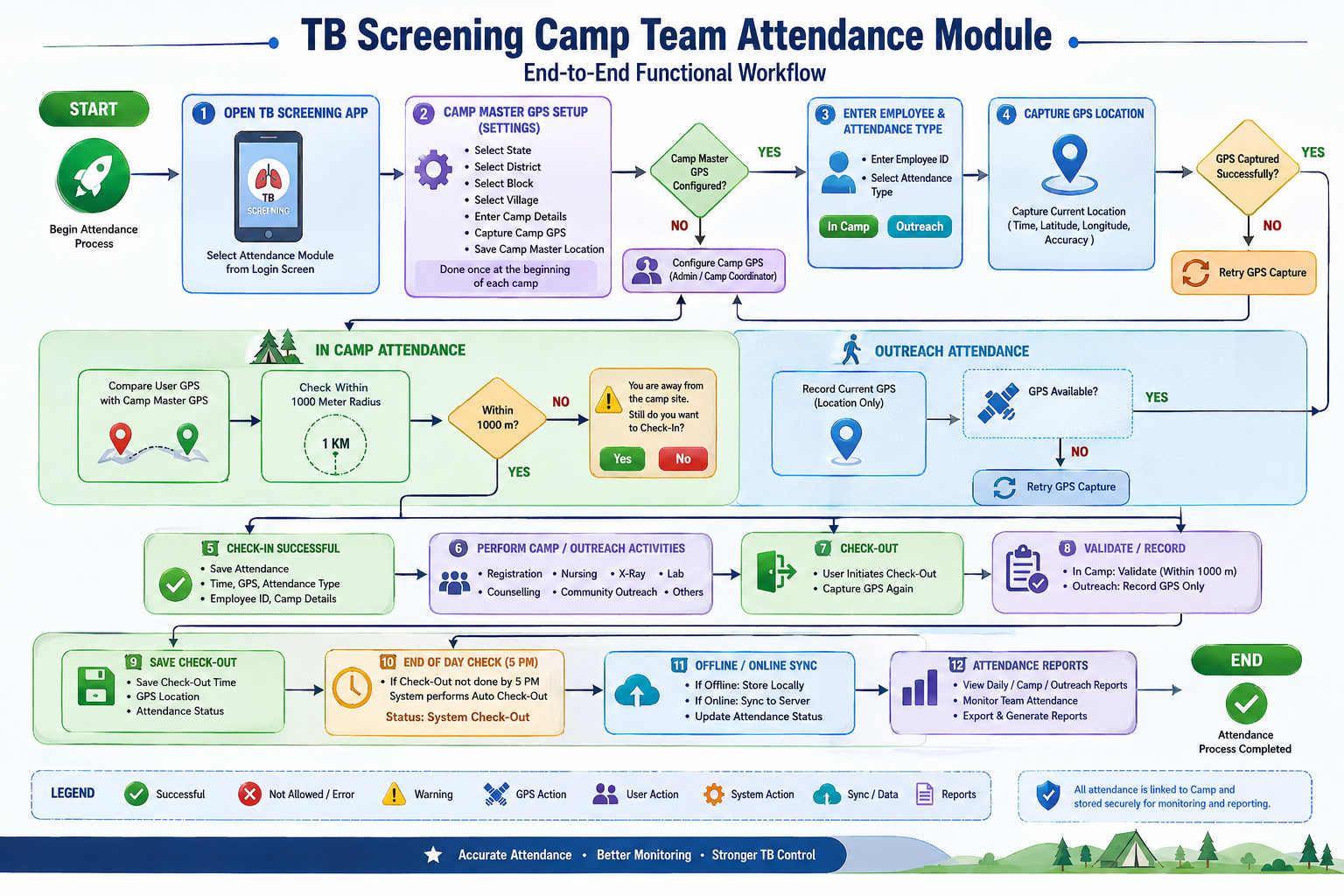
Attendance Flow Diagram