
This document provides step-by-step instructions to set up Elasticsearch on Linux and Windows, along with common operations such as creating an index, syncing data, and searching data.
...
Overview
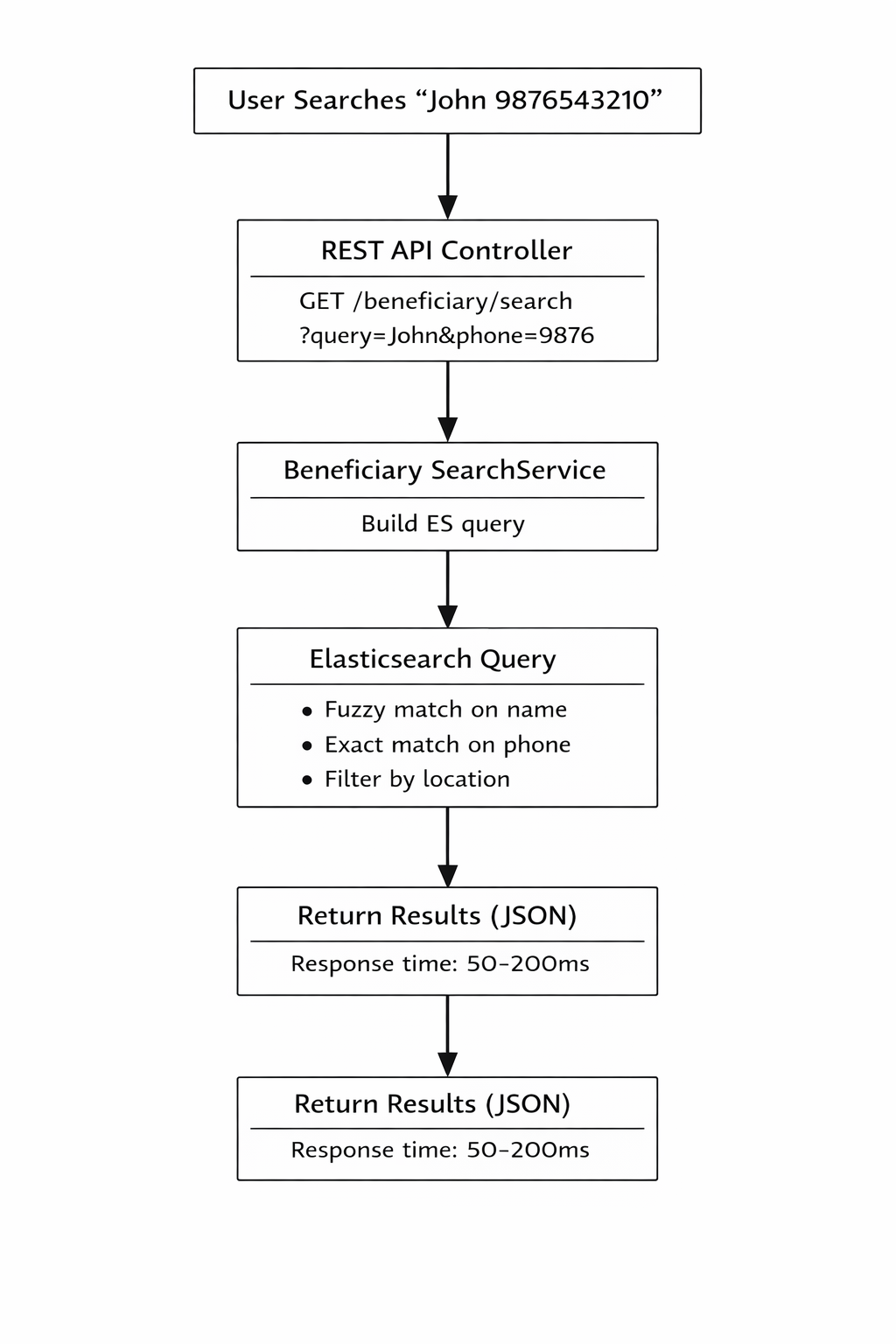
The Elasticsearch implementation provides a high-performance search solution for beneficiary data. It enables fast, fuzzy, and flexible searching across millions of beneficiary records with sub-second response times.
Key Features
- Lightning-fast search: Sub-second queries even with millions of records
- Fuzzy matching: Find beneficiaries even with spelling mistakes
- Flexible filtering: Search by multiple criteria simultaneously
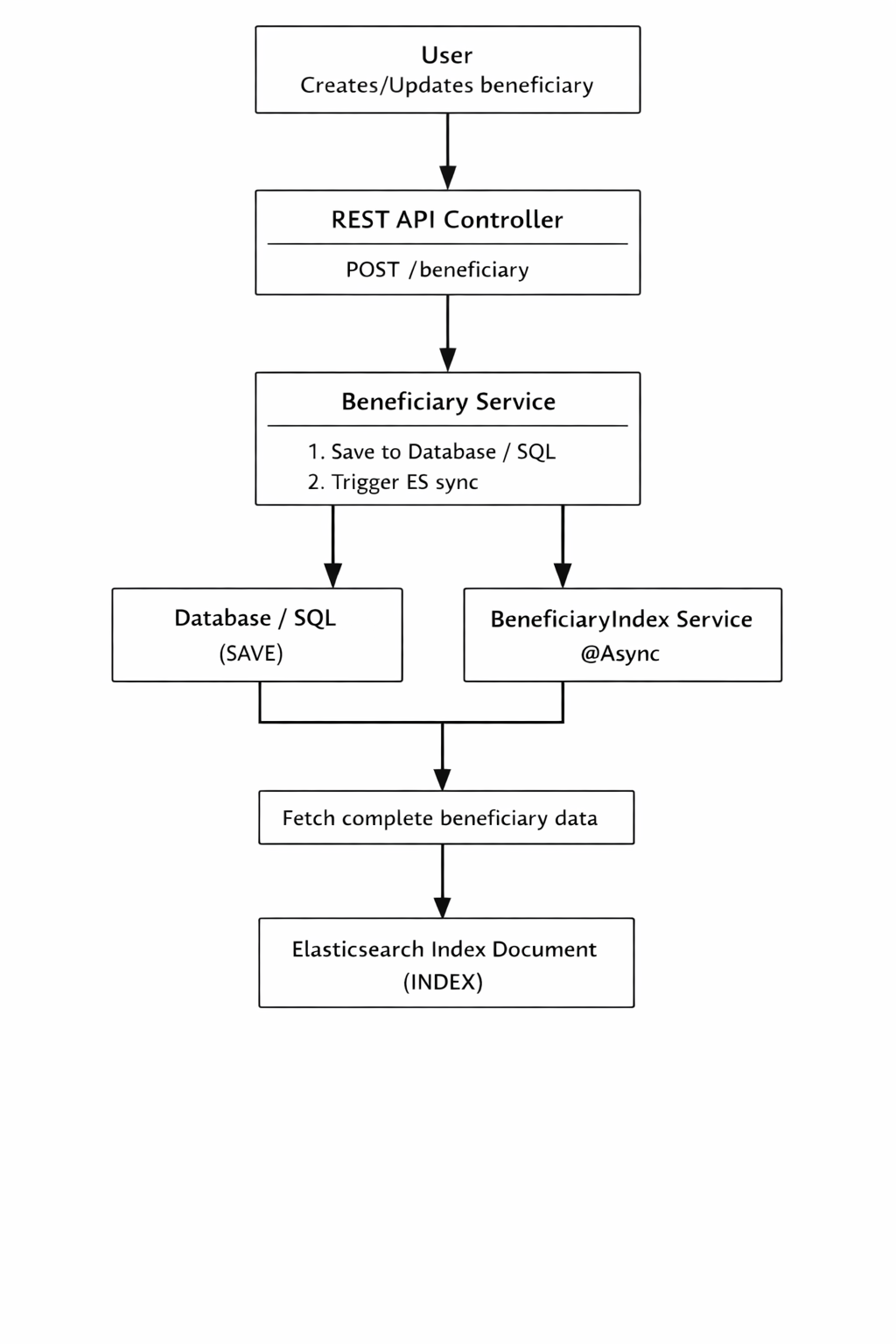
- Real-time sync: Automatic indexing when beneficiaries are created/updated
- Scalable: Handles growing data volumes efficiently
Why Elasticsearch?
Business Problem
The existing database search was experiencing performance issues:
- Slow queries: Complex searches taking 5-15 seconds on large datasets
- Limited fuzzy matching: Exact matches required, causing missed results
- Database load: Heavy search queries impacting transactional operations
- Poor user experience: Users waiting too long for search results
Prerequisites
Java (Elasticsearch 8.x comes with bundled JDK – no separate Java install required)
Minimum 4 GB RAM (recommended)
- Database with beneficiary data
Open ports: 9200 (HTTP), 9300 (Transport)
...
Elasticsearch Installation
...
Linux Setup (Ubuntu / RHEL)
Step 1: Download Elasticsearch
...
curl http://localhost:9200
...
Windows Setup
Step 1: Download Elasticsearch
Download the Windows ZIP from Elastic official site
Step 2: Extract ZIP File
Extract to a directory (example:
C:\elasticsearch)
Step 3: Configure Elasticsearch
...
Step 5: Verify Installation
Open browser or Postman:
http://localhost:9200
Docker Setup
Step 1: Create docker-compose.yml
version: '3.8'
services:
elasticsearch:
image: docker.elastic.co/elasticsearch/elasticsearch:8.11.0
container_name: amrit-elasticsearch
environment:
- discovery.type=single-node
- xpack.security.enabled=true
- xpack.security.http.ssl.enabled=false
- ELASTIC_PASSWORD=Password
- "ES_JAVA_OPTS=-Xms1g -Xmx1g"
ports:
- "9200:9200"
- "9300:9300"
volumes:
- es-data:/usr/share/elasticsearch/data
networks:
- elastickibana:
image: docker.elastic.co/kibana/kibana:8.11.0
container_name: amrit-kibana
environment:
- ELASTICSEARCH_HOSTS=http://elasticsearch:9200
- ELASTICSEARCH_USERNAME=elastic
- ELASTICSEARCH_PASSWORD=Password
ports:
- "5601:5601"
depends_on:
- elasticsearch
networks:
- elasticvolumes:
es-data:
driver: localnetworks:
elastic:
driver: bridge
Step 2: Start Elasticsearch Container
docker compose up -dStep-3: Verify Elasticsearch is running
curl -u elastic:Password http://localhost:9200