
PRD for "STOP TB Application"- Community Screening
...
1. Document Overview
Application
Document Revision History
Date | Version Number | Author | Approved By | Document change reference |
| Dr Vanshika | Madhav | Initial draft | ||
| 23.4.2026 | Dr Vanshika | Madhav | Beneficiary Registration, TB screening, Vitals after feedback and several updates done | |
| 24.4.2026 | Dr Vanshika | Madhav | Mock ups and flow diagram | |
| Dr Vanshika | Madhav | TPT screening module in progress |
1. Document Overview
This document defines the functional requirements for the TB Screening mobile application developed under the TB Mukt Janjati Abhiyan: A communityThis document defines the functional requirements for the TB Screening mobile application developed under the TB Mukt Janjati Abhiyan: A community-driven TB elimination initiative targeting tribal populations across India. The application is purpose-built for field use by community volunteers in tribal areas where connectivity, literacy, and device familiarity may be limited.
The application should be simple to use, comprehensive and must work in low/no-connectivity environments.
1.1 Purpose
This application is developed to screen and maximize TB case detection in all age groups through active case finding, contact investigation, and community mobilization. This application helps in patient tracking throughout treatment cascade at community and facility level via Community Influencers and Nikshay MitrasSTOP TBs. Ensure prompt referral and linkage of diagnosed individuals from community to health facilities for timely treatment initiation is the purpose of this application.
1.2 Users of the system
1. Volunteers- Community mobilization, screenings, camps etc.
2. Admin / NTEP/ SupervisorySTOP TB- Backend/Dashboard Access
1.3 In Scope Functional Modules
| TB Modules | Enlisted in the PRD | NCD Screening modules | Enlisted in the PRD |
| Integration of Digital XRAY Nikshay integration | External technical dependency | ||
| Integration of AI assessment toolenabled hand- held chest Xray (digital) | External technical dependency | ||
| Lab testing device integration (sputum testing)- Truenat | External technical dependency | ||
General NCD Screening module (Vital check-up) | Enlisted in the PRD | ||
General OPD module | Enlisted in the PRD | ||
Dashboard indicators | Enlisted in the PRD. Can be added more as per the requirement. | ||
Pre Camp Work Plan Preparation Module | Subjected to requirement |
1.4 Workflow
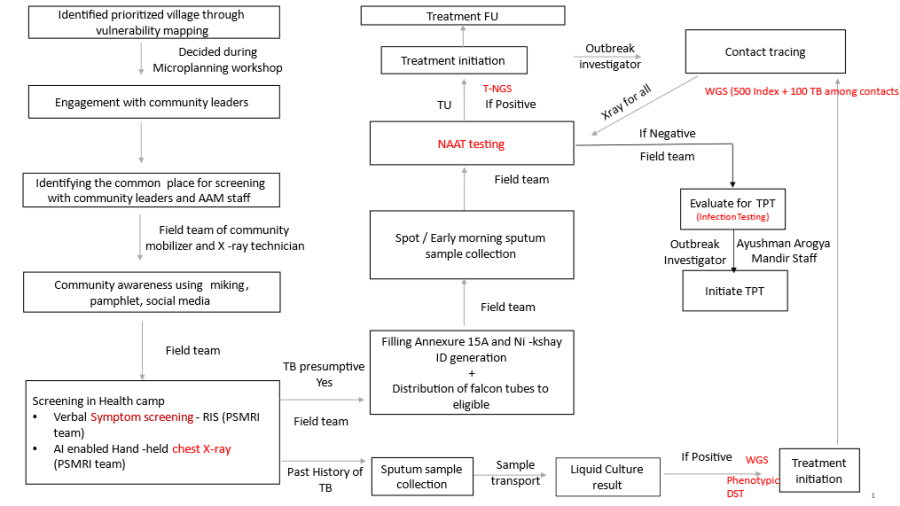
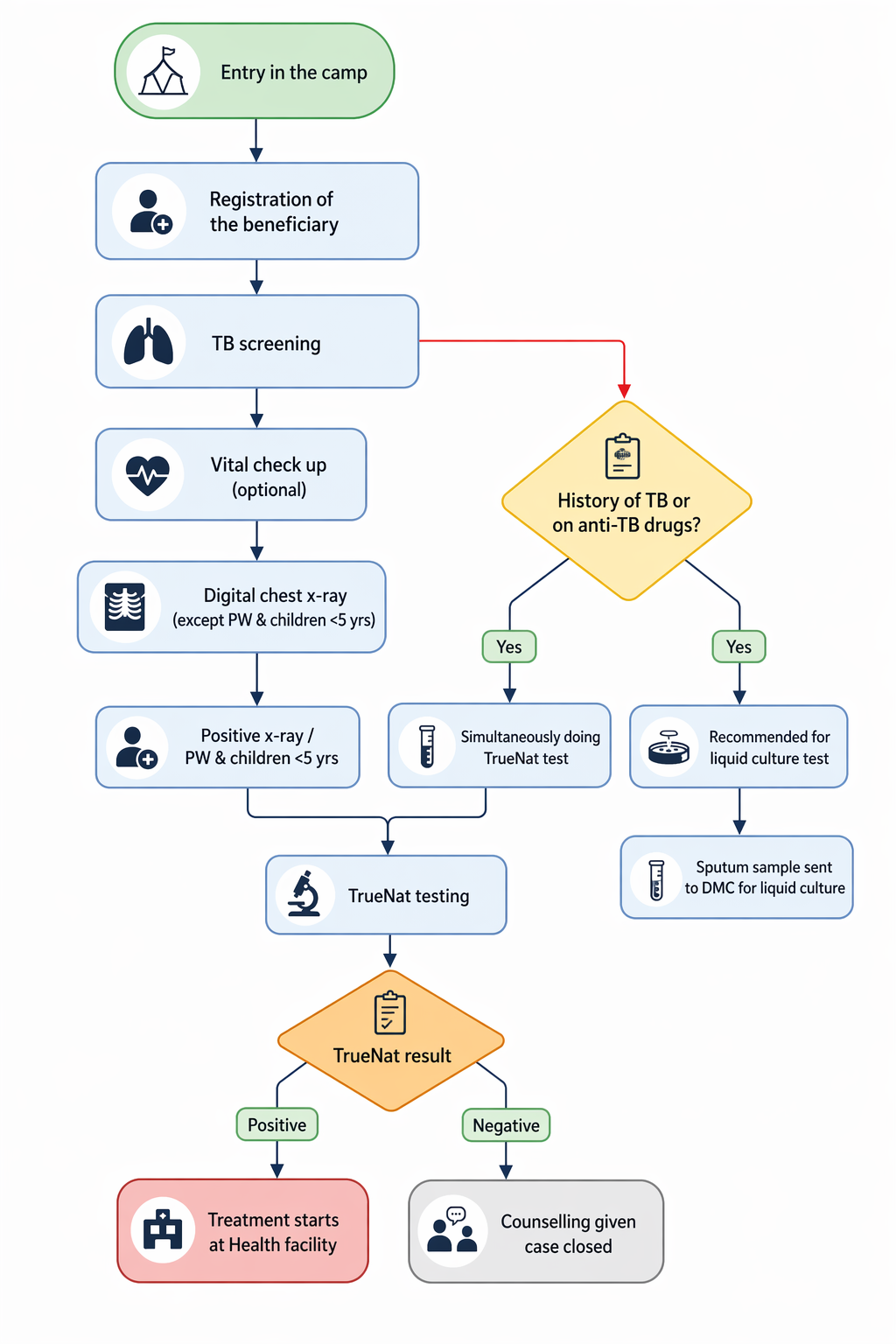
2. Login Page
- Login Page Name should be "STOP TB" Application.
- It must be followed by "STOP TB" Logo.
- It must have both Online and Offline capabilities. ("Offline capabilities feature to exchange data between Mobile devices in a closed environment in real-time without internet")
- For online- Mobile number OTP based with 5 min expiry. For offline- 4-digit PIN which can be set during the first login.
- It must have Multilingual Feature with English, Hindi and other Indian languages enabled, and must be configurable to accommodate all the Indian languages as and when required in future.
UI Field Name | Field Type | Options | Validations |
"STOP TB |
...
" Application Logo |
...
<Placeholder> |
| |
Please Select your Language | Radio |
...
Button |
...
|
...
|
|
...
|
Username |
...
Textbox | |||
Password | Textbox | ||
Remember Me |
...
Checkbox |
|
|
...
|
Powered by Piramal Foundation |
...
Text |
|
|
2.1 Landing page
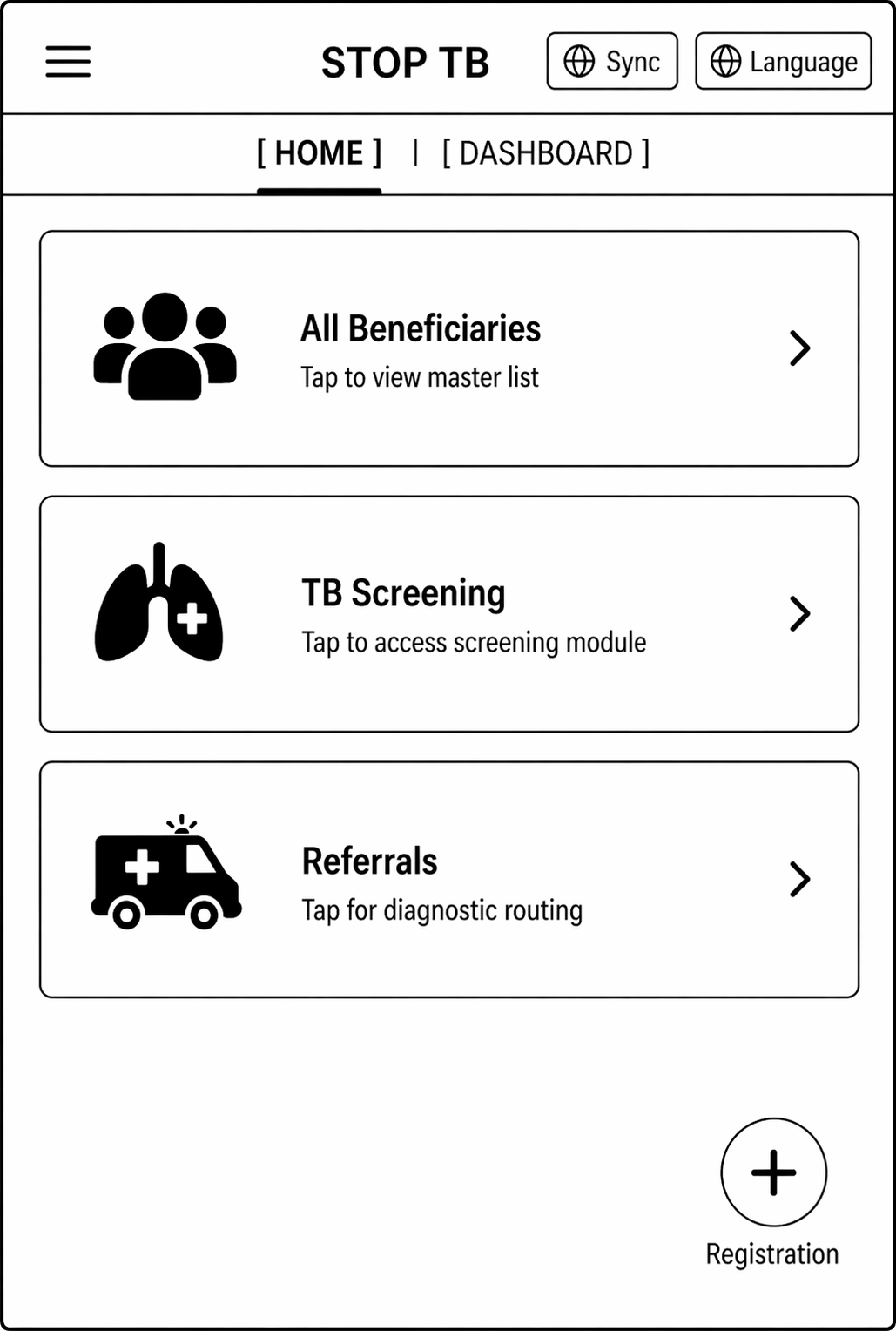
- This page must have a hamburger icon (side drawer), " Stop
- STOP TB" text, sync button, and "Language Translation" button on the Top row.
- There should be a hamburger icon on the left side, which on clicking should have following details-
- Full Name (User)
- Username
- Sync Records
- Create ABHA ID
- Support
- Request to delete account
- Log out
- Landing page should have 2 tabs- "Home" and "Dashboard".
- In home tab floating "Registration" button on the right bottom corner.
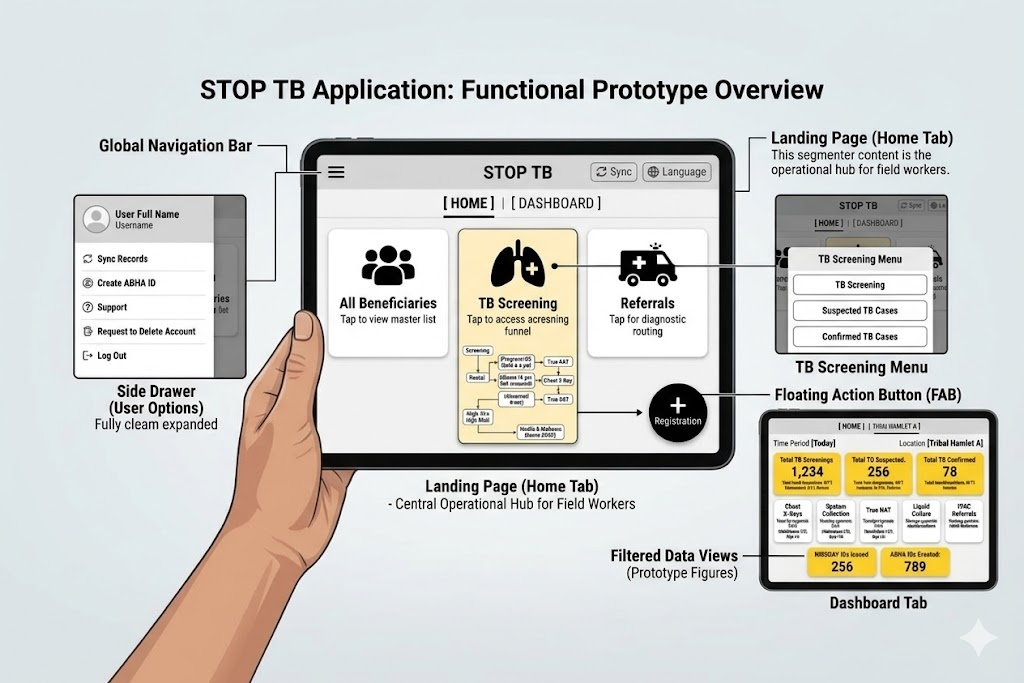
2.2 Home Page- "Home tab"
- Should contain four
- three modules/ Cards- All Beneficiaries, TB screening, NCD
- screening, Referrals written on these cards.
- On clicking "All Beneficiaries" card- open the "Beneficiary module" form documented below (section 2.2.1) for registering the beneficiary by giving the floating "Registration" button in the right corner.
- On clicking "TB" card- open the "Tuberculosis module" (section 2.2.2). On clicking the next screen, it should have 3 cards titled "TB Screening", "Suspected TB cases" and ""Confirmed TB cases".
- On clicking " NCD
- Referrals" card- open the "Non Communicable Disease (NCD) module" (section 2.2.3) the
- - The next screen should have 4
- cards titled "NCD eligible list
- , "Digital Chest X-ray", " NCD priority list
- Truenat", " NCD non-priority list
- Liquid Culture", " NCD referred list".
- On clicking "Referrals"- This should show the line listing of "TB suspected cases" and "NCDs referred list" when they are referred to facilities for further check up.
...
- Health and Wellness Centre". These cards will enlist patients for a particular type of testing. Beneficiaries who are pregnant will be shown directly in "Truenat". All beneficiaries who are not pregnant are shown in "Digital Chest X-ray" and if any abnormality is detected on chest x-ray then that beneficiary is further referred for Truenat testing. All beneficiaries who have high blood pressure and high random blood sugar will be shown in "Health and Wellness Centre" card.
2.2.1 Module - Beneficiary Registration
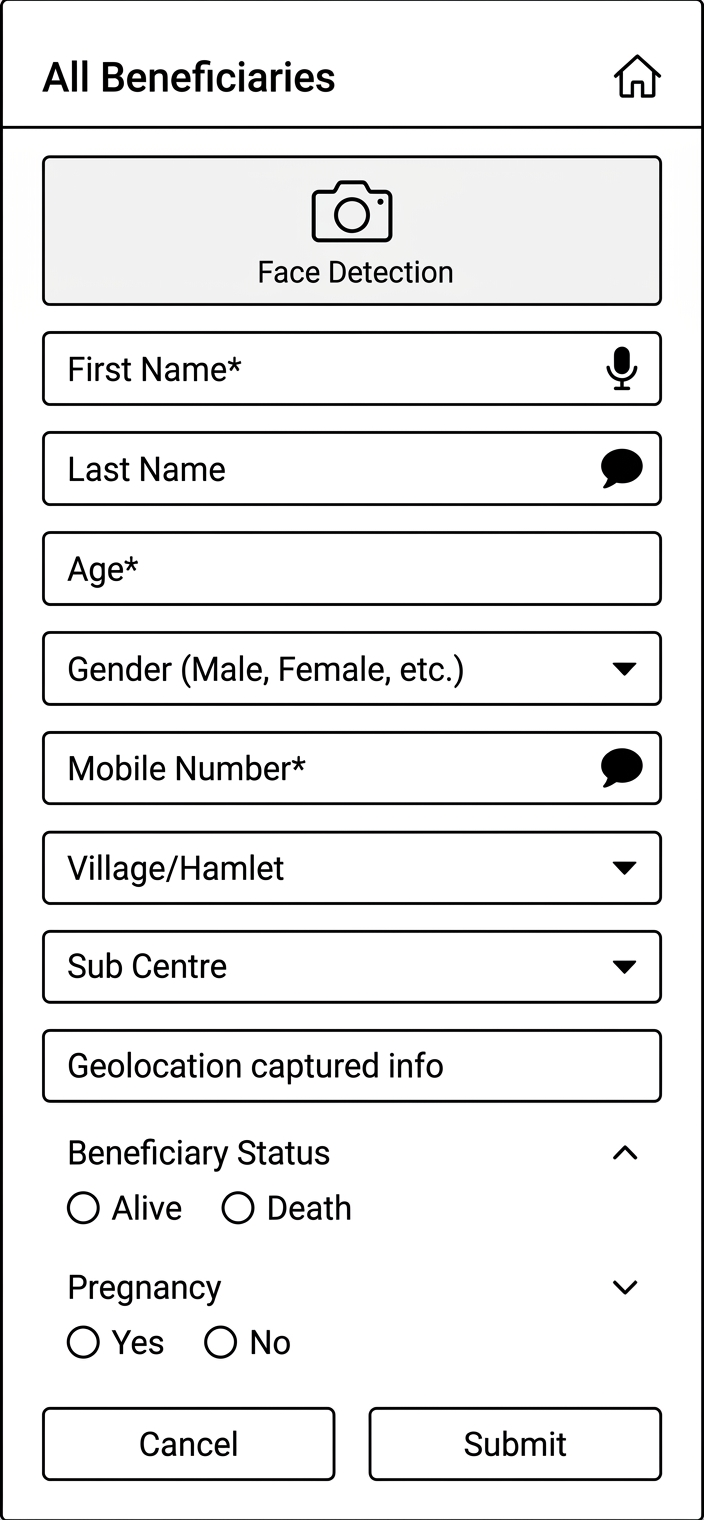
- On clicking Registration button the user will be navigated to Beneficiary Registration Page
...
- Show a pop up for Consent form "I have been explained, the purpose for which the information and findings is being collected from me, in a language I understand and I give my consent to collect the information and findings on my personal health profile."
- This page has "All Beneficiaries" Text displayed on top with "Home" Icon on the right corner to Navigate to Home page in the 1st row
- The card below should be visible after the registration of beneficiary.
- If the beneficiary does not have ABHA ID, give one clickable button on the ABHA ID area of the card to initiate ABHA ID generation.
Photo of the beneficiary | Name | Beneficiary ID |
Age (Years) | Village Name- | |
Phone Number | ABHA ID (ABHA registration)- Clickable |
Field Name | Field Type | Value/ Options | Validation/ Logic |
Date of registration | Should be auto selected and updated when the volunteer logs in the application to do the screening. |
Photo
Camera
Beneficiary ID (AMRIT ID) |
|
| Unique ID auto generated by the system |
Photo | Camera | Optional |
|
Beneficiary Status
Dead
First Name | Text |
| |
Last Name |
|
Age
Number (Years)
If DOB unknown, approximate age allowed
Date of Birth
Date Picker
Populate Age automatically if entered
Gender
Dropdown
Female
Transgender
Prefer not to sayMandatory
Speech to text feature
Mobile Number
Number
Speech to text feature
Village/ Hamlet
dropdown
Marital Status
Spinner
- Unmarried
- Married
- Divorced
- Separated
- Widow
- Widower
- Not Applicable for Newborn/ Child/ Adolescent (Age 0 to less than 18 Years)
- Mandatory and editable
- Show this field once above Gender is selected
- Based on the 'Gender' values in this dropdown list should change as follows:
- In case of 'Gender' = "Female" show "Widow" and hide "Widower"
- In case of 'Gender' = "Male" show "Widower" and hide "Widow"
Husband's/ Wife's Name
Textbox
Is Conditionally Mandatory
- Input method: Speech to Text feature
- Hide this field in case of 'Marital Status' = "Unmarried"
- Optional (Not Mandatory) in case of 'Marital Status' = "Divorced"
- Based on the Gender show label name as: 'Husband's' or 'Wife's Name'
- Accept alphabets only
- Character limit 50
- All letter should be in caps
Father's Name
Textbox
- Input method: Speech to Text feature
- Optional (Not Mandatory) in case of 'Gender' = "Female" and 'Marital Status' = "Married"
- Accept alphabets only
- Character limit 50
- All letter should be in caps
Mother's Name
Textbox
- Input method: Speech to Text feature
- Optional (Not Mandatory) in case of 'Gender' = "Female" and 'Marital Status' = "Married"
- Accept alphabets only
- Character limit 50
- All letter should be in caps
Community
Spinner
- General
- SC
- ST
- OBC
- OC
- Not Given
- Mandatory
- But it should be editable
Religion
Spinner
- Hindu
- Muslim
- Christian
- Sikhism
- Buddhism
- Jainism
- Parsi
- Other
- Not disclosed
- Mandatory
- But it should be editable
Economic Status
Spinner
Is Mandatory Choose:
- APL
- BPL
- Don't know
Type of Residential area
Spinner
Choose:
- Rural
- Urban
- Tribal
- Tea Garden
- Other
Other Type of Residential area
Textbox
- Enable if other is selected above
- Is Mandatory if other is selected above
- Allow Alphanumeric Character and special Characters
- Character limit 100
Occupation
- Default value is unknown
Cancel
Button
If cancel is selected, a pop up message "Are you Sure?" with options "Yes" and "No" will come.
If selected "yes" navigate back to home page
If selected "no" then do not erase the patient health data and let the page remain open so it can be submitted by volunteer as sometime by mistake cancel button is clicked.
Submit
On clicking this, it must display the Pop up msg "Patient Registered successfully"
This must store the data of the patient and display the required fields over the Beneficiary card
Ensure that data should go to server.
...
| |||
Beneficiary Status | Radio Button | · Alive · Death | · Enable only in the “Edit” Beneficiary screen · Auto-populate, if ‘Death’ is reported from any module · Default value is “Alive” · If “Death” is selected, enable below four fields and mark it mandatory- 1. Date of Death 2. Time of Death 3. Reason for Death 4. Place of Death or Other Place of Death |
Date of Death | Date picker | · Enable if “Beneficiary status”= “Death” · Mandatory if enabled · By default, date is null · Not greater than Today’s Date · Accept ‘Date of Death’ after date of registration · Auto-populate, if ‘Death’ is reported from any module (eg: Tuberculosis) | |
Time of Death | Time picker | · Show only if above value is “Death” · Optional | |
Reason for Death (Type of Death) | · Maternal Death · Natural Death · Accident · Infectious Disease · Animal Bite Death · Suicide · Undetermined | · Enable if “Beneficiary status”= “Death” · Mandatory if enabled
| |
Place of Death |
| · Enable if “Beneficiary status”= “Death” · Mandatory if enabled
| |
Other Place of Death | Textbox |
| |
Age | Number (Years) |
| |
Date of Birth | Date Picker |
| |
Gender | Dropdown |
|
|
Mobile Number | Number |
| |
Whose mobile number | dropdown | ||
Marital Status | dropdown |
|
|
Are you Pregnant | radio button |
|
|
Husband's/ Wife's Name | Textbox |
| |
Father's Name | Textbox |
| |
Mother's Name | Textbox |
| |
Community | radio button |
|
|
Religion | radio button |
|
|
Economic Status | radio button |
|
|
Type of Residential area | radio button |
|
|
Other Type of Residential area | Textbox |
| |
Occupation | free text |
| |
Village/ Hamlet | dropdown |
| |
Sub Centre | dropdown |
| |
Capture Geolocation |
| ||
Cancel | Button |
|
|
Submit |
|
2.2.2 Module- Tuberculosis
2.2.2.a TB Screening
In this section show all beneficiaries irrespective of any age group and gender.
This module should open in continuation after beneficiary registration.
- All Beneficiaries List
- NCD Eligible List: All Beneficiary both Male and Female whose age > = 30 years and excluding Pregnant Women; with CBAC Form access
- NCD Priority List: Beneficiary age > = 30 years and CBAC assessment score is greater than 4
- NCD Non-Eligible List: Beneficiary age > = 30 years and CBAC assessment score is less or equals to 4
...
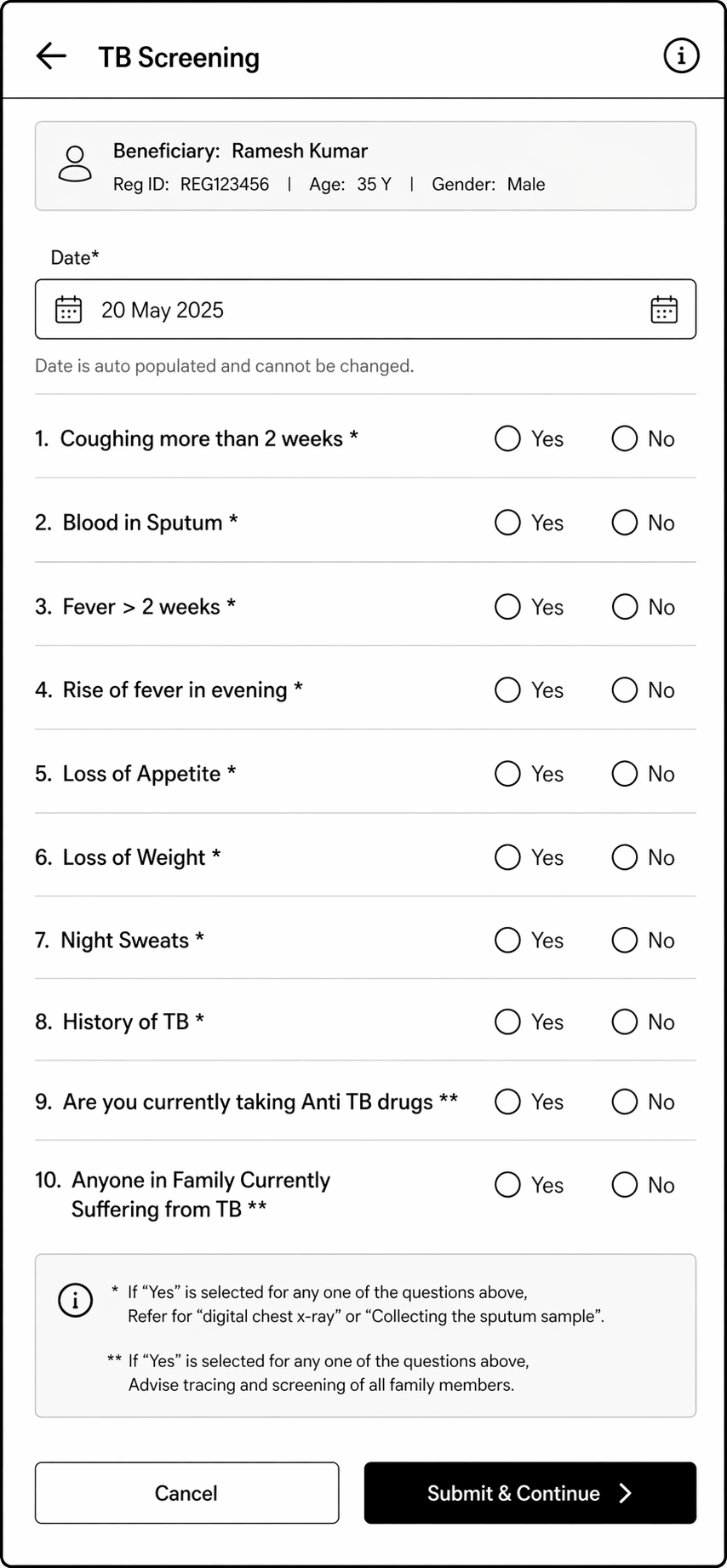
TB Screening
In this section show all beneficiaries irrespective of any age group and gender.
Maintain a separate list for TB Suspected cases for further follow-ups.
Early Detection of Tuberculosis (TB)
Ask if Patient has any of these symptoms
* If "Yes" is selected for any one of the questions below with "*" then show a pop-up message "Refer to the nearest health facility and collect the Sputum sample".
Show these beneficiaries to 'Referral list module in the Home' section
** If "Yes" is selected for any one of the questions below with "**" then show a pop-up message "Refer to the nearest health facility and collect the Sputum sample".
Show these beneficiaries to 'Referral list module in the Home' section
Date
Calendar
Date Picker
Is Mandatory
- Default value Today's Date
- Not greater than Today's Date
- Accept date greater or equal to Date of beneficiary registration
- should not allow to update in edit or once submitted
Name
Textbox
Auto fill from Beneficiary details
Show: First Name + Last Name
Read only
Age
Textbox
Auto fill from Beneficiary details
Read only
Sex
Textbox
Auto fill from Beneficiary details
Read only
Coughing More than 2 weeks *
Spinner
Is Mandatory
Choose:
- Yes
- No
Blood in Sputum *
Spinner
Is Mandatory
Choose:
- Yes
- No
Fever > 2 weeks *
Spinner
Is Mandatory
Choose:
- Yes
- No
Rise of fever in evening
Spinner
Is Mandatory
Choose:
- Yes
- No
Loss of Appetite
Spinner
Is Mandatory
Choose:
- Yes
- No
Loss of Weight *
Spinner
Is Mandatory
Choose:
- Yes
- No
Night Sweats *
Spinner
Is Mandatory
Choose:
- Yes
- No
History of TB *
Spinner
Is Mandatory
Choose:
- Yes
- No
* If "Yes" is selected for any one of the questions below with "*" ; "Refer for "digital chest x-ray" or "Collecting the sputum sample". | |||
** If "Yes" is selected for any one of the questions below with "**" ; "Advise tracing and screening of all family members". | |||
TB Screening |
|
| |
Date | Calendar | Is Mandatory |
|
Coughing More than 2 weeks * | radio button |
|
|
Blood in Sputum * | radio button |
|
|
Fever > 2 weeks * | radio button |
|
|
Rise of fever in evening* | radio button |
|
|
Loss of Appetite* | radio button |
|
|
Loss of Weight * | radio button |
|
|
Night Sweats * | radio button |
|
|
History of TB * | radio button |
|
|
Are you currently taking Anti TB drugs ** |
Spinner
Is Mandatory
Choose:
- Yes
- No
radio button |
|
|
Anyone in Family Currently Suffering from |
TB ** |
Spinner
Is Mandatory
Choose:
- Yes
- No
Inform to ANM / MPW/ MO for tracing of Family members
Submit
Button
Suspected TB cases
Maintain a separate list of Suspected TB cases based on above assessment check.
This section should contain only Suspected TB cases.
Name of data Field | Field Type | Value/ Options | Validation/ Logic/ Condition |
Date | Calendar | Is Mandatory |
|
Name | Textbox |
| Auto fill from Beneficiary details |
Age | Textbox |
| Auto fill from Beneficiary details |
Sex | Textbox |
| Auto fill from Beneficiary details |
Is Sputum sample collected? | Spinner | Is Mandatory
|
|
Sputum sample submitted at | Spinner | Choose:
| Enable if "Yes" is selected for 'Is Sputum sample collected?' |
Nikshay ID | Textbox |
| Enable if "Yes" is selected for 'Is Sputum sample collected?' |
Sputum Test result | Spinner | Choose:
| Enable if "Yes" is selected for 'Is Sputum sample collected?' |
Referred to facility | Spinner | Is Mandatory
|
|
Facility Referral follow-ups | Textbox |
|
|
Submit | Button |
|
|
2.2.3 Module- Non Communicable Disease (NCD) Screening
Note: The common questions in CBAC Part B1 and TB screening form, if either of the form is filled and submitted first, then responses in the other form should be automatically selected.
Community Based Assessment Checklist (CBAC) Form
NCD (Non-Communicable Diseases) Eligible List:
Show all Beneficiary both Male and Female whose age > = 30 years and excluding Pregnant Women.
And this CBAC Form is applicable to screen these Beneficiaries.
This CBAC Form, assessment check should be done yearly once,
Edit is applicable – but once approved by ANM/MO/ CHO, edit is not applicable
Maintain the history of submitted CBAC Form for viewing, year wise
radio button |
|
| |
Submit | Button |
| Continue next to "General Examination" |
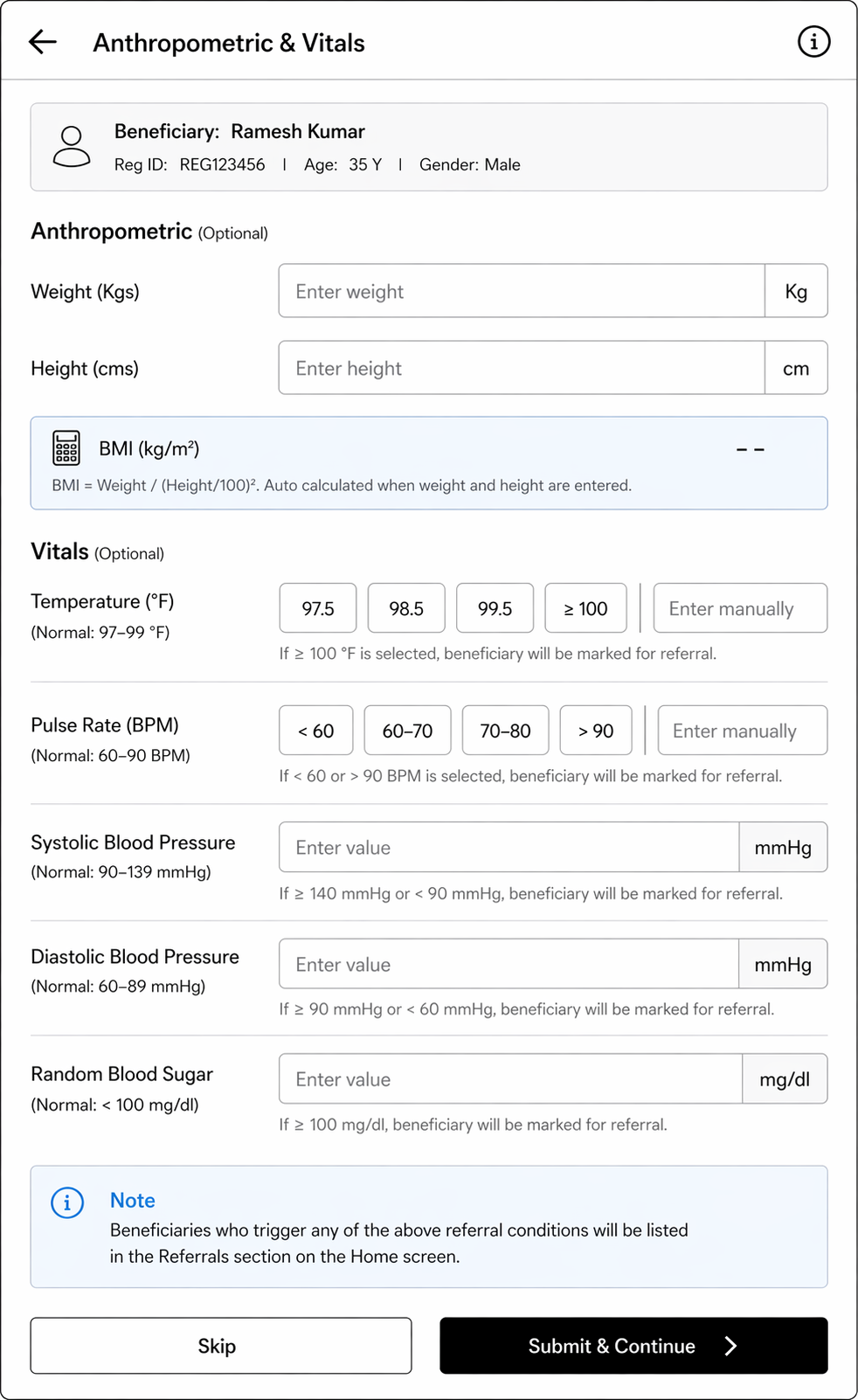
General Examination
Fields | Validation |
Anthropometric (Optional) |
|
Weight (Kgs) | - |
Height (cms) | - |
BMI=Weight/(Height/100) ² | Should be auto calculated if height and weight details are entered |
Vitals (Optional) |
|
Temperature (Degree Fahrenheit) |
a) 97.5 b) 98.5 c) 99.5 d)>= 100 If option d)>= 100 is chosen, show alert "Refer to Health and Wellness Centre" and show such beneficiaries in "Referral" card in Home |
Pulse Rate (beats per minute) |
Give predefined options (Normal range= 60-90 BPM) a) less than 60 b) 60-70 c) 70-80 d) More than 90 If "less than 60" or "more than 90" option is chosen, show alert "Refer to Health and Wellness Centre" and show such beneficiaries in "Referral" card in Home |
Systolic Blood Pressure (mmHg) |
|
Diastolic Blood Pressure (mmHg) |
|
Random Blood sugar (mg/dl) |
|
Skip Button |
|
Submit Button | Continue next to "Diagnostics" Screen |
Diagnostics
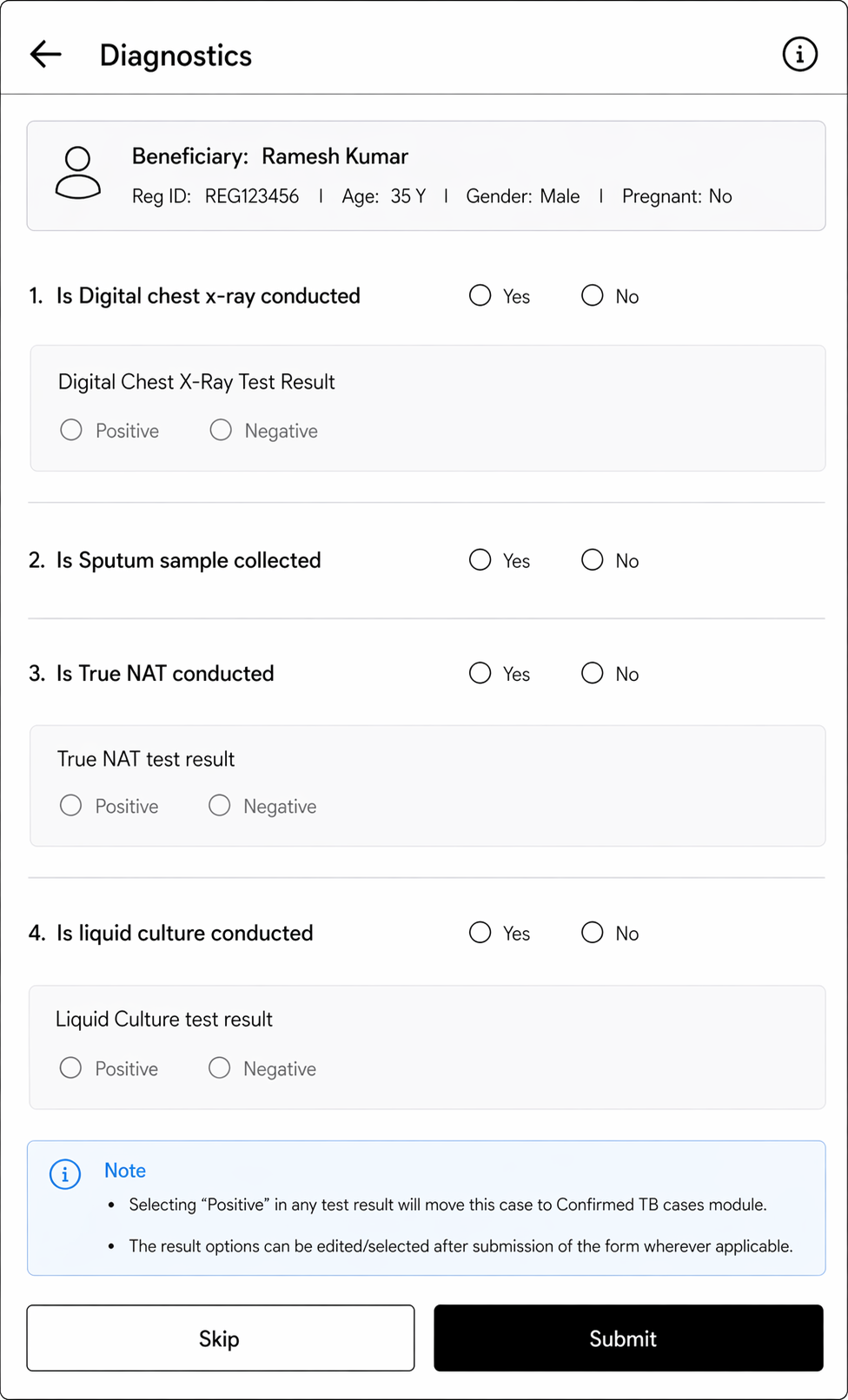
Diagnostics | |||
Is Digital chest x-ray conducted |
|
| |
Digital Chest X-Ray Test Result |
|
|
|
Is Sputum sample collected |
|
| |
Recommended for Truenat test |
|
| |
Truenat test result | radio button |
|
|
Recommended for liquid culture test |
|
| |
Liquid Culture test result | radio button |
|
|
2.2.2.b Suspected TB cases
This section should contain all beneficiaries in the following scenario-
Scenario 1- If not a single symptom is presented in a beneficiary but chest x-ray is positive, show the case here.
Scenario 2- If any symptom or symptoms reported "yes" then show the case here even if chest x-ray/ Truenat is negative.
Name of data Field | Field Type | Value/ Options | Validation/ Logic/ Condition |
Date | Calendar | Mandatory |
|
Name of Data Field
Field Type
Value/ Options
Validation/ Logic/ Condition
CBAC Form
Date
Calendar
Date Picker
- Is Mandatory
- Choose the date from the calendar
- Format: dd-mm-yyyy
- Default value Today's Date
|
|
|
Name |
Textbox |
| Auto fill from Beneficiary |
details |
Name |
|
only |
Age |
Textbox |
| Auto fill from Beneficiary |
details |
only |
Gender |
Textbox |
| Auto fill from Beneficiary |
details |
Part A: Risk Assessment
What is your Age? (in Age)
Spinner
Is Mandatory
Choose:
- 30 – 39
- 40 - 49
- 50 – 59
- 60 and Above
Auto-populate Age from 'Beneficiary' registration:
Score Logic:
"Score" is a variable whose Default Score value is "0".
If 30 <= Age <= 39 then display "1"If 40 <= Age <= 49 then display "2"If 50 <= Age <= 59 then display "3"If 60 <= Age then display "4"
Do you smoke or consume smokeless products such as gutka or khaini
Spinner
Is Mandatory
Choose:
- Never
- Used to consume in the past sometime now
- Daily
Score Logic:
If option selected "Never" then display "0"If option selected "Used to consume in the past sometime now" then display "1"If option selected = "Daily" then display "2"
Do you consume alcohol daily
Spinner
Is Mandatory
Choose:
- Yes
- No
Score Logic:
If "No" then display "0" or If "Yes" then display "1"
Measurement of Waist (in cm)
Spinner
Is Mandatory
Condition:
Show values in the Spinner based on Gender:
For Male:
Choose:
- 90 cm or less
- 91 - 100 cm
- More than 100 cm
For Female:
Choose:
- 80 cm or less
- 81 - 90 cm
- More than 90 cm
Score Logic:
If "Gender" = "Female" and "Waist length" <= 80 then display "0"If "Gender" = "Female" and 81 <= "Waist length" <= 90 then display "1"If "Gender" = "Female" and "Waist length" > 90 then display "2"If "Gender" = "Male" and "Waist length" <= 90 then display "0"If "Gender" = "Male" and 91 <= "Waist length" <= 100 then display "1"If "Gender" = "Male" and "Waist length" > 100 then display "2"
Do you under take any physical activity for minimum of 150 minutes in a week
Spinner
Is Mandatory
Choose:
- At least 150 min in a week
- Less than 150 min in a week
Score Logic:
If "At least 150 min in a week" then display "0" or
If "Less than 150 min in a week" then display "1"
Do you have any family history (any one of your parents or siblings) of high BP / Diabetes / Heart Disease
Spinner
Is Mandatory
Choose:
- Yes
- No
Score Logic:
If "No" then display "0" or If "Yes" then display "2"
Total Score
Label
Total Score Formula:
Sum of all above score.
Based on the "Total Score" display a message in pop-up as show below:
If score is > 4
"Refer to NCD screening day / VHSND/ HWC for NCD screening (Priority)"
If score is < = 4
"Refer to NCD screening day / VHSND/ HWC for NCD screening (Less Priority)"
Part B1: Early Detection
Ask if Patient has any of these symptoms
If "Yes" is selected below then display a pop-up message, "Suspected NCD case, please visit nearest HWC or call 104."
* If "Yes" is selected for any one of the questions below with "*" then show a pop-up message "Refer to MO and collect the Sputum sample"
** If "Yes" is selected for any one of the questions below with "**" then show a pop-up message "Refer to MO or inform ANM/MPW to tracing of all family members"
Shortness of Breath
Spinner
Is Mandatory
Choose:
- Yes
- No
Coughing More than 2 weeks *
Spinner
Is Mandatory
Choose:
- Yes
- No
Blood in Sputum *
Spinner
Is Mandatory
Choose:
- Yes
- No
Fever > 2 weeks *
Spinner
Is Mandatory
Choose:
- Yes
- No
Loss of Weight *
Spinner
Is Mandatory
Choose:
- Yes
- No
Night Sweats *
Spinner
Is Mandatory
Choose:
- Yes
- No
Are you currently taking Anti TB drugs **
Spinner
Is Mandatory
Choose:
- Yes
- No
Anyone in Family Currently Suffering from TB **
Spinner
Is Mandatory
Choose:
- Yes
- No
History of TB *
Spinner
Is Mandatory
Choose:
- Yes
- No
Recurrent of ulceration on Palm or Sole
Spinner
Is Mandatory
Choose:
- Yes
- No
Recurrent of tingling on Palm or Sole
Spinner
Is Mandatory
Choose:
- Yes
- No
Cloudy or Blurred Vision
Spinner
Is Mandatory
Choose:
- Yes
- No
Difficulty in reading
Spinner
Is Mandatory
Choose:
- Yes
- No
Pain in eyes lasting for more than weeks
Spinner
Is Mandatory
Choose:
- Yes
- No
Redness in eyes for more than weeks
Spinner
Is Mandatory
Choose:
- Yes
- No
Difficulty in Hearing
Spinner
Is Mandatory
Choose:
- Yes
- No
History of Fits
Spinner
Is Mandatory
Choose:
- Yes
- No
Difficulty in Opening Mouth
Spinner
Is Mandatory
Choose:
- Yes
- No
Ulcers in Mouth Not Healed in 2 weeks
Spinner
Is Mandatory
Choose:
- Yes
- No
Growth in Mouth Not Healed in 2 weeks
Spinner
Is Mandatory
Choose:
Any white or red Patch in Mouth Not Healed in 2 weeks
Spinner
Is Mandatory
Choose:
- Yes
- No
Pain while chewing
Spinner
Is Mandatory
Choose:
- Yes
- No
Any change in Tone of Voice
Spinner
Is Mandatory
Choose:
- Yes
- No
Any hypo pigmented patches or discolour lesions with loss of sensation
Spinner
Is Mandatory
Choose:
- Yes
- No
Any thickened skin
Spinner
Is Mandatory
Choose:
- Yes
- No
Any nodules skin
Spinner
Is Mandatory
Choose:
- Yes
- No
Any Patch or Discoloration on Skin
Spinner
Is Mandatory
Choose:
- Yes
- No
Recurrent numbness on palm or sole
Spinner
Is Mandatory
Choose:
- Yes
- No
Clawing of fingers in hand or feet
Spinner
Is Mandatory
Choose:
- Yes
- No
Tingling and numbness in hand / or feet
Spinner
Is Mandatory
Choose:
- Yes
- No
Inability to close eye lid
Spinner
Is Mandatory
Choose:
- Yes
- No
Difficulty in Holding Objects in hands or Fingers
Spinner
Is Mandatory
Choose:
- Yes
- No
Weakness in feet that cause difficulty in walking
Spinner
Is Mandatory
Choose:
- Yes
- No
Part B2: Women Only
Lump in the Breast
Spinner
Is Mandatory
Choose:
- Yes
- No
Bleeding after Menopause
Spinner
Is Mandatory
Choose:
- Yes
- No
If option selected is "Yes" then display "Inform ASHA Facilitator."
Blood Stained Discharge from the Nipple
Spinner
Is Mandatory
Choose:
- Yes
- No
Bleeding after intercourse
Spinner
Is Mandatory
Choose:
- Yes
- No
Part B3: Elderly Specific
Feeling unsteady while standing or walking
Spinner
Is Mandatory
Choose:
- Yes
- No
If option selected is "Yes" then display "Send the patient to MOIC of nearest health center for treatment "
Suffering from any physical disability that restrict movement
Spinner
Is Mandatory
Choose:
- Yes
- No
If option selected is "Yes" then display "Send the patient to MOIC of nearest health center for treatment "
Needing help from others to perform every day activities such as eating, getting dressed, grooming, bathing, walking, or using the toilets
Spinner
Is Mandatory
Choose:
- Yes
- No
If option selected is "Yes" then display "Send the patient to MOIC of nearest health center for treatment "
Forgetting names of yours, near ones or your own home address
Spinner
Is Mandatory
Choose:
- Yes
- No
If option selected is "Yes" then display "Send the patient to MOIC of nearest health center for treatment "
Part C: Risk factor for COPD
Type of Fuel Used for Cooking
Spinner
Choose:
Wood, Crop Residue, Gobar Gas, Coal, Kerosene oil, LPG
Occupational Exposure
Spinner
Choose:
Crop residue burning / burning of garbage – leaves/working in industries with smoke, gas and dust exposure such as brick kilns and glass factories etc.
Part D: PHQ2
Over the last two weeks bothered by the following problem?
Little interest or pleasure in doing things?
Spinner
Choose:
- Not at all
- several days
- more than half the days
- nearly every day
Score Logic:
If option selected is "Not at all" then display "0"If option selected is "several days" then display "1"If option selected is "more than half the days" then display "2"If option selected is "nearly every day" then display "3"
Feeling down, depressed or hopeless?
Spinner
Choose:
- Not at all
- several days
- more than half the days
- nearly every day
Score Logic:
If option selected is "Not at all" then display "0"If option selected is "several days" then display "1"If option selected is "more than half the days" then display "2"If option selected is "nearly every day" then display "3"
Total Score
Label
Total Score formula: Sum of all the above score
If "Total Score" is more than "3" then display pop up message "Refer the person to MOIC for treatment."
2.2.4 Module - Referrals
2.3 Home Page- Dashboard
- Flip feature between "Home" and "Dashboard".
- Put a field for filter with 2 selection options-
- Time Period- based on "today and previous months" This filter should show all the data cards in the dashboard pertaining to the time period selected. (eg: today, Jan, Feb etc)
- Village Name- Dropdown options to be populated with names of village/ hamlets
- Module cards should be placed below the filter selection option.
only | |||
Nikshay ID | Textbox |
|
|
Is Digital Chest X-ray conducted |
|
|
|
Digital Chest X-Ray Test Result |
|
|
|
Sputum Test |
|
a) If "Digital Chest X-Ray Test Result"= "Positive" b) If "History of TB" = "Yes" c) If "Are you pregnant= yes" d) If "Are you currently taking Anti TB drugs" = "yes" | |
Is Sputum sample collected? | radio button |
|
|
Sputum Sample submitted at | dropdown |
|
|
Is Truenat conducted | radio button |
|
|
Truenat test result | radio button |
|
|
Is Liquid culture conducted | radio button |
|
|
Liquid Culture test result | radio button |
|
|
Capture Geolocation |
| ||
Submit | Button |
|
|
2.2.2.c Confirmed TB cases
Treatment and follow up of TB confirmed cases.
Name of Data Field | Field Type | Value/ Options | Validation/ Logic/ Condition |
Regimen Type | Radio button |
| Open module 2.2.2.d (TPT- TB Prevention treatment) module if “DS-TB (6 Months)” is selected Alert to Volunteer to screen all household members/ Contacts if DS-TB case is selected.
|
Treatment Start Date | Date picker
| Mandatory |
|
Expected Treatment Completion Date | Label | Read only | Auto calculate this date based on below condition form ‘Treatment Start Date’: 1. If ‘Regimen Type’ is “1”, “4”, “5” then add 6 months 2. If ‘Regimen Type’ is “2”, then, Treatment duration is 9–12 months (show 9–12 range dates) 3. If ‘Regimen Type’ is “3”, then, Treatment duration is 18–24 months (show 18–24 range dates) |
Follow-up & Adherence | |||
Follow up Date | Date picker
| Mandatory |
|
Monthly follow up done | Label | Month-1 to Month-24 |
|
Adherence to Medicines | Radio button |
|
|
Any discomfort | Radio button |
|
|
Treatment Completion | |||
Did the patient complete the full course of treatment? | Radio button |
| Enable these below filed based on below conditions: 1. If ‘Regimen Type’ is “1”, “4”, “5” then enable after 5 Monthly follow up visits 2. If ‘Regimen Type’ is “2”, then enable after 9 Monthly follow up visits 3. If ‘Regimen Type’ is “3”, then enable after 18 Monthly follow up visits |
Actual Treatment Completion Date | Date picker |
|
|
TB Treatment outcomes | Dropdown |
| If "Death" is selected, update 'Beneficiary Status' = "Death" in the Beneficiary record, with “Date of Death”, "Place of Death" and "Reason for Death” in the next fields. |
Date of Death | Date picker |
|
|
Place of Death | Dropdown |
| Enable only if "TB Treatment outcomes" = “Death” |
Reason for Death | Label Read only | Tuberculosis | Enable only if "TB Treatment outcomes" = “Death” |
Reason for non completion of treatment | Textbox |
| Enable this field if “No” selected for “Did the patient complete full treatment?” |
Capture Geolocation |
| ||
Submit | button |
|
|
Follow up visit history | Table |
| Maintain a Follow up visit history of Visit |
2.2.2.d Tuberculosis Preventive Treatment
Tuberculosis Preventive Treatment (TPT)
- TPT is the preventive treatment given to close contacts of confirmed Drug-Sensitive TB (DS-TB) cases who are at high risk of developing active TB.
- If a contact tests positive for active TB at any step (X-Ray or Sputum positive), the system must immediately redirect the volunteer to create a new TB Suspected Case record for that contact — bypassing the TPT flow.
- This module should open when in Confirmed TB case module, “Regimen type” = “DS-TB (6 months)”
- Make this module editable as after referral of the contact for diagnostic tests, volunteer needs to enter further details once the tests are done.
Household Contact Line listing Screen-
Name of data field | Field Type | Value/ Options | Validation/ logic/ condition |
Name of the contact | Text Box |
| |
Age of the contact |
| ||
Gender | Dropdown |
|
|
Mobile Number | Number |
| |
TPT (TB Preventive Treatment) Screening Status |
|
|
|
Referral Facility for screening |
|
|
|
Screening done at the referral facility |
|
|
|
Is it confirmed TB case |
|
|
|
Are you advised to take (TPT) |
|
|
|
TPT initiated |
|
|
|
TPT start date | Date picker | =<Today’s date |
|
Treatment duration of TPT |
|
|
|
Expected completion date | date |
|
|
Follow up visit number | Numeric |
|
|
Follow up visit date | Date picker | =<Today’s date |
|
TPT completion status |
|
|
|
Other | Free text | ||
Date of completion | Date picker | =<Today’s date |
|
Date of death | Date picker |
|
|
Cause of death | Free text |
|
|
Capture Geolocation |
| ||
Submit |
|
|
|
Module - Referrals
This module should contain the list of names/ cases referred to health facilities.
2.3 Home Page- Dashboard
- Flip feature between "Home" and "Dashboard".
- Put a field for filter with 2 selection options-
- Time Period- based on "today and previous months" This filter should show all the data cards in the dashboard pertaining to the time period selected. (eg: today, Jan, Feb etc)
- Village Name- Dropdown options to be populated with names of village/ hamlets
Field Name | Field Type | Options | Validation |
Filter/ Selection option | Dropdown | The Dropdown Values are
| If this filter is selected, then show all the values of the dashboard indicators pertaining to the time period selected. |
Filter/ Selection option | Dropdown | Village/ Hamlet names to be put here | If this filter is selected, then show all the values of the dashboard indicators pertaining to the particular village selected. |
Total TB screenings Total Positives/ Negatives | Card must be yellow in colour | It must auto populate based on the filter selected. | |
Total TB suspected cases Total Positives/ Negatives | Card must be yellow in colour | It must auto populate based on the filter selected. | |
Total TB confirmed cases Total Positives/ Negatives | Card must be yellow in colour | It must auto populate based on the filter selected. | |
Total Digital Chest X-Rays conducted Total Positives/ Negatives Male- Positive/ Negative Age>= 60 years- Positives/ Negatives |
| It must auto populate based on the filter selected. | |
Total Sputum collection conducted Total- Positives/ Negatives Male- Positives/ Negatives Age>= 60 years- Positives/ Negatives |
| It must auto populate based on the filter selected. | |
Total Truenat tests conducted Male- Positives/ Negatives Age>= 60 years- Positives/ Negatives |
|
Field Name
Field Type
Options
Validation
Filter/ Selection option
Dropdown
The Dropdown Values are
- Today
- January
- February
- March
- April
- May
- June
- July
- August
- September
- October
- November
- December
If this filter is selected, then show all the values of the dashboard indicators pertaining to the time period selected.
Filter/ Selection option
Dropdown
Village/ Hamlet names to be put here
If this filter is selected, then show all the values of the dashboard indicators pertaining to the particular village selected.
Male
Female
Children (<15 yrs)
OthersCard must be yellow in colour
It must auto populate based on the filter selected. | |
Total |
sputum samples sent for liquid culture Male- Positives/ Negatives |
Age>= 60 years- Positives/ Negatives |
| It must auto populate based on the filter selected. | |
Total |
Male
cases referred to Health and Wellness Centres Male |
Card must be yellow in colour
Age>= 60 years |
| It must auto populate based on the filter selected. | |
NIKSHAY IDs | Card must be yellow in colour | Total number of NIKSHAY IDs made in the selected time period or Village | |
ABHA IDs | Card must be yellow in colour | Total number of ABHA IDs made in the selected time period or Village |