
...
2. Architecture Overview & Sync Model
2.1
...
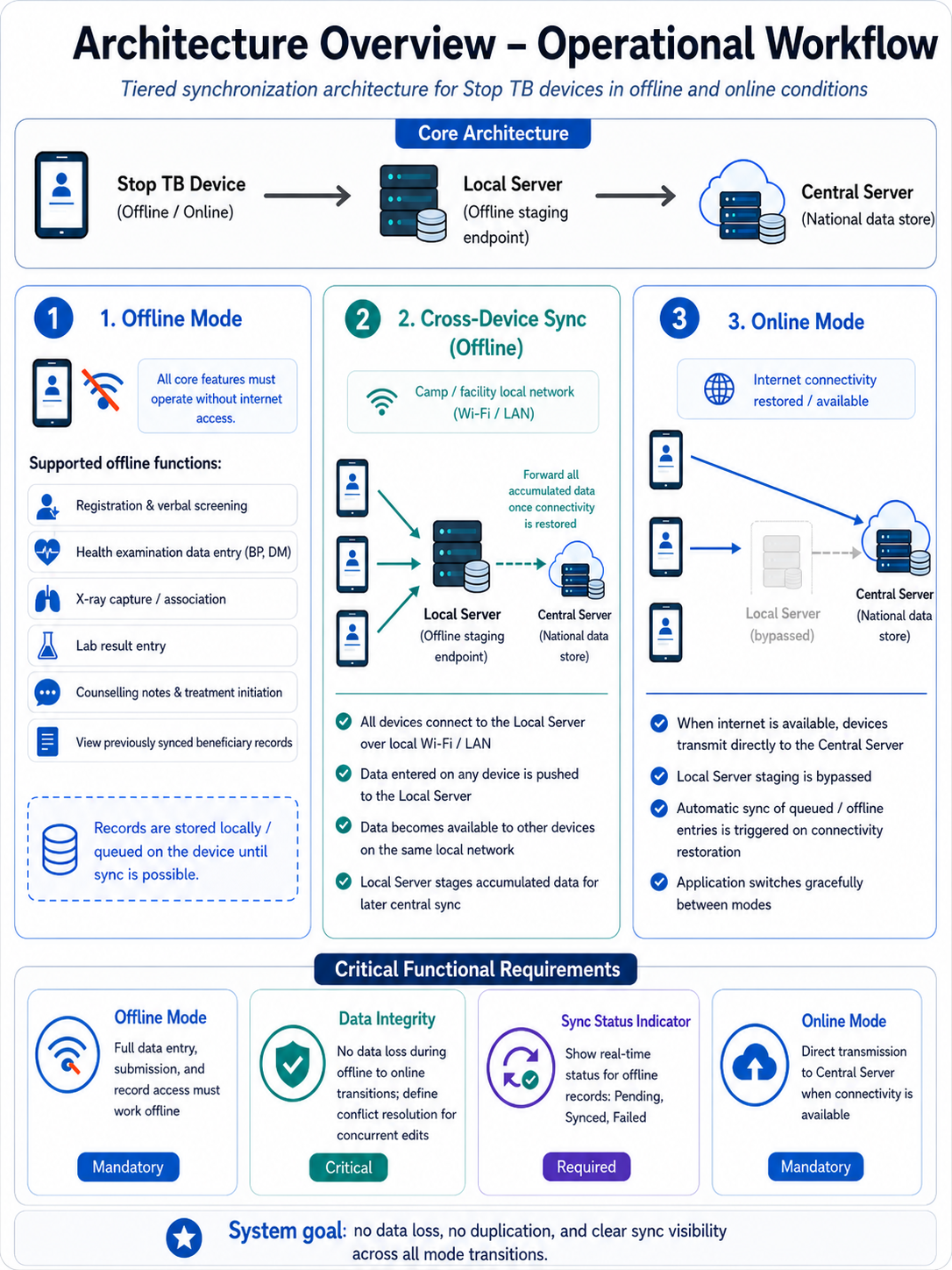
Sync Architecture
S.No. | Component | Role |
1. | STOP TB Mobile / Tablet Application (Offline/Online) | Primary data entry device for all roles; operates in full offline mode or direct online mode |
2. | Local Server (Offline Staging Endpoint) | Receives data from all devices on the same local Wi-Fi/LAN when no internet is available; forwards accumulated data to central server on connectivity restore |
. When this server comes online, it pushes the data to central server. | ||
3. | Central Server — AMRIT (National Data Store) | Authoritative data store; receives data directly from devices when online, or batched from local server when offline connectivity is restored |
2.2 Operational Mode Requirements
...
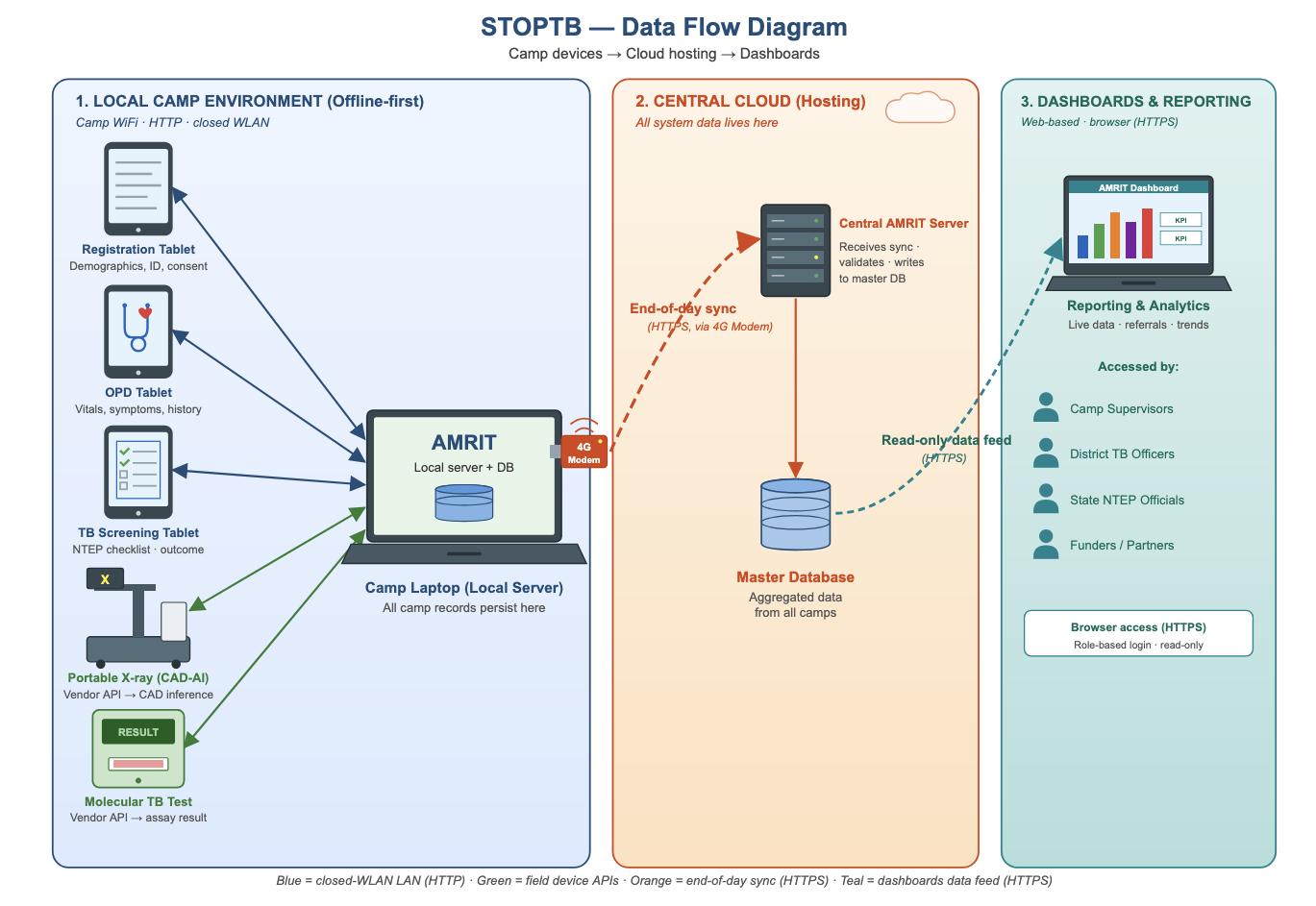
The finalized dataset will then be uploaded or integrated into the AMRIT system to ensure backend- (Discussion with the tech provider is in progress and is subjected to change)
STOP TB- Data Flow Diagram
3. Login Page & Landing Page
...
- It must capture the State and District/Block/Village Submit the Data to Navigate to "Landing" Page
- .
- Only selection of the village is needed at the frontend. State/ District/Block/ TU/ Health facility can be automatically pre selected at the backend.
UI Field Name | Field Type | Options | Validations |
State | Drop Down | · Auto-Populate | · This must be configurable and must allow to add different states in Future) · · (One Time Activity)- User must be registered with the State that he selected while enrolling himself for the first time under "Settings" |
District | Drop Down | · Auto-Populate | · (This must be configurable and must allow to add different District/Town/City in Future) · · (One Time Activity)- User must be registered with the district that he selected while enrolling himself for the first time under "Settings" |
Block | Drop Down | · Auto-Populate | · (This must be configurable and must allow to add different Taluk/Tehsil in Future) · (One Time Activity)- User must be registered with the block that he selected while enrolling himself for the first time under "Settings" |
TU | Drop Down | · Auto-Populate | · (This must be configurable and must allow to add different TUs in Future) · (One Time Activity)- User must be registered with the block that he selected while enrolling himself for the first time under "Settings" |
Health Facility | Drop Down | · Auto-Populate | · (This must be configurable and must allow to add different health facilities in Future) · (One Time Activity)- User must be registered with the block that he selected while enrolling himself for the first time under "Settings" |
Village | Drop Down | · Auto-Populate | · (This must be configurable and must allow to add different Taluk/Tehsil in Future) · (One Time Activity)- User must be registered with the Block |
Submit | Button | · On clicking Submit Button it must navigate to HWC Page |
...
Referral Card routing rules: Pregnant beneficiaries → shown directly in NAAT card. All non-pregnant beneficiaries (all genders, all ages) → shown in Digital Chest X-ray card. If abnormality detected on chest X-ray → referred further to NAAT. Beneficiaries with high BP or high Random Blood Sugar → shown in Health and Wellness Centre card in addition to Digital Chest X-Ray/ NAAT cards.
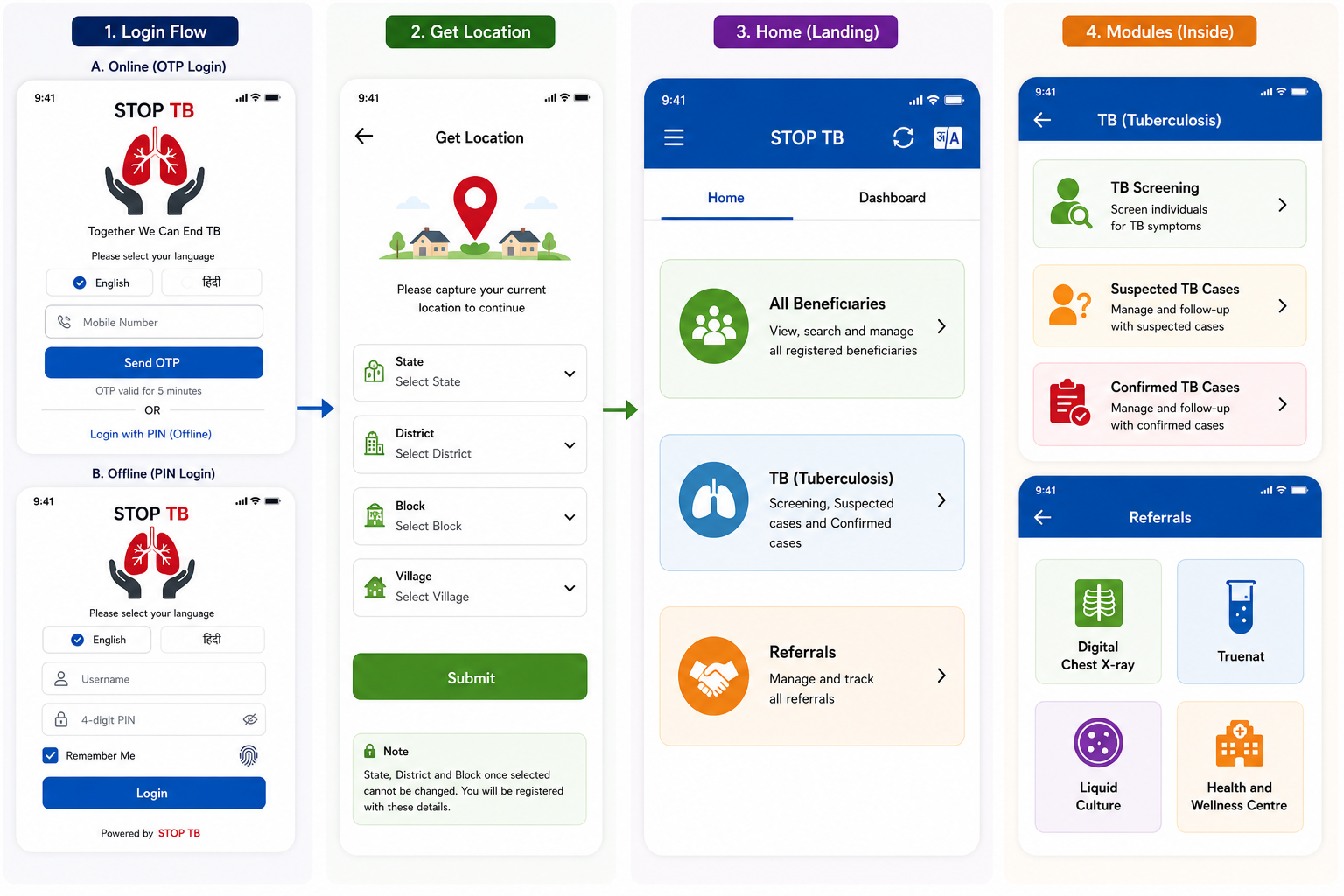
Disclaimer: Application screen needs to resemble with the mock ups in all the sections of the PRD to highlight the flow and content required in the application.
4. Registration Officer Flow
The Registration Officer is the first actor in the beneficiary workflow. This role performs two sequential steps: (1) Beneficiary Registration and (2) Anthropometry. On completion, the beneficiary appears in the Nurse module queue.
ACTOR: Registration Officer | ENTRY POINT: Home → All Beneficiaries → Registration button | NEXT ACTOR: Nurse
4.1 Pre-Registration — Consent Form
Before the registration form opens, a consent pop up must be displayed:
"I have been explained, the purpose for which the information and findings is being collected from me, in a language I understand and I give my consent to collect the information and findings on my personal health profile."
The form opens only after the beneficiary provides consent.
Biometric/ Audio Consent from the beneficiary to be captured- To be discussed and planned in Phase 2
4.2 Page Header & Beneficiary Card
- Page displays 'All Beneficiaries' text at top with a Home icon on the right to navigate back to Home
- After registration, a Beneficiary Card is shown with the following layout:
...
Photo of the beneficiary
...
Name
...
Beneficiary ID
...
Age (Years)
...
Village Name-
...
Phone Number
...
ABHA ID (ABHA registration)- Clickable
...
NIKSHAY ID
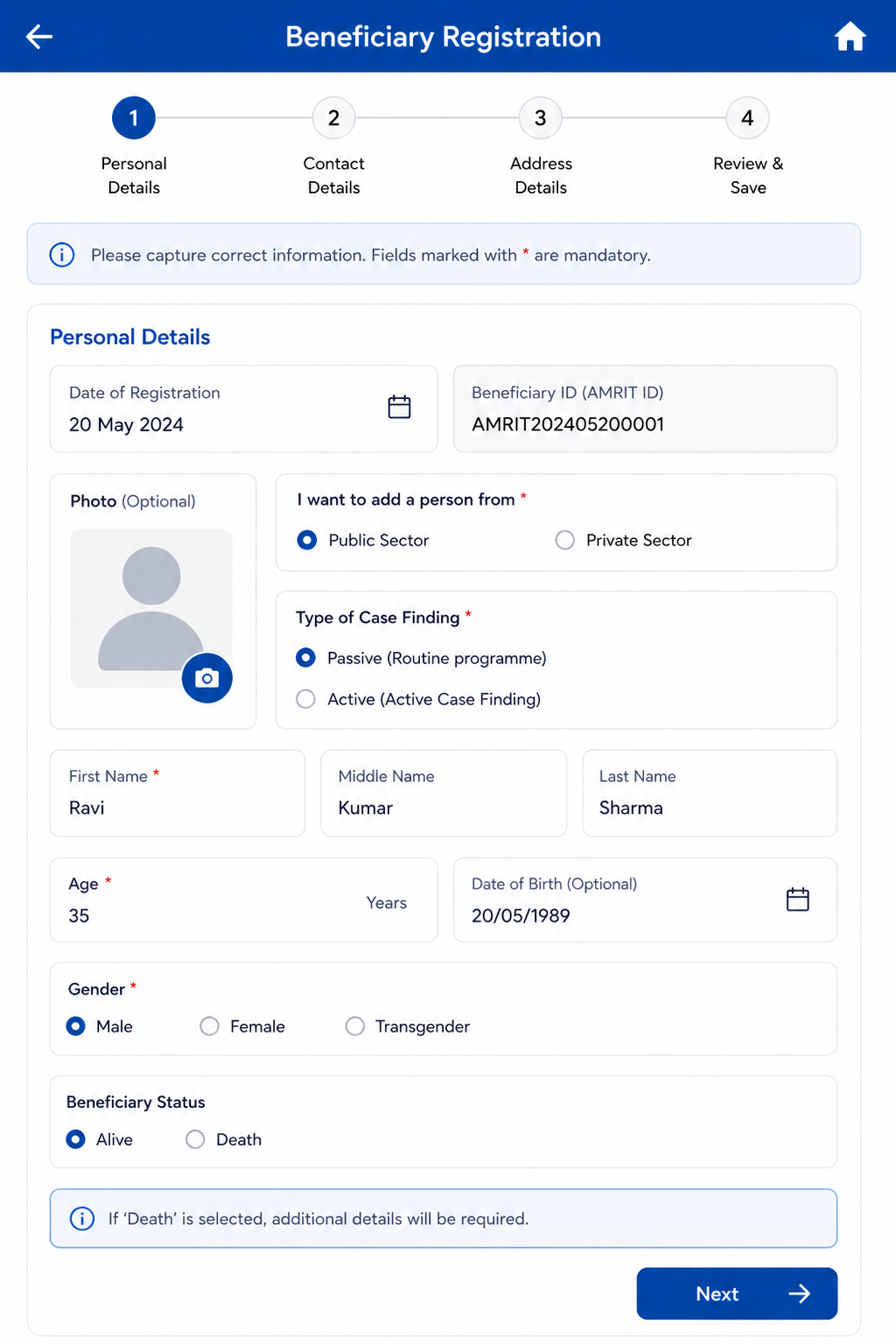
4.3 Beneficiary Registration — Field Specifications
- Editable on clicking "Edit" option.
...
Field Name
...
Input Type
...
Options / Values
...
Logic & Validations
...
Date of Registration
...
- Should be auto selected and updated when the volunteer logs in the application to do the screening.
...
Beneficiary ID (AMRIT ID)
...
- Unique ID auto generated by the system
...
Photo
...
Camera
...
Optional
...
- Should have face detection/ Facial recognition
- Camera should identify & capture human face but not any objects
- Show an Alert if Photo is not captured, just as reminder but Not Mandatory
- Alert: "Do you like to Take Photo", Yes or No If "Yes", open Camera; If "No", go to next
...
I want to add a person from*
...
Radio
...
· Public Sector
- Private Sector
...
This field is not visible in the form/ screen. Will be handled in the backend.
Mandatory
· Single select
- Default: Public Sector selected.
...
Type of Case Finding*
...
Radio
...
· Passive (Routine programme)
- Active (Active Case Finding)
...
·This field is not visible in the form/ screen. Will be handled in the backend.
Mandatory
· Single select
- Default: Passive selected.
...
First Name*
...
Text Input
...
· Free text
...
· Mandatory
· Only English letters
- No numbers/special characters.
...
Middle & Last Name*
...
Text Input
...
- Free text
...
· Mandatory
· Only English letters
- No numbers/special characters.
...
Beneficiary Status
...
Radio Button
...
· Alive
· Death
...
· Enable only in the “Edit” Beneficiary screen
· Auto-populate, if ‘Death’ is reported from any module
· Default value is “Alive”
· If “Death” is selected, enable below four fields and mark it mandatory-
1. Date of Death
2. Time of Death
3. Reason for Death
- 4. Place of Death or Other Place of Death
...
Date of Death
...
Date picker
...
· Enable if “Beneficiary status”= “Death”
· Mandatory if enabled
· By default, date is null
· Not greater than Today’s Date
· Accept ‘Date of Death’ after date of registration
- · Auto-populate, if ‘Death’ is reported from any module (eg: Tuberculosis)
...
Time of Death
...
Time picker
...
· Show only if above value is “Death”
- · Optional
...
Reason for Death
(Type of Death)
- Tuberculosis
- Maternal Death
· Natural Death
· Accident
· Infectious Disease
· Animal Bite Death
· Suicide
· Undetermined
...
· Enable if “Beneficiary status”= “Death”
· Mandatory if enabled
- Show only above value is “Death” and it is Mandatory
- If Gender is Female, and Age is 15-49 Years, show “Maternal Death” in dropdown list otherwise hide
...
Place of Death
...
- Home
- Subcenter
- PHC
- CHC
- District Hospital
- Medical College Hospital
- Private Hospital
- In Transit
- Other Place of Death
...
· Enable if “Beneficiary status”= “Death”
· Mandatory if enabled
- If ‘Place of Death’ is selected as “Other Place of Death” then enable below field “Other Place of Death” and is mandatory.
...
Other Place of Death
...
Textbox
...
- Enable if “Beneficiary status”= “Death”
- Mandatory if enabled
...
Age*
...
Number Input
...
1–99
...
· Required.
· Numeric. Min 1 Max 99 in years
- Either Age or DOB required.
...
Date of Birth
...
Date Picker
...
- Populate automatically if entered
- Auto Calculate 'Date of Birth' based on the Age entered
...
Gender*
...
Radio
...
· Male
· Female
· Transgender
...
· Mandatory
- Single select
...
Mobile number not available
...
Checkbox
...
- If this check box is selected, disable mobile number field.
...
Primary Phone*
...
Number
...
- Mandatory
- In case mobile number is not available, consider this number (9999999999) as mobile number (Will be handeled by default in the backend)
- Exactly 10 digits.
...
Whose mobile number
...
dropdown
...
· Self
· Husband
· Mother
· Father
· Family Head
- Other
...
- Default select "Self" option.
...
Address*
...
Text
...
- Free text
...
- Required. Max 2000 chars. Only English letters.
- Default value to be considered as "Village" name
...
State*
...
Dropdown
...
- Required.
- Default value selected from location screen
...
District*
...
Dropdown
...
- Required.
- Cascades from State.
- Default value selected from location screen
...
Block*
...
Dropdown
...
- Required.
- Cascades from district.
- Default value selected from location screen
...
Village*
...
Dropdown
...
- Required.
- Cascaded from block
- Default value selected from location screen or selection to change the village is given
...
TU*
...
Dropdown
...
- Required. Cascades from District.
- Default value selected from location screen
...
Health Facility*
...
Dropdown
...
- Required. Cascades from District.
- Default value selected from location screen
...
Caste*
...
Radio
...
· SC
· ST
· Other
...
· Mandatory
- Single select
...
Religion
...
radio button
...
- Hindu
- Muslim
- Christian
- Sikhism
- Buddhism
- Jainism
- Parsi
- Other
- Not disclosed
- should be editable
- optional
...
Area*
...
Radio
...
· Tribal-NPVTG
· Tribal-PVTG
· Rural
· Urban
· Urban Slum
· Unknown
...
· Mandatory
Default Unknown.
...
Marital Status*
...
Radio
...
· Single
· Married
· Unknown
...
· Mandatory
· Default Unknown.
...
Are you Pregnant*
...
radio button
...
- Yes
- No
...
- Enabled if "Marital status"= "Married" and “Gender”= “Female”
- Mandatory
- If ""Are you pregnant"= "Yes", then referral to NAAT and not digital chest x-ray.
...
Husband's/ Wife's Name
...
Textbox
...
· Optional
- Should be enabled if "Marital status"= Married
- Based on the Gender show label name as: 'Husband's' or 'Wife's Name'
- Accept alphabets only
- Character limit 50
All letter should be in caps
...
Father's Name
...
Textbox
...
·
...
- Optional
- Accept alphabets only
- Character limit 50
- All letter should be in caps
...
Mother's Name
...
Textbox
...
·
...
- Optional
- Accept alphabets only
- Character limit 50
- All letter should be in caps
...
Occupation*
...
Dropdown
...
· Unknown
· Student
· Unemployed
· Homemaker
· Farmer
· Laborer / Daily Wage Worker
· Self-employed / Business
· Government Employee
· Private Employee
· Health Care Worker
· Retired / Pensioner
· Other
...
· Mandatory
· Default Unknown.
...
Socioeconomic Status*
...
Radio
...
· APL
· BPL
· Unknown
...
· Mandatory
- Default Unknown.
...
Cancel
...
Button
...
- Yes
· No
...
- If cancel is selected, a pop up message "Are you Sure?" with options "Yes" and "No" will come.
- If selected "yes" navigate back to home page
· If selected "no" then do not erase the patient health data and let the page remain open so it can be submitted by volunteer as sometime by mistake cancel button is clicked.
...
Submit
...
- On clicking this, it must display the Pop up msg "Patient Registered successfully"
- This must store the data of the patient and display the required fields over the Beneficiary card.
Continue next to "Anthropometry" Screen
Acceptance Criteria — Registration
AC-REG-01: Given a Registration Officer completes all mandatory fields and clicks Submit, When the system processes the form, Then a unique AMRIT ID is generated, a 'Patient Registered Successfully' popup appears, and the Beneficiary Card is displayed with Name, Age, Phone, Village, AMRIT ID, and ABHA ID link.
AC-REG-02: Given Gender = Female, Marital Status = Married, and Are you Pregnant = Yes, when the beneficiary is registered, Then the beneficiary is referred for NAAT test and sputum collection. The X-ray referral field is hidden in TB Screening.
AC-REG-03: Given 'Mobile number not available' is checked, When the form is submitted, Then the system stores 9999999999 as the primary phone number.
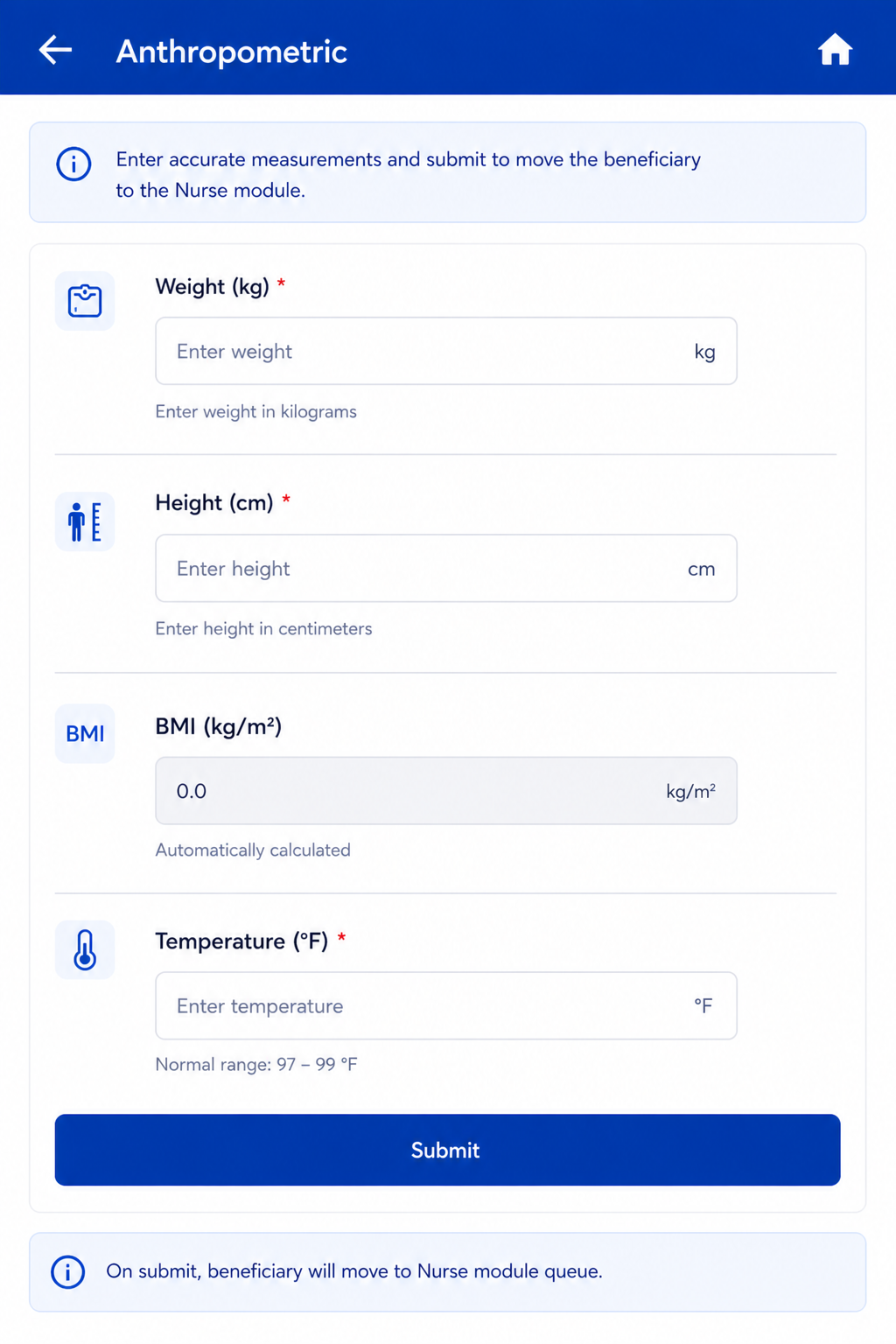
4.4 Anthropometry Screen
Follows immediately after Registration Submit. Same actor: Registration Officer. On Anthropometry Submit → Beneficiary moves to Nurse module queue.
...
Field Name
...
Input / Type
...
Options / Values
...
Logic & Validations
...
Weight (Kgs)
...
Number input
...
Numeric
...
Numeric; 1 decimal place allowed.
...
Height (cms)
...
Number input
...
Numeric
...
Numeric; 1 decimal place allowed.
...
BMI = Weight / (Height/100)²
...
Auto-calculated (read-only)
...
Calculated value
...
Auto-calculated when both Height and Weight are entered. Formula: Weight ÷ (Height ÷ 100)². Display to 1 decimal place. Non-editable.
...
Temperature (Degree Fahrenheit)
...
Radio + free textbox
...
Free textbox also provided for manual entry.
Normal range shown: 97–99°F.
If >= 100 selected → show alert 'Refer to Health and Wellness Centre' and show beneficiary in Referral card on Home.
...
Submit
...
Button
...
—
...
Beneficiary moves to Nurse module queue.
5. Nurse Flow
Once a beneficiary is registered and anthropometry is completed, they appear in the Nurse module queue. The Nurse role covers four sequential screens: General Examination → TB Screening → General OPD (optional/skippable) → Diagnostics Screen.
ACTOR: Nurse | ENTRY POINT: Nurse login → beneficiary queue | QUEUE: All registered beneficiaries irrespective of age or gender | NEXT ACTOR: Counselling Officer (for confirmed TB cases)
5.1 General Examination Module
On Submit → proceed to TB Screening screen.
...
Field Name
...
Input Type
...
Options / Values
...
Logic & Validations
...
Pulse Rate (beats per minute)
...
Free textbox
...
Numeric (BPM)
· Free textbox for manual entry.
· If value < 60 or > 90 BPM → show alert 'Refer to Health and Wellness Centre' and flag in Referral card on Home. Auto-sets 'Referral to HWC needed' = Yes.
...
Systolic Blood Pressure (mmHg)
...
Free textbox
...
Numeric (mmHg)
· SBP and DBP fields placed side by side with their units.
· Free textbox for manual entry.
· If >= 140 mmHg (High) or < 90 mmHg (Low) → alert 'Refer to Health and Wellness Centre'. Auto-sets 'Referral to HWC needed' = Yes.
...
Diastolic Blood Pressure (mmHg)
...
Free textbox
...
Numeric (mmHg)
...
· SBP and DBP placed side by side.
· Free textbox for manual entry.
· If >= 90 mmHg (High) or < 60 mmHg (Low) → alert 'Refer to Health and Wellness Centre'. Auto-sets 'Referral to HWC needed' = Yes.
...
Random Blood Sugar (mg/dl)
...
Free textbox
...
Numeric (mg/dl)
...
· Free textbox for manual entry.
· If >= 100 mg/dl → alert 'Refer to Health and Wellness Centre'. Auto-sets 'Referral to HWC needed' = Yes.
...
Pallor
...
Radio Button
...
Present | Absent
...
· Optional.
...
Icterus
...
Radio Button
...
Present | Absent
...
· Optional.
...
Cyanosis
...
Radio Button
...
Present | Absent
...
· Optional.
...
Clubbing
...
Radio Button
...
Present | Absent
...
· Optional.
...
Lymphadenopathy
...
Radio Button
...
Present | Absent
...
· Optional.
...
Oedema
...
Radio Button
...
Present | Absent
...
· Optional.
...
Key Population / Risk Factors*
...
Checkbox (multi-select)
...
Pregnancy
Lactating mother
Anti-TNF treatment
Bronchial Asthma
Cancer
Cardiovascular Disorder
Contact of Known TB Patients
COPD
COVID recovered patients
Diabetes
Dialysis
Health Care Worker
Hypertensive
Liver Impairment
Migrant
Miner
Palliative Care
Patient on immunosuppressants
Prison
Illegal Immigrant
Renal Impairment
Transplantation
Urban Slum
H/o Adult BCG Vaccination
Undernourished / Malnourished (BMI <18.5 kg/m²)
Elderly (age >60 years)
Workplace settings (coal/sandblasting/brick kiln)
Tea garden worker
Construction site worker
Congregate settings
Attendees of de-addiction centers
Person exposed to indoor air pollution
Marginalized populations at risk of HIV
LGBTQAI++
Substance abuse (alcoholic/intravenous drug users)
Tobacco/smoker
Silica exposure/silicosis
Other
Not Applicable
...
· Mandatory.
· Multi-select.
- Default- Not applicable
· If 'Not Applicable' selected → all other options are disabled.
- Auto selection to "Pregnancy" if "Are you Pregnant"= "Yes"
...
HIV Status*
...
Radio
...
Positive | Reactive | Negative | Unknown
...
· Mandatory.
· Default: Unknown.
...
Referral to HWC needed
...
Auto + manual
...
Yes | No
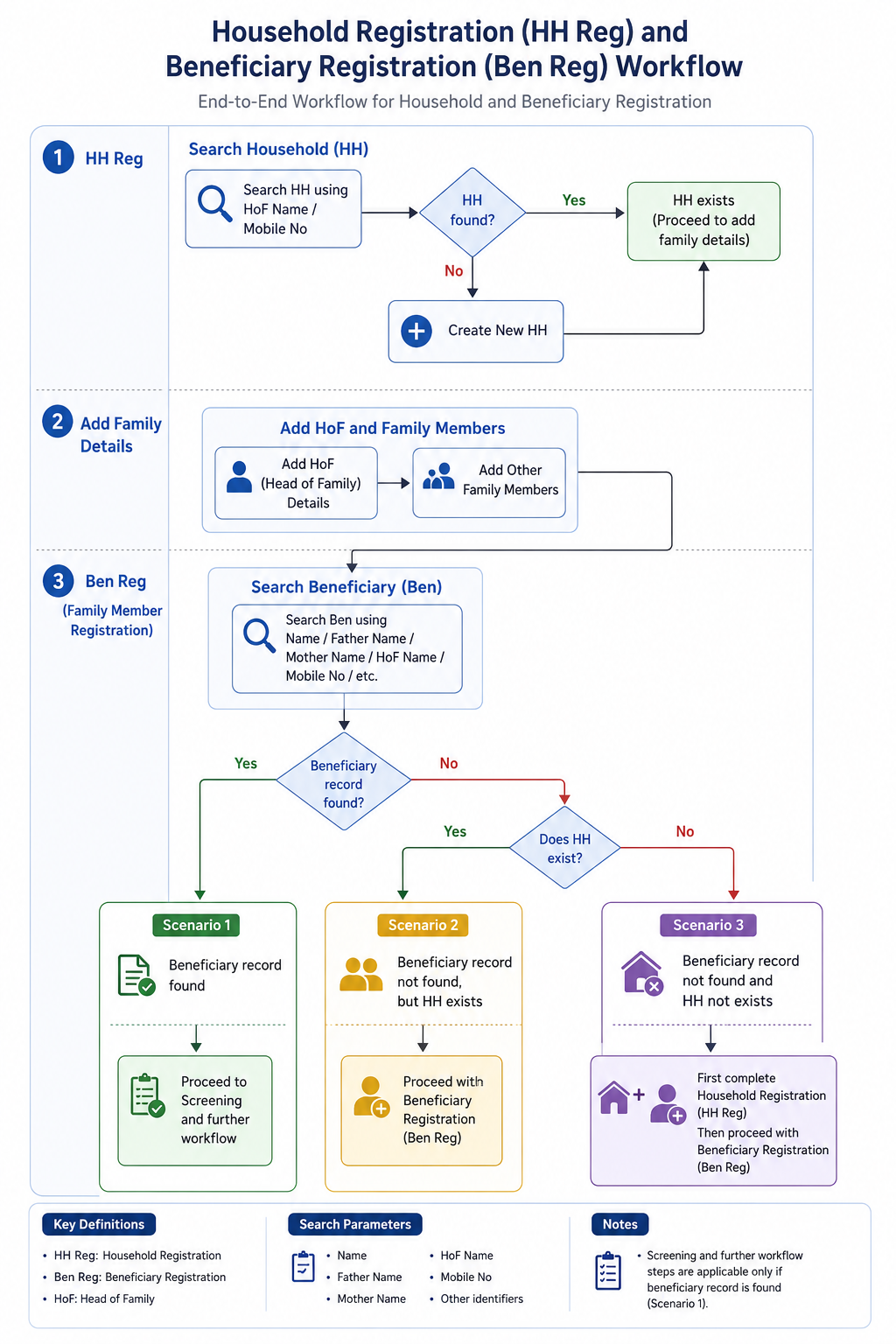
New Household Registration Form
- Household Registration (HH Reg)
- Search for Household using:
- HoF (Head of Family) Name
- Mobile Number
- If Household does not exist, create a new Household (HH).
- Search for Household using:
- Add Family Details
- Add HoF details.
- Add other family members to the Household.
- Beneficiary Registration (Ben Reg / Family Member Registration)
- Search Beneficiary using:
- Name
- Father’s Name
- Mother’s Name
- HoF Name
- Mobile Number
- Other available identifiers
- Search Beneficiary using:
- Scenarios
- Scenario 1: If Beneficiary record is found → Proceed to Screening and further workflow.
- Scenario 2: If Beneficiary record is not found, but Household exists → Proceed with Beneficiary Registration (Ben Reg).
- Scenario 3: If neither Beneficiary record nor Household exists → First complete Household Registration (HH Reg), then proceed with Beneficiary Registration (Ben Reg).
Family Details
S No | Name of Data Field | Field Type | Value/ Options | Validation/ Logic/ Condition |
1 | First Name of Head of the family | Textbox | Is Mandatory | · Input method: Speech to Text feature · Accept alphabets only · Character limit 50 · All letter should be in caps |
2 | Last Name/ Surname | Textbox | · Input method: Speech to Text feature · Accept alphabets only · Character limit 50 · All letter should be in caps | |
3 | Mobile No of Head of the family | Textbox | Is Mandatory | · Accept numeric (integer) value only · Accept 10 digits only · Should not start form zero · Should start with digit 6, 7, 8 or 9 · Should Not accept all same digits |
4 | House No | Textbox | · Allow Alphanumeric Character and special Characters · Character limit 100 | |
5 | Ward No | Textbox | · Allow Alphanumeric Character and special Characters · Character limit 100 | |
6 | Ward Name | Textbox | · Allow Alphanumeric Character and special Characters · Character limit 100 | |
7 | Mohalla Name | Textbox | · Allow Alphanumeric Character and special Characters · Character limit 100 | |
8 | Economic Status | Spinner | Is Mandatory · APL · BPL · Don't know |
House Hold Details
S No | Name of Data Field | Field Type | Value/ Options | Validation/ Logic/ Condition |
1 | Type of Residential area | Spinner | Choose: · Rural · Urban · Tribal · Tea Garden · Other | |
2 | Other Type of Residential area | Textbox | · Enable if other is selected above · Is Mandatory if other is selected above · Allow Alphanumeric Character and special Characters · Character limit 100 | |
3 | Type of House | Spinner | Is Mandatory · Kuchha · Pucca · None · Other | |
4 | House ownership | Spinner | Is Mandatory · Yes · No |
House Hold Amenities
S No | Name of Data Field | Field Type | Value/ Options | Validation/ Logic/ Condition |
1 | Separate Kitchen | Spinner | Is Mandatory · Yes · No | |
2 | Type of Fuel used for cooking | Spinner | Is Mandatory | |
3 | Other type of fuel used for cooking | Textbox | · Enable if other is selected above · Is Mandatory if other is selected above · Allow Alphanumeric Character and special Characters · Character limit 100 | |
4 | Primary Source of water | Spinner | Is Mandatory | |
5 | Other Source of Water | Textbox | · Enable if other is selected above · Is Mandatory if other is selected above · Allow Alphanumeric Character and special Characters · Character limit 100 | |
6 | Availability of Electricity | Spinner | Is Mandatory | |
7 | Other Availability of electricity | Textbox | · Enable if other is selected above · Is Mandatory if other is selected above · Allow Alphanumeric Character and special Characters · Character limit 100 | |
8 | Availability of Toilet | Spinner | Is Mandatory | |
9 | Other Availability of Toilet | Textbox | · Enable if other is selected above · Is Mandatory if other is selected above · Allow Alphanumeric Character and special Characters · Character limit 100 | |
After Household registration is completed, show below alert in pop: |
4. Registration Officer Flow
The Registration Officer is the first actor in the beneficiary workflow. This role performs two sequential steps: (1) Beneficiary Registration and (2) Anthropometry. On completion, the beneficiary appears in the Nurse module queue.
ACTOR: Registration Officer | ENTRY POINT: Home → All Beneficiaries → Registration button | NEXT ACTOR: Nurse
4.1 Pre-Registration — Consent Form
Before the registration form opens, a consent pop up must be displayed:
"I have been explained, the purpose for which the information and findings is being collected from me, in a language I understand and I give my consent to collect the information and findings on my personal health profile."
The form opens only after the beneficiary provides consent.
Biometric/ Audio Consent from the beneficiary to be captured- To be discussed and planned in Phase 2
4.2 Page Header & Beneficiary Card
- Page displays 'All Beneficiaries' text at top with a Home icon on the right to navigate back to Home
- After registration, a Beneficiary Card is shown with the following layout:
Photo of the beneficiary | Name | Beneficiary ID |
Age (Years) | Village Name- | |
Phone Number | ABHA ID (ABHA registration)- Clickable | |
NIKSHAY ID |
4.3 Beneficiary Registration — Field Specifications
- Editable on clicking "Edit" option.
Field Name | Input Type | Options / Values | Logic & Validations |
Date of Registration |
| ||
Beneficiary ID (AMRIT ID) |
| ||
Photo | Camera | Optional |
|
I want to add a person from* | Radio | · Public Sector
| This field is not visible in the form/ screen. Will be handled in the backend. Mandatory · Single select
|
Type of Case Finding* | Radio | · Passive (Routine programme)
| ·This field is not visible in the form/ screen. Will be handled in the backend. Mandatory · Single select
|
First Name* | Text Input | · Free text | · Mandatory · Only English letters
|
Middle & Last Name* | Text Input |
| · Mandatory · Only English letters
|
Beneficiary Status | Radio Button | · Alive · Death | · Enable only in the “Edit” Beneficiary screen · Auto-populate, if ‘Death’ is reported from any module · Default value is “Alive” · If “Death” is selected, enable below four fields and mark it mandatory- 1. Date of Death 2. Time of Death 3. Reason for Death
|
Date of Death | Date picker | · Enable if “Beneficiary status”= “Death” · Mandatory if enabled · By default, date is null · Not greater than Today’s Date · Accept ‘Date of Death’ after date of registration
| |
Time of Death | Time picker | · Show only if above value is “Death”
| |
Reason for Death (Type of Death) |
· Natural Death · Accident · Infectious Disease · Animal Bite Death · Suicide · Undetermined | · Enable if “Beneficiary status”= “Death” · Mandatory if enabled
| |
Place of Death |
| · Enable if “Beneficiary status”= “Death” · Mandatory if enabled
| |
Other Place of Death | Textbox |
| |
Age* | Number Input | 1–99 | · Required. · Numeric. Min 1 Max 99 in years
|
Date of Birth | Date Picker |
| |
Gender* | Radio | · Male · Female · Transgender | · Mandatory
|
Mobile number not available | Checkbox |
| |
Primary Phone* | Number |
| |
Whose mobile number | dropdown | · Self · Husband · Mother · Father · Family Head
|
|
Address* | Text |
|
|
Village* | Dropdown |
| |
Caste* | Radio | · SC · ST · Other | · Mandatory
|
Area* | Radio | · Tribal-NPVTG · Tribal-PVTG · Rural · Urban · Urban Slum · Unknown | · Mandatory Default Unknown. |
Marital Status* | Radio | · Single · Married · Unknown | · Mandatory · Default Unknown. |
Are you Pregnant* | radio button |
|
|
Husband's/ Wife's Name | Textbox | · Optional
All letter should be in caps | |
Father's Name | Textbox | · |
|
Mother's Name | Textbox | · |
|
Occupation* | Dropdown | · Unknown · Student · Unemployed · Homemaker · Farmer · Laborer / Daily Wage Worker · Self-employed / Business · Government Employee · Private Employee · Health Care Worker · Retired / Pensioner · Other | · Mandatory · Default Unknown. |
Socioeconomic Status* | Radio | · APL · BPL · Unknown | · Mandatory
|
Cancel | Button |
· No |
· If selected "no" then do not erase the patient health data and let the page remain open so it can be submitted by volunteer as sometime by mistake cancel button is clicked. |
Submit |
Continue next to "Anthropometry" Screen |
Acceptance Criteria — Registration
AC-REG-01: Given a Registration Officer completes all mandatory fields and clicks Submit, When the system processes the form, Then a unique AMRIT ID is generated, a 'Patient Registered Successfully' popup appears, and the Beneficiary Card is displayed with Name, Age, Phone, Village, AMRIT ID, and ABHA ID link.
AC-REG-02: Given Gender = Female, Marital Status = Married, and Are you Pregnant = Yes, when the beneficiary is registered, Then the beneficiary is referred for NAAT test and sputum collection. The X-ray referral field is hidden in TB Screening.
AC-REG-03: Given 'Mobile number not available' is checked, When the form is submitted, Then the system stores 9999999999 as the primary phone number.
4.4 Anthropometry Screen
Follows immediately after Registration Submit. Same actor: Registration Officer. On Anthropometry Submit → Beneficiary moves to Nurse module queue.
Field Name | Input / Type | Options / Values | Logic & Validations |
Weight (Kgs) | Number input | Numeric | Numeric; 1 decimal place allowed. |
Height (cms) | Number input | Numeric | Numeric; 1 decimal place allowed. |
BMI = Weight / (Height/100)² | Auto-calculated (read-only) | Calculated value | Auto-calculated when both Height and Weight are entered. Formula: Weight ÷ (Height ÷ 100)². Display to 1 decimal place. Non-editable. |
Temperature (Degree Fahrenheit) | Radio + free textbox | Free textbox also provided for manual entry. Normal range shown: 97–99°F. If >= 100 selected → show alert 'Refer to Health and Wellness Centre' and show beneficiary in Referral card on Home. | |
Submit | Button | — | Beneficiary moves to Nurse module queue. |
5. Nurse Flow
Once a beneficiary is registered and anthropometry is completed, they appear in the Nurse module queue. The Nurse role covers four sequential screens: General Examination → TB Screening → General OPD (optional/skippable) → Diagnostics Screen.
ACTOR: Nurse | ENTRY POINT: Nurse login → beneficiary queue | QUEUE: All registered beneficiaries irrespective of age or gender | NEXT ACTOR: Counselling Officer (for confirmed TB cases)
5.1 General Examination Module
On Submit → proceed to TB Screening screen.
Field Name | Input Type | Options / Values | Logic & Validations |
Pulse Rate (beats per minute) | Free textbox | Numeric (BPM) | · Free textbox for manual entry. · If value < 60 or > 90 BPM → show alert 'Refer to Health and Wellness Centre' and flag in Referral card on Home. Auto-sets 'Referral to HWC needed' = Yes. |
Systolic Blood Pressure (mmHg) | Free textbox | Numeric (mmHg) | · SBP and DBP fields placed side by side with their units. · Free textbox for manual entry. · If >= 140 mmHg (High) or < 90 mmHg (Low) → alert 'Refer to Health and Wellness Centre'. Auto-sets 'Referral to HWC needed' = Yes. |
Diastolic Blood Pressure (mmHg) | Free textbox | Numeric (mmHg) | · SBP and DBP placed side by side. · Free textbox for manual entry. · If >= 90 mmHg (High) or < 60 mmHg (Low) → alert 'Refer to Health and Wellness Centre'. Auto-sets 'Referral to HWC needed' = Yes. |
Random Blood Sugar (mg/dl) | Free textbox | Numeric (mg/dl) | · Free textbox for manual entry. · If >= 100 mg/dl → alert 'Refer to Health and Wellness Centre'. Auto-sets 'Referral to HWC needed' = Yes. |
Pallor | Radio Button | Present | Absent | · Optional. |
Icterus | Radio Button | Present | Absent | · Optional. |
Cyanosis | Radio Button | Present | Absent | · Optional. |
Clubbing | Radio Button | Present | Absent | · Optional. |
Lymphadenopathy | Radio Button | Present | Absent | · Optional. |
Oedema | Radio Button | Present | Absent | · Optional. |
Key Population / Risk Factors* | Checkbox (multi-select) | Pregnancy Lactating mother Anti-TNF treatment Bronchial Asthma Cancer Cardiovascular Disorder Contact of Known TB Patients COPD COVID recovered patients Diabetes Dialysis Health Care Worker Hypertensive Liver Impairment Migrant Miner Palliative Care Patient on immunosuppressants Prison Illegal Immigrant Renal Impairment Transplantation Urban Slum H/o Adult BCG Vaccination Undernourished / Malnourished (BMI <18.5 kg/m²) Elderly (age >60 years) Workplace settings (coal/sandblasting/brick kiln) Tea garden worker Construction site worker Congregate settings Attendees of de-addiction centers Person exposed to indoor air pollution Marginalized populations at risk of HIV LGBTQAI++ Substance abuse (alcoholic/intravenous drug users) Tobacco/smoker Silica exposure/silicosis Other Not Applicable | · Mandatory. · Multi-select.
· If 'Not Applicable' selected → all other options are disabled.
|
HIV Status* | Radio | Positive | Reactive | Negative | Unknown | · Mandatory. · Default: Unknown. |
Referral to HWC needed | Auto + manual | Yes | No | · Auto-set to 'Yes' if: Pulse < 60 or > 90 BPM; OR Systolic BP >= 140 or < 90 mmHg; OR Diastolic BP >= 90 or < 60 mmHg; OR Random Blood Sugar >= 100 mg/dl. · Show all such beneficiaries in the Referral → Health and Wellness Centre card on Home. · If all vitals fall in the normal range then 'Referral to HWC needed' remains No and the beneficiary does NOT appear in the HWC Referral card. |
Submit | Button | — | Proceed to TB Screening screen. |
5.2 TB Screening Module
RULE (*): If 'Yes' is selected for ANY question marked *, the system must enable 'Referred for Digital Chest X-Ray' and/or 'Referred for Sputum Collection'.
RULE (**): If 'Yes' is selected for ANY question marked **, the system must generate advisory: 'Advise tracing and screening of all family members'.
Field Name | Input Type | Options / Values | Logic & Validations |
Date | Calendar / Date Picker | Date | Mandatory. Default: Today's Date. Not greater than Today's Date. Accept date >= Date of beneficiary registration. Not editable once submitted. |
Coughing More than 2 weeks * | Radio button | Yes | No | Mandatory. |
Blood in Sputum * | Radio button | Yes | No | Mandatory. |
Fever > 2 weeks * | Radio button | Yes | No | Mandatory. |
Rise of fever in evening * | Radio button | Yes | No | Mandatory. |
Loss of Appetite * | Radio button | Yes | No | Mandatory. |
Loss of Weight * | Radio button | Yes | No | Mandatory. |
Night Sweats * | Radio button | Yes | No | Mandatory. |
History of TB * | Radio button | Yes | No | Mandatory. |
Are you currently taking Anti-TB drugs ** | Radio button | Yes | No | Mandatory. |
Anyone in Family Currently Suffering from TB ** | Radio button | Yes | No | Mandatory. |
"Is beneficiary asymptomatic" | Radio button | Yes | No | Option "Yes" will be auto selected if responses to all the Previous 10 Questions are "No". Option "No" will be auto selected if responses to any of the Previous 10 Questions are "Yes", valid even for one single response as "Yes". |
Next Screen after TB Screening Questions- | This Screen will be dynamic and results should keep on auto populating after NAAT device and Digital Chest X-ray devices are integrated. Manual entries are also allowed. | ||
Referred for digital chest x-ray | Radio button | Yes | No | · Default: Yes. · Do NOT show/ Hide for pregnant women. · Mandatory. · If yes, move beneficiary to Referral list titled 'Digital Chest X-ray'. |
Reason for denial to get referred for chest x-ray | dropdown |
| Enabled if Referred for digital chest x-ray= "No" Mandatory if enabled Multi select option Default option- Patient refused |
Other | free text | enabled if Reason for denial to get referred for chest x-ray= Other Mandatory if enabled | |
Is Digital Chest X-ray conducted | Radio / Auto | Yes | No | Enabled for everyone EXCEPT 'Are you pregnant = Yes' and Key Population / Risk Factors = Pregnancy. Enabled if Referred for digital chest x-ray= "Yes" Auto-populated by cross-device sync between STOP TB app and digital chest X-ray device. |
Reasons for not conducting the chest x-ray | dropdown |
| Enabled if Is Digital Chest X-ray conducted= "No" Mandatory if enabled Single Selection |
Other | free text | enabled if Reasons for not conducting the chest x-ray= Other Mandatory if enabled | |
Digital Chest X-Ray Test Result | Radio / Auto | Positive | Negative | Enabled only if 'Is Digital Chest X-ray conducted = Yes'. Auto-populated by cross-device sync. If Positive → move case to Suspected TB cases module AND show patient in NAAT referral list for further testing. |
Referred for Sputum Collection | Radio button | Yes | No | · Enabled in case of-
|
Reason for denial to get referred for sputum collection | dropdown |
| Enabled if Referred for sputum collection= "No" Mandatory if enabled Multi select option Default option- Patient refused |
Other | free text | Enabled if Reason for denial to get referred for sputum collection= Other Mandatory if enabled | |
Sputum Sample submitted at | Dropdown |
| Mandatory if Referred for Sputum Collection= "Yes" Default is TB Screening Camp |
Is NAAT test conducted | Radio / Auto | Yes | No | Enabled in case of-
|
Reasons for not conducting the NAAT test | dropdown |
| Enabled if Is NAAT test conducted= "No" Mandatory if enabled Single Selection |
Other | free text | enabled if Reasons for not conducting the NAAT test= Other Mandatory if enabled | |
NAAT test result | Radio button / Auto | Positive | Negative | Enabled only if 'Is NAAT conducted = Yes'. Auto-populated by cross-device sync. If Positive → move case to Confirmed TB cases module. |
Recommended for liquid culture test | Radio | Yes | No | Enabled only if History of TB = Yes AND Currently on Anti-TB drugs = Yes. |
Liquid Culture test result | Radio button | Positive | Negative | If Positive → move case to Confirmed TB cases module. Option to edit/select after form submission as results come after 40-45 days |
· Auto-set to 'Yes' if: Pulse < 60 or > 90 BPM; OR Systolic BP >= 140 or < 90 mmHg; OR Diastolic BP >= 90 or < 60 mmHg; OR Random Blood Sugar >= 100 mg/dl.
· Show all such beneficiaries in the Referral → Health and Wellness Centre card on Home.
· If all vitals fall in the normal range then 'Referral to HWC needed' remains No and the beneficiary does NOT appear in the HWC Referral card.
...
Submit
...
Button
...
—
...
Proceed to TB Screening screen.
5.2 TB Screening Module
RULE (*): If 'Yes' is selected for ANY question marked *, the system must enable 'Referred for Digital Chest X-Ray' and/or 'Referred for Sputum Collection'.
RULE (**): If 'Yes' is selected for ANY question marked **, the system must generate advisory: 'Advise tracing and screening of all family members'.
Field Name | Input Type | Options / Values | Logic & Validations |
Date | Calendar / Date Picker | Date | Mandatory. Default: Today's Date. Not greater than Today's Date. Accept date >= Date of beneficiary registration. Not editable once submitted. |
Coughing More than 2 weeks * | Radio button | Yes | No | Mandatory. |
Blood in Sputum * | Radio button | Yes | No | Mandatory. |
Fever > 2 weeks * | Radio button | Yes | No | Mandatory. |
Rise of fever in evening * | Radio button | Yes | No | Mandatory. |
Loss of Appetite * | Radio button | Yes | No | Mandatory. |
Loss of Weight * | Radio button | Yes | No | Mandatory. |
Night Sweats * | Radio button | Yes | No | Mandatory. |
History of TB * | Radio button | Yes | No | Mandatory. |
Are you currently taking Anti-TB drugs ** | Radio button | Yes | No | Mandatory. |
Anyone in Family Currently Suffering from TB ** | Radio button | Yes | No | Mandatory. |
Referred for digital chest x-ray | Radio button | Yes | No | · Default: Yes. · Do NOT show for pregnant women. · Mandatory. · Move beneficiary to Referral list titled 'Digital Chest X-ray'. |
Referred for Sputum Collection | Radio button | Yes | No | · Enabled in case of-
|
Sputum Sample submitted at | Dropdown |
| · Optional. · Kept available in case NAAT device is non-functional. |
Recommended for NAAT test | Radio button | Yes | No | · Enabled if Referred for Sputum Collection = Yes. · Mandatory if enabled. · Move beneficiary to Referral list titled 'NAAT'. |
Recommended for liquid culture test | Radio button | Yes | No | · Enabled if: Referred for Sputum Collection = Yes AND History of TB = Yes AND Currently on Anti-TB drugs = Yes. · Mandatory if enabled. · Move beneficiary to Referral list titled 'Liquid Culture'. | Reason for denial for getting tested | Dropdown (multi-select) | · Fear and anxiety · Misconceptions · Social stigma · Cultural and gender-related barriers · Prior negative experiences with healthcare staff · Privacy concerns · Long waiting times at the camp · Loss of daily wages · Lack of trust in government programs or camp organizers · Others |
. | |||
Submit | Button | — | Continue to General OPD module. If skipped → move directly to Diagnostics Results screen. |
...
Field Name | Input Type | Options / Values | Logic & Validations |
Counselling Date | Date picker | Date | Mandatory. Default: Today. Not > Today. Must be >= Registration date. |
Counselling Officer Name | Auto-filled (read-only) | Logged-in user | Auto-filled from logged-in Counselling Officer account. Read only. |
— PATIENT HEADER (AUTO-FILLED, READ-ONLY) — | |||
Beneficiary Name | Textbox (read-only) | Auto-filled | First Name + Last Name from beneficiary record. |
Beneficiary ID (AMRIT ID) | Textbox (read-only) | Auto-filled | From beneficiary record. |
Nikshay ID | Textbox (read-only) | Auto-filled | From Diagnostics screen. Read only. |
Age / Gender | Textbox (read-only) | Auto-filled | Age (years) and Gender from beneficiary record. |
Diagnosis | Textbox (read-only) | Auto-filled | X-ray Result | NAAT Result | Liquid Culture Result — populated from diagnostic records. Read only. |
SECTION A: DISEASE AWARENESS | |||
TB disease explained to patient | Radio button | Yes/ No | Mandatory. Must be checked before proceeding. Confirms counsellor has explained TB to the patient. |
Transmission route explained | Radio button | Yes/ No | Mandatory. |
Symptoms explained | Radio button | Yes/ No | Mandatory. |
Treatment duration explained | Radio button | Yes/ No | Mandatory. |
Disease awareness notes | Free text | — | Optional. Max 500 chars. |
SECTION B: DO'S AND DON'TS | |||
Cover mouth while coughing — advised | Radio button | Yes/ No | Mandatory. |
Complete full treatment course — advised | Radio button | Yes/ No | Mandatory. |
Regular follow-up attendance — advised | Radio button | Yes/ No | Mandatory. |
Nutritional guidance provided | Radio button | Yes/ No | Mandatory. |
No smoking / alcohol — advised | Radio button | Yes/ No | Mandatory. |
Isolation precautions explained | Radio button | Yes/ No | Mandatory. |
Do's & Don'ts notes | Free text | — | Optional. Max 500 chars. |
SECTION C: GOVERNMENT SCHEMES | |||
Nikshay Poshan Yojana (NPY) eligibility explained | Radio button | Yes/ No | NPY: DBT of Rs. 5001000/month for duration of treatment. |
DOTS free treatment explained | Radio button | Yes/ No | Confirm patient understands treatment is free under NTEP. |
Schemes notes | Free text | — | Optional. Max 300 chars. |
SECTION D: TREATMENT REGIMEN | |||
Regimen explained to patient | Radio button | Yes/ No | Mandatory. |
Medication names explained | Radio button | Yes/ No | Mandatory. |
Side effects explained | Radio button | Yes/ No | Mandatory. |
Importance of adherence explained | Radio button | Yes/ No | Mandatory. |
Treatment regimen notes | Free text | — | Optional. Max 300 chars. |
SECTION E: COUNSELLING COMPLETION | |||
Counselling completion status | Radio button | Complete | Refused | Mandatory. Make all the above sections obsolete if “Counselling completion status” = “Refused” If Refused → enable 'Reason for refusal' field. |
Reason for refusal | Free text | — | Mandatory if Counselling status = Refused. Max 300 chars. |
Counsellor remarks | Free text | — | Optional. Max 500 chars. |
SECTION E: Follow Up to TU | To be done within 15 days Editable | ||
Has the patient started the prescribed TB treatment regimen? | Radio button | Yes/ No | If No is selected, then enable “Reason for not starting the prescribed TB treatment regimen” |
Reason for not starting the prescribed TB treatment regimen | Free text | To be enabled if “Has the patient started the prescribed TB treatment regimen” = “No” Up to 500 characteristics | |
Has the patient visited the DOTS centre / referred health facility for treatment collection? | Radio button | Yes/ No | |
Has the patient reported side effects to the treating doctor or DOTS centre? | Radio button | Yes/ No | |
Submit | Button | — | Save counselling record. If status = Complete → Nikshay record updated; case marked 'Counselled'. |
...