
...
The finalized dataset will then be uploaded or integrated into the AMRIT system to ensure backend- (Discussion with the tech provider is in progress and is subjected to change)
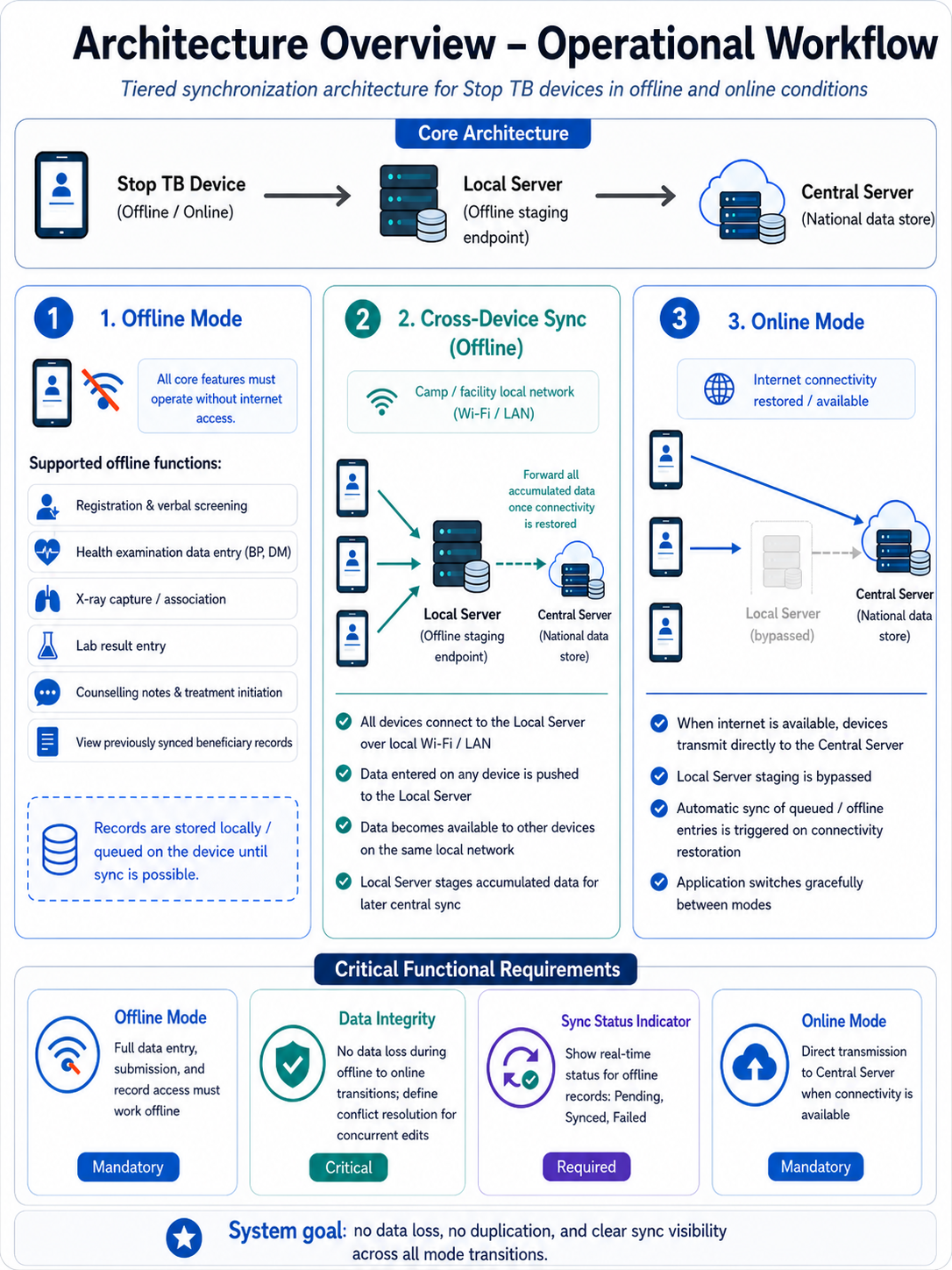
STOP TB- Data Flow Diagram
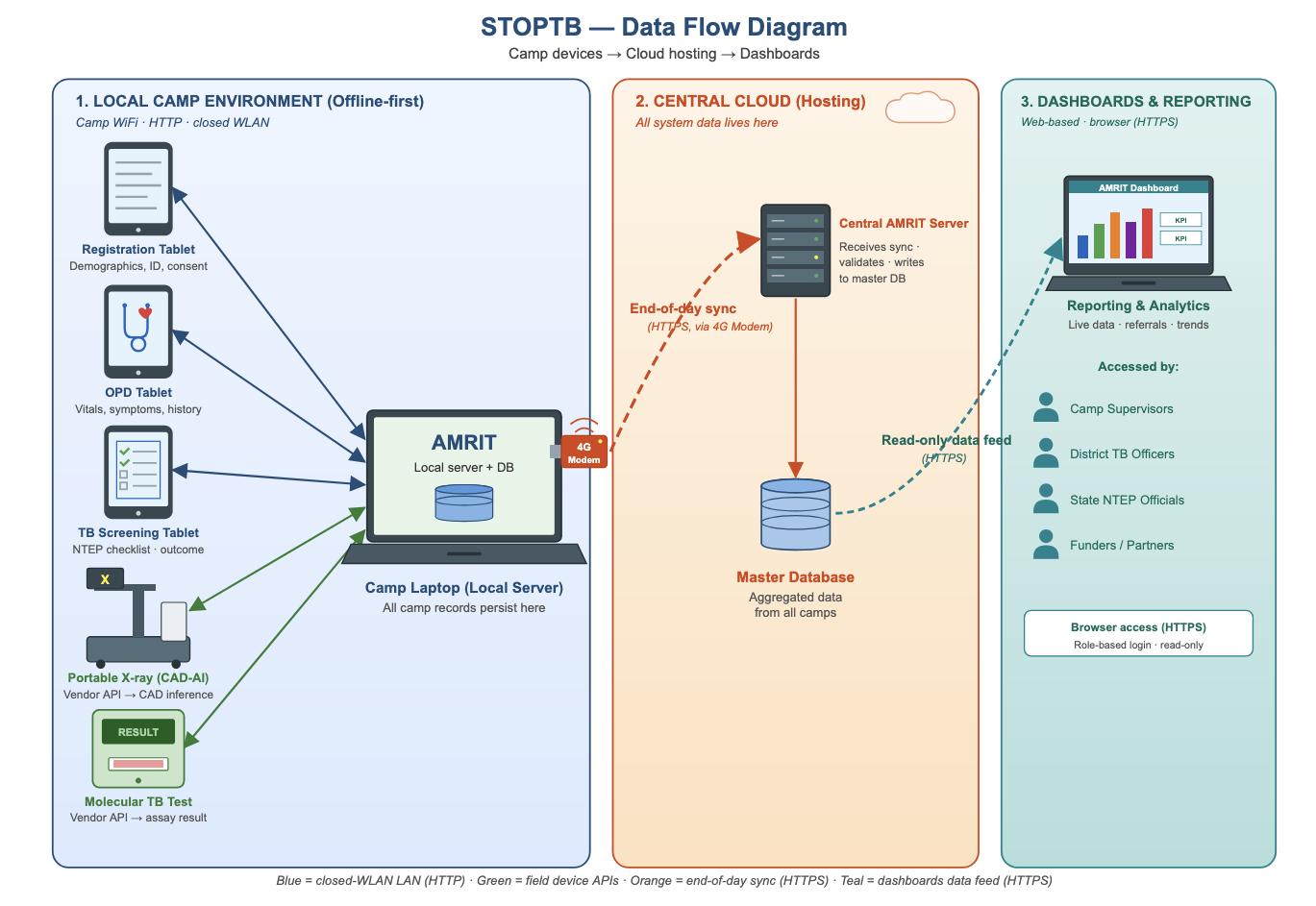
3. Login Page & Landing Page
...
Referral Card routing rules: Pregnant beneficiaries → shown directly in NAAT card. All non-pregnant beneficiaries (all genders, all ages) → shown in Digital Chest X-ray card. If abnormality detected on chest X-ray → referred further to NAAT. Beneficiaries with high BP or high Random Blood Sugar → shown in Health and Wellness Centre card in addition to Digital Chest X-Ray/ NAAT cards.
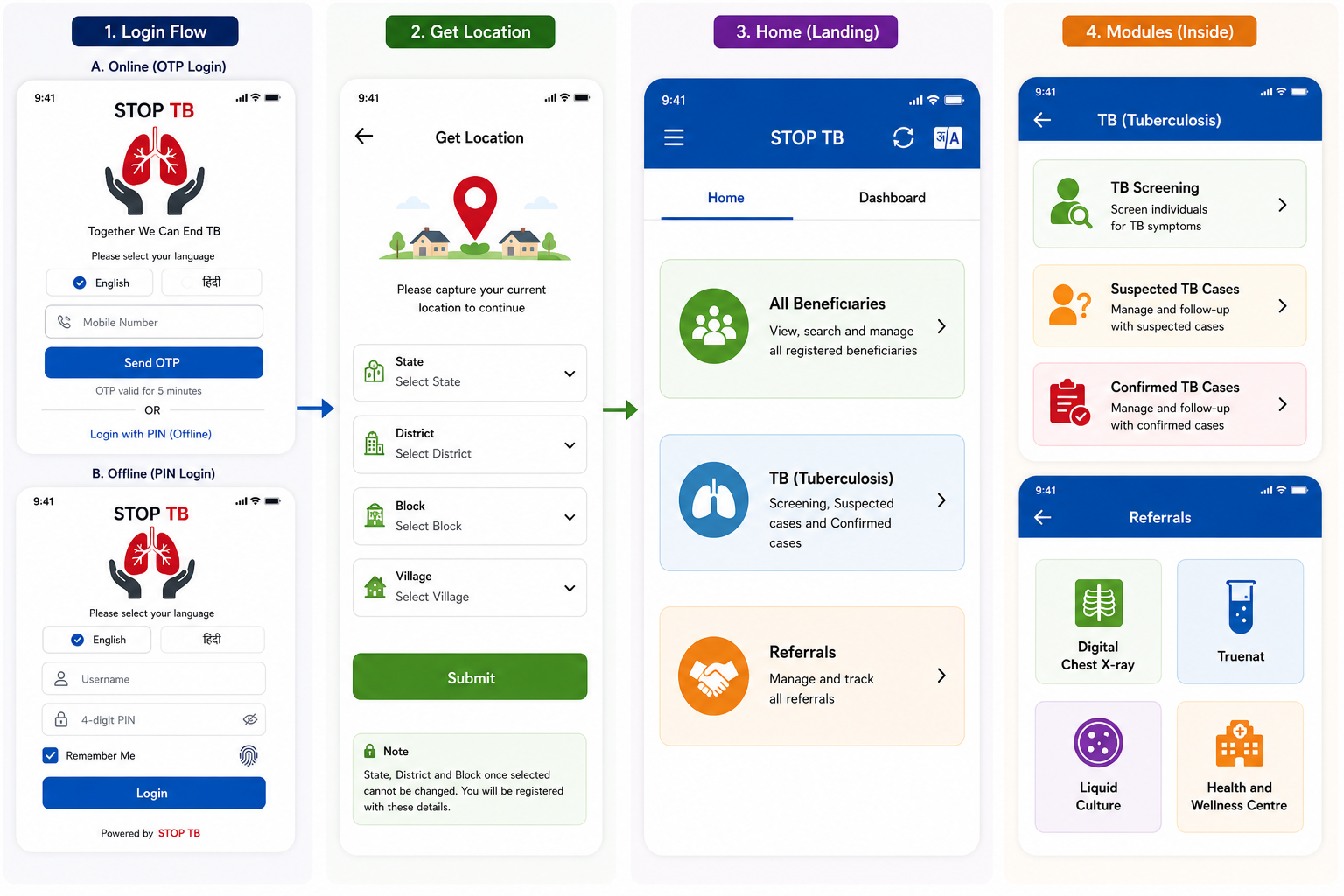
Disclaimer: Application screen needs to resemble with the mock ups in all the sections of the PRD to highlight the flow and content required in the application.
4. Registration Officer Flow
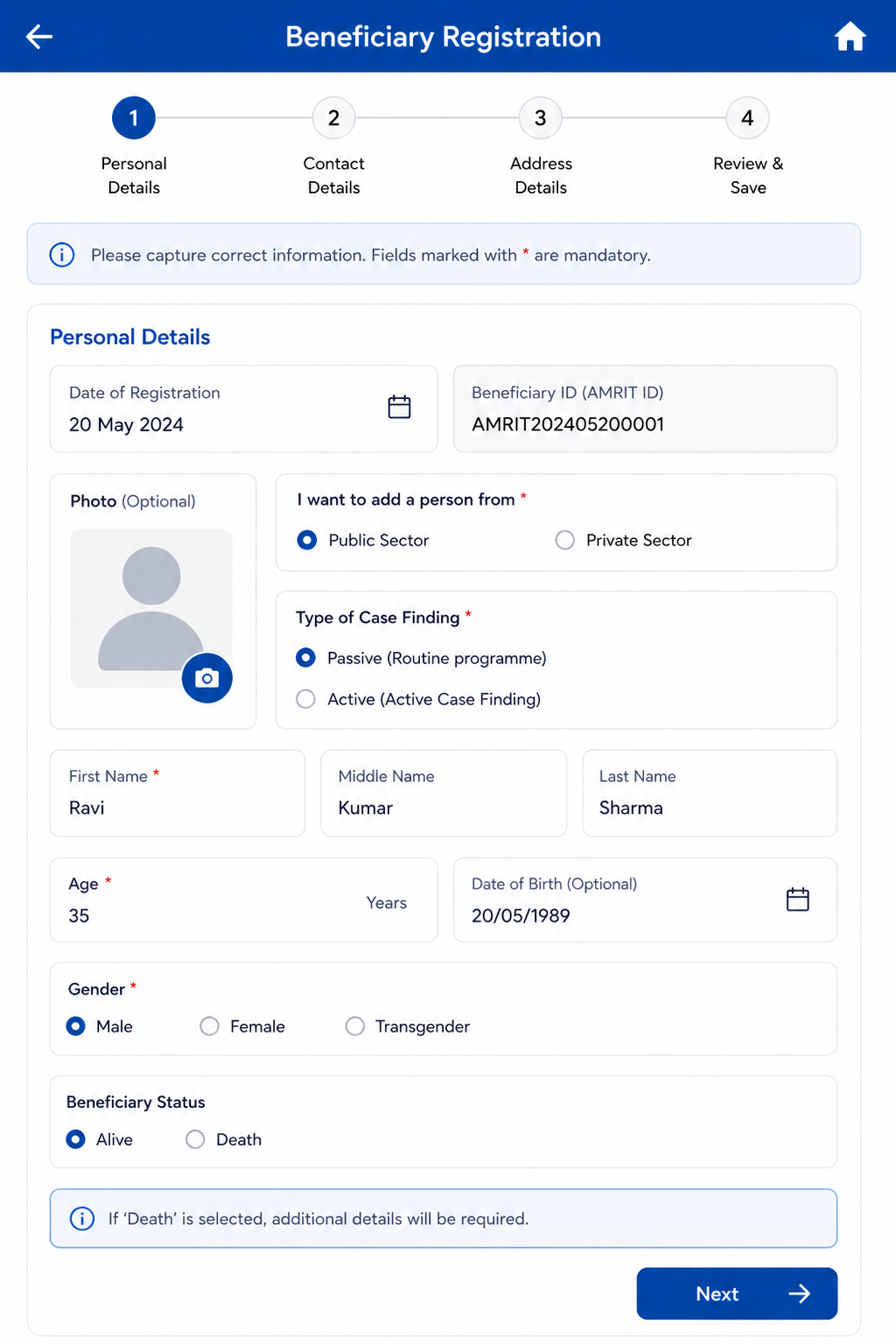
The Registration Officer is the first actor in the beneficiary workflow. This role performs two sequential steps: (1) Beneficiary Registration and (2) Anthropometry. On completion, the beneficiary appears in the Nurse module queue.
New Household Registration Form
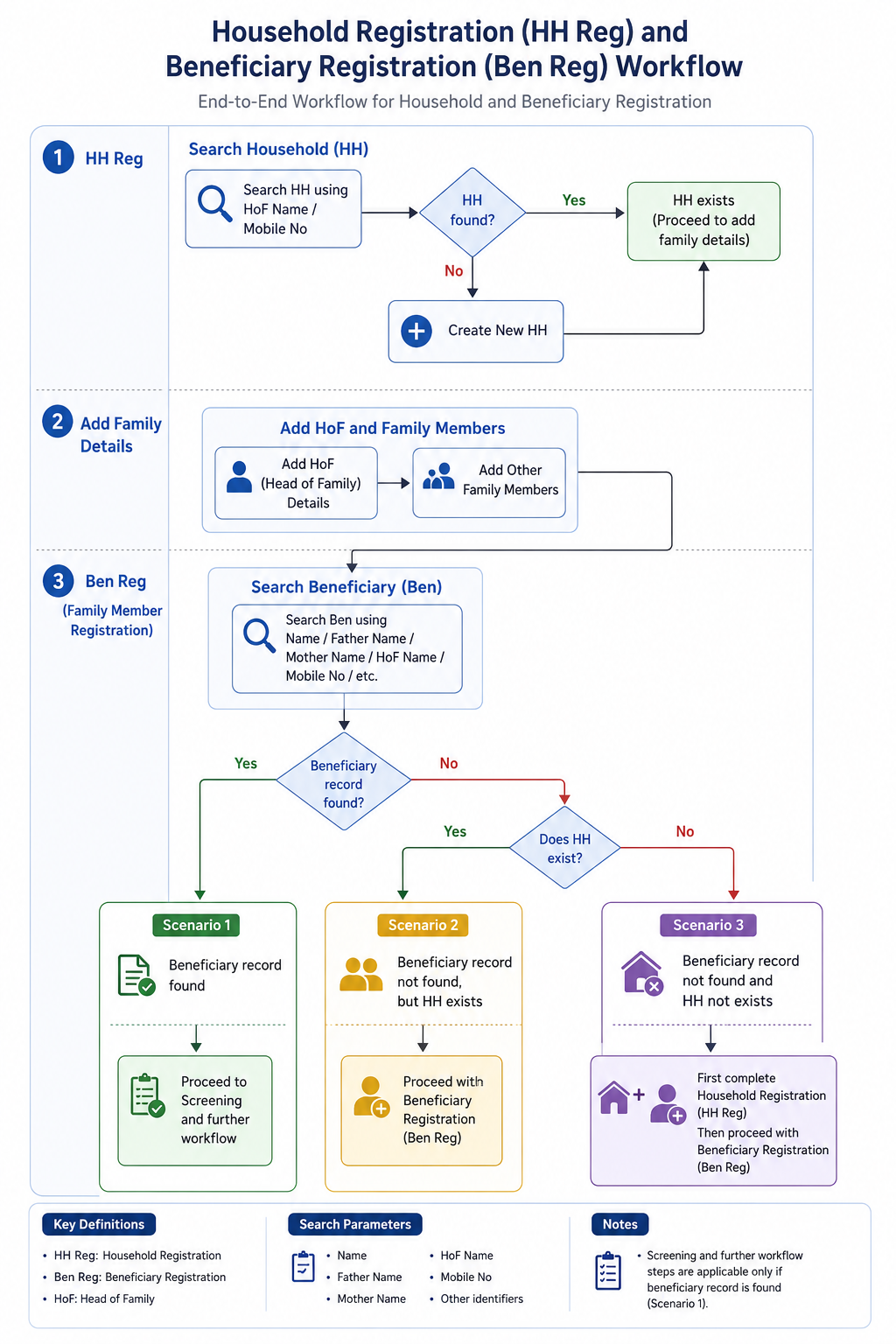
- Household Registration (HH Reg)
- Search for Household using:
- HoF (Head of Family) Name
- Mobile Number
- If Household does not exist, create a new Household (HH).
- Search for Household using:
- Add Family Details
- Add HoF details.
- Add other family members to the Household.
- Beneficiary Registration (Ben Reg / Family Member Registration)
- Search Beneficiary using:
- Name
- Father’s Name
- Mother’s Name
- HoF Name
- Mobile Number
- Other available identifiers
- Search Beneficiary using:
- Scenarios
- Scenario 1: If Beneficiary record is found → Proceed to Screening and further workflow.
- Scenario 2: If Beneficiary record is not found, but Household exists → Proceed with Beneficiary Registration (Ben Reg).
- Scenario 3: If neither Beneficiary record nor Household exists → First complete Household Registration (HH Reg), then proceed with Beneficiary Registration (Ben Reg).
Family Details
S No | Name of Data Field | Field Type | Value/ Options | Validation/ Logic/ Condition |
1 | First Name of Head of the family | Textbox | Is Mandatory | · Input method: Speech to Text feature · Accept alphabets only · Character limit 50 · All letter should be in caps |
2 | Last Name/ Surname | Textbox | · Input method: Speech to Text feature · Accept alphabets only · Character limit 50 · All letter should be in caps | |
3 | Mobile No of Head of the family | Textbox | Is Mandatory | · Accept numeric (integer) value only · Accept 10 digits only · Should not start form zero · Should start with digit 6, 7, 8 or 9 · Should Not accept all same digits |
4 | House No | Textbox | · Allow Alphanumeric Character and special Characters · Character limit 100 | |
5 | Ward No | Textbox | · Allow Alphanumeric Character and special Characters · Character limit 100 | |
6 | Ward Name | Textbox | · Allow Alphanumeric Character and special Characters · Character limit 100 | |
7 | Mohalla Name | Textbox | · Allow Alphanumeric Character and special Characters · Character limit 100 | |
8 | Economic Status | Spinner | Is Mandatory · APL · BPL · Don't know |
House Hold Details
S No | Name of Data Field | Field Type | Value/ Options | Validation/ Logic/ Condition |
1 | Type of Residential area | Spinner | Choose: · Rural · Urban · Tribal · Tea Garden · Other | |
2 | Other Type of Residential area | Textbox | · Enable if other is selected above · Is Mandatory if other is selected above · Allow Alphanumeric Character and special Characters · Character limit 100 | |
3 | Type of House | Spinner | Is Mandatory · Kuchha · Pucca · None · Other | |
4 | House ownership | Spinner | Is Mandatory · Yes · No |
House Hold Amenities
S No | Name of Data Field | Field Type | Value/ Options | Validation/ Logic/ Condition |
1 | Separate Kitchen | Spinner | Is Mandatory · Yes · No | |
2 | Type of Fuel used for cooking | Spinner | Is Mandatory | |
3 | Other type of fuel used for cooking | Textbox | · Enable if other is selected above · Is Mandatory if other is selected above · Allow Alphanumeric Character and special Characters · Character limit 100 | |
4 | Primary Source of water | Spinner | Is Mandatory | |
5 | Other Source of Water | Textbox | · Enable if other is selected above · Is Mandatory if other is selected above · Allow Alphanumeric Character and special Characters · Character limit 100 | |
6 | Availability of Electricity | Spinner | Is Mandatory | |
7 | Other Availability of electricity | Textbox | · Enable if other is selected above · Is Mandatory if other is selected above · Allow Alphanumeric Character and special Characters · Character limit 100 | |
8 | Availability of Toilet | Spinner | Is Mandatory | |
9 | Other Availability of Toilet | Textbox | · Enable if other is selected above · Is Mandatory if other is selected above · Allow Alphanumeric Character and special Characters · Character limit 100 | |
After Household registration is completed, show below alert in pop: |
4. Registration Officer Flow
The Registration Officer is the first actor in the beneficiary workflow. This role performs two sequential steps: (1) Beneficiary Registration and (2) Anthropometry. On completion, the beneficiary appears in the Nurse module queue.
ACTOR: Registration Officer | ENTRY POINT: ACTOR: Registration Officer | ENTRY POINT: Home → All Beneficiaries → Registration button | NEXT ACTOR: Nurse
...
AC-REG-03: Given 'Mobile number not available' is checked, When the form is submitted, Then the system stores 9999999999 as the primary phone number.
4.4 Anthropometry Screen
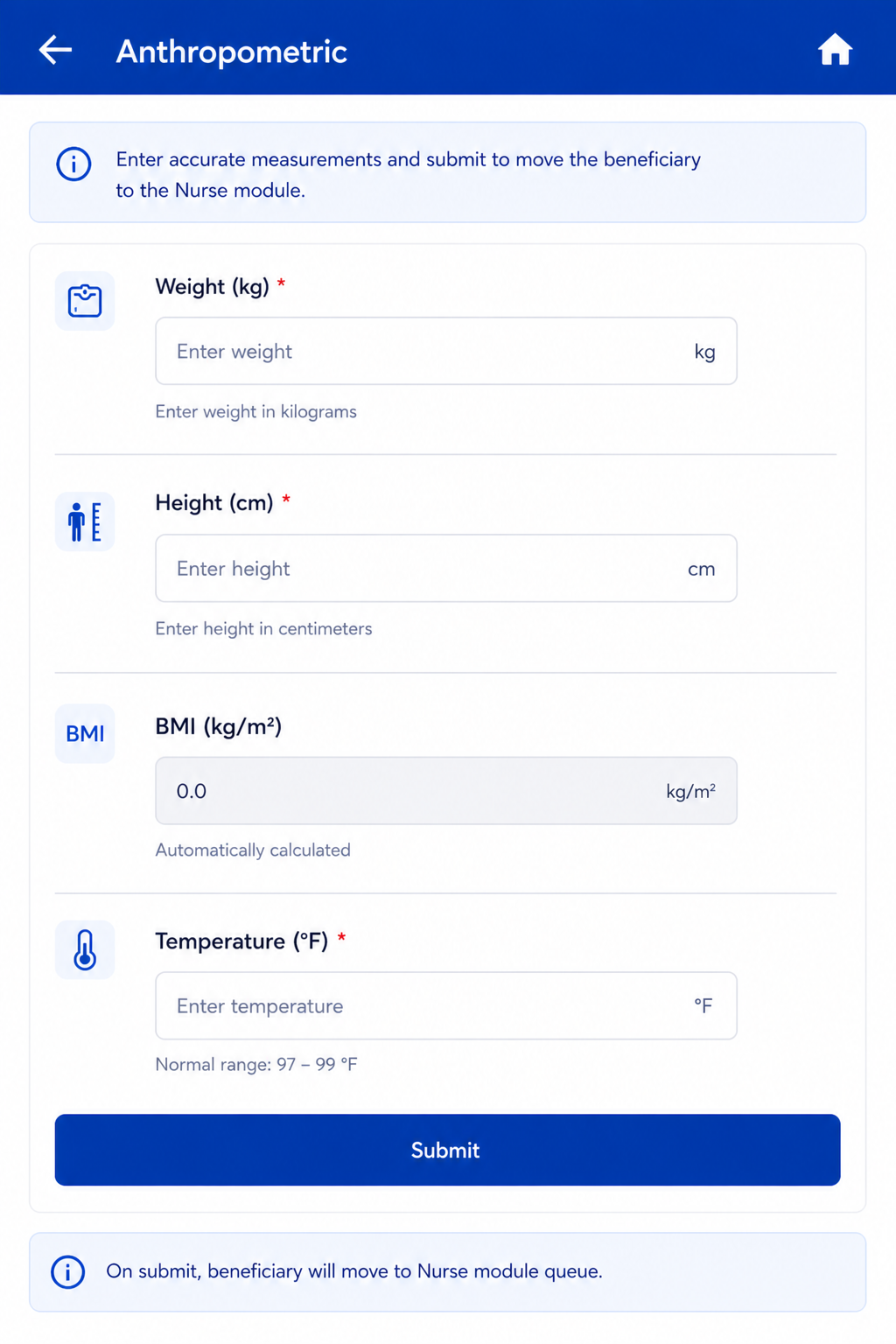
Follows immediately after Registration Submit. Same actor: Registration Officer. On Anthropometry Submit → Beneficiary moves to Nurse module queue.
...
Field Name | Input / Type | Options / Values | Logic & Validations |
Weight (Kgs) | Number input | Numeric | Numeric; 1 decimal place allowed. |
Height (cms) | Number input | Numeric | Numeric; 1 decimal place allowed. |
BMI = Weight / (Height/100)² | Auto-calculated (read-only) | Calculated value | Auto-calculated when both Height and Weight are entered. Formula: Weight ÷ (Height ÷ 100)². Display to 1 decimal place. Non-editable. |
Temperature (Degree Fahrenheit) | Radio + free textbox | Free textbox also provided for manual entry. Normal range shown: 97–99°F. If >= 100 selected → show alert 'Refer to Health and Wellness Centre' and show beneficiary in Referral card on Home. | |
Submit | Button | — | Beneficiary moves to Nurse module queue. |
5. Nurse Flow
Once a beneficiary is registered and anthropometry is completed, they appear in the Nurse module queue. The Nurse role covers four sequential screens: General Examination → TB Screening → General OPD (optional/skippable) → Diagnostics Screen.
...
Field Name | Input Type | Options / Values | Logic & Validations | ||||
Date | Calendar / Date Picker | Date | Mandatory. Default: Today's Date. Not greater than Today's Date. Accept date >= Date of beneficiary registration. Not editable once submitted. of beneficiary registration. Not editable once submitted. | ||||
Coughing More than 2 weeks * | Radio button | Yes | No | Mandatory. | ||||
Blood in Sputum * | Radio button | Yes | No | Mandatory. | ||||
Fever > 2 weeks * | Radio button | Yes | No | Mandatory. | ||||
Rise of fever in evening * | Radio button | Yes | No | Mandatory. | ||||
Loss of Appetite Coughing More than 2 weeks * | Radio button | Yes | No | Mandatory. | ||||
Blood in Sputum Loss of Weight * | Radio button | Yes | No | Mandatory. | ||||
Fever > 2 weeks Night Sweats * | Radio button | Yes | No | Mandatory. | ||||
Rise History of fever in evening TB * | Radio button | Yes | No | Mandatory. | ||||
Loss of Appetite Are you currently taking Anti-TB drugs ** | Radio button | Yes | No | Mandatory. | ||||
Loss of Weight Anyone in Family Currently Suffering from TB ** | Radio button | Yes | No | Mandatory. | ||||
Night Sweats * | Radio button | Yes | No | Mandatory. | ||||
History of TB * | Radio button | Yes | No | Mandatory. | ||||
. | |||||||
"Is beneficiary asymptomatic" | Radio button | Yes | No | Option "Yes" will be auto selected if responses to all the Previous 10 Questions are "No". Option "No" will be auto selected if responses to any of the Previous 10 Questions are "Yes", valid even for one single response as "Yes". | ||||
Next Screen after TB Screening Questions- | This Screen will be dynamic and results should keep on auto populating after NAAT device and Digital Chest X-ray devices are integrated. Manual entries are also allowed. | ||||||
Referred for digital chest x-ray | Radio button | Yes | No | Mandatory. | ||||
Anyone in Family Currently Suffering from TB ** | Radio button | Yes | No | Mandatory. | ||||
"Is beneficiary asymptomatic" | Radio button | Yes | No | Option "Yes" will be auto selected if responses to all the Previous 10 Questions are "No". Option "No" will be auto selected if responses to any of the Previous 10 Questions are "Yes", valid even for one single response as "Yes". | Next Screen after TB Screening Questions- | |||
· Default: Yes. · Do NOT show/ Hide for pregnant women. · Mandatory. · If yes, move beneficiary to Referral list titled 'Digital Chest X-ray'. | |||||||
Reason for denial to get referred for chest x-ray | dropdown |
| Enabled if Referred for digital chest x-ray= "No" Mandatory if enabled Multi select option Default option- Patient refused | ||||
Other | free text | enabled if | Radio button | Yes | No | · Default: Yes. · Do NOT show for pregnant women. · Mandatory. · Move beneficiary to Referral list titled 'Digital Chest X-ray'. | Reason for denial to get referred for chest x-ray= Other Mandatory if enabled | |
Is Digital Chest X-ray conducted | Radio / Auto | Yes | No | Enabled for everyone EXCEPT 'Are you pregnant = Yes' and Key Population / Risk Factors = Pregnancy. Enabled if Referred for digital chest x-ray= "Yes" Auto-populated by cross-device sync between STOP TB app and digital chest X-ray device. | ||||
Reasons for not conducting the chest x-ray | dropdown |
| Enabled if Is Digital Chest X-ray conducted= "No" Mandatory if enabled Single Selection | ||||
Other | free text | enabled if Reasons for not conducting the chest x-rayx-ray= Other Mandatory if enabled | |||||
Digital Chest X-Ray Test Result | Radio / Auto | Positive | Negative | Enabled only if 'Is Digital Chest X-ray conducted = Yes'. Auto-populated by cross-device sync. If Positive → move case to Confirmed Suspected TB cases module AND show patient in NAAT referral list for further testing. | ||||
Referred for Sputum Collection | Radio button | Yes | No | · Enabled in case of-
| ||||
Reason for denial to get referred for sputum collection | dropdown |
| Enabled if Referred for sputum collection= "No" Mandatory if enabled Multi select option Default option- Patient refused | ||||
Other | free text | Enabled if Reason for denial to get referred for sputum collection= Other Mandatory if enabled | |||||
Sputum Sample submitted at | Dropdown |
| Mandatory if Referred for Sputum Collection= "Yes" Default is TB Screening Camp | ||||
Is NAAT test conducted | Radio / Auto | Yes | No | Enabled in case of-
| ||||
Reasons for not conducting the NAAT test | dropdown |
| Enabled if Is NAAT test conducted= "No" Mandatory if enabled Single Selection | ||||
Other | free text | enabled if Reasons for not conducting the NAAT test= Other Mandatory if enabled | |||||
NAAT test result | Radio button / Auto | Positive | Negative | Enabled only if 'Is NAAT conducted = Yes'. Auto-populated by cross-device sync. If Positive → move case to Confirmed TB cases module. | ||||
Recommended for liquid culture test | Radio | Yes | No | Enabled only if History of TB = Yes AND Currently on Anti-TB drugs = Yes. | ||||
Liquid Culture test result | Radio button | Positive | Negative | If Positive → move case to Confirmed TB cases module. Option to edit/select after form submission as results come after 40-45 days. | Reason for denial for getting tested | Dropdown (multi-select) | · Fear and anxiety · Misconceptions · Social stigma · Cultural and gender-related barriers · Prior negative experiences with healthcare staff · Privacy concerns · Long waiting times at the camp · Loss of daily wages · Lack of trust in government programs or camp organizers · Others | |
. | |||||||
Other | free text | ||||||
Submit | Button | — | Continue to General OPD module. If skipped → move directly to Diagnostics Results screen. |
...
Field Name | Input Type | Options / Values | Logic & Validations |
Counselling Date | Date picker | Date | Mandatory. Default: Today. Not > Today. Must be >= Registration date. |
Counselling Officer Name | Auto-filled (read-only) | Logged-in user | Auto-filled from logged-in Counselling Officer account. Read only. |
— PATIENT HEADER (AUTO-FILLED, READ-ONLY) — | |||
Beneficiary Name | Textbox (read-only) | Auto-filled | First Name + Last Name from beneficiary record. |
Beneficiary ID (AMRIT ID) | Textbox (read-only) | Auto-filled | From beneficiary record. |
Nikshay ID | Textbox (read-only) | Auto-filled | From Diagnostics screen. Read only. |
Age / Gender | Textbox (read-only) | Auto-filled | Age (years) and Gender from beneficiary record. |
Diagnosis | Textbox (read-only) | Auto-filled | X-ray Result | NAAT Result | Liquid Culture Result — populated from diagnostic records. Read only. |
SECTION A: DISEASE AWARENESS | |||
TB disease explained to patient | Radio button | Yes/ No | Mandatory. Must be checked before proceeding. Confirms counsellor has explained TB to the patient. |
Transmission route explained | Radio button | Yes/ No | Mandatory. |
Symptoms explained | Radio button | Yes/ No | Mandatory. |
Treatment duration explained | Radio button | Yes/ No | Mandatory. |
Disease awareness notes | Free text | — | Optional. Max 500 chars. |
SECTION B: DO'S AND DON'TS | |||
Cover mouth while coughing — advised | Radio button | Yes/ No | Mandatory. |
Complete full treatment course — advised | Radio button | Yes/ No | Mandatory. |
Regular follow-up attendance — advised | Radio button | Yes/ No | Mandatory. |
Nutritional guidance provided | Radio button | Yes/ No | Mandatory. |
No smoking / alcohol — advised | Radio button | Yes/ No | Mandatory. |
Isolation precautions explained | Radio button | Yes/ No | Mandatory. |
Do's & Don'ts notes | Free text | — | Optional. Max 500 chars. |
SECTION C: GOVERNMENT SCHEMES | |||
Nikshay Poshan Yojana (NPY) eligibility explained | Radio button | Yes/ No | NPY: DBT of Rs. 5001000/month for duration of treatment. |
DOTS free treatment explained | Radio button | Yes/ No | Confirm patient understands treatment is free under NTEP. |
Schemes notes | Free text | — | Optional. Max 300 chars. |
SECTION D: TREATMENT REGIMEN | |||
Regimen explained to patient | Radio button | Yes/ No | Mandatory. |
Medication names explained | Radio button | Yes/ No | Mandatory. |
Side effects explained | Radio button | Yes/ No | Mandatory. |
Importance of adherence explained | Radio button | Yes/ No | Mandatory. |
Treatment regimen notes | Free text | — | Optional. Max 300 chars. |
SECTION E: COUNSELLING COMPLETION | |||
Counselling completion status | Radio button | Complete | Refused | Mandatory. Make all the above sections obsolete if “Counselling completion status” = “Refused” If Refused → enable 'Reason for refusal' field. |
Reason for refusal | Free text | — | Mandatory if Counselling status = Refused. Max 300 chars. |
Counsellor remarks | Free text | — | Optional. Max 500 chars. |
SECTION E: Follow Up to TU | To be done within 15 days Editable | ||
Has the patient started the prescribed TB treatment regimen? | Radio button | Yes/ No | If No is selected, then enable “Reason for not starting the prescribed TB treatment regimen” |
Reason for not starting the prescribed TB treatment regimen | Free text | To be enabled if “Has the patient started the prescribed TB treatment regimen” = “No” Up to 500 characteristics | |
Has the patient visited the DOTS centre / referred health facility for treatment collection? | Radio button | Yes/ No | |
Has the patient reported side effects to the treating doctor or DOTS centre? | Radio button | Yes/ No | |
Submit | Button | — | Save counselling record. If status = Complete → Nikshay record updated; case marked 'Counselled'. |
...