
...
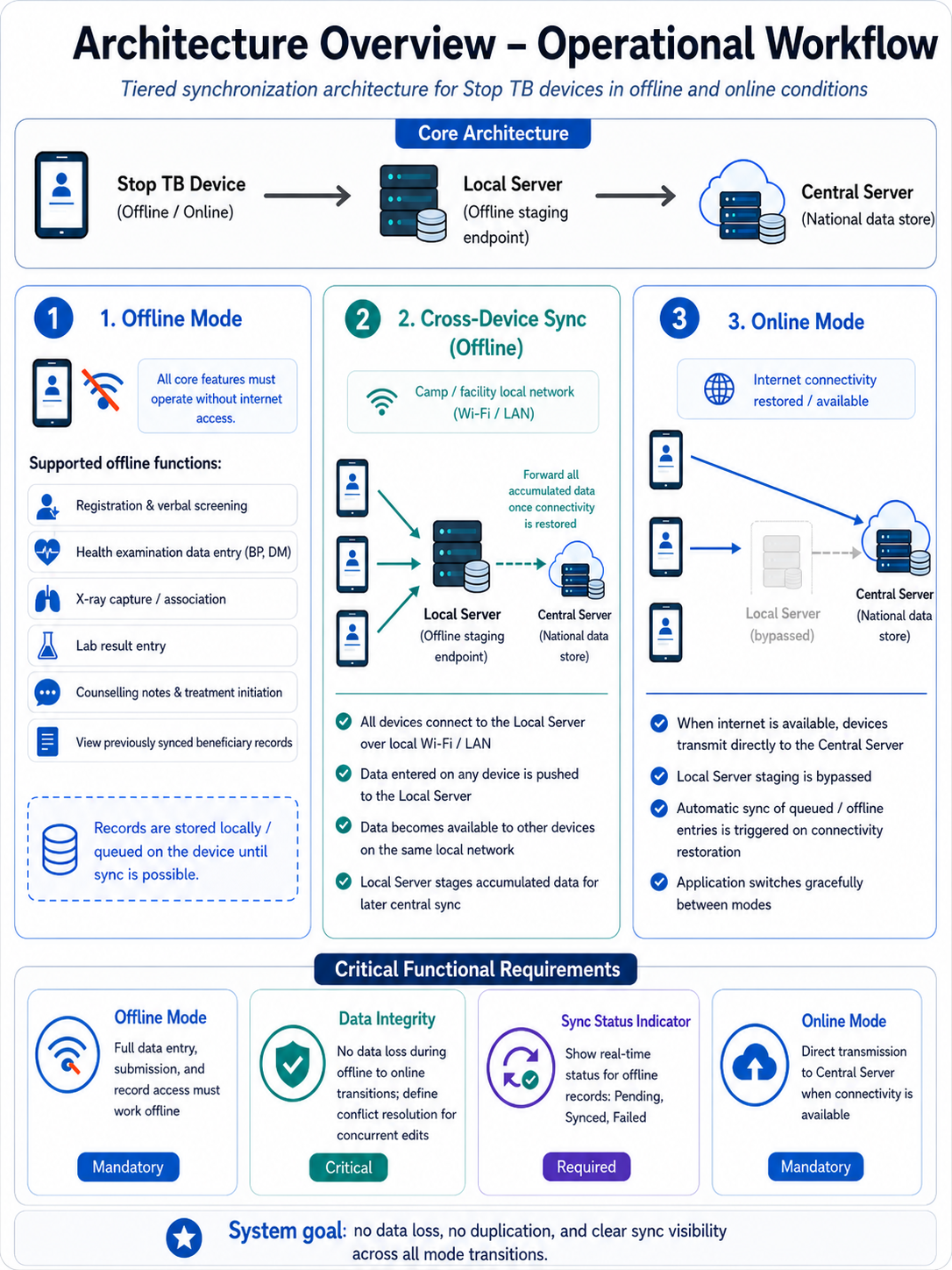
The finalized dataset will then be uploaded or integrated into the AMRIT system to ensure backend- (Discussion with the tech provider is in progress and is subjected to change)
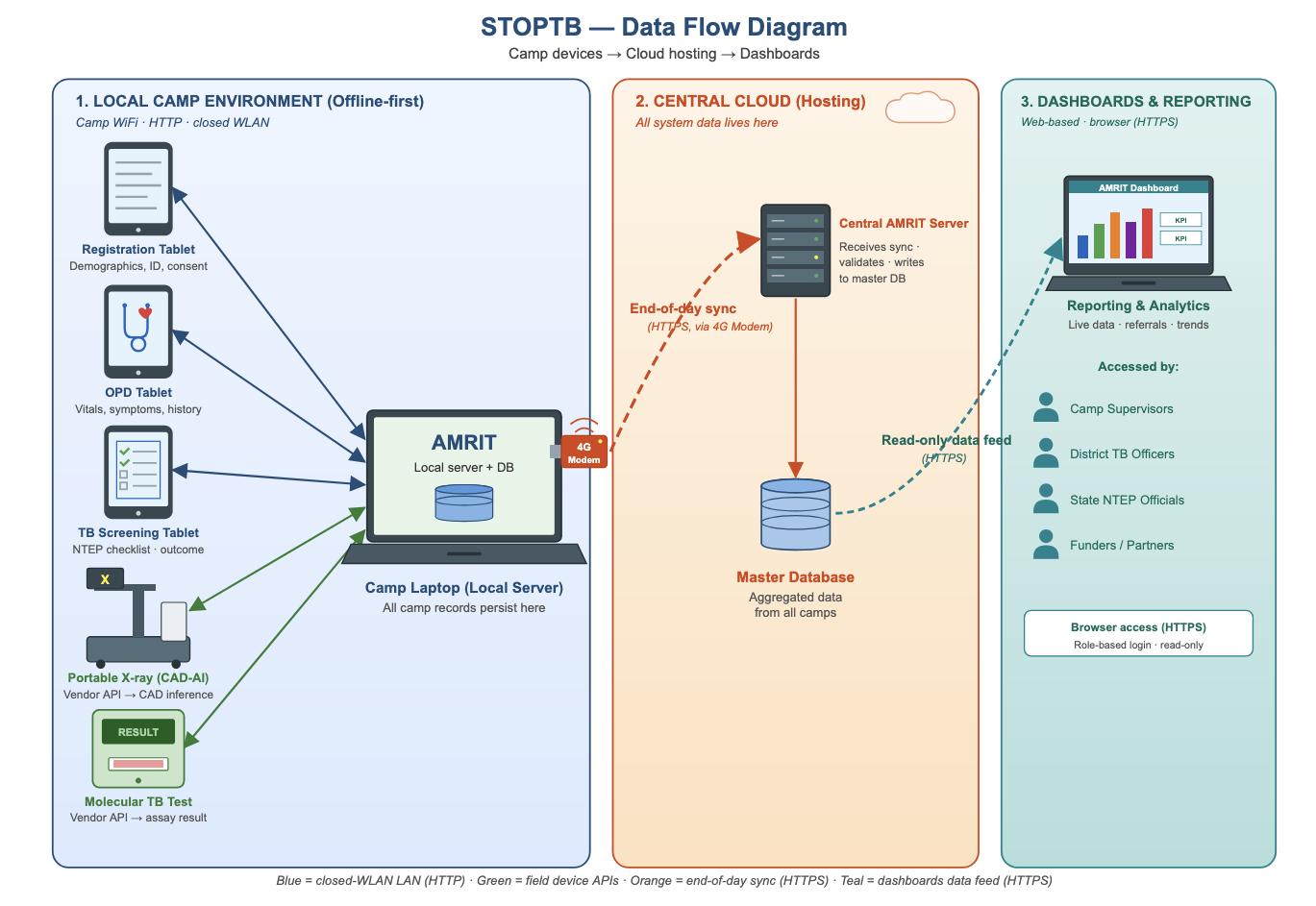
STOP TB- Data Flow Diagram
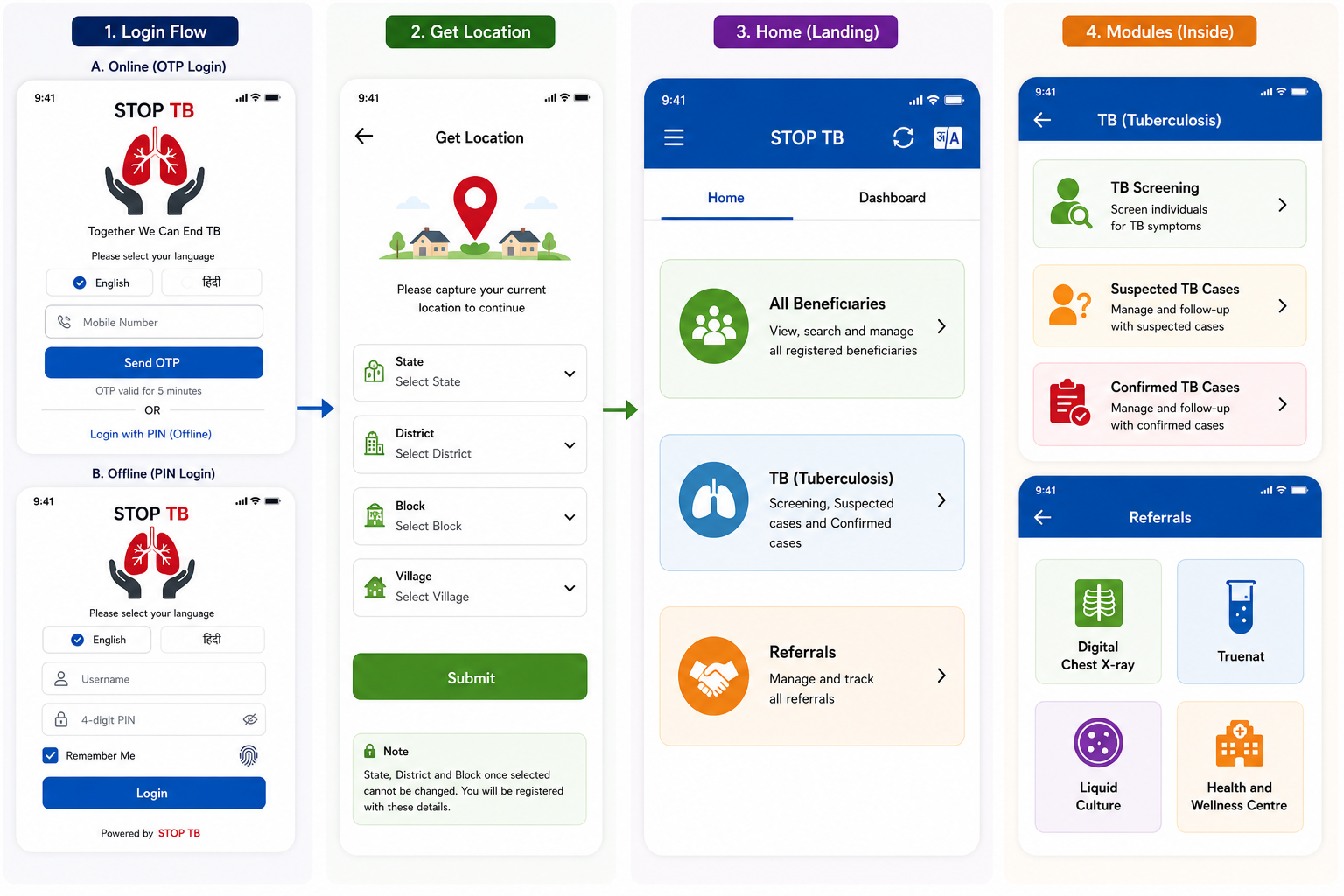
3. Login Page & Landing Page
...
Referral Card routing rules: Pregnant beneficiaries → shown directly in NAAT card. All non-pregnant beneficiaries (all genders, all ages) → shown in Digital Chest X-ray card. If abnormality detected on chest X-ray → referred further to NAAT. Beneficiaries with high BP or high Random Blood Sugar → shown in Health and Wellness Centre card in addition to Digital Chest X-Ray/ NAAT cards.
Disclaimer: Application screen needs to resemble with the mock ups in all the sections of the PRD to highlight the flow and content required in the application.
New Household Registration Form
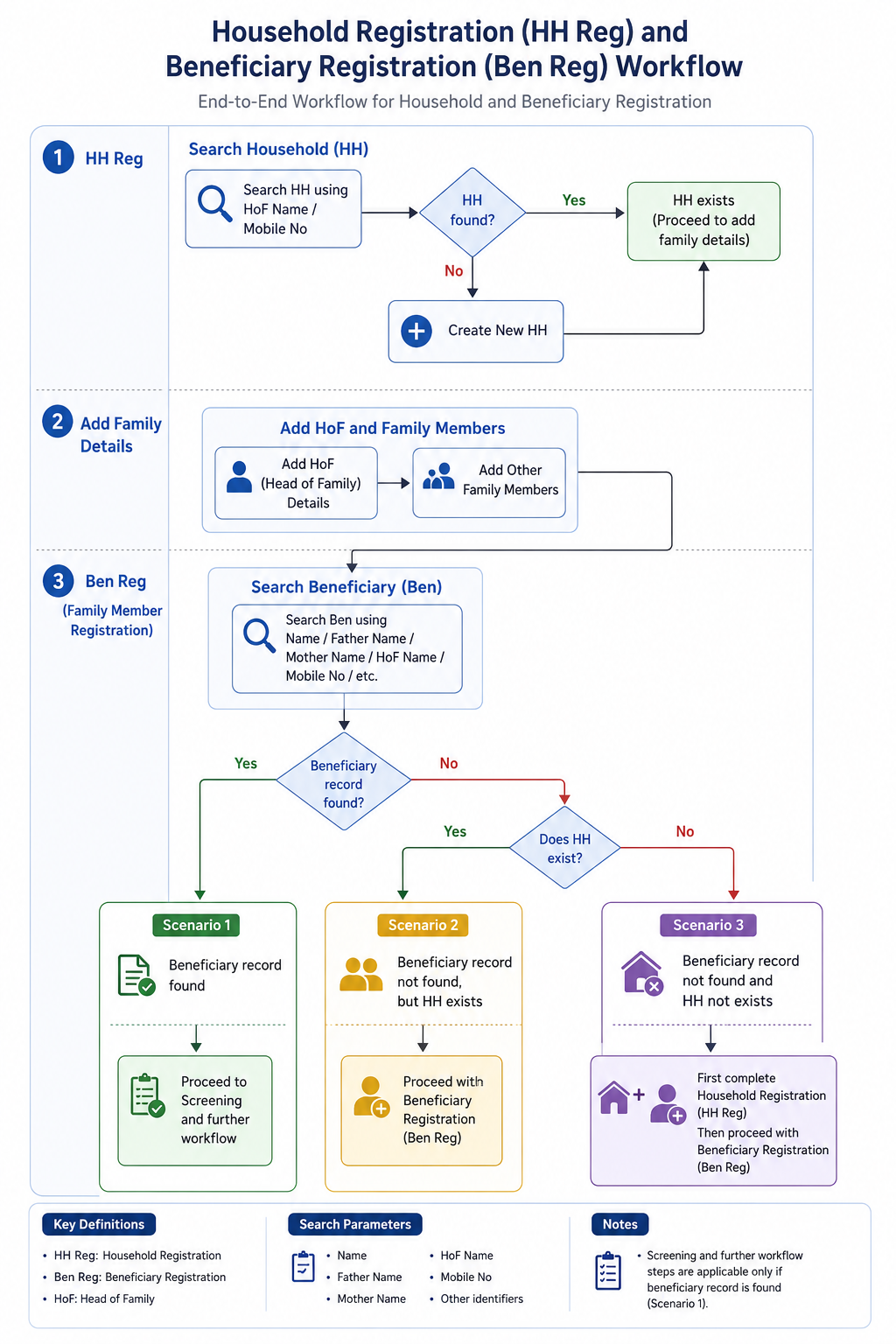
- Household Registration (HH Reg)
- Search for Household using:
- HoF (Head of Family) Name
- Mobile Number
- If Household does not exist, create a new Household (HH).
- Search for Household using:
- Add Family Details
- Add HoF details.
- Add other family members to the Household.
- Beneficiary Registration (Ben Reg / Family Member Registration)
- Search Beneficiary using:
- Name
- Father’s Name
- Mother’s Name
- HoF Name
- Mobile Number
- Other available identifiers
- Search Beneficiary using:
- Scenarios
- Scenario 1: If Beneficiary record is found → Proceed to Screening and further workflow.
- Scenario 2: If Beneficiary record is not found, but Household exists → Proceed with Beneficiary Registration (Ben Reg).
- Scenario 3: If neither Beneficiary record nor Household exists → First complete Household Registration (HH Reg), then proceed with Beneficiary Registration (Ben Reg).
Family Details
S No | Name of Data Field | Field Type | Value/ Options | Validation/ Logic/ Condition |
1 | First Name of Head of the family | Textbox | Is Mandatory | · Input method: Speech to Text feature · Accept alphabets only · Character limit 50 · All letter should be in caps |
2 | Last Name/ Surname | Textbox | · Input method: Speech to Text feature · Accept alphabets only · Character limit 50 · All letter should be in caps | |
3 | Mobile No of Head of the family | Textbox | Is Mandatory | · Accept numeric (integer) value only · Accept 10 digits only · Should not start form zero · Should start with digit 6, 7, 8 or 9 · Should Not accept all same digits |
4 | House No | Textbox | · Allow Alphanumeric Character and special Characters · Character limit 100 | |
5 | Ward No | Textbox | · Allow Alphanumeric Character and special Characters · Character limit 100 | |
6 | Ward Name | Textbox | · Allow Alphanumeric Character and special Characters · Character limit 100 | |
7 | Mohalla Name | Textbox | · Allow Alphanumeric Character and special Characters · Character limit 100 | |
8 | Economic Status | Spinner | Is Mandatory · APL · BPL · Don't know |
House Hold Details
S No | Name of Data Field | Field Type | Value/ Options | Validation/ Logic/ Condition |
1 | Type of Residential area | Spinner | Choose: · Rural · Urban · Tribal · Tea Garden · Other | |
2 | Other Type of Residential area | Textbox | · Enable if other is selected above · Is Mandatory if other is selected above · Allow Alphanumeric Character and special Characters · Character limit 100 | |
3 | Type of House | Spinner | Is Mandatory · Kuchha · Pucca · None · Other | |
4 | House ownership | Spinner | Is Mandatory · Yes · No |
House Hold Amenities
S No | Name of Data Field | Field Type | Value/ Options | Validation/ Logic/ Condition |
1 | Separate Kitchen | Spinner | Is Mandatory · Yes · No | |
2 | Type of Fuel used for cooking | Spinner | Is Mandatory | |
3 | Other type of fuel used for cooking | Textbox | · Enable if other is selected above · Is Mandatory if other is selected above · Allow Alphanumeric Character and special Characters · Character limit 100 | |
4 | Primary Source of water | Spinner | Is Mandatory | |
5 | Other Source of Water | Textbox | · Enable if other is selected above · Is Mandatory if other is selected above · Allow Alphanumeric Character and special Characters · Character limit 100 | |
6 | Availability of Electricity | Spinner | Is Mandatory | |
7 | Other Availability of electricity | Textbox | · Enable if other is selected above · Is Mandatory if other is selected above · Allow Alphanumeric Character and special Characters · Character limit 100 | |
8 | Availability of Toilet | Spinner | Is Mandatory | |
9 | Other Availability of Toilet | Textbox | · Enable if other is selected above · Is Mandatory if other is selected above · Allow Alphanumeric Character and special Characters · Character limit 100 | |
After Household registration is completed, show below alert in pop: |
4. Registration Officer Flow
...
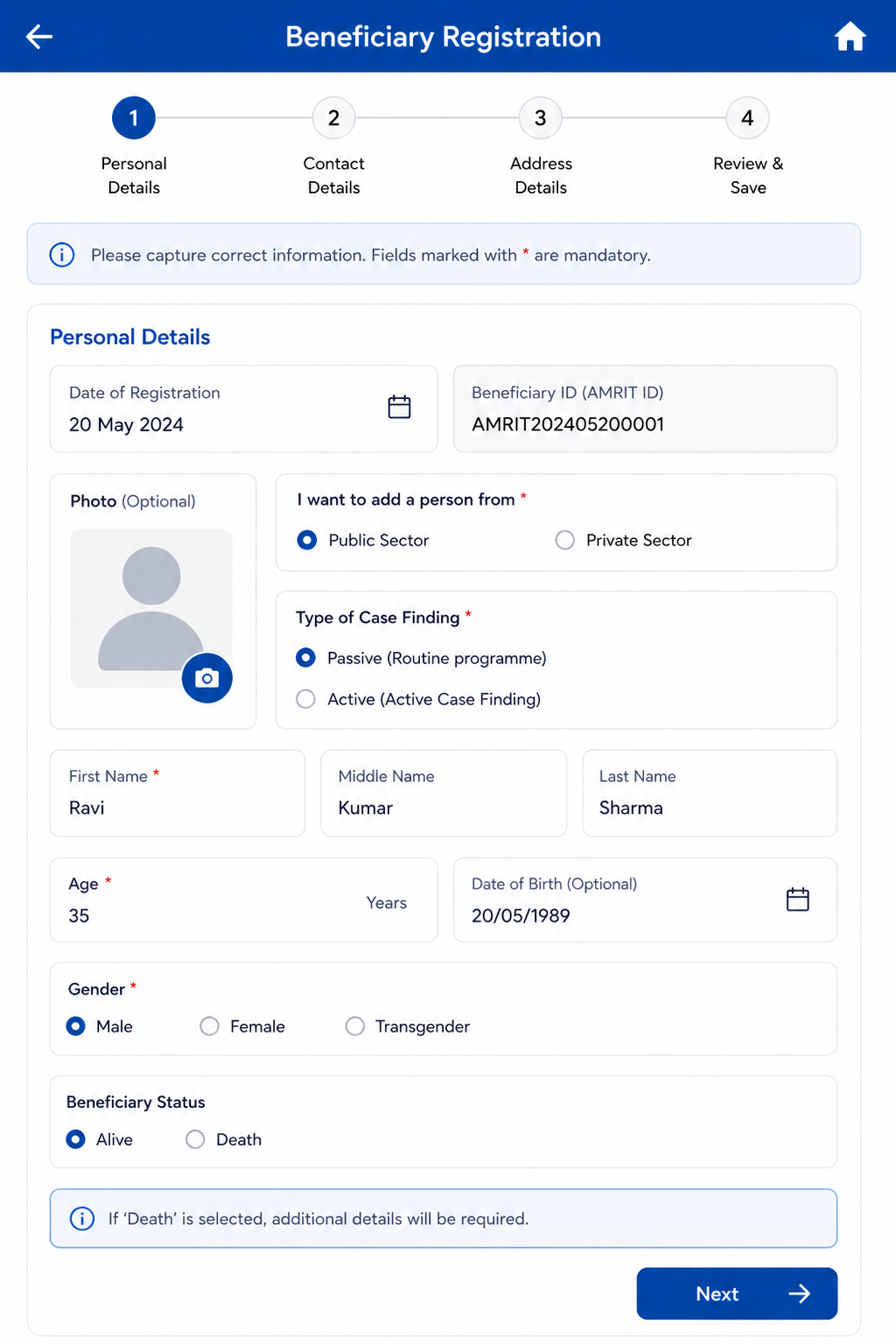
AC-REG-03: Given 'Mobile number not available' is checked, When the form is submitted, Then the system stores 9999999999 as the primary phone number.
4.4 Anthropometry Screen
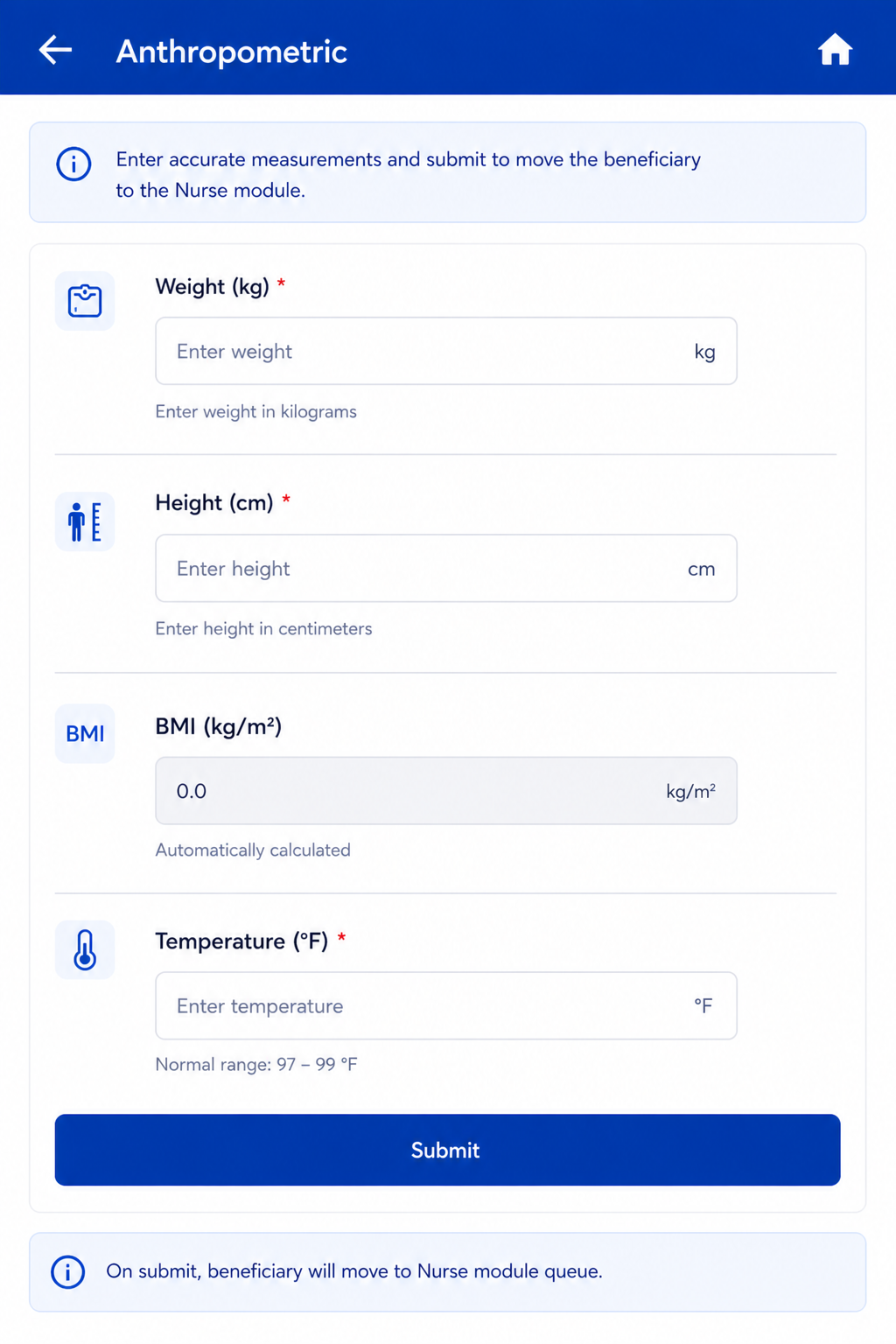
Follows immediately after Registration Submit. Same actor: Registration Officer. On Anthropometry Submit → Beneficiary moves to Nurse module queue.
...
Field Name | Input / Type | Options / Values | Logic & Validations |
Weight (Kgs) | Number input | Numeric | Numeric; 1 decimal place allowed. |
Height (cms) | Number input | Numeric | Numeric; 1 decimal place allowed. |
BMI = Weight / (Height/100)² | Auto-calculated (read-only) | Calculated value | Auto-calculated when both Height and Weight are entered. Formula: Weight ÷ (Height ÷ 100)². Display to 1 decimal place. Non-editable. |
Temperature (Degree Fahrenheit) | Radio + free textbox | Free textbox also provided for manual entry. Normal range shown: 97–99°F. If >= 100 selected → show alert 'Refer to Health and Wellness Centre' and show beneficiary in Referral card on Home. | |
Submit | Button | — | Beneficiary moves to Nurse module queue. |
5. Nurse Flow
Once a beneficiary is registered and anthropometry is completed, they appear in the Nurse module queue. The Nurse role covers four sequential screens: General Examination → TB Screening → General OPD (optional/skippable) → Diagnostics Screen.
...