
...
Document Revision History
Date | Version Number | Author | Approved By | Document change reference |
Dr Vanshika | Madhav | Initial draft | ||
23.4.2026 | Dr Vanshika | Madhav | Beneficiary Registration, TB screening, Vitals after feedback and several updates done | |
24.4.2026 | Dr Vanshika | Madhav | Mock ups and flow diagram | |
Dr Vanshika | Madhav | TPT screening module in progress | ||
01.05.2026 | Dr Vanshika | Madhav | Offline/ Online functionality with cross device communication. | |
05.05.2026 | Dr Vanshika | Madhav | General Examination, General OPD, Counsellor Modules, Role Based Access Control, Glossary, Architecture Overview and Sync model | |
01.06.2026 | Dr Vanshika | Madhav | Non House hold list, Unscreened list, Door locked cases management, Role Configuration and user management, Other application restrictions, Mobile device management, Smart Search, DIGIPIN, | |
Dr Vanshika | Madhav | AI innovation for Nutritional Counselling, Contact tracing questionnaire |
| Table of Contents |
|---|
1. Executive Summary & Core Objectives
...
- Enable end-to-end beneficiary flow management — from registration through treatment follow-up
- Support role-based data entry and access with clearly separated module privileges
- Capture clinical, anthropometric, diagnostic, and screening data.
- Implement conditional workflows based on test outcomes (X-ray, NAAT, Liquid Culture)
- Generate actionable outputs: referral lists, line lists, dashboard indicators, and reports
- Integrate with Nikshay, AMRIT, ABDM, portable digital X-ray device, and NAAT device
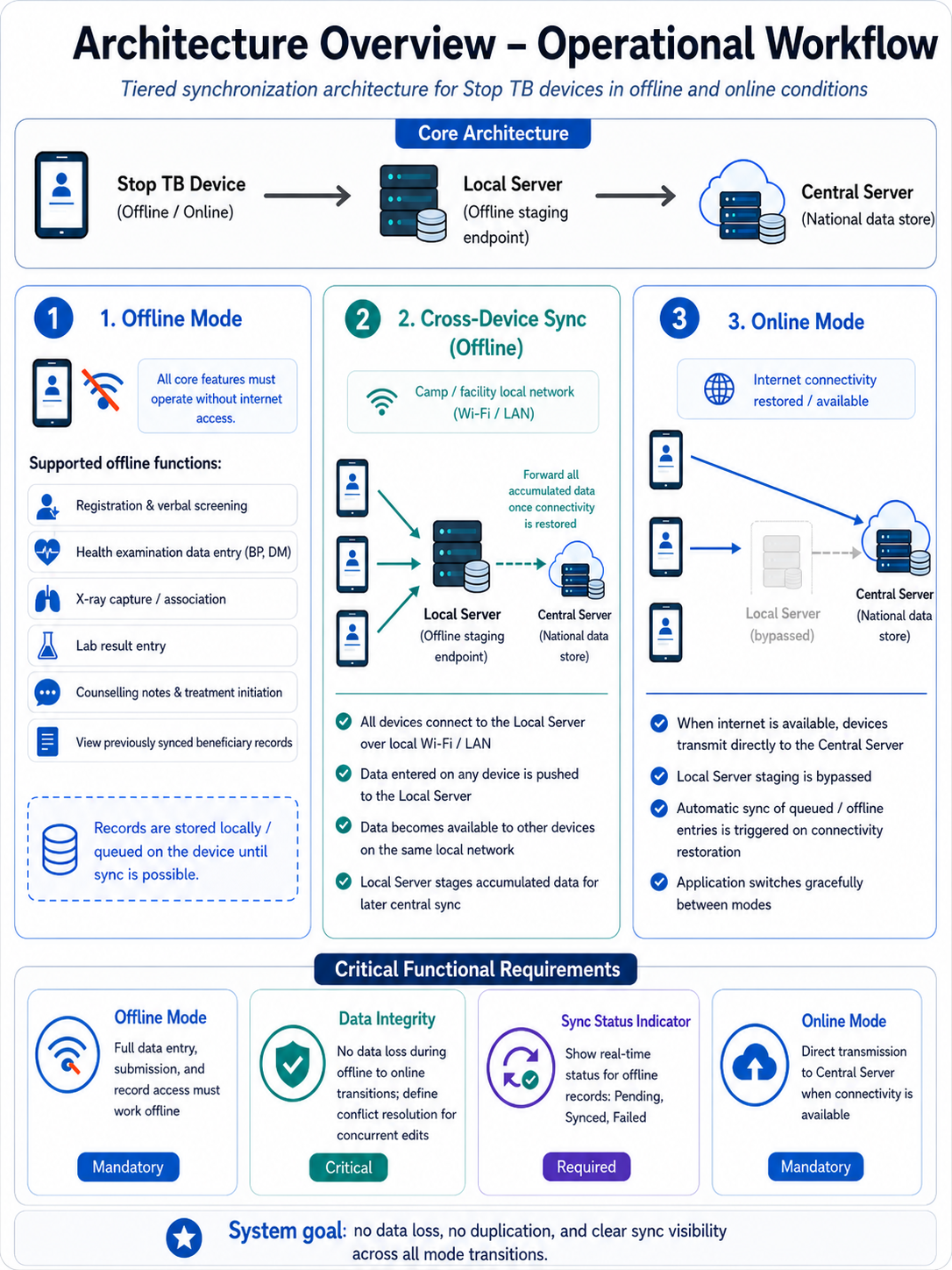
- Operate fully offline with cross-device synchronization via a local server, and auto-sync when online
1.2 Users of the System
# | Role | Primary Responsibilities |
1 | Registration Officer | Register beneficiaries; capture anthropometric measurements (Height, Weight, BMI) and Temperature |
2 | Nurse | General Examination; TB Verbal Screening; General OPD ailments; over-the-counter medicine dispensation; Diagnostics screen management |
3 | Counselling Officer | Counsel beneficiaries diagnosed with TB; initiate treatment at nearest health centre; notify TB Units; follow-up (15 days) on beneficiaries |
4 | Admin / NTEP / STOP TB | Backend and dashboard access; programme monitoring and reporting |
1.3 In-Scope Functional Modules
Module | Scope Status |
Offline functionality with cross-device communication + online sync to central server (AMRIT) | Mandatory |
Role-based user access (with actions and privileges) | Mandatory |
House Hold registration Module | Enlisted in this PRD |
Non House Hold registration Module | Enlisted in this PRD |
Beneficiary Registration Module | Enlisted in this PRD |
Unscreened Beneficiary Registration Module | Enlisted in this PRD |
TB Screening, tracking, confirmation, treatment follow-up and TPT modules | Enlisted in this PRD |
General Examination and General OPD modules | Enlisted in this PRD |
User Dashboard indicators | Enlisted in this PRD |
Integration of Nikshay application | External technical dependency |
Integration of portable digital chest X-ray device (AI enabled) | External technical dependency |
Integration of lab testing device (sputum testing and others) | External technical dependency |
Integration of AMRIT inventory management module | To be Included |
ABDM M2 flow (care context) | |
Pre-Camp Work Plan Preparation Module | Subject to requirement |
1.4 Glossary
Term | Definition |
ABHA | Ayushman Bharat Health Account — unique digital health ID under ABDM |
ABDM | Ayushman Bharat Digital Mission — national digital health initiative |
ACF | Active Case Finding — proactive screening of high-risk populations for TB |
AMRIT | Application for Managing and Recording Information in Telehealth — central platform |
BPaL | Bedaquiline, Pretomanid, Linezolid TB drug regimen |
CHC | Community Health Centre |
DMC | Designated Microscopy Centre |
DOTS | Directly Observed Treatment Short-course — standard TB treatment strategy |
DH | District Hospital |
DPDP | Digital Personal Data Protection Act, 2023 — India's data privacy legislation |
DS-TB | Drug-Sensitive Tuberculosis |
HWC | Health and Wellness Centre |
INH Mono | Isoniazid Monotherapy TB prevention regimen |
LFU | Lost to Follow-up |
NAAT | Nucleic Acid Amplification Test |
Nikshay | National TB Information System — India's web-based TB patient management portal |
NPVTG | Non-Particularly Vulnerable Tribal Group |
NPY | Nikshay Poshan Yojana — DBT scheme of Rs. 500/month for TB patients |
NTEP | National TB Elimination Programme — India's programme to eliminate TB by 2025 |
PHC | Primary Health Centre |
PVTG | Particularly Vulnerable Tribal Group |
SC | Sub-Centre |
TPT | TB Preventive Treatment — given to close contacts of DS-TB cases at risk of active TB |
NAAT | Portable PCR-based molecular diagnostic device for TB (Molbio Diagnostics) |
TU | Tuberculosis Unit — administrative health unit in NTEP structure |
2. Architecture Overview & Sync Model
...
S.No. | Component | Role |
1. | STOP TB Mobile / Tablet Application (Offline/Online) | Primary data entry device for all roles; operates in full offline mode or direct online mode |
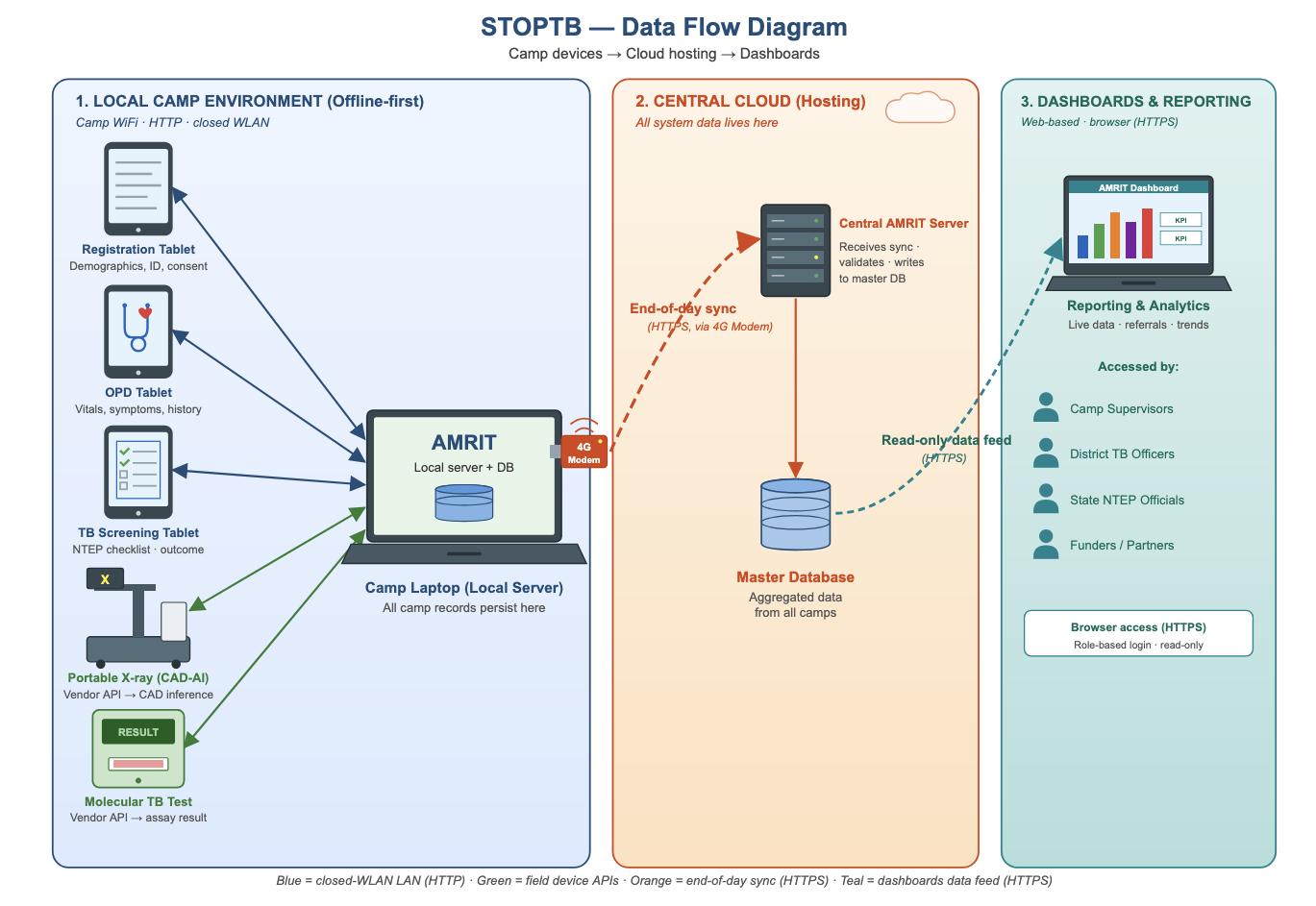
2. | Local Server (Offline Staging Endpoint) | Receives data from all devices on the same local Wi-Fi/LAN when no internet is available; forwards accumulated data to central server on connectivity restore. When this server comes online, it pushes the data to central server. |
3. | Central Server — AMRIT (National Data Store) | Authoritative data store; receives data directly from devices when online, or batched from local server when offline connectivity is restored |
"Role Configuration and User Management”Management: Admin can add/remove users and assign/modify roles from the local server (laptop) interface; role changes propagate to all devices on sync; role assignment is device-agnostic (handled at login, not device level).
Role based user access to be provided and single user can have multiple roles. This has to be managed by Admin role in the central server as well as the local server. Based upon the role access permission only the application should have specific role privileges. Roles will be registrar, nurse, counsellor.
2.2 Operational Mode Requirements
Mode | Description | Priority |
Offline Mode | · Application must function fully without internet connectivity. · All data entry, form submission, and record access must be operational offline. · Covers: Registration and verbal screening; Health examination data entry (BP, DM); X-ray capture/association; Lab result entry; Counselling notes and treatment initiation; Viewing of previously synced beneficiary records. | Mandatory |
Cross-Device Sync (Offline) | · When operating offline within a camp or facility: All devices connect to the Local Server over a local network (Wi-Fi/LAN). · Data entered on any device is pushed to the local server and becomes available to other devices on the same network. · The Local Server forwards all accumulated data to the Central Server once connectivity is restored. | Mandatory |
Online Mode | · When internet is available: All devices bypass the local server and transmit data directly to the Central Server. · Automatic sync of any locally queued/offline entries is triggered upon connectivity restoration. · The application must switch between modes gracefully without data loss or duplication. | Mandatory |
Data Integrity | · No data loss during mode transitions (offline → online). · Conflict resolution logic must be defined for concurrent edits across devices. | Critical |
Sync Status Indicator | · Users must be able to see real-time sync status (Pending / Synced / Failed) for records entered offline. | Required |
The Health Screening App will provide a “Download for Nikshay ID Generation” option for authorized users to export camp screening beneficiary data in a predefined format. This file can be uploaded to the Nikshay integration module, where users authenticate with valid credentials.
...
The finalized dataset will then be uploaded or integrated into the AMRIT system to ensure backend- (Discussion with the tech provider is in progress and is subjected to change)
STOP TB- Data Flow Diagram
Device Binding: Each user account must be bound to one or more specific devices identified by MAC address or IMEI. Login from an unregistered device must be blocked with an error: 'This device is not authorized for your account. Contact your Admin.' Device binding is managed by Admin from the local server interface."
Application Restriction- "Organization-provided devices must be configured with an MDM (Mobile Device Management) solution to restrict access to non-program applications. This is an infrastructure/deployment requirement outside the scope of the STOP TB application but must be addressed in the deployment checklist."
STOP TB- Data Flow Diagram
3. 3. Login Page & Landing Page
...
- Application name displayed: "STOP TB"
- Must display the STOP TB logo
- Online authentication: Mobile number OTP-based with 5-minute expiry
- Offline authentication: 4-digit PIN set during first login
- Multilingual: English and Hindi enabled by default; configurable to support all Indian languages as required in future
UI Field Name | Field Type | Options | Validations / Logic |
STOP TB Application Logo | Placeholder / Image | — | Displayed prominently at top of login screen |
Please Select your Language | Radio Button | English | Hindi | Fields and labels populate in the language selected by the user |
Username | Textbox | Free text | — |
4-digit PIN | Textbox | Numeric, 4 digits | Used for offline login; set during first login |
Remember Me | Checkbox | — | When selected: next login authenticates directly via fingerprint biometric |
Powered by STOP TB | Static text label | — | Displayed at the centre bottom of the screen |
Location
- It must capture the State and District/Block/Village.
- Only selection of the village is needed at the frontend. State/ District/Block/ TU/ Health facility can be automatically pre selected at the backend.
UI Field Name | Field Type | Options | Validations |
State | Drop Down | · Auto-Populate | · This must be configurable and must allow to add different states in Future) · · (One Time Activity)- User must be registered with the State that he selected while enrolling himself for the first time under "Settings" |
District | Drop Down | · Auto-Populate | · (This must be configurable and must allow to add different District/Town/City in Future) · · (One Time Activity)- User must be registered with the district that he selected while enrolling himself for the first time under "Settings" |
Block | Drop Down | · Auto-Populate | · (This must be configurable and must allow to add different Taluk/Tehsil in Future) · (One Time Activity)- User must be registered with the block that he selected while enrolling himself for the first time under "Settings" |
TU | Drop Down | · Auto-Populate | · (This must be configurable and must allow to add different TUs in Future) · (One Time Activity)- User must be registered with the block that he selected while enrolling himself for the first time under "Settings" |
Health Facility | Drop Down | · Auto-Populate | · (This must be configurable and must allow to add different health facilities in Future) · (One Time Activity)- User must be registered with the block that he selected while enrolling himself for the first time under "Settings" |
Village | Drop Down | · Auto-Populate | · (This must be configurable and must allow to add different Taluk/Tehsil in Future) · (One Time Activity)- User must be registered with the Block
|
Submit | Button | · On clicking Submit Button it must navigate to HWC Page |
Acceptance Criteria — Login
...
- Top row contains: Hamburger icon (left), 'STOP TB' text (centre), Sync button, Language Translation button
- Hamburger icon (side drawer) contains: Full Name (User), Username, Sync Records, Create ABHA ID, Support, Request to delete account, Log out
- Landing page has 2 tabs: Home and Dashboard
3.2.1 Home
...
Tab
The Home tab must render role-conditionally.
Registration Officer: sees "House hold", "All Beneficiaries", "Non House Hold", "Unscreened" cards (with Registration button) and Anthropometry screen.
Nurse: sees 'All Beneficiaries' (queue view, no Registration button), General Examination, General OPD ,Diagnostics screen and 'Referrals' card.
Counselling Officer: sees queue of only Confirmed TB Cases and TPT cards only. On clicking on these cases counselling module will further open.
Admin: sees all cards.
Sections | ||
On Click — Opens | Sub-Cards | |
For Registration Officer Login | ||
House Hold list | ||
All Beneficiaries list | Beneficiary Registration module with floating Registration button in right corner | List of all registered beneficiaries; Registration button initiates new registration |
TB (Tuberculosis) | Tuberculosis module; next screen shows 3 cards | TB Screening | Suspected TB Cases | Confirmed TB Cases |
Referrals | Referrals module; next screen shows 4 cards | Digital Chest X-ray | NAAT | Liquid Culture | Health and Wellness Centre |
Referral Card routing rules: Pregnant beneficiaries → shown directly in NAAT card. All non-pregnant beneficiaries (all genders, all ages) → shown in Digital Chest X-ray card. If abnormality detected on chest X-ray → referred further to NAAT. Beneficiaries with high BP or high Random Blood Sugar → shown in Health and Wellness Centre card in addition to Digital Chest X-Ray/ NAAT cards.
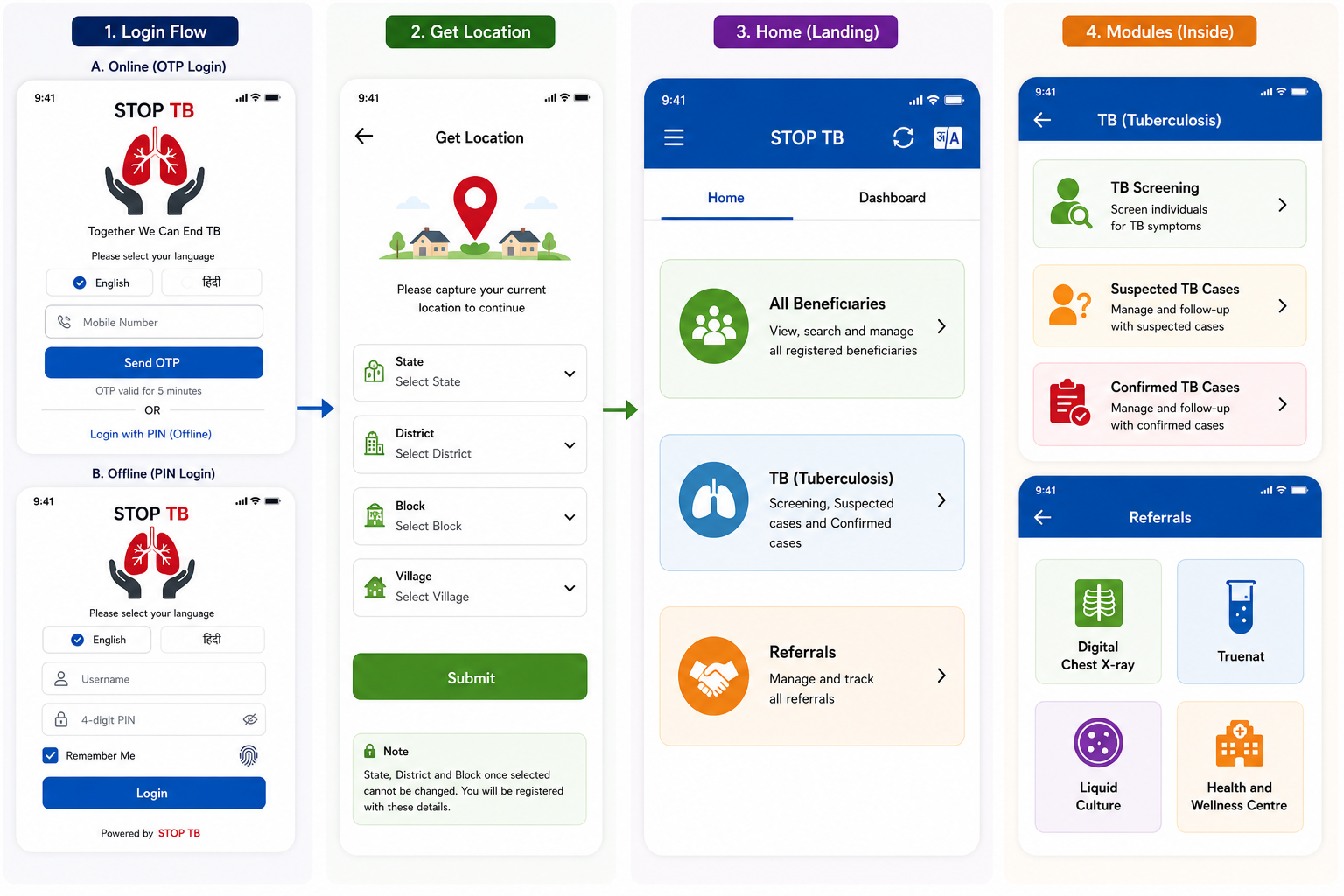
Disclaimer: Application screen needs to resemble with the mock ups in all the sections of the PRD to highlight the flow and content required in the application.
New Household Registration Form
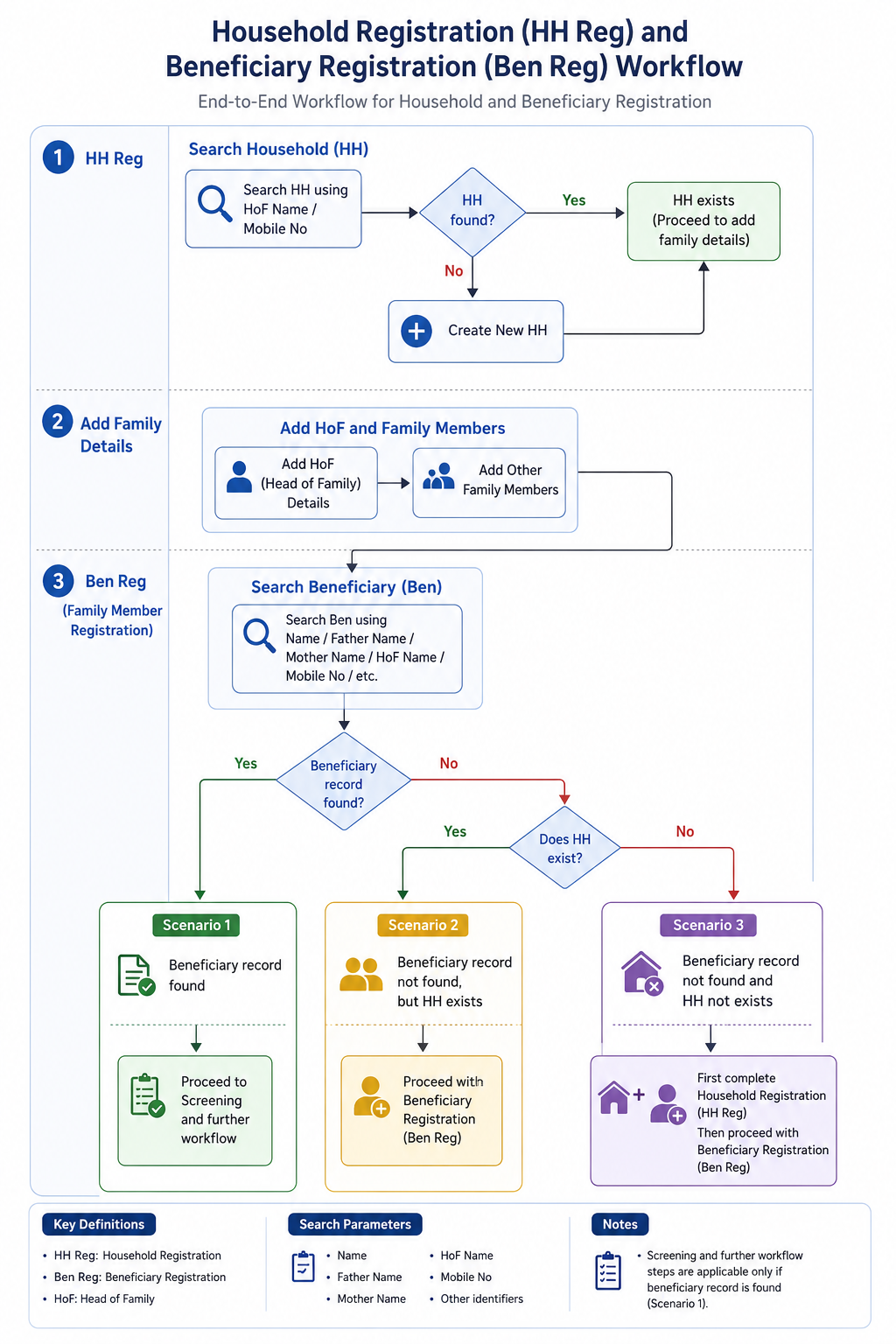
- Household Registration (HH Reg)
- Search for Household using:
- HoF (Head of Family) Name
- Mobile Number
- If Household does not exist, create a new Household (HH).
- Search for Household using:
- Add Family Details
- Add HoF details.
- Add other family members to the Household.
- Beneficiary Registration (Ben Reg / Family Member Registration)
- Search Beneficiary using:
- Beneficiary and Household search should default to Village level first, then escalate to Block level (camp host village). The search validation stating "Search is scoped to the currently selected Village by default. If no result is found within the Village, the system then offers an option to expand search to Block level." After login, the search scope should start from the selected village.
- Name
- Father’s Name
- Mother’s Name
- HoF Name
- Mobile Number
- Other available identifiers
Beneficiary and Household search should default to Village level first, then escalate to Block level (camp host village). The search validation stating "Search is scoped to the currently selected Village by default. If no result is found within the Village, the system then offers an option to expand search to Block level." After login, the search scope should start from the selected village after logging in.
- Search Beneficiary using:
- Scenarios
- Scenario 1: If Beneficiary record is found → Proceed to Screening and further workflow.
- Scenario 2: If Beneficiary record is not found, but Household exists → Proceed with Beneficiary Registration (Ben Reg).
- Scenario 3: If neither Beneficiary record nor Household exists → First complete Household Registration (HH Reg), then proceed with Beneficiary Registration (Ben Reg).
Non House Hold list | To address the cases for people without households (Homeless, migrants, wanderers etc) a separate list is to be maintained with the ability to link them to a HH at later stage if and when it happens. For such cases register as an individual beneficiary without HH linkage. Give a flag on the ben card “No HH” by a cross on the home icon. The system must allow linking this ben to an HH at a later date from the Beneficiary Card edit screen." Give Same beneficiary registration form in this section. Once the beneficiary is registered in this list, then this ben will also be shown in the list of all beneficiaries irrespective of HH or no HH. | |
Unscreened list | A new card should be introduced in the registrar home page “Unscreened Population” module to track unscreened population with details captured and dropdown options given for reason of not screening them- physically disabled, bed ridden, door lock, deny, others etc with multiple date of attempts, notes etc. This should also be added in the dashboard titled “Total Unscreened and disaggregated by reasons” | |
For Nurse Login | ||
TB (Tuberculosis) | Tuberculosis module; next screen shows 3 cards | TB Screening | Suspected TB Cases | Confirmed TB Cases |
Referrals | Referrals module; next screen shows 4 cards | Digital Chest X-ray | NAAT | Liquid Culture | Health and Wellness Centre |
For Counsellor Login | ||
Confirmed TB cases | ||
Counselling modules | ||
TPT module |
Referral Card routing rules: Pregnant beneficiaries → shown directly in NAAT card. All non-pregnant beneficiaries (all genders, all ages) → shown in Digital Chest X-ray card. If abnormality detected on chest X-ray → referred further to NAAT. Beneficiaries with high BP or high Random Blood Sugar → shown in Health and Wellness Centre card in addition to Digital Chest X-Ray/ NAAT cards.
Disclaimer: Application screen needs to resemble with the mock ups in all the sections of the PRD to highlight the flow and content required in the application.
New Household Registration Form
- Household Registration (HH Reg)
- Search for Household using:
- HoF (Head of Family) Name
- Mobile Number
- If Household does not exist, create a new Household (HH).
- Search for Household using:
- Add Family Details
- Add HoF details.
- Add other family members to the Household.
- Beneficiary Registration (Ben Reg / Family Member Registration)
- Search Beneficiary using:
- Beneficiary and Household search should default to Village level first, then escalate to Block level (camp host village). The search validation stating "Search is scoped to the currently selected Village by default. If no result is found within the Village, the system then offers an option to expand search to Block level." After login, the search scope should start from the selected village.
- Name
- Father’s Name
- Mother’s Name
- HoF Name
- Mobile Number
- Other available identifiers
- When search returns multiple records with identical names, the system must display a card showing Name + Age + Gender + Village + HoF (Head of Family) /Father's+ Mother's Name side-by-side, allowing the Registration Officer to confirm the correct match before proceeding." If HoF (Head of Family) detail is present then show this on the card instead of Parents name, if HoF is not present, then show Father's/Mother's name side-by-side.
- Search Beneficiary using:
- Scenarios
- Scenario 1: If Beneficiary record is found → Proceed to Screening and further workflow.
- Scenario 2: If Beneficiary record is not found, but Household exists → Proceed with Beneficiary Registration (Ben Reg).
- Scenario 3: If neither Beneficiary record nor Household exists → First complete Household Registration (HH Reg), then proceed with Beneficiary Registration (Ben Reg).
- Scenario 4: If while doing HH registration, the house is door locked, a badge/ icon of door lock should be given on such a HH with the date of visit and a separate line listing for door lock HHs so that the field team can revisit such houses and complete the record whenever the family is available. To manage this, give a checkbox on top of HH registration, which if clicked, gives the user to fill all the details whatever can be collected by the field team from neighbours and even if mandatory fields are not filled, in only these cases the application should allow to submit (even if mandatory fields are not filled) and this case will be enlisted in the "door lock" list. Such cases can be directly accessed from this list and all the details (especially mandatory) can be filled at a later time by the field team as per the availability of the family. Once such a "door lock" HH registration is completed when the family is available, move this case to HH card and also show all the members in the all beneficiaries list.
Family Details
S No | Name of Data Field | Field Type | Value/ Options | Validation/ Logic/ Condition |
1 | First Name of Head of the family | Textbox | Is Mandatory | · Input method: Speech to Text feature · Accept alphabets only · Character limit 50 · All letter should be in caps |
2 | Last Name/ Surname | Textbox | · Input method: Speech to Text feature · Accept alphabets only · Character limit 50 · All letter should be in caps | |
3 | Mobile No of Head of the family | Textbox | Is Mandatory | · Accept numeric (integer) value only · Accept 10 digits only · Should not start form zero · Should start with digit 6, 7, 8 or 9 · Should Not accept all same digits |
4 | House No | Textbox | · Allow Alphanumeric Character and special Characters · Character limit 100 | |
5 | Ward No | Textbox | · Allow Alphanumeric Character and special Characters · Character limit 100 | |
6 | Ward Name | Textbox | · Allow Alphanumeric Character and special Characters · Character limit 100 | |
7 | Mohalla Name | Textbox | · Allow Alphanumeric Character and special Characters · Character limit 100 | |
8 | Socioeconomic Status | Spinner | Is Mandatory · APL · BPL · Don't know |
House Hold Family Details
S No | Name of Data Field | Field Type | Value/ Options | Validation/ Logic/ Condition |
1 | First Name of Head of the family | Textbox | Is Mandatory | · Input method: Speech to Text feature · Accept alphabets only · Character limit 50 · All letter should be in caps |
Type of Residential area | Spinner | Choose: · Rural · Urban · Tribal · Tea Garden · Other | ||
2 | Other Type of Residential area | Textbox | · Enable if other is selected above · Is Mandatory if other is selected above · Allow Alphanumeric Character and special Characters · Character limit 100 | |
3 | Type of House | Spinner | Is Mandatory · Kuchha · Pucca · None · Other | |
4 | House ownership | Spinner | Is Mandatory · Yes · No |
House Hold Amenities
S No | Name of Data Field | Field Type | Value/ Options | Validation/ Logic/ Condition |
1 | Separate Kitchen | Spinner | Is Mandatory · Yes · No | |
2 | Type of Fuel used for cooking | Spinner | Is Mandatory | Multi select option to be provided |
3 | Other type of fuel used for cooking | Textbox | · Enable if other is selected above · Is Mandatory if other is selected above | 2 | Last Name/ Surname | Textbox | · Input method: Speech to Text feature · Accept alphabets only · Character limit 50 · All letter should be in caps |
3 | Mobile No of Head of the family | Textbox | Is Mandatory | · Accept numeric (integer) value only · Accept 10 digits only · Should not start form zero · Should start with digit 6, 7, 8 or 9 · Should Not accept all same digits | 4 | House No | Textbox | · Allow Alphanumeric Character and special Characters · Character limit 100 | 5 | Ward No | Textbox | · Allow Alphanumeric Character and special Characters · Character limit 100 | 6 | Ward Name | Textbox | · Allow Alphanumeric Character and special Characters · Character limit 100 | 7 | Mohalla Name | Textbox
· Allow Alphanumeric Character and special Characters · Character limit 100 | 8 | Economic Status|||
4 | Primary Source of water | Spinner | Is Mandatory |
House Hold Details
Tap Water, Handpump Inside House, Handpump Outside House, Well, Tank, River, Pond, Other | Multi select option to be provided | |||
5 | Other Source of Water | Textbox | · Enable if other is selected above · Is Mandatory if other is selected above · Allow Alphanumeric Character and special Characters · Character limit 100 | |
6 | Availability of Electricity | Spinner | Is Mandatory | |
7 | Other Availability of electricity | |||
S No | Name of Data Field | Field Type | Value/ Options | Validation/ Logic/ Condition | 1 | Type of Residential area | Spinner | Choose: · Rural · Urban · Tribal · Tea Garden · Other | 2 | Other Type of Residential area
Textbox | · Enable if other is selected above · Is Mandatory if other is selected above · Allow Alphanumeric Character and special Characters · Character limit 100 | |||
8 | ||||
Availability of | ||||
Toilet | Spinner | Is Mandatory | 4 | House ownership | Spinner | Is Mandatory · Yes · No |
House Hold Amenities
...
S No
...
Name of Data Field
...
Field Type
...
Value/ Options
...
Validation/ Logic/ Condition
...
1
...
Separate Kitchen
...
Spinner
...
Is Mandatory
Choose:
· Yes
· No
...
2
...
Type of Fuel used for cooking
...
Spinner
...
Is Mandatory
Choose:
Firewood, Crop Residue, Cow Dung Cake, Coal, Kerosene, LPG, Other
...
3
...
Other type of fuel used for cooking
...
Textbox
...
· Enable if other is selected above
· Is Mandatory if other is selected above
· Allow Alphanumeric Character and special Characters
· Character limit 100
...
4
...
Primary Source of water
...
Spinner
...
Is Mandatory
Choose:
Tap Water, Handpump Inside House, Handpump Outside House, Well, Tank, River, Pond, Other
...
5
...
Other Source of Water
...
Textbox
...
· Enable if other is selected above
· Is Mandatory if other is selected above
· Allow Alphanumeric Character and special Characters
· Character limit 100
...
6
...
Availability of Electricity
...
Spinner
...
Is Mandatory
Choose:
Electricity Supply, Generator, Solar Power, Kerosene Lamp, Other
...
7
...
Other Availability of electricity
...
Textbox
...
· Enable if other is selected above
· Is Mandatory if other is selected above
· Allow Alphanumeric Character and special Characters
· Character limit 100
...
8
...
Availability of Toilet
...
Spinner
...
Is Mandatory
Choose:
Flush Toilet with Running Water, Flush Toilet without Water, Pit Toilet with Running Water Supply, Pit Toilet without Water Supply, Other, None
...
9
...
Other Availability of Toilet
...
Textbox
...
· Enable if other is selected above
· Is Mandatory if other is selected above
· Allow Alphanumeric Character and special Characters
· Character limit 100
...
After Household registration is completed, show below alert in pop:
"Do you want to proceed with registration of Head of the family"; "Yes" or "No"
If "Yes", navigate to the Beneficiary Registration
If "No", land back to Household list screen
| ||||
9 | Other Availability of Toilet | Textbox | · Enable if other is selected above · Is Mandatory if other is selected above · Allow Alphanumeric Character and special Characters · Character limit 100 | |
After Household registration is completed, show below alert in pop: |
Field Name | Field type | Values/ Options | Validations |
GPS unavailable | Checkbox If this box is checked only “Reason field” should be activated If this box is checked then fields “Latitude”, “Longitude”, “DIGIPIN” and time stamp should be disabled. | ||
Reason | Dropdown | · No GPS signal · Indoor location · Underground · Device GPS disabled · Other | |
Latitude | Numeric (read-only) | Auto-populated | Decimal degrees format (e.g. 21.1458). Auto-populated from GPS capture. Non-editable after capture. |
Longitude | Numeric (read-only) | Auto-populated | Decimal degrees format (e.g. 21.1458). Auto-populated from GPS capture. Non-editable after capture. |
DIGIPIN | Alphanumeric (read-only) | 10-character code | Auto-generated from Lat/Long using DIGIPIN encoding algorithm (open-source, can run offline). Displayed as: ◉ XXXX-XXXX-XX (official DIGIPIN notation). Non-editable. |
Timestamp | Date and Time (read-only) | Auto | Non editable System captures timestamp |
Cancel | Button |
· No |
· If selected "no" then do not erase the patient health data and let the page remain open so it can be submitted by volunteer as sometime by mistake cancel button is clicked. |
Submit |
|
4. Registration Officer Flow
...
- Page displays 'All Beneficiaries' text at top with a Home icon on the right to navigate back to Home
- After registration, a Beneficiary Card is shown with the following layout:
Photo of the beneficiary | Name | Beneficiary ID |
Age (Years) | Village Name- | |
Phone Number | ABHA ID (ABHA registration)- Clickable | |
NIKSHAY ID |
4.3 Beneficiary Registration — Field Specifications
...
Field Name | Input Type | Options / Values | Logic & Validations |
Date of Registration |
| ||
Beneficiary ID (AMRIT ID) |
| ||
Photo | Camera | Optional |
|
I want to add a person from* | Radio | · Public Sector
| This field is not visible in the form/ screen. Will be handled in the backend. Mandatory · Single select
|
Type of Case Finding* | Radio | · Passive (Routine programme)
| ·This field is not visible in the form/ screen. Will be handled in the backend. Mandatory · Single select
|
First Name* | Text Input | · Free text | · Mandatory · Only English letters
|
Middle & Last Name* | Text Input |
| · Mandatory · Only English letters
|
Beneficiary Status | Radio Button | · Alive · Death | · Enable only in the “Edit” Beneficiary screen · Auto-populate, if ‘Death’ is reported from any module · Default value is “Alive” · If “Death” is selected, enable below four fields and mark it mandatory- 1. Date of Death 2. Time of Death 3. Reason for Death
|
Date of Death | Date picker | · Enable if “Beneficiary status”= “Death” · Mandatory if enabled · By default, date is null · Not greater than Today’s Date · Accept ‘Date of Death’ after date of registration
| |
Time of Death | Time picker | · Show only if above value is “Death”
| |
Reason for Death (Type of Death) |
· Natural Death · Accident · Infectious Disease · Animal Bite Death · Suicide · Undetermined | · Enable if “Beneficiary status”= “Death” · Mandatory if enabled
| |
Place of Death |
| · Enable if “Beneficiary status”= “Death” · Mandatory if enabled
| |
Other Place of Death | Textbox |
| |
Age* | Number Input | 1–99 | · Required. · Numeric. Min 1 Max 99 in years
|
Date of Birth | Date Picker |
| |
Gender* | Radio | · Male · Female · Transgender | · Mandatory
|
Mobile number not available | Checkbox |
| |
Primary Phone* | Number |
| |
Whose mobile number | dropdown | · Self · Husband · Mother · Father · Family Head
|
|
Address* | Text |
|
|
Village* | Dropdown |
| |
Caste* | Radio | · SC · ST · Other | · Mandatory
|
Area* | Radio | · Tribal-NPVTG · Tribal-PVTG · Rural · Urban · Urban Slum · Unknown | · Mandatory Default Unknown. |
Marital Status* | Radio | · Single · Married · Unknown · Unknown | · Mandatory · Should be made selectable (Blank) so that user can ask and fill this detail by asking beneficiary · Mandatory · Default Unknown. |
Are you Pregnant* | radio button |
|
|
Husband's/ Wife's Name | Textbox | · Optional
All letter should be in caps | |
Father's Name | Textbox | · |
|
Mother' All letter should be in caps | |||
Father's Name | Textbox | · |
|
Mother's Name | Textbox | · |
|
Occupation* | Dropdown | · Unknown · Student · Unemployed · Homemaker · Farmer · Laborer / Daily Wage Worker · Self-employed / Business · Government Employee · Private Employee · Health Care Worker · Retired / Pensioner · Other | · Mandatory · Default Unknown. | Socioeconomic Status* | Radio | · APL · BPL · Unknown |
s Name | Textbox | · |
|
Occupation* | Dropdown | · Unknown · Student · Unemployed · Homemaker · Farmer · Laborer / Daily Wage Worker · Self-employed / Business · Government Employee · Private Employee · Health Care Worker · Retired / Pensioner · Other | · Mandatory · Default Unknown. |
Socioeconomic Status* | Radio | · APL · BPL · Unknown | · Mandatory
|
Default: auto-inherit from linked Household GPS coordinates if HH registration is completed. If beneficiary has no linked HH (non-HH member, door-lock scenario) then again the following table will open and will capture camp latitude and longitude. Display generated DIGIPIN on Beneficiary Card.
Field Name | Field type | Values/ Options | Validations |
Latitude | Numeric (read-only) | Auto-populated | Decimal degrees format (e.g. 21.1458). Auto-populated from GPS capture. Non-editable after capture. |
Longitude | Numeric (read-only) | Auto-populated | Decimal degrees format (e.g. 21.1458). Auto-populated from GPS capture. Non-editable after capture. |
DIGIPIN | Alphanumeric (read-only) | 10-character code | Auto-generated from Lat/Long using DIGIPIN encoding algorithm (open-source, can run offline). Displayed as: ◉ XXXX-XXXX-XX (official DIGIPIN notation). Non-editable. |
Timestamp | Date and Time (read-only) | Auto | Non editable System captures timestamp |
Cancel | Button |
· No |
· If selected "no" then do not erase the patient health data and let the page remain open so it can be submitted by volunteer as sometime by mistake cancel button is clicked. |
Submit |
|
|
Acceptance Criteria — Registration
...
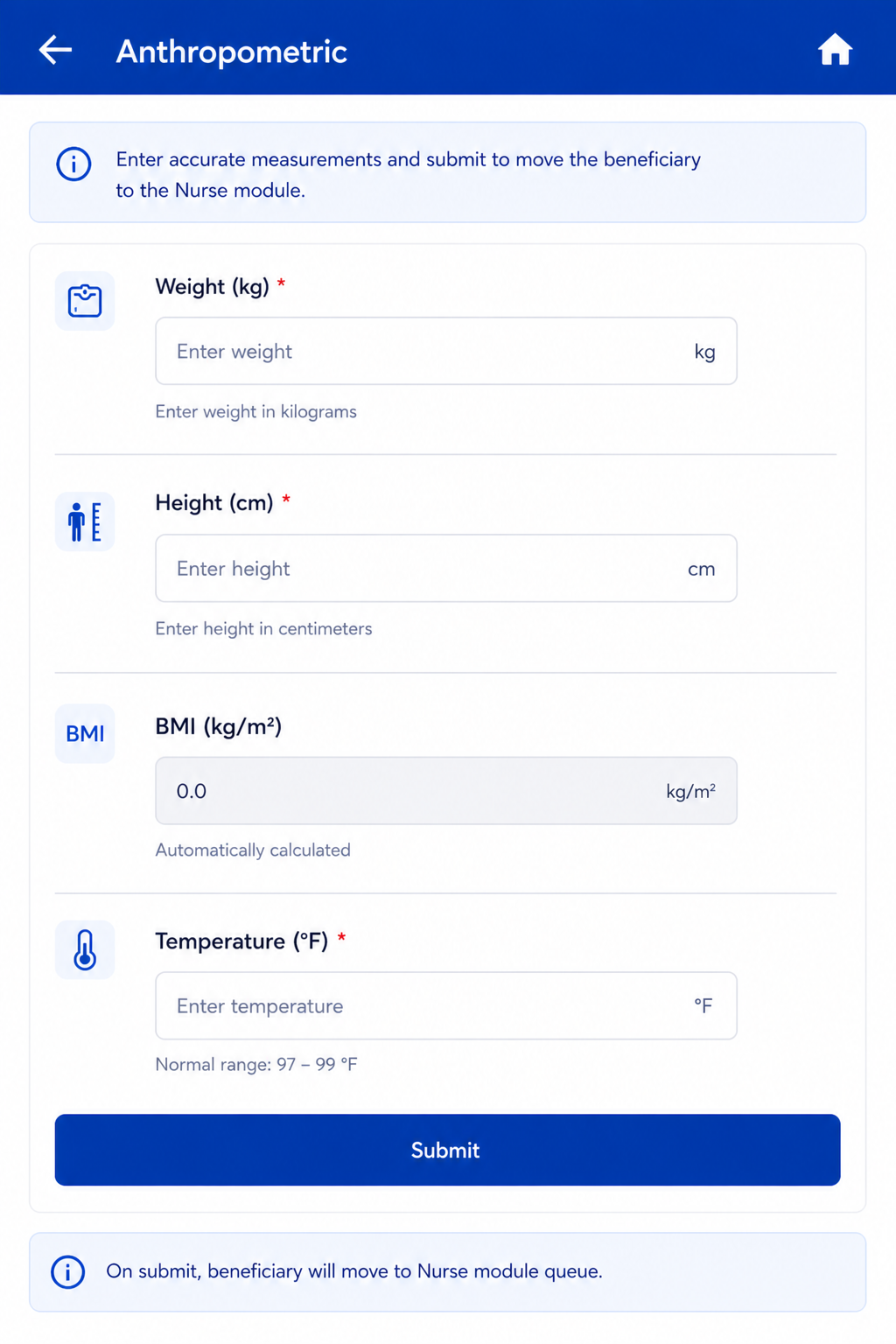
Follows immediately after Registration Submit. Same actor: Registration Officer. On Anthropometry Submit → Beneficiary moves to Nurse module queue.
Field Name | Input / Type | Options / Values | Logic & Validations |
Weight (Kgs) | Number input | Numeric | Numeric; 1 decimal place allowed. |
Height (cms) | Number input | Numeric | Numeric; 1 decimal place allowed. |
BMI = Weight / (Height/100)² | Auto-calculated (read-only) | Calculated value | Auto-calculated when both Height and Weight are entered. Formula: Weight ÷ (Height ÷ 100)². Display to 1 decimal place. Non-editable. |
Temperature (Degree Fahrenheit) | Radio + free textbox | ||
| |||
Submit | Button | — | Beneficiary moves to Nurse module queue. |
5. Nurse Flow
Once a beneficiary is registered and anthropometry is completed, they appear in the Nurse module queue. The Nurse role covers four sequential screens: General Examination → TB Screening → General OPD (optional/skippable) → Diagnostics Screen.
...
On Submit → proceed to TB Screening screen.
Field Name | Input Type | Options / Values | Logic & Validations |
Pulse Rate (beats per minute) | Free textbox | Numeric (BPM) | · Free textbox for manual entry. · If value < 60 or > 90 BPM → show alert 'Refer to Health and Wellness Centre' and flag in Referral card on Home. Auto-sets 'Referral to HWC needed' = Yes. |
Systolic Blood Pressure (mmHg) | Free textbox | Numeric (mmHg) | · SBP and DBP fields placed side by side with their units. · Free textbox for manual entry. · If >= 140 mmHg (High) or < 90 mmHg (Low) → alert 'Refer to Health and Wellness Centre'. Auto-sets 'Referral to HWC needed' = Yes. |
Diastolic Blood Pressure (mmHg) | Free textbox | Numeric (mmHg) | · SBP and DBP placed side by side. · Free textbox for manual entry. · If >= 90 mmHg (High) or < 60 mmHg (Low) → alert 'Refer to Health and Wellness Centre'. Auto-sets 'Referral to HWC needed' = Yes. |
Random Blood Sugar (mg/dl) | Free textbox | Numeric (mg/dl) | · Free textbox for manual entry. · If >= 100 mg/dl → alert 'Refer to Health and Wellness Centre'. Auto-sets 'Referral to HWC needed' = Yes. |
Pallor | Radio Button | Present | Absent | · Optional. |
Icterus | Radio Button | Present | Absent | · Optional. |
Cyanosis | Radio Button | Present | Absent | · Optional. |
Clubbing | Radio Button | Present | Absent | · Optional. |
Lymphadenopathy | Radio Button | Present | Absent | · Optional. |
Oedema | Radio Button | Present | Absent | · Optional. |
Key Population / Risk Factors* | Checkbox (multi-select) | Pregnancy Lactating mother Anti-TNF treatment Bronchial Asthma Cancer Cardiovascular Disorder Contact of Known TB Patients COPD COVID recovered patients Diabetes Dialysis Health Care Worker Hypertensive Liver Impairment Migrant Miner Palliative Care Patient on immunosuppressants Prison Illegal Immigrant Renal Impairment Transplantation Urban Slum H/o Adult BCG Vaccination Undernourished / Malnourished (BMI <18.5 kg/m²) Elderly (age >60 years) Workplace settings (coal/sandblasting/brick kiln) Tea garden worker Construction site worker Congregate settings Attendees of de-addiction centers Person exposed to indoor air pollution Marginalized populations at risk of HIV LGBTQAI++ Substance abuse (alcoholic/intravenous drug users) Tobacco/smoker Silica exposure/silicosis Other Not Applicable | · Mandatory. · Multi-select.
· If 'Not Applicable' selected → all other options are disabled.
|
HIV Status* | Radio | Positive | Reactive | Negative | Unknown | · Mandatory. · Default: Unknown. |
Referral to HWC needed | Auto + manual | Yes | No | · Auto-set to 'Yes' if: Pulse < 60 or > 90 BPM; OR Systolic BP >= 140 or < 90 mmHg; OR Diastolic BP >= 90 or < 60 mmHg; OR Random Blood Sugar >= 100 mg/dl. · Show all such beneficiaries in the Referral → Health and Wellness Centre card on Home. · If all vitals fall in the normal range then 'Referral to HWC needed' remains No and the beneficiary does NOT appear in the HWC Referral card. |
Submit | Button | — | Proceed to TB Screening screen. |
5.2 TB Screening Module
RULE (*): If 'Yes' is selected for ANY question marked *, the system must enable 'Referred for Digital Chest X-Ray' and/or 'Referred for Sputum Collection'.
RULE (**): If 'Yes' is selected for ANY question marked **, the system must generate advisory: 'Advise tracing and screening of all family members'.
Field Name | Input Type | Options / Values | Logic & Validations |
Date | Calendar / Date Picker | Date | Mandatory. Default: Today's Date. Not greater than Today's Date. Accept date >= Date of beneficiary registration. Not editable once submitted. |
Coughing More than 2 weeks * | Radio button | Yes | No | Mandatory. |
Blood in Sputum * | Radio button | Yes | No | Mandatory. |
Fever > 2 weeks * | Radio button | Yes | No | Mandatory. |
Rise of fever in evening * | Radio button | Yes | No | Mandatory. |
Loss of Appetite * | Radio button | Yes | No | Mandatory. |
Loss of Weight * | Radio button | Yes | No | Mandatory. |
Night Sweats * | Radio button | Yes | No | Mandatory. |
History of TB * | Radio button | Yes | No | Mandatory. |
Are you currently taking Anti-TB drugs ** | Radio button | Yes | No | Mandatory. |
Anyone in Family Currently Suffering from TB ** | Radio button | Yes | No | Mandatory. |
"Is beneficiary asymptomatic" | Radio button | Yes | No | Option "Yes" will be auto selected if responses to all the Previous 10 Questions are "No". Option "No" will be auto selected if responses to any of the Previous 10 Questions are "Yes", valid even for one single response as "Yes". |
Next Screen after TB Screening Questions- | This Screen will be dynamic and results should keep on auto populating after NAAT device and Digital Chest X-ray devices are integrated. Manual entries are also allowed. | ||
Referred for digital chest x-ray | Radio button | Yes | No | · Default: Yes. · Do NOT show/ Hide for pregnant women. · Mandatory. · If yes, move beneficiary to Referral list titled 'Digital Chest X-ray'. |
Reason for denial to get referred for chest x-ray | dropdown |
| Enabled if Referred for digital chest x-ray= "No" Mandatory if enabled Multi select option Default option- Patient refused |
Other | free text | enabled if Reason for denial to get referred for chest x-ray= Other Mandatory if enabled | |
Is Digital Chest X-ray conducted | Radio / Auto | Yes | No | Enabled for everyone EXCEPT 'Are you pregnant = Yes' and Key Population / Risk Factors = Pregnancy. Enabled if Referred for digital chest x-ray= "Yes" Auto-populated by cross-device sync between STOP TB app and digital chest X-ray device. |
Reasons for not conducting the chest x-ray | dropdown |
| Enabled if Is Digital Chest X-ray conducted= "No" Mandatory if enabled Single Selection |
Other | free text | enabled if Reasons for not conducting the chest x-ray= Other Mandatory if enabled | |
Digital Chest X-Ray Test Result | Radio / Auto | Positive | Negative | Enabled only if 'Is Digital Chest X-ray conducted = Yes'. Auto-populated by cross-device sync. If Positive → move case to Suspected TB cases module AND show patient in NAAT referral list for further testing. |
Referred for Sputum Collection | Radio button | Yes | No | · Enabled in case of-
|
Reason for denial to get referred for sputum collection | dropdown |
| Enabled if Referred for sputum collection= "No" Mandatory if enabled Multi select option Default option- Patient refused |
Other | free text | Enabled if Reason for denial to get referred for sputum collection= Other Mandatory if enabled | |
Sputum Sample submitted at | Dropdown |
| Mandatory if Referred for Sputum Collection= "Yes" Default is TB Screening Camp |
Is NAAT test conducted | Radio / Auto | Yes | No | Enabled in case of-
|
Reasons for not conducting the NAAT test | dropdown |
| Enabled if Is NAAT test conducted= "No" Mandatory if enabled Single Selection |
Other | free text | enabled if Reasons for not conducting the NAAT test= Other Mandatory if enabled | |
NAAT test result | Radio button / Auto | Positive | Negative | Enabled only if 'Is NAAT conducted = Yes'. Auto-populated by cross-device sync. If Positive → move case to Confirmed TB cases module. |
Recommended for liquid culture test | Radio | Yes | No | Enabled only if History of TB = Yes AND Currently on Anti-TB drugs = Yes. |
Liquid Culture test result | Radio button | Positive | Negative | If Positive → move case to Confirmed TB cases module. Option to edit/select after form submission as results come after 40-45 days. |
Submit | Button | — | Continue to General OPD module. If skipped → move directly to Diagnostics Results screen. |
Acceptance Criteria — TB Screening
...
This module is Optional / Skippable. A 'Skip' button must be provided. Nurse can capture chief complaint and dispense OTC medication. Submit moves to Diagnostics screen.
Field Name | Input Type | Options / Values | Logic & Validations |
Chief Complaint | Dropdown (multi-select) | · Fever · Mild to moderate body pain · Headache · General weakness with fever · Acidity · Burning sensation in stomach · Indigestion · Gas · Bloating · Upper abdominal discomfort · Allergic symptoms · Sneezing · Runny nose · Itching (skin or eyes) · Mild allergic rash · Diarrhea · Loose stools · Gut imbalance · Indigestion with loose motion · Dehydration · Vomiting with weakness · Heat exhaustion · General weakness · Fatigue · Nutritional deficiency · Poor appetite · Fever in children · Body ache in children · Post-vaccination fever · Allergies in children · Cold with sneezing · Itching in children · Mild skin allergy · Diarrhea in children · Weak immunity · Recovery from illness | · Optional. · Multiple selection possible. |
Medication | Dropdown (multi-select) | · Tab Paracetamol (500 mg) · Tab Digene (Alluminium hydroxide+ magnesium aluminium silicate + magnesium oxide + simethicone) · Tab Cetrizine (10 mg) · Tab.Sporolac DS 120M (Lactic acid bacillus tablets) · ORS sachets · Tab Multivitamin · Syp Paracetamol 250mg (60ml) · Syp Cetrizine 60 ml · Syp Zinc 60 ml | · Mandatory if any chief complaint is selected. · Multiple selection is possible |
Frequency | Dropdown | Once daily | Twice daily | Thrice daily | SoS | Mandatory if Medication is selected. |
Duration | Dropdown | 1 day | 2 days | 3 days | 5 days | 7 days | Mandatory if Medication is selected. |
Notes / Remarks | Free text | — | Optional. |
Skip | Button | — | Skip OPD module and move directly to Diagnostics screen. |
Submit | Button | — | Save OPD data and move to Diagnostics screen. |
Acceptance Criteria — General OPD
...
This screen is visible in the Nurse module and is auto-populated via results from the Digital Chest X-ray and NAAT devices through cross-device sync. All results display here automatically.
Field Name | Input Type | Options / Values | Logic & Validations |
Date | Calendar / Date Picker | Date | Mandatory. Default: Today's Date. Not greater than Today's Date. Accept date >= Date of beneficiary registration. Not editable once submitted. |
Name | Textbox (read-only) | Auto-filled | Auto-fill from Beneficiary details. Shows First Name + Last Name. Read only. |
Age | Textbox (read-only) | Auto-filled | Auto-fill from Beneficiary details. Read only. |
Gender | Textbox (read-only) | Auto-filled | Auto-fill from Beneficiary details. Read only. |
Nikshay ID | Textbox | Auto-populated | Auto-populated after all mandatory fields per Nikshay application are filled. |
Is Digital Chest X-ray conducted | Radio / Auto | Yes | No | Enabled for everyone EXCEPT 'Are you pregnant = Yes' and Key Population / Risk Factors = Pregnancy. Auto-populated by cross-device sync between STOP TB app and digital chest X-ray device. |
Digital Chest X-Ray Test Result | Radio / Auto | Positive | Negative | Enabled only if 'Is Digital Chest X-ray conducted = Yes'. Auto-populated by cross-device sync. If Positive → move case to Confirmed TB cases module AND show patient in NAAT referral list for further testing. |
Is NAAT test conducted | Radio / Auto | Yes | No | Enabled in case of-
|
NAAT test result | Radio button / Auto | Positive | Negative | Enabled only if 'Is NAAT conducted = Yes'. Auto-populated by cross-device sync. If Positive → move case to Confirmed TB cases module. |
Recommended for liquid culture test | Radio | Yes | No | Enabled only if History of TB = Yes AND Currently on Anti-TB drugs = Yes. |
Liquid Culture test result | Radio button | Positive | Negative | If Positive → move case to Confirmed TB cases module. Option to edit/select after form submission as results come after 40-45 days. |
Submit | Button | — | Save diagnostics data. |
Acceptance Criteria — Diagnostics
...
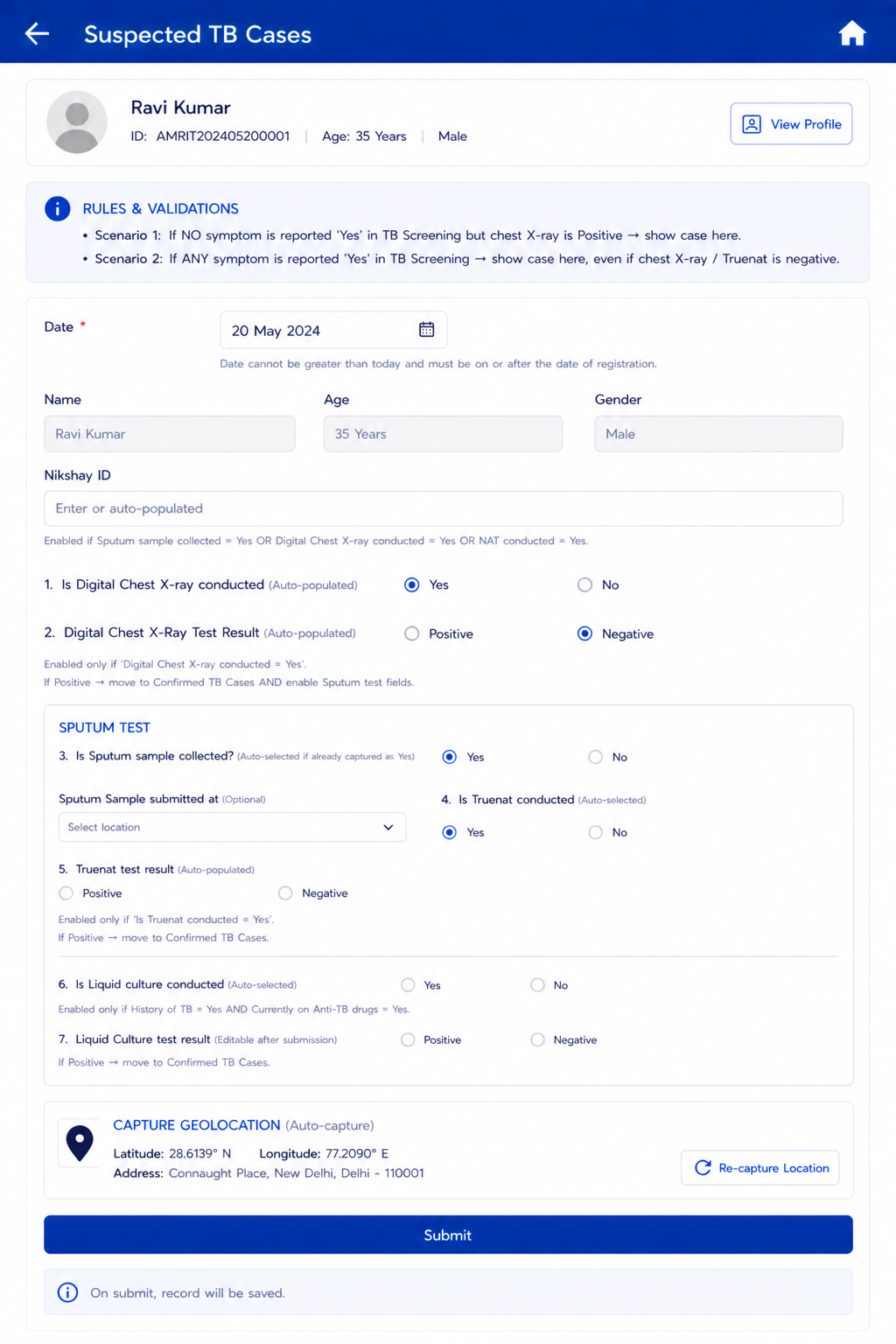
- Scenario 1: If NO symptom is reported 'Yes' in TB Screening but chest X-ray is Positive → show case here.
- Scenario 2: If ANY symptom is reported 'Yes' in TB Screening → show case here, even if chest X-ray / NAAT is negative.
Field Name | Field Type | Options / Values | Validation / Logic / Condition |
Date | Calendar / Date Picker | Date | Mandatory. Default: Today's Date. Not greater than Today's Date. Accept date >= Date of beneficiary registration. Not editable once submitted. |
Name | Textbox (read-only) | Auto-filled | Auto-fill from Beneficiary details. Shows First Name + Last Name. Read only. |
Age | Textbox (read-only) | Auto-filled | Auto-fill from Beneficiary details. Read only. |
Gender | Textbox (read-only) | Auto-filled | Auto-fill from Beneficiary details. Read only. |
Nikshay ID | Textbox | Auto/Manual | Enable if 'Is Sputum sample collected = Yes'; OR 'Digital Chest X-ray conducted = Yes'; OR 'NAT conducted = Yes'. |
Is Digital Chest X-ray conducted | Radio / Auto | Yes | No | Auto-selected 'Yes' if 'Is Digital chest x-ray conducted = Yes' in Diagnostics screen. |
Digital Chest X-Ray Test Result | Radio / Auto | Positive | Negative | Enabled only if 'Digital Chest X-ray conducted = Yes'. Auto-select if already captured in Diagnostics screen; also allow manual selection. If Positive → move to Confirmed TB cases AND enable Sputum test fields. |
Sputum Test (section) | Section | — | Enabled if: a) Digital Chest X-Ray Result = Positive; b) History of TB = Yes; c) Are you pregnant = Yes; d) Currently taking Anti-TB drugs = Yes. |
Is Sputum sample collected? | Radio button | Yes | No | Auto-selected 'Yes' if already captured as Yes. |
Sputum Sample submitted at | Dropdown | DMC | DH | CHC | PHC | SC | Optional. |
Is NAAT conducted | Radio button | Yes | No | Auto-selected 'Yes' if: Is NAAT conducted = Yes AND Sputum Sample Collected = Yes; OR Digital Chest X-Ray Result = Positive. |
NAAT test result | Radio button | Positive | Negative | Enabled only if Is NAAT conducted = Yes. Option to edit/select after submission. Auto-select if already captured in Diagnostics screen; allow manual selection. If Positive → move to Confirmed TB cases. |
Is Liquid culture conducted | Radio button | Yes | No | Auto-selected 'Yes' if: Is liquid culture conducted = Yes AND Sputum Sample Collected = Yes. Enabled only if History of TB = Yes AND Currently on Anti-TB drugs = Yes. |
Liquid Culture test result | Radio button | Positive | Negative | Auto-select if already captured in Diagnostics screen; allow manual selection. If Positive → move to Confirmed TB cases. Option to edit/select after submission. |
Capture Geolocation | Auto capture | — | Capture current location details: latitude, longitude, address. |
Submit | Button | — | Save record. |
7. Counselling Officer Flow
...
7.2 Counselling Module — Field Specifications
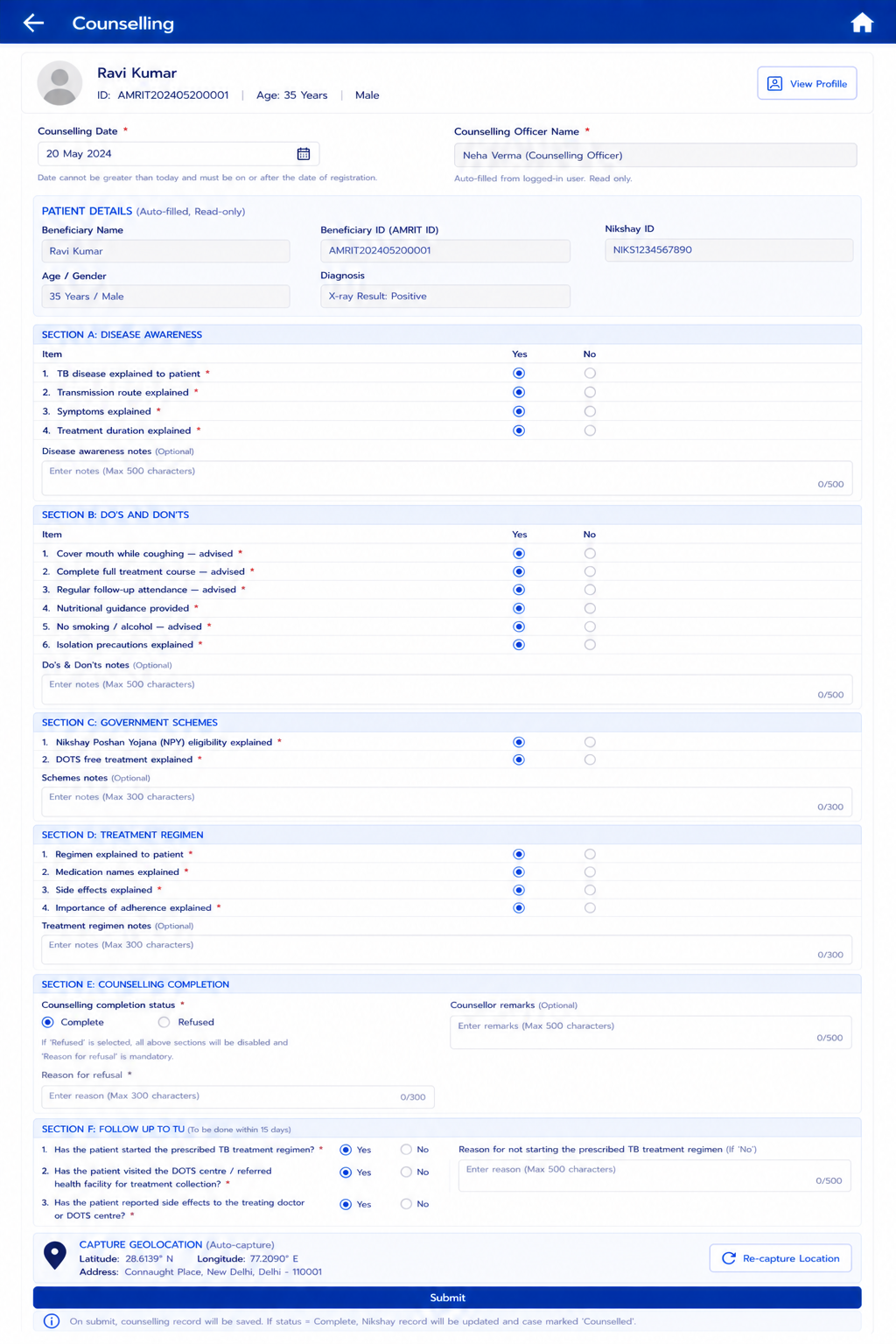
Field Name | Input Type | Options / Values | Logic & Validations |
Counselling Date | Date picker | Date | Mandatory. Default: Today. Not > Today. Must be >= Registration date. |
Counselling Officer Name | Auto-filled (read-only) | Logged-in user | Auto-filled from logged-in Counselling Officer account. Read only. |
— PATIENT HEADER (AUTO-FILLED, READ-ONLY) — | |||
Beneficiary Name | Textbox (read-only) | Auto-filled | First Name + Last Name from beneficiary record. |
Beneficiary ID (AMRIT ID) | Textbox (read-only) | Auto-filled | From beneficiary record. |
Nikshay ID | Textbox (read-only) | Auto-filled | From Diagnostics screen. Read only. |
Age / Gender | Textbox (read-only) | Auto-filled | Age (years) and Gender from beneficiary record. |
Diagnosis | Textbox (read-only) | Auto-filled | X-ray Result | NAAT Result | Liquid Culture Result — populated from diagnostic records. Read only. |
SECTION A: DISEASE AWARENESS | |||
TB disease explained to patient | Radio button | Yes/ No | Mandatory. Must be checked before proceeding. Confirms counsellor has explained TB to the patient. |
Transmission route explained | Radio button | Yes/ No | Mandatory. |
Symptoms explained | Radio button | Yes/ No | Mandatory. |
Treatment duration explained | Radio button | Yes/ No | Mandatory. |
Disease awareness notes | Free text | — | Optional. Max 500 chars. |
SECTION B: DO'S AND DON'TS | |||
Cover mouth while coughing — advised | Radio button | Yes/ No | Mandatory. |
Complete full treatment course — advised | Radio button | Yes/ No | Mandatory. |
Regular follow-up attendance — advised | Radio button | Yes/ No | Mandatory. |
Nutritional guidance provided | Radio button | Yes/ No | Mandatory. |
No smoking / alcohol — advised | Radio button | Yes/ No | Mandatory. |
Isolation precautions explained | Radio button | Yes/ No | Mandatory. |
Do's & Don'ts notes | Free text | — | Optional. Max 500 chars. |
SECTION C: GOVERNMENT SCHEMES | |||
Nikshay Poshan Yojana (NPY) eligibility explained | Radio button | Yes/ No | NPY: DBT of Rs. 1000/month for duration of treatment. |
DOTS free treatment explained | Radio button | Yes/ No | Confirm patient understands treatment is free under NTEP. |
Schemes notes | Free text | — | Optional. Max 300 chars. |
SECTION D: TREATMENT REGIMEN | |||
Regimen explained to patient | Radio button | Yes/ No | Mandatory. |
Medication names explained | Radio button | Yes/ No | Mandatory. |
Side effects explained | Radio button | Yes/ No | Mandatory. |
Importance of adherence explained | Radio button | Yes/ No | Mandatory. |
Treatment regimen notes | Free text | — | Optional. Max 300 chars. |
SECTION E: COUNSELLING COMPLETION | |||
Counselling completion status | Radio button | Complete | Refused | Mandatory. Make all the above sections obsolete if “Counselling completion status” = “Refused” If Refused → enable 'Reason for refusal' field. |
Reason for refusal | Free text | — | Mandatory if Counselling status = Refused. Max 300 chars. |
Counsellor remarks | Free text | — | Optional. Max 500 chars |
. | |||
Submit | Option to submit to be given here, so that counsellor can submit and move to another patient. Next Section can be opened at a later date | ||
SECTION F | |||
: Follow Up to TU | To be done within 15 days Editable | ||
Has the patient started the prescribed TB treatment regimen? | Radio button | Yes/ No | If No is selected, then enable “Reason for not starting the prescribed TB treatment regimen” |
Reason for not starting the prescribed TB treatment regimen | Free text | To be enabled if “Has the patient started the prescribed TB treatment regimen” = “No” Up to 500 characteristics | |
Has the patient visited the DOTS centre / referred health facility for treatment collection? | Radio button | Yes/ No | |
Has the patient reported side effects to the treating doctor or DOTS centre? | Radio button | Yes/ No | |
Submit | Button | — | Save counselling record. If status = Complete → Nikshay record updated; case marked 'Counselled'. |
7.3 Confirmed TB Cases — Treatment & Follow-Up
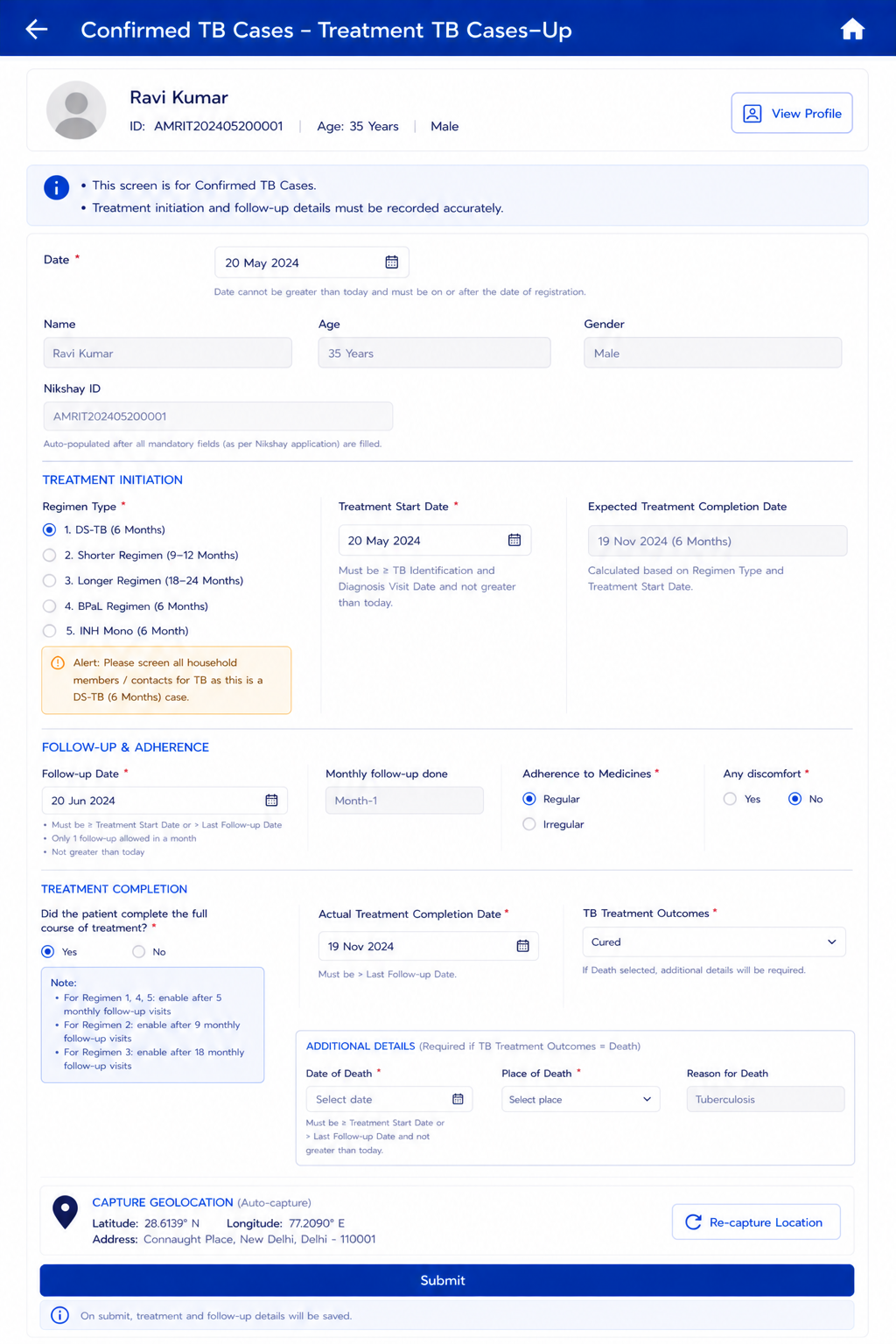
This screen manages treatment initiation and ongoing follow-up for beneficiaries confirmed as TB positive via Digital Chest X-ray, NAAT, or Liquid Culture.
Field Name | Field Type | Options / Values | Validation / Logic / Condition |
Regimen Type | Radio button | 1.DS-TB (6 Months) 2.Shorter Regimen (9–12 Months) 3.Longer Regimen (18–24 Months) 4.BPaL Regimen (6 Months) 5.INH Mono (6 Month) | · If DS-TB (6 Months) selected → open TPT module. · Alert volunteer to screen all household members / contacts if DS-TB case is selected. |
Treatment Start Date | Date picker | Date | · Mandatory. Must be >= TB Identification and Diagnosis Visit Date. Not greater than Today's Date. |
Expected Treatment Completion Date | Label (read-only) | Auto-calculated | Auto calculate this date based on below condition form ‘Treatment Start Date’: 1. If ‘Regimen Type’ is “1”, “4”, “5” then add 6 months 2. If ‘Regimen Type’ is “2”, then, Treatment duration is 9–12 months (show 9–12 range dates) 3. If ‘Regimen Type’ is “3”, then, Treatment duration is 18–24 months (show 18–24 range dates) |
— FOLLOW-UP & ADHERENCE SECTION — | |||
Follow-up Date | Date picker | Date | · Greater than or equal to Treatment Start Date or greater than Last Follow up Date · Mandatory · Minimum date is Treatment Start Date · Accept date greater than Last Follow up Date · Allow 1 Follow up visit in a month (i.e. monthly 1 Follow up) · Not greater than Today's Date |
Monthly follow-up done | Label (read-only) | Month-1 to Month-12 | Incremental based on monthly follow-up visits completed. Indicate the status of follow-up on the card "Due", "Overdue" or "Completed". |
Adherence to Medicines | Radio button | Regular | Irregular | — |
Any discomfort | Radio button | Yes | No | — |
— TREATMENT COMPLETION SECTION — | |||
Did the patient complete the full course of treatment? | Radio button | Yes | No | Enable these below filed based on below conditions: 1. If ‘Regimen Type’ is “1”, “4”, “5” then enable after 5 Monthly follow up visits 2. If ‘Regimen Type’ is “2”, then enable after 9 Monthly follow up visits 3. If ‘Regimen Type’ is “3”, then enable after 18 Monthly follow up visits |
Actual Treatment Completion Date | Date picker | Date | Enabled if 'Yes' selected above. Must be > Last Follow-up Date. |
TB Treatment Outcomes | Dropdown | Cured | Failed | Lost to Follow-up (LFU) | Death | If Death selected → update Beneficiary Status = Death in Beneficiary record; Enable Date of Death, Place of Death, and Reason for Death fields. |
Date of Death | Date picker | Date | Enable only if TB Treatment Outcomes = Death. Mandatory if enabled. Default: null. Not greater than Today's Date. >= Treatment Start Date or > Last Follow-up Date. |
Place of Death | Dropdown | Home | Subcenter | PHC | CHC | District Hospital | Medical College Hospital | Private Hospital | Other Place | Enable only if TB Treatment Outcomes = Death. |
Reason for Death | Label (read-only) | Tuberculosis | Enable only if TB Treatment Outcomes = Death. Pre-filled as 'Tuberculosis'. Read only. |
Reason for non-completion of treatment | Textbox | Free text | Enable if 'No' selected for 'Did the patient complete full treatment?' |
Capture Geolocation | Auto capture | — | Capture current location: latitude, longitude, address. |
Submit | Button | — | Save record. |
Follow-up visit history | Table (read-only) | — | Maintain and display complete follow-up visit history. |
7.4 TB Preventive Treatment (TPT) Module
...
7.4.1 Household Contact Line Listing Screen
Field Name | Field Type | Options / Values | Validation / Logic / Condition |
Name of the contact | Text Box | Free text | — |
Age of the contact | Number input | Numeric | — |
Gender | Dropdown | Male | Female | Transgender | Prefer not to say | Mandatory. Speech-to-text feature enabled. |
Mobile Number | Number | Numeric | Optional. Speech-to-text feature enabled. |
TPT Screening Status | Radio / Dropdown | Not Started | Pending | Completed | Mandatory. Single selection. Default: Pending. |
Referral Facility for screening | Radio / Dropdown | HWC | PHC | CHC | District Hospital | Mandatory. Single selection. From here volunteer can go directly to Submit as contact must first get tested. |
Screening done at the referral facility | Radio | Yes | No | Mandatory. |
Is it confirmed TB case | Radio | Yes | No | If Yes → move card to Confirmed TB list. If No → continue ahead. |
Are you advised to take TPT | Radio | Yes | No | If Yes → continue to next field. If No → go directly to Submit. |
TPT initiated | Radio | Yes | No | Mandatory. Enable next fields if Yes. |
TPT start date | Date picker | <= Today's date | Mandatory if enabled. Cannot be future date. Cannot be before date of screening. |
Treatment duration of TPT | Radio / Dropdown | 1 Month | 3 months | 6 months | — |
Expected completion date | Date (read-only) | Auto-calculated | Auto-calculated = TPT start date + regimen duration. Non-editable. |
Follow-up visit number | Numeric (read-only) | Auto-increment (1–6) | Non-editable. Automatically calculated by system. |
Follow-up visit date | Date picker | <= Today's date | Mandatory if enabled. Cannot be future date. Cannot be before TPT start date. |
TPT completion status | Radio / Dropdown | Completed Incomplete Lost to follow-up Developed active TB during TPT Died during TPT Other | Mandatory. If 'Completed' → enable Date of completion field. If 'Developed active TB during TPT' → redirect volunteer to create new TB Suspected Case record and close this TPT case. If 'Died during TPT' → enable Date of death and Cause of death fields. |
Other | Free text | — | — |
Date of completion | Date picker | <= Today's date | Mandatory if TPT completion status = Completed. Cannot be future date. |
Date of death | Date picker | Date | Enabled if TPT completion status = Died during TPT. Mandatory if enabled. |
Cause of death | Free text | — | Enabled if TPT completion status = Died during TPT. Mandatory if enabled. |
Capture Geolocation | Auto capture | — | Capture current location: latitude, longitude, address. |
Submit | Button | — | Save record. |
Acceptance Criteria — Confirmed TB Cases
...
8.1 Common List Screen Elements (All Four Cards)
Element | Specification |
Screen header | Card name (e.g. 'Digital Chest X-ray') displayed as screen title with Back arrow to Referrals home |
Search bar | Search by beneficiary name or AMRIT ID. Real-time filtering. |
Sort options | Sort by: Date referred (default — newest first) | Name (A–Z) | Status |
Filter options | Filter by: Status (All / Pending / Completed / Referred elsewhere) | Date range |
Beneficiary count | Total count displayed: 'X beneficiaries' below the screen title |
Sync indicator | Global sync status bar visible at top of screen |
Refresh button | Manual refresh to pull latest cross-device sync data |
Referral Card | Population Listed | Routing Rule |
Digital Chest X-ray | All beneficiaries who are not pregnant and are referred for X-ray from TB Screening | All non-pregnant beneficiaries (all genders, all ages) who have any * symptom = Yes in TB Screening |
NAAT | a) Pregnant beneficiaries (direct referral, skipping X-ray) b) Beneficiaries with positive Digital Chest X-ray result | Pregnancy → direct to NAAT. Positive X-ray → referred to NAAT for further testing. |
Liquid Culture | Beneficiaries recommended for liquid culture test | History of TB = Yes AND Currently on Anti-TB drugs = Yes AND Referred for Sputum = Yes |
Health and Wellness Centre | Beneficiaries with abnormal vitals | Auto-referred: Pulse < 60 or > 90; Systolic BP >= 140 or < 90; Diastolic BP >= 90 or < 60; Random Blood Sugar >= 100; Temperature >= 100°F |
Acceptance Criteria — Referrals
...
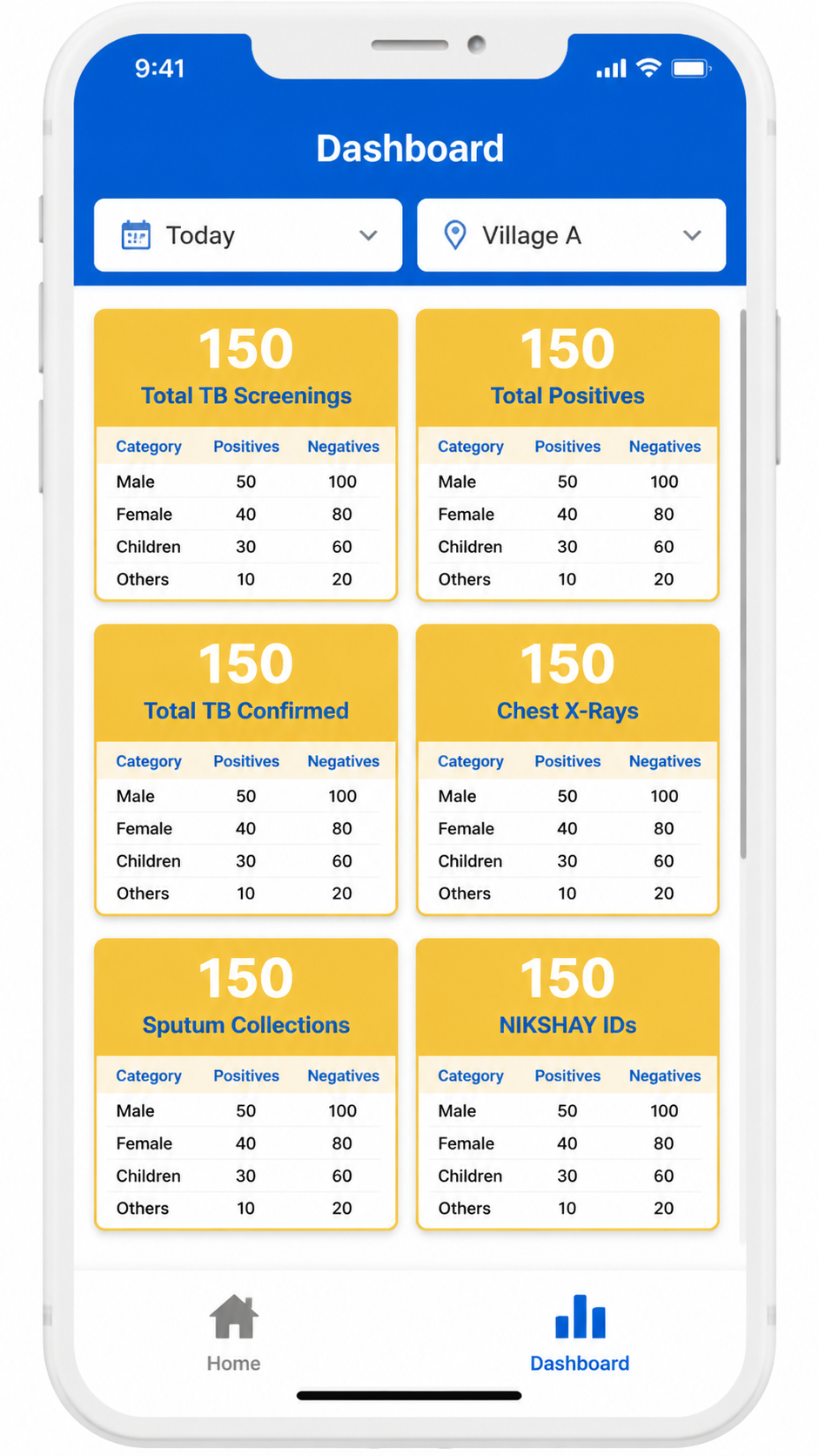
- Landing page has 2 tabs: Home and Dashboard. The Dashboard tab flips to the analytics view.
- Two filter options are provided at the top of the Dashboard:
- Time Period: Dropdown — Today / January / February / March / April / May / June / July / August / September / October / November / December
- Village Name: Dropdown — populated with village/hamlet names
- All dashboard indicators auto-populate based on the filter selected.
- Total numbers shown in bold; sex-disaggregated data shown for each card.
Dashboard Card | Colour | Breakdown Required | Logic / Condition |
Total TB Screenings (Total Positives / Negatives) | Yellow card | Male — Positives / Negatives Female — Positives / Negatives Children (<15 yrs) — Positives / Negatives Others | Auto-populate based on filter selected. Total shown in bold. |
Total Unscreened cases | Disaggregated by reasons (dropdown options specified) | Auto-populate based on filter selected. Total shown in bold. | |
Total beneficiaries with Past History of TB | Male — Positives / Negatives Female — Positives / Negatives Children (<15 yrs) — Positives / Negatives Others | Auto-populate based on filter selected. Total shown in bold. | |
Total beneficiaries Currently on Anti-TB Drugs | Male — Positives / Negatives Female — Positives / Negatives Children (<15 yrs) — Positives / Negatives Others | Auto-populate based on filter selected. Total shown in bold. | |
Total TB Suspected Cases (Total Positives / Negatives) | Yellow card | Male — Positives / Negatives Female — Positives / Negatives Children (<15 yrs) — Positives / Negatives Others | Auto-populate based on filter selected. Total shown in bold. |
Total TB Confirmed Cases (Total Positives / Negatives) | Yellow card | Male — Positives / Negatives Female — Positives / Negatives Children (<15 yrs) — Positives / Negatives Others | Auto-populate based on filter selected. Total shown in bold. |
Total Digital Chest X-Rays conducted (Total Positives / Negatives) | — | Male — Positive / Negative Female — Positive / Negative Children (<15 yrs) — Positives / Negatives Others Age >= 60 years — Positives / Negatives | Auto-populate based on filter selected. Total shown in bold. |
Total Sputum collections conducted (Total Positives / Negatives) | — | Male — Positives / Negatives Female — Positives / Negatives Children (<15 yrs) — Positives / Negatives Others Age >= 60 years — Positives / Negatives | Auto-populate based on filter selected. Total shown in bold. |
Total NAAT tests conducted | — | Male — Positives / Negatives Female — Positives / Negatives Children (<15 yrs) — Positives / Negatives Others Age >= 60 years — Positives / Negatives | Auto-populate based on filter selected. Total shown in bold. |
Total sputum samples sent for liquid culture | — | Male — Positives / Negatives Female — Positives / Negatives Children (<15 yrs) — Positives / Negatives Others Age >= 60 years — Positives / Negatives | Auto-populate based on filter selected. Total shown in bold. |
Total cases referred to Health and Wellness Centres | — | Male Female Children (<15 yrs) Others Age >= 60 years | Auto-populate based on filter selected. Total shown in bold. |
NIKSHAY IDs | Yellow card | Total count | Total number of Nikshay IDs created in selected time period or village. |
ABHA IDs | Yellow card | Total count | Total number of ABHA IDs created in selected time period or village. |
Role-Based Access Control (RBAC)
Role | Modules Accessible | Write Access | Read Access | Cannot Access |
Registration Officer | Registration, Anthropometry | Registration, Anthropometry data for own camp | Own records | All Nurse, Counselling, Diagnostic, and Admin screens |
Nurse | General Examination, TB Screening, General OPD, Diagnostics Screen | All Nurse module data | Registration + Anthropometry data | Confirmed TB Cases (write); Counselling; Admin panel |
Counselling Officer | Confirmed TB Cases, Counselling, TPT / Household Contact Line Listing | Counselling data, Treatment initiation, Follow-up | Confirmed TB case data, Line list | Registration, Nurse modules (write); Admin panel |
Admin / NTEP / STOP TB | Full Dashboard, Reports, All modules (read), Configuration | Configuration, User management | All data — district and national level | full access |
Role Configuration and User Management: Admin can add/remove users and assign/modify roles from the local server (laptop) interface; role changes propagate to all devices on sync; role assignment is device-agnostic (handled at login, not device level).
Role based user access to be provided and single user can have multiple roles. This has to be managed by Admin role in the central server as well as the local server. Based upon the role access permission only the application should have specific role privileges. Roles will be registrar, nurse, counsellor.