
...
Date | Version Number | Author | Approved By | Document change reference |
Dr Vanshika | Madhav | Initial draft | ||
23.4.2026 | Dr Vanshika | Madhav | Beneficiary Registration, TB screening, Vitals after feedback and several updates done | |
24.4.2026 | Dr Vanshika | Madhav | Mock ups and flow diagram | |
Dr Vanshika | Madhav | TPT screening module in progress | ||
01.05.2026 | Dr Vanshika | Madhav | Offline/ Online functionality with cross device communication. | |
05.05.2026 | Dr Vanshika | Madhav | General Examination, General OPD, Counsellor Modules, Role Based Access Control, Glossary, Architecture Overview and Sync model | |
01.06.2026 | Dr Vanshika | Madhav | Non House hold list, Unscreened list, Door locked cases management, Role Configuration and user management, Other application restrictions, Mobile device management, Smart Search, DIGIPIN, | |
Dr Vanshika | Madhav | AI innovation for Nutritional Counselling, Contact tracing questionnaire |
| Table of Contents |
|---|
1. Executive Summary & Core Objectives
...
Module | Scope Status |
Offline functionality with cross-device communication + online sync to central server (AMRIT) | Mandatory |
Role-based user access (with actions and privileges) | Mandatory |
House Hold registration Module | Enlisted in this PRD |
Non House Hold registration Module | Enlisted in this PRD |
Beneficiary Registration Module | Enlisted in this PRD |
Unscreened Beneficiary Registration Module | Enlisted in this PRD |
TB Screening, tracking, confirmation, treatment follow-up and TPT modules | Enlisted in this PRD |
General Examination and General OPD modules | Enlisted in this PRD |
User Dashboard indicators | Enlisted in this PRD |
Integration of Nikshay application | External technical dependency |
Integration of portable digital chest X-ray device (AI enabled) | External technical dependency |
Integration of lab testing device (sputum testing and others) | External technical dependency |
Integration of AMRIT inventory management module | To be Included |
ABDM M2 flow (care context) | |
Pre-Camp Work Plan Preparation Module | Subject to requirement |
...
The finalized dataset will then be uploaded or integrated into the AMRIT system to ensure backend- (Discussion with the tech provider is in progress and is subjected to change)
Device Binding: Each user account must be bound to one or more specific devices identified by MAC address or IMEI. Login from an unregistered device must be blocked with an error: 'This device is not authorized for your account. Contact your Admin.' Device binding is managed by Admin from the local server interface."
Application Restriction- "Organization-provided devices must be configured with an MDM (Mobile Device Management) solution to restrict access to non-program applications. This is an infrastructure/deployment requirement outside the scope of the STOP TB application but must be addressed in the deployment checklist."
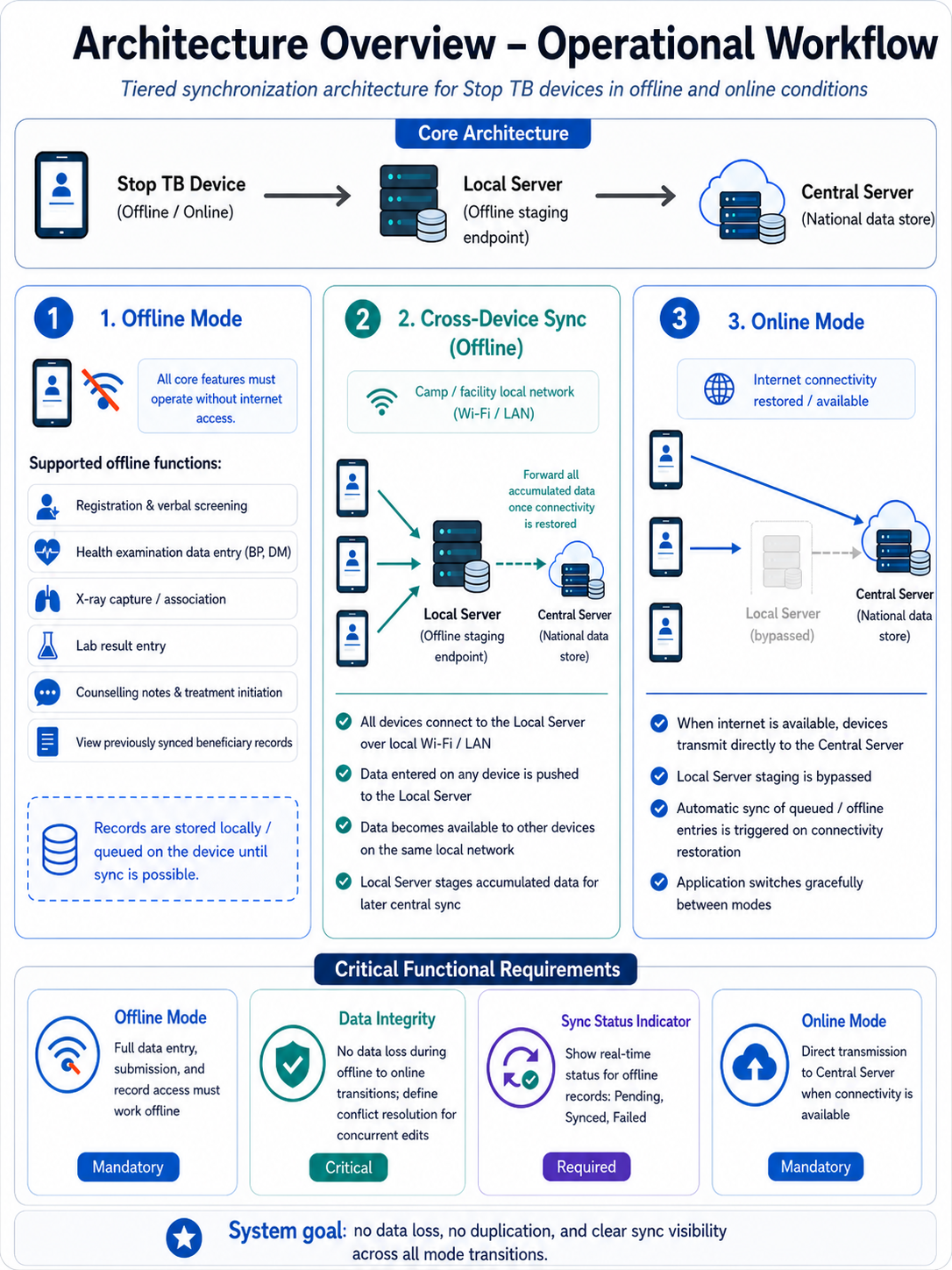
STOP TB- Data Flow Diagram
...
- Top row contains: Hamburger icon (left), 'STOP TB' text (centre), Sync button, Language Translation button
- Hamburger icon (side drawer) contains: Full Name (User), Username, Sync Records, Create ABHA ID, Support, Request to delete account, Log out
- Landing page has 2 tabs: Home and Dashboard
3.2.1 Home
...
Tab
The Home tab must render role-conditionally.
Registration Officer: sees "House hold", "All Beneficiaries", "Non House Hold", "Unscreened" card only cards (with Registration button) (with Registration button) QAQR nand and Anthropometry screen.
Nurse: sees 'All Beneficiaries' (queue view, no Registration button), General Examination, General OPD ,Diagnostics screen and 'Referrals' card.
Counselling Officer: sees queue of only Confirmed TB Cases and TPT card cards only. On clicking on these cases counseliing counselling module will further open.
Admin: sees all cards.
Flow- A Nurse logs in>>Home tab loads>>Registration button is not visible and only Nurse-accessible cards are displayed. Similarly for other roles.
SectionsCard | On Click — Opens | Sub-Cards |
For Registration Officer Login | ||
House Hold list | ||
All Beneficiaries list | Beneficiary Registration module with floating Registration button in right corner | List of all registered beneficiaries; Registration button initiates new registration |
Non House Hold list | To address the cases for people without households (Homeless, migrants, wanderers etc) a separate list is to be maintained with the ability to link them to a HH at later stage if and when it happens. For such cases register as an individual beneficiary without HH linkage. Give a flag on the ben card “No HH” by a cross on the home icon. The system must allow linking this ben to an HH at a later date from the Beneficiary Card edit screen." Give Same beneficiary registration form in this section. Once the beneficiary is registered in this list, then this ben will also be shown in the list of all beneficiaries irrespective of HH or no HH. | |
Unscreened list | A new card should be introduced in the registrar home page “Unscreened Population” module to track unscreened population with details captured and dropdown options given for reason of not screening them- physically disabled, bed ridden, door lock, deny, others etc with multiple date of attempts, notes etc. This should also be added in the dashboard titled “Total Unscreened and disaggregated by reasons” | |
For Nurse Login | ||
TB (Tuberculosis) | Tuberculosis module; next screen shows 3 cards | TB Screening | Suspected TB Cases | Confirmed TB Cases |
Referrals | Referrals module; next screen shows 4 cards | Digital Chest X-ray | NAAT | Liquid Culture | Health and Wellness Centre |
For Counsellor Login | ||
Confirmed TB cases | ||
Counselling modules | ||
TPT module |
Referral Card routing rules: Pregnant beneficiaries → shown directly in NAAT card. All non-pregnant beneficiaries (all genders, all ages) → shown in Digital Chest X-ray card. If abnormality detected on chest X-ray → referred further to NAAT. Beneficiaries with high BP or high Random Blood Sugar → shown in Health and Wellness Centre card in addition to Digital Chest X-Ray/ NAAT cards.
...
S No | Name of Data Field | Field Type | Value/ Options | Validation/ Logic/ Condition |
1 | Separate Kitchen | Spinner | Is Mandatory · Yes · No | |
2 | Type of Fuel used for cooking | Spinner | Is Mandatory | Multi select option to be provided |
3 | Other type of fuel used for cooking | Textbox | · Enable if other is selected above · Is Mandatory if other is selected above · Allow Alphanumeric Character and special Characters · Character limit 100 | |
4 | Primary Source of water | Spinner | Is Mandatory | Multi select option to be provided |
5 | Other Source of Water | Textbox | · Enable if other is selected above · Is Mandatory if other is selected above · Allow Alphanumeric Character and special Characters · Character limit 100 | |
6 | Availability of Electricity | Spinner | Is Mandatory | |
7 | Other Availability of electricity | Textbox | · Enable if other is selected above · Is Mandatory if other is selected above · Allow Alphanumeric Character and special Characters · Character limit 100 | |
8 | Availability of Toilet | Spinner | Is Mandatory | |
9 | Other Availability of Toilet | Textbox | · Enable if other is selected above · Is Mandatory if other is selected above · Allow Alphanumeric Character and special Characters · Character limit 100 | |
After Household registration is completed, show below alert in pop: |
Field Name | Field type | Values/ Options | Validations |
GPS unavailable | Checkbox If this box is checked only “Reason field” should be activated If this box is checked then fields “Latitude”, “Longitude”, “DIGIPIN” and time stamp should be disabled. | ||
Reason | Dropdown | · No GPS signal · Indoor location · Underground · Device GPS disabled · Other | |
Latitude | Numeric (read-only) | Auto-populated | Decimal degrees format (e.g. 21.1458). Auto-populated from GPS capture. Non-editable after capture. |
Longitude | Numeric (read-only) | Auto-populated | Decimal degrees format (e.g. 21.1458). Auto-populated from GPS capture. Non-editable after capture. |
DIGIPIN | Alphanumeric (read-only) | 10-character code | Auto-generated from Lat/Long using DIGIPIN encoding algorithm (open-source, can run offline). Displayed as: ◉ XXXX-XXXX-XX (official DIGIPIN notation). Non-editable. |
Timestamp | Date and Time (read-only) | Auto | Non editable System captures timestamp |
Cancel | Button |
· No |
· If selected "no" then do not erase the patient health data and let the page remain open so it can be submitted by volunteer as sometime by mistake cancel button is clicked. |
Submit |
|
4. Registration Officer Flow
...
Field Name | Input Type | Options / Values | Logic & Validations |
Date of Registration |
| ||
Beneficiary ID (AMRIT ID) |
| ||
Photo | Camera | Optional |
|
I want to add a person from* | Radio | · Public Sector
| This field is not visible in the form/ screen. Will be handled in the backend. Mandatory · Single select
|
Type of Case Finding* | Radio | · Passive (Routine programme)
| ·This field is not visible in the form/ screen. Will be handled in the backend. Mandatory · Single select
|
First Name* | Text Input | · Free text | · Mandatory · Only English letters
|
Middle & Last Name* | Text Input |
| · Mandatory · Only English letters
|
Beneficiary Status | Radio Button | · Alive · Death | · Enable only in the “Edit” Beneficiary screen · Auto-populate, if ‘Death’ is reported from any module · Default value is “Alive” · If “Death” is selected, enable below four fields and mark it mandatory- 1. Date of Death 2. Time of Death 3. Reason for Death
|
Date of Death | Date picker | · Enable if “Beneficiary status”= “Death” · Mandatory if enabled · By default, date is null · Not greater than Today’s Date · Accept ‘Date of Death’ after date of registration
| |
Time of Death | Time picker | · Show only if above value is “Death”
| |
Reason for Death (Type of Death) |
· Natural Death · Accident · Infectious Disease · Animal Bite Death · Suicide · Undetermined | · Enable if “Beneficiary status”= “Death” · Mandatory if enabled
| |
Place of Death |
| · Enable if “Beneficiary status”= “Death” · Mandatory if enabled
| |
Other Place of Death | Textbox |
| |
Age* | Number Input | 1–99 | · Required. · Numeric. Min 1 Max 99 in years
|
Date of Birth | Date Picker |
| |
Gender* | Radio | · Male · Female · Transgender | · Mandatory
|
Mobile number not available | Checkbox |
| |
Primary Phone* | Number |
| |
Whose mobile number | dropdown | · Self · Husband · Mother · Father · Family Head
|
|
Address* | Text |
|
|
Village* | Dropdown |
| |
Caste* | Radio | · SC · ST · Other | · Mandatory
|
Area* | Radio | · Tribal-NPVTG · Tribal-PVTG · Rural · Urban · Urban Slum · Unknown | · Mandatory Default Unknown. |
Marital Status* | Radio | · Single · Married · Unknown | · Mandatory· Default Unknown · Should be made selectable (Blank) so that user can ask and fill this detail by asking beneficiary. |
Are you Pregnant* | radio button |
|
|
Husband's/ Wife's Name | Textbox | · Optional
All letter should be in caps | |
Father's Name | Textbox | · |
|
Mother's Name | Textbox | · |
|
Occupation* | Dropdown | · Unknown · Student · Unemployed · Homemaker · Farmer · Laborer / Daily Wage Worker · Self-employed / Business · Government Employee · Private Employee · Health Care Worker · Retired / Pensioner · Other | · Mandatory · Default Unknown. |
Socioeconomic Status* | Radio | · APL · BPL · Unknown | · Mandatory
|
Default: auto-inherit from linked Household GPS coordinates if HH registration is completed. If beneficiary has no linked HH (non-HH member, door-lock scenario) then again the following table will open and will capture camp latitude and longitude. Display generated DIGIPIN on Beneficiary Card.
Field Name | Field type | Values/ Options | Validations |
Latitude | Numeric (read-only) | Auto-populated | Decimal degrees format (e.g. 21.1458). Auto-populated from GPS capture. Non-editable after capture. |
Longitude | Numeric (read-only) | Auto-populated | Decimal degrees format (e.g. 21.1458). Auto-populated from GPS capture. Non-editable after capture. |
DIGIPIN | Alphanumeric (read-only) | 10-character code | Auto-generated from Lat/Long using DIGIPIN encoding algorithm (open-source, can run offline). Displayed as: ◉ XXXX-XXXX-XX (official DIGIPIN notation). Non-editable. |
Timestamp | Date and Time (read-only) | Auto | Non editable System captures timestamp |
Cancel | Button |
· No |
· If selected "no" then do not erase the patient health data and let the page remain open so it can be submitted by volunteer as sometime by mistake cancel button is clicked. |
Submit |
|
Acceptance Criteria — Registration
...
Field Name | Input / Type | Options / Values | Logic & Validations |
Weight (Kgs) | Number input | Numeric | Numeric; 1 decimal place allowed. |
Height (cms) | Number input | Numeric | Numeric; 1 decimal place allowed. |
BMI = Weight / (Height/100)² | Auto-calculated (read-only) | Calculated value | Auto-calculated when both Height and Weight are entered. Formula: Weight ÷ (Height ÷ 100)². Display to 1 decimal place. Non-editable. |
Temperature (Degree Fahrenheit) | Radio + free textbox Free textbox also provided for manual entry. Normal range shown: 97–99°F. |
| |
Submit | Button | — | Beneficiary moves to Nurse module queue. |
...
Field Name | Input Type | Options / Values | Logic & Validations |
Counselling Date | Date picker | Date | Mandatory. Default: Today. Not > Today. Must be >= Registration date. |
Counselling Officer Name | Auto-filled (read-only) | Logged-in user | Auto-filled from logged-in Counselling Officer account. Read only. |
— PATIENT HEADER (AUTO-FILLED, READ-ONLY) — | |||
Beneficiary Name | Textbox (read-only) | Auto-filled | First Name + Last Name from beneficiary record. |
Beneficiary ID (AMRIT ID) | Textbox (read-only) | Auto-filled | From beneficiary record. |
Nikshay ID | Textbox (read-only) | Auto-filled | From Diagnostics screen. Read only. |
Age / Gender | Textbox (read-only) | Auto-filled | Age (years) and Gender from beneficiary record. |
Diagnosis | Textbox (read-only) | Auto-filled | X-ray Result | NAAT Result | Liquid Culture Result — populated from diagnostic records. Read only. |
SECTION A: DISEASE AWARENESS | |||
TB disease explained to patient | Radio button | Yes/ No | Mandatory. Must be checked before proceeding. Confirms counsellor has explained TB to the patient. |
Transmission route explained | Radio button | Yes/ No | Mandatory. |
Symptoms explained | Radio button | Yes/ No | Mandatory. |
Treatment duration explained | Radio button | Yes/ No | Mandatory. |
Disease awareness notes | Free text | — | Optional. Max 500 chars. |
SECTION B: DO'S AND DON'TS | |||
Cover mouth while coughing — advised | Radio button | Yes/ No | Mandatory. |
Complete full treatment course — advised | Radio button | Yes/ No | Mandatory. |
Regular follow-up attendance — advised | Radio button | Yes/ No | Mandatory. |
Nutritional guidance provided | Radio button | Yes/ No | Mandatory. |
No smoking / alcohol — advised | Radio button | Yes/ No | Mandatory. |
Isolation precautions explained | Radio button | Yes/ No | Mandatory. |
Do's & Don'ts notes | Free text | — | Optional. Max 500 chars. |
SECTION C: GOVERNMENT SCHEMES | |||
Nikshay Poshan Yojana (NPY) eligibility explained | Radio button | Yes/ No | NPY: DBT of Rs. 1000/month for duration of treatment. |
DOTS free treatment explained | Radio button | Yes/ No | Confirm patient understands treatment is free under NTEP. |
Schemes notes | Free text | — | Optional. Max 300 chars. |
SECTION D: TREATMENT REGIMEN | |||
Regimen explained to patient | Radio button | Yes/ No | Mandatory. |
Medication names explained | Radio button | Yes/ No | Mandatory. |
Side effects explained | Radio button | Yes/ No | Mandatory. |
Importance of adherence explained | Radio button | Yes/ No | Mandatory. |
Treatment regimen notes | Free text | — | Optional. Max 300 chars. |
SECTION E: COUNSELLING COMPLETION | |||
Counselling completion status | Radio button | Complete | Refused | Mandatory. Make all the above sections obsolete if “Counselling completion status” = “Refused” If Refused → enable 'Reason for refusal' field. |
Reason for refusal | Free text | — | Mandatory if Counselling status = Refused. Max 300 chars. |
Counsellor remarks | Free text | — | Optional. Max 500 chars. |
Submit | Option to submit to be given here, so that counsellor can submit and move to another patient. Next Section can be opened at a later date | ||
SECTION FSECTION E: Follow Up to TU | To be done within 15 days Editable | ||
Has the patient started the prescribed TB treatment regimen? | Radio button | Yes/ No | If No is selected, then enable “Reason for not starting the prescribed TB treatment regimen” |
Reason for not starting the prescribed TB treatment regimen | Free text | To be enabled if “Has the patient started the prescribed TB treatment regimen” = “No” Up to 500 characteristics | |
Has the patient visited the DOTS centre / referred health facility for treatment collection? | Radio button | Yes/ No | |
Has the patient reported side effects to the treating doctor or DOTS centre? | Radio button | Yes/ No | |
Submit | Button | — | Save counselling record. If status = Complete → Nikshay record updated; case marked 'Counselled'. |
...