
...
Date | Version Number | Author | Approved By | Document change reference |
| Dr Vanshika | Madhav | Initial draft | ||
| 23.4.2026 | Dr Vanshika | Madhav | Beneficiary Registration, TB screening, Vitals after feedback and several updates done | |
| 2224.4.2026 | Dr Vanshika | Madhav | Mock ups and flow diagram | |
| Dr Vanshika | Madhav | TPT screening module in progress |
...
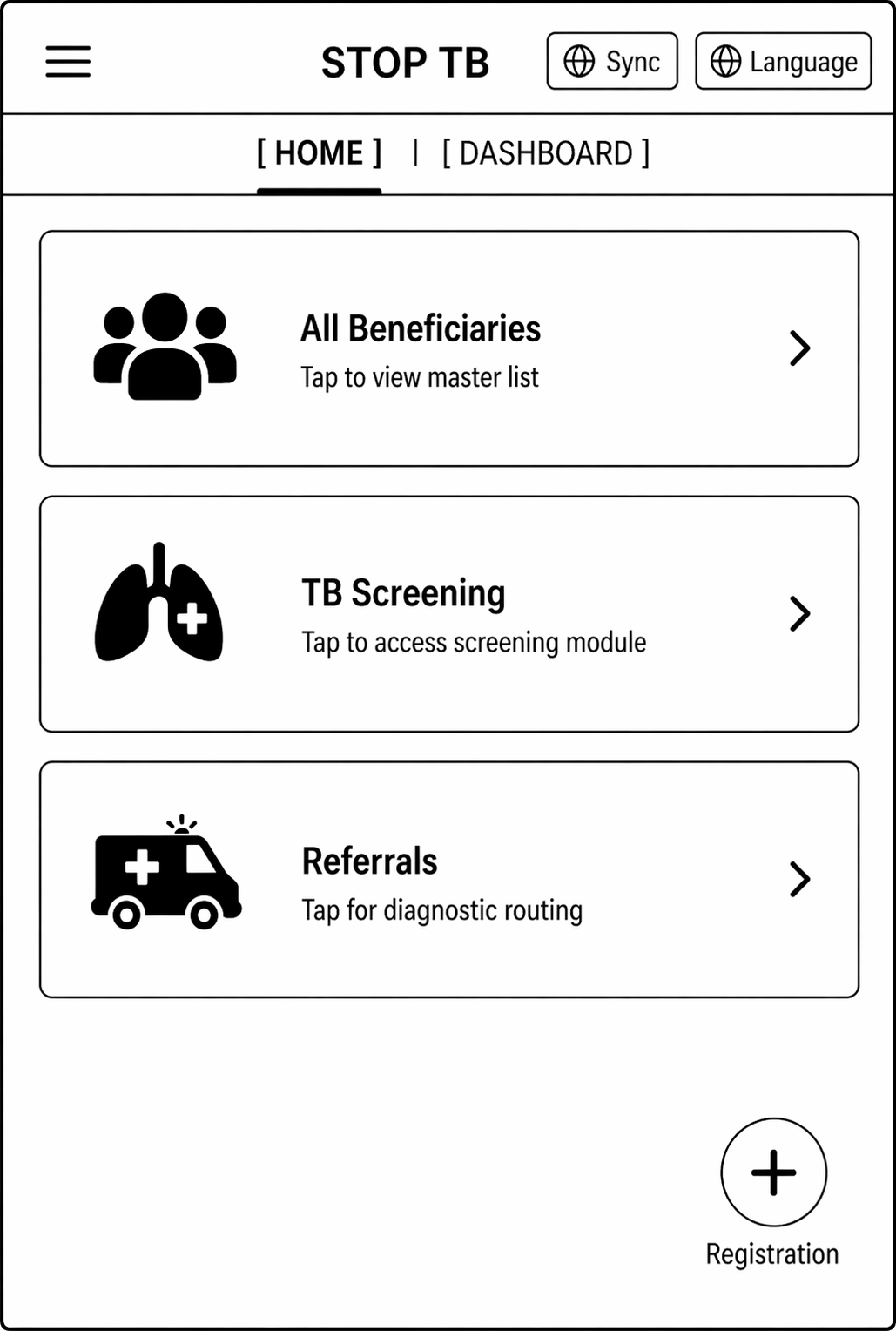
- Should contain three modules/ Cards- All Beneficiaries, TB screening, Referrals written on these cards.
- On clicking "All Beneficiaries" card- open the "Beneficiary module" form documented below (section 2.2.1) for registering the beneficiary by giving the floating "Registration" button in the right corner.
- On clicking "TB" card- open the "Tuberculosis module" (section 2.2.2). On clicking the next screen, it should have 3 cards titled "TB Screening", "Suspected TB cases" and ""Confirmed TB cases".
- On clicking "Referrals"- The next screen should have cards titled, "Digital Chest X-ray", "Truenat", "Liquid Culture", "Health and Wellness Centre". These cards will enlist patients for a particular type of testing. Beneficiaries who are pregnant or children =< 5 years will be shown directly in "Truenat". All beneficiaries who are not pregnant and children above 5 years are shown in "Digital Chest X-ray" and if any abnormality is detected on chest x-ray then that beneficiary is further referred for Truenat testing. All beneficiaries who have high blood pressure and high random blood sugar will be shown in "Health and Wellness Centre" card.
2.2.1 Module - Beneficiary Registration
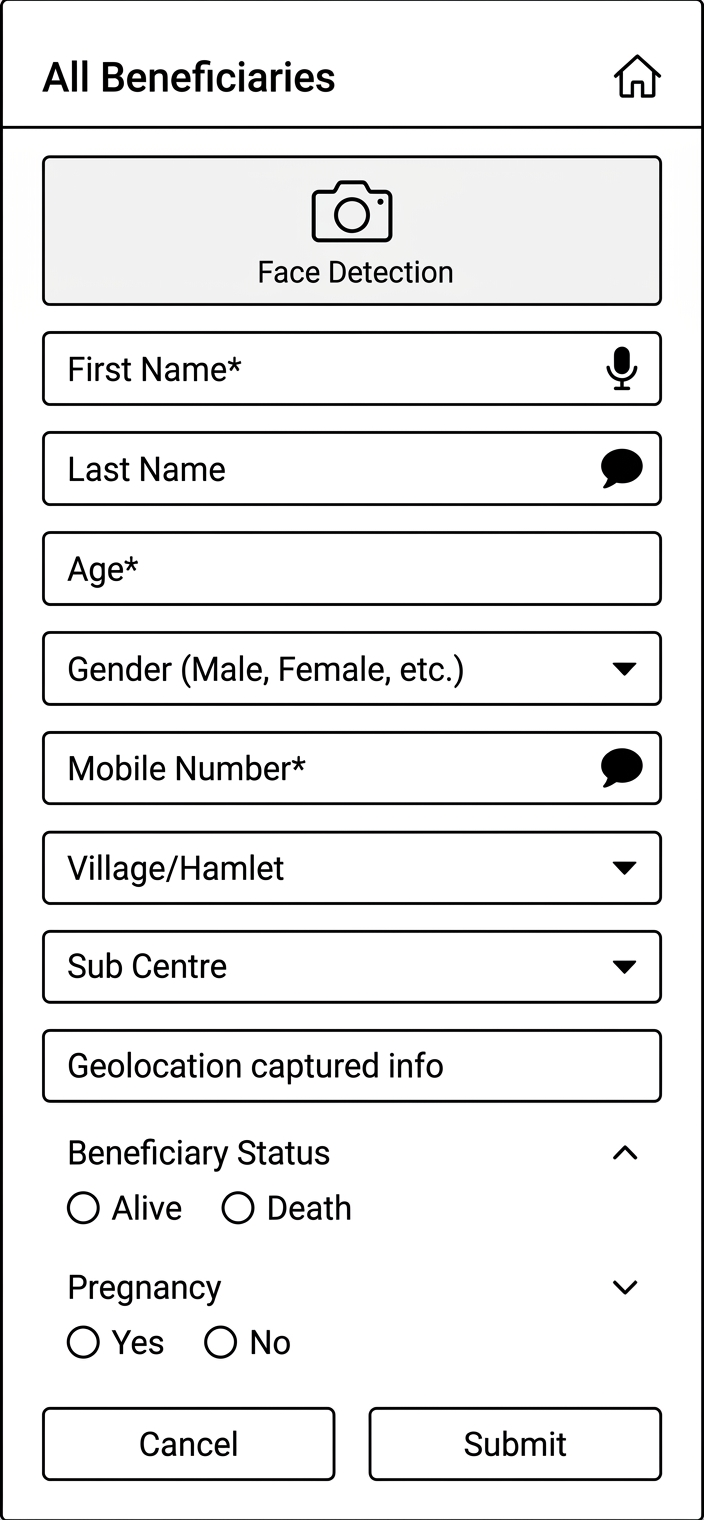
- On clicking Registration button the user will be navigated to Beneficiary Registration Page
- Show a pop up for Consent form "I have been explained, the purpose for which the information and findings is being collected from me, in a language I understand and I give my consent to collect the information and findings on my personal health profile."
- This page has "All Beneficiaries" Text displayed on top with "Home" Icon on the right corner to Navigate to Home page in the 1st row
- The card below should be visible after the registration of beneficiary.
- If the beneficiary does not have ABHA ID, give one clickable button on the ABHA ID area of the card to initiate ABHA ID generation.
...
Photo of the beneficiary | Name | Beneficiary ID |
Age (Years) | Village Name- | |
Phone Number | ABHA ID (ABHA registration)- Clickable |
...
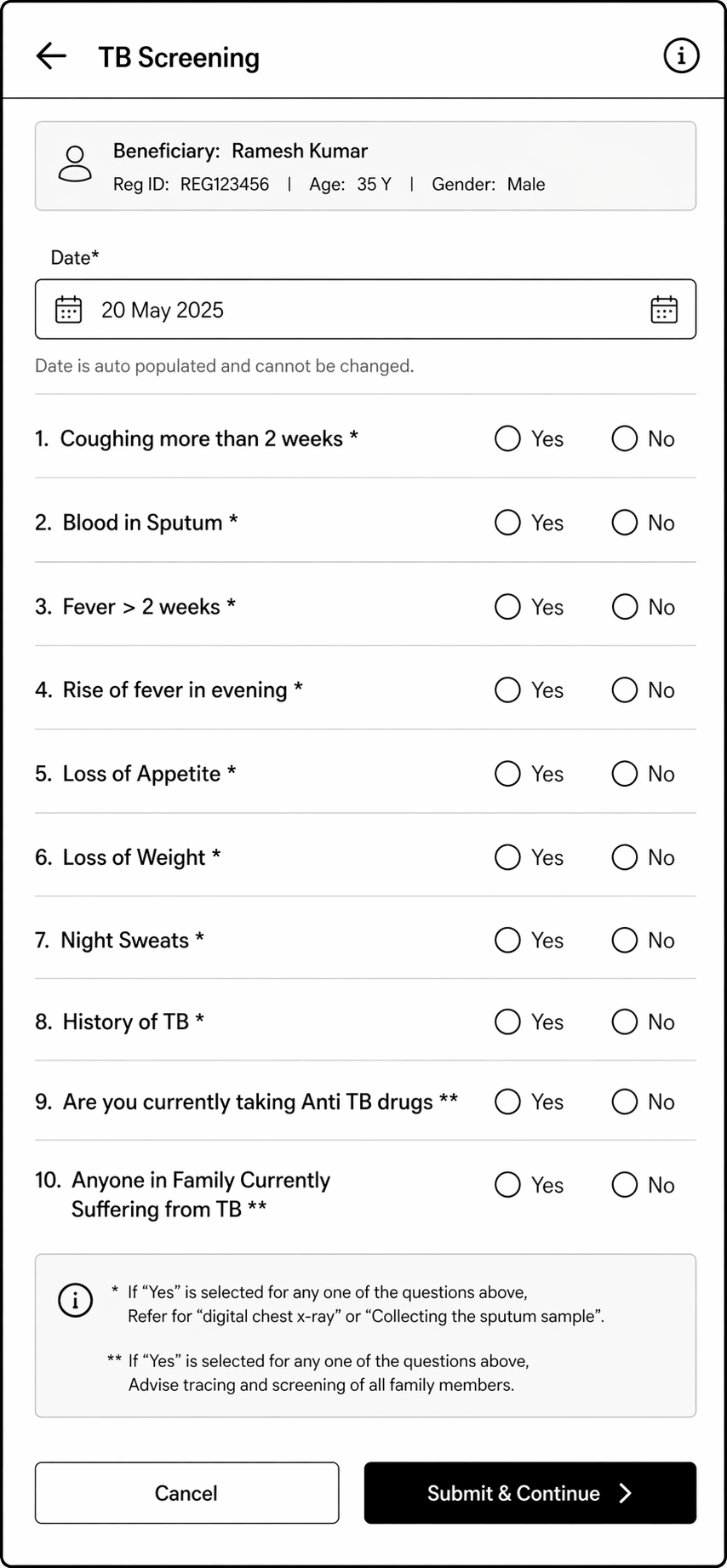
This module should open in continuation after beneficiary registration.
* If "Yes" is selected for any one of the questions below with "*" ; "Refer for "digital chest x-ray" or "Collecting the sputum sample". | |||
** If "Yes" is selected for any one of the questions below with "**" ; "Advise tracing and screening of all family members". | |||
TB Screening |
|
| |
Date | Calendar | Is Mandatory |
|
Coughing More than 2 weeks * | radio button |
|
|
Blood in Sputum * | radio button |
|
|
Fever > 2 weeks * | radio button |
|
|
Rise of fever in evening* | radio button |
|
|
Loss of Appetite* | radio button |
|
|
Loss of Weight * | radio button |
|
|
Night Sweats * | radio button |
|
|
History of TB * | radio button |
|
|
Are you currently taking Anti TB drugs ** | radio button |
|
|
Anyone in Family Currently Suffering from TB ** | radio button |
|
|
Submit | Button |
| Continue next to "Anthropometric and VitalsGeneral Examination" Screen |
Vitals and Anthropometric
General Examination
Fields | Validation |
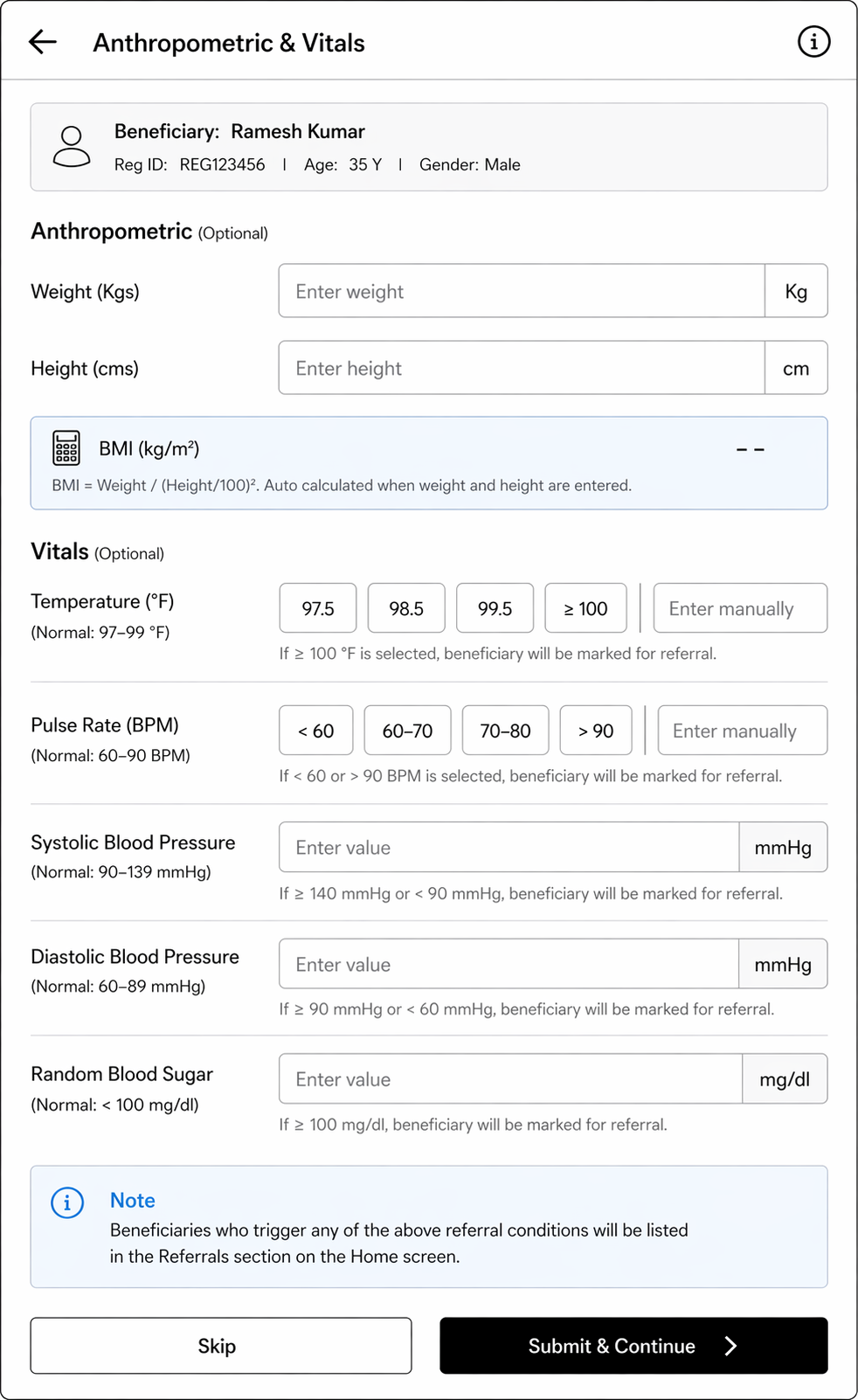
Anthropometric (Optional) |
|
Weight (Kgs) | - |
Height (cms) | - |
BMI=Weight/(Height/100) ² | Should be auto calculated if height and weight details are entered |
Vitals (Optional) |
|
Temperature (Degree Fahrenheit) |
a) 97.5 b) 98.5 c) 99.5 d)>= 100 If option d)>= 100 is chosen, show alert "Refer to Health and Wellness Centre" and show such beneficiaries in "Referral" card in Home |
Pulse Rate (beats per minute) |
Give predefined options (Normal range= 60-90 BPM) a) less than 60 b) 60-70 c) 70-80 d) More than 90 If "less than 60" or "more than 90" option is chosen, show alert "Refer to Health and Wellness Centre" and show such beneficiaries in "Referral" card in Home |
Systolic Blood Pressure (mmHg) |
|
Diastolic Blood Pressure (mmHg) |
|
Random Blood sugar (mg/dl) |
|
Skip Button |
|
Submit Button | Continue next to "Diagnostics" Screen |
...
Diagnostics | |||
Is Digital chest x-ray conducted |
|
| |
Digital Chest X-Ray Test Result |
|
|
|
Is Sputum sample collected |
|
| |
Recommended for Truenat test |
|
| |
Truenat test result | radio button |
|
|
Recommended for liquid culture test |
|
| |
Liquid Culture test result | radio button |
|
|
...
Name of data Field | Field Type | Value/ Options | Validation/ Logic/ Condition |
Date | Calendar | Mandatory |
|
Name | Textbox |
| Auto fill from Beneficiary details |
Age | Textbox |
| Auto fill from Beneficiary details |
Gender | Textbox |
| Auto fill from Beneficiary details |
Nikshay ID | Textbox |
|
|
Is Digital Chest X-ray conducted |
|
|
|
Digital Chest X-Ray Test Result |
|
|
|
Sputum Test |
|
a) If "Digital Chest X-Ray Test Result"= "Positive" b) If "History of TB" = "Yes" c) If "Age=< 5 years"d) If "Are you pregnant= yes" ed) If "Are you currently taking Anti TB drugs" = "yes" | |
Is Sputum sample collected? | radio button |
|
|
Sputum Sample submitted at | dropdown |
|
|
Is Truenat conducted | radio button |
|
|
Truenat test result | radio button |
|
|
Is Liquid culture conducted | radio button |
|
|
Liquid Culture test result | radio button |
|
|
Capture Geolocation |
| ||
Submit | Button |
|
|
...