
...
1.3 In Scope Functional Modules
| S.No | ||
|---|---|---|
| Offline Functionality with cross device communication including online functionalities to communicate with central server (AMRIT). | External dependency | |
| Role based user access (with actions and privileges) | ||
| Beneficiary Registration Module | Enlisted in the PRD | |
| TB Screening, tracking and conformation, treatment follow up and TPT (TB Preventive treatment) modules. | Enlisted in the PRD | |
| General Examination and General OPD modules | Enlisted in the |
| PRD | ||
| User Dashboard indicators | Enlisted in the PRD | |
| Integration of NIKSHAY application | External technical dependency | |
| Integration of portable digital chest Xray device (AI enabled) | External technical dependency | |
| Integration of Lab testing device |
| (sputum testing and others) |
| External technical dependency |
General NCD Screening module (Vital check-up)
General OPD module
Dashboard indicators
| AMRIT inventory management module integration | ||
| Pre Camp Work Plan Preparation Module | Subjected to requirement |
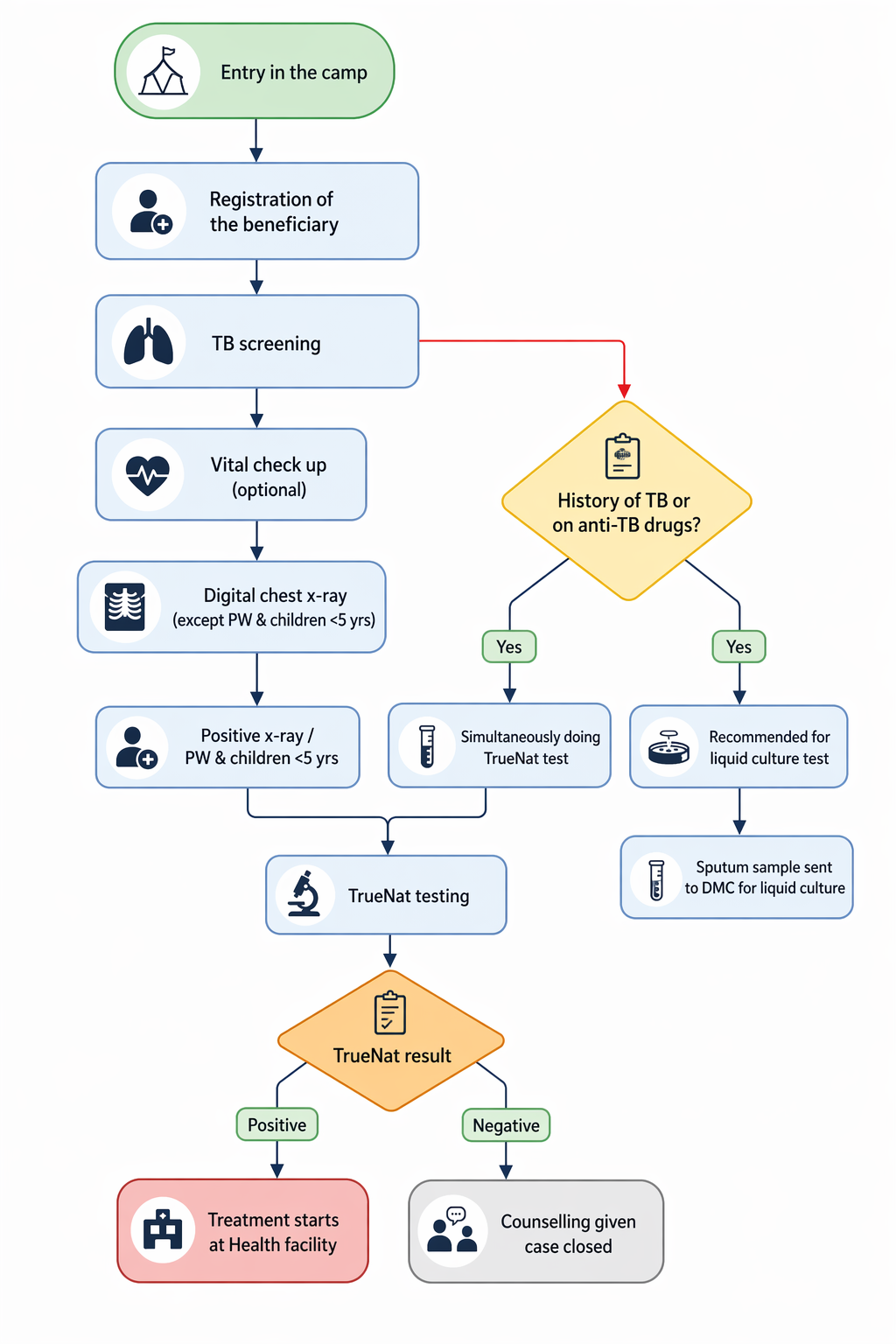
1.4 Workflow
2. Login Page
...
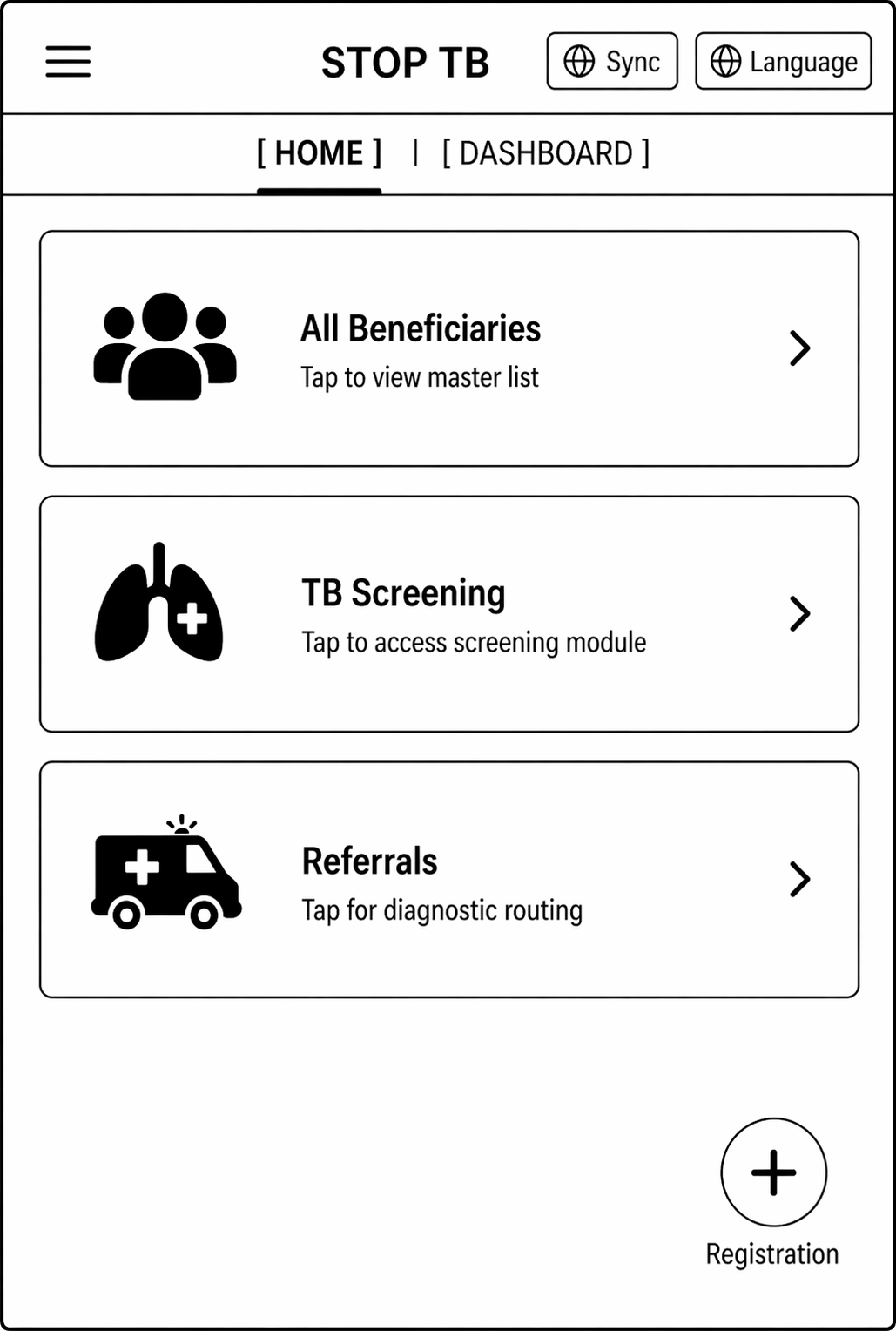
- Should contain three modules/ Cards- All Beneficiaries, TB screening, Referrals written on these cards.
- On clicking "All Beneficiaries" card- open the "Beneficiary module" form documented below (section 2.2.1) for registering the beneficiary by giving the floating "Registration" button in the right corner.
- On clicking "TB" card- open the "Tuberculosis module" (section 2.2.2). On clicking the next screen, it should have 3 cards titled "TB Screening", "Suspected TB cases" and ""Confirmed TB cases".
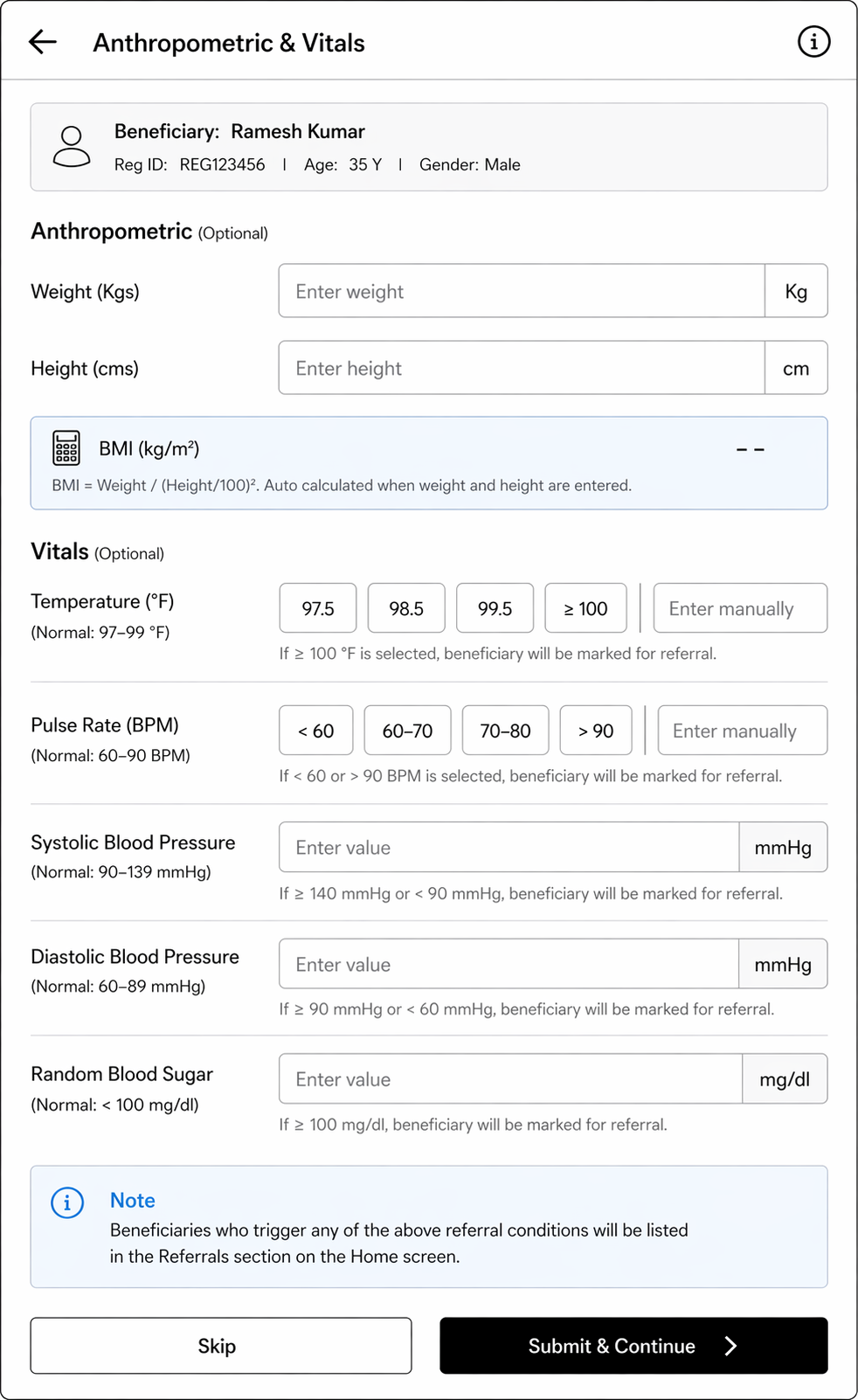
- On clicking "Referrals"- The next screen should have cards titled, "Digital Chest X-ray", "Truenat", "Liquid Culture", "Health and Wellness Centre". These cards will enlist patients for a particular type of testing. Beneficiaries who are pregnant will be shown directly in "Truenat". All beneficiaries who are not pregnant are shown in "Digital Chest X-ray" and if any abnormality is detected on chest x-ray then that beneficiary is further referred for Truenat testing. All beneficiaries who have high blood pressure and high random blood sugar will be shown in "Health and Wellness Centre" card.
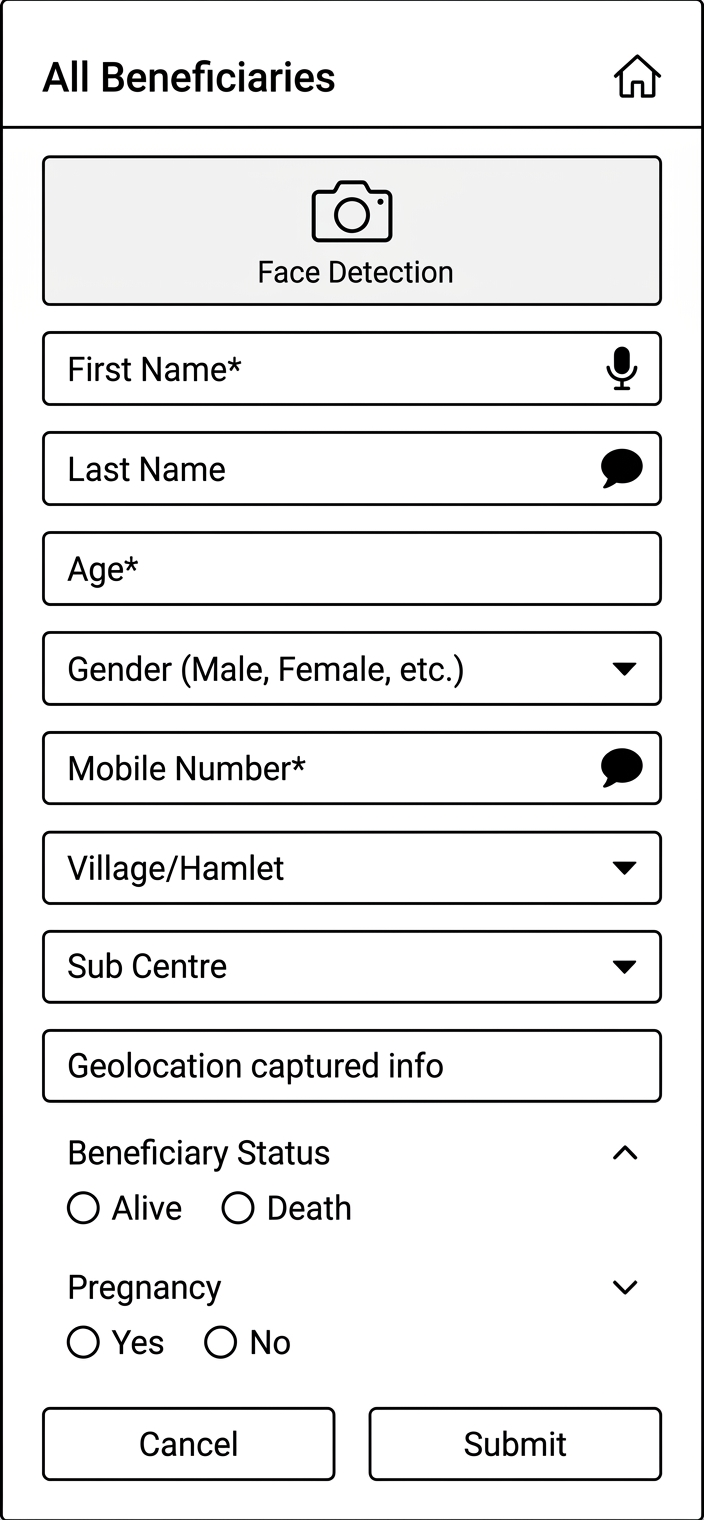
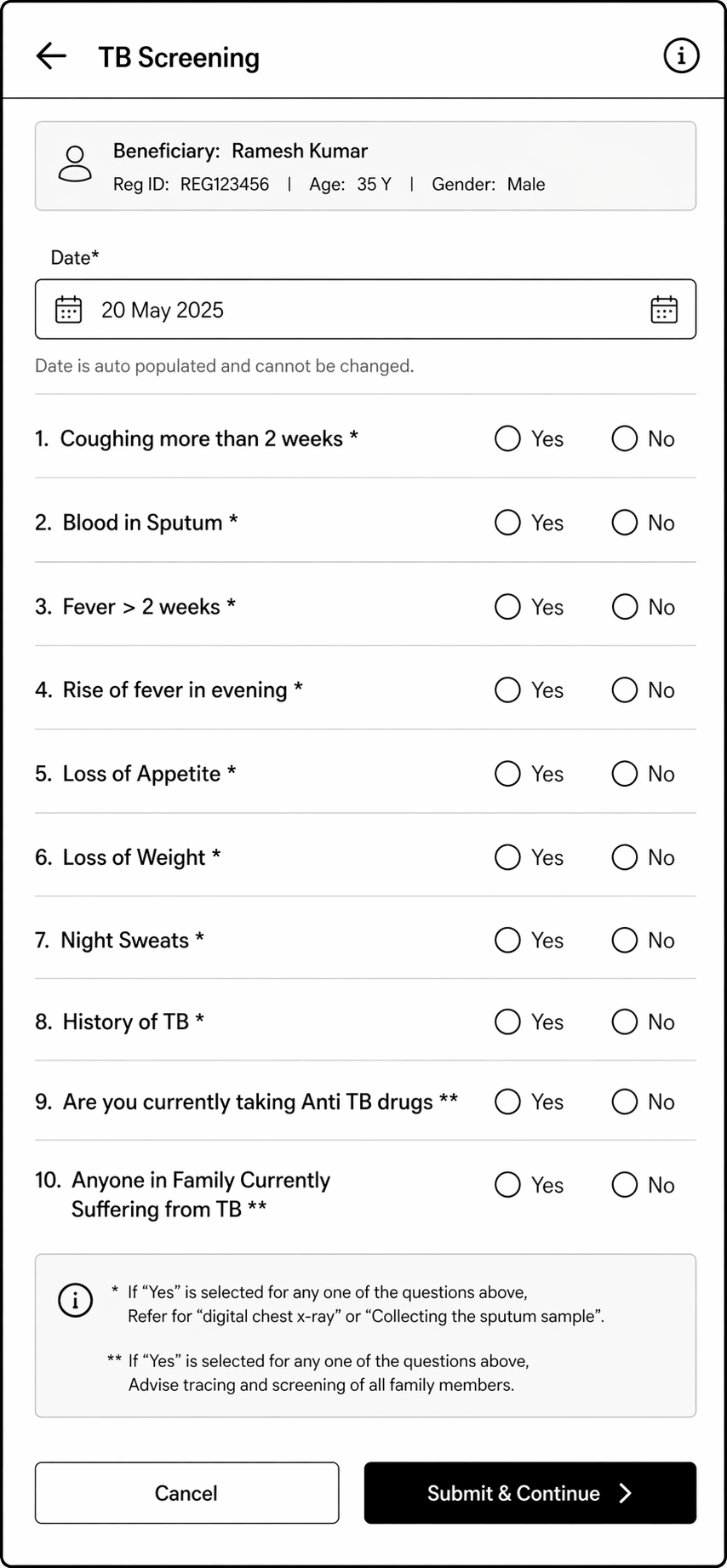
2.2.1 Module - Beneficiary Registration
...
Field Name | Field Type | Options | Validation |
Filter/ Selection option | Dropdown | The Dropdown Values are
| If this filter is selected, then show all the values of the dashboard indicators pertaining to the time period selected. |
Filter/ Selection option | Dropdown | Village/ Hamlet names to be put here | If this filter is selected, then show all the values of the dashboard indicators pertaining to the particular village selected. |
Total TB screenings Total Positives/ Negatives | Card must be yellow in colour | It must auto populate based on the filter selected. | |
Total TB suspected cases Total Positives/ Negatives | Card must be yellow in colour | It must auto populate based on the filter selected. | |
Total TB confirmed cases Total Positives/ Negatives | Card must be yellow in colour | It must auto populate based on the filter selected. | |
Total Digital Chest X-Rays conducted Total Positives/ Negatives Male- Positive/ Negative Age>= 60 years- Positives/ Negatives |
| It must auto populate based on the filter selected. | |
Total Sputum collection conducted Total- Positives/ Negatives Male- Positives/ Negatives Age>= 60 years- Positives/ Negatives |
| It must auto populate based on the filter selected. | |
Total Truenat tests conducted Male- Positives/ Negatives Age>= 60 years- Positives/ Negatives |
| It must auto populate based on the filter selected. | |
Total sputum samples sent for liquid culture Male- Positives/ Negatives Age>= 60 years- Positives/ Negatives |
| It must auto populate based on the filter selected. | |
Total cases referred to Health and Wellness Centres Male Age>= 60 years |
| It must auto populate based on the filter selected. | |
NIKSHAY IDs | Card must be yellow in colour | Total number of NIKSHAY IDs made in the selected time period or Village | |
ABHA IDs | Card must be yellow in colour | Total number of ABHA IDs made in the selected time period or Village |
...