
User Story: Truenat Test Result-Based Workflow
Epic: Truenat Testing and Result-Based Case Management
As a Lab Technician / Nurse / Counsellor / authorized Camp User,
I want the application to automatically create and manage Truenat test orders under the beneficiary's Visit ID, capture MTB/RIF test results through either automated device integration or manual entry, and trigger the appropriate next action based on the test result,
so that Truenat testing, repeat testing, clinical referral, TB treatment referral, and end-of-day order closure can be managed systematically with complete traceability.
- Preconditions
- The beneficiary is registered in the application.
- TB Symptoms Screening based on verbal questions has been completed.
- A Visit ID has been generated against the beneficiary.
- The beneficiary has been referred for a Truenat test.
- For automated result capture, the Truenat testing device is integrated with the application through the approved integration mechanism.
- Functional User Story
US-TRUENAT-001: Create Visit and Truenat Test Order
As a system,
I want to create a Visit ID after completion of TB Symptoms Screening and create a Test Order ID whenever a new Truenat referral is generated,
so that every Truenat test can be uniquely identified and tracked against the beneficiary's visit.
Acceptance Criteria
AC-01: Visit ID Creation
- Given TB Symptoms Screening is completed,
- When the screening is submitted successfully,
- Then the system shall create a unique Visit ID against the beneficiary.
AC-02: New Truenat Referral
- Given a valid Visit ID exists,
- When a new Truenat test referral is generated,
- Then the system shall automatically create a unique Test Order ID under the Visit ID.
AC-03: Multiple Orders
- The system shall allow multiple Test Order IDs to be created against the same Visit ID on the same date.
- Each Test Order ID shall have its own status, result, timestamps and audit trail.
- A closed Test Order ID shall not be overwritten or reused.
AC-04: Order Validity
- Each Test Order ID shall be valid for one day only.
- Any open/pending order remaining at the end of the day shall be automatically closed.
- Test Order Status
The system shall support the following Test Order statuses:
Status | Definition |
Pending | Test Order ID created, but test is not yet completed with a valid result |
Completed | Test conducted and a valid result other than Invalid/Error has been captured |
Closed | Order is no longer active, including EoD closure, not conducted, invalid/error attempt, or other applicable closure |
Business Rule
BR-01: An order shall be marked Completed only when a valid test result is captured.
BR-02: An Invalid/Error result shall not make the order Completed. The current order shall be closed and a new order shall be created for repeat testing.
- User Story: Capture Truenat Result
US-TRUENAT-002: Capture Test Result Through Automated or Manual Mode
As a Lab Technician / Nurse / Counsellor,
I want to capture Truenat test results either automatically from an integrated Truenat device or manually,
so that the application can support both integrated and field-operational testing scenarios.
Acceptance Criteria
AC-05: Automated Result Capture
When the Truenat testing device is integrated:
- The test result shall be received automatically from the Truenat device.
- The result shall be associated with the correct:
- Beneficiary ID
- Visit ID
- Test Order ID
- Test Type
- The system shall validate the received result before updating the order.
- A valid result shall update the Test Order ID to Completed.
- An Invalid/Error result shall trigger the repeat-test workflow.
AC-06: Manual Result Capture
When automated integration is unavailable:
- Authorized users shall have the option to manually enter the result.
- Authorized users shall include:
- Lab Technician
- Nurse
- Counsellor
- The user shall select the applicable Test Order ID and Test Type.
- The user shall select one of the predefined result values.
- The system shall apply the same result-based business rules used for automated results.
- The system shall record the result source as Manual.
Important: Automated and Manual result capture shall use the same downstream business rules. The difference is only the source of the result.
- Truenat MTB Test User Story
US-TRUENAT-003: Process Truenat MTB Result
As a system,
I want to process the Truenat MTB result according to predefined result rules,
so that the beneficiary is automatically routed to the appropriate next step.
MTB Result Options
- TB Positive (Detected)
- TB Negative (Not Detected)
- Invalid / Error
Acceptance Criteria
MTB Result | System Action | Order Status |
TB Positive (Detected) | Complete MTB order and create Truenat RIF Test Order ID | Completed |
TB Negative + X-Ray Normal | No further action required | Completed |
TB Negative + X-Ray Abnormal but not TB Presumptive | Refer for Clinical Assessment & Diagnosis | Completed |
TB Negative + X-Ray TB Presumptive | Refer for Clinical Assessment & Diagnosis | Completed |
Invalid / Error | Save result, close current order and create new MTB order for repeat test | Closed |
AC-07: MTB Positive
When MTB result is TB Positive (Detected):
- The system shall save the result.
- The MTB Test Order ID shall be marked Completed.
- The system shall automatically create a new Truenat RIF Test Order ID under the same Visit ID.
- The new RIF order shall have status Pending.
- The RIF order shall maintain a reference to the MTB order that triggered it.
AC-08: MTB Negative + Normal Chest X-Ray
When:
- MTB = TB Negative (Not Detected), and
- Chest X-Ray = Normal
Then:
- MTB order shall be marked Completed.
- No additional diagnostic referral shall be generated.
- The beneficiary shall not be referred to RIF testing based on this result combination.
AC-09: MTB Negative + Abnormal Chest X-Ray
When:
- MTB = TB Negative, and
- Chest X-Ray = Abnormal but not TB Presumptive
OR
- MTB = TB Negative, and
- Chest X-Ray = TB Presumptive
Then:
- MTB order shall be marked Completed.
- The system shall generate a referral for Further Clinical Assessment & Diagnosis.
- The referral shall be recorded against the beneficiary/Visit ID.
AC-10: MTB Invalid/Error
When MTB result is Invalid / Error:
- The system shall save the Invalid/Error result.
- The current MTB Test Order ID shall be changed to Closed.
- The system shall automatically create a new MTB Test Order ID under the same Visit ID.
- The new order shall have status Pending.
- The new order shall be identified as a repeat test.
- The previous order shall remain available in the beneficiary's test history.
- Truenat RIF Test User Story
US-TRUENAT-004: Process Truenat RIF Result
As a system,
I want to process the Truenat RIF result and trigger the appropriate TB treatment or clinical assessment workflow,
so that confirmed TB/DR-TB cases can be appropriately flagged and referred.
RIF Result Options
- DR TB (Rif Resistance Detected)
- Non-DR TB (Rif Resistance Not Detected)
- Indeterminate
- Invalid / Error
Acceptance Criteria
RIF Result | System Action | Order Status |
DR TB | Flag confirmed DR-TB case and refer for DOTS/appropriate DR-TB treatment | Completed |
Non-DR TB | Flag confirmed TB case and refer for DOTS/appropriate TB treatment | Completed |
Indeterminate | Refer for further Clinical Assessment & Diagnosis | Completed |
Invalid / Error | Save result, close current order and create new RIF order for repeat test | Closed |
AC-11: RIF DR-TB
When RIF result is DR TB (Rif Resistance Detected):
- Save the result.
- Mark the RIF Test Order ID as Completed.
- Flag the beneficiary as a Confirmed DR-TB Case.
- Generate a referral for DOTS/appropriate DR-TB treatment as per program protocol.
- Record the referral against the beneficiary/Visit ID.
AC-12: RIF Non-DR TB
When RIF result is Non-DR TB (Rif Resistance Not Detected):
- Save the result.
- Mark the RIF Test Order ID as Completed.
- Flag the beneficiary as a Confirmed TB Case.
- Generate a referral for DOTS/appropriate TB treatment as per program protocol.
AC-13: RIF Indeterminate
When RIF result is Indeterminate:
- Save the result.
- Mark the RIF order as Completed.
- Generate a referral for Further Clinical Assessment & Diagnosis.
AC-14: RIF Invalid/Error
When RIF result is Invalid / Error:
- Save the result.
- Close the current RIF Test Order ID.
- Automatically create a new RIF Test Order ID under the same Visit ID.
- Set the new order to Pending.
- Mark the new order as a repeat test.
- Preserve the previous Invalid/Error order in the test history.
- User Story: Test Not Conducted
US-TRUENAT-005: Close Test Order When Test Is Not Conducted
As a Lab Technician / Nurse / Counsellor,
I want to close a Test Order when the test is not conducted and capture the reason,
so that every Test Order has a clear and auditable outcome.
Acceptance Criteria
AC-15: MTB Test Not Conducted
If the MTB test is not conducted:
- User shall select Test Not Conducted.
- The system shall make Reason mandatory.
- The user shall enter/select the reason.
- The MTB Test Order ID shall be changed to Closed.
- The closure date/time and user shall be recorded.
AC-16: RIF Test Not Conducted
The same rule shall apply to RIF:
- Test Not Conducted shall be selected.
- Reason shall be mandatory.
- RIF Test Order ID shall be marked Closed.
- Closure details shall be recorded.
- User Story: End-of-Day Order Closure
US-TRUENAT-006: Automatically Close Open Orders at EoD
As a system,
I want to automatically close all applicable open/pending Truenat Test Orders at the end of the day,
so that no Test Order remains active beyond its one-day validity.
Acceptance Criteria
At EoD, the system shall identify Truenat Test Orders with status Pending where:
- Test was not conducted; or
- Result has not been entered/received; or
- The order has reached the end of its one-day validity.
The system shall:
- Change the order status to Closed.
- Record EoD as the closure reason.
- Record closure date/time.
- Maintain the complete order history.
- Ensure that a new Test Order can subsequently be created from the beneficiary record when required.
Important Rule
A Completed order shall not be closed by the EoD process because it already represents a successfully completed test.
An Invalid/Error attempt is closed as soon as the result is recorded, and a new repeat order is created. If the repeat order remains Pending at EoD, that repeat order shall subsequently be closed by EoD.
- User Story: Create New Test Order for Closed Order
US-TRUENAT-007: Re-Order Truenat Test
As a Lab Technician / Nurse / Counsellor / authorized user,
I want to create a new Test Order ID for a beneficiary whose previous order is closed,
so that the test can be performed again when required.
Acceptance Criteria
- The beneficiary record/card shall display the previous Test Order status.
- If the order is Closed, the system shall provide a Create New Test Order option, subject to applicable referral/business rules.
- The new order shall:
- Have a unique Test Order ID.
- Be linked to the same Visit ID where applicable.
- Have status Pending.
- Record the previous order as the Parent/Previous Order ID where applicable.
- The previous closed order shall remain unchanged.
- The new order shall appear as a separate test attempt in the test history.
- End-to-End Business Workflow
TB Symptoms Screening Completed
↓
Create Visit ID
↓
New Truenat Referral
↓
Create Test Order ID
↓
Status: Pending
↓
┌────────┴─────────┐
↓ ↓
Automated Result Manual Result
(Device) (User Entry)
└────────┬─────────┘
↓
Result Captured
↓
┌──────┴───────┐
↓ ↓
MTB Test RIF Test
↓ ↓
MTB Result RIF Result
↓ ↓
┌─────┼──────┐ ┌───┼──────────────┐
↓ ↓ ↓ ↓ ↓ ↓ ↓
Pos. Neg. Invalid DR Non-DR Indeterminate Invalid
↓ ↓ ↓ ↓ ↓ ↓ ↓
RIF X-Ray Repeat Confirmed Confirmed Clinical Repeat
↓ Check MTB DR-TB TB Assessment RIF
↓ ↓ ↓ ↓
RIF Normal DOTS/ Clinical
Order ↓ TB Tx Assessment
↓ No Action
↓
└──────────────────────────────────────────
↓
Pending Orders at EoD
↓
Status = Closed
- Business Rules
ID | Business Rule |
BR-01 | Visit ID shall be created after completion of TB Symptoms Screening. |
BR-02 | Every new Truenat referral shall generate a unique Test Order ID. |
BR-03 | Multiple Test Order IDs can exist under one Visit ID on the same date. |
BR-04 | Every Test Order ID is valid for one day. |
BR-05 | Valid result → Order Status = Completed. |
BR-06 | Invalid/Error result → Current Order Status = Closed and repeat order is created. |
BR-07 | Test Not Conducted → Reason is mandatory and Order Status = Closed. |
BR-08 | Pending order with no valid result at EoD → Order Status = Closed. |
BR-09 | Closed orders shall not be overwritten or reused. |
BR-10 | A new order may be created against the beneficiary after an order is closed, subject to applicable workflow. |
BR-11 | Automated and Manual result capture shall follow the same result-processing rules. |
BR-12 | All test attempts and results shall remain available in the beneficiary's test history. |
- Audit & Traceability Requirements
For every Test Order ID, the system should maintain:
- Beneficiary ID
- Visit ID
- Test Order ID
- Test Type — MTB / RIF
- Parent/Previous Test Order ID
- Attempt Number
- Order Date & Time
- Test Date & Time
- Order Status
- Test Result
- Result Source — Automated / Manual
- Result Entered By
- Result Received Date & Time
- Closure Reason
- Closure Date & Time
- Created By / Updated By
- Referral/Next Action
- Device/Integration reference, where automated
Example of Repeat Test History
Visit ID: V10001
MTB Order M10001
Result: Invalid/Error
Status: Closed
↓
MTB Order M10002
Result: Invalid/Error
Status: Closed
↓
MTB Order M10003
Result: TB Positive
Status: Completed
↓
RIF Order R10001
Result: Non-DR TB
Status: Completed
↓
Flag: Confirmed TB Case
↓
Refer for DOTS / TB Treatment
This design ensures that every Truenat test attempt is independently traceable, while the Visit ID provides the overall clinical journey for the beneficiary.
Status Matrix
Scenario | Status |
New MTB Order | Pending |
MTB Positive | Completed |
MTB Negative | Completed |
MTB Invalid – repeat required with new test order id | Closed |
MTB Invalid after final repeat at EoD | Closed |
MTB not conducted | Closed |
MTB result not entered at EoD | Closed |
New RIF Order | Pending |
RIF DR TB | Completed |
RIF Non-DR TB | Completed |
RIF Indeterminate | Completed |
RIF Invalid – repeat required with new test order id | Closed |
RIF Invalid after final repeat at EoD | Closed |
RIF not conducted | Closed |
RIF result not entered at EoD | Closed |
17. Complete Functional Workflow
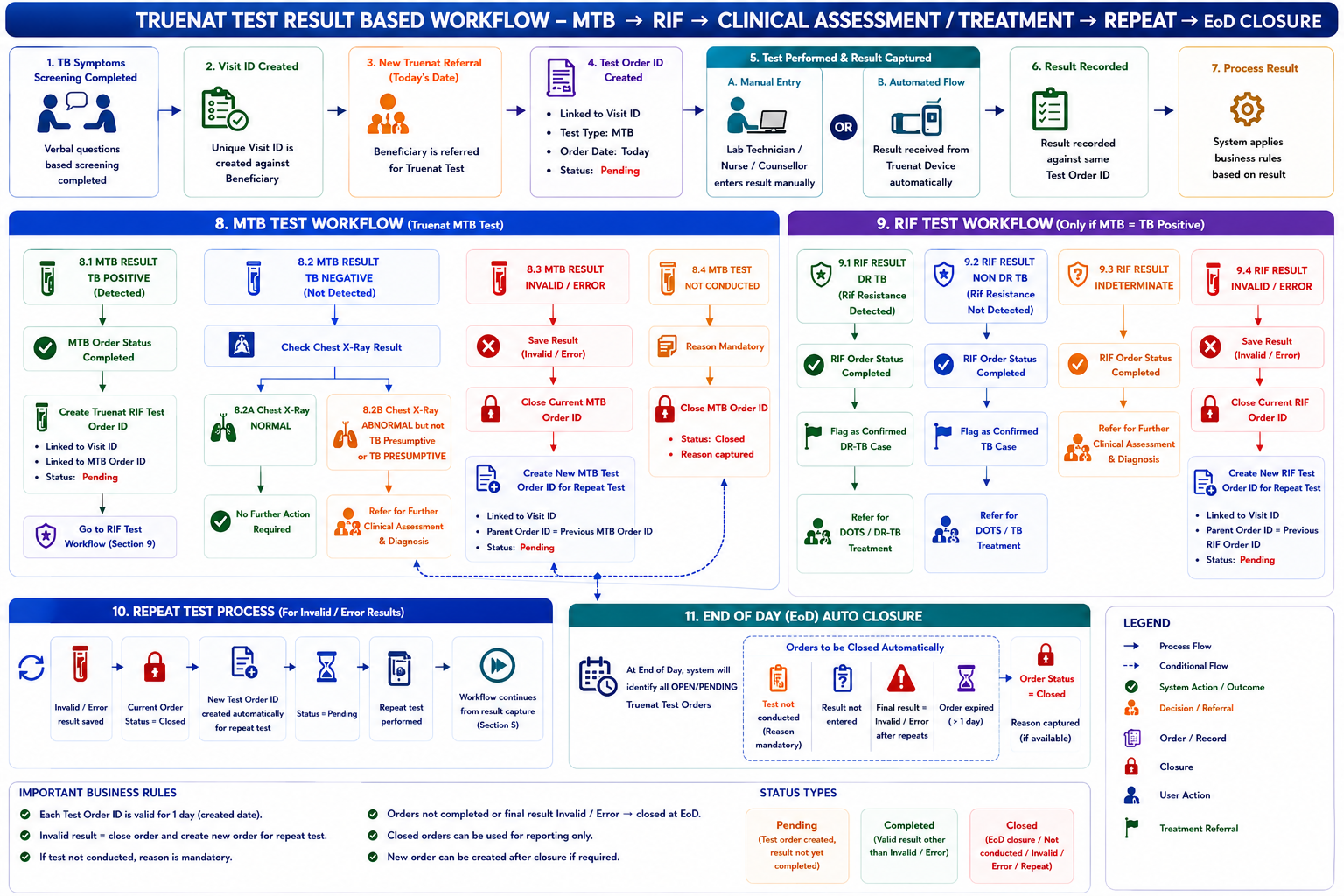
1 Comment
Shivani Garg
Aug 26, 2026Hey Madhava Ramu N -
Does our system track what happens after that, or does it just end there for us?
And if RIF never gets done for that patient, does anyone follow up?
Should there be extra follow-up since this decides their treatment path?
Is there a limit, or can staff keep trying all day until it auto-closes?
For example, if they picked the wrong result and it already created a RIF order or a DR TB flag — can that be corrected?
Want to make sure they match so the two workflows connect properly.