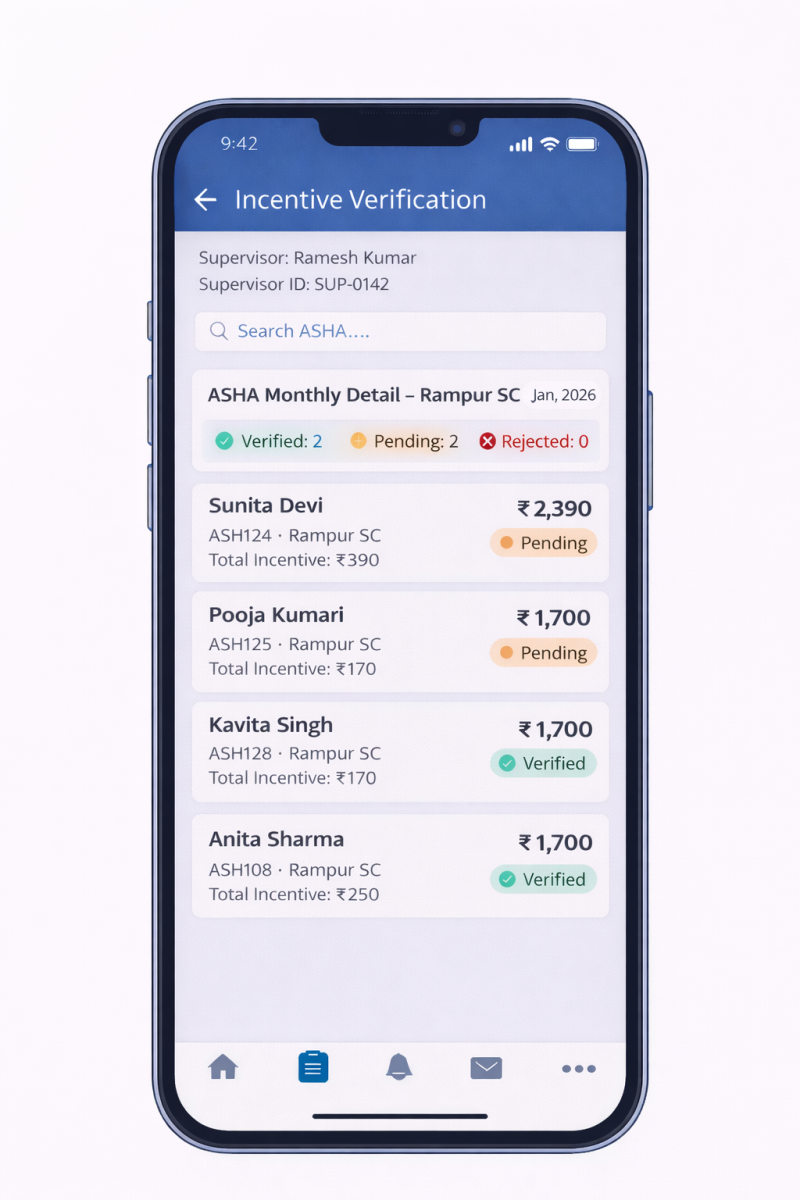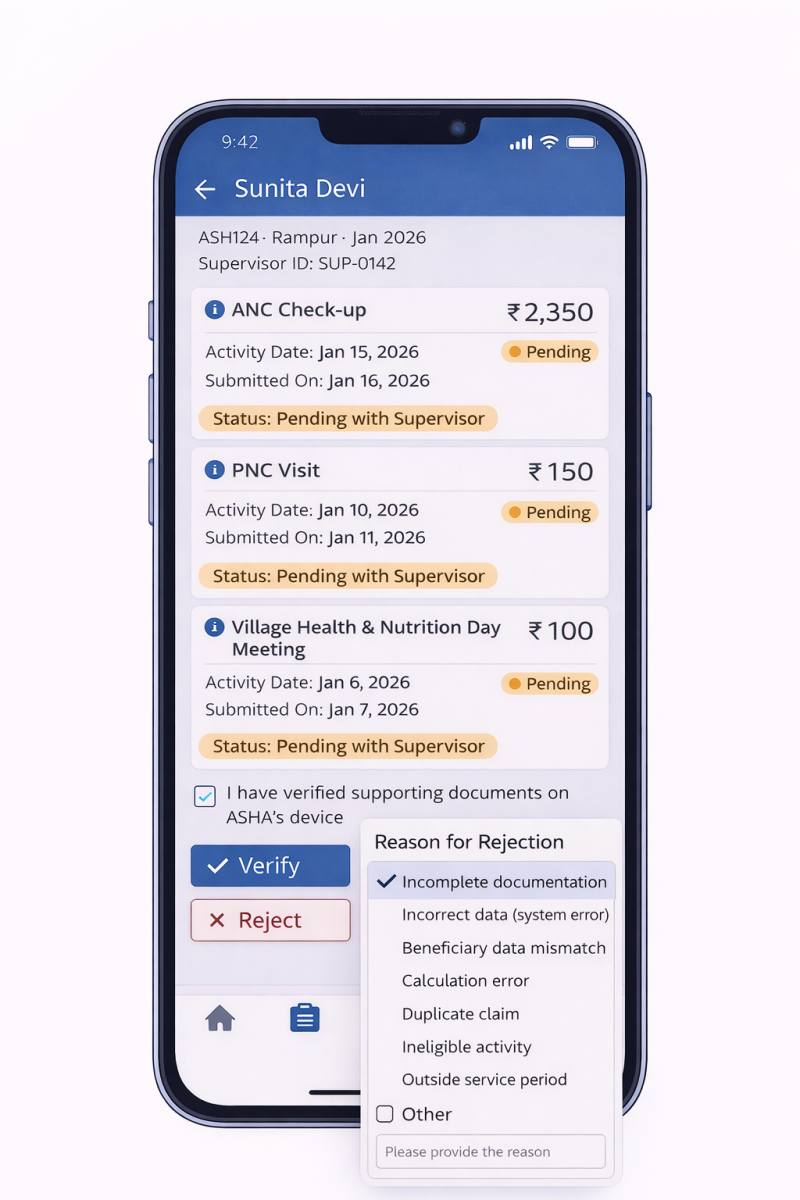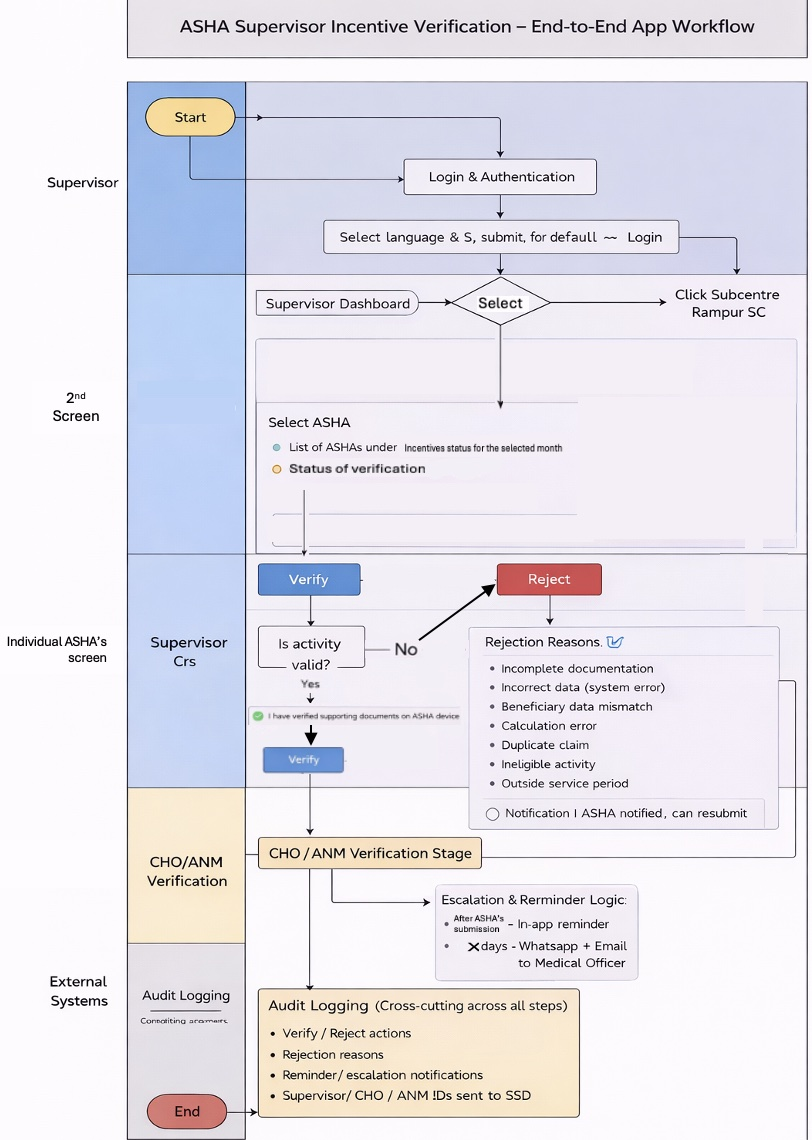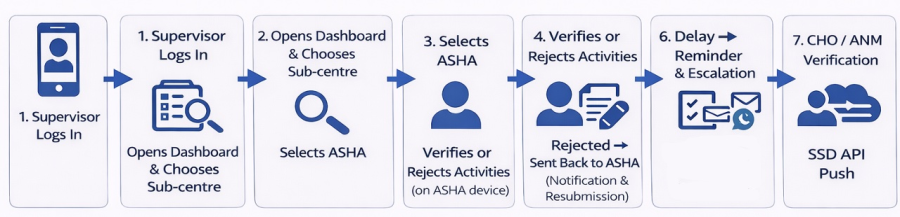
Utprerona is a unified application used by multiple health system actors such as ASHA Supervisors, CHOs, and ANMs, with access governed through role-based user authentication. Based on the logged-in user's role and mapped geography, the application provides access to relevant ASHAs, their performance indicators, and incentive claim data. This document defines the requirements for a mobile-first ASHA Supervisor Incentive Verification module within the Utprerona application, aimed at digitising the monthly incentive verification process that is currently carried out through paper-based workflows.
Item | Description |
Target Users | ASHA Supervisors, CHOs, ANMs, Block Coordinators |
Primary Audience | Product Managers, Engineering & Backend Teams, UI/UX Designers, Program & Government Stakeholders |
Phase | Phase 1 |
Platform | Android Mobile Application |
Approval Level | ASHA Supervisor and CHO or ANM can verify the activities using their respective login on the app. 'Verified by' is flagged and then at next level process at the SSD portal.CHO doesn't have access to SSD, CHO also had to validate on Utprerona App with role CHO Edited accordingly |
Future Platform Scope | Reading artificats uploaded by ASHAs, Web portal and adding Suepervisor's incentive activities |
Utprerona is used by ASHAs to digitally capture health care activities and generate monthly incentive claims, with incentive amounts auto calculated based on predefined NHMNHM logic.
Currently, ASHA Supervisors:
This manual process is time-consuming, error-prone, and lacks transparency and auditability.
Provide ASHA Supervisors with a simple, mobile-first digital interface to review and verify ASHA incentive claims efficiently and transparently.
Category | Goal / Metric | Description |
Process Digitisation | Digitise incentive verification workflow | Replace paper-based incentive verification with a fully digital process for ASHA Supervisors. |
Operational Efficiency | Reduce verification turnaround time | Minimise time spent by supervisors on monthly incentive verification. |
Accuracy & Compliance | Improve verification accuracy | Reduce manual errors in verification and verification through system-driven calculations and structured review. |
Transparency & Audit | Enable audit-ready verifications | Ensure every verification action is traceable with supervisor identity, timestamp, and remarks. |
Adoption Metric | % incentives verification digitally | Measure proportion of total incentives verifies through the supervisor app vs paper process. |
Efficiency Metric | Average verification time per ASHA | Track time taken from ASHA submission to supervisor verification at ASHA-month level. |
Usage Metric | Supervisor adoption rate | Percentage of mapped supervisors actively using the module each month. |
Certain configurations must be applied differently for the Mitanin and Utprerona application build variants based on Statespecific requirements. The following functional behaviors distinguish the two builds:
Every month all ASHAs incentive claimed activities are verified by respective ASHA supervisor; and if required, followed by other actors like CHO or ANM, further post verification claims are processed to the SSD portal for approval actions. Hence the two roles of ASHA supervisor broadly are
Incentive amounts are read-only and system-calculated.
Features
ASHA Card Fields
Header
Summary Card
Primary Action
Each activity displayed as expandable card:
Collapsed View
Expanded View
Activity cards in the Supervisor application shall follow the same colour coding used in the Utprerona ASHA application to maintain visual consistency and improve verification efficiency.
Category | Colour | Description | Examples |
Fixed / Monthly Incentives | Orange | Fixed monthly claim amounts not linked to beneficiaries | ASHA Monthly Remuneration, Additional Incentives, Mobile Bill related activities |
Meeting / Event Incentives | Yellow | Meeting, training, campaign participation | MAA Meeting, AHD, NDD, PHC Meeting related activities |
Beneficiary Based Incentives | White | Incentives linked to individual beneficiaries | ANC, PNC, Immunization, Family Planning related activities |
Each incentive-linked activity shall move through the following role-based verification statuses, which are visible to ASHA users:
Stage | Status Displayed to ASHA | Meaning |
1 | Pending with Supervisor | Activity submitted by ASHA and awaiting verification by ASHA Supervisor |
2 | Verified by Supervisor | Activity verified by ASHA Supervisor and forwarded for next-level verification |
3 | Pending with CHO | Activity awaiting verification by CHO |
4 | Verified by CHO | Activity verified by CHO |
5 | Pending with ANM | Activity awaiting verification by ANM (only if CHO is unavailable) |
6 | Verified by ANM | Activity verified by ANM |
7 | Eligible for SSD Processing | Activity verification completed and ready to Process at SSD system |
Note: Either CHO or ANM verification is required / applicable.
The monthly status for an ASHA shall be system-derived based on the verification state of all activities submitted for the selected month.
Condition | Monthly Status |
All activities pending at Supervisor level | Pending with Supervisor |
Mix of verified and pending activities | Partially Verified |
All activities verified by Supervisor | Verified by Supervisor |
Activities pending at CHO / ANM level | Pending with CHO / ANM |
All activities verified by CHO / ANM | Verification Completed |
Note: Monthly status is read-only and updated automatically by the system.
@CHO will get similar reflection of the three tiles of the supervisor dashboard with pending and rejection
Area | Rule / Logic Description |
Incentive Calculation | Incentive amounts are calculated only in the backend using existing Utprerona / NHM logic. Supervisor app consumes calculated values in read-only mode. |
Edit Permissions | ASHA Supervisors cannot edit or override incentive amounts, activity data, or incentive logic. |
Activity Eligibility | Only activities submitted by ASHAs and marked as Pending with Supervisor are eligible for verification. |
Verification Mode | Verification is performed only at individual activity level. Bulk or "Verify All" functionality is not supported. |
Document Verification Confirmation | Supervisor must confirm verification of supporting documents on the ASHA's device via an explicit checkbox before taking any action. This confirmation is logged for audit. |
Activity Verification | Supervisor can Verify an activity. Status becomes Verified by Supervisor and moves to CHO/ANM verification stage. |
Activity Rejection | Supervisor can Reject an activity. Rejection requires selecting a predefined reason. If Other is selected, remarks are mandatory. |
Rejection Reasons | • Incomplete documentation• Incorrect data (system error)• Beneficiary data mismatch• Calculation error• Duplicate claim• Ineligible activity• Outside service period• Other (mandatory remarks) |
ASHA Notification on Rejection | When rejected, ASHA receives an in-app notification with rejection remarks. Activity returns to ASHA app as Pending for correction and resubmission. |
Resubmission Flow | After correction, ASHA resubmits the activity and it re-enters workflow as Pending with Supervisor. |
CHO / ANM Dashboard Reflection | CHO/ANM dashboards will display tiles similar to Supervisor dashboard showing Pending, Verified, and Rejected counts. |
Monthly Status Derivation | Monthly ASHA status is system-derived:• Pending – Activities awaiting Supervisor verification.• Verified – All activities verified by Supervisor.• Rejected – One or more activities rejected and awaiting correction.• Pending with CHO/ANM – Supervisor verification completed and awaiting next-level verification. |
Status Visibility to ASHA | ASHA app shows stage-wise status:• Pending with Supervisor• Verified by Supervisor• Pending with CHO/ANM• Verified by CHO/ANM |
Incentive Freeze Rule | Once any activity is verified by Supervisor, incentive amounts for that ASHA-month become immutable (no recalculation). |
Concurrency Handling | If activity status changes due to another action, the system prompts Supervisor to refresh before proceeding. |
Finality of Supervisor Action | Verified activities cannot be modified or reverted by Supervisor and move to CHO/ANM verification. |
Verification Hierarchy | Incentive verification order: ASHA Supervisor → CHO (or ANM if CHO unavailable) → SSD Portal |
Verifier Metadata Sharing | Along with incentive claim data, verifier metadata (Supervisor, CHO, ANM identifiers) is transmitted during SSD API integration for auditability and downstream processing. |
Final Push to SSD Portal | Incentive claim data is pushed to SSD portal only after successful verification by Supervisor and CHO/ANM. |
Reminder Notification | If activities remain Pending with Supervisor immediately after the ASHAs submit their claim through Utpreorna, reminder notification is sent to Supervisor mobile app. |
Escalation (x Days) | If activities remain pending for x days, WhatsApp and Email notification is sent to the mapped Medical Officer. |
Escalation Frequency | Escalation occurs once per month per Supervisor via email and WhatsApp. |
Notification Logging | All reminders, escalations, verification and rejection notifications are logged for audit and monitoring. |
Configurable Notifications | Notification templates and frequency may be configurable by the program team. |
Audit Attribute | Description |
Supervisor ID | Unique identifier of the supervisor performing the action |
ASHA ID | Unique identifier of the ASHA whose incentive is being reviewed |
Activity ID | Identifier of the incentive-linked activity (nullable for bulk verifications) |
Action Type | Type of action performed (Approve Activity and Approve All) |
Timestamp | Date and time when the action was performed |
Remarks | Supervisor remarks (optional) |
ASHA- Supervisor- CHO/ANM (beyond cut off date for supervisor CHO/ANM will have the verification responsbility)-SSD
Maintaining the status level (Verified/Pending/Rejected) at every level (Supervisor/CHO/ANM)
To ensure timely completion of incentive verification and prevent delays in downstream processing, the system shall implement an automated reminder and escalation mechanism.
Please note: In Utprerona for ASHAs they should get reminder to fill out the claim information in accordance with the monthly set date set up by the Supervisor
Trigger | Notification Type | Channel | Description |
Immediately after ASHA submission | Reminder | In-app notification | Supervisor receives reminder highlighting number of ASHAs and activities pending verification for the selected month. |
Until verification is completed | Recurring reminders | In-app notification | Periodic reminders may continue until pending verifications are completed. |
Notification content (indicative): "X ASHAs have pending incentive verifications for Month YYYY. Please complete verification to avoid delays in payment processing."
Trigger | Escalation Target | Channel | Description |
X days afteconfirm with syed jir submission if verification still pending | Medical Officer mapped to Supervisor | Email and WhatsApp message (via official integration) | Escalation alert indicating delayed verification. |
*Escalation message (indicative):* "Incentive verification for _X ASHAs_ under Supervisor _\[Name\]_ is pending for _Month YYYY_ beyond the defined timeline. Kindly review and follow up." \\ \\ \\ \\ \\ \\ \\ \\ \\ \\ \\ \\ \\ \\ \\ \\ \\ \\ \\ \\ \\ \\ \\ \\ \\ |
Log in page Profile under the 3 line (hamburger)option
(Admin filled) Incentive Dashboard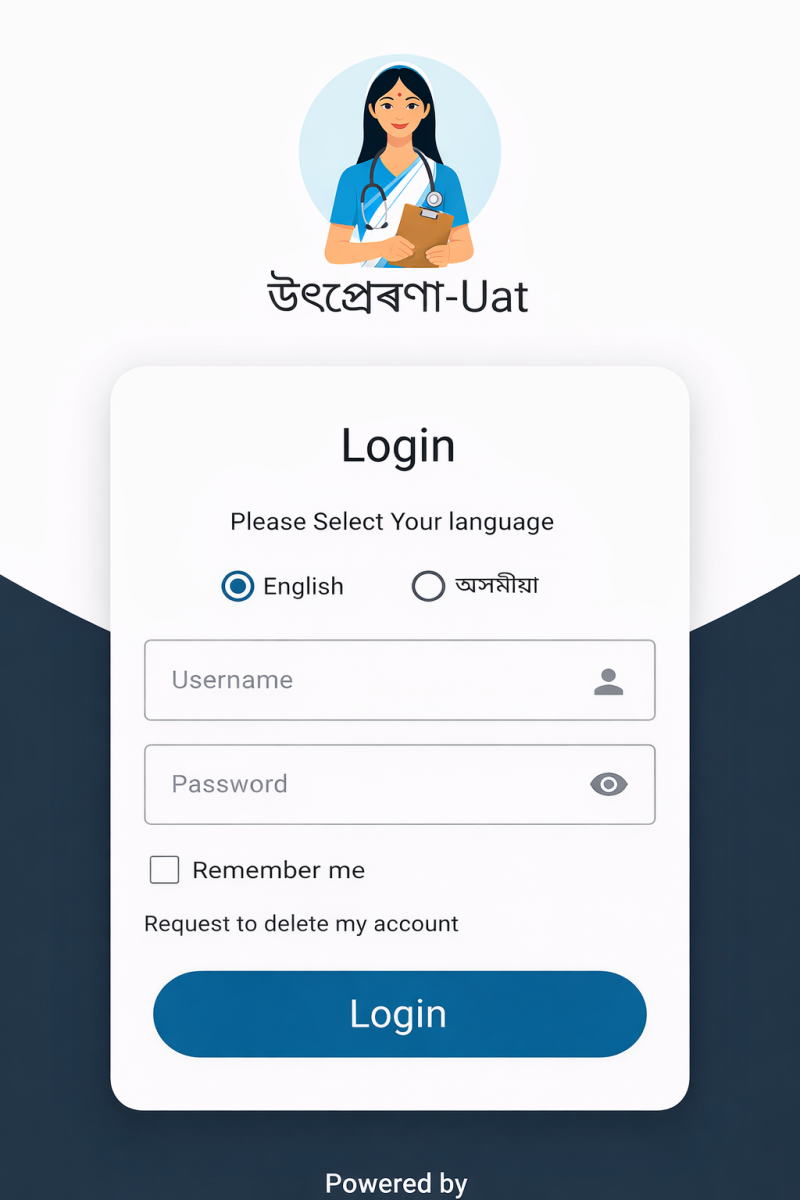 Follow it up with ASHA Supervisor profile: Nmae, employee ID, Designation, email, Working since etc
 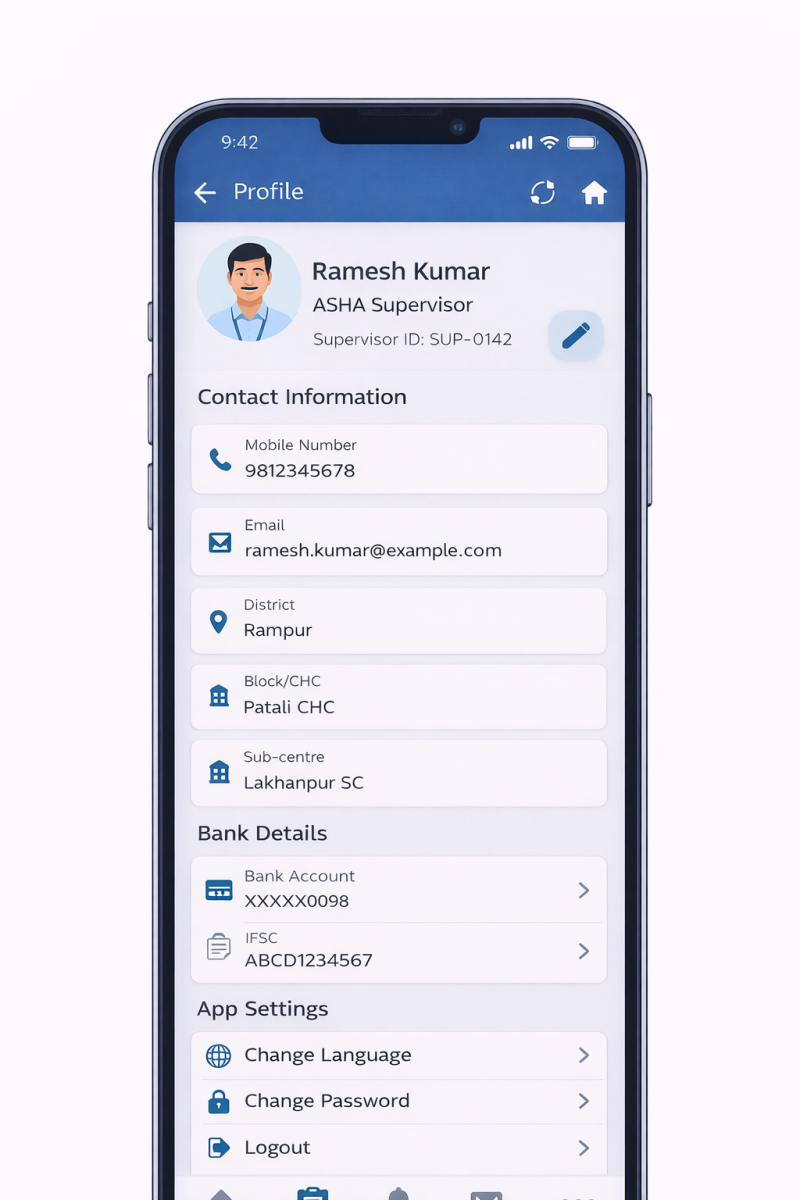 In Supervisor profile what details need to show?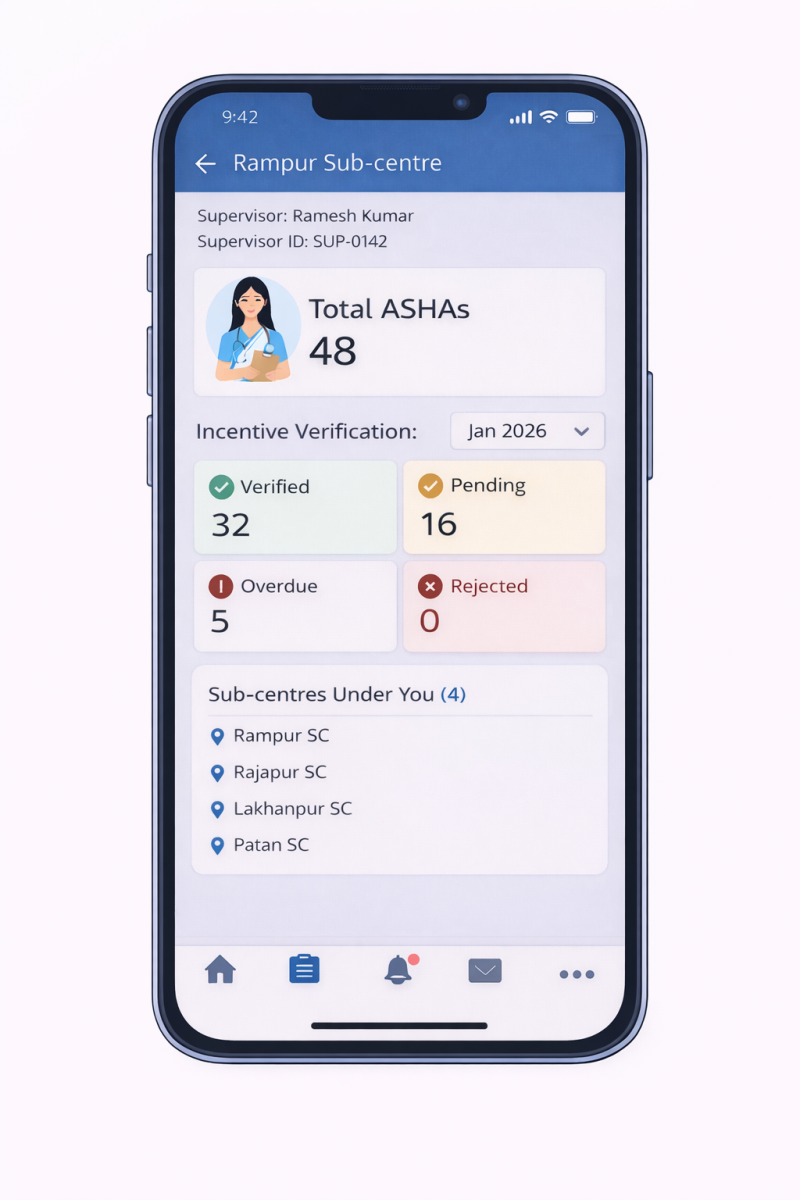
Incentive screen for ASHAs listed Single ASHA screen with Incentive
under a particular subcentre Verification