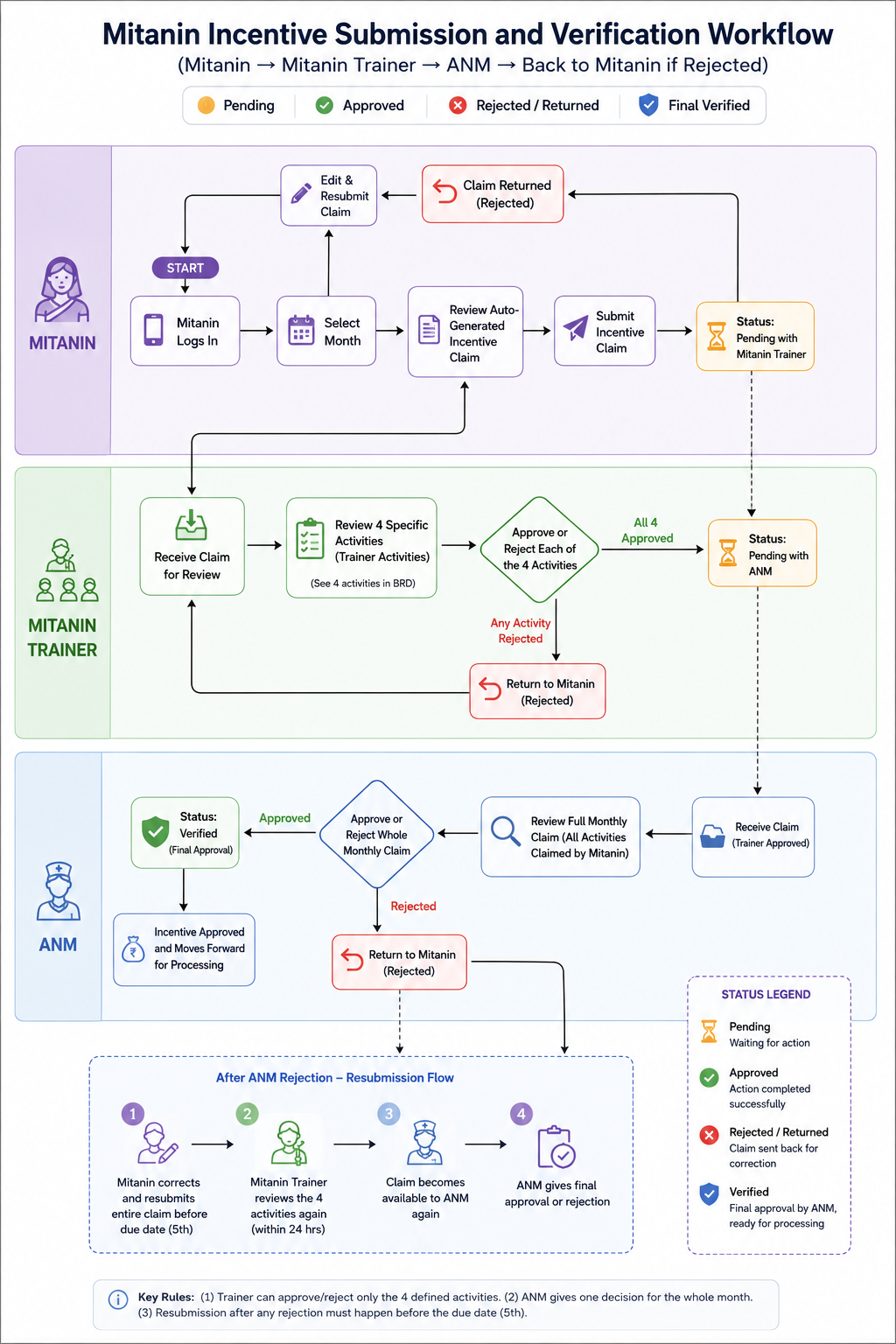
Mitanin is the mobile application used by Chhattisgarh's community health workers, called Mitanins, to record health care activities and generate monthly incentive claims. This document defines the requirements for the Incentive Verification module of the Mitanin application, covering two roles: the Mitanin Trainer (MT), who reviews a defined set of activities, and the ANM, who provides final approval or rejection of each Mitanin's monthly claim.
Target Users | Mitanin Trainer, ANM |
Primary Audience | Product managers, engineering and backend teams, UI/UX designers, program stakeholders |
Phase | Phase 1 |
Platform | Android mobile application |
Approval Level | Mitanin Trainer reviews four defined incentive activities. ANM reviews the complete monthly claim and gives the final approval or rejection. |
Future Scope | Web portal access, and any expansion of the Mitanin Trainer's reviewed activity list as decided by the program team |
Mitanins record their health care activities in the Mitanin app and generate monthly incentive claims. Verifying these claims today depends on manual checks and paper registers, which is slow and hard to audit. This module replaces that manual process with a digital, two-step verification workflow: the Mitanin Trainer checks a small set of activities she can personally confirm through her own fieldwork with the Mitanins she trains, and the ANM reviews the whole claim and gives the final decision for the month.
Give the Mitanin Trainer and the ANM a simple mobile interface to review and approve Mitanin incentive claims every month, with clear accountability for each decision.
Category | Goal | Description |
Process Digitisation | Digitise incentive verification | Replace the manual, paper based verification process with a fully digital workflow for the Mitanin Trainer and the ANM. |
Operational Efficiency | Reduce verification turnaround | Minimise the time between a Mitanin's submission and the ANM's final decision. |
Accuracy and Compliance | Improve verification accuracy | Reduce manual errors through structured review by both the Mitanin Trainer and the ANM. |
Transparency and Audit | Enable audit ready verification | Every decision by the Mitanin Trainer and the ANM is traceable, with identity, timestamp, and reasons where applicable. |
Adoption | Track usage of the module | Percentage of monthly claims verified digitally, and average turnaround time at each stage. |
This module uses two roles instead of one, and they do not have the same authority.
Role | What they review | What they can decide | When it applies |
Mitanin Trainer | The four named activities listed in Section 8, when claimed by the Mitanin that month | Approve or reject each of those four activities. Cannot act on any other activity, and cannot approve or reject the whole month's claim | Only when a Mitanin's monthly claim includes one or more of the four activities |
ANM | Every activity the Mitanin has claimed for the month | Approve or reject the whole month's claim in one decision | Every month, for every submitted claim. This is the only route to final approval |
The ANM's decision on a claim becomes available only once the Mitanin Trainer has approved the four activities, if the Mitanin claimed any of them that month. This is not a limit on the ANM's authority. It simply means the ANM reviews a claim once the specific activities the Trainer can personally vouch for have already been checked. If a Mitanin's claim does not include any of the four Trainer activities, the ANM can review and decide on it without waiting on the Mitanin Trainer at all.
The following four incentive activities fall within the Mitanin Trainer's review. All four are meeting attendance or self reporting activities rather than clinical or beneficiary linked ones, which fits the Trainer's role: she can personally confirm attendance at these meetings and the completeness of the register during her own fieldwork with the Mitanin, unlike clinical activities such as antenatal visits or immunisation records.
S.No | Activity | Rate | Category |
23 | Attending monthly cluster meetings of Mitanins | Rs. 150 per case | Village Health Meetings |
24 | Organising and attending monthly meetings of the Village Health, Sanitation and Nutrition Committee (VHSNC) | Rs. 150 per meeting | Village Health Meetings |
25 | Filling prescribed information in the Mitanin register | Rs. 500 per month | Mitanin Register and Reporting |
40 | Filling 5 prescribed types of information in the Mitanin register | Rs. 1,000 per month | Mitanin Register and Reporting |
Stage | Timeline |
Mitanin submission window | 1st to 3rd of every month |
Mitanin Trainer review window | 24 hours from the moment a Mitanin submits, or resubmits, a claim that includes one or more of the four Trainer activities |
ANM review and approval | By the 5th of every month, regardless of when the Mitanin Trainer's review is completed within that window |
Because the Mitanin Trainer's 24 hour window sits inside the ANM's overall cut off, a Mitanin who submits close to the 3rd leaves less time for the ANM to act. This document does not change the submission window or the ANM's due date; both roles are expected to act well within their own windows so the ANM still has enough time to review.
The Mitanin Trainer is issued her own username and password, separate from the Mitanins and separate from the ANM. Logging in takes her directly to her own dashboard. She only sees the Mitanins mapped to her own geography.
The dashboard header shows the Mitanin Trainer's name and ID. It includes a month selector, defaulted to the current month, and a filter for the villages or clusters mapped to her, along with a search box for finding a Mitanin by name.
The dashboard shows the following counts for the selected month: Total Mitanins mapped to her, Activities Awaiting Her Review, Activities Approved, Activities Rejected (sent back to the Mitanin for correction), and Mitanin Unclaimed. These counts are based on claimed instances of the four Trainer activities, not on the Mitanin's overall status.
Tapping into the dashboard shows Mitanins grouped by village or cluster, each with a short status label describing where her four activities currently stand: Awaiting Review, Approved, Rejected (awaiting the Mitanin's correction), or Not Applicable if she did not claim any of the four activities that month.
Opening a Mitanin shows her full monthly claim for context, with every activity she has claimed listed by category, serial number, activity name, number of claims, and amount, in read only form. Only the four Trainer activities, when claimed, carry an action: Approve or Reject.
Approving or rejecting one of these activities is final once submitted. The Mitanin Trainer cannot change her own decision afterward. A decision can only be reopened in two situations: the Mitanin corrects and resubmits after a Trainer rejection, in which case the Trainer reviews the corrected activity again, or the ANM later rejects the whole month's claim, in which case the whole claim, including these four activities, comes back to the Mitanin Trainer for a fresh review.
Rejecting one of the four activities opens a short reason field and sends only that activity back to the Mitanin for correction. It does not affect any of the Mitanin's other claimed activities, and it does not require the Mitanin to resubmit her entire month's claim, only the rejected activity.
The ANM is issued her own username and password, separate from the Mitanins and the Mitanin Trainer. Logging in takes her directly to her own dashboard, scoped to the Mitanins mapped to her.
The dashboard header shows the ANM's name and ID, a month selector defaulted to the current month, a geography filter, and a search box for finding a Mitanin by name. Tiles show the count of Mitanins in each of the five statuses defined in Section 13: Verified, Pending, Overdue, Rejected, and Mitanin Unclaimed, along with a Total Mitanins tile.
A grouped list of Mitanins by facility or geography, each with a status pill showing Verified, Pending, Overdue, Rejected, or Unclaimed for the selected month.
Opening a Mitanin shows every activity she has claimed for the month, grouped by category. Each category header shows the number of activities and the total amount claimed, and expands to show each activity's serial number, name, number of claims, and amount. On the four Trainer scoped activities, a short label shows whether the Mitanin Trainer has approved them, and when.
A single footer lets the ANM approve or reject the whole month's claim. Approve and reject apply to every activity claimed that month in one action. The approve action is available once the Mitanin Trainer has approved every one of the four activities the Mitanin claimed that month. If any of them are still awaiting the Trainer's decision, the approve action stays unavailable, with a short note explaining that it is waiting on the Mitanin Trainer. The reject action is always available to the ANM, whether or not the Mitanin Trainer has finished her review.
Rejecting opens a short list of standard reasons, such as incomplete documentation, incorrect data, duplicate claim, or ineligible activity, with an option for other reasons that requires a written remark. Submitting sends the whole month's claim back to the Mitanin along with the reasons given.
For activities linked to individual beneficiaries, tapping the activity row opens a read only screen listing each beneficiary's details and the amount claimed for that beneficiary. This screen has no actions available on it.
Status | Meaning |
Mitanin Unclaimed | The Mitanin has not submitted a valid claim for the month by the ANM due date (the 5th). This also applies when a claim was sent back for correction and the Mitanin never resubmitted it in time. |
Pending | The claim has been submitted and is awaiting a decision, either from the Mitanin Trainer on her four activities, or from the ANM on the whole month, whichever stage the claim is currently at. |
Overdue | The claim is still Pending after the ANM due date (the 5th) has passed. |
Rejected | The ANM has rejected the whole month's claim and sent it back to the Mitanin for correction. |
Verified | The ANM has approved the whole month's claim. The claim is final and moves forward for processing. |
Mitanin submits before the 3rd
-> Mitanin Trainer's 24-hour review window starts
-> Mitanin Trainer approves the four activities (if claimed)
-> Claim becomes available for the ANM
-> ANM approves the whole month's claim
-> Claim is verified, incentive is approved and moves forward for processing
Step | What happens |
1 | Mitanin submits her claim. |
2 | Mitanin Trainer rejects one of the four activities within her 24 hour window. |
3 | Mitanin has 24 hours to correct and resubmit that activity. |
4 | Mitanin Trainer reviews the correction and approves it. |
5 | Claim proceeds to the ANM as in the standard flow. |
Step | What happens |
1 | ANM rejects the claim. It is sent back to the Mitanin along with the reasons. |
2 | Mitanin must resubmit the whole claim before the ANM's due date, the 5th, for it to be considered again. |
3 | If resubmitted in time, the Mitanin Trainer reviews and approves the four activities again on the new submission. |
4 | Once approved, the claim becomes available to the ANM again, who gives the final decision. |
5 | If the Mitanin does not resubmit before the due date, the claim for that month becomes Mitanin Unclaimed. |
Area | Rule |
Mitanin Trainer decision finality | Approving or rejecting one of the four activities is final once submitted. It can only be reopened if the Mitanin corrects and resubmits after a rejection, or if the ANM later rejects the whole month's claim. |
ANM decision mode | One decision covers every activity claimed that month. There is no per activity approve or reject for the ANM. |
Resubmission after a Mitanin Trainer rejection | The Mitanin must correct and resubmit within 24 hours for the Mitanin Trainer to approve it. |
Resubmission after an ANM rejection | The Mitanin must resubmit the whole claim before the ANM's due date. If resubmitted in time, the Mitanin Trainer reviews the four activities again before the ANM gives her final decision. |
Cut off and Overdue | The ANM's due date, the 5th of the month, does not change based on how long the Mitanin Trainer's review takes. A claim becomes Overdue once the 5th passes while still Pending, regardless of which stage caused the delay. |
Escalation | Escalation relies mainly on the notifications defined in Sections 10.6 and 11.8, timed to give both roles enough warning. Escalation to the Medical Officer by SMS or WhatsApp remains available as a fallback, but is expected to be rarely needed if these notifications are followed. |
Incentive freeze | Once the ANM approves a month's claim, all figures for that Mitanin's month become final and cannot be changed. |
Concurrency | If the underlying claim changes while a screen is open, the user is asked to refresh before taking any action. |
Attribute | Description |
Mitanin Trainer ID | Identifier of the Mitanin Trainer performing the action |
ANM ID | Identifier of the ANM performing the action |
Mitanin ID | Identifier of the Mitanin whose claim is being reviewed |
Activity ID | Identifier of the specific activity, recorded for Mitanin Trainer actions since these are activity level decisions. Not required for the ANM's whole month actions |
Action Type | Trainer Approve Activity, Trainer Reject Activity, ANM Approve Month, or ANM Reject Month |
Timestamp | Date and time the action was performed |
Remarks | Reason given, where applicable |
This document assumes the following, and it would help to confirm these with the program team before development begins.