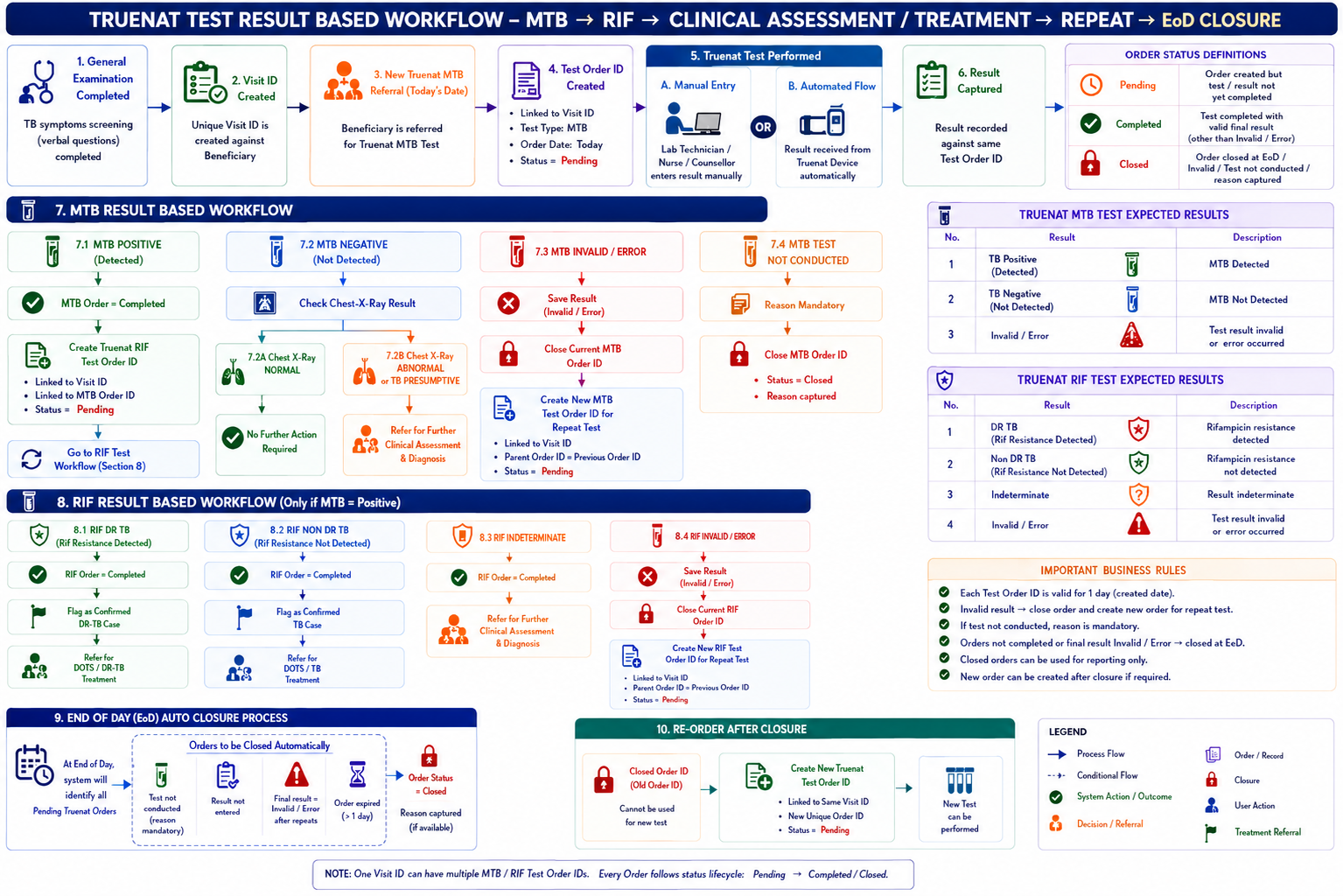
Part A – Business Requirements Document (BRD)
This document defines the business and functional requirements for managing the Truenat testing workflow within the TB Screening Camp application.
The solution shall digitally manage Truenat referrals, test orders, MTB and RIF testing, result capture, repeat testing, clinical referrals, treatment referrals, and End-of-Day (EoD) order closure.
The workflow shall support both:
The overall workflow is:
TB Symptoms Screening → Visit Creation → Truenat Referral → Test Order Creation → MTB Test → MTB Result → RIF / Clinical Assessment / No Action / Repeat → RIF Test → Treatment / Clinical Assessment / Repeat → EoD Closure
The objective is to ensure that every Truenat referral generated during a TB Screening Camp is:
3.1 In Scope
The solution shall cover:
Entity | Description |
Beneficiary | Person registered for TB screening |
Beneficiary ID | Unique identifier assigned to the beneficiary |
Visit ID | Unique identifier for the beneficiary's screening encounter |
Test Order ID | Unique identifier for an individual Truenat test order |
Test Type | MTB or RIF |
Test Result | Result generated for the respective Truenat test |
Referral | Action generated based on the test result |
Test Attempt | Individual testing attempt associated with an order |
Parent Order ID | Previous order reference when a new order is created after closure |
Entity Relationship
Beneficiary
│
▼
Visit ID
│
├───────────────┐
▼ ▼
MTB Order(s) RIF Order(s)
│ │
▼ ▼
MTB Result RIF Result
BR-01 – Visit Creation
A unique Visit ID shall be created against the Beneficiary ID once TB Symptoms Screening based on verbal questions has been completed.
The Visit ID shall act as the parent reference for diagnostic investigations performed during the beneficiary's visit.
Business Rules
BR-02 – New Truenat Referral
For every new Truenat referral generated on the current date, the system shall automatically create a unique Test Order ID under the applicable Visit ID.
The Order shall contain:
Initial status:
Pending
BR-03 – One-Day Order Validity
Every Truenat Test Order ID shall be valid for one calendar day from the date on which it is created.
At EoD, the system shall identify applicable open orders and close them according to the EoD closure rules.
The system shall support the following three statuses:
Status | Definition |
Pending | Test order created but valid final test result has not yet been completed |
Completed | Test conducted and valid final result recorded |
Closed | Order has been closed due to EoD expiry, test not conducted, or applicable repeat/closure condition |
Important Rule
An Invalid / Error result shall not result in Completed status.
For an Invalid/Error result:
The system shall support two result-capture methods.
Option 1 – Automated Result Capture
Where a Truenat testing device is integrated with the application:
Truenat Device
│
▼
Integration Interface
│
▼
Identify Test Order
│
▼
Validate Result
│
▼
Save Result
│
▼
Apply Business Rules
The result shall be automatically associated with:
Option 2 – Manual Result Entry
Where automated integration is unavailable, an authorized user shall be able to manually enter the result.
Users who may be permitted to enter results
Role-based permissions shall determine which users can perform manual result entry.
Manual Flow
Search Beneficiary
↓
Select Visit
↓
Select Pending Test Order
↓
Select Test Type
↓
Enter Test Result
↓
Save
↓
Apply Business Rules
The system shall support the following MTB results:
BR-04 – MTB Positive
When the MTB result is:
TB Positive (Detected)
the system shall:
Workflow
MTB Test
↓
TB Positive
↓
MTB Order = Completed
↓
RIF Referral
↓
Create RIF Order ID
↓
RIF Order = Pending
BR-05 – No Further Action
When:
MTB = TB Negative
AND
Chest X-Ray = Normal
the system shall:
MTB Negative
↓
Check Chest X-Ray
↓
Chest X-Ray = Normal
↓
No Further Action
BR-06 – Clinical Assessment & Diagnosis
When:
MTB = TB Negative
AND Chest X-Ray result is either:
the system shall:
No RIF Order shall be automatically created solely based on this result combination.
BR-07 – Repeat MTB Test
When:
MTB Result = Invalid / Error
the system shall:
Example
Visit V001
│
├── MTB Order M001
│ │
│ └── Invalid/Error → CLOSED
│
└── MTB Order M002
│
└── Repeat Test → PENDING
A RIF Test shall be initiated when the MTB result is:
TB Positive (Detected)
The system shall support the following RIF results:
BR-08 – DR TB
When RIF Result =
DR TB (Rif Resistance Detected)
the system shall:
RIF Test
↓
DR TB
↓
RIF Order = Completed
↓
Confirmed DR-TB Case
↓
Treatment Referral / DOTS
BR-09 – Confirmed TB Case
When RIF Result =
Non-DR TB (Rif Resistance Not Detected)
the system shall:
BR-10 – Clinical Assessment & Diagnosis
When RIF Result = Indeterminate:
BR-11 – Repeat RIF Test
When RIF Result = Invalid / Error:
BR-12 – MTB Test Not Conducted
The system shall allow an authorized user to mark an MTB Test as Not Conducted.
Business Rules
BR-13 – RIF Test Not Conducted
The same rule shall apply to RIF testing.
BR-14 – Automatic End-of-Day Closure
At the end of each camp day, the system shall identify all applicable open Truenat Test Orders.
The system shall close orders where:
EoD Workflow
END OF DAY
│
▼
Identify Open Orders
│
┌────────┴─────────┐
▼ ▼
MTB Orders RIF Orders
│ │
▼ ▼
Check Order Status Check Order Status
│ │
Pending/Open? Pending/Open?
│ │
└────────┬─────────┘
▼
Close Order
│
▼
Status = CLOSED
BR-15 – Create New Test Order
For any Closed Truenat Test Order, the beneficiary record/card shall provide an option to Create New Test Order where another test is clinically/operationally required.
The new order shall:
The closed order shall remain unchanged for historical and audit purposes.
The application shall support multiple test orders against the same Visit ID.
Example:
Visit ID
│
┌────────────┼─────────────┐
▼ ▼ ▼
MTB Order MTB Order RIF Order
M001 M002 R001
│ │ │
Invalid Valid Result
Closed Completed
This ensures that repeat testing and sequential testing are fully traceable.
High-Level Business Workflow