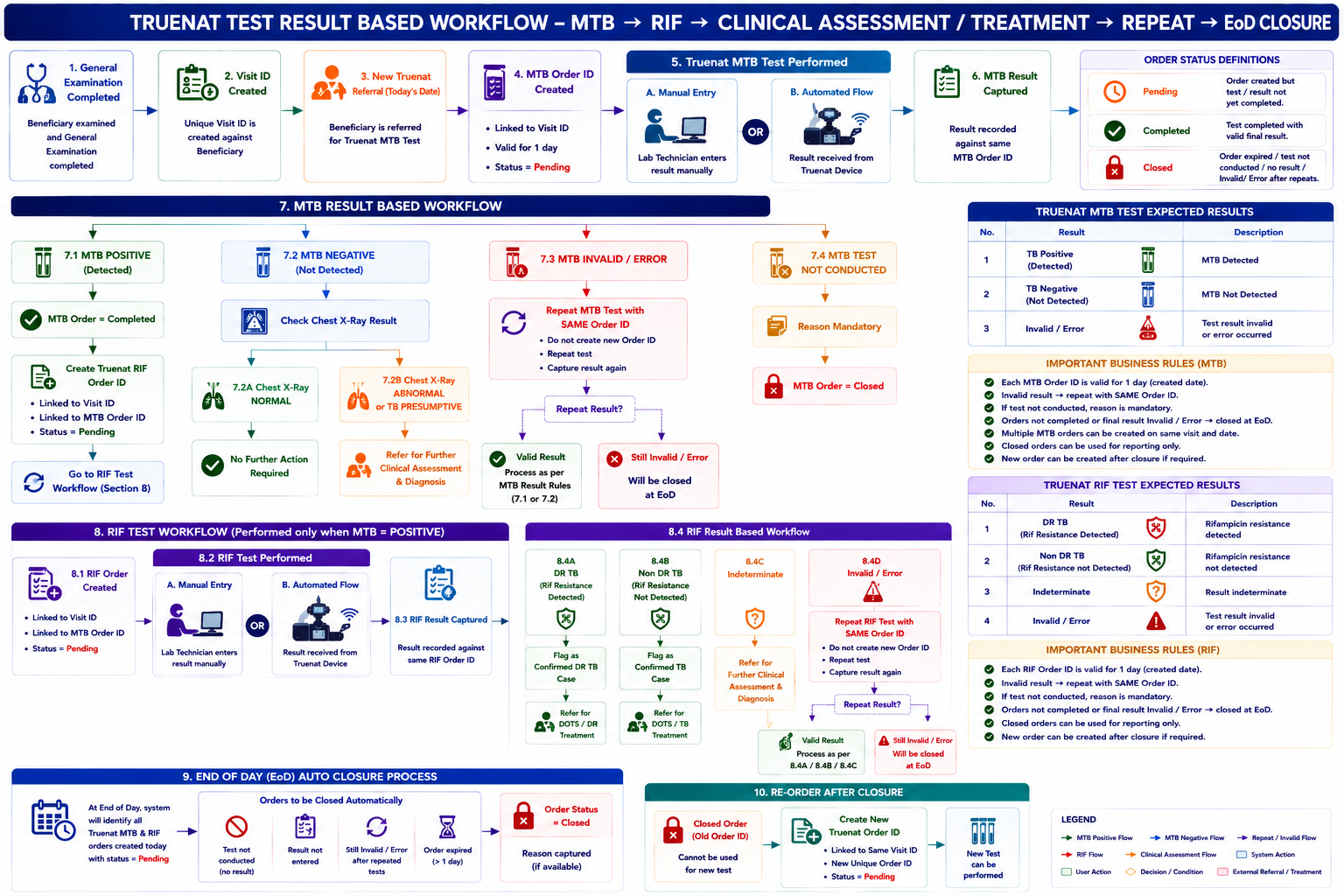
Epic: Truenat Test Order Management and Result-Based Diagnostic Workflow
As a TB Screening Application, I want to create, manage, and process Truenat MTB and RIF test orders against a beneficiary's Visit ID through manual result entry or automated integration with Truenat testing devices, so that the system can determine the appropriate next clinical action based on the test results and ensure all open orders are closed at the end of the day.
1. User Story – Visit ID Creation
US-TR-01: Create Visit ID
As a TB Screening Application,
I want to create a unique Visit ID when General Examination is completed for a beneficiary,
so that all diagnostic investigations performed during that encounter can be linked to the beneficiary's visit.
Acceptance Criteria
2. User Story – Create Truenat MTB Order
US-TR-02: Create Truenat MTB Test Order
As a TB Screening Application, after TB symptoms screening is done,
I want to automatically create a Truenat MTB Test Order ID for a new Truenat referral on the current date, so that the MTB test can be tracked from referral through completion.
Acceptance Criteria
3. User Story – Capture Truenat Result
US-TR-03: Capture Truenat Test Result
As a Lab Technician/authorized user,
I want to enter the Truenat test result manually or receive it automatically from an integrated Truenat device, so that the application can determine the appropriate next action for the beneficiary.
Acceptance Criteria
The system shall support two methods of result capture:
4. Truenat MTB Test
US-TR-04: Process Truenat MTB Result
The system shall support the following MTB results:
US-TR-04A: MTB Positive
As a TB Screening Application,
I want to automatically refer a beneficiary for a Truenat RIF test when the MTB result is TB Positive, so that Rifampicin resistance can be assessed.
Acceptance Criteria
When MTB Result = TB Positive (Detected):
Flow
MTB Test
│
▼
TB Positive (Detected)
│
▼
MTB Order = Completed
│
▼
Create RIF Order
│
▼
RIF Order = Pending
5. MTB Negative – Chest X-Ray Based Workflow
US-TR-04B: MTB Negative + Normal Chest X-Ray
As a TB Screening Application,
I want to close the diagnostic workflow when MTB is negative and the Chest X-Ray result is Normal, so that no unnecessary further diagnostic action is initiated.
Acceptance Criteria
When:
Then:
MTB Negative
│
▼
Check Chest X-Ray Result
│
┌───────┴────────┐
│ │
NORMAL ABNORMAL /
│ TB PRESUMPTIVE
▼ │
No Further ▼
Action Clinical Assessment
& Diagnosis
6. MTB Negative + Abnormal Chest X-Ray
US-TR-04C: MTB Negative with Abnormal Chest X-Ray
As a TB Screening Application,
I want to refer the beneficiary for further Clinical Assessment & Diagnosis when MTB is negative but the Chest X-Ray indicates an abnormality, so that the beneficiary can receive appropriate clinical evaluation despite the negative MTB result.
Acceptance Criteria
When:
Then:
7. MTB Invalid / Error
US-TR-04D: Repeat MTB Test
As a Lab Technician,
I want to repeat the MTB test when the result is Invalid/Error, so that a valid MTB result can be obtained without creating another MTB Order ID.
Acceptance Criteria
When MTB Result = Invalid / Error:
MTB Test
│
▼
Invalid / Error
│
▼
Repeat MTB Test
using SAME Order ID
│
▼
New Result
│
├───────────────┐
│ │
Valid Result Invalid/Error
│ │
▼ ▼
Process Result Close at EoD
8. Truenat RIF Test
US-TR-05: Process Truenat RIF Result
The RIF test shall be performed when the MTB test result is TB Positive (Detected).
The system shall support the following RIF results:
US-TR-05A: Identify Confirmed DR TB
As a TB Screening Application,
I want to flag a beneficiary as a confirmed DR TB case when the RIF result indicates Rifampicin resistance, so that the beneficiary can be referred for appropriate DR TB treatment.
Acceptance Criteria
When RIF Result = DR TB (Rif Resistance Detected):
MTB Positive
│
▼
RIF Test
│
▼
DR TB
(Rif Resistance Detected)
│
▼
RIF Order = Completed
│
▼
Confirmed DR TB Case
│
▼
Refer for DOTS Treatment
9. RIF – Non-DR TB
US-TR-05B: Identify Confirmed TB Case
As a TB Screening Application,
I want to flag a beneficiary as a confirmed TB case when the RIF result indicates no Rifampicin resistance, so that the beneficiary can be referred for TB treatment.
Acceptance Criteria
When RIF Result = Non-DR TB (Rif Resistance Not Detected):
10. RIF – Indeterminate
US-TR-05C: Refer for Clinical Assessment
As a TB Screening Application,
I want to refer the beneficiary for further Clinical Assessment & Diagnosis when the RIF result is Indeterminate, so that an appropriate clinical decision can be made.
Acceptance Criteria
When RIF Result = Indeterminate:
11. RIF Invalid / Error
US-TR-05D: Repeat RIF Test
As a Lab Technician,
I want to repeat the RIF test when the result is Invalid/Error, so that a valid RIF result can be obtained using the same Order ID.
Acceptance Criteria
When RIF Result = Invalid / Error:
12. Test Not Conducted
US-TR-06: Close MTB Order When Test Is Not Conducted
As an authorized user,
I want to mark the MTB test as Not Conducted with a mandatory reason, so that the system maintains an accurate record of why the test was not completed.
Acceptance Criteria
Examples of Reasons for not conducting the Truenat Test:
13. Test Not Conducted – RIF
US-TR-07: Close RIF Order When Test Is Not Conducted
The same rule shall apply to the RIF test.
Acceptance Criteria
14. EoD Auto Closure
US-TR-08: Automatically Close Open Truenat Orders at EoD
As a TB Screening Application,
I want to automatically close eligible open Truenat orders at the end of the day,
so that no expired Truenat Order remains open after its one-day validity period.
MTB orders to be closed at EoD
The system shall close an MTB Order when:
RIF orders to be closed at EoD
The system shall close a RIF Order when:
EoD Flow
END OF DAY
│
▼
Identify Pending Orders
│
┌───────────────┴────────────────┐
│ │
MTB Orders RIF Orders
│ │
▼ ▼
Test not conducted Test not conducted
Result not entered Result not entered
Still Invalid/Error Still Invalid/Error
│ │
└───────────────┬────────────────┘
▼
Order Status = CLOSED
15. Re-Order After Closure
US-TR-09: Create New Truenat Order After Closure
As an authorized user,
I want to create a new Truenat test Order ID when an earlier Order ID is closed,
so that the beneficiary can undergo another test when required.
Acceptance Criteria
16. Order Status
The system shall support three Order statuses:
Status | Definition |
Pending | Order created but test/result is not yet completed |
Completed | Test conducted and valid final result recorded |
Closed | Order expired, test not conducted, result not entered, or final result remained Invalid/Error |
Status Matrix
Scenario | Status |
New MTB Order | Pending |
MTB Positive | Completed |
MTB Negative | Completed |
MTB Invalid – repeat required | Pending |
MTB Invalid after final repeat at EoD | Closed |
MTB not conducted | Closed |
MTB result not entered at EoD | Closed |
New RIF Order | Pending |
RIF DR TB | Completed |
RIF Non-DR TB | Completed |
RIF Indeterminate | Completed |
RIF Invalid – repeat required | Pending |
RIF Invalid after final repeat at EoD | Closed |
RIF not conducted | Closed |
RIF result not entered at EoD | Closed |
17. Complete Functional Workflow
18. Manual vs Automated Result Flow
The system should provide the same business outcome regardless of the result source.
TRUENAT TEST
│
┌──────────┴──────────┐
│ │
▼ ▼
Lab Technician Truenat Device
│ │
└──────────┬──────────┘
│
▼
Result Captured
│
▼
Result-Based Workflow
│
┌──────────────┴──────────────┐
│ │
MTB Result RIF Result
│ │
▼ ▼
Next Action Rules Next Action Rules