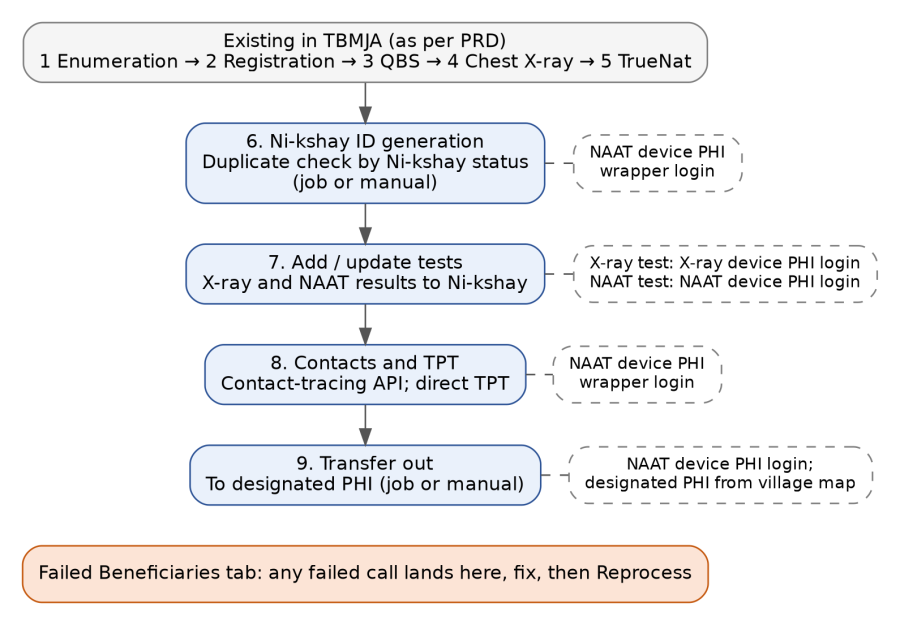
Figure 1 — Steps 1 to 5 run in TBMJA today; steps 6 to 9 are added by this BRD. Dashed boxes show the login each new step uses.
Nikshay Enrollment and Test Addition Flow
BRD: Ni-kshay Enrollment and Test Addition from TBMJA
Version 1.1 — team feedback incorporated
Date | Version | Author | Approved By | Document change reference |
07-10-2026 | 1.0 | Ganesh Shirpure | Initial draft | |
12-10-2026 | 1.1 | Ganesh Shirpure | Team feedback incorporated: single-ID login model removed; device PHI wrapper logins (X-ray, NAAT); duplicate handling by Ni-kshay status with new episode IDs; TPT flow (contact tracing and direct TPT); five MMU tabs including Failed Beneficiaries; device configuration placeholder table; API job, failed-beneficiary handling and manual push |
Item | Detail |
Product | TBMJA application (AMRIT), MMU module |
Version | 1.1 (draft for team review) |
Status | Draft |
Reference | TBMJA PRD (Confluence, AMRIT space, page 149487638) |
Related | TPT Enrollment in Ni-kshay – Field User Guide; Device-Login TPT Enrollment and Auto-Transfer – Concept Note |
How to read the tags | [New] added in v1.1; [Changed] changed in v1.1; [Removed] taken out in v1.1. Untagged content is unchanged from v1.0. |
# | Team feedback | Where addressed |
1 | Single-ID (PPSA) login for enrollment and tests is not applicable: remove it | Section 6 (login model replaced); FR-04 to FR-06, FR-12; Section 12 field mapping; scenarios S1–S3; NFR and Roles. [Removed] everywhere else. |
2 | Confirmed-patient addition: no duplicate → fresh ID; duplicate → act by its Ni-kshay status (six cases) | Section 7; Figure 5; FR-03; V14; Section 12 (episode fields) |
3 | TPT flow: confirmed member → create ID, add contacts through contact-tracing API; contact of known TB patient → direct TPT | Section 8; Figure 6; FR-16, FR-17 |
4 | Login management: X-ray device PHI login; NAAT device PHI login (also enrollment and transfer out) | Section 6; Figure 4; FR-04 to FR-06, FR-09 |
5 | UI: options for ID generation, X-ray, NAAT, failed beneficiaries tab, transfer-out job / manual | Section 10 (five tabs); FR-01, FR-18 |
6 | Placeholder: device details table with the wrapper PHI login per activity (as in the sheet screenshot) | Section 6.2 device configuration table; FR-12 |
7 | API job: automate or manual push; address failed beneficiaries; expose manual push when the job has issues | Section 11; Figure 7; FR-19 to FR-21; scenario S10 |
8 | Consequential changes made while going through the document | Tab and sync-status lists; validation V14, V16; tests T5, T7, T8; scenarios S1–S10; NFR; Roles; new Assumptions (Section 18) and Open points (Section 19) |
TBMJA already supports the camp workflow up to testing: enumeration, beneficiary registration, Question Based Screening (QBS), Chest X-ray and TrueNat (NAAT). After the camp, field staff re-enter the same beneficiaries and results in Ni-kshay by hand using PHI logins. This is slow, error-prone and hard to track.
This BRD defines the missing features: generating the Ni-kshay ID from TBMJA (with duplicate handling by existing Ni-kshay status), pushing X-ray and NAAT results to Ni-kshay, adding contacts and TPT cases, and transferring the case to the designated PHI for treatment initiation. Calls to Ni-kshay use wrapper PHI logins created for the X-ray and NAAT devices and assigned only to the TBMJA project.
Generate a Ni-kshay ID for each eligible camp beneficiary from TBMJA, after the camp data is complete, by job or manual trigger. *\[Changed\]* |
Check for an existing Ni-kshay record and act on its status: fresh ID, existing record, or a new episode under the parent ID. *\[New\]* |
Add household contacts against the index patient, and enrol contacts of known TB patients directly as TPT. *\[New\]* |
Show every failed beneficiary with its reason and let staff fix and reprocess it; expose manual push when the automatic job has issues. *\[New\]* |
In scope | Out of scope |
• Ni-kshay ID generation (enrollment) from the MMU module, with duplicate handling by Ni-kshay status [Changed] • NAAT result push to Ni-kshay • Chest X-ray result push to Ni-kshay • Contact addition (contact-tracing API) and direct TPT enrollment [New] • Pre-API validation and data rectification • Transfer out to the designated PHI, by job or manual [Changed] • Device and wrapper PHI login configuration, sync status and reports [Changed] • Failed Beneficiaries tab, reprocessing, automatic job and manual push [New] | • Enumeration, registration, QBS, X-ray and TrueNat capture (already built as per PRD) • Treatment initiation, dispensation and adherence in Ni-kshay • ABHA generation (to be confirmed) • Changes to the Ni-kshay portal itself • [Removed] Login through a single organisation-level ID: not applicable in this version |
Steps 1 to 5 run in TBMJA today. This BRD adds steps 6 to 9. The Ni-kshay steps start only after the camp data for a beneficiary is complete (registration, QBS and the tests done for that person).
Figure 1 — Steps 1 to 5 run in TBMJA today; steps 6 to 9 are added by this BRD. Dashed boxes show the login each new step uses.
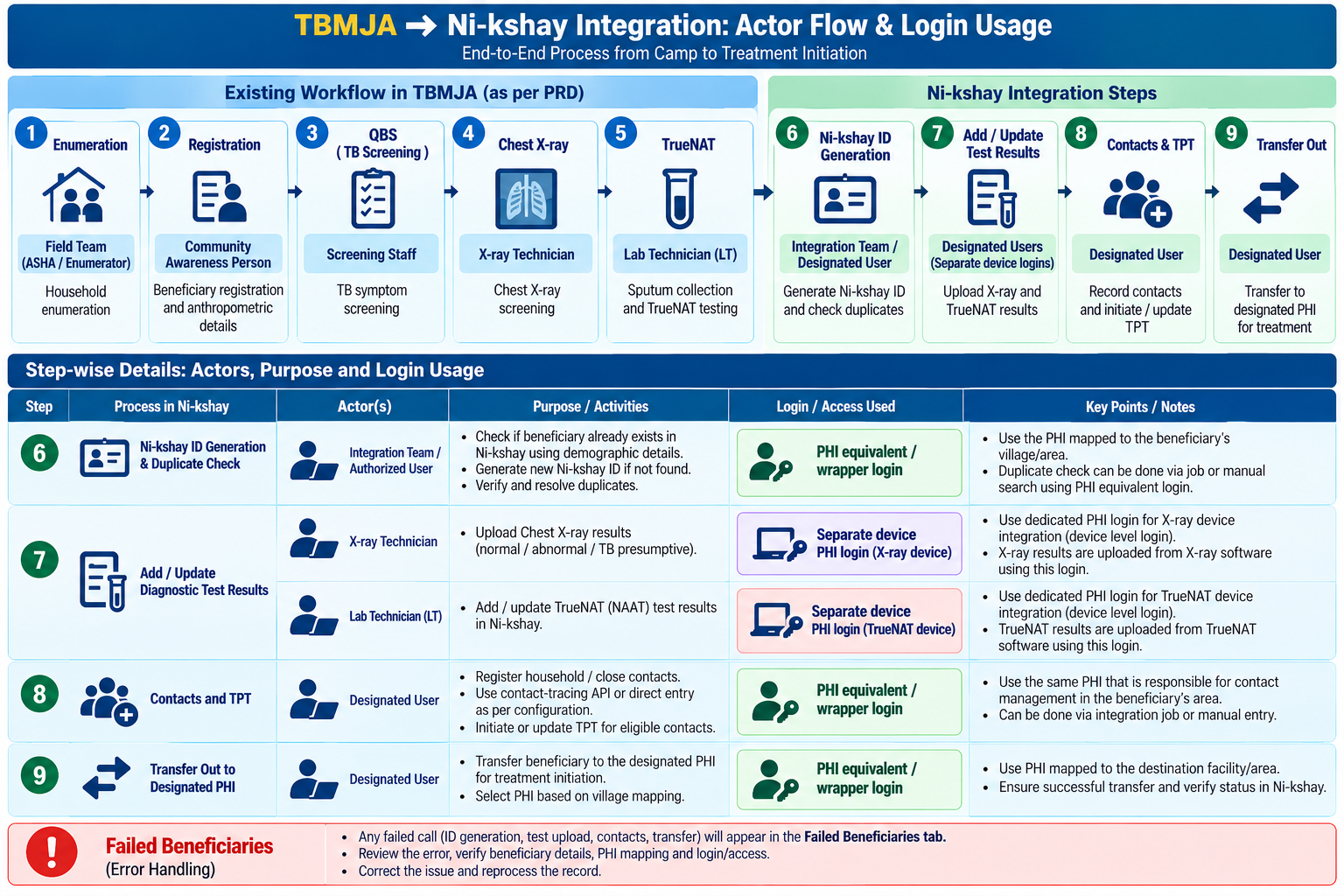
Step | What happens | System | Status |
1. Enumeration | Household / community enumeration for TB screening | TBMJA | Built |
2. Beneficiary registration | Register beneficiary details | TBMJA | Built |
3. QBS | Question Based Screening to identify presumptives | TBMJA | Built |
4. Chest X-ray | X-ray for identified presumptives | TBMJA | Built |
5. TrueNat | Sample collection and TrueNat (NAAT) test | TBMJA | Built |
6. Ni-kshay ID generation | Check for a duplicate in Ni-kshay; create a fresh ID, use the existing record, or create a new episode; store the IDs in TBMJA | TBMJA, Ni-kshay | New [Changed] |
7. Add / update tests | Push NAAT and X-ray results to the beneficiary’s Ni-kshay record or episode | TBMJA, Ni-kshay | New |
8. Contacts and TPT | Add household contacts to the index patient; enrol contacts of known TB patients directly as TPT | TBMJA, Ni-kshay | New [New] |
9. Transfer out | Transfer to the designated PHI for treatment initiation or TPT, by job or manual | TBMJA, Ni-kshay | New [Changed] |
The flow is shown in two parts: enrollment (Tab 1) and then tests, contacts and transfer out. Any failed call goes to the Failed Beneficiaries tab (Tab 4), where it is fixed and reprocessed.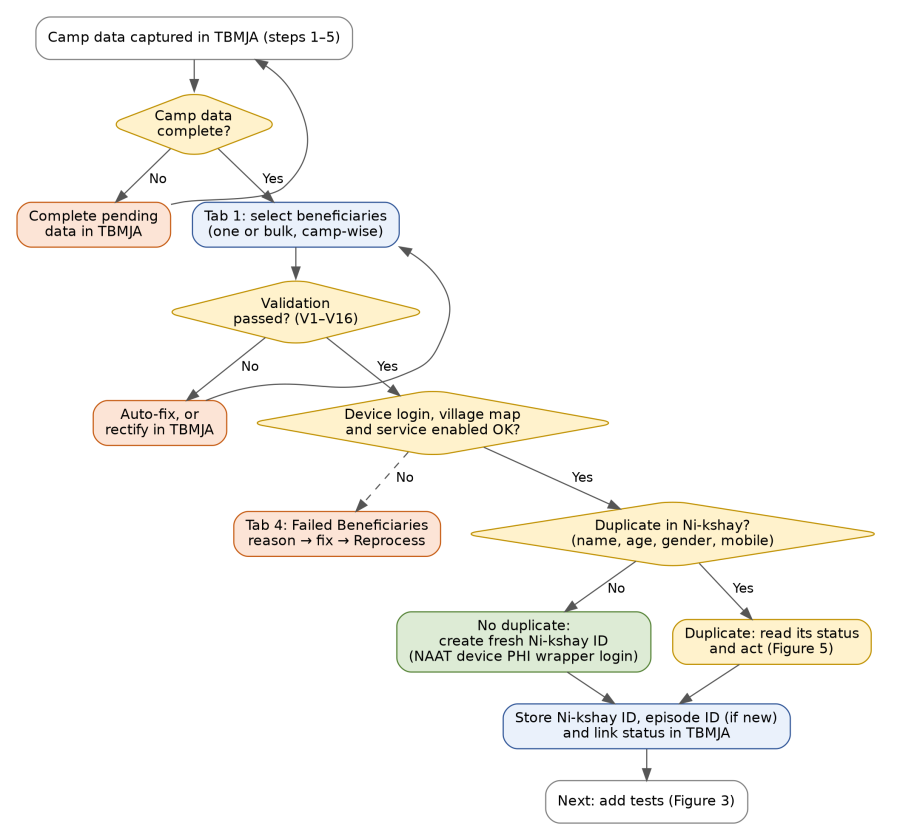
Figure 2 — Enrollment flow (Tab 1): camp data check, validation, device login check, duplicate check, ID creation or linking.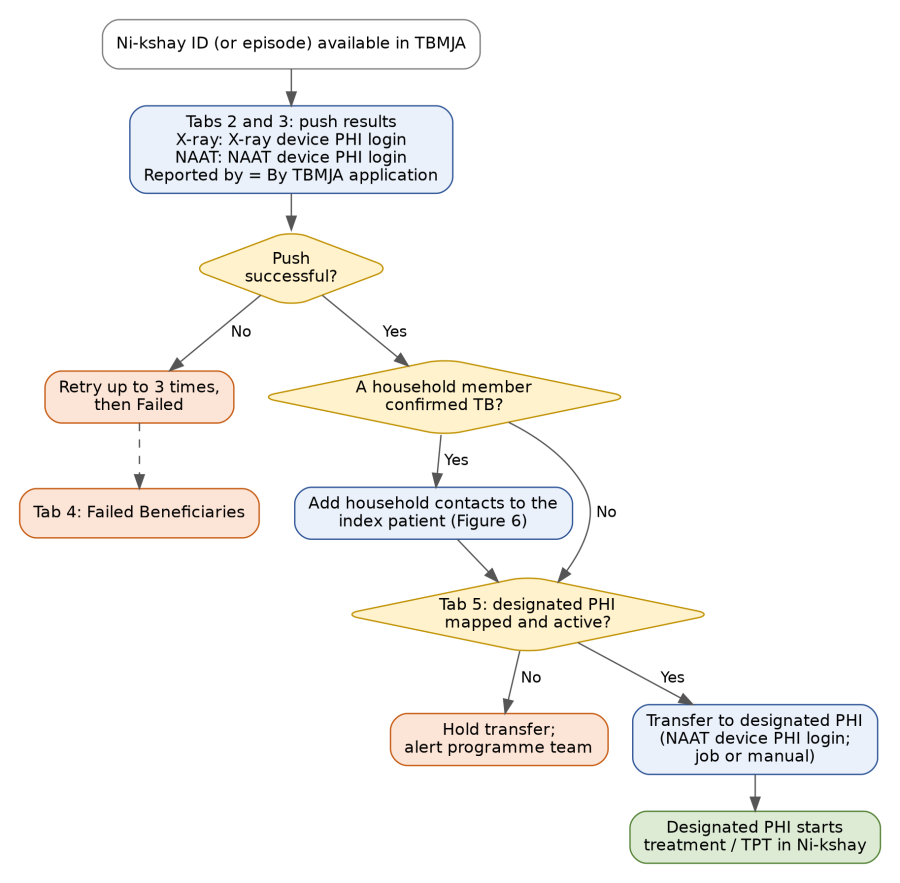
Figure 3 — Tests, contacts and transfer out (Tabs 2, 3 and 5), with failures sent to Tab 4.
Term | Meaning |
|---|---|
Wrapper PHI login | A Ni-kshay login created on a device PHI and assigned only to the TBMJA project. TBMJA uses it to call Ni-kshay for the activities listed in Section 6. |
Device PHI | The PHI created for a device: the NAAT device PHI or the X-ray device PHI. It decides where the case and the test sit in Ni-kshay. |
Designated PHI | The PHI mapped to the beneficiary's village that accepts the transferred case and starts treatment or TPT. |
Parent ID / episode ID | The Ni-kshay ID of the patient (parent) and the ID of a new episode created under it for a repeat presentation. |
Index patient | The household member confirmed as TB, against whom contacts are added. |
Run mode | For each step: Automatic (a scheduled job pushes it) or Manual (a user pushes it from the tab). |
Failed Beneficiaries | Tab 4: every beneficiary whose call failed or is held, with the reason, so it can be fixed and reprocessed. |
[Removed] The v1.0 model of one organisation-level ID with a TBU and device PHI selected after login is not applicable. Ni-kshay access now uses wrapper PHI logins, one per device, each assigned only to the TBMJA project. |
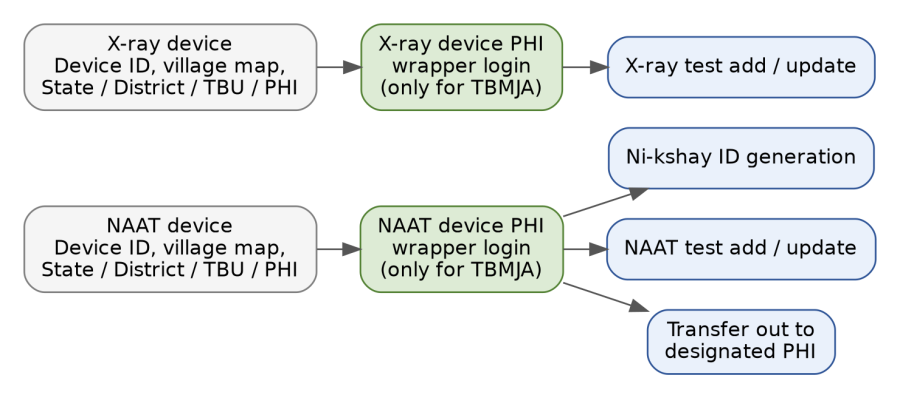
Figure 4 — The device ID picks the wrapper PHI login; each login serves the activities shown.
Activity | Login used | Notes |
|---|---|---|
Ni-kshay ID generation (enrollment) | NAAT device PHI wrapper login | A separate login is provided for enrollment and NAAT test addition; it is the NAAT device ID login |
NAAT test addition and result update | NAAT device PHI wrapper login | Same login as enrollment |
Chest X-ray test addition and result update | X-ray device PHI wrapper login | A PHI is provided for the X-ray device; the login is made with the X-ray device ID |
Transfer out to the designated PHI | NAAT device PHI wrapper login | The same ID is used to transfer the patient out to the designated PHI |
Contact addition (contact-tracing API) and direct TPT | NAAT device PHI wrapper login | Same login as enrollment |
Rules
One row per device and activity. The programme team fills it in; TBMJA reads it to pick the wrapper PHI login for each call. The two example rows are taken from the team's sheet. The purpose text of the first row was cut off in the screenshot and is completed here from the login management feedback.
Purpose | Device ID | Device name | Device village mapping | State | District | TBU | Health facility | Login wrapper PHI user ID | Password |
|---|---|---|---|---|---|---|---|---|---|
Enrollment and NAAT test addition and result update; transfer out | 234 | NAAT | Village A | Madhya Pradesh | Dhora | Dhora TBU1 | PHI-1 | Phi-jhmhg09-008 | •••••• (masked) |
X-ray test addition and result update | 4345 | X ray | Village A | Madhya Pradesh | Dhora | Dhora TBU1 | PHI-12 | Phi-jhmhg09-012 | •••••• (masked) |
Do not store real passwords in a sheet or in this page. The team's screenshot shows a password column in plain text. In TBMJA the password is set only in the admin screen and displayed masked. |
Suggested extra columns (optional): services enabled on the PHI profile (NAAT / X-ray), valid from / to, active yes / no. The "services enabled" column lets TBMJA check the service before the call (scenario S3).
Village | Designated PHI | TBU | Valid from / to | Mapping active |
[to fill] | [to fill] | [to fill] | [to fill] | Yes / No |
Village-level mapping of device PHIs, their Ni-kshay IDs and the designated PHI per village is maintained in the attached sheet (Section 17).
Before creating a Ni-kshay ID, TBMJA checks Ni-kshay for the same person (name, age, gender, mobile). What happens next depends on whether a duplicate exists and on its status.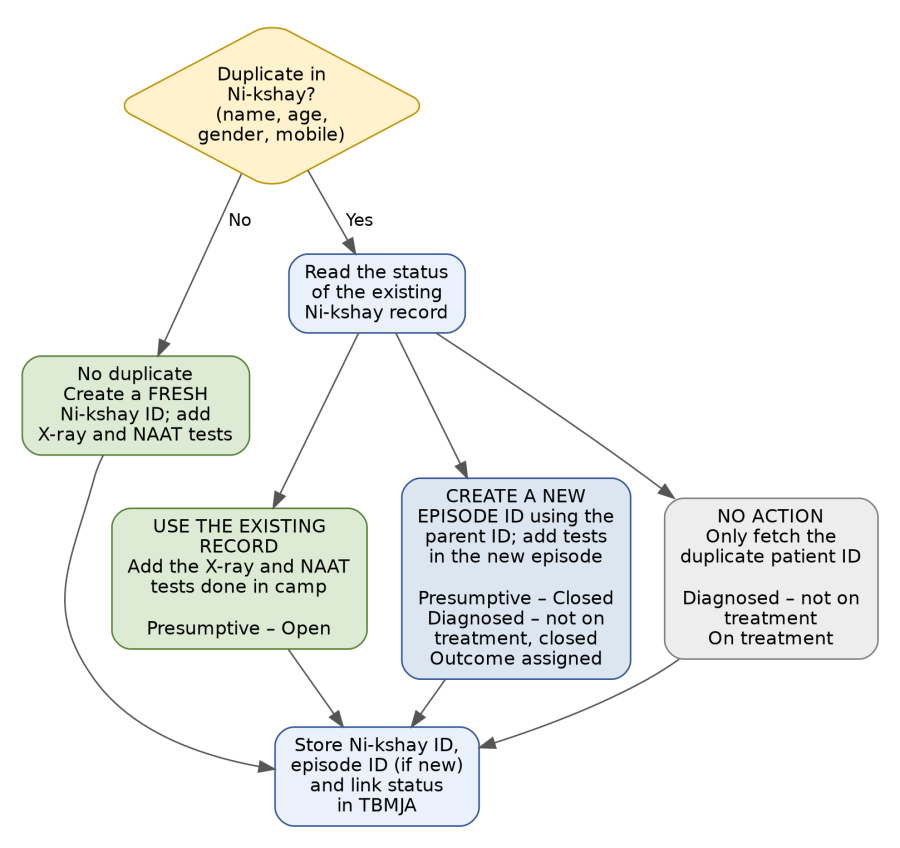
Figure 5 — Duplicate check and the action for each Ni-kshay status. Green: tests added to the existing record; blue: new episode under the parent ID; grey: no action, ID only.
# | Duplicate in Ni-kshay? | Status of the existing record | Action in TBMJA | New ID or episode? | Camp tests added? |
|---|---|---|---|---|---|
1 | No | — | Create a fresh Ni-kshay ID | New patient ID | Yes, to the new record |
2.1 | Yes | Presumptive – Open | No separate ID. Use the existing record | No | Yes: add the X-ray and NAAT tests done in camp |
2.2 | Yes | Presumptive – Closed | Create a new episode ID using the parent ID | New episode | Yes, in the new episode |
2.3 | Yes | Diagnosed – not on treatment | No action. Fetch the duplicate patient ID only | No | No |
2.4 | Yes | Diagnosed – not on treatment, closed | Create a new episode ID using the parent ID | New episode | Yes |
2.5 | Yes | On treatment | No action. Fetch the duplicate patient ID only | No | No |
2.6 | Yes | Outcome assigned | Create a new episode ID using the parent ID | New episode | Yes, in the new episode |
Rules
TBMJA stores the Ni-kshay ID (parent), the episode ID if a new episode was created, the status found at the time of the check, and a link status: New, Linked, or New episode. *\[New fields\]* |
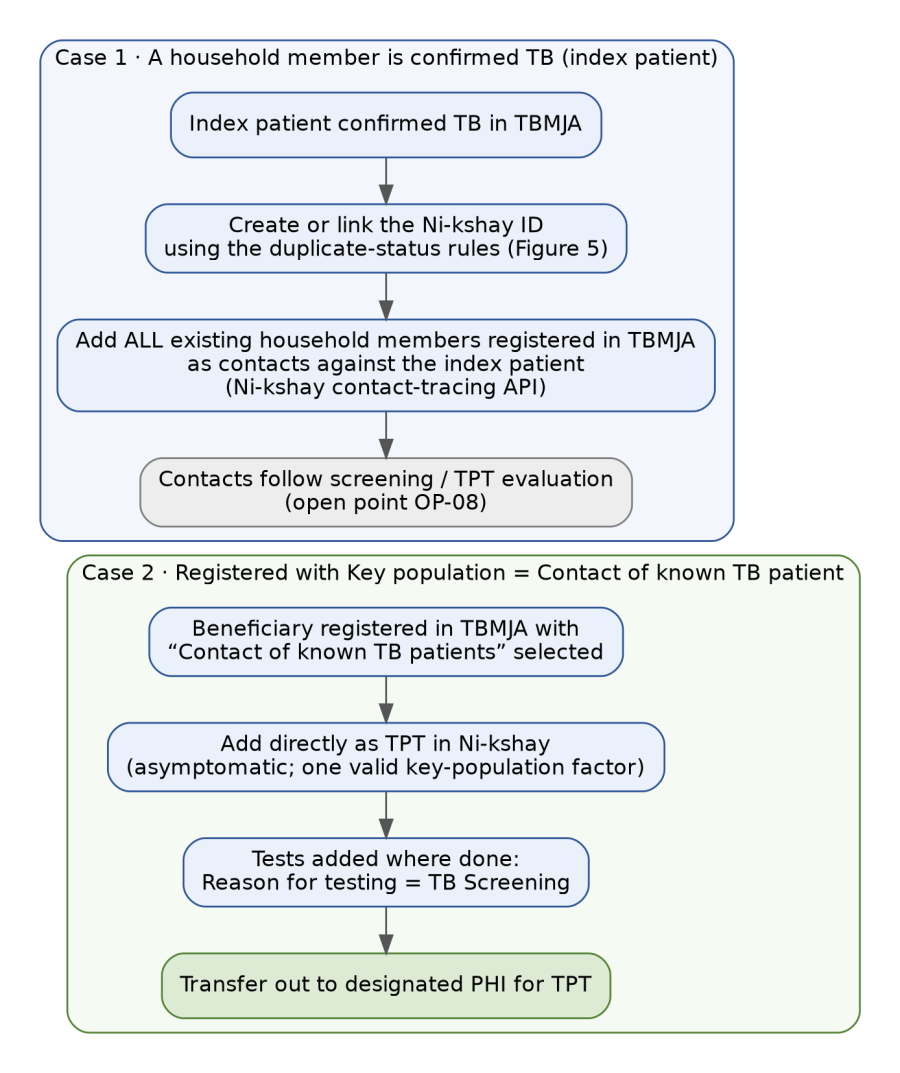
Figure 6 — TPT flow: index patient with contacts, and direct TPT for contacts of known TB patients.
ID | Requirement | Priority | v1.1 |
|---|---|---|---|
FR-01 | Provide five Ni-kshay tabs in the MMU module: Generate Ni-kshay ID, X-ray Test, NAAT Test, Failed Beneficiaries and Transfer Out. Each tab lists only beneficiaries eligible for that step. | Must | Changed (was three tabs) |
FR-02 | Run all validation and rectification rules (Section 13) before any Ni-kshay API call; block the call and show the fields to fix if any rule fails. | Must | |
FR-03 | Before enrollment, search Ni-kshay for an existing record (name, age, gender, mobile). If none, create a fresh ID. If found, read its status and apply the action in Section 7 (use existing record, create a new episode under the parent ID, or no action). Never create a second enrollment when an ID exists. | Must | Changed |
FR-04 | Enroll the beneficiary using the NAAT device PHI wrapper login selected from the device ID, and save the returned Ni-kshay ID (and episode ID) against the beneficiary in TBMJA. | Must | Changed |
FR-05 | Add the NAAT (TrueNat) test and update its result under the NAAT device PHI wrapper login once the Ni-kshay ID or episode exists. | Must | Changed |
FR-06 | Add the Chest X-ray test and update its result under the X-ray device PHI wrapper login once the Ni-kshay ID or episode exists. | Must | Changed |
FR-07 | Set Reported By to "By TBMJA application" on every test pushed, for tracking. | Must | |
FR-08 | Set Reason for testing to TB Screening when Key Population includes Contact of Known TB Patients (the only option Ni-kshay allows for contacts). | Must | |
FR-09 | Transfer the case to the designated PHI mapped to the beneficiary's village after tests are pushed, using the NAAT device PHI wrapper login, by automatic job or manual action. | Must | Changed |
FR-10 | Show a Ni-kshay sync status per beneficiary: Not started, Validation failed, Enrolled, Linked – no action, New episode created, Contacts added, Tests pushed, Transferred, Failed (with reason), Held, Updated. | Must | Changed (new values) |
FR-11 | Allow retry and reprocessing of failed calls; never create a second enrollment when a Ni-kshay ID already exists. | Must | Changed |
FR-12 | Admin screen to manage the device configuration table (Section 6.2): device ID and name, village mapping, State, District, TBU, health facility, wrapper PHI user ID and masked password, for each activity; plus the designated PHI by village (6.3). No organisation-level login is stored. | Must | Changed |
FR-13 | Bulk trigger for all eligible beneficiaries of a camp, skipping those that fail validation, available in the Generate Ni-kshay ID, X-ray, NAAT and Transfer Out tabs. | Should | |
FR-14 | Report: beneficiaries enrolled, tests pushed, contacts added and transfers done through TBMJA, and failures by reason, by camp, PHI and date. | Should | Changed |
FR-15 | Allow updating a test result (X-ray or NAAT) already pushed to Ni-kshay when it is corrected in TBMJA, from the X-ray Test or NAAT Test tab. | Must | |
FR-16 | When a household member is confirmed as TB, create or link the index patient's Ni-kshay ID (FR-03) and add all existing household members registered in TBMJA as contacts against the index patient using the Ni-kshay contact-tracing API. | Must | New |
FR-17 | When a beneficiary is registered with Key population = Contact of known TB patients, add the beneficiary directly as TPT in Ni-kshay. | Must | New |
FR-18 | Failed Beneficiaries tab: list every failed or held beneficiary with step, reason, detail and attempts; allow Fix data (opens the record) and Reprocess for one or many (Section 10.2). | Must | New |
FR-19 | Run mode setting per step (Generate ID, X-ray push, NAAT push, contacts and direct TPT, transfer out): Automatic job or Manual push, set by Admin (Section 11.1). | Must | New |
FR-20 | Monitor the automatic job (last run, counts, failures). When the job has issues, alert Admin and expose manual push (Section 11.4). | Must | New |
FR-21 | Before each call, check that the device row, village mapping, wrapper login and enabled service exist; if not, block and send the beneficiary to Failed Beneficiaries with the reason. | Must | New |
MMU logins get five Ni-kshay tabs. A beneficiary moves from Tab 1 to Tabs 2 and 3 as each step is completed; any failed or held call also appears in Tab 4.
Tab | Purpose | Beneficiaries shown | Actions | Login used |
|---|---|---|---|---|
1. Generate Ni-kshay ID | Enroll in Ni-kshay (also contacts and direct TPT for the cases in Section 8) | Camp data complete and no Ni-kshay ID or link yet | Select one or all → Generate Ni-kshay ID; Fix data opens the record for rectification | NAAT device PHI wrapper login |
2. X-ray Test | Add and update the Chest X-ray result | Ni-kshay ID or episode available and X-ray done | Push result; Update result when corrected in TBMJA | X-ray device PHI wrapper login |
3. NAAT Test | Add and update the NAAT (TrueNat) result | Ni-kshay ID or episode available and NAAT done | Push result; Update result when corrected in TBMJA | NAAT device PHI wrapper login |
4. Failed Beneficiaries | Re-process failed or held beneficiaries | Any beneficiary with a Failed or Held call in any step | View reason; Fix data; Reprocess one or many | The login of the failed step |
5. Transfer Out | Transfer to the designated PHI for treatment initiation or TPT | Tests pushed and the case needs treatment (confirmed TB) or TPT (eligible results) | Select one or all → Transfer to the designated PHI; destination PHI name and Ni-kshay ID are shown before confirming; job or manual | NAAT device PHI wrapper login |
Tab | Status values | Filters |
|---|---|---|
1. Generate Ni-kshay ID | Pending, Validation failed, Enrolled, Linked – no action, New episode created, Contacts added, Failed | Camp, date, village, status |
2. X-ray Test | Not pushed, Pushed, Updated, Failed | Camp, date, status |
3. NAAT Test | Not pushed, Pushed, Updated, Failed | Camp, date, status |
4. Failed Beneficiaries | Failed, Held, Reprocessing, Resolved | Camp, village, step, reason, date |
5. Transfer Out | Pending, Transferred, Held (with reason), Failed | Camp, date, designated PHI, status |
Rules
Every failed or held call is listed here with the step, reason and detail, so it can be corrected and reprocessed. Columns: beneficiary, camp, village, step, reason, detail (for example the Ni-kshay message or the missing field), attempts, last attempt, status.
Reason | Cause | How to re-process | Who |
|---|---|---|---|
Ni-kshay unavailable | Ni-kshay down, timeout or no internet | The system retries automatically up to 3 times, then marks Failed. Reprocess when Ni-kshay is back | Job; Field staff; Supervisor |
Village missing | Beneficiary's village is not in the device PHI's village list or mapping | Configuration team adds the village to the mapping, then Reprocess | Configuration team; Admin |
Mandatory field missing or invalid | A mandatory Ni-kshay field is blank or fails a rule (V1–V16) | Fix data opens the record at the field; save, then Reprocess | Field staff |
Service not enabled on the PHI login | NAAT or X-ray service is not enabled in the device PHI profile | Admin asks the programme team to enable the service, then Reprocess | Admin; Programme team |
Wrapper login rejected | Wrong or expired password for the wrapper PHI login | Admin updates the password in the admin screen, then Reprocess | Admin |
Device configuration missing | No row, login or mapping for the device or activity | Admin completes the configuration row, then Reprocess | Admin |
Ni-kshay validation error | Ni-kshay rejects a value and returns a message | The message is shown on the beneficiary; correct the data, then Reprocess | Field staff |
Designated PHI not mapped | No active designated PHI for the village | Status Held; the programme team maps the village, then Reprocess | Programme team |
Transfer rejected | Ni-kshay rejects the transfer | Manual transfer from the device PHI, then mark as done | Supervisor |
Multiple duplicate matches | More than one Ni-kshay record matches | Manual review; choose the correct record, then Reprocess (OP-02) | Supervisor |
Reprocess puts the beneficiary back in the queue of the failed step, runs the validation and configuration checks again, and never creates a second enrollment: if an ID or episode is already stored, the call resumes from the next step.
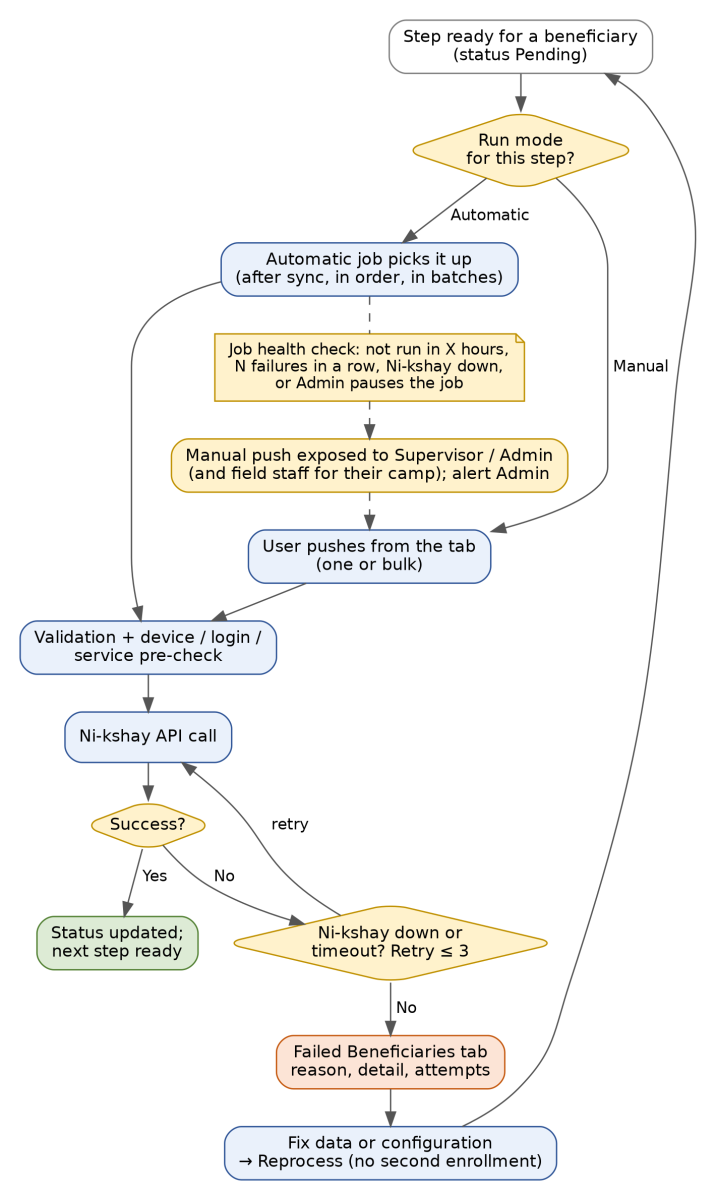
Figure 7 — How a step is run (automatic or manual), how failures are handled, and when manual push is exposed.
Each step can run as an automatic job or by manual push from its tab. Admin sets the mode per step (FR-19). The defaults below are proposed and need confirmation (open point OP-05).
Step | Automatic job | Manual push | Proposed default |
|---|---|---|---|
Generate Ni-kshay ID | Supported | Supported (Tab 1) | Manual, after the camp data is complete (as in v1.0) |
X-ray result push | Supported | Supported (Tab 2) | Automatic once the Ni-kshay ID or episode exists |
NAAT result push | Supported | Supported (Tab 3) | Automatic once the Ni-kshay ID or episode exists |
Contacts (contact-tracing API) and direct TPT | Supported | Supported (Tab 1) | Automatic after the index or TPT enrollment |
Transfer out | Supported | Supported (Tab 5) | Job, with manual action always available |
Condition | Detected by | System response |
|---|---|---|
Job has not run within X hours of data being ready | Job health check | Alert Admin; banner "Automatic push delayed"; enable Push now for Supervisor and Admin |
N consecutive failures in a step | Job health check | Pause the job for that step; alert Admin; expose manual push |
Ni-kshay down or timing out | Call result | Job waits and retries; beneficiaries show "Ni-kshay unavailable"; manual push is allowed but will also wait or fail |
Admin pauses the job | Admin setting | Manual push enabled for the step |
Job stops in the middle of a batch | Job health check | Unfinished items stay Pending or Failed; no duplicates because of the idempotency check; alert Admin |
Mandatory Ni-kshay fields only, taken from the manual enrollment and test screens. The TBMJA source field names are placeholders until checked against the PRD. Changes in v1.1 are tagged.
Ni-kshay field | TBMJA source | Rule sent to Ni-kshay |
Person sector | Fixed | Public Sector |
Type of case finding | Fixed | Active (Active Case Finding), to confirm |
Caste | Registration | SC / ST / Other |
Generate ABHA | Fixed | To confirm (Yes is the portal default) |
First name | Registration | English letters only |
Middle & last name | Registration | English letters only; required |
Age | Registration | Whole years, 1 to 99 |
Gender | Registration | Male / Female / Transgender |
Primary phone | Registration | 10 digits, no leading 0 or +91 |
Address | Registration / enumeration | English, not empty, max 2000 characters |
State / District / TU [Changed] | Device configuration table | From the State, District and TBU of the NAAT device row |
Health facility [Changed] | Device configuration table | The NAAT device PHI of the wrapper login |
Village | Enumeration | Must be in the device PHI’s village list |
Area, marital status, occupation, socioeconomic status | Registration | Mapped value, else Unknown |
Symptoms | QBS | Asymptomatic for TPT; symptom list if presumptive |
Key population / risk factors | Registration / QBS | At least one valid factor (not only Other or Not Applicable) to register as TPT |
HIV status | Registration | Mapped value, else Unknown |
Parent Ni-kshay ID [New] | TBMJA (duplicate check) | Sent only when a new episode is created under an existing patient (Section 7) |
Episode ID [New] | Returned by Ni-kshay | Stored in TBMJA and used for tests, contacts and transfer |
Contact-tracing call (Section 8.1): index patient's Ni-kshay ID plus the contact details required by the Ni-kshay contact-tracing API. The exact field list is to be taken from the API flow attachment (OP-01, OP-10).
Ni-kshay field | TBMJA source | Rule sent to Ni-kshay |
Reason for testing | Derived | TB Screening for contacts; otherwise Diagnosis of TB (to confirm) |
Type of case | Fixed | New (until programme confirms) |
Test type | TrueNat module | TrueNat / CBNAAT as recorded |
Testing lab [Changed] | Device configuration table | NAAT device PHI (wrapper login) |
Sample and result availability | Fixed | Present / Present |
Sample type, sputum collection, description | TrueNat module | Sputum; Spot or Early morning; Saliva |
Collection date and time | TrueNat module | Not in the future; not before registration |
Sample ID | Derived | Sample-1 (or matching sample number) |
Date reported | TrueNat module | Result date |
Reported by | Fixed | By TBMJA application |
Final interpretation | TrueNat module | Ni-kshay list: M.Tb. not detected; detected with Rif not detected / indeterminate / detected; No result; Error; Invalid |
Ni-kshay field | TBMJA source | Rule sent to Ni-kshay |
Reason for testing | Derived | TB Screening (only option for contacts) |
Type of case | Fixed | New |
Test type | Fixed | Chest X Ray |
Testing lab [Changed] | Device configuration table | X-ray device PHI (wrapper login) |
Result available | Fixed | Present |
Date reported | X-ray module | Result date |
Reported by | Fixed | By TBMJA application |
Final interpretation | X-ray module | Normal; Abnormal – Suggestive of TB; Abnormal – Not Suggestive of TB |
TBMJA must check every rule below before the API call. Auto-fix: TBMJA corrects the value silently and logs it. Rectify: the call is blocked and staff must correct the data in TBMJA. Block: the case is not sent.
# | Scenario | Example | Ni-kshay rule | Action |
V1 | Age entered in months, 12 or more | 24 months | Whole years, 1 to 99 | Auto-fix: convert to years (24 months → 2), round down; show for confirmation |
V2 | Age under 12 months | 8 months | Age below 1 not accepted | Block; flag for manual enrollment as per programme guidance |
V3 | Age blank, 0 or above 99 | 0, 105 | 1 to 99 | Rectify |
V4 | Age and date of birth do not match | Age 30, DOB 2010 | Consistent values | Rectify; DOB wins if verified |
V5 | Name has Hindi script, digits or symbols | “राम”, “Ram1” | English letters only | Rectify (no auto-transliteration) |
V6 | Only one name word | “Sunita” | Middle & last name required | Rectify (programme to decide a default rule) |
V7 | Phone starts with 0 or +91, or has spaces | 09876543210 | 10 digits, no leading 0 | Auto-fix: strip prefix and spaces |
V8 | Phone not 10 digits after cleaning, or missing | 98765 | 10 digits required | Rectify |
V9 | Address blank, in Hindi or over 2000 characters | — | English, 1 to 2000 characters | Rectify |
V10 | Village not in the device PHI’s village list | New hamlet | Village must be mapped | Block; Failed reason “Village missing”; send to configuration team |
V11 | Gender or caste missing | — | Required | Rectify |
V12 | Key population only “Other” or “Not Applicable” | — | Not registered as TPT | Rectify, or confirm the case is not TPT |
V13 | QBS shows symptoms | Cough > 2 weeks | Not eligible for TPT | Enroll as presumptive (to confirm); no TPT transfer |
V14 [Changed] | Beneficiary already in Ni-kshay | Same name, age, mobile | No duplicates | Read the status and apply Section 7: use the existing record, create a new episode under the parent ID, or no action |
V15 | Ni-kshay ID already stored in TBMJA | Retrigger | One enrollment only | Block enrollment; allow test push / retry only |
V16 [New] | Any other mandatory Ni-kshay field missing or invalid | — | Mandatory fields in Section 12 | Rectify; Failed reason “Mandatory field missing” with the field name |
# | Scenario | Action |
T1 | Collection or result date in the future, or before registration | Rectify |
T2 | Collection time missing (NAAT) | Rectify |
T3 | Sample type or description not in the Ni-kshay list | Rectify; map to Sputum / Saliva |
T4 | Only one of X-ray or NAAT done | Push the test available; mark the other “Not done” |
T5 [Changed] | NAAT: M.Tb. detected | Push result; alert MO / STS for TB treatment; transfer to the designated PHI for treatment initiation (not TPT). Confirm in OP-04 |
T6 | NAAT: Error, Invalid or No result | Push result; flag for repeat test; no transfer yet |
T7 [Changed] | X-ray: Abnormal – Suggestive of TB | Push result; alert MO / STS; no TPT; transfer for treatment evaluation at the designated PHI. Confirm in OP-04 |
T8 [Changed] | No Ni-kshay ID or episode yet | Hold the test in queue until enrollment succeeds; not applicable to “Linked – no action” cases (no tests are pushed for them) |
# | Scenario | Action |
S1 [Changed] | Device row, village mapping or wrapper PHI login missing for the activity | Block; Failed reason “Device configuration missing”; show “Configuration missing” to Admin |
S2 [Changed] | Wrapper PHI login rejected (wrong or expired password) | Mark Failed; alert Admin; no auto-retry |
S3 [Changed] | Service (NAAT or X-ray) not enabled on the device PHI profile | Block; Failed reason “Service not enabled on PHI login”; alert Admin to ask the programme team to enable it |
S4 | Ni-kshay down, timeout or no internet | Queue and auto-retry (3 times), then mark Failed (reason “Ni-kshay unavailable”) |
S5 | Ni-kshay returns a validation error | Show the Ni-kshay message on the beneficiary; status Validation failed |
S6 [Changed] | Village missing from the device PHI’s village list | Failed reason “Village missing”; send to configuration team; reprocess after mapping |
S7 | Designated PHI not mapped for the village | Enroll and push tests; hold transfer; alert programme team |
S8 | Transfer rejected by Ni-kshay | Mark transfer Failed; manual transfer from the device PHI |
S9 [New] | Duplicate check returns more than one possible match | Hold; manual review by Supervisor (OP-02) |
S10 [New] | Automatic job delayed, stopped or failing repeatedly | Alert Admin; pause the step if needed; expose manual push (Section 11.4) |
*Idempotency:* every step checks the stored Ni-kshay ID or episode before calling, so retries, reprocessing and manual pushes never create duplicates. *\[New\]* |
*Observability:* a job view shows last run, counts and failures per step, as the basis for the job health check. *\[New\]* |
Role | Responsibility |
|---|---|
Field staff (MMU) | Complete camp data, fix rectification errors, work in the five Ni-kshay tabs, reprocess failed beneficiaries they can fix |
Supervisor | Monitor sync status and failed cases per camp; use manual push; review multiple-match duplicates |
TBMJA admin | Maintain the device configuration table, wrapper PHI user IDs and passwords, run mode per step, and job monitoring |
Configuration team | Add villages to the device and designated PHI mapping |
Programme team | Provide the device PHIs, wrapper PHI logins, services enabled, village mapping and designated PHIs; confirm open points |
Designated PHI | Accept transferred cases and initiate treatment or TPT in Ni-kshay |
Village-level mapping (device PHIs, their Ni-kshay IDs and designated PHI per village) is maintained in the attached sheet, Village_Device_PHI_Mapping_Template.xlsx. The Ni-kshay API flow is in the attached enrollment-flow (1).pdf.
These two attachments were not part of the PDF reviewed for this version. Both should be checked against the new login model (wrapper PHI logins per device) and the new calls (duplicate status, new episode under parent ID, contact-tracing API). See OP-01 and OP-10. |
Abbreviation | Meaning |
|---|---|
ABHA | Ayushman Bharat Health Account |
API | Application Programming Interface |
BRD / FR / NFR | Business Requirements Document / Functional Requirement / Non-Functional Requirement |
MMU | Mobile Medical Unit (module of AMRIT) |
MO / STS | Medical Officer / Senior Treatment Supervisor |
NAAT / TrueNat | Nucleic Acid Amplification Test / the NAAT device platform used in camps |
PHI | Primary Health Institution |
QBS | Question Based Screening |
TBU / TU | TB Unit / Tuberculosis Unit |
TPT | TB Preventive Treatment |
V / T / S | Numbering of validation (V), test-data (T) and system (S) scenarios |
Other document for reference: