
Sample
Early Childhood development product requirement document draft
Version 1.0
Prepared by
Piramal Swasthya Management Research Institute
&
Wipro Limited
Health Care Delivery Unit
This document is an intellectual property. Unauthorized copying, reproduction or distribution of this document, or any portion of it, may result in severe civil and criminal penalties, and will be prosecuted to the maximum extent possible under the law.
Document Management Information
Document Title: Early childhood development Product requirement draft
Document Owner: Piramal Swasthya Management Research Institute & Wipro Ltd.
Document Classification: Confidential
This document is a confidential document of Wipro Ltd. and Piramal Swasthya Management Research Institute. Reproduction, translation, transformation to any medium requires prior written approval of the Wipro Ltd./ PSMRI. This document includes confidential information related to Wipro Ltd. and PSMRI and shall not be distributed to any persons other than those mentioned in the distribution list without the consent of both the parties.
Document Identification
Document Title |
Version |
Author (s) |
Remarks |
Early childhood development PRD draft |
1.0 |
Piramal Swasthya Management Research Institute |
|
Document Distribution List
Sr. No. |
Name & Company |
Title |
1 |
PSMRI |
Author |
2 |
Wipro Limited |
Author |
Contents
1. Business Process
2. Actors-Outbound
3. System Use Case-Outbound
3.1. Helpline-ECD-0001: User Login
3.2. Helpline-ECD-0002: Supervisor – Upload ECD Data into Application
3.3. Helpline-ECD-003: System – Generate unique ID
3.4. Helpline-ECD-0004: System – Identify duplicate data during next data upload into the System
3.5. Helpline-ECD-00005: System– Self & Other Phone numbers- Logic
3.6. Helpline-ECD-00006: System– Estimated Delivery Date Calculation
3.7. Helpline-ECD-0008: Supervisor – Allocate Calls to Agent
3.8. Helpline-ECD-00010: Agent/Associate -Outbound Call worklist
3.9. Helpline-ECD-00011: Agent-Outbound Call worklist – High Risk Patient
3.10. Helpline-ECD-00012: Outbound Call – View Call & History Details
3.11. Helpline-ECD-00013: Outbound Call – Call Documentation- Self / Other Phone number
3.12. Helpline-ECD-00016: Move beneficiary to MO worklist – for High-Risk Patient
3.13. Helpline-ECD-00017: SMS feature for MO to send any Advice
3.14. Helpline-ECD-0018: System – Retain Beneficiary data into the system as per the defined rule and Auto Schedule for next ECD call
3.15. Helpline-ECD-0019: System – Stop Scheduling for further calls for a Selected Beneficiary
3.16. Helpline-ECD-0025: Allocation of agent to their respective Quality Auditor
3.17. Helpline-ECD-0025: Quality Auditor Activities- Listening the call and rating the call of ANM/MO
3.18. Helpline-ECD-0021: Quality Auditor Activities- Call Audit Details
3.19. Helpline-ECD-0022: ANM/MO Activity – Agent to rebuttal if he is not satisfied with the Audit report/Remarks
3.20. Helpline-ECD-0023: Dashboard requirement for Quality supervisor
3.21. Helpline-ECD-00034: System – User should be Navigated to Homepage/Dashboard when Agent clicks on Break
3.22. Helpline-ECD-00035: System – IVRS Recording- When Agent has kept Beneficiary on Hold
3.23. Helpline-ECD-00026: System – SMS Alerts to Beneficiary
3.24. Helpline-ECD-00027: System – Capture Congenital Anomalies during PNC Calls
3.25. Helpline-ECD-00028: System –Report- Congenital Anomalies
3.26. Helpline-ECD-00029: System –Sticky Agent
3.27. Helpline-ECD-00030: ECD No of Calls Configuration Screen:
3.28. Helpline-ECD-00031: ECD Content data for each ECD Calls Upload Screen:
3.29. Helpline-ECD-00032A: Supervisor- Dashboard
3.30. Helpline-ECD-00032B: Supervisor- Reports
3.31. Helpline-ECD-0033-System-Auto- Preview dialling
3.32. Helpline-ECD-0034-System-Capture CSAT Score through Manual/IVRS/SMS Services
- Revision History
Version
Date of Revision
Description of Change
Reason for Change
Affected use case
Approved By (Name, Email Id)
V 0.1
18.07.2022
Initial Draft
Product Requirement-ECD
Business Process
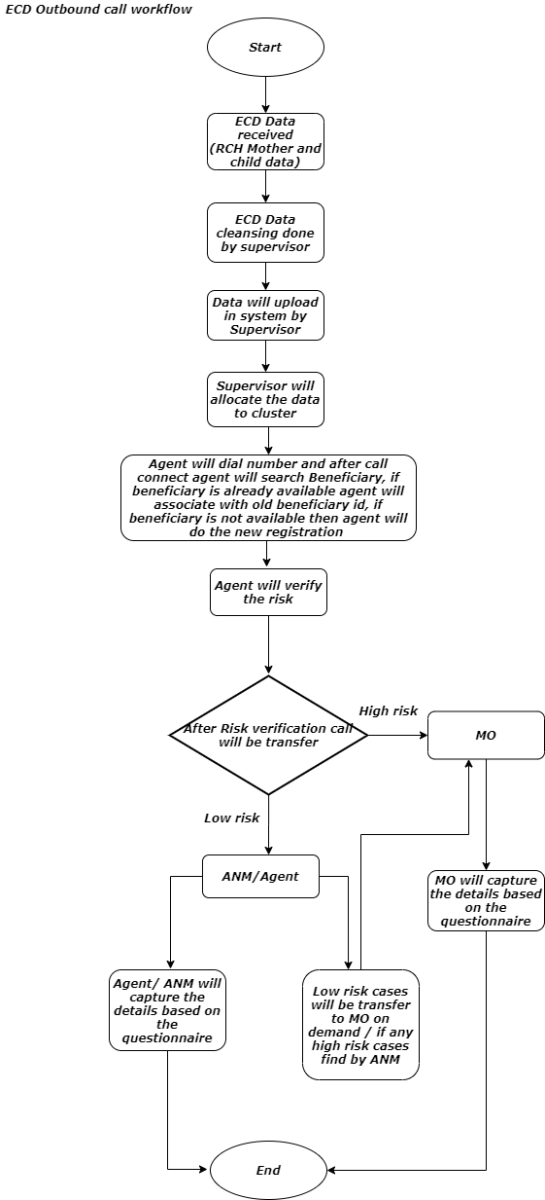
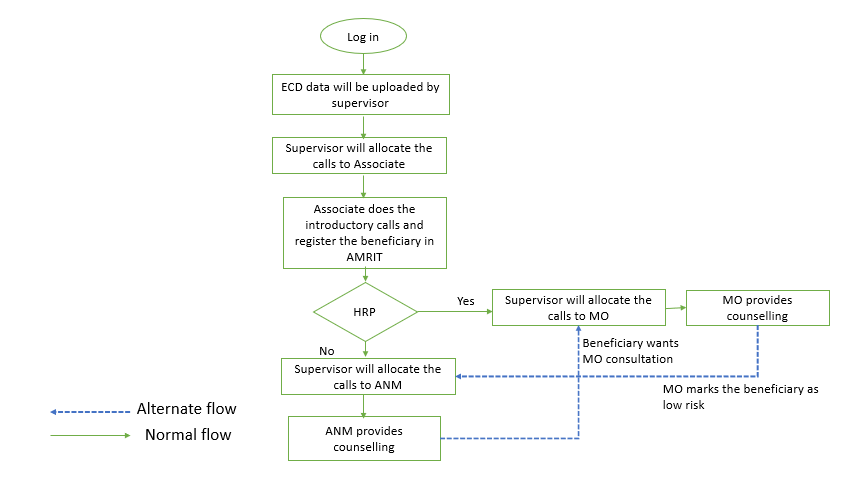
Actors-Outbound
Following are the actors who will be interacting with the Application
- Ancillary Nurse Midwife – ANM
- MO (Medical Officer - MO
- Supervisor
- Associate / Agent
- Quality Auditor
Following are the actors who will be interacting with the Beneficiary
- Ancillary Nurse Midwife - ANM
- MO (Medical Officer) – MO
- Agent
3. System Use Case-Outbound
3.1. Helpline-ECD-0001: User Login
ID |
Helpline-ECD-0001 |
||
Requirement No |
N/A |
||
Type |
Product specific |
||
Requirement Description |
User can login to ECD application. |
||
Solution Description |
Login with user name – Staff can login with username and password. After login, system asks for role selection. |
||
Actor(s) |
Agent, ANM (Ancillary Nurse Midwife), Medical Officer, Supervisor, Quality Auditor |
||
Pre-Conditions |
|
||
Basic Flow |
|
||
Alternative Flow |
None |
||
Business Rules |
For whole session, screen displays username, Login Date & Time |
||
Post-Conditions |
User has logged into ECD application |
||
Change Impact |
N/A |
||
Exception(s) |
|
||
Extension Points |
N/A |
||
Data Elements |
|||
Data Field |
Input Type |
Validation |
Behaviour |
Login Id |
Entry |
Username should have login created |
|
Password |
Entry |
Mandatory, should have minimum 8 characters with alpha numeric with at least one uppercase |
|
Current Date and Time |
Display |
Format: DD-MM-YYYY and HH:MM: SS |
|
|
|||
Variants |
N/A |
||
Assumptions |
N/A |
||
Not in Scope |
N/A |
3.2. Helpline-ECD-0002: Supervisor – Upload ECD Data into Application
ID |
Helpline-ECD-0002 |
||
Requirement No |
N/A |
||
Type |
Product specific |
||
Requirement Description |
ECD data, which is received from RCH, should be uploaded into the system via a manual upload from Supervisor role. |
||
Solution Description |
Supervisor should be able to upload the clean ECD data into the application via manual upload process |
||
Actor(s) |
Supervisor |
||
Pre-Conditions |
|
||
Basic Flow |
|
||
Alternative Flow |
None |
||
Business Rules |
None |
||
Post-Conditions |
|
||
Change Impact |
N/A |
||
Exception(s) |
|
||
Extension Points |
|
||
Data Elements |
|||
Data Field |
Input Type |
Validation |
Behaviour |
Supervisor> Data Upload Master> |
Selection |
|
|
Mother Data |
Selection |
|
Radio Button |
Child Data |
Selection |
|
Radio Button |
Browse File |
Selection |
|
Browse button |
Upload |
Selection |
|
Button |
|
|||
Variants |
|
||
Assumptions |
|
||
Not in Scope |
|
3.3. Helpline-ECD-003: System – Generate unique ID
ID |
Helpline-ECD-0003 |
Requirement No |
N/A |
Type |
Product specific |
Requirement Description |
System to generate unique AMRIT ID for every unique beneficiary. |
Solution Description |
Agent/associate should generate a unique AMRIT ID for new Beneficiaries for identification of the beneficiary across platform. |
Actor(s) |
Agent/Associate |
Pre-Conditions |
|
Basic Flow |
|
Alternative Flow |
None. |
Business Rules |
|
Post-Conditions |
Unique Beneficiary/AMRIT ID is generated in the system. |
Change Impact |
N/A |
Exception(s) |
N/A |
Extension Points |
N/A |
Variants |
|
Assumptions |
|
Not in Scope |
|
3.4. Helpline-ECD-0004: System – Identify duplicate data during next data upload into the System
ID |
Helpline-ECD-00004 |
||
Requirement No |
N/A |
||
Type |
Product specific |
||
Requirement Description |
Every time when ECD data is being provided by govt there are lot of records, which are duplicate. |
||
Solution Description |
When ECD data is provided to PSMRI, most of the time there will be lot of duplicate records, which has been provided earlier. |
||
Actor(s) |
System |
||
Pre-Conditions |
Previous data is available in the system and when new data is being uploaded into the system, system should validate for duplicates |
||
Basic Flow |
|
||
Alternative Flow |
when a beneficiary becomes pregnant for the second time, RCH will generate a separate Mother ID, in that case system should identify such cases and append previous calls history of the mother to this new mother id as historical record. |
||
Business Rules |
|
||
Post-Conditions |
Unique Beneficiary is generated in the system. |
||
Change Impact |
N/A |
||
Exception(s) |
Phone number will not be considered to identify duplicates, because many beneficiaries will not have mobile number and there ASHA worker number is provided. So, it is excluded in duplicate identification logic |
||
Extension Points |
N/A |
||
Data Elements |
|||
Data Field |
Input Type |
Validation |
Behaviour |
Mother ID |
Display |
|
Numeric |
Mother Name |
Display |
|
Text field |
Husband's Name |
Display |
|
Text field |
District Name |
Display |
|
Text field |
Health Block |
Display |
|
Text field |
PHC Name |
Display |
|
Text field |
Sub Facility/Subcentres |
Display |
|
Text field |
GP Village |
Display |
|
Text field |
Address |
Display |
|
Text field |
ASHA name |
Display |
|
Text field |
ASHA mobile number |
Display |
|
Text field |
ANM Name |
Display |
|
Text field |
ANM mobile number |
Display |
|
Text field |
Child ID |
Display |
|
Numeric |
Child Name |
Display |
|
Text field |
|
|||
Variants |
|
||
Assumptions |
|
||
Not in Scope |
|
||
Last modified Date |
|
||
Last modified by |
|
3.5. Helpline-ECD-00005: System– Self & Other Phone numbers- Logic
ID |
Helpline-ECD-00005 |
Requirement No |
N/A |
Type |
Product specific |
Requirement Description |
ECD data has both mother & Child Data- In most of the cases Beneficiary phone number (Self Number) are not provided, they might have entered ANM's or other persons phone number (Other Number) when data is provided for outbound call. |
Solution Description |
Once data is uploaded into the system, it should segregate mother & Child data with Self & Other numbers separately in different buckets for a supervisor to assign calls to agents manually. |
Actor(s) |
System, Supervisor (Based on configuration) |
Pre-Conditions |
|
Basic Flow |
|
Alternative Flow |
|
Business Rules |
Once data is uploaded into the system, it should segregate mother & Child data with Self & Other numbers separately in different buckets for a supervisor to assign calls to agents manually. |
Post-Conditions |
|
Change Impact |
N/A |
Exception(s) |
N/A |
Extension Points |
N/A |
Variants |
|
Assumptions |
|
Not in Scope |
|
3.6. Helpline-ECD-00006: System– Estimated Delivery Date Calculation
ID |
Helpline-ECD-00006 |
Requirement No |
N/A |
Type |
Product specific |
Requirement Description |
When the data is uploaded into the system, ECD data will have LMP (Last Menstruation Period) & EDD (Estimated Delivery Date). |
Solution Description |
System should calculate/re-calculate and populate the EDD based on LMP |
Actor(s) |
System, Agent, ANM, MO |
Pre-Conditions |
|
Basic Flow |
|
Alternative Flow |
|
Business Rules |
280 days from LMP should be the EDD |
Post-Conditions |
Based on the LMP and EDD should auto schedule ECD call (ANC/PNC) according to the ECD program guidelines, which are state specific. |
Change Impact |
N/A |
Exception(s) |
N/A |
Extension Points |
N/A |
Variants |
|
Assumptions |
|
Not in Scope |
|
3.7. Helpline-ECD-0008: Supervisor – Allocate Calls to Agent
ID |
Helpline-ECD-00008 |
||
Requirement No |
N/A |
||
Type |
Product specific |
||
Requirement Description |
When new ECD data is uploaded into the System, Supervisor will be able to allocate the records to the respective agents to make outbound call. |
||
Solution Description |
When data is uploaded in the System, Data needs to be allocated to agents to make outbound call to Beneficiary (may be either "Husband" or 'Wife). |
||
Actor(s) |
Supervisor. |
||
Pre-Conditions |
|
||
Basic Flow |
|
||
Alternative Flow |
N/A |
||
Business Rules |
|
||
Post-Conditions |
|
||
Change Impact |
N/A |
||
Exception(s) |
N/A |
||
Extension Points |
N/A |
||
Data Elements |
|||
Data Field |
Input Type |
Validation |
Behaviour |
List ID: |
Selection |
Mother Data or Child Data |
Dropdown |
Phone number Type |
Selection |
Self or Other |
Dropdown |
From Date |
Date Entry |
|
Date Format |
To Date |
Date Entry |
|
Date Format |
Submit Button |
Selection |
|
Button |
Total New Records |
Display |
Self or Other |
Numeric Display |
Allocate to |
Selection |
|
Dropdown list |
Allocate No of Records |
Numeric Entry |
|
Numeric |
Allocate |
Selection |
|
Button |
|
|||
Variants |
|
||
Assumptions |
|
||
Not in Scope |
|
||
Last modified Date |
|
||
Last modified by |
|
3.8. Helpline-ECD-00010: Agent/Associate -Outbound Call worklist
ID |
Helpline-ECD-00010 |
||
Requirement No |
N/A |
||
Type |
Product specific |
||
Requirement Description |
Agent to view their Outbound Call worklist which has been assigned to them. |
||
Solution Description |
Agent to view their Outbound Call worklist which has been assigned to them. |
||
Actor(s) |
Agent, ANM (Ancillary Nurse Midwife), Medical Officer |
||
Pre-Conditions |
|
||
Basic Flow |
|
||
Alternative Flow |
None |
||
Business Rules |
For whole session, screen displays username, Login Date & Time. |
||
Post-Conditions |
User can see the allocated calls in their worklist. |
||
Change Impact |
N/A |
||
Exception(s) |
If no calls are allocated, there will not be any data in the worklist |
||
Extension Points |
N/A |
||
Data Elements |
|||
Data Field |
Input Type |
Validation |
Behaviour |
S. No |
Display |
|
Numeric |
Phone Number |
Display |
|
Numeric |
Mother ID |
Display |
|
Numeric |
Child ID |
Display |
|
Numeric |
Action
|
Selection |
|
Button |
Lapse time |
|
Auto populate |
|
Whom phone number |
|
Auto populate |
|
Call Attempt Number |
|
Auto populate |
|
Call status |
|
|
|
Record upload date |
|
|
|
ECD Call type |
|
Auto populate |
|
|
|||
Variants |
N/A |
||
Assumptions |
N/A |
||
Not in Scope |
N/A |
||
Last modified Date |
|
||
Last modified by |
|
3.9. Helpline-ECD-00011: Agent-Outbound Call worklist – High Risk Patient
ID |
Helpline-ECD-00011 |
|
Requirement No |
N/A |
|
Type |
Product specific |
|
Requirement Description |
High risk calls will be transferred to MO. |
|
Solution Description |
High Risk Pregnancy calls will be handled with MO, Agent will verify all the High-Risk Pregnancy calls and transfer the list to supervisor for allocation to MO. |
|
Actor(s) |
Agent, Medical Officer, Supervisor, System |
|
Pre-Conditions |
|
|
Basic Flow |
|
|
Alternative Flow |
|
|
Business Rules |
System should identify the data as high-risk pregnancy and auto segregate data based on the below identification criteria: |
|
IDENTIFICATION OF HIGH RISK PREGNANCY |
|
|
S.NO |
HISTORY TAKING |
HIGH RISK PREGNANCY IDENTIFIER |
1 |
Age of the patient |
Age < 18 years and age > 35years |
2 |
LMP |
not known, > 40weeks ( postdatism) |
3 |
Obstetric history |
recurrent abortions, no living issue, cong anamoly, still birth, LBW or > 4.5kg, previous caesarean delivery, history of PPH, failure of lactation, Grand multipara(> 4 live births) |
4 |
Personal history |
Heart disease, DM or HT, any surgical history, drug allergy, hypothyroidism, any medication on |
5 |
Height |
< 145cm |
6 |
Stature |
Any spinal deformity |
7 |
Pallor |
<7 gm% |
8 |
Bp, Oedema |
>140/90mmHg |
9 |
Blood Group |
Rh Negative |
10 |
HIV, HbsAg, VDRL |
Positive |
11 |
USG/ Examination |
Abnormal Lie( breech, transverse etc), multiple pregnancy |
12 |
Present Pregnancy |
High priority fetus(infertility treatment), Bleeding P/V( abortions, placenta praevia), GDM, PIH |
13 |
Others |
|
- If any one of the mentioned criteria is provided in ECD data at the time of upload, system to auto consider it as High-Risk Pregnancy case.
|Post-Conditions
User can see the allocated calls in their worklist.
Change Impact
N/A
Exception(s)
- Only those calls would be displayed, which are tagged as High-risk Pregnancy during data upload or during previous ECD calls.
Extension Points
N/A
Variants
N/A
Assumptions
N/A
Not in Scope
N/A
3.10. Helpline-ECD-00012: Outbound Call – View Call & History Details
ID
Helpline-ECD-00012
Requirement No
N/A
Type
Product specific
Requirement Description
Agent can view the details of the call, which has been assigned to him/her.
Solution Description
When calls are assigned to user, user can view the details of beneficiary by clicking on View button.
Actor(s)
Agent, ANM (Ancillary Nurse Midwife), Medical Officer
Pre-Conditions
- Respective user is created in the system and roles have been assigned by admin
Basic Flow
- Enter username & password
- Select the required role (if user is having more than one role)
- System opens the respective 'Module'/ 'Screen'/Homepage
- User will see their home page.
- Click on call link/ Menu select outbound call worklist.
- User can see the allocated calls in their worklist.
- User click on View button on any of the allocated calls to see the details of the beneficiary before speaking to them.
- When clicked on 'View' button system will display the beneficiary details|
Alternative Flow
None
Business Rules
For whole session, screen displays username, Login Date & Time.
Users can see the allocated calls/task in their worklist (allocation can be System allocated or Supervisor Manually allocated).Post-Conditions
User can see the allocated calls & beneficiary details when clicked on 'View' Button in their worklist.
Change Impact
N/A
Exception(s)
- If no calls are allocated, no data/task will be visible in worklist
Extension Points
N/A
Data Elements
Data Field
Input Type
Validation
Behaviour
View Button
Selection
Button
Record Uploaded Date
Display
Date
Mother ID
Mother Name
Husband's Name
Address
Health Block
PHC Name
Sub Facility/Subcentre
Phone No
ASHA
ANM
LMP Date
Next ANC/PNC Call Date
Call History
Date & Time
ECD call Type
Advise Provided
Complaints
Variants
N/A
Assumptions
N/A
Not in Scope
N/A
3.11. Helpline-ECD-00013: Outbound Call – Call Documentation- Self / Other Phone number
ID
Helpline-ECD-00013
Requirement No
N/A
Type
Product specific
Requirement Description
ECD –Agent, ANM or MO to able to document the details as per the ECD questionnaire during the call with the Beneficiary
Solution Description
When an Agent makes an outbound call to Beneficiary, ANM/MO should be able to document the details of the call as per the ECD standard Questionnaire in the system and save.
Once the call is saved, based on the last LMP, system should calculate the next call based on the logic/Business rules provided and schedule it accordingly.
All previous call details entered should be visible in History section.
Actor(s)
Agent, ANM (Ancillary Nurse Midwife), Medical Officer
Pre-Conditions
- Respective user is created in the system and roles have been assigned by admin
- If no calls are allocated, no data/task will be visible in worklist
- ECD data uploaded into the System
- System has segregated Self and another phone number
- Supervisor has assigned calls (Self phone numbers) to agent.|
Basic Flow
- Enter username & password
- Enter username & password
- Select the required role (if user is having more than one role)
- System opens the respective 'Module'/ 'Screen'/Homepage
- User will see their home page.
- Click on call link/ Menu select outbound call worklist
- User can see the allocated calls in their worklist
- When system connects the call to beneficiary through Preview dialling.
- System will open the Call Document screen/CRM screen before call gets connected
- Based on the ECD call number, system will populate the questionnaire for the agent to interact with the beneficiary.
- Screen will have an interactive section-, which will display what interaction details for the agent to speak to beneficiary.
- Below the interactive section, system will list down the questions (Standard questions for each call number provided by Client/Govt as per the state specific ECD Program.
- Agent/ANM/MO will document the call details accordingly.
- Capture the call closure details
- If Further ECD calls are not required – Flag /Select No Further Call Required option with remarks.
- During the call – Some of the questions based on the finding – few of the items will go as complaints.
- There are three complaint type categories – Complaints related to ASHA, JSY, others and also provide free text.
- Complaint report should be extracted on daily basis by the supervisor.
- If call is not answered Select call Answered 'No' and enter next attempt date. Configuration required at the supervisor level for the no of attempts and conditions for frequency of attempts based on the state.
- Click on 'End Call'|
Alternative Flow
None
Business Rules
- For whole session, screen displays username, Login Date & Time.
- For whole session, screen displays username, Login Date & Time.
- Users can see the allocated calls/task in their worklist (allocation can be System allocated or Supervisor Manually allocated).
- When the call is connected, Agent or ANM or MO should be able to document based on the standard questionnaire.
- Once the call is closed, the call details should be visible in history section for that beneficiary.
- Based on the ECD outbound call schedules, this call should be automatically scheduled for next ECD call to the ANM/MO which was allocated first time by the supervisor.|
Post-Conditions
- Agent entered, captured data to be visible in History section for that beneficiary.
- Agent entered, captured data to be visible in History section for that beneficiary.
- As per the ECD outbound call schedule, call should be automatically scheduled for Next ECD call.
- If in case Beneficiary (mother has abortion/Dead/Reallocate to different state/Still birth) system should not schedule it for next call.
|Change Impact
N/A
Exception(s)
- Questions will vary from State to State.
- Questions will vary from State to State.
- During call closure if Agent/ANM/MO has selected /Flagged – No Further calls are required with remarks, system should not schedule this beneficiary for future ECD call and it should archive the data.
- This archived data to be reflected to supervisor for validation.
- If supervisor identifies the call is valid he can allocate the call to the appropriate channel.
|Extension Points
System should be configurable so that Questions /documents specific to a state should be visible only to them.
Data Elements
Data Field
Input Type
Validation
Behaviour
Mother ID
Display
Numeric
Mother Name
Display
Text field
Husband's Name
Display
Text field
District Name
Display
Text field
Health Block
Display
Text field
PHC Name
Display
Text field
Sub Facility/Subcentres
Display
Text field
GP Village
Display
Text field
Address
Display
Text field
Phone Number
Display
Numeric
Phone Number of whom
Display
Numeric
ASHA name
Display
Text field
ASHA Phone Number
Display
Numeric
ANM Name
Display
Text field
ANM Phone Number
Display
Numeric
Child ID
Display
Numeric
Child Name
Display
Text field
LMP
Display
Date
ECD Call Type
Selection
Drop Down
Questions Template - Assam

Call Closure Details
No Further Call Required
Selection
Checkbox
Reason for No further call required
Free Text box
Free Text Box
Call Answered
Selection 'Yes' or No'
Radio button
Call Verified
Selection 'Yes' or No'
Radio button
Type of Complaint
Selection
Dropdown
Complaint Remarks
Free Text
Free Text
If call answered 'No'
Selection
Values for selection are:
1. Invalid number2. Out of service3. Out of Reach4. Switched off5. No reply6. Number busy7. Call not connected.Dropdown list
Next Attempt Date & Time
Entry
Date & Time format
Remarks
Free text box
Free Text Box
Correct Self Phone Number
Selection 'Yes' 'No'
Not to be provided for other category
If 'No'
Selection
Dropdown list
(ANM, Asha, Relative, Neighbour)Alternate Phone Number
Entry
Numeric
Variants
N/A
Assumptions
N/A
Not in Scope
N/A
3.12. Helpline-ECD-00016: Move beneficiary to MO worklist – for High-Risk Patient
ID
Helpline-ECD-00016
Requirement No
N/A
Type
Product specific
Requirement Description
Agent should have a feature to move the beneficiary to supervisor after validating risk of the beneficiary for allocation.
Solution Description
During a call when a beneficiary comes to know that the beneficiary/expectant mother/infant condition falls under high risk/Infant high risk.
Actor(s)
ANM (Ancillary Nurse Midwife), Medical Officer
Pre-Conditions
- Respective user is created in the system and particular roles have been assigned by admin
- Respective user is created in the system and particular roles have been assigned by admin
- Agent, ANM & MO have logged in|
Basic Flow
- Enter username & password
- Enter username & password
- Select the required role (if user is having more than one role)
- System opens the respective 'Module'/ 'Screen'/Homepage
- User will see their home page.
- Click on call link/ Menu select outbound call worklist
- User can see the allocated calls in their worklist
- When system connects the call to beneficiary through dialling, System will open the Call Document screen.
- Based on the ECD call number, system will populate the questionnaire for the agent to interact with the beneficiary.
- Screen will have an interactive section-, which will display what interaction details for the agent to speak to beneficiary.
- Below the interactive section, system will list down the questions (Standard questions for each call number provided by Client/Govt as per the state specific ECD Program)
- ANM/MO will document the call details accordingly.
- During the call if ANM's comes to know that the beneficiary is falling under high-risk category, will flag the beneficiary as High Risk.
- Select the High-Risk pregnancy/Infant high-risk flag (Checkbox)
- Enter Remarks
- Move the beneficiary to supervisor for allocation to MO.|
Alternative Flow
None
Business Rules
- For whole session, screen displays username, Login Date & Time.
- For whole session, screen displays username, Login Date & Time.
- Users are able to see the allocated calls/task in their worklist |
Post-Conditions
None
Change Impact
N/A
Exception(s)
- If no MO role is created, transfer feature will not be available.
Extension Points
System should be configurable so that Questions /documents specific to a particular state should be visible only to them.
Data Elements
Data Field
Input Type
Validation
Behaviour
High Risk Pregnancy/Infant high risk (Based on the ECD call type configuration)
Selection
Checkbox
Remarks
Text
Free Text
Transfer
Selection
Button
Variants
N/A
Assumptions
N/A
Not in Scope
N/A
3.13. Helpline-ECD-00017: SMS feature for MO to send any Advice
ID
Helpline-ECD-00017
Requirement No
N/A
Type
Product specific
Requirement Description
SMS option for MO to send any advice.
Solution Description
During a call with beneficiary, if MO needs to send any details/advise, he should be able to send SMS to the self(herself/husband's) mobile number.
Actor(s)
Medical Officer
Pre-Conditions
- High Risk Pregnancy cases are assigned to Medical Officer.
Basic Flow
- Medical officer calls beneficiary.
- If Medical officer feels, he needs to give any specific advice.
- Enters details under Advice section.
- System will display the current number for sending SMS, MO will capture if any alternate mobile number(herself/husband's) is provided before sending SMS.
- Clicks on Send SMS
|Alternative Flow
N/A
Business Rules
- SMS option should be enabled only to medical officer
- SMS option should be enabled only to medical officer
- Medical officer should be able to enter alternate mobile number and send SMS.|
Post-Conditions
- SMS sent details will be visible in History section
Change Impact
N/A
Exception(s)
N/A
Extension Points
SMS gateway
Data Elements
Data Field
Input Type
Validation
Behaviour
Advise
Free text
Free Text
Alternate Mobile Number
Numeric
Numeric
Send SMS
Selection
Button
Variants
N/A
Assumptions
N/A
Not in Scope
N/A
3.14. Helpline-ECD-0018: System – Retain Beneficiary data into the system as per the defined rule and Auto Schedule for next ECD call
ID
Helpline-ECD-00018
Requirement No
N/A
Type
Product specific
Requirement Description
System to retain Beneficiary date into the system for next call as per the defined call in the ECD Call Configuration Screen, which is state specific.
Solution Description
System to retain Beneficiary date into the system and auto schedule for next call as per the defined call schedule logic for a particular location.
For the next call, previous call details need to be displayed in History section.
Once all the calls are completed as per the defined call matrix, Beneficiary data needs to be archived.Actor(s)
System
Pre-Conditions
- Clean Data uploaded into the system (both Mother and child data)
- Calls allocated to Agent.|
Basic Flow
- Clean Data uploaded into the system (both Mother and child data)
- Clean Data uploaded into the system (both Mother and child data)
- Calls allocated to AgentS.
- Outbound call is made based on the logic of Call number.
- Once call is completed, System should auto schedule the call for next ECD call based on Business rules for each specific state/location logic.|
Alternative Flow
- None
Business Rules
- It is based on LMP and EDD
Business Rule for ECD Calls:
ECD Calls
ANC/PNC/After PNC
Months of Pregnancy
ECD 1st Call
ANC
LMP Date to within next 2 Months
ECD 2nd Call
ANC
LMP Date+2 months to within next month
ECD 3rd Call
ANC
LMP Date+3 months to within next 1 month
ECD 4th Call
ANC
LMP Date+4 months to within next 1 month
ECD 5th Call
ANC
LMP Date+5 months to within next 1 month
ECD 6th Call
ANC
LMP Date+6 months to within next 1 month
ECD 7th Call
ANC
LMP Date+7 months to within next 1 month
ECD 8th Call
ANC
LMP Date+8months to within next 1 month
ECD 9th Call
ANC
LMP Date+9months to one week before EDD
ECD Calls
ANC/PNC/After PNC
Months of Pregnancy
ECD 10th Call
PNC
Date of Birth to within 10 Days of Life (Neonate)
ECD 11th Call
PNC
At the age of 3 months
ECD 12th Call
PNC
At the age of 6 months
ECD 13th Call
PNC
At the age of 9 months
ECD Calls
ANC/PNC/After PNC
Months of Pregnancy
ECD 14th Call
PNC
At the age between 10-12 months
ECD 15th Call
PNC
Between the age of 18-24 months
ECD 16th Call
PNC
Yet to decide
ECD 17th Call
PNC
Yet to decide
ECD 18th Call
PNC
Yet to decide
ECD 19th Call
After PNC
Yet to decide
ECD 20th Call
After PNC
Yet to decide
ECD 21th Call
After PNC
Yet to decide
Post-Conditions
- Once call is completed, System should auto schedule the call for next ECD call based on Business rules for each specific state/location logic
Change Impact
N/A
Exception(s)
- During an ANC/PNC call if the Agent – ANM/MO flags that no further call required with remarks, system should not schedule the next call. Beneficiary data needs to be archived.
- For the cases where mother ID is there but child data is not provided by RCH, PNC calls will follow as per EDD and the record can later be merged when child data is available through RCH.|
Extension Points
N/A
Variants
N/A
Assumptions
N/A
Not in Scope
N/A
3.15. Helpline-ECD-0019: System – Stop Scheduling for further calls for a Selected Beneficiary
ID
Helpline-ECD-00019
Requirement No
N/A
Type
Product specific
Requirement Description
During an ANC/PNC call if the Agent – ANM/MO flags that no further call required with remarks, system should not schedule the next call. Beneficiary data needs to be archived.
Solution Description
System to retain Beneficiary date into the system and auto schedule for next call as per the defined call schedule logic for a particular location.
However, in some cases ANM/MO will decide that no Further calls are required for the beneficiary (Mother is not alive/child is not Alive).
ANM/MO will flag no further call is required, based on the same System should stop scheduling the call for the beneficiary.
Separate report needs to be generated for all the cases where 'No further calls Required' flag is selected.Actor(s)
Agent, ANM, MO and System
Pre-Conditions
- Clean Data uploaded into the system (both Mother and child data)
- Clean Data uploaded into the system (both Mother and child data)
- Calls allocated to cluster|
Basic Flow
- Outbound call is made based on the logic of Call number
- Outbound call is made based on the logic of Call number
- During the outgoing call Agent/ANM/MO if they feel that further calls are not required to this beneficiary, they will check the flag' No Further Calls Required' and Enter Remarks
- Capture the Call closure details
- Click on 'End Call'|
Alternative Flow
- None
Business Rules
When an Agent/ANM/MO check the Flag 'No Further calls Required', System should not auto schedule this call for the pending ECD's calls and data to be archived
Post-Conditions
- Once call is completed, System should not schedule the next call.
- Report needs to be generated for all the calls where 'No Further call required' is selected.
|Change Impact
N/A
Exception(s)
- Once the call is flagged/marked as 'No Further call is required' and remarks entered.
- Once the call is flagged/marked as 'No Further call is required' and remarks entered.
- These calls should be made available to supervisor to validate some samples by listening the call recordings and if required, to reopen.|
Extension Points
N/A
Data Elements
Data Field
Input Type
Validation
Behaviour
Call Closure Details
No Further Call Required
Selection
Checkbox
Reason for No further call required
Free Text box
Mandatory
Free Text Box
Variants
N/A
Assumptions
N/A
Not in Scope
N/A
3.16. Helpline-ECD-0025: Allocation of agent to their respective Quality Auditor
ID
Helpline-ECD-0020
Requirement No
N/A
Type
Product specific
Requirement Description
Quality supervisor should be able to allocate the agents to the mapped/available auditor.
Solution Description
Supervisor should be able to allocate the agents to the mapped/available auditor
Actor(s)
Quality Supervisor
Pre-Conditions
- Quality supervisor should have proper login credentials
- Quality supervisor should have proper login credentials
- Mapping of agents and evaluator configured in the system.
- List of available quality auditors. |
Basic Flow
- Quality Supervisor will login to the application using his/her credentials.
- Quality Supervisor will login to the application using his/her credentials.
- Navigates to Call allocation screen.
- The auditor will automatically get populated against the agent's name. Supervisor will click on "submit" button.
- Supervisor can even change the quality auditor against any agent.|
Alternative Flow
None
Business Rules
- Mapping of agent and auditor to be uploaded/configured in the system.
- Mapping of agent and auditor to be uploaded/configured in the system.
- The configuration can be modified any time by the supervisor. |
Post-Conditions
- Calls of the mapped agent to get assigned to their respective auditor.
- Calls of the mapped agent to get assigned to their respective auditor.
- Agent can be mapped to other quality auditor too in case of unavailability of primary quality auditor.|
Change Impact
N/A
Exception(s)
None
Extension Points
N/A
Data Elements
Search Panel
Data Field
Input Type
Validation
Behaviour
Start date
Selection
Mandatory
Calendar
End date
Selection
Mandatory
Calendar
Agent Name
Auto populated
List
Role
Auto populated
Total Calls
Auto populated
Mandatory
Numeric
Sample Size
Auto populated
Mandatory
Numeric
Assigned Auditor
Auto populated
Mandatory
Drop down (to change the auditor)
Submit
Button
Variants
N/A
Assumptions
N/A
Not in Scope
N/A
3.17. Helpline-ECD-0025: Quality Auditor Activities- Listening the call and rating the call of ANM/MO
ID
Helpline-ECD-0020
Requirement No
N/A
Type
Product specific
Requirement Description
Quality Auditor should be able to Listen the Agent/ANM/MO' attended call recording and audit the call
Solution Description
System should be able to capture the Agent/ANM/MO 's call recordings and display them within the Quality Auditor screen as per location and Date category. Quality auditor will listen to the recordings and rate each recording as per the Standard template.
Actor(s)
Quality Auditor
Pre-Conditions
- Quality Auditor should have proper login credentials
- Quality Auditor should have proper login credentials
- Quality Auditor should have access to listen to the recordings and rate the recordings.
- Agent/ANM/MO call recordings should be available within the Quality Auditor module for listening.
- Audit sheet/template is created in the System
- This audit sheet/template should be kept configurable. Supervisor should have the functionality to change the template at any given point of time.
- Pre conditions are configured in the system to populate the sample calls. These preconditions to be kept configurable for the supervisor.
- The sampling should also consider agent's last ratings. For the agents whose rating were low, more samples should be considered. |
Basic Flow
- Quality Auditor will login to the application using his/her credentials.
- Quality Auditor will login to the application using his/her credentials.
- Navigates to Call Audit screen. Details related to the beneficiary to be made visible.
- Quality Auditor will search for the recordings as per agent /location/Date. – Samples to be generated by the system based on certain pre conditions.
- Quality Auditor will listen to the recordings and at the same time start giving rating to the call. Quality Auditor will rate all the recording and logout from the application.|
Alternative Flow
None
Business Rules
- Quality Auditor should be able to listen only one recording at a time.
- Quality Auditor should be able to listen only one recording at a time.
- Quality Auditor should be able to provide rating during the call and even after the call.
- Quality Auditor should be able to edit the ratings and edit feature should be only for the Auditor who listens to the recording. |
Post-Conditions
- Quality auditor completed ratings should be displayed within the Agent/ ANM/ MO's dashboard, -Current rating and comprehensive annual rating.
- Quality auditor completed ratings should be displayed within the Agent/ ANM/ MO's dashboard, -Current rating and comprehensive annual rating.
- Recordings to be Audited count should be reduced, Completed Audit count should increase.|
Change Impact
N/A
Exception(s)
- Quality auditor should be able to sign-out from the application at any point of time.
Extension Points
N/A
Data Elements
Search Panel
Data Field
Input Type
Validation
Behaviour
Location
Selection
Drop down
From Date
Calendar
Text Field
To Date
Calendar
Text Field
Language
Selection
Drop down
Agent Name
Selection
Smart Search
Valid Call
Selection
Check box
Invalid Call
Selection
Check box
Recording
Selection
Audio recording format
Call Audit
Manual entry
Audit sheet to be providedVariants
N/A
Assumptions
N/A
Not in Scope
N/A
3.18. Helpline-ECD-0021: Quality Auditor Activities- Call Audit Details
ID
Helpline-ECD-0021
Requirement No
N/A
Type
Product specific
Requirement Description
Quality Auditor should be able to audit the call based on the given parameters
Solution Description
System should be able to capture the Audit details/Score of the agent by Auditor.
Actor(s)
Quality Auditor
Pre-Conditions
- Electronic quality audit sheet/ template is created/uploaded in the system.
Basic Flow
- Quality Auditor will login to the application using his/her credentials.
- Auditor will navigate to call audit screen
- Quality Auditor will search for the recordings as per agent /location/Date.
- Quality Auditor will listen to the recordings and at the same time start giving rating to the call.
- Quality Auditor will rate all the recording and logout from the application.|
Alternative Flow
None
Business Rules
- Quality Auditor should be able to see all the details of the calls/Beneficiary details.
- Quality Auditor should be able to see all the details of the calls/Beneficiary details.
- Quality Auditor should be able to listen only one recording at a time.
- Quality Auditor should be able to provide rating during the call and even after the call.
- Quality Auditor should be able to edit the ratings and edit feature should be available only for the Auditor who listen the recording.
- Quality Auditor can also the average rating of the Agent
- After listening to all the samples for an agent, the average score should get reflected to Auditor which should be editable.|
Post-Conditions
- Quality auditor completed ratings should be displayed within the Agent/ANM/MO's dashboard and Quality Auditor dashboard.
- Quality auditor completed ratings should be displayed within the Agent/ANM/MO's dashboard and Quality Auditor dashboard.
- Recordings to be Audited count should be reduced, Completed Audit count should increase.|
Change Impact
N/A
Exception(s)
- Quality auditor should be able to sign-out from the application at any point of time.
Extension Points
N/A
Data Elements
Search Panel
Data Field
Input Type
Validation
Behaviour
Location
Selection
Drop down
From Date
Calendar
Text Field
To Date
Calendar
Text Field
Language
Selection
Drop down
Agent Name
Selection
Smart Search
Valid Call
Selection
Check box
Invalid Call
Selection
Check box
Recording
Selection
Audio recording format
Call Audit
Manual entry
Call Audit sheet/Template requiredVariants
N/A
Assumptions
N/A
Not in Scope
N/A
Last modified Date
Last modified by
Approved by
Approved on
3.19. Helpline-ECD-0022: ANM/MO Activity – Agent to rebuttal if he is not satisfied with the Audit report/Remarks
ID
Helpline-ECD-0022
Requirement No
N/A
Type
Product specific
Requirement Description
ANM/MO to rebuttal if he is not satisfied with the Audit report/Remarks.
Solution Description
System should have an option to capture the ANM/MO response within the ANM/MO module. ANM/MO provided response should reflect within the Auditor module.
Actor(s)
Quality Auditor, ANM, Medical Officer
Pre-Conditions
- Agent/ANM/MO has attended the Call outbound; call is recorded within the System/application.
- Quality Auditor should have audited the call and has provided the Ratings.
- Quality Auditors provided ratings should be available to the Agent/ANM/MO within his/her dashboard.|
Basic Flow
- Agent/ANM/MO login to the application
- Agent/ANM/MO login to the application
- Within the Application in Dashboard/under Report Card, Auditor provided ratings should be available.
- Agent/ANM/MO will check the ratings, which are provided by the Auditor and respond back with the comments, if he/she not convinced with the ratings.|
Alternative Flow
- Manual Process of communicating to Auditor by email or orally.
Business Rules
Agent/ANM/MO's response should reflect only to the Auditor who has provided the ratings, it should not land in another other Auditor screen.
Post-Conditions
- Agent/ANM/MO response regarding ratings should be displayed within the Auditor dashboards.
Change Impact
N/A
Exception(s)
Extension Points
N/A
Data Elements
Search Panel
Data Field
Input Type
Validation
Behaviour
Not- Satisfied with the Rating
Manual entry
Check box
Remarks
Manual Entry
Text Field
Rebuttal
Selection
button
Variants
N/A
Assumptions
N/A
Not in Scope
N/A
3.20. Helpline-ECD-0023: Dashboard requirement for Quality supervisor
ID
Helpline-ECD-0023
Requirement No
N/A
Type
Product specific
Requirement Description
Dashboard for the supervisor to see the details of the quality scores as per different categories.
Solution Description
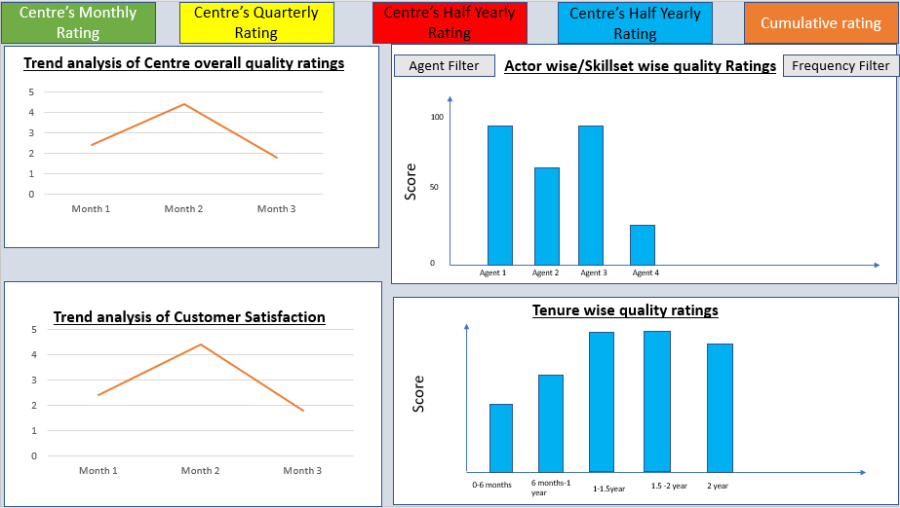
System should have the functionality to reflect dashboard for the supervisor. This dashboard should have different charts to visualize the details.
Actor(s)
Quality Supervisor
Pre-Conditions
- Agent/ANM/MO has attended the Call outbound; call is recorded within the System/application.
- Quality Auditor should have audited the call and has provided the Ratings.
- All the actors to have credentials and roles/skillset mapped in the application.
- System should have the mapping of agent and quality auditor.
- System should have the CSAT score.
- Supervisor should create and configure the Joining date of each agent to capture tenure wise ratings.|
Basic Flow
- Supervisor login to the application
- Supervisor login to the application
- Within the Application in Dashboard/under Report Card, supervisor should be able to see the charts.|
Alternative Flow
None
Business Rules
Data for following charts to be captured and should get reflected in dashboard
1. Skillset wise/Actor wise quality ratings (Associate/ANM/MO/Auditor)
2. Trend analysis for centre's overall quality score for last 3 months.
3. Trend analysis for Customer satisfaction score for last 3 months
4. Tenure wise quality ratings
Frequency to be considered for the reports –
Cycle wise
Month wise
Quarter wise
Year wise
Year to date
Post-Conditions
- Dashboard should be dynamic based on the selection on the filters.
Change Impact
N/A
Exception(s)
Extension Points
N/A
Variants
N/A
Assumptions
N/A
Not in Scope
N/A
Required reports: -
1. AGENT-WISE MONTHLY TOTAL PRIMARY DEFECTS
2. AGENT-WISE MONTHLY TOTAL SECONDARY DEFECTS
3. HIGHLIGHTING OF THE AGENTS BELOW 95% QUALITY SCORE FOR Training need identification.
3.21. Helpline-ECD-00034: System – User should be Navigated to Homepage/Dashboard when Agent clicks on Break
ID
Helpline-ECD-00024
Requirement No
N/A
Type
Product specific
Requirement Description
Whenever agents/user login to the system by default user should land on his homepage/dashboard.
In addition, when agent/user goes on break/applies break system should re-direct him to his dashboard until he changes his status as 'Read' or Logout of the System.Solution Description
When agent/user goes on break/applies break system should re-direct him to his dashboard until he changes his status as 'Read' or Logout of the System.
Actor(s)
Agent, ANM, Medical Officer, Supervisor, Auditor
Pre-Conditions
- Agent/User is logged into the System
Basic Flow
- Once the agent in to the system by default user will land on his/her homepage/Dashboard.
- And once the agent s clicks on 'Ready' Status to take calls,
- System will start auto dialling / manual dialling and connects ECD calls to them.
- Agent might not be able to come back to dashboard until they click on 'Break'
- User should be able to re-directed to dashboard whenever they click on 'Break" and select a particular 'Break type'
* |Alternative Flow
None
Business Rules
- Once the agent log's in to the system by default user will land on his/her homepage/Dashboard.
- Once the agent log's in to the system by default user will land on his/her homepage/Dashboard.
- And once the agent s clicks on 'Ready' Status to take calls,
- System will start auto dialling / manual dialling and connects ECD calls to them.
- Agent/user might not be able to come back to dashboard until they click on 'Break'
- User should be able to re-directed to dashboard whenever they click on 'Break" and select a particular 'Break type'
- User can get back to calls once they click on 'Ready'|
Post-Conditions
- User should be re-directed to Agents/user's Dashboard.
Change Impact
N/A
Exception(s)
- Supervisors, Auditors can anytime navigate to their Dashboard (Above-mentioned logic is not applicable to them).
- Supervisor can stop auto dialling for a district for the time period.
|Extension Points
N/A
Variants
N/A
Assumptions
N/A
Not in Scope
N/A
3.22. Helpline-ECD-00035: System – IVRS Recording- When Agent has kept Beneficiary on Hold
ID
Helpline-ECD-00025
Requirement No
N/A
Type
Product specific
Requirement Description
System should play IVRS recording when Agent has kept the beneficiary on hold.
Solution Description
System should play IVRS recording when Agent has kept the beneficiary on hold.
System should have the option to upload new recordings in the system whenever there is change in the IVRS records to be played.Actor(s)
System, IVRS
Pre-Conditions
- Agent/User is logged into the System
- Agent/User is logged into the System
- Agent is in call with Beneficiary /Or in conference with Beneficiary, ANM & Asha workers|
Basic Flow
- Agent is in call with Beneficiary/conference with Beneficiary, ANM & Asha worker
- Agent is in call with Beneficiary/conference with Beneficiary, ANM & Asha worker
- Agent wants to keep Beneficiary on hold.
- Once the agent keeps the call on hold
- System must play IVRS recordings till the call is on hold.
- Once the call is resumed, IVRS playback should stop
- Agent will continue the call as per the process and close.|
Alternative Flow
When No IVRS Recording file is upload, this is not applicable.
Business Rules
- System should have a feature to upload IVRS recordings
- System should have a feature to upload IVRS recordings
- When call is kept on hold, system should play IVRS recording.
- Admin should be able to upload new recordings and delete old recordings as per the need. |
Post-Conditions
Change Impact
N/A
Exception(s)
None
Extension Points
N/A
Variants
N/A
Assumptions
N/A
Not in Scope
N/A
3.23. Helpline-ECD-00026: System – SMS Alerts to Beneficiary
ID
Helpline-ECD-00026
Requirement No
N/A
Type
Product specific
Requirement Description
System should send automated SMS reminder to all Beneficiary at the time of call allocation to the agent/MO/ANM before each service due date of ANC/PNC
Solution Description
System should send automated SMS reminder to all Beneficiary at the time of call allocation to the agent/MO/ANM before each service due date of ANC/PNC
Actor(s)
System.
Pre-Conditions
- SMS Integration
- SMS Integration
- SMS format defined|
Basic Flow
System should send automated SMS reminder to all Beneficiary before each service due date of ANC/PNC at the time of allocation of calls.
SMS Format sample: "Please visit nearest Government Health Centre for PNC 2 checkup due on 12/06/2017"
Alternative Flow
None
Business Rules
- SMS to be sent as reminder before each due service like ANC1 to 4 & PNC1 to 4.
- SMS to be sent as reminder before each due service like ANC1 to 4 & PNC1 to 4.
- System triggered |
Post-Conditions
- SMS is sent to the beneficiary before there scheduled ANC/PNC Service
Change Impact
N/A
Exception(s)
None
Extension Points
N/A
Variants
N/A
Assumptions
N/A
Not in Scope
N/A
3.24. Helpline-ECD-00027: System – Capture Congenital Anomalies during PNC Calls
ID
Helpline-ECD-00027
Requirement No
N/A
Type
Product specific
Requirement Description
ANM should have a feature to capture Congenital Anomalies during PNC Calls
Solution Description
ANM should have a feature to capture Congenital Anomalies during PNC Calls (for Child)
Actor(s)
ANM (Ancillary Nurse Midwife)
Pre-Conditions
- Mother / Child Data uploaded into the system
Basic Flow
- During the PNC calls ANM's to have a provision to capture Congenital Anomalies:
- Cleft lip/palate
- Bow Leg
- Congenital heart disease
- Club feet
- lateral clavicle deformity
- Spinal deformity
- Others (A remarks box to type the dieses or defect)
- Possible Cause of defect
|Alternative Flow
None
Business Rules
- Below fields is required to capture the details:
- Cleft lip/palate
- Bow Leg
- Congenital heart disease
- Club feet
- Lateral clavicle deformity
- Spinal deformity
- Others (A remarks box to type the dieses or defect)
- Possible Cause of defect|
Post-Conditions
- Captured data to be saved and reports for birth defects to be generated.
*
Change Impact
N/A
Exception(s)
- None
Extension Points
Data Elements
Data Field
Input Type
Validation
Behaviour
Cleft lip/palate
Selection
Check Box/Dropdown list
Bow Leg
Selection
Check Box/Dropdown list
Congenital heart disease
Selection
Check Box/Dropdown list
Club feet
Selection
Check Box/Dropdown list
lateral clavicle deformity
Selection
Check Box/Dropdown list
Spinal deformity
Selection
Check Box/Dropdown list
Others
Free Text Box
Free Text Box
Possible Cause of Defect
Free Text Box
Free Text Box
Remarks
Free Text Box
Free Text box
Variants
N/A
Assumptions
N/A
Not in Scope
N/A
3.25. Helpline-ECD-00028: System –Report- Congenital Anomalies
ID
Helpline-ECD-00028
Requirement No
N/A
Type
Product specific
Requirement Description
Share Data with Public Health agencies (govt) to estimate how common these birth defects are and to develop prevention programs.
Solution Description
ANM should have a feature to capture Congenital Anomalies during PNC Calls (for Child),
Data captured during this call needs to be generated as a report.Actor(s)
ANM (Ancillary Nurse Midwife), System
Pre-Conditions
- Mother / Child Data uploaded into the system
Basic Flow
- During the PNC calls ANM's to have a provision to capture Congenital Anomalies:
- Captured data to be saved and reports for birth defects to be generated.
- Cleft lip/palate
- Congenital heart disease
- Club feet
- lateral clavicle deformity
- Spinal deformity
- Others (A remarks box to type the dieses or defect)
- Data captured during the call for congenital anomalies should populate in a report.
- Below fields is required to capture the details:
- b) Arears where these cases are significant
- c) No. of count
- d) Trend of these disease
- e) Possible causes
|Alternative Flow
None
Business Rules
- Reports for all beneficiary where defects were captured needs to be generated (Beneficiary ID (Mother Name, Child Name, Age, District)
Post-Conditions
- Captured data to be saved and reports for birth defects to be generated.
Change Impact
N/A
Exception(s)
- None
Extension Points
Data Elements
Data Field
Input Type
Validation
Behaviour
District
Type of Anomalies
Total Count
Possible Cause of Defect
Remarks
Free Text Box
Free Text box
Variants
N/A
Assumptions
N/A
Not in Scope
N/A
3.26. Helpline-ECD-00029: System –Sticky Agent
ID
Helpline-ECD-00029
Requirement No
N/A
Type
Product specific
Requirement Description
Sticky Agent for calling Beneficiaries through the ANC / PNC cycles
Solution Description
Sticky Agent for calling Beneficiaries through the ANC / PNC cycles.
If Previous call was handled by one agent/ANM/MO, next call system should automatically allocated/routed to the same agent.
If in case that agent is not available, it should be allocated/routed to any other agent.Actor(s)
System, Agent/ANM/MO
Pre-Conditions
A specific agent handled first/previous call.
Basic Flow
- When a call is allocated to an ANM (manually)
- Reports for all beneficiary where defects were captured needs to be generated (Beneficiary ID (Mother Name, Child Name, Age, District)
- ANM will speak to the beneficiary and provide the ANC/PNC service.
- Next scheduled call for the beneficiary should automatically allocated to the same agent who has handled the previous call.
- If in case the agent is not available, then the call should be routed to any other agent accordingly.
|Alternative Flow
If the same agent Is not available, Supervisor will allocate the call to any other available agent.
Business Rules
- Whenever an ANM/MO attends a beneficiary call for the first time,
- Whenever an ANM/MO attends a beneficiary call for the first time,
- Next call for the same beneficiary should automatically allocated/routed to the same agent until the completion of all the calls as per the program.
- If in case specific agent is not available, then the call to be routed to any other available agent.
- In the system when a first call to the beneficiary is completed, it should map the Agent ID with the beneficiary ID for sticky agent concept, so that the next call can be routed to the same agent.
|Post-Conditions
Same agent should be able to attend/speak to the beneficiary for the next ANC/PNC call.
Change Impact
None.
Exception(s)
Extension Points
Data Elements
Data Field
Input Type
Validation
Behaviour
Mother ID
Child ID
Agent ID
Variants
N/A
Assumptions
N/A
Not in Scope
N/A
Last modified Date
Last modified by
Approved by
Approved on
3.27. Helpline-ECD-00030: ECD No of Calls Configuration Screen:
Master data setup- Supervisor Role
Supervisor will create the call configuration and will map the questionnaire with call type.
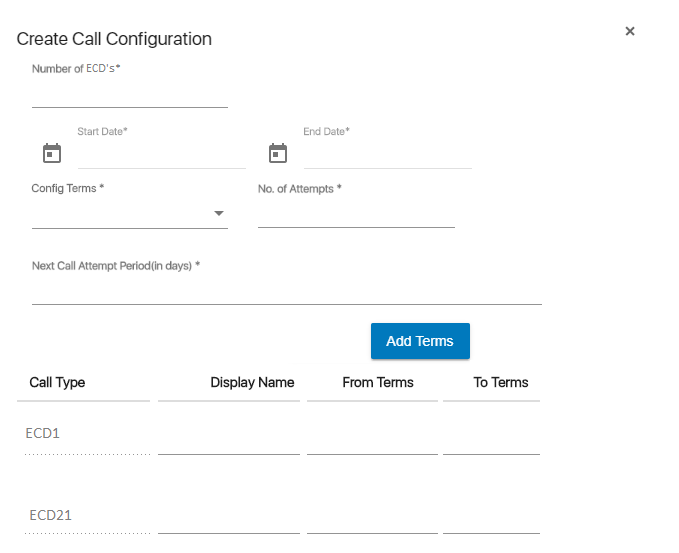 Note-1-Supervisor can configure the call.
2-Supervisor can edit and delete the call configuration.
3-Questionnaire sheet is attached in 6.14, Answers control type would be based on questionnaire sheet and supervisor can edit and delete.
4-Questionnaire master data setup would be based on questionnaire sheet (Control type).
5-Supervisor can edit the questionnaire sequence also.
3.28. Helpline-ECD-00031: ECD Content data for each ECD Calls Upload Screen:
Note- Will provide the RCH data sheet.
3.29. Helpline-ECD-00032A: Supervisor- Dashboard
Note- Will provide the finalized report format.
1. Numbers of calls placed/Calls Verified-Break up as per the call type (Frequency-Monthly, Year to date)
2. High risk calls (Frequency-Monthly, Year to date)
3. HRP cases identified by ANM (Frequency-Monthly, Year to date)
4.HRP cases identified by RCH data (Frequency-Monthly, Year to date)3.30. Helpline-ECD-00032B: Supervisor- Reports
1. Numbers of calls placed/Calls Verified-Break up as per the call type (Frequency-Monthly, Year to date)
2. High risk calls (Frequency-Monthly, Year to date)
3. HRP cases identified by ANM (Frequency-Monthly, Year to date)
4.HRP cases identified by RCH data (Frequency-Monthly, Year to date)
5.Follow up reports (Frequency-Daily)
6.VHSND Promotion (Frequency- Monthly)
7.NCD Detection during Pregnancy
8.Still birth reporting
9.Early detection of new born deformity
10. compliance check on delivery of pregnancy services in community registration
11. Monthly survey finding reports
12. Behavior change reports
13. Infant death
14. Maternal death
15. Miscarriage/Abortion
16. Delivery (Home/Govt. hospital/Pvt Hospital etc.)
17. Infant immunization _left out
18. ASHA/JSY Grievance registered
19. District wise call list
20. Agent wise Productivity Report
21. Stakeholder Report
3.31. Helpline-ECD-0033-System-Auto- Preview dialling
ID
Helpline-ECD-0033
Requirement No
N/A
Type
Product specific
Requirement Description
Once the calls are allocated to user (Either auto allocation by System or Manual allocation by supervisor), System should provide Auto Preview dialling.
User should be able to see the CRM-Beneficiary screen with details before the call is connectedSolution Description
When call allocated to Agent, then system should have a provision to auto connect call by auto preview mode.
Actor(s)
System, Agent, ANM or Medical Officer
Pre-Conditions
- Data uploaded into the system
- Data uploaded into the system
- Calls allocated to Agent.
- System connects calls to Agent by Auto –Preview mode
- Before call gets connected to the beneficiary, Agent should be able to view the beneficiary details and history.
- There should be 15 to 20 seconds time gap agent should get to view the details before call gets connected (this should be configurable by Supervisor. My Operator))
|Basic Flow
- System connects calls to Agent by Auto –Preview mode
- System connects calls to Agent by Auto –Preview mode
- Before call gets connected to the beneficiary, Agent should be able to view the beneficiary details and history.
- There should be 15 to 20 seconds time gap agent should get to view the details before call gets connected (this should be configurable by Supervisor. My Operator)
- Once call gets connected, Agent will document the details as per the ANC/PNC schedule
- Close the call as Valid/Invalid call.|
Alternative Flow
None
Business Rules
- Agent should be able to view the beneficiary details 15 to 25 sec before call gets connected in Auto-Preview mode
Post-Conditions
- Agent able to view the details before call gets connected.
Change Impact
N/A
Exception(s)
None
Extension Points
N/A
Variants
N/A
Assumptions
N/A
Not in Scope
N/A
3.32. Helpline-ECD-0034-System-Capture CSAT Score through Manual/IVRS/SMS Services
(Under discussion-approach to be finalised)
ID
Helpline-ECD-0034
Requirement No
N/A
Type
Product specific
Requirement Description
Once the calls are allocated to user (Either auto allocation by System or Manual allocation by supervisor), System/Agent should capture the feedback from the beneficiary
Solution Description
When call allocated to Agent, then agent should capture the CSAT score.
Actor(s)
System, Agent
Pre-Conditions
- Data uploaded into the system
- Calls allocated to Agent.
- Before call gets connected to the beneficiary, Agent should be able to view the beneficiary details and history. |
Basic Flow
- Login the application using login credentials
- Login the application using login credentials
- Go to worklist
- Total number of calls displayed with details of every allocated beneficiary.
- Call is placed to the beneficiary.
- Customer satisfaction Score is captured|
Alternative Flow
None
Business Rules
- Agent should be able to view the beneficiary details 15 to 25 sec before call gets connected in Auto-Preview mode
Post-Conditions
- Agent to capture the CSAT score.
Change Impact
N/A
Exception(s)
None
Extension Points
N/A
Variants
N/A
Assumptions
N/A
Not in Scope
N/A