...
Document Revision History
Date | Version Number | Author | Approved By | Document change reference |
|
|
|
|
|
|
|
|
|
|
|
|
|
|
|
|
|
|
|
|
Introduction
Document Purpose
...
Piramal Swasthya Management and Research Institute (PSMRI), an initiative under the aegis of Piramal Foundation. Is one of the largest not-for-profit organizations in India. Piramal Swasthya is contributing with its experience and expertise of building innovative solutions that impact at scale.
Piramal Swasthya is focused on bridging the public healthcare gaps by supplementing and complementing the Government of India's vision to meet Universal Health Coverage. In the primary public healthcare space with a focus on Maternal, Child and Adolescent Health and Non-communicable Diseases. Piramal Swasthya has more than a decade-long experience in operating several healthcare innovations at scale, which are addressing the primary healthcare needs of the most underserved and marginalized populations across India. Piramal Swasthya is operational in 21 States in India through 35 innovative public healthcare delivery programs and has served more than 112 million beneficiaries so far.
One such innovation is AMRIT (Accessible Medical Records via Integrated Technologies) which is a digital health platform developed by Piramal Swasthya that stores electronic health records of beneficiaries for the use of public primary healthcare service delivery and decision-making. The platform enables the connection between beneficiaries, health facilities, and frontline workers in an integrated ecosystem through technology.
Services and features under AMRIT Platform:
HWC Application: A comprehensive application with 12 Service packages.
MMU Application: Offline and Online Application to support operations in outreach programs.
HIHL Application: Helpline CRM to support services like 104, 1097, MCTS and ECD with inbound and outbound facility.
Telemedicine Solution: Video consulting facility.
Smart Phone Applications: FLW for ASHAs and mHWC app for Primary Care are Android Mobile App
Point of Care Device: AMRIT is integrated with PoCT devices like Fetosense and Healthcube etc.
ABDM compliant:AMRIT is integrated with ABDM for ABHA with all three (M1, M2, M3) milestones.
...
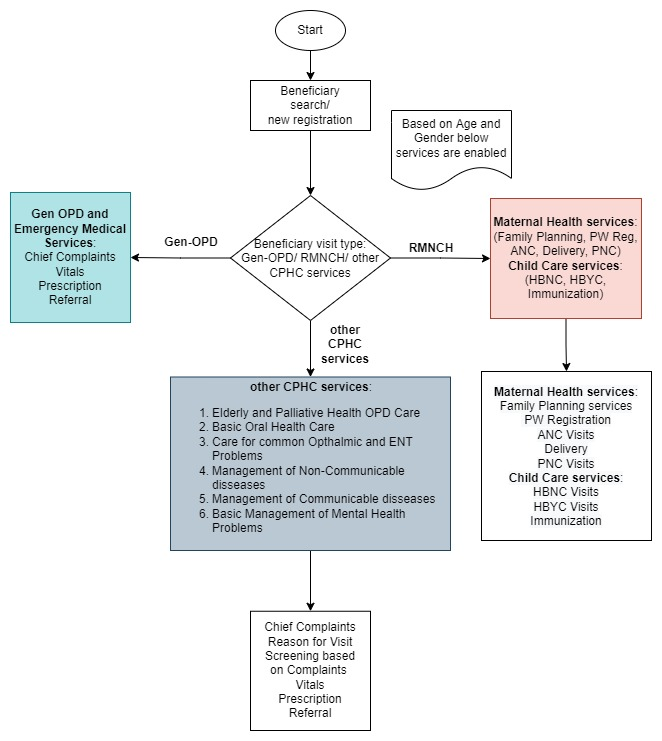
mHWC App Comprehensive Care workflow diagram:
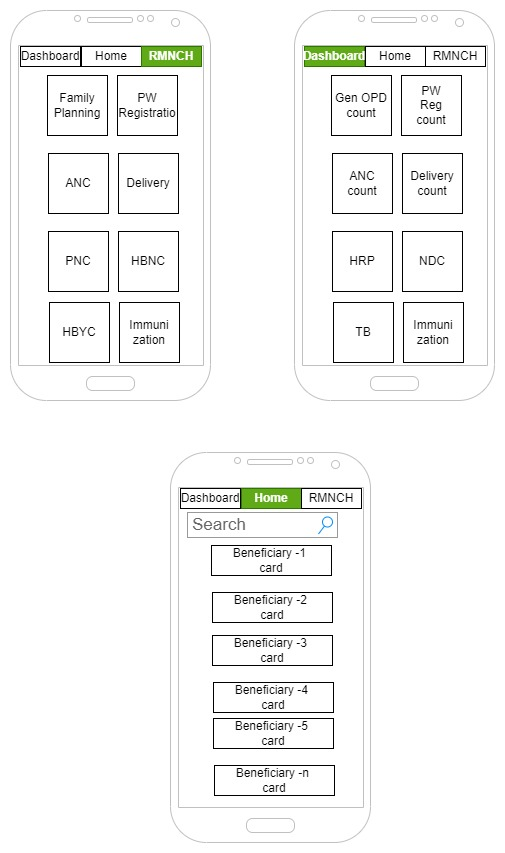
Mobile App mockup screens
Mockup for landing page Home, Dashboard and RMNCH sections:
General OPD workflow diagram
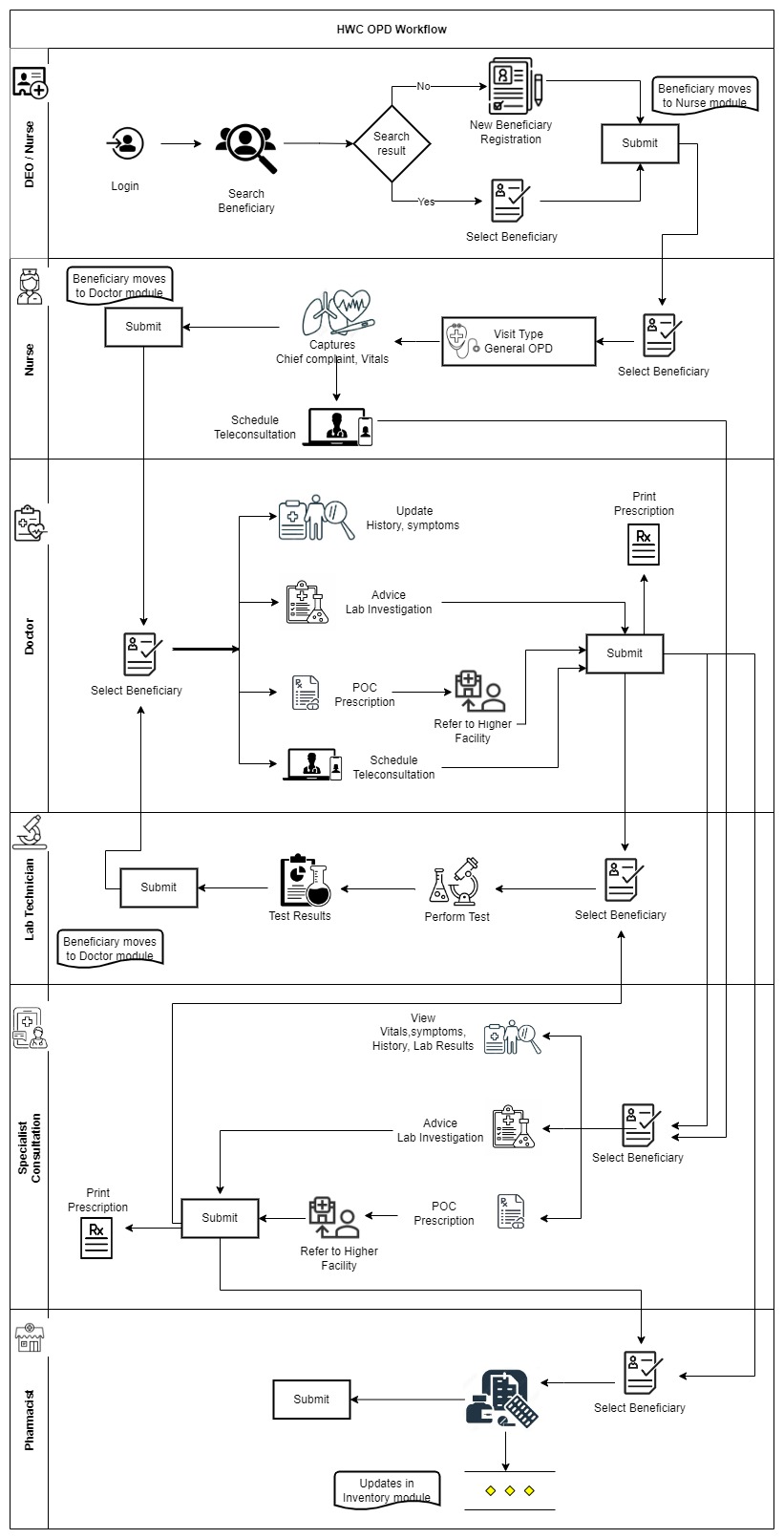 Image Added
Beneficiary Registration
- On clicking Registration button the user will be navigated to Beneficiary Registration Page
- This page has Beneficiary Registration Text displayed on top with "Home" Icon on the right corner to Navigate to Home page in the 1st row
- The Page will end with "Cancel" and "Submit" button at the bottom
- The card below should be visible after the registration of beneficiary.
- If the beneficiary does not have ABHA ID, give one clickable button on the ABHA ID area of the card to initiate ABHA ID generation
...
Photo of the beneficiary | Name | Beneficiary ID |
| Age (years)/ Gender | Phone Number |
| Village Name | ABHA ID (clickable button to initiate ABHA generationregistration) |
Data Field | Field Type | Value/ Options | Validations/ Logic |
Patient Registration | Text |
| Header |
Photo | Image |
| - On clicking Tap to take photo it must enable the camera to click the photo of the Beneficiary
- This should have the ability to retrieve the patients data associated with the photo already registered
- This should have Face detection feature
|
Village Name | Dropdown |
| - Mandatory
- Single selection allowed
- This must auto fetch the dropdown values (Villages) with which the user is aligned.
|
First Name | Text |
| - Mandatory
- Speech to Text Feature
- Allow alphabets, space, hyphen
|
Last Name | Text |
| - Optional
- Speech to Text Feature
- Allow alphabets, space, hyphens
- Make it editable with pencil icon, if there is change in the status of woman (un married to married)
|
Father's Name | Text |
| - Mandatory if '"Status of Women"= "Adolescent", "Unmarried"
- Speech to Text Feature
- Allow alphabets, space, hyphens
|
Phone number | Number |
| - Optional
- Allow Numerical values only
- Speech to Text Feature
- Should be a 10 digit Mobile number starting with 6,7,8,9 number
|
Date of Birth | Calendar | | - Optional (if someone does not remember/ know their DOB as in elderlies)
- Calendar date picker
- On selecting the date of Birth it must auto calculate the age in Years
- Auto populate the age in Age Field
|
Age | Date Picker | Years (mandatory), months and days (optional if manually filled) | - Mandatory
- Editable by CHO/Registrar
- Should be auto calculated and auto filled from date of birth but if it is not available then it should have an option for the CHO to manually enter age
- Format should be Years, Months, Days.
- Years should be mandatory, months and days if filled manually can be optional.
|
Gender | Drop down | | - Mandatory
- Single selection
- Default is Select
|
Marital Status | Dropdown | - Unmarried
- Married
- Divorced
- Separated
- Widow
| - Mandatory and single selection
- Editable, if there is any change in the marital status in future.
- If marital status = "Married" then enable field "Spouse Name"
|
Spouse Name | Text |
| - Mandatory
- Speech to Text Feature
- Allow alphabets, space, hyphens
- Should be enabled if marital status = "Married"
|
Status of Women | Dropdown | - Eligible couple (EC)
- Pregnant Woman (PW)
- Post Natal Mother
- Elderly
- Adolescent
- Permanent sterilization
- Not applicable
| - Mandatory
- Should be enabled if Gender= "Female"
- If marital status = "Married" and pregnancy status = "Eligible couple", move the woman in eligible couple due list
- If marital status = "Married" and pregnancy status = "Pregnant Woman", move the woman in ANC due list and capture details in "Pregnancy identification and registration" module
- If marital status = "Married" and pregnancy status = "Post Natal mother", move the woman in PNC due list for ASHAs and capture details in the postnatal care module.
Acceptance Criteria:
- If Gender is female, Age is 10-19 Years and Marital Status = "Unmarried" enable only Adolescent Girl option
- If Gender is female, Age is >=15 Years and Marital Status = "Married" enable EC, PW, Postnatal Mother and Permanently Sterilized options
- If gender is female, age is 15-19 years and marital status is married then enable EC, PW, post natal mother, permanent sterilization options
- If Gender is female, Age is 20-49 Years and Marital Status = "Married" show EC, PW, Postnatal Mother and Permanently Sterilized
- If Gender is female, Age is 20-49 Years and Marital Status = "Unmarried" show only "Not Applicable"
- If Gender is female and Age is 20 and above, do not show Adolescent Girl option.
- If Gender is female and Age is 50 and above, show only Elderly Woman.
|
Does the beneficiary have ABHA ID |
| | - Mandatory
- If yes, enable next field where ABHA number can be input
- If no, show alert to counsel the beneficiary to enroll and get an ABHA (Ayushman Bharat Health Account)
|
ABHA ID | Textbox |
| - Mandatory if enabled
- 14-digit unique numeric identifier
- Accept numeric (integer) value only
|
Cancel | Button |
| - If cancel is selected, a pop up message "Are you Sure?" with options "Yes" and "No" will come.
- If selected "yes" navigate back to home page
- If selected "no" then do not erase the patient health data and let the page remain open so it can be submitted by CHO as sometime by mistake cancel button is clicked.
|
Submit | Button |
| - On clicking this, it must display the Pop up msg "Patient Registered successfully"
- This must store the data of the patient and display the required fields over the Beneficiary card
- This Beneficiary Card must be visible in CHO and Staff Nurse role.
- Ensure that data should go to server.
|
Edit
Edit option after Registration details of beneficiary is submitted. | Pencil Button
(click to edit) |
| - On clicking this, it must navigate to the Page filled by CHO to edit and at the end "OK" button.
- On clicking "OK" it must display the Pop up msg "Patient details edited successfully"
- Make the following fields editable with a pencil icon-
- Last name (If status of woman changes in future)
- Phone number
- Status of woman
- Age if CHO has to manually enter it instead of being auto calculated from date of birth.
|
...
