...
Date | Version Number | Author | Approved By | Document change reference |
| 1.0 |
|
| Initial Draft |
|
| Dr Vanshika |
| RMRNCHRMNCH- Reproductive, Maternal, Neonatal, Child Health modules |
|
| Dr Vanshika |
| ENT- Ear, Nose, Throat module, Ophthalmic |
|
| Dr Vanshika |
| Oral Health |
...
- Bridge Healthcare Gaps: Provide equitable access to quality healthcare services across urban and rural populations and support online/offline data capture with auto-sync on connectivity restoration.
- Empower Citizens: Enable patients to take control of their health through easy appointment booking, teleconsultation, health tracking, and access to medical records
- Enhance Healthcare Delivery: Equip healthcare workers and medical officers with digital tools for efficient service delivery, documentation, and patient management
- Strengthen Health Systems: Provide administrators and policymakers with real-time data, analytics, and insights for evidence-based decision making
- Ensure Interoperability: Integrate seamlessly with national health infrastructure (ABDM, Nikshay, PM-JAY) for unified health information exchange.
mHWC App Comprehensive Care workflow diagram:
...
Scope of Work
Current scope of project is limited:
- CPHC Modules
- General OPD Module
- Comprehensive RMNCH+A Module
- Remining other CPHC Modules
- NCD screening Module
- Pharmacy Module
- Lab Module
- User Dashboard
Users of the system
S. No | Primary Actor | Role |
1 | CHO |
|
2 | Registrar | Registration and Data Entry |
3 | Nurse | Primary Care, Maternal Care and Immunization |
4 | Medical Officer (MO/Doctor) |
|
5 | Pharmacist |
|
6 | Lab Technician |
|
|
|
|
Role-Based Access to Applications
- Users with roles CHO, Medical Officer (MO/Doctor), Nurse, Pharmacist, Lab Technician, Registrar, or any combination of these roles, should have access to the HWC application.
- Users with the CHO role must be able to log in to both FLW and HWC applications.
HWC App Comprehensive Care workflow diagram:
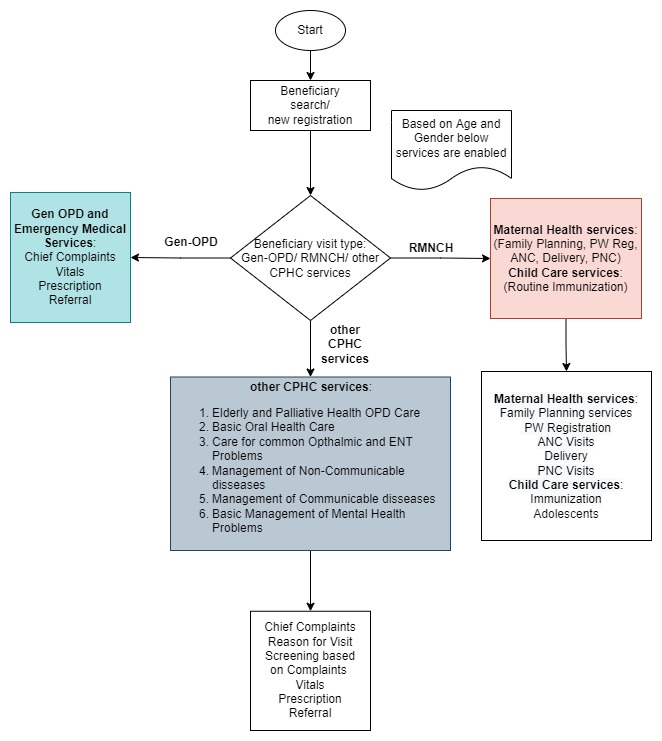 Image Added
Mobile App mockup screens
Mockup for landing page Home, Dashboard and RMNCH sections:
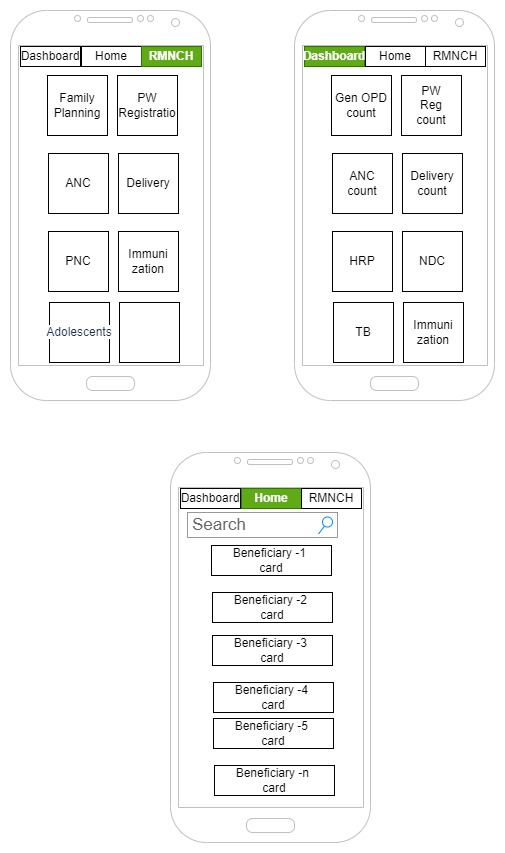 Image Added
General OPD workflow diagram
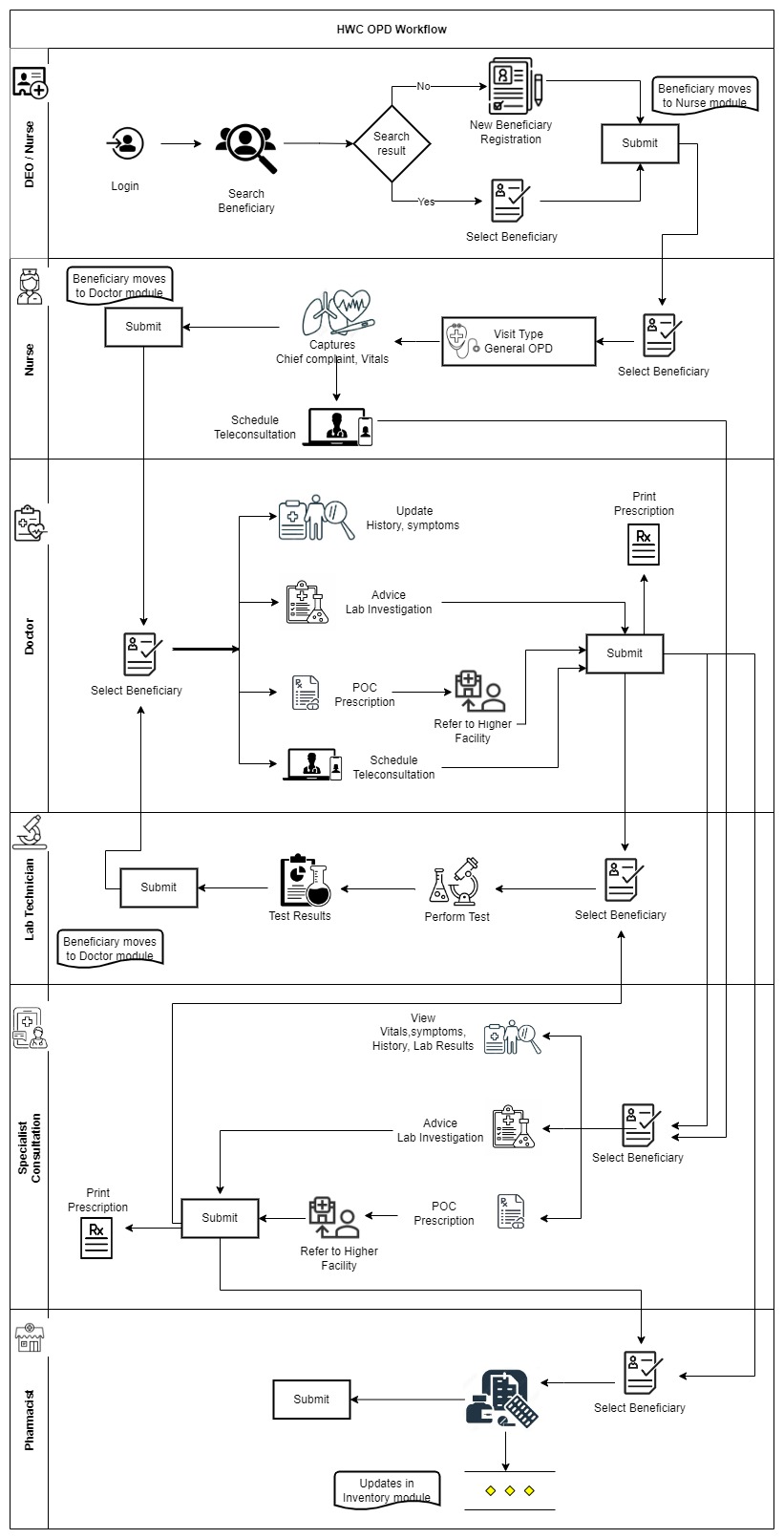 Image Added
Beneficiary Registration
- On clicking Registration button the user will be navigated to Beneficiary Registration Page
- This page has Beneficiary Registration Text displayed on top with "Home" Icon on the right corner to Navigate to Home page in the 1st row
- The Page will end with "Cancel" and "Submit" button at the bottom
- The card below should be visible after the registration of beneficiary.
- If the beneficiary does not have ABHA ID, give one clickable button on the ABHA ID area of the card to initiate ABHA ID generation
Photo of the beneficiary | Name | Beneficiary ID |
| Age (years)/ Gender | Phone Number |
| Village Name | ABHA ID (ABHA registration) |
S. No | Data Field | Field Type | Value/ Options | Validations/ Logic |
| Patient Registration | Text |
| Header |
| Photo | Image |
| - On clicking Tap to take photo it must enable the camera to click the photo of the Beneficiary
- This should have the ability to retrieve the patients data associated with the photo already registered
- This should have Face detection feature
|
| Village Name | Dropdown |
| - Mandatory
- Single selection allowed
- This must auto fetch the dropdown values (Villages) with which the user is aligned.
|
| First Name | Text |
| - Mandatory
- Speech to Text Feature
- Allow alphabets, space, hyphen
|
| Last Name | Text |
| - Optional
- Speech to Text Feature
- Allow alphabets, space, hyphens
- Make it editable with pencil icon, if there is change in the status of woman (un married to married)
|
| Father's Name | Text |
| - Mandatory if '"Status of Women"= "Adolescent", "Unmarried"
- Speech to Text Feature
- Allow alphabets, space, hyphens
|
| Phone number | Number |
| - Optional
- Allow Numerical values only
- Speech to Text Feature
- Should be a 10 digit Mobile number starting with 6,7,8,9 number
|
| Date of Birth | Calendar | | - Optional (if someone does not remember/ know their DOB as in elderlies)
- Calendar date picker
- On selecting the date of Birth it must auto calculate the age in Years
- Auto populate the age in Age Field
|
| Age | Date Picker | Years (mandatory), months and days (optional if manually filled) | - Mandatory
- Editable by CHO/Registrar
- Should be auto calculated and auto filled from date of birth but if it is not available then it should have an option for the CHO to manually enter age
- Format should be Years, Months, Days.
- Years should be mandatory, months and days if filled manually can be optional.
|
| Gender | Drop down | | - Mandatory
- Single selection
- If Gender is female and Age is 10 Years to less than 15 Years then also show in Adolescent section
- If Gender is male and Age is 10 to 19 Years then also show in Adolescent section
|
| Marital Status | Dropdown | - Unmarried
- Married
- Divorced
- Separated
- Widow
- Widower
| - Mandatory and single selection
- Not Applicable for Newborn/ Child/ Adolescent (Age 0 to less than 15 Years)
- Show this field once above Gender is selected
- Editable, if there is any change in the Marital status in future.
- If Marital status = "Married" then enable field "Spouse Name"
- If "Unmarried" is selected hide below field "Spouse Name"
- If "Unmarried" is selected, 'Status of Woman' is based on the below condition (i.e. Adolescent/ No Applicable)
- Based on the 'Gender' values in this dropdown list should change as follows:
- In case of 'Gender' = "Female" show "Widow" and hide "Widower"
- In case of 'Gender' = "Male" show "Widower" and hide "Widow"
- If "Married" is selected, show option to add Spouse Name (Husband/ Wife)
- In case of "Unmarried", allow to edit this field and update, open/ add "Spouse" details
|
| Spouse Name
| Textbox | Husband's/ Wife's Name | - Mandatory
- Speech to Text Feature
- Allow alphabets
- Should be enabled if marital status = "Married"
|
| Status of Women | Dropdown | - Eligible couple
- Pregnant Woman
- Postnatal Mother
- Elderly Woman
- Adolescent
- Permanently Sterilised
- Not applicable
| - Mandatory
- Should enable if Gender = "Female"
- The options in the "Status of Women" field should be based on Age criteria as per four conditions defined in the below table and based on 'Marital Status'.
- If Marital status = "Married" and 'Status of Women' = "Eligible couple", then move the woman to 'Eligible Couple' due list
- If Marital status = "Married" and 'Status of Women' = "Pregnant Woman", then move the woman to Pregnant Woman due list and capture details for "Pregnancy identification and registration" and move to ANC due list
- If Marital status = "Married" and 'Status of Women' = "Postnatal Mother", then move the woman in PNC due list and capture details in the postnatal care module.
Acceptance Criteria: - “Not Applicable” choice is applicable only in “unmarried” case
- If Age is 15-19 Years and Marital Status= “Unmarried” then default value is “Adolescent Girl”
- If Age is 20-49 Years and Marital Status= “Unmarried” then default value is “Not Applicable”
- If Age is 50 Years and above, then default value is “Elderly Woman” (Marital Status can be anything)
- If Age is 15-49 Years and Marital Status= “Married” then show list as per below Condition-4
- If Age is 20-49 Years and ‘Status of Women’ = “Not Applicable”, then in this case Edit of ‘Status of Women’ is allowed as per below age criteria conditions, in “Married” case
- If Age is 15-19 Years then ‘Status of Women’ = “Adolescent Girl” and in this case Edit of ‘Status of Women’ is allowed as per below age criteria conditions, in “Married” case
- If Gender is female andAge is 15-19 Years then also show this record in Adolescent section
|
| Cancel | Button |
| - If cancel is selected, a pop up message "Are you Sure?" with options "Yes" and "No" will come.
- If selected "yes" navigate back to home page
- If selected "no" then do
|
Mockup for landing page Home, Dashboard and RMNCH sections:
Image Removed
General OPD workflow diagram
Image Removed
Beneficiary Registration
- On clicking Registration button the user will be navigated to Beneficiary Registration Page
- This page has Beneficiary Registration Text displayed on top with "Home" Icon on the right corner to Navigate to Home page in the 1st row
- The Page will end with "Cancel" and "Submit" button at the bottom
- The card below should be visible after the registration of beneficiary.
- If the beneficiary does not have ABHA ID, give one clickable button on the ABHA ID area of the card to initiate ABHA ID generation
Photo of the beneficiary | Name | Beneficiary ID |
Age (years)/ Gender | Phone Number | Village Name | ABHA ID (ABHA registration) | S. No | Data Field | Field Type | Value/ Options | Validations/ Logic |
| Patient Registration | Text | Header | | Photo | Image | - On clicking Tap to take photo it must enable the camera to click the photo of the Beneficiary
- This should have the ability to retrieve the patients data associated with the photo already registered
- This should have Face detection feature
| | Village Name | Dropdown | - Mandatory
- Single selection allowed
- This must auto fetch the dropdown values (Villages) with which the user is aligned.
| | First Name | Text | - Mandatory
- Speech to Text Feature
- Allow alphabets, space, hyphen
| | Last Name | Text | - Optional
- Speech to Text Feature
- Allow alphabets, space, hyphens
- Make it editable with pencil icon, if there is change in the status of woman (un married to married)
| | Father's Name | Text | - Mandatory if '"Status of Women"= "Adolescent", "Unmarried"
- Speech to Text Feature
- Allow alphabets, space, hyphens
| | Phone number | Number | - Optional
- Allow Numerical values only
- Speech to Text Feature
- Should be a 10 digit Mobile number starting with 6,7,8,9 number
| | Date of Birth | Calendar | | - Optional (if someone does not remember/ know their DOB as in elderlies)
- Calendar date picker
- On selecting the date of Birth it must auto calculate the age in Years
- Auto populate the age in Age Field
|
| Age | Date Picker | Years (mandatory), months and days (optional if manually filled) | - Mandatory
- Editable by CHO/Registrar
- Should be auto calculated and auto filled from date of birth but if it is not available then it should have an option for the CHO to manually enter age
- Format should be Years, Months, Days.
- Years should be mandatory, months and days if filled manually can be optional.
|
| Gender | Drop down | | - Mandatory
- Single selection
- If Gender is female and Age is 10 Years to less than 15 Years then also show in Adolescent section
- If Gender is male and Age is 10 to 19 Years then also show in Adolescent section
|
| Marital Status | Dropdown | - Unmarried
- Married
- Divorced
- Separated
- Widow
- Widower
| - Mandatory and single selection
- Not Applicable for Newborn/ Child/ Adolescent (Age 0 to less than 15 Years)
- Show this field once above Gender is selected
- Editable, if there is any change in the Marital status in future.
- If Marital status = "Married" then enable field "Spouse Name"
- If "Unmarried" is selected hide below field "Spouse Name"
- If "Unmarried" is selected, 'Status of Woman' is based on the below condition (i.e. Adolescent/ No Applicable)
- Based on the 'Gender' values in this dropdown list should change as follows:
- In case of 'Gender' = "Female" show "Widow" and hide "Widower"
- In case of 'Gender' = "Male" show "Widower" and hide "Widow"
- If "Married" is selected, show option to add Spouse Name (Husband/ Wife)
- In case of "Unmarried", allow to edit this field and update, open/ add "Spouse" details
|
| Spouse Name
Textbox | Husband's/ Wife's Name | - Mandatory
- Speech to Text Feature
- Allow alphabets
- Should be enabled if marital status = "Married"
| | Status of Women | Dropdown | - Eligible couple
- Pregnant Woman
- Postnatal Mother
- Elderly Woman
- Adolescent
- Permanently Sterilised
- Not applicable
| MandatoryShould enable if Gender = "Female"The options in the "Status of Women" field should be based on Age criteria as per four conditions defined in the below table and based on 'Marital Status'.If Marital status = "Married" and 'Status of Women' = "Eligible couple", then move the woman to 'Eligible Couple' due listIf Marital status = "Married" and 'Status of Women' = "Pregnant Woman", then move the woman to Pregnant Woman due list and capture details for "Pregnancy identification and registration" and move to ANC due listIf Marital status = "Married" and 'Status of Women' = "Postnatal Mother", then move the woman in PNC due list and capture details in the postnatal care module.
Acceptance Criteria:“Not Applicable” choice is applicable only in “unmarried” caseIf Age is 15-19 Years and Marital Status= “Unmarried” then default value is “Adolescent Girl”If Age is 20-49 Years and Marital Status= “Unmarried” then default value is “Not Applicable”If Age is 50 Years and above, then default value is “Elderly Woman” (Marital Status can be anything)If Age is 15-49 Years and Marital Status= “Married” then show list as per below Condition-4If Age is 20-49 Years and ‘Status of Women’ = “Not Applicable”, then in this case Edit of ‘Status of Women’ is allowed as per below age criteria conditions, in “Married” caseIf Age is 15-19 Years then ‘Status of Women’ = “Adolescent Girl” and in this case Edit of ‘Status of Women’ is allowed as per below age criteria conditions, in “Married” caseIf Gender is female andAge is 15-19 Years then also show this record in Adolescent sectionCancel | Button | - If cancel is selected, a pop up message "Are you Sure?" with options "Yes" and "No" will come.
- If selected "yes" navigate back to home page
- If selected "no" then do not erase the patient health data and let the page remain open so it can be submitted by CHO as sometime by mistake cancel button is clicked.
|
| Submit | Button |
| - On clicking this, it must display the Pop up msg "Patient Registered successfully"
- This must store the data of the patient and display the required fields over the Beneficiary card
- This Beneficiary Card must be visible in CHO and Staff Nurse role.
- Ensure that data should go to server.
| | Edit
Edit option after Registration details of beneficiary is submitted. | Pencil Button
(click to edit) | - On clicking this, it must navigate to the Page filled by CHO to edit and at the end "OK" button.
- On clicking "OK" it must display the Pop up msg "Patient details edited successfully"
- Make the following fields editable with a pencil icon-
- Last name (If status of woman changes in future)
- Phone number
- Status of woman
- Age if CHO has to manually enter it instead of being auto calculated from date of birth.
|
The options in the "Status of Women" field should be based on Age criteria as defined in the below 4 conditions:
- Staff Nurse role.
- Ensure that data should go to server.
|
| Edit
Edit option after Registration details of beneficiary is submitted. | Pencil Button
(click to edit) |
| - On clicking this, it must navigate to the Page filled by CHO to edit and at the end "OK" button.
- On clicking "OK" it must display the Pop up msg "Patient details edited successfully"
- Make the following fields editable with a pencil icon-
- Last name (If status of woman changes in future)
- Phone number
- Status of woman
- Age if CHO has to manually enter it instead of being auto calculated from date of birth.
|
The options in the "Status of Women" field should be based on Age criteria as defined in the below 4 conditions:
| Condition-1 | Condition-2 | Condition-3 | Condition-4 |
|---|
| Show only "Adolescent Girl" for age 15 to 19 years and 'Marital Status'= “Unmarried” | After Age 20 years, the "Adolescent Girl" option should be disabled | Elderly Women (Age 50 years and above) | Women Age 20 to 49 Years and 'Marital Status' = “Married” |
If Age is 15 to 49 years and 'Marital Status' = “Married”show only below options: - Eligible Couple
- Pregnant Woman
- Postnatal Mother
- Permanently Sterilised
|
| Display "Elderly Woman" only for individuals age 50 years and above. | Show only below options: - Eligible Couple
- Pregnant Woman
- Postnatal Mother
- Permanently Sterilised
|
Vital Screen
Vitals | Normal Range (Green Code) | Borderline (Yellow code) | High/ Low than the normal range(Red code) |
Weight (Kgs) | - | - | - |
Height (cms) | - | - | - |
BMI=Weight/(Height/100) ² | 18.5-24.9 | 25-29.9 (Overweight) | <18.5 (Underweight) ≥30 ( Obese ) |
Temperature (Degree Fahrenheit) | 98.6 F | 99.6 F | >= 100 F |
Rate of Respiration (Breaths per minute) | 16-20 | 20-24 | >24 |
Pulse Rate (beats per minute) | 70-80 | - | <60- >90 |
Systolic Blood Pressure (mm Hg) | 120 | Upto 130 | >140 (High BP) <90 (Low BP) |
Diastolic blood Pressure (mm Hg) | 80 | Upto 90 | >90 (High BP) <60 (Low BP) |
| Condition-1 | Condition-2 | Condition-3 | Condition-4 |
|---|
Show only "Adolescent Girl" for age 15 to 19 years and 'Marital Status'= “Unmarried”After Age 20 years, the "Adolescent Girl" option should be disabled | Elderly Women (Age 50 years and above) | Women Age 20 to 49 Years and 'Marital Status' = “Married” | If Age is 15 to 49 years and 'Marital Status' = “Married”show only below options:- Eligible Couple
- Pregnant Woman
- Postnatal Mother
- Permanently Sterilised
Display "Elderly Woman" only for individuals age 50 years and above. | Show only below options:
Eligible CouplePregnant WomanPostnatal MotherPermanently Sterilised
List of 12 Comprehensive Primary Health Care (CPHC) Services
...
- Maternal Health services include:
- Family Planning services
- Maternal care services
- Pregnancy Identification and Registration
- Antenatal Care
- Abortion Care
- Delivery
- Postnatal Care
- Child Care services include:
- Newborn Registration
- Routine Immunization
- Adolescent Care
- In Other CPHC services:
- Based on Age and Gender, services are available by selecting
- Subcategory and relevant
- Reason for visit and relevant specialty screening form is enabled
...
S No | Data Field | Field Type | Value/Options | Validation / Logic |
| RCH ID No. of Woman | Text Box | Default as 0 | · Auto-populate from beneficiary details, if id is available or enter here and update in the beneficiary record/ table · 12-digit unique number · Accept numeric (integer) value only · Character limit up to 12 |
| Is the pregnancy test conducted at facility? | Dropdown | · Yes · No |
· If “yes” enable next question · If “No”- show alert to conduct UPT (urine pregnancy test) |
| Result of UPT | Dropdown | · Positive · Negative
|
· If positive → enable LMP and EDD fields · If negative → take the woman to Eligible couple tracking form
|
| LMP | Date | DD/MM/YYYY | · Mandatory if enabled · LMP is Last Menstrual Period · Cannot be future date · Should be within last 42 weeks |
| EDD | Auto-calculated | LMP+ 280 days | · Mandatory if enabled · Cannot be past or current date, will always be in future. · Should be auto calculated · EDD is Expected Date of delivery · Based on Naegele’s rule (First day of LMP + 9 months + 7 days) i.e (LMP+280 days)
|
| Blood Group | Spinner | Choose: · A +ve · B +ve · AB +ve · O +ve · A -ve · B -ve · AB -ve · O -ve | Optional |
| Gestational Age (Weeks) | Auto-calculated | Display as "X weeks Y days" | · Mandatory · Auto-calculated · Current date minus LMP date
|
| Trimester
| Auto-selection | · First · Second · Third | · Auto-calculated based on gestational age · Should be classified based on the gestational age in weeks above i.e.
Ø First to be chosen if gestational age is in between 0-12 weeks Ø Second to be chosen if gestational age is in between 13-26 weeks Ø Third to be chosen if gestational age is in between 27-40 weeks |
| Gravida | Number | Numeric· Mandatory | · Total number of pregnancies including current · Minimum value will be 1 |
| Para | Number | Numeric· Mandatory | · Cannot exceed gravida · Auto select “0” if Gravida is 1 · Para is number of deliveries if the fetus reaches a viable gestational age of ≥ 20–24 weeks regardless of the fetus was born alive or stillborn
|
| History of abortions | Number | · Yes · No· Mandatory | · Enable if gravida is more than 1 otherwise the field will be disabled · If Yes → show alert for HRP (High Risk Pregnancy) |
| History of previous LSCS | Radio | · Yes · No· Mandatory | · Enable if gravida is more than 1 otherwise the field will be disabled · If Yes → show alert for HRP (High Risk Pregnancy) |
| Any complications in previous pregnancy | Dropdown | · Gestational Diabetes · Pre-eclampsia · Eclampsia · Hemorrhage · Preterm Birth · Stillbirth · None | · Mandatory · Multiple selection · If selected “None” then only single selection should be enabled. · Show alert for HRP (High Risk Pregnancy) if any option is selected except none · Enable if gravida is more than 1 otherwise the field will be disabled · If Yes → show alert for HRP (High Risk Pregnancy) |
| Height (cm) | Number | Numeric Value | · Mandatory · Range to be kept = 100-220 cm · Use for BMI calculation · If <145 cm → show alert for HRP (High Risk Pregnancy
|
| Weight (Kgs) | Number | Decimal Value | · Mandatory · Range 30-150 kg · Use for BMI calculation
|
| BMI | Auto calculated and single selection | · Under weight · Normal · Overweight · Obese | · Single selection of the option · Auto-calculated using formula Weight/(Height/100) ² · Weight is in Kgs · Height is in cms · Display category according : Ø Underweight (<18.5) Ø Normal (18.5-24.9) Overweight (25-29.9) Ø Obese (≥30) |
| Pre-existing conditions | Multi-select | · Hypertension · Diabetes Mellitus · Thyroid · Heart disease · Epilepsy · Tuberculosis · HIV · Sexually transmitted Infections · Severe Malnutrition · Kidney disease · Auto Immune disorders | · Mandatory · Any selection → show alert for HRP (High Risk Pregnancy) |
| VDRL/RPR Test result | Spinner | Choose: · Reactive · Non-Reactive · Test Not Done· Mandatory | · Reactive → show alert for HRP (High Risk Pregnancy) |
| Date of VDRL/RPR Test done | Calendar | · Choose the date from the calendar · Date Format: dd-mm-yyyy | · Accept date equal to or greater than Date of PW Registration. · Accept Date of PW registration minus one year · Not greater than Today's Date · Disable if "Test Not Done" |
| HIV Test result | Spinner | Choose: · Reactive · Non-Reactive · Test Not Done· Mandatory | · Reactive → show alert for HRP (High Risk Pregnancy) |
| Date of HIV Test done | Calendar | · Choose the date from the calendar · Date Format: dd-mm-yyyy | · Accept date equal to or greater than Date of PW Registration. · Not greater than Today's Date · Disable if "Test Not Done" · Accept Date of PW registration minus one year |
| HBsAg Test result | Spinner | Choose: · Positive · Negative · Test Not Done· Mandatory | · Reactive → show alert for HRP (High Risk Pregnancy)
|
| Date of HBsAg Test done | Calendar | · Choose the date from the calendar · Date Format: dd-mm-yyyy | · Accept date equal to or greater than Date of PW Registration. · Not greater than Today's Date · Disable if "Test Not Done" · Accept Date of PW registration minus one year |
| High-Risk Conditions Present? | Auto selected | · Yes · No | · Auto-selection based on algorithm · HRP if any of the condition is present: age <18 yrs or >35 yrs, Height <145 cm, History of abortion, Previous LSCS, Any pre-existing condition selected
|
| Next Button | | | · Proceed to vital screen and prescription. |
...
After the pregnancy is registered in the app, beneficiary should be added to ASHA's due list for tracking and follow up.
ANC schedule (4 visits minimum as per WHO) should be auto generated after the pregnancy is registered.
Antenatal Care
...
- This module should be enabled after the woman is identified as a pregnant woman and registered in the application.
- Lock the previous ANC visit form once new ANC visit form is started and give the option to "View" previous ANC visit form. Till the time new ANC visit form is not started the previous form can be edited.
- This form will be enabled whenever the woman comes for her ANC visit which is minimum 4 times in her pregnancy.
...
Data Field | Field Type | Value/Options | Validation / Logic |
Date of ANC Visit | Date | dd-mm-yyyy
(to be chosen from calendar) | - Mandatory
- Cannot exceed current date
- Default date should be null
- Format dd-mm-yyyy
- Accept Date after 5 weeks from LMP Date
- Date less than 4 weeks from Last ANC Date must not be allowed.
- Accept date greater than Last ANC Date.
- And not greater than Date "42 weeks of Pregnancy"; i.e. maximum Date is 42 weeks from LMP Date
|
ANC Visit Number | Auto | - 1st visit
- 2nd visit
- 3rd visit
- 4th visit
| - Mandatory
- Auto-populated based on the time when data entry happens as it should calculate the number of visit based on prior history but it should be editable.
- Default Value is auto select based on below conditions
- Display ANC 1, if "ANC Date" is within 12 weeks from LMP Date.
- Display ANC 2, if "ANC Date" is between 14- 26 weeks from LMP Date.
- Display ANC 3, if "ANC Date" is between 28-36 weeks from LMP Date.
- Display ANC 4, if "ANC Date" is between 36 weeks up to EDD from LMP Date.
|
Gestational Age (Weeks) | Auto-calculated | Display as "X weeks Y days" | - Auto-calculated and mandatory
- Current date minus LMP date
|
Weight | Number | Number- kg | - Mandatory
- Accept numbers only
- Values from 30 to 200
- Character limit 3
|
BP(Systolic) | Number | Numeric- mmHg | - Mandatory
- Accept numeric (integer) value only
- Values from 50 to 300
- Default value 0
- If value is < 90 or ≥140 mmHg → show alert for HRP (High Risk Pregnancy)
|
BP(Diastolic) | Number | Numeric- mmHg | - Mandatory
- Accept numeric (integer) value only
- Values from 30 to 200
- Default Value 0
- If value is < 60 or >= 90 mm Hg → show alert for HRP (High Risk Pregnancy)
|
Blood Sugar (Fasting) | Number | Numeric- mg/dl | - Mandatory
- Range 40-400 mg/dL
- Show alert if >95mg/dl
|
Urine Sugar | Dropdown | | - Mandatory
- If selected negative or trace, move to the next question without any alert.
- + or more → show alert for HRP (High Risk Pregnancy)
|
Fundal Height | Custom Number Picker | - Must accept numeric (integer) value only
- Character limit 2 Default value null
|
- Optional
- Disable field up to 12 Weeks of Pregnancy.
- Accept numeric (integer) value only
- Accept values up to 2 digits
- Do not allow decimals
|
Fetal Heart Rate (FHR) | Number | BPM |
- Optional
- Accept decimal numbers only, up to one decimal place
- Accept values up to 3 digits
- Allow range minimum 40.0 to maximum 200.0 bpm
- If FHR<110 bpm→ show alert for bradycardia
- If FHR>160 bpm→ show alert for tachycardia
- If <110 or >160 → show alert for HRP (High Risk Pregnancy)
|
Urine Albumin | Dropdown | | - Mandatory
- If selected negative or trace, move to the next question without any alert.
- + or more → show alert for HRP (High Risk Pregnancy)
|
Hb Level | Number | g/dL | - Mandatory
- If <7 → Severe Anemia → show alert for HRP (High Risk Pregnancy)
|
Date of TD dose 1 | Date Picker | - dd-mm-yyyy
- Choose the date from the calendar
|
- Optional
- TD= Tetanus Diphtheria
- Format dd-mm-yyyy
- Accept date between 5 weeks from LMP Date up to 36 Week of LMP
- Not greater than Today's Date
- Default Value: to be null if no data is entered.
- Disable this data field if
"TD dose 2" or '"Date of TT Booster Dose" is entered in the Last ANC Visit.
|
TD dose 2 given | Date Picker | - dd-mm-yyyy
- Choose the date from the calendar
|
- Enable only if TD dose 1 date is documented
- Accept date after 4 weeks from TD dose 1 given to date up to 36 weeks of LMP
- Enable this data field if "Date of TD 1st Dose" is entered in the Last ANC Visit.
- If "TD 2nd Dose" is given in the Last ANC Visit, then display a message "All TD doses are given"
- Not greater than Today's Date
- Disable this data field if "Date of TD Booster Dose" is entered in the Last ANC Visit.
- If "TD 2nd Dose" is given in the Last ANC Visit, then message as "All TD doses have been given" must appear alongside the data field.
|
TT booster dose given | Date Picker | - dd-mm-yyyy
- Choose the date from the calendar
| - Mandatory
- Enable only if TT dose 2 given date is documented
- Accept date between 5 weeks from LMP Date up to up to 36 Week of LMP
- Not greater than Today's Date
- Default Value: to be null if no data is entered.
- Disable this data field if "Date of TD 1st Dose" is entered in the Last ANC Visit.
- If "Date of TD Booster Dose" is entered in the Last ANC Visit, then message as "All TD doses have been given" must appear alongside the data field.
|
No. of IFA tabs given | Custom Number Picker | - Must accept numeric (integer) value only
- Default Value 0
|
- Disable field up to 12 Weeks of Pregnancy.
- Default Value: to be null if no data is entered
- Accept value up to 400
|
Calcium Given | Custom Number Picker | - Must accept numeric (integer) value only
- Default Value 0
|
- Disable field up to 14 Weeks of Pregnancy.
- Default Value: to be null if no data is entered
- Accept value up to 400
|
Danger Signs | Multi-select | - Vaginal Bleeding
- Swelling of hands, feet or face
- Severe Headache
- Blurred Vision
- Convulsions/ seizures
- Severe abdominal pain
- Fever > 38°C
- Painful urination/ Burning
- Reduced fetal movement
- Vaginal fluid leakage
- Persistent vomiting
- Breathlessness/ chest pain
- None
| - Mandatory
- Multiple selection should be possible
- If selected “None” then only single selection should be enabled.
- On any selection→ show alert for HRP (High Risk Pregnancy)
|
Counselling Provided | Dropdown | |
- If "Yes"→ enable next question
|
Which counselling was provided? |
| - Nutrition
- Birth Preparedness and Complication readiness
- Identification of danger signs
- Medication compliance (IFA/ Calcium/ other medications)
- Immunization
- Hygiene and Infection Prevention
| - Mandatory if enabled
- Multiselect
- Should be enabled if above question is "Yes"
|
Next ANC Visit Date | Calendar | - Choose the date from the calendar
- Format: dd-mm-yyyy
| - Greater than Today's Date
- Should be < = EDD
|
Next Button |
|
| - Proceed to vital screen and prescription.
|
Delivery Outcome
Data Field | Field Type | Value/Options | Validation / Logic |
Name Details of the woman | Auto-populated | From pregnancy registration | - Auto populate
- Display only (non-editable)
- Should show: Name, Age, Case ID
- Should link to full ANC history
|
Date of Delivery | Date picker | dd/mm/yyyy | - Mandatory
- Cannot be future date
- Must be ≥ EDD minus 4 weeks (premature) and ≤ EDD plus 2 weeks (post-term)
- If >14 days from EDD → Show alert: "Post-term delivery"
- If <37 weeks gestation → Auto-flag as "Preterm delivery"
|
Time of Delivery | Time picker | HH:MM (12-hour format) | Optional |
Gestational Age at Delivery | Auto-calculated | Weeks + Days (e.g., 38w 5d) | - Auto-calculated from LMP/EDD
- Non editable
- Display only
- Based on the classification below show alert-
- <28 weeks: Extremely Preterm
- 28-32 weeks: Very Preterm
- 32-37 weeks: Moderate to Late Preterm
- 37-42 weeks: Term
- >42 weeks: Post-term
|
Place of Delivery | Dropdown (Single select) | - Sub-Centre
- Primary Health Centre (PHC)
- Community Health Centre (CHC)
- District Hospital (DH)
- Medical College Hospital
- Referral/Tertiary Hospital
- Private Hospital
- Home delivery
- On the way to facility
| - Mandatory
- If "Home delivery" → Show alert: "Home delivery occurred. Provide counselling on risks. Ensure immediate PNC visit."
- If "Private Hospital" → Enable field for hospital name
- If "Home delivery" or "On the way" → Show alert for urgent PNC home visit within 24 hours
| If Private Hospital, specify name | Text field | text | - Enable only if place of delivery = "Private Hospital"
- Optional
- Free text (100 char limit) -
|
|
|
|
|
Delivery conducted by | Dropdown | - Doctor (MBBS/Specialist)
- Nurse/ANM
- CHO
- Skilled Birth Attendant (SBA)
- Dai/TBA (Traditional Birth Attendant)
- Family member
- Self/Unassisted
| - Mandatory
- Single selection
- If "Dai/TBA", "Family member", or "Self" → Show alert: "Unskilled delivery. High-risk PNC needed."
|
Mode of Delivery | Dropdown | - Normal Vaginal Delivery (NVD)
- Vacuum/ Forceps Assisted
- Lower Segment Cesarean Section (LSCS)
- Emergency LSCS
- Vaginal Birth After Cesarean (VBAC)
|
- Mandatory
- Single selection
- If LSCS/ emergency LSCS/ Assisted→ Enable "Indication for LSCS" field
|
Indication for LSCS/Emergency LSCS/Assisted | Multi-select checkbox | - Fetal distress
- Cephalopelvic disproportion (CPD)
- Previous LSCS
- Malpresentation (Breech/Transverse)
- Prolonged/Obstructed labor
- Antepartum hemorrhage (APH)
- Pre-eclampsia/Eclampsia
- Cord prolapse
- Failed induction
- Multiple pregnancies
- Maternal request
- Other (specify)
|
- Enable only if Mode of Delivery = LSCS/Assisted
- Mandatory if enabled
- Multiple selections allowed
- If "Other" → Enable text field (200 char)
|
Mother's Condition Immediately Post-Delivery | Radio button | - Healthy/ Stable
- Complication (specify)
- Critical/ICU admission
- Maternal Death
| - Mandatory
- If selected "Complications" or "Critical" → Enable maternal complications field.
- If "Maternal Death" → open maternal death audit form
- If "Maternal Death" → Show alert "Inform District Nodal Officer" automatically
|
Maternal Complications | Multi-select checkbox | - Post-Partum Hemorrhage (PPH)
- Retained placenta
- Perineal tear (1st/2nd degree)
- Perineal tear (3rd/4th degree)
- Uterine rupture
- Sepsis/ Infection
- Pre-eclampsia/Eclampsia
- Blood transfusion required
- Hysterectomy performed
- Anesthesia complication
- Other
| - Mandatory if enabled
- Enable if Mother's Condition Immediately Post-Delivery= "Complications" or "Critical"
- Multiple selections allowed
- If "PPH" or "Uterine rupture" → show alert for PNC monitoring
- If "Hysterectomy" → Automatic family planning counseling adjustment (permanent method done) or take in eligible couple tracking form
- Make it editable, for cases if any further complications occur in future.
|
Mother currently admitted? | Radio button | - Yes (Still in hospital)
- No (Discharged)
|
- If "No" → Enable discharge date field
|
Date of Discharge | Date picker | DD/MM/YYYY | - To be enabled if Mother currently admitted? = "No"
- Mandatory if discharged
- Cannot be before delivery date
- Should be used to calculate first PNC home visit timing
|
Next Button |
|
| - Proceed to vital screen and prescription.
|
Postnatal Care
Condition
- This module will open only when the date of discharge is filled in the delivery outcome module and woman will be moved to PNC due list.
- This module will be enabled if marital status = "Married" and status of woman = "Post Natal mother", then move the woman in PNC due list for ASHAs and capture details in the post-natal care module.
...
S.No. | Name of Data Field | Field Type | Value/ Options | Validation/ Logic/ Condition |
1 | Name | Auto-populated | From delivery outcome |
- Auto-populate form Delivery outcome
- Display only
- Links to ANC & Delivery history
- Non-editable.
|
2 | Date of Delivery | Auto-populated | From delivery outcome | - Auto-populate form Delivery outcome
- Non editable
|
3 | PNC Visit | Spinner | - 1st Day
- 3rd Day
- 7th Day
- 14th Day
- 21st Day
- 28th Day
- 42nd Day/ 6th Week
| - Mandatory
- Single selection
- If any 'Visit Day' or previous visit is submitted, then don't show that 'Visit Day' in the spinner for next visit. eg- if last PNC visit was done on 3rd day, remove options 1st and 3rd day when next PNC visit is conducted.
- Selection should be incremental i.e. 1,3,7,14,21,28,42 days
|
4 | PNC Visit Date | Calendar picker | | - Auto-populate this due date by calculating using below logic
- After selecting above 'PNC Visit' and calculate this date from 'date of Delivery'
- Not greater than Today's Date
- Not less than Date of Delivery
- Date of 'next visit' should be incremental
- Date of 'next visit' should not be less than 'previous visit' date (always should be greater than 'previous visit' date)
- 1st Day - Accept date equal to Date of Delivery
- 3rd Day – date should be equal to 3rd day after delivery
- 7th Day – date should be between Delivery + 7 (-3 and +3 ) in days
- 14th Day - date should be between Delivery + 14 (-3 and +3) in days.
- 21st Day - date should be between Delivery + 21 (-3 and +3 ) in days.
- 28th Day - date should be between Delivery + 28 (-3 and +3 ) in days
- 42nd Day - date should be between Delivery + 42 (-3 and +3 ) in days
|
5 | Maternal Death | Radio Button | | - Mandatory
- Default value is "No"
- If "Yes" is selected, enable Q.6 to Q.10 and close the case by directly going to the submit option.
- If "No" is selected, disable Q.6 to Q.10 and enable from Q.11 onwards
- If "Yes" is selected, enable below three fields and mark it mandatory
- Probable Cause of Death
- Date of Death
- Place of Death
- If "Yes" is selected, update 'Beneficiary Status' = "Death" in the Beneficiary record, with "Death Date", "Place of Death" and "Reason for Death" in Beneficiary table and sync to AMRIT
- If "Yes" is selected, then disable below fields from S. No. 11 to 20 (are Not applicable)
|
6 | Date of Death | Date Picker | - Choose the date from the calendar
- Format: dd-mm-yyyy
| - Mandatory if enabled
- Enable if 'Maternal Death' = "Yes"
- Not greater than Today's Date
- Not less than Delivery Date
|
7 | Cause of maternal death | Spinner | - Eclampsia
- Hemorrhage (PPH)
- Anaemia
- High fever
- Sepsis
- Accident
- Other
| - Mandatory if enabled
- Enable if 'Maternal Death' = "Yes"
- Open "Other Death Cause" Text Box on selection of "Any Other" option and is mandatory.
- If "Accident" is selected mark it as "Non-maternal death"
|
8 | Other | Text |
| - Enable only if "cause of maternal death" = "Other"
- Accept alphabets only
- Character limit 50
|
9 | Place of Death | Spinner | - Home
- Subcenter
- PHC
- CHC
- District Hospital
- Medical College Hospital
- Private Hospital
- In Transit
- Other
| - Mandatory if enabled.
- Enable if 'Maternal Death' = "Yes"
- If 'Place of Death' is selected as "Other" then enable next field, otherwise don't.
|
10 | Other Place of Death | Textbox |
| - Mandatory if enabled.
- Enable If 'Place of Death' = "Other"
- Accept alphabets only
- Character limit 50
|
11 | Maternal Symptoms | Dropdown | - Excessive bleeding
- Foul-smelling discharge
- Fever
- Severe abdominal pain
- Breast pain
- Painful urination
- Severe headache
- Dizziness
- Difficulty breathing
- Swelling
- Wound pain
- Mood changes
- None
- Other
| - Mandatory.
- Multiple selection
- If 2 or more symptoms selected → show alert for referral to facility
- If "other" is selected enable next field, otherwise don't.
|
12 | Other maternal symptoms | Text |
|
- To be enabled if "Maternal Symptoms" = "Other"
- Accept alphabets only
- Character limit 50
|
13 | Pallor (Anemia check) | Dropdown | |
- Optional
- If pallor= "Severe" → show alert for referral to facility
|
14 | Vaginal Bleeding | Dropdown | - Normal
- Heavy bleeding
- Foul-smelling discharge
- Scanty
- Stopped
|
- Optional
- Heavy bleeding or foul smell → show alert for referral to facility
|
15 | Family planning method used by the couple after delivery to avoid pregnancy? | Spinner | Choose: - Post partum iucd (PPIUCD)
- Condom
- Male sterilization
- Female sterilization
- Post partum sterilization (PPS)
- Minilap
- None
- Other
| - Default value is select
- If "Other" is selected then enable " Other contraception method " Text Box below and is mandatory.
- If 'Method of Contraception' = "MALE STERILIZATION" or "FEMALE STERILIZATION" or "POST PARTUM STERILIZATION (PPS)" or "Minilap", then from next PNC visits fields 'Any Method of Postpartum Contraception (PPC)', 'Method of Contraception' and 'Date of Sterilisation' should be disables and show last visit details.
- If 'Method of Contraception' is "FEMALE STERILIZATION" or "POST PARTUM STERILIZATION (PPS)" or "Minilap" is selected, then update 'Status of Women' to "Permanently Sterilized" after submission of 42nd Day PNC visit or after 60 Days from Date of Delivery
|
16 | Other contraception method | Text Box |
| - Mandatory if enabled
- Accept alphabets, numeric and special character
- Character limit 50
|
17 | Date of Sterilization | Calendar | dd-mm-yyyy | - Enable only If 'Method of Contraception' is "FEMALE STERILIZATION" or "MALE STERILIZATION" or "Minilap" or "POST PARTUM STERILIZATION (PPS)"
- Mandatory
- Not greater than Today's Date
- Accept date not less than Date of Delivery
|
18 | No. of IFA Tablets given | Custom Number Picker |
|
- Default value 0
- IFA supplementation- 180 days postpartum recommended
- Accept numeric (integer) value only
- Accept value greater than 0
- Accept value up to 400
|
19 | Calcium supplementation | Custom Number Picker |
|
- Must accept numeric (integer) value only
- Default Value 0
- Default Value: to be null if no data is entered
- Accept value up to 400
|
20 | Next Button |
|
| - Proceed to vital screen and prescription.
|
Neonatal Outcome
S. No. | Data Field | Field Type | Value/Options | Validation / Logic |
1 | Number of neonates | Dropdown | - Single (1)
- Twins (2)
- Triplets (3)
- Quadruplets+ (4+)
| - Mandatory
- If >1 → Duplicate baby outcome section for each baby
- Multiple births flagged for special PNC attention
- This module should be filled separately for each live neonate and generate unique ID for each neonate linked to the same Delivery ID
|
2 | Outcome at Birth | Radio button | - Live Birth
- Still Birth (Macerated)
- Still Birth (Fresh)
- Died during delivery
| - Mandatory
- If stillbirth/died → open stillbirth audit form and disable remaining fields
- If stillbirth/ died → Skip growth parameters, go to complications section
|
3 | Sex | Radio button | | - Mandatory
- If "Ambiguous" → Show alert for pediatric specialist referral
|
4 | Cried immediately after birth? | Radio button | - Immediate cry
- Cried after resuscitation
- Not applicable (Stillbirth)
| - To be enabled if Q.2 = "Live Birth"
- Mandatory
- If "cried after resuscitation" enable "type of resuscitation" field.
|
5 | Type of resuscitation | Dropdown | - Stimulation
- Suctioning
- Bag and mask ventilation
- Oxygen
- Intubation
- Chest compressions
- Medications
| - Mandatory if enabledOptional
- To be enabled if Q.4 = "cried after resuscitation"
- Multiple selections allowed
|
6 | Birth Weight | Number | Capture in grams | - Mandatory
- Validation:
- Must be between 500-6000g
- If <2500g → show alert for "Low Birth Weight (LBW)"
- If <1500g → show alert for "Very Low Birth Weight (VLBW)"
- If <1000g → show alert for "Extremely Low Birth Weight (ELBW)"
- If >4000g → show alert for "Macrosomia" (flag for maternal GDM screening)
|
7 | Any congenital anomaly detected? | Radio button | - Yes
- No
- Suspected (under evaluation)
|
- Optional
- If "Yes" or "Suspected" → Enable type of congenital anomaly field
|
8 | Type of congenital anomaly | Dropdown | - Neural tube defect (Spina bifida/Anencephaly)
- Cleft lip/palate
- Club foot
- Down syndrome (suspected)
- Congenital heart defect (suspected)
- Limb defects
- Abdominal wall defect
- Genital abnormality
- Other
| - Mandatory if enabled
- To be enabled if Q7. = "Yes" or "Suspected"
- Multiple selections to be allowed
- Enable text field for "Other" specification
|
9 | Other | Textbox | Free text (300 character limit) | - Mandatory if enabled
- To be enabled if type of congenital anomaly= "Other"
|
10 | Newborn Complications | Dropdown | - Birth asphyxia
- Respiratory distress
- Neonatal jaundice (visible at birth)
- Sepsis (suspected)
- Hypothermia
- Hypoglycemia
- Bleeding
- Convulsions
- None
|
- Multiple selections allowed
- Any complication → show alert for immediate pediatric/ specialist review
|
11 | Current Status of Baby | Radio button | - Healthy and with mother
- Admitted (SNCU/NICU)
- Admitted (General ward)
- Died
| - Mandatory
- If "Died" → open neonatal death audit form
- If "Died" enable Q.12 and disable Q.14 to Q.18
- If admitted → show alert for PNC counseling
- If "Healthy and with mother" enable directly Q. 14
|
12 | If baby died, cause of death | Multi-select checkbox | - Birth asphyxia
- Prematurity
- Low birth weight complications
- Sepsis
- Congenital anomaly
- Respiratory distress
- Unknown
- Other (specify)
| - Enabled if Current Status of Baby
= "Died" - Mandatory if enabled
- Multiple causes can contribute
- Enable text field for "Other" specification
|
13 | Other | Textbox | Free text (300 character limit) |
- To be enabled if cause of death of baby= "Other"
|
14 | Birth dose vaccines given? | Dropdown | - BCG
- Hepatitis B (Birth dose)
- OPV-0
- None
| - Mandatory
- Multiple selections allowed
- If "None" → enable Q.15 to capture the reason for not giving birth dose vaccines
|
15 | Reason for not giving birth dose vaccines | Text field | Free text (200 char) | - Mandatory if enabled
- To be enabled if Q14 = "None"
- Common reasons: Baby unstable, SNCU admission, vaccine unavailable
|
16 | Vitamin K injection given? | Radio button | | - Mandatory
- If "No" → Enable Q.17 to capture reason for not giving Vitamin K injection
|
17 | Reason for not giving Vitamin K injection | Text field | Free text (200 char) | - To be enabled if Q16 = "No"
- Mandatory if enabled
- Common reasons: Baby unstable, SNCU admission, vaccine unavailable
|
18 | Birth Certificate issued? | Radio button | - Yes
- In process
- No (Not applied)
| - Mandatory
- If "No (Not applied)" → show alert to provide information to family stating that birth registration is a legal requirement
|
19 | Next Button |
|
| - Proceed to vital screen and prescription.
|
...
Data Field | Field Type | Values / Options | Validation / Logic |
Difficulty Hearing |
| | - Mandatory
- If Difficulty Hearing= "yes" then enable next field "Whisper test response"
|
Whisper Test Response | Dropdown | | - Mandatory if enabled
- To be enabled if Difficulty Hearing= "yes".
|
Hearing Test Outcome | Dropdown | - Normal
- Slight Loss
- Moderate
- Severe
- Deaf
| - Any option other than normal is selected show alert for referral to specialist at the secondary level.
|
Earache/Ear Pain |
| | |
Ear Discharge Present |
| | |
Foreign Body present in Ear |
| - Yes (superficial)
- Yes (Deep)
- No
| - Optional
- If selected Yes (Deep) then show alert for referral to specialist at the secondary level.
|
Type of Ear Condition | Dropdown | - Otomycosis
- Otitis Externa
- Acute Ear Discharge
- Chronic Ear Discharge
- Ear WaxMandatory
| - Optional
- Multiple selection
|
Congenital Ear Malformation |
| | - Optional
- If selected Yes then show alert for referral to specialist at the secondary level.
|
Next Button |
|
| - Proceed to vital screen and prescription.
|
...
Data Field | Field Type | Values / Options | Validation / Logic |
Difficulty in breathing |
| | - Mandatory
- If Yes, show alert to diagnose URI/rhinitis/sinusitis and refer to specialist if not manageable at HWC.
|
Open Mouth Breathing |
| | - MandatoryOptional
- If Yes, show alert to diagnose URI/rhinitis/sinusitis and refer to specialist if not manageable at HWC.
|
Nose Bleed (Epistaxis) |
| | - Optional
- If Yes, enable fields, "Systolic BP" and "Diastolic BP"
|
Systolic BP | Textbox | | - To be enabled if nose bleed= "yes"
- Mandatory if enabled
- If more than 120 mm Hg then show alert for referral to specialist at the secondary level.
|
Diastolic BP | Textbox | | - To be enabled if nose bleed= "yes"
- Mandatory if enabled
- If more than 80 mm Hg then show alert for referral to specialist at the secondary level.
|
Foreign Body Nose | Yes/No | - Yes (anterior visible)
- Yes (posterior visible)
- No
| - Optional
- If Yes (posterior visible) is selected show alert for referral to specialist at the secondary level.
|
Sinusitis |
| - Yes (facial pain/tenderness)/
- NoMandatory
| - Optional
- show alert for referral to specialist at the secondary level for chronic cases.
|
Next Button |
|
| - Proceed to vital screen and prescription.
|
...
S No | Name of Data Field | Field Type | Value / Options | Validation / Logic |
| Injury Type | Multi-select | - Mechanical foreign body
- Blunt trauma
- Penetrating injury suspected
- Chemical (acid/alkali/other)
| |
| Foreign Body Removal Attempted | Dropdown | - Not attempted
- Attempted from conjunctival sac
- Foreign body lodged in cornea
| - Optional
- If selected Foreign body lodged in cornea - show alert for referral to Ophthalmologist at the secondary level.
|
| Chemical Exposure – Thorough Wash Performed |
| | - Optional
- Show alert for referral to Ophthalmologist at the secondary level.
|
| Next Button |
|
| - Proceed to vital screen and prescription.
|
...
S No | Data Field | Field type | Value/ Options | Validation/ Logic |
| Tooth Decay Present |
| | - MandatoryOptional
- If selected Yes, enable the field "Symptoms of tooth decay"
|
| Symptoms of tooth decay | Dropdown | - Black spot
- Discoloration of tooth Cavity
- Hole in the tooth
- Sensitivity to hot and cold, sweet and sour
- Food lodgment in the cavity/
between teeth - Pain
- Swelling
- Pus discharge
| - To be enabled if Tooth Decay present= "Yes"
- Multiple selection
- Mandatory if enabled
- If yes, Show alert show for referral to Dentist at the secondary level.
|
| Gum Diseases Present |
| | - MandatoryOptional
- If selected Yes, enable the field "Symptoms of Gum diseases"
|
| Symptoms of Gum diseases | Dropdown | - Foul smell
- Bleeding gums
- Deposits and discoloration of tooth
- Loose teeth
- Widening gap between teeth
- Swollen gums
| - To be enabled if Gum diseases present= "Yes"
- Multiple selection
- Mandatory if enabled
- Show alert for referral to Dentist at the secondary level.
|
| Irregular Teeth/Jaws |
| | - Optional
- If yes, Show alert for referral to Dentist at the secondary level.
|
| Abnormal Growth/Ulcer |
| | - Optional
- If yes, Show alert for referral to Dentist at the secondary level.
|
| Cleft Lip/Palate |
| | - Optional
- If yes, Show alert for referral to Dentist at the secondary level.
|
| Dental Fluorosis |
| | - Optional
- If yes, Show alert for referral to Dentist at the secondary level.
|
| Dental Emergency | Dropdown | - Pain
- Abscess
- Swelling
- Tooth Injury
- Avulsion
- Non-Healing Ulcer
- Uncontrolled Bleeding
- Trauma (Fractured jaw/mobile teeth)
| - Optional
- Show alert for referral to Dentist at the secondary level.
|
| Next Button |
|
| - Proceed to vital screen and prescription.
|
...
