
1. Architecture Overview
Architecture Type: Three-tier (Controller → Service → Repository)
Multi-Tenant Isolation: providerServiceMapID scoping ensures data separation between providers and states
Session Management: Redis with JWT authentication
Soft Deletion Pattern: deleted flags used across entities for safe deletion
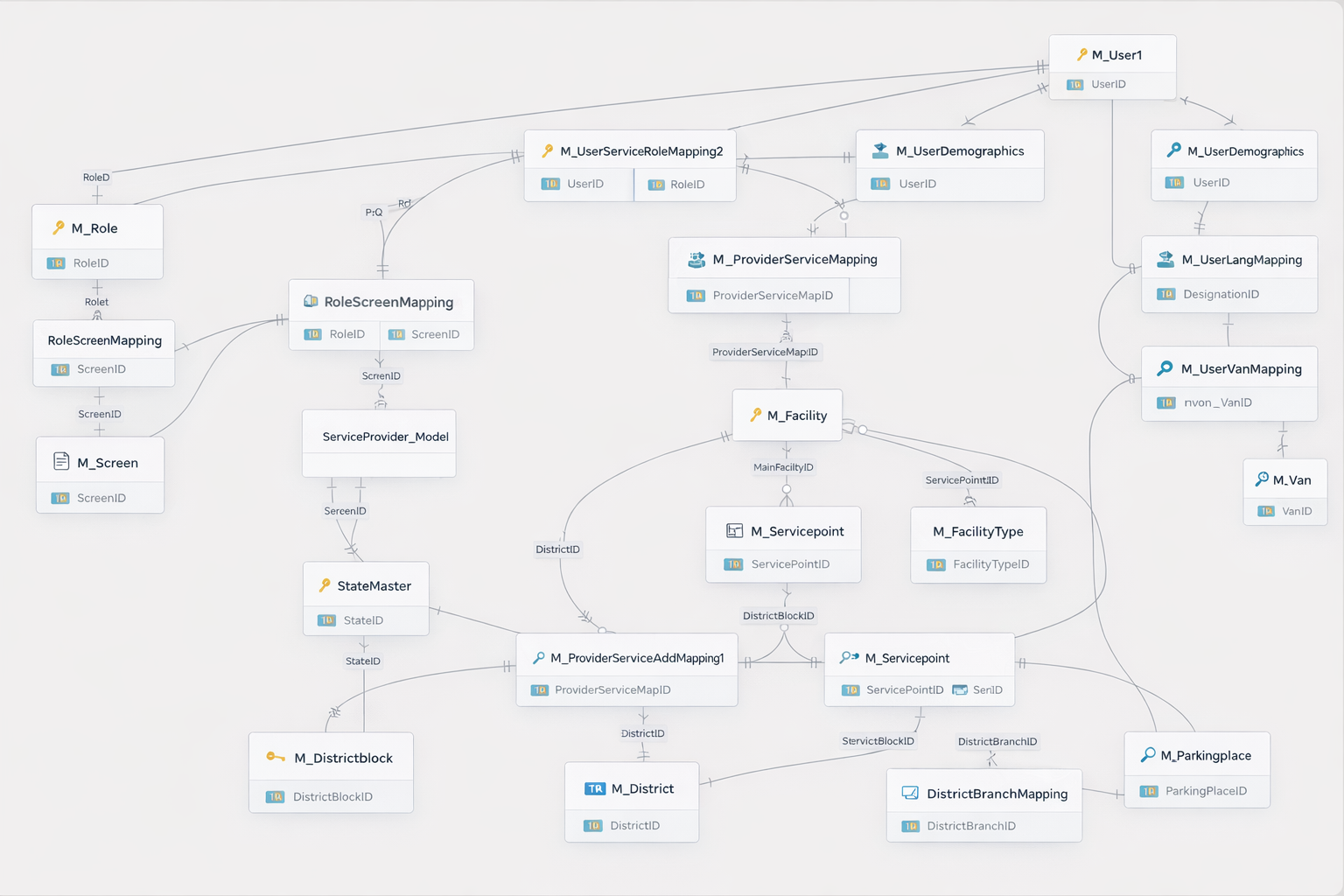
Current System ER Diagram: 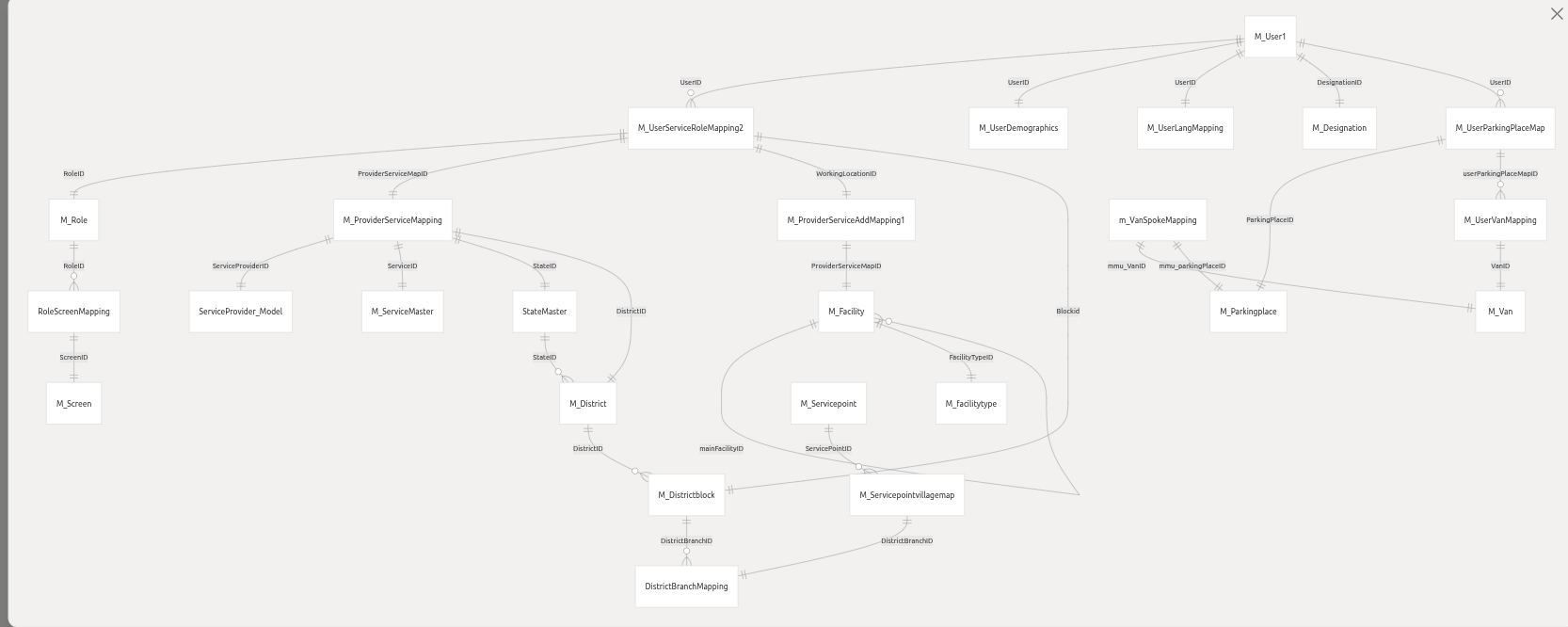
2. Core Entity Relationships
2.1 User Management Structure
Primary User Entity: M_User1
| Attribute | Description |
|---|---|
| Basic profile | firstName, lastName, username, etc. |
| Designation | Single designation per user |
| Demographics & Languages | Linked via one-to-one relationships |
| Supervisor/Admin flags | Supports role-specific behavior |
User-Service-Role Mapping: M_UserServiceRoleMapping2
| Feature | Description |
|---|---|
| Multi-role support | Assign multiple roles to a single user |
| Facility assignment | Uses workingLocationID |
| Multi-village coverage | Stored as comma-separated villageidDb |
| Multi-tenant scope | Scoped by providerServiceMapID |
2.2 Multi-Tenant Provider Structure
Provider Service Mapping: M_ProviderServiceMapping
Maps healthcare providers to states and services
Creates unique
providerServiceMapIDper provider-state-serviceSupports geographic and service-line isolation
Geographic Hierarchy
State → District → Block → Village
Users assigned to blocks/villages via role mapping
Facilities linked to geographic addresses
3. User Creation and Management Flow
Creation Hierarchy:
Provider Creation – Setup healthcare organization
Provider-Service-State Mapping – Define operational scope
User Creation – Basic profile in
M_User1Role Assignment – Map users to services and facilities
Step-by-Step Process:
| Step | Description |
|---|---|
| Step 1: Basic Profile | Personal details, credentials, designation. Endpoint: /m/AddEmployee |
| Step 2: Demographics & Address | Family info, present/permanent addresses, geographic mapping |
| Step 3: Language Capabilities | Multiple languages with read/write/speak proficiency |
| Step 4: Role & Service Assignments | Multi-role assignments, facility via workingLocationID, village coverage |
4. Facility Management
4.1 Facility Structure
Entity: M_Facility
| Feature | Description |
|---|---|
| Hierarchy | Two levels: Main Store / Sub Store |
| Type | Inventory-focused via M_facilitytype |
| Location | Basic address info |
4.2 Main/Sub Store Logic
| Facility Type | Purpose | Parent Facility | Mapping |
|---|---|---|---|
| Main Store | Central inventory hub, MMU parking | None (mainFacilityID = null) | Parking place assignment |
| Sub Store | Distribution point, MMU unit | Points to Main Store | Van assignment |
UI Implications:
Radio buttons for Main vs Sub Store
Conditional dropdown for parent store (only Sub Store)
Mapping via
/mapStoreendpoint
4.3 Healthcare Facility Hierarchy Integration
Existing Main/Sub Store logic remains
New healthcare hierarchy:
District Hospital → CHC → PHC → SubcenterBoth hierarchies coexist:
| Current Logic | Healthcare Logic |
|---|---|
| Main Store / Sub Store | DH → CHC → PHC → SC |
| Inventory focus | Healthcare service focus |
storeTypeused for inventory logichealthcareLevelused for healthcare logicNote: Existing
/mapStorelogic unchanged
5. Geographic & Village Management
Multi-village assignments stored in
villageidDbSupports field workers (ASHA/ANM) covering multiple villages
Subcenter assignment via
workingLocationIDOrganized at block level
6. Role and Permission System
Flat role model:
M_RoleScreen-level permissions:
RoleScreenMappingMulti-role assignments supported
Role updates/deletions supported
Optional CTI integration for call centers
7. Services and UI Components NOT Affected
7.1 MMU/Van Services:
Van-facility mapping:
M_VanSpokeMappingVan service point mapping:
M_VanServicePointMapParking place & van master repositories unaffected
7.2 Inventory Management:
Main/Sub Store hierarchy maintained
Item-facility mapping (
M_itemfacilitymapping) unchangedStock entry/allocation unaffected
7.3 User Management:
/m/AddEmployeeand role assignments unchangedASHA worker village assignments preserved
7.4 Facility Types:
M_facilitytyperemainsStore controller endpoints unchanged
7.5 File Upload Systems:
Facility upload (
/saveFacility) continuesExisting file processing maintained
Note: Healthcare fields are additive and nullable; zero disruption to current system.
8. User & Entity Mapping Architecture
Central Junction Table: M_UserServiceRoleMapping2
| Column | Purpose |
|---|---|
userID | Links to M_User1 profile |
providerServiceMapID | Provider-Service-State mapping |
workingLocationID | Facility assignment |
roleID | User role |
blockID | Geographic block |
villageidDb | Comma-separated villages |
Connection Examples:
ASHA Worker “Sunita”:
providerServiceMapID=123,workingLocationID=456,blockID=78, villages=101–105,roleID=5MMU Driver “Ramesh”:
parkingPlaceID=789,vanID=45, multiple districts,roleID=12
Data Flow Summary:
Hub-and-spoke model: Provider → State → District → Block → Villages
Supports static facility and mobile unit assignments
Scoped by
providerServiceMapIDfor multi-tenancy
9. Multi-Role Assignment Architecture
| Role Type | Context |
|---|---|
| Clinical (Doctor/Nurse) | Facilities via workingLocationID, multiple roles, screen access via RoleScreenMapping |
| Field (ASHA/ANM) | Subcenters, multi-village coverage (villageidDb) |
| Administrative (Supervisor) | Multiple service lines, optional CTI integration |
Key Features:
Flexible multi-role assignment
Geographic context for field roles
Service line isolation via
providerServiceMapIDScreen-based access control
Note: Junction table pattern enables complex multi-role assignments; audit trails and soft deletion supported
10. Summary
The PSMRI/Admin-API provides: Comprehensive user and role management Geographic and service-line isolation Support for multi-village field workers and MMU operations Scalable three-tier architecture with audit trails Additive healthcare facility hierarchy without affecting existing systems
11. Proposed New Implementation – Healthcare Facility Hierarchy (To-Be)
11.1 Purpose of the New Implementation
The existing facility model is optimized for inventory and MMU operations using a Main Store / Sub Store structure.
However, healthcare delivery requires a clinical hierarchy aligned with public health systems.
This new implementation introduces a healthcare-focused hierarchy to support:
Referral pathways
Clinical reporting
ABDM (HFR) compliance
State-level healthcare structuring
11.2 Design Principle
Separation of Concerns
| Aspect | Current System | New Implementation |
|---|---|---|
| Hierarchy Type | Inventory hierarchy | Healthcare hierarchy |
| Primary Goal | Stock & MMU management | Clinical & service delivery |
| Impact on Existing Logic | — | ❌ No impact |
| Data Model | M_Facility (store-based) | New hierarchy layer |
| Backward Compatibility | — | ✅ Fully preserved |
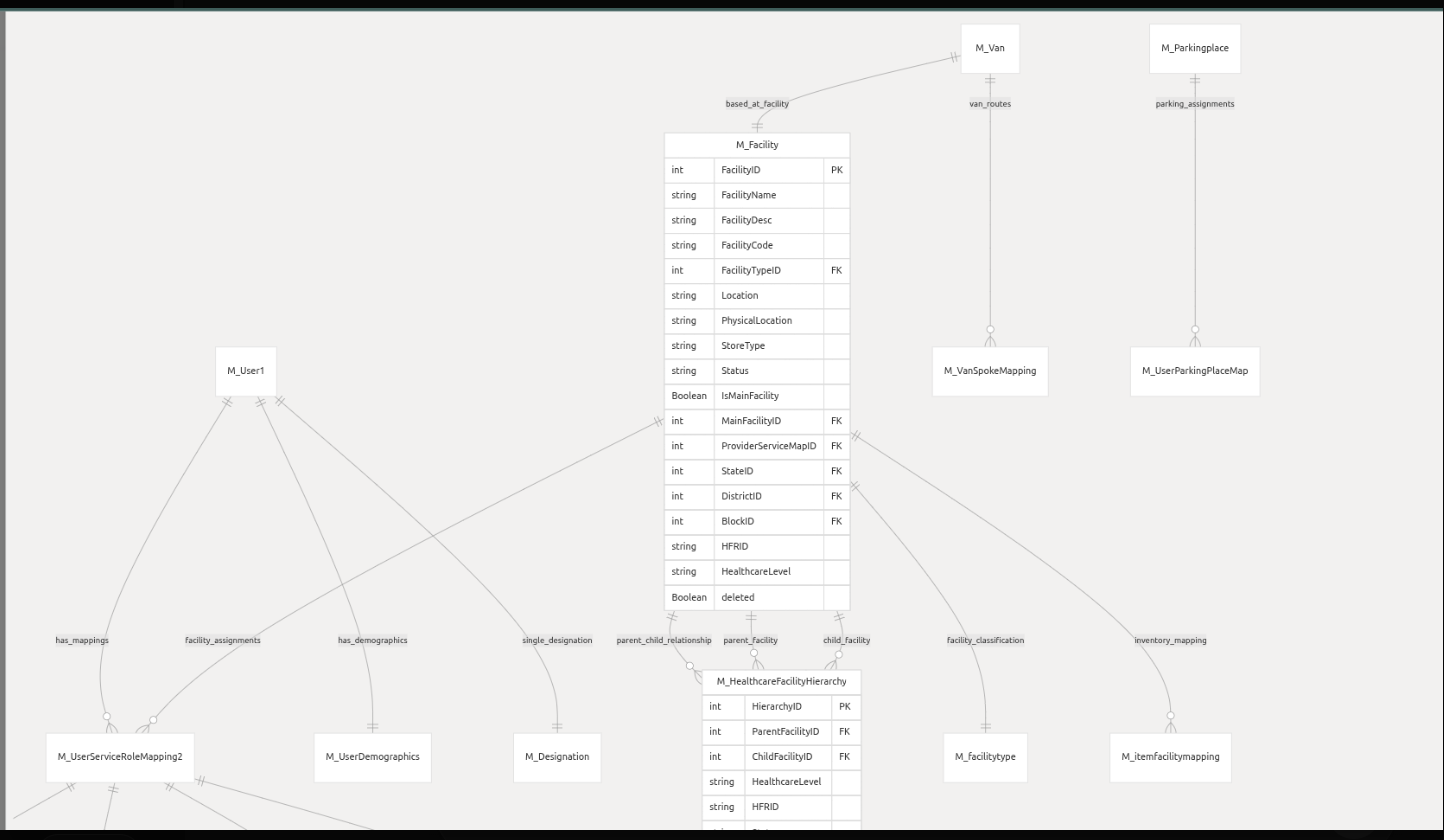
11.3 Enhanced M_Facility Entity (Additive Only)
The existing M_Facility table is extended, not modified.
Newly Added Nullable Fields
stateIDdistrictIDblockIDhfrIDhealthcareLevel(DH, CHC, PHC, SC)
Why This Works
Existing records remain valid
No migration risk
Inventory logic continues using
storeTypeHealthcare logic uses
healthcareLevel
storeTypeandhealthcareLeveloperate independently
11.4 New M_HealthcareFacilityHierarchy Table
A new dedicated table is introduced to model healthcare relationships.
Purpose
Represent clinical hierarchy:
District Hospital → CHC → PHC → SubcenterEnable structured referrals and reporting
Keep healthcare logic separate from store logic
Key Characteristics
Self-referencing parent–child relationship
Healthcare-level validation rules
HFR ID mapping for ABDM
Audit fields and soft deletion
This table does not replace
mapStoreor Main/Sub Store logic.
11.5 Hierarchy Coexistence Model
Both hierarchies exist in parallel, serving different purposes.
| Inventory Logic (Existing) | Healthcare Logic (New) |
|---|---|
| Main Store | District Hospital (DH) |
| Sub Store | CHC / PHC / SC |
| Van & MMU focus | Referral & care delivery |
| Stock flow | Patient/service flow |
11.6 API Enhancements (Non-Breaking)
Extended / New APIs
/createStore– accepts optional healthcare fields/editStore– updates healthcare attributes/getFacilityHierarchy– returns healthcare tree/validateFacilityHierarchy– validates DH→CHC→PHC→SC rules
Important Note
Existing API consumers do not need changes
Healthcare parameters are optional
Current flows remain intact
11.7 UI Enhancements (Proposed)
Facility Creation Screen
Current UI
Radio buttons: Main Store / Sub Store
New UI (Additive)
Dropdown: Facility Type
District Hospital (DH)
CHC / Block
PHC / UPHC
Subcenter (SC)
Inventory UI behavior remains unchanged.
11.8 What Is NOT Changing (Reconfirmed)
The following remain 100% untouched:
Main/Sub Store mapping
MMU, Van, and parking logic
Inventory & stock management
User creation and role assignment
Village coverage logic
File upload and bulk import processes