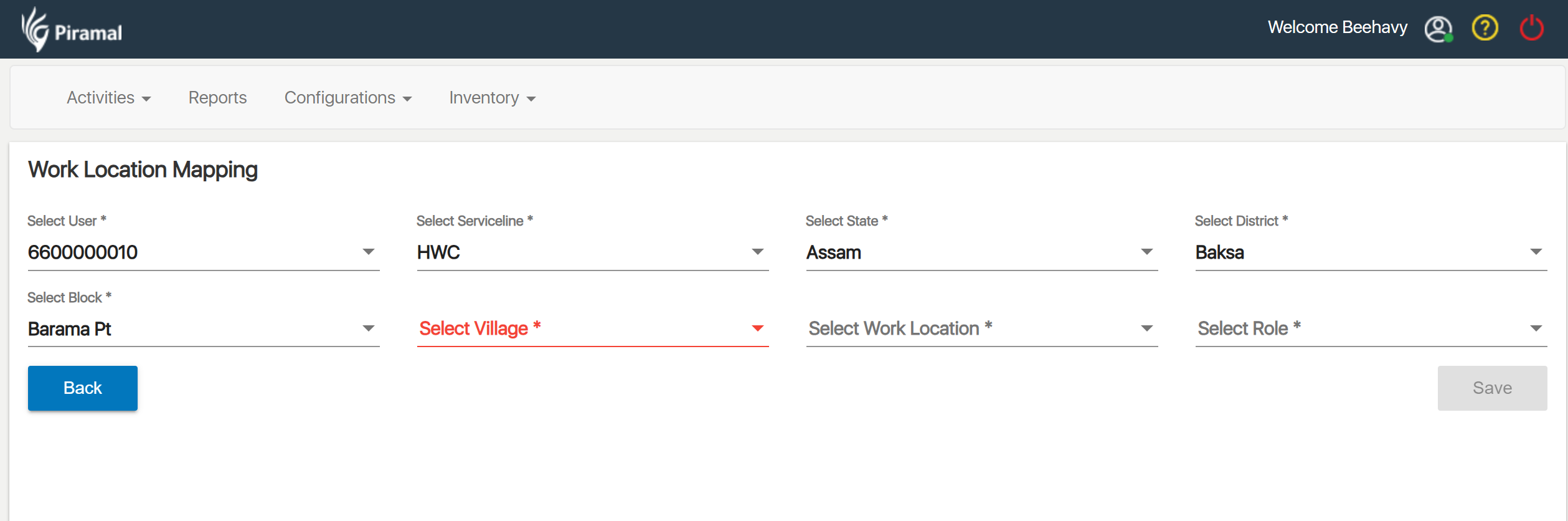
1. Introduction
1.1 Purpose
This document defines the requirements and architecture for enabling Facility definition, Facility hierarchy, and Health Worker–Facility mapping in the HWC application. It addresses gaps in facility identification, type classification, worker allocation, role-based access, KPIs, and ABDM integration (HFR/HPR).
1.2 Scope
The solution covers:
- Creation and management of Facilities with type, location, and unique identity (HFR linkage).
- Support Rural vs Urban facility hierarchy models.
- Mapping CHOs, ANMs, ASHAs, AWWs, MPWs, ASHA Supervisors to facilities, including multi-supervisor cases.
- Role-based access control (RBAC) based on User ↔ Facility ↔ Role mapping.
- KPIs, Dashboards, Analytics driven by mappings.
- ABDM integration: HFR for Facility; HPR for Health Worker.
- Referral facility directory & routing rules.
1.3 Definitions & Acronyms
- HFR: Health Facility Registry (ABDM)
- HPR: Healthcare Professional Registry (ABDM)
- SC: Subcentre
- PHC: Primary Health Centre
- CHC: Community Health Centre
- ABDM: Ayushman Bharat Digital Mission
- FLW: Frontline Worker
- ULB: Urban Local Body
2. Business Problem & Goals
2.1 Problem Summary
- No way to create/define facilities → inconsistent naming, identification, mapping.
- Lack of facility type & naming → poor categorization and searchability.
- No health worker–facility mapping → allocation/management issues.
- No structured mapping of CHOs, ANMs, ASHAs, Supervisors → governance gaps.
- Hierarchical mapping of ASHAs to CHOs/ANMs/AWWs/Supervisors missing → weak supervision, KPI, Incentives.
2.2 Business Outcomes
- Single source of truth for Facilities with hierarchy & geocodes.
- Accurate User ↔ Facility ↔ Role mappings.
- Support both one‑to‑many and many‑to‑many mappings (e.g., ASHAs ↔ Supervisors).
- Analytics-ready data model for KPIs and incentives.
- Seamless ABDM alignment (HFR/HPR IDs).
- Improved referral pathways using facility directory.
3. System Context
3.1 Actors
- Admin (State/District): Defines and create facility, manage hierarchy, mappings, referral rules.
- Program Teams: Reviews allocations, KPIs and Reports.
- CHO / ANM / MPW / AWW / ASHA / ASHA Supervisor: Operational users mapped to facilities.
- Analytics Consumer: Dashboard/report users.
- ABDM Services: HFR/HPR registries validation.
3.2 External Systems
- ABDM HFR – facility identity & metadata validation.
- ABDM HPR – professional identity (doctor, nurse, CHO, etc.).
- GIS/Address service (optional) – geocoding/validation.
4. Requirements
4.1 Functional Requirements
4.1.1 Facility Master
Create, read, update, retire/reactivate Facility with: name, type, ownership (public/private), rural/urban, location (state/district/block/village/ward), geo-coordinates, contact, HFR_ID (optional at creation, updatable), tags, parent facility reference.
4.1.2 Hierarchy Management
- Support hierarchical chains:
- Tertiary: Medical College → District Hospital
- Secondary: Sub-District Hospital / CHC
- Primary: PHC → SC (and Urban equivalents: U-PHC, U-CHC, etc.)
- Support Rural vs Urban hierarchy variants and state-customizable ladders.
4.1.3 Health Worker Registry & Mapping
- Register users with designation, HPR_ID (optional), contact, qualifications, Employ id, username, password, etc
- Map Users to Facilities with effective dates, primary/secondary flags.
- Support ASHA ↔ Supervisor mapping across multiple SCs and one SC → multiple Supervisors scenarios.
4.1.4 Role-Based Access Control (RBAC)
- Access filtered by user’s mapped facilities and role permissions.
- Supervisors view all ASHAs in their mapped facilities. Edge case: subcentre split across supervisors.
4.1.5 Referral Facilities
- Define Referral Directory: allowed referral types (lab, imaging, inpatient, outpatient, emergency)
- Map referral routes per facility type (e.g., SC → PHC/CHC → District).
4.1.6 ABDM Integration
- HFR validation for facility entries; store HFR_ID and sync basic profile.
- HPR validation for workers; store HPR_ID and status.
4.1.7 KPIs & Analytics
- KPIs derived from facility & role mapping: coverage, visit ratios, supervision load, exception lists.
- Support period snapshots for historical analysis.
4.1.8 Audit & History
- Full audit for creates/updates/mappings, with editor, timestamp, old/new values.
4.1.9 Search & De-duplication
- Fuzzy search by name + location; dedupe rules (name+type+geocode/HFR_ID).
4.1.10 Data Import/Export
- Bulk CSV/XLSX import with validation report; export for audits.
4.2 Non-Functional Requirements
- Security: OAuth2/OIDC, role-permission matrix, PII encryption at rest, TLS in transit.
- Availability: 99.5% (business hours); queue-based retries for ABDM sync.
- Performance: <2s for search results; <5s for bulk import validation per 5k rows.
- Scalability: 1M+ facility records; 5M+ user-facility mappings.
- Observability: Structured logs, metrics, distributed tracing.
- Compliance: Align with ABDM privacy guidelines; data residency in India.
4.3 Constraints & Assumptions
- State-specific hierarchy models must be configurable (metadata-driven).
- Some facilities/users may not have HFR/HPR at inception; progressive linkage allowed.
- State policies vary for urban ladders and ASHA splits; must be metadata-driven.
- Village codes from Census/LGD recommended for interoperability.
5. Solution Architecture
5.1 Logical Architecture
- Presentation: Admin portal (Facility & Mapping UI).
- API Layer: REST/GraphQL for facility, mapping, referral, search.
- Services:
- Facility Service (CRUD, hierarchy, dedupe, HFR sync)
- User-Role Service (role registry, RBAC)
- Mapping Service (user-facility allocation, supervisor-asha graph)
- Referral Service (directory & routing)
- ABDM Integration Service (HFR/HPR adapters, retries)
- Analytics Service (KPI aggregations, snapshots)
- Audit Service
- Data Layer: Relational DB (MySQL) + Search index (Elasticsearch/OpenSearch) for fuzzy search.
6. Detailed Functional Design
6.1 Facility Creation and Hierarchy workflow
- Admin initiates Create Facility
- Admin → Create Facility → Select State/District/Block/ULB → Type (SC/PHC/…) → Parent Facility (validated by rules)
- Unique (name + type + admin division) or link HFR_ID.
- Select Parent Facility type allowed by FacilityHierarchyRule.
- Enter location: Geo coordinates in bounds; capture recommended.
- Choose Facility Type (Medical College/DH/CHC/PHC/SC/UPHC/U-CHC/etc.) and Rural/Urban flag.
- Save; emit events: facility.created, hierarchy.cache.refresh.
Validations
- Unique (name + type + admin_division) unless flagged as duplicate with justification.
- Parent type must be allowed (per rule).
- Geocoordinates in valid bounds; encourage capture.
6.2 Facility–Village Mapping
Admin → Select SC (or urban equivalent) → Load villages by block/ULB → Multi-select villages → Save (PRIMARY or SHARED) → Audit.
- A village can have one PRIMARY SC; SHARED allowed per policy with explicit flag.
- Higher facilities inherit villages via children.
6.3 Health Worker Mapping
User–Facility Mapping (Role-Based)
- ASHA is the lowest Health worker mapped to lowest Health facility known as health Subcenter
- Health Subcenter is associated with ASHAs, ANMs, CHO, and MPWs
- ASHA Supervisor is associated with multiple subcenters and all ASHAs under these subcenters.
- Primary Health Centers (PHC/UPHC) is mapped with Subcenters under it and is associated with health staff Medical Officer, Staff Nurse, Pharmacist, Lab Technician, DEO, Supervisors, etc.
Note: In most of the States, all ASHAs in a subcenter are mapped to one ASHA Supervisor.
But whereas in some States, ASHAs in a subcenter are mapped to more than one ASHA Supervisor (i.e. some ASHAs are mapped to one Supervisor and other are mapped to another Supervisor).
Select: User, Role, State, District, Block, Facility Type, Facility (select Work Location - multiselect) and Village (multiselect).
Based on the Role selected Facility selection is dependent
Ex:
- If Role “ASHA” is selected need to select Facility (Sub-center) and Villages
- If Role “ASHA-Supervisor” is selected need to select Facilities (multiple Sub-center) and ASHAs
- If Role “CHO” is selected need to select Facility (Sub-center)
- ASHA: must be mapped to exactly one primary SC (can have secondary assignments if policy allows).
- ASHA → select SC and villages served.
- ASHA Supervisor: map to multiple facilities (SCs); select facility-wise ASHA lists. Supports split-ASHA scenarios across supervisors.
- ASHA Supervisor → select multiple SCs and facility-wise ASHAs (supports split).
- ANM/CHO/MPW/AWW: map to PHC/SC per program policy; allow multiple if needed.
- ANM/CHO/MPW/AWW → map per state policy to SC/PHC/HWC; allow secondary
6.4 Role-Based Access
On login, build scope from UserFacilityMapping + role permissions. Down-chain include children. Supervisors include assigned ASHAs even if cross-facility.
- On login, fetch UserFacilityMapping + Role → construct scope token.
- Data access filters by facility_id IN (user’s mapped facilities + children if permission includes down-chain scope).
- Supervisors auto-expand scope to assigned ASHAs even if cross-facility.
6.5 Referral Setup
Configure from→to routes with types (OPD, emergency, lab), distance, priority; used in referral flows.
- Admin defines from → to allowed pairs by referral_type with priority and distance.
- UI suggests nearest or policy-preferred to-facility during referrals.
7. Facility Creation, Mapping and User Assignment
End‑to‑End Workflow
7.1 Rural & Urban as Location Types
- The system classifies all administrative locations under two Location Types:
Rural and Urban. - All downstream logic (facility types, village/ward mapping, worker allocation) depends on this classification.
- State Location Master (In‑built)
- Each State → District → Block/ULB → Village/Ward is pre‑configured in the Location Master.
- Every entry in the Location Master is tagged as either:
- Rural (District → Block → Village)
- Urban (District → ULB → Ward)
This ensures correct Facility Type visibility and prevents cross‑mapping errors.
7.2 Create Facility Types (Based on Rural & Urban Location Types)
Facility Types are defined for each Location Type:
7.2.1 Rural Facility Types
- Subcentre (SC / HWC-SC)
- Primary Health Centre (PHC)
- Community Health Centre (CHC)
- District Hospital
- Medical College
7.2.2 Urban Facility Types
- Urban Primary Health Centre (UPHC)
- Urban Community Health Centre (U‑CHC)
- Ward Clinic / Health & Wellness Centre – Urban
- Zone/District Hospital
- Medical College
Outcome: Both Rural and Urban Facility-Type catalogues are ready.
Diagram-1: Create Facility Types
Based on Rural and Urban Location Types

7.3 Create Facilities Based on Facility Types
Once Facility Types are defined:
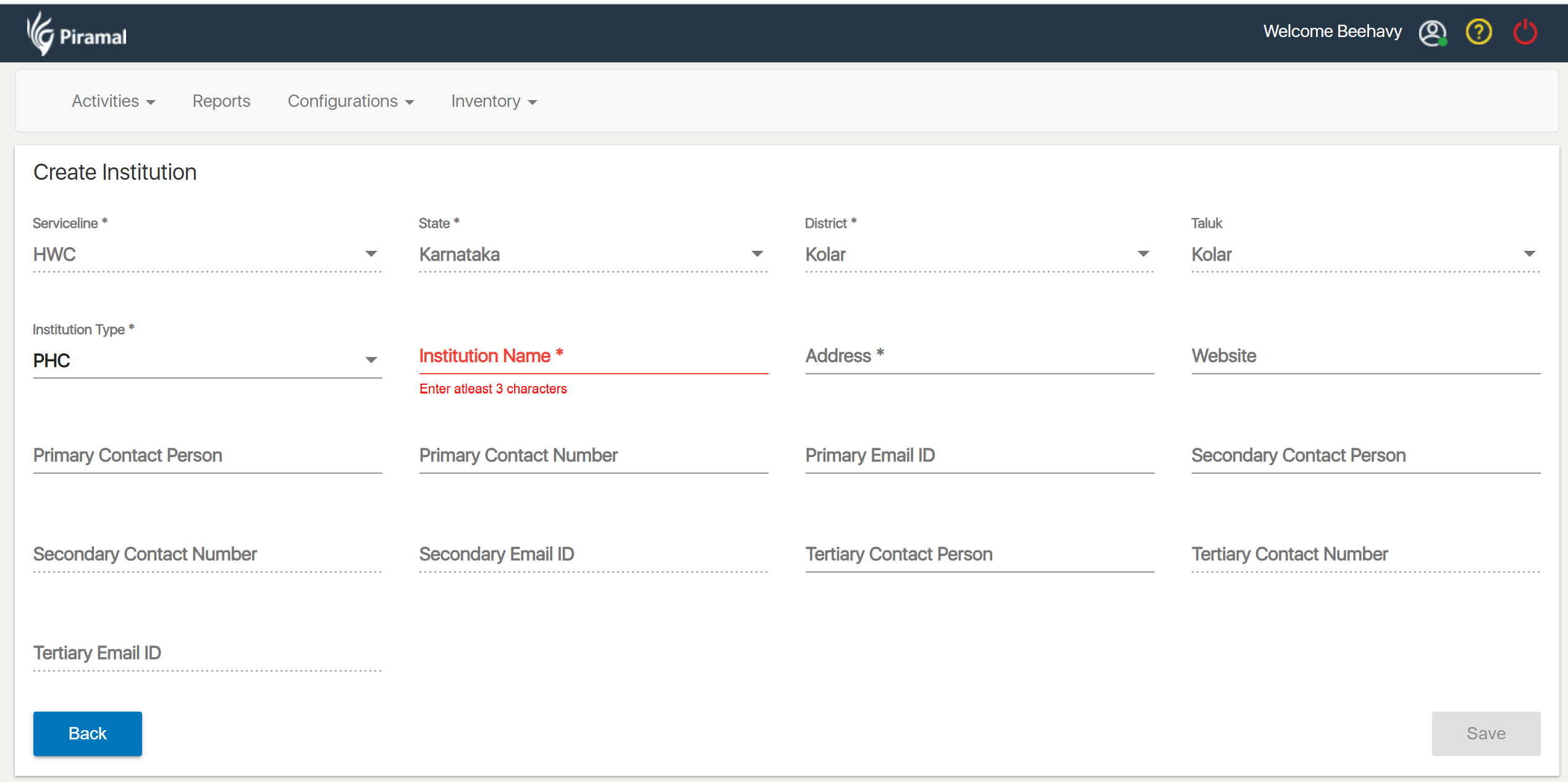
7.3.1 Create Facility
Steps
- Select State → District → Block/ULB
- Select location type Rural or Urban
- Display Facility Types based on location type selected
- Select Facility Type
- Enter Facility details:
- Facility Name
- Address & Geo‑coordinates
- Contact Details
- Parent Facility (optional at this stage)
- HFR ID (optional)
Outcome: Individual Facilities for Rural and Urban areas are created.
7.3.2 Map Every Facility to Village(s) / Ward(s)
Each Facility must be assigned its geographical catchment:
Rules
- Rural: SCs are mapped to Villages
- Urban: UPHCs/Ward Clinics are mapped to Wards/Slums
- Each Village/Ward must have:
- One Primary Facility
- Optional Shared Facility (if policy allows)
Outcome: Catchment mapping is established for service delivery and analytics.
7.3.3 Create the Lowest-Level Facility First and Map Villages/Wards
Lowest-level facilities differ by location type:
1. Rural Lowest Facility
- Subcentre (SC)
2. Urban Lowest Facility
- UPHC or Ward Clinic
Steps
- Create SC/UPHC
- Select Villages/Wards from the Location Master
- Assign:
- Primary
- Shared (if applicable)
- Save Mapping
Outcome: Base (lowest-tier) coverage mapping is completed.
7.3.4 Map Higher-Level Facilities to Lower Facilities
After lowest-level mapping is complete, build the hierarchy upward.
1. Rural Hierarchy Mapping
- PHC → SCs
- CHC → PHCs
- District Hospital → CHCs
2. Urban Hierarchy Mapping
- U‑CHC → UPHCs
- Zone/District Hospital → U‑CHCs
Steps
- Select Higher-Level Facility
- System displays allowed lower facilities based on hierarchy rules
- Select one or multiple child facilities
- Save Mapping
Outcome: Multi‑tier facility hierarchy is constructed from bottom to top.
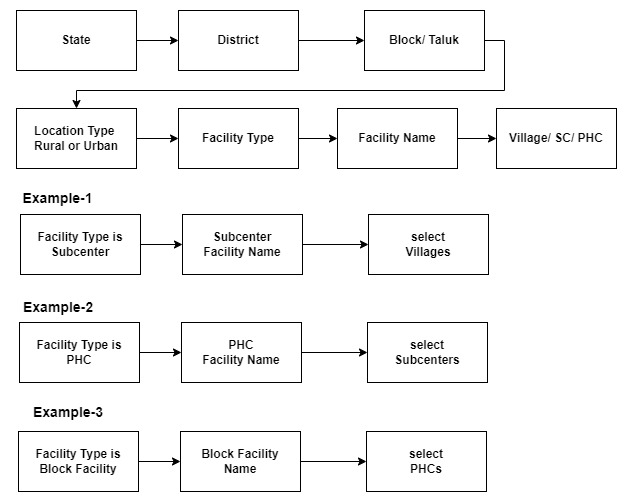
Diagram-2: Facility Creation and Village Mapping Workflow
This sample block diagram illustrates the facility‑to‑location (village) mapping structure based on the defined Location Types (Rural or Urban) and their corresponding facility types.
Facility mapping is dependent on the defined hierarchy, meaning the process must begin by creating and mapping the lowest‑level facilities first. i.e.
the setup should begin at the lowest level of facilities before progressing upward.
7.4 Map Users with Role and Facility(s)
Once facility hierarchy and village/ward mapping are complete, assign users.
Steps
- Create User or select User
- Select Role (ASHA, ANM, CHO, MPW, AWW, Supervisor, etc.)
- Based on role, system determines facility-selection logic:
Role-based Mapping Examples
- ASHA (Rural):
- Must map to one SC
- Must map to village(s) under that SC
- ASHA Supervisor:
- Map to multiple SCs
- Select ASHAs under those SCs
- CHO (HWC):
- Map to one SC / UPHC
- ANM / MPW:
- Map to SCs or PHCs depending on program
- Urban ASHA / Link Worker:
- Map to wards, inherited to UPHC
System Validations
- Facility must belong to the user’s admin location
- User cannot be mapped to a facility without completed hierarchy
- ASHA cannot be mapped without village assignment
- Supervisor → ASHA mapping restricted to selected SCs
Outcome: Users receive correct permissions, coverage areas, and analytics linkage.
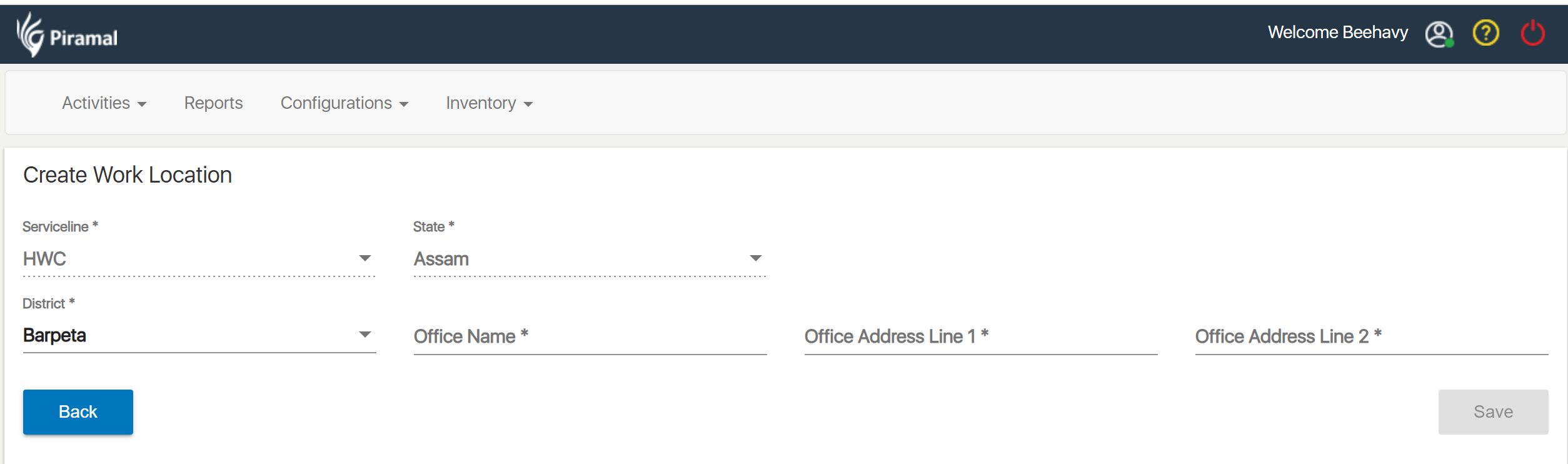
7.4.1 User Work location mapping: User Facility and Role Mapping
This requirement applies to both FLW (Frontline Worker) and HWC (Health & Wellness Centre) service lines.
The block diagram referenced in this section illustrates the workflow for mapping user roles to corresponding facilities.
The system shall provide functionality to map a user’s selected role to one or more facilities based on predefined hierarchy rules.
Role‑based facility mapping ensures that each user is associated with appropriate facility locations and subordinate worker lists (where applicable).
Role-Based Mapping Requirements
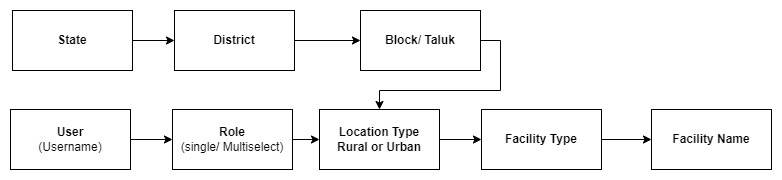
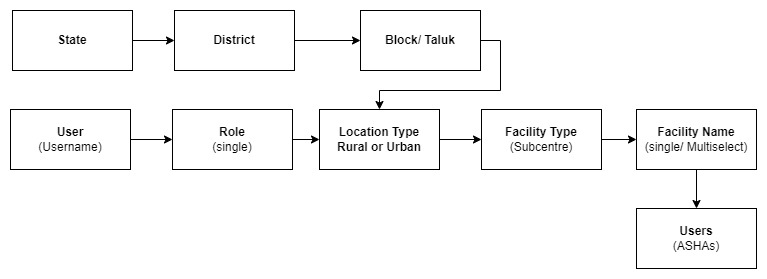
Role-based mapping wizard: select User → select Role → select Rural or Urban → select Facility type → select Facility
a. Role is ANM/CHO/MPW/AWW/ other facility Staff (i.e. Medical Officer (MO/Doctor), Nurse, Pharmacist, Lab Technician, Registrar):
- When the user selects any one of these above role, the system shall require selection of exactly one Facility Name.
- The system shall allow multiple facility selections for these roles.
Diagram-3:
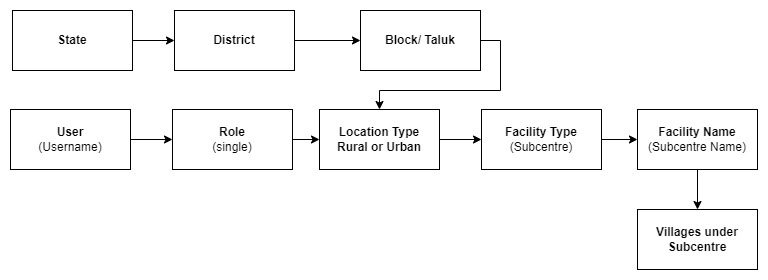
b. Role is ASHA
- When the user selects the role “ASHA”, the system shall require selection of exactly one Facility Name (Subcenter) and one or more Villages mapped under SC.
- The system shall not allow multiple facility selections for this role.
Diagram-4:
c. Role is ASHA Supervisor
- When the user selects the role “ASHA Supervisor”, the system shall allow selection of multiple Facility Names.
- For each selected facility, the system shall display the list of ASHAs associated with that facility.
- The user shall be required to select one or more ASHAs from each mapped facility.
Diagram-5:
8. References
8.1 India Public Health Hierarchy
- Primary level: Sub Centres (SC) and Primary Health Centres (PHCs)
- Secondary level: Community Health Centres (CHCs) and Sub-District hospitals
- Tertiary level: Medical Colleges and District/General/ Civil Hospitals
8.2 Facility to Village Mapping Logic
Facility–Village mapping defines which villages (or wards/habitations in urban areas) fall under the catchment area of each facility. This mapping drives FLW allocation, service coverage, planning, RBAC access, referrals, and KPIs.
Below are the two distinct facility hierarchies used across India:
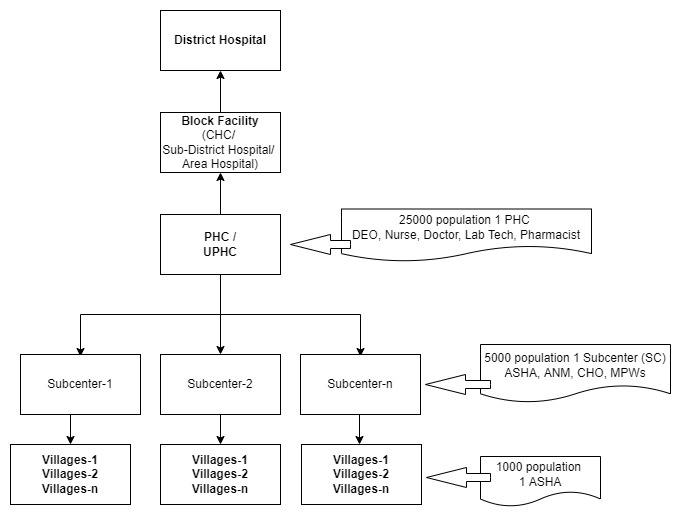
8.2.1 Facility Hierarchy – Rural Example
The Rural Public Health Infrastructure follows a well‑established hierarchy:
Rural Facility Levels (Top → Bottom):
- Medical College / Tertiary Hospitals
- District Hospital (DH) / General Hospital
- Sub‑District Hospital / Community Health Centre (CHC)
- Primary Health Centre (PHC)
- Subcentre (SC) / HWC‑SC (FLW level)
- Village / Revenue Village / Habitation
Rural Facility-to-Village Mapping Logic:
- Villages are mapped ONLY to the lowest service delivery point: the Subcentre (SC).
- A single SC typically covers 3–5 villages, depending on population norms (5,000 in plains, 3,000 in tribal/hilly areas).
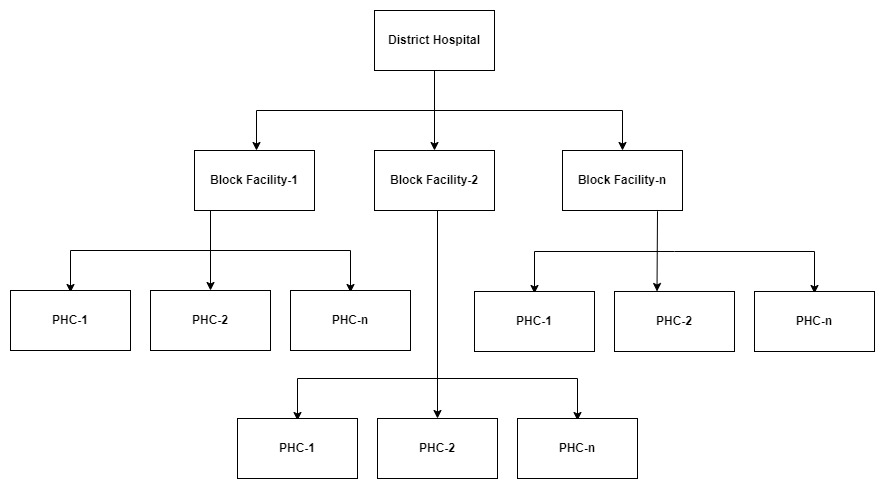
- PHC covers all villages mapped under its child SCs.
- CHC inherits villages from all PHCs under it.
- District Hospital inherits villages indirectly from CHCs and PHCs.
- Workers are then mapped to these villages via their SC assignment.
Diagram-6: Rural Hierarchy Mapping
8.2.2 Facility Hierarchy – Urban Example
Urban health infrastructure differs significantly from rural and varies by state.
Urban Facility Levels (Top → Bottom):
- Medical College / Tertiary Hospital
- District Hospital / Zone Hospital
- Urban Community Health Centre (U‑CHC)
- Urban Primary Health Centre (UPHC)
- Health & Wellness Clinic – Urban
- Urban Ward / Slum Cluster / Habitation
Urban Facility-to-Ward Mapping Logic
- Wards (or slum clusters) are mapped to Urban PHC (UPHC).
- UPHC is the lowest functional unit equivalent to SC in rural, for mapping.
- Some states use Ward Health Clinics, which map directly to:
- One Ward
- Or multiple small habitations
- Urban ASHAs (U‑ASHAs) or Community Workers are mapped to wards, and the ward is mapped to the UPHC.
Urban Hierarchy Mapping
Diagram-7: ---
8.2.3 Rural vs Urban Mapping – At a Glance
Aspect | Rural Mapping | Urban Mapping |
Lowest facility for mapping villages/wards | Subcentre (SC) | Urban PHC (UPHC) |
Mapping unit | Village / Hamlet / Habitation | Ward / Sub‑ward / Slum cluster |
Typical coverage | 3–5 villages per SC | Several wards per UPHC |
Worker type | ASHA/ ANM/ CHO | U‑ASHA / ANM / CHO (Urban) |
Supervisor coverage | Multiple SCs → multiple villages | Multiple wards → multiple UPHCs possible |
Inheritance | SC → PHC → CHC → DH | Ward → UPHC → U‑CHC → District Hospital |
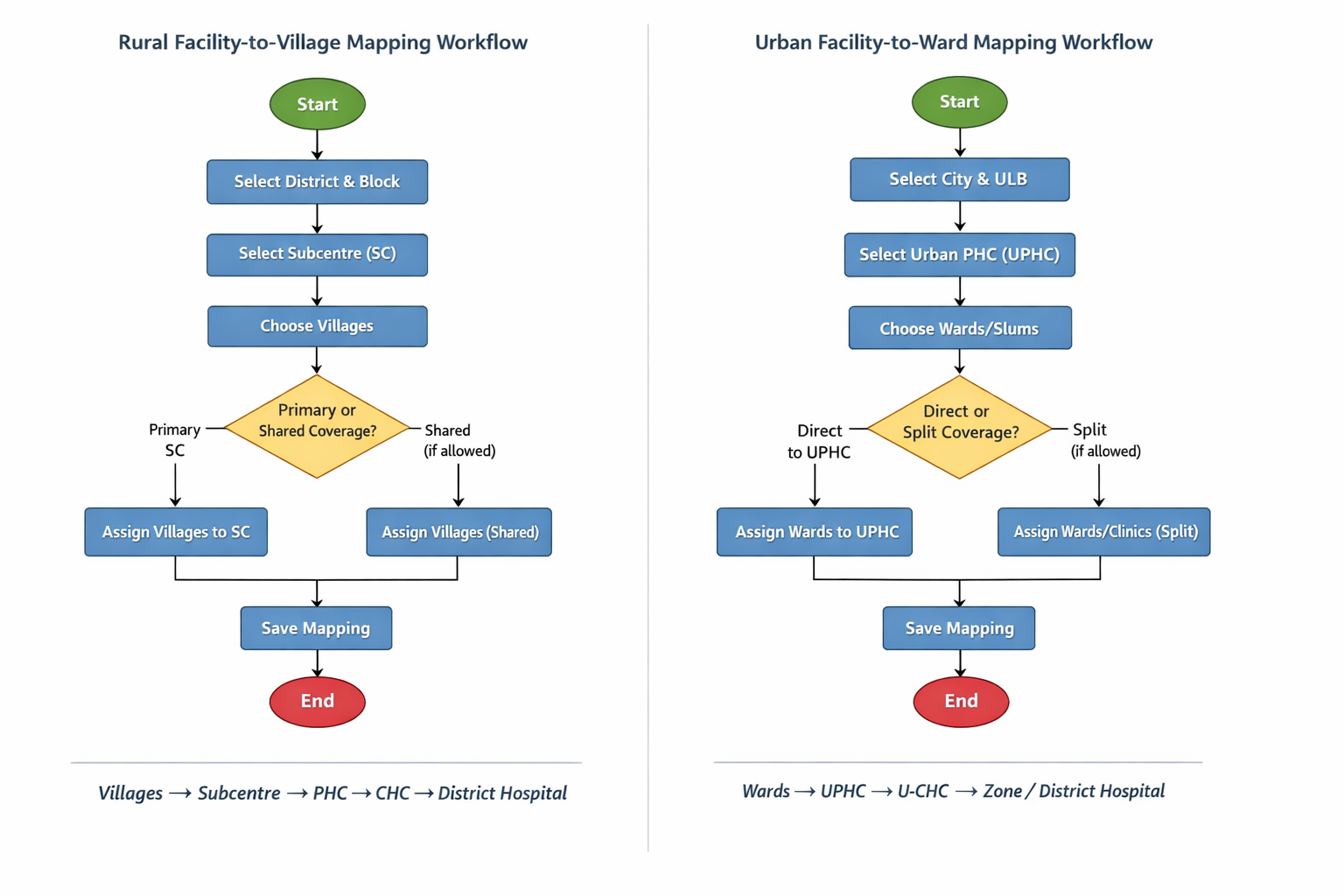
8.2.3.1 Rural vs Urban Mapping workflow
Diagram-8:
Facility – Hierarchy mapping
Diagram-9:
9. Regression and Acceptance Criteria
9.1 Impact on Existing User Role and Village Mapping in FLW and HWC Applications
As part of the current enhancement that shifts user‑mapping from Village-level to Facility-level, it is essential to ensure that existing user configurations remain unaffected. The following requirements and considerations must be met:
Preservation of Existing Mappings
- Users are currently mapped to a Role and directly to one or more Villages.
- With the new update, user mapping will transition from Village → Facility.
- All previously mapped Villages must remain valid and functional after this change.
- The system must ensure consistency between Facility and Village mappings so that no user loses access due to this change.
Role-Based Access to Applications
- Users with roles CHO, Medical Officer (MO/Doctor), Nurse, Pharmacist, Lab Technician, Registrar, or any combination of these roles, should have access to the HWC application.
- Users with the CHO role must be able to log in to both FLW and HWC applications.
FLW App Access Control
- Users with roles ASHA, ASHA Supervisor, or ANM should have access only to the FLW application.
- In the FLW app:
- Users with roles CHO, ASHA Supervisor, or ANM should have access only to Supervisor modules, and must not access ASHA comprehensive modules.
- Users with the ASHA role should have access to all ASHA comprehensive modules, but not to Supervisor modules.
Regression Expectations
- All existing functionalities must continue to work without interruption.
- No user should experience access loss or incorrect access after the new mapping changes.
- System behavior across both FLW and HWC apps should remain stable for all impacted user roles.
9.2 Impact on ASHA Users
1. What Changes for ASHA Users?
- Mapping model changes under the hood: From Village(s) to Facility.
Expected user experience: No visible change in day-to-day tasks if facility–village mapping is configured correctly. - ASHA:
- Continues to log in only to FLW.
- Continues to access ASHA comprehensive modules.
- Cannot access Supervisor modules or HWC app.
- Data linkage: New records will carry Facility ID (with village context resolved via facility–village mapping); historical records remain intact.
2. Potential Risks & Mitigations
Risk: Missing facility mapping for a village
- Impact: ASHA may lose access to cases tied to that village or fail to sync.
- Mitigation: Migration reporting & fallback—keep legacy mapping active until facility mapping is fixed; highlight gaps to admins.
Risk: Multi-facility migrations (ASHA mapped to villages across multiple facilities)
- Impact: Incorrect scoping may hide some households/tasks.
- Mitigation: Support multi-facility assignments for such users; validate views/dashboards after migration (TC-07).
Risk: Role overlap (ASHA + CHO)
- Impact: Confusion over which modules are visible in FLW.
- Mitigation: Define and document precedence:
- Recommended: If a supervisory role exists (e.g., CHO), disable ASHA comprehensive modules in FLW; enable Supervisor modules; allow HWC access.
Risk: Device sync & offline caches
- Impact: After migration, old filters may persist on device.
- Mitigation: Force metadata refresh on next login; version the sync schema; provide an app notice if schema changes.
Create Facility/Mapping:
Job Location-Serviceline Mapping Master (Work Location-Serviceline Master):
Employee Work Location Mapping: