
User Stories: Chest X-Ray Referral, Order Management & Result Workflow
- Epic: Chest X-Ray Test Order and Result Management
Epic Description:
As part of the TB screening workflow, the system shall create and manage Chest X-Ray test orders against a beneficiary's visit after completion of TB symptom screening. The system shall support automated and manual result entry, multiple test orders against the same visit, result-based referrals to Truenat, repeat testing for AI-invalid results, and automatic closure of pending orders at the end of the day.
- User Story – Create Visit ID
US-CXR-001: Create Visit ID
As a TB Screening Application,
I want to create a Visit ID for a beneficiary after completion of TB symptom screening,
so that all clinical and diagnostic activities performed during the beneficiary's visit can be linked to a common visit record.
Acceptance Criteria
- A Visit ID shall be created against every beneficiary after TB symptom screening is completed.
- The Visit ID shall uniquely identify the beneficiary's current screening visit.
- All Chest X-Ray orders created during the visit shall be associated with the Visit ID.
- Multiple test orders may be associated with the same Visit ID.
- The system shall retain the relationship between:
- Beneficiary
- Visit ID
- Test Order ID
- Test Result.
- User Story – Automatically Create Chest X-Ray Order
US-CXR-002: Create New Chest X-Ray Order
As a Nurse User/authorized clinical user,
I want the system to automatically create a Chest X-Ray Order ID when a new Chest X-Ray referral is made,
so that the diagnostic test can be uniquely tracked against the beneficiary's visit.
Acceptance Criteria
- For every New Chest X-Ray referral, the system shall automatically generate a unique Order ID.
- The Order ID shall be associated with:
- Beneficiary ID
- Visit ID
- Test Type = Chest X-Ray
- Order Date
- Order Status.
- The Order ID shall be valid for the current calendar day.
- Multiple Chest X-Ray Order IDs may be created against the same Visit ID where repeat testing is required.
- Each Order ID shall be unique.
- User Story – Manage Chest X-Ray Order Status
US-CXR-003: Manage Order Status
As a system,
I want to maintain the status of each Chest X-Ray Order ID,
so that the current state of the diagnostic test is clearly tracked.
Order Statuses
Status | Description |
Pending | Order created but test is not completed or valid result is not available |
Completed | Test conducted and result is valid, i.e., result is other than AI Invalid Result |
Closed | Order is no longer active, including not conducted, end-of-day closure, or AI Invalid Result order being replaced by a new order |
Acceptance Criteria
- A newly created order shall have status Pending.
- A successfully conducted test with a valid result shall change the order status to Completed.
- An order that is not conducted by the end of the day shall be changed to Closed.
- An order for which the result is not entered by the end of the day shall be changed to Closed.
- An order with AI Invalid Result shall be changed to Closed when the result is saved and a new order shall be created for repeat testing.
- A closed order shall remain available in the beneficiary's historical record.
- User Story – Automated Chest X-Ray Result
US-CXR-004: Receive Automated X-Ray Result
As a Radiographer,
I want the Chest X-Ray result to be automatically received from the integrated Digital X-Ray/AI system,
so that I do not have to manually enter the result when device integration is available.
Acceptance Criteria
- Where Digital X-Ray integration is enabled, the system shall receive the result automatically.
- The result shall be linked to the correct:
- Beneficiary ID
- Visit ID
- Chest X-Ray Order ID.
- The system shall store the X-Ray Test ID.
- The system shall store the X-Ray image where image integration is supported.
- A valid result shall change the Order Status from Pending → Completed.
- An AI Invalid Result shall trigger the repeat-test workflow.
- User Story – Manual Chest X-Ray Result
US-CXR-005: Enter X-Ray Result Manually
As an authorized user,
I want to manually enter the Chest X-Ray result when automated device integration is unavailable,
so that the screening workflow can continue without dependency on device integration.
Authorized Users
Depending on configured role permissions, manual result entry may be provided to:
- Radiographer
- Nurse
- Laboratory Technician
- Counsellor
Acceptance Criteria
- The system shall provide a Manual Result Entry option when permitted by the user's role.
- The user shall select one of the configured Chest X-Ray results.
- The result shall be associated with the active Order ID.
- The system shall record the user who entered the result.
- The system shall record date and time of result entry.
- A valid result shall change the order status to Completed.
- AI Invalid Result shall initiate the repeat-test workflow.
- Chest X-Ray Result Types
US-CXR-006: Capture Chest X-Ray Result
As a authorized user/system,
I want to record a standardized Chest X-Ray result,
so that the appropriate downstream action can be initiated automatically.
The system shall support exactly the following four result types:
Result Types | Meaning | Next Action |
Normal | No abnormality requiring TB diagnostic referral | No further action |
Abnormal but not TB Presumptive | Abnormal finding, but not suggestive of presumptive TB | Create Truenat Order |
TB Presumptive | Finding is suggestive of presumptive TB | Create Truenat Order |
AI Invalid Result | AI/device result cannot be considered valid | Repeat Chest X-Ray using same Order ID |
- User Story – Normal Result
US-CXR-007: Process Normal Result
As a system,
I want to complete the Chest X-Ray order when the result is Normal,
so that no unnecessary diagnostic referral is generated.
Acceptance Criteria
- User/system records Normal.
- Order Status changes from Pending → Completed.
- The Chest X-Ray result is saved against the Order ID.
- No Truenat Order shall be automatically created based solely on a Normal X-Ray result.
- The beneficiary can proceed to the next applicable workflow.
- User Story – Abnormal but Not TB Presumptive
US-CXR-008: Refer Abnormal Result to Truenat
As a system,
I want to refer beneficiaries with an abnormal Chest X-Ray result to Truenat testing,
so that further diagnostic evaluation can be performed.
Acceptance Criteria
- User/system records Abnormal but not TB Presumptive.
- Chest X-Ray Order Status changes to Completed.
- The X-Ray result is saved against the beneficiary's record.
- A Truenat referral shall be initiated.
- A unique Truenat Test Order ID shall be created.
- The Truenat Order shall be associated with the same Beneficiary ID and Visit ID.
- User Story – TB Presumptive Result
US-CXR-009: Refer TB Presumptive Result to Truenat
As a system,
I want to automatically refer a beneficiary with a TB Presumptive Chest X-Ray result for Truenat testing,
so that molecular confirmation can be performed.
Acceptance Criteria
- User/system records TB Presumptive.
- Chest X-Ray Order Status changes to Completed.
- The result is saved against the beneficiary record.
- The system shall create a Truenat Test Order ID.
- The Truenat Order ID shall be linked to:
- Beneficiary ID
- Visit ID
- Referral source = Chest X-Ray.
- The beneficiary shall become available for the Truenat workflow.
- User Story – AI Invalid Result
US-CXR-010: Handle AI Invalid Result
As a system,
I want to handle an AI Invalid Result by closing the current order and creating a new order for repeat testing,
so that an invalid AI result does not incorrectly complete the diagnostic workflow.
Acceptance Criteria
- User/system records AI Invalid Result.
- The result shall be saved against the current Order ID.
- The current Order Status shall change to Closed.
- The system shall automatically create a new Chest X-Ray Order ID for repeat testing.
- The new Order ID shall have status Pending.
- The new Order ID shall be associated with the same:
- Beneficiary ID
- Visit ID.
- The previous Order ID shall remain available in the test history.
- The system shall maintain the sequence/history of repeated X-Ray tests.
Example
Order ID: CXR-001
│
▼
AI Invalid Result
│
▼
CXR-001 = CLOSED
│
▼
Create New Order
│
▼
Order ID: CXR-002
Status = PENDING
│
▼
Repeat Chest X-Ray
- User Story – Chest X-Ray Not Conducted
US-CXR-011: Close Unconducted X-Ray Order
As a Radiographer/authorized user,
I want to close a Chest X-Ray order when the test is not conducted,
so that incomplete orders are properly accounted for.
Acceptance Criteria
- The user shall have an option to mark the Chest X-Ray test as Not Conducted.
- A reason shall be mandatory.
- The system shall not allow the user to close the order without entering a reason.
- The Order Status shall change to Closed.
- The system shall store:
- Not Conducted reason
- User ID
- Date/time
- Order ID.
- The closed order shall remain visible in the beneficiary's history.
Example Reasons
- Beneficiary unavailable
- Device unavailable
- Technical issue
- Beneficiary declined
- Time constraint
- Other
For Other, the user should be required to provide a description.
- User Story – End-of-Day Order Closure
US-CXR-012: Automatically Close Open Orders
As a system,
I want to automatically close all eligible open Chest X-Ray orders at the end of the day,
so that there are no stale pending orders remaining from the day's camp activity.
Acceptance Criteria
At EoD, the system shall identify all Chest X-Ray orders for the current day that remain:
- Pending
- Test not conducted
- Result not entered
and change their status to Closed.
The system shall preserve the order history and closure timestamp.
Important Rule
An order shall not remain Pending after the end-of-day processing for that day's activity.
- User Story – Create New Order from Closed Order
US-CXR-013: Reorder Chest X-Ray
As an authorized user,
I want to create a new Chest X-Ray Order ID from a previously closed order,
so that the beneficiary can undergo another Chest X-Ray when clinically required.
Acceptance Criteria
- Closed orders shall remain visible on the beneficiary record/card.
- The system shall provide a "Create New X-Ray Order" option.
- Selecting the option shall generate a new unique Order ID.
- The new order shall be associated with the current Visit ID where applicable.
- The new order shall have status Pending.
- The previous closed order shall remain unchanged.
- The system shall maintain the complete test history.
- User Story – Multiple Orders Against a Visit
US-CXR-014: Support Multiple Chest X-Ray Orders
As a system,
I want to allow multiple Chest X-Ray Order IDs against the same Visit ID,
so that repeat testing can be tracked without overwriting previous test records.
Acceptance Criteria
For example:
Beneficiary ID: BEN-001
│
▼
Visit ID: VIS-001
│
├── CXR-001 → AI Invalid → Closed
│
├── CXR-002 → AI Invalid → Closed
│
└── CXR-003 → Normal → Completed
Each Order ID shall maintain its own:
- Test ID
- Result
- Status
- Date/time
- Performing user/device
- Reason, where applicable
- Test history.
- Complete Functional Workflow
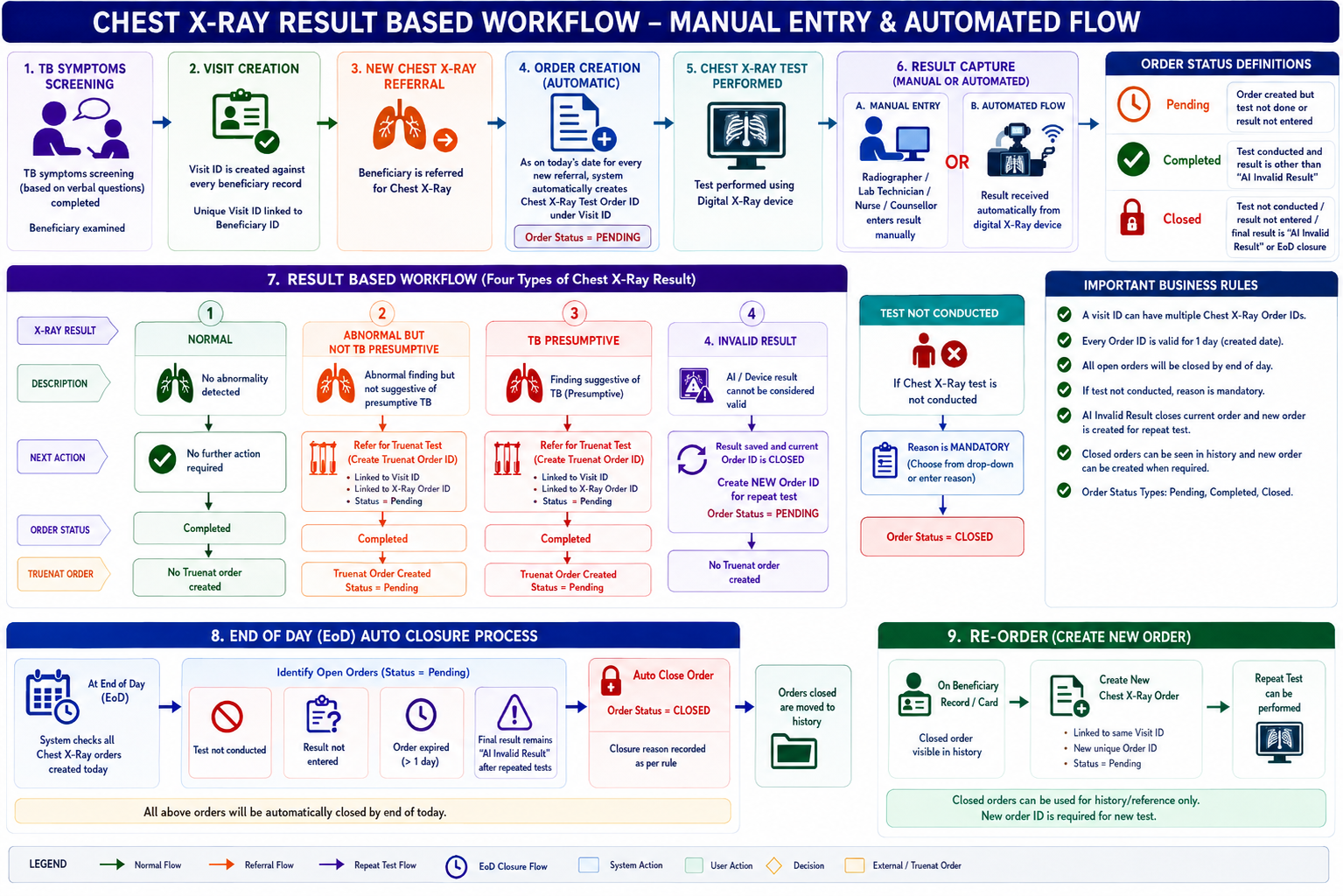
- Business Rules
Rule ID | Business Rule |
BR-CXR-01 | A Visit ID shall be created after TB symptom screening is completed. |
BR-CXR-02 | A new Chest X-Ray referral shall automatically create a unique Order ID. |
BR-CXR-03 | Multiple X-Ray Order IDs may exist under one Visit ID. |
BR-CXR-04 | Every Order ID is valid for the day on which it is created. |
BR-CXR-05 | New orders shall have status Pending. |
BR-CXR-06 | A valid X-Ray result shall change the order status to Completed. |
BR-CXR-07 | AI Invalid Result shall close the current order and generate a new order for repeat testing. |
BR-CXR-08 | A Not Conducted reason is mandatory before closing an order for a test that was not conducted. |
BR-CXR-09 | Eligible open orders shall be automatically closed at EoD. |
BR-CXR-10 | Closed orders shall not be deleted. |
BR-CXR-11 | A new order can be manually created from a closed order when another test is required. |
BR-CXR-12 | Each test attempt shall have a unique Test ID/Order ID as applicable. |
BR-CXR-13 | Abnormal but not TB Presumptive and TB Presumptive results shall initiate Truenat referral. |
BR-CXR-14 | Automated and manual result-entry mechanisms shall produce the same standardized result types and downstream workflow. |
- Key Data Relationships
Beneficiary
│
▼
Visit ID
│
├───────────────┬────────────────┬────────────────┐
▼ ▼ ▼ ▼
CXR Order 1 CXR Order 2 CXR Order 3 Truenat Order
│ │ │
▼ ▼ ▼
Test ID Test ID Test ID
│ │ │
Result Result Result
│ │ │
Status Status Status
This design ensures that repeat Chest X-Ray attempts are never overwritten, while the Visit ID continues to provide a common clinical context for all tests performed during the beneficiary's visit.
Order has expired or has been closed because the test was not conducted, result was not entered, or the final result remained AI Invalid.
Scenario | Order Status |
New X-Ray referral | Pending |
Test not yet conducted | Pending |
Valid result entered | Completed |
Normal result | Completed |
Abnormal result | Completed |
TB Presumptive | Completed |
AI Invalid – repeat required with new order id | Closed |
AI Invalid after repeated attempts at EoD | Closed |
Test not conducted + reason recorded | Closed |
Result not entered at EoD | Closed |
Expired order at EoD | Closed |
New order after previous closure | Pending |
1 Comment
Shivani Garg
Aug 28, 2026Madhava Ramu N - Hi, can you pls clarify below queries with your inputs -
If the AI keeps saying "invalid," should the radiographer be able to retry as many times as they want all day, or should we stop them after a few tries and just send the patient home? What's better for patient flow at the camp?
This feels confusing — that label sounds like it's the machine talking. If a radiographer looks at a film and just can't tell what it shows, should we call that something else, like "unreadable"? I don't want staff picking the wrong option out of confusion.
Say a radiographer meant to click "Normal" but clicked "TB Presumptive" instead, and a Truenat test already got created. Can we undo that? Do we need a reason logged, or a supervisor to approve the fix?
This affects a lot of downstream logic. Is "end of day" the same clock time everywhere, or does each camp/site set its own cutoff? I want to know so we can set expectations with field teams.
This will happen eventually — bad connection, wrong ID, whatever. Does someone get an alert to fix it manually, or does the result just get lost? We should decide this now rather than find out in production.
Can any staff member mark a test as "not done," or does it need to be a specific role? I want to avoid confusion in the field about who's responsible for what action.
This spec stops at "create the Truenat order." Everything after that — running the test, getting that result — lives in a separate flow we're building elsewhere?
It's mentioned once in the diagram with no explanation. Does it actually matter for how X-ray orders work, or is it left over from a different feature and safe to ignore?