
Part B – Software Requirements Specification (SRS)
- Functional Requirements
FR-01 – Visit ID Generation
Trigger: Completion of TB Symptoms Screening.
System shall:
- Validate that TB Symptoms Screening is completed.
- Generate a unique Visit ID.
- Associate Visit ID with Beneficiary ID.
- Store Visit creation date/time.
- Make Visit ID available for subsequent diagnostic referrals.
FR-02 – Chest X-Ray Referral
When a Chest X-Ray referral is initiated, the system shall:
- Validate the Beneficiary ID.
- Identify the applicable Visit ID.
- Create a unique Chest X-Ray Order ID.
- Record the current date/time.
- Set Order Status = Pending.
- Make the order available to the authorized testing user/device.
- FR-03 – Order ID Structure
Each Order ID shall maintain at least the following information:
Field | Description |
Order ID | Unique investigation order identifier |
Beneficiary ID | Beneficiary reference |
Visit ID | Visit reference |
Test Type | Chest X-Ray |
Order Date | Date order was created |
Order Time | Time order was created |
Status | Pending / Completed / Closed |
Result | Chest X-Ray result |
Result Source | Manual / Automated |
Result Date/Time | Date/time result received |
Closure Date/Time | Date/time order closed |
Closure Reason | Reason for closure, where applicable |
Parent Order ID | Previous order, if created for repeat |
Created By | User/system |
Updated By | User/system |
- FR-04 – Result Capture
The system shall provide:
Manual Result Entry
Search Beneficiary
↓
Select Visit
↓
Select Pending X-Ray Order
↓
Select Result
↓
Save Result
Automated Result Flow
Digital X-Ray Device
↓
Integration Interface
↓
Identify Order
↓
Validate Result
↓
Save Result
↓
Process Business Rules
- FR-05 – Result Validation
The system shall only accept the following final Chest X-Ray results:
- Normal
- Abnormal but not TB Presumptive
- TB Presumptive
- AI Invalid Result
Any unsupported or invalid result received through integration shall be rejected or flagged for appropriate exception handling.
- FR-06 – Result Processing Engine
After successful result capture, the application shall execute the applicable business rule.
X-Ray Result | X-Ray Order | System Action |
Normal | Completed | No further action |
Abnormal but not TB Presumptive | Completed | Create Truenat Order |
TB Presumptive | Completed | Create Truenat Order |
AI Invalid Result | Closed | Create new X-Ray Order |
- FR-07 – Repeat Test Management
For an AI Invalid Result:
- Current Order ID shall be retained for historical purposes.
- Current Order Status shall become Closed.
- A new Order ID shall be created.
- New Order Status = Pending.
- New Order shall reference the previous Order ID as its Parent Order ID.
- Repeat count/attempt number should be maintained.
Example:
Visit V001
│
├── X-Ray Order XR001 → AI Invalid → Closed
│ │
│ ▼
├── X-Ray Order XR002 → AI Invalid → Closed
│ │
│ ▼
└── X-Ray Order XR003 → Normal → Completed
This provides a complete audit trail of repeat attempts.
- FR-08 – Truenat Referral
For either:
- Abnormal but not TB Presumptive
- TB Presumptive
the system shall automatically initiate a Truenat referral.
The system shall:
- Complete the Chest X-Ray Order.
- Create a Truenat Order ID.
- Link the Truenat Order to the Beneficiary.
- Link the Truenat Order to the Visit ID.
- Link the Truenat Order to the Chest X-Ray Order.
- Set Truenat Order Status = Pending.
- FR-09 – Test Not Conducted
The system shall provide a "Test Not Conducted" option.
When selected:
- Reason field becomes mandatory.
- User cannot save without reason.
- Order status becomes Closed.
- Closure date/time shall be recorded.
- User ID shall be recorded.
- FR-10 – EoD Scheduler
The system shall run an EoD process to identify eligible Pending Chest X-Ray Orders.
Processing logic
FOR each Chest X-Ray Order
IF Order Status = Pending
AND Order Date < Current Business Date
THEN
Change Status → Closed
Record Closure Date/Time
Record Closure Reason
END IF
END FOR
For the current day's EoD, the system shall close applicable orders that have not been completed according to the operational closure rules.
- FR-11 – Closed Order Management
For a Closed Chest X-Ray Order:
- Result/order history shall remain read-only.
- User shall be able to view the previous Order details.
- User shall have an option to Create New Order where permitted.
- New Order shall have a unique Order ID.
- Previous order shall not be modified to represent the new test.
- FR-12 – Multiple Orders Under One Visit
The system shall support:
One Beneficiary
│
▼
One Visit ID
│
├── X-Ray Order 001
├── X-Ray Order 002
├── X-Ray Order 003
└── Truenat Order(s)
Multiple Chest X-Ray Order IDs may therefore be created against the same Visit ID.
- FR-13 – Role-Based Access
The application shall provide role-based access for result entry and order management.
Function | Radiographer | Lab Technician | Nurse | Counsellor |
View Beneficiary | ✓ | ✓ | ✓ | ✓ |
Search Beneficiary | ✓ | ✓ | ✓ | ✓ |
View X-Ray Order | ✓ | ✓ | ✓ | ✓ |
Manual X-Ray Result | ✓ | Configurable | Configurable | Configurable |
Mark Test Not Conducted | ✓ | Configurable | Configurable | Configurable |
Create New Order | ✓ | Configurable | Configurable | Configurable |
View Result | ✓ | ✓ | ✓ | ✓ |
Note: Final permissions should be configurable according to program policy.
- FR-14 – Audit Trail
The system shall maintain an audit trail for:
- Visit ID creation.
- Order ID creation.
- Result entry.
- Result modification, where permitted.
- Result source.
- Repeat test.
- Order closure.
- Closure reason.
- New Order creation.
- User ID.
- Device/integration source.
- Date and time.
- Non-Functional Requirements
NFR-01 – Offline Capability
The TB Screening Camp application should support the Chest X-Ray workflow in the camp's offline environment where applicable.
NFR-02 – Performance
Beneficiary and Pending Order searches should return results within an acceptable operational response time under the camp's local network conditions.
NFR-03 – Data Integrity
Every result must be linked to the correct:
Beneficiary ID → Visit ID → Order ID
to prevent results from being assigned to the wrong beneficiary.
NFR-04 – Security
Only authenticated and authorized users shall be able to:
- Enter results.
- Mark tests as not conducted.
- Create new orders.
- Close orders manually.
NFR-05 – Auditability
The system shall preserve historical orders and test attempts and shall not delete closed orders as part of normal business operations.
- Recommended Data Model
BENEFICIARY
│
│ 1:N
▼
VISIT
│
│ 1:N
▼
DIAGNOSTIC ORDER
│
├───────────────┐
│ │
▼ ▼
CHEST X-RAY TRUENAT
ORDER ORDER
│
│ 1:N
▼
TEST ATTEMPT
│
▼
RESULT
For repeat AI-invalid testing, the recommended model is:
XR001
AI Invalid
Closed
│
│ Parent Order
▼
XR002
AI Invalid
Closed
│
│ Parent Order
▼
XR003
Normal
Completed
This is preferable to overwriting results because it preserves the complete diagnostic history.
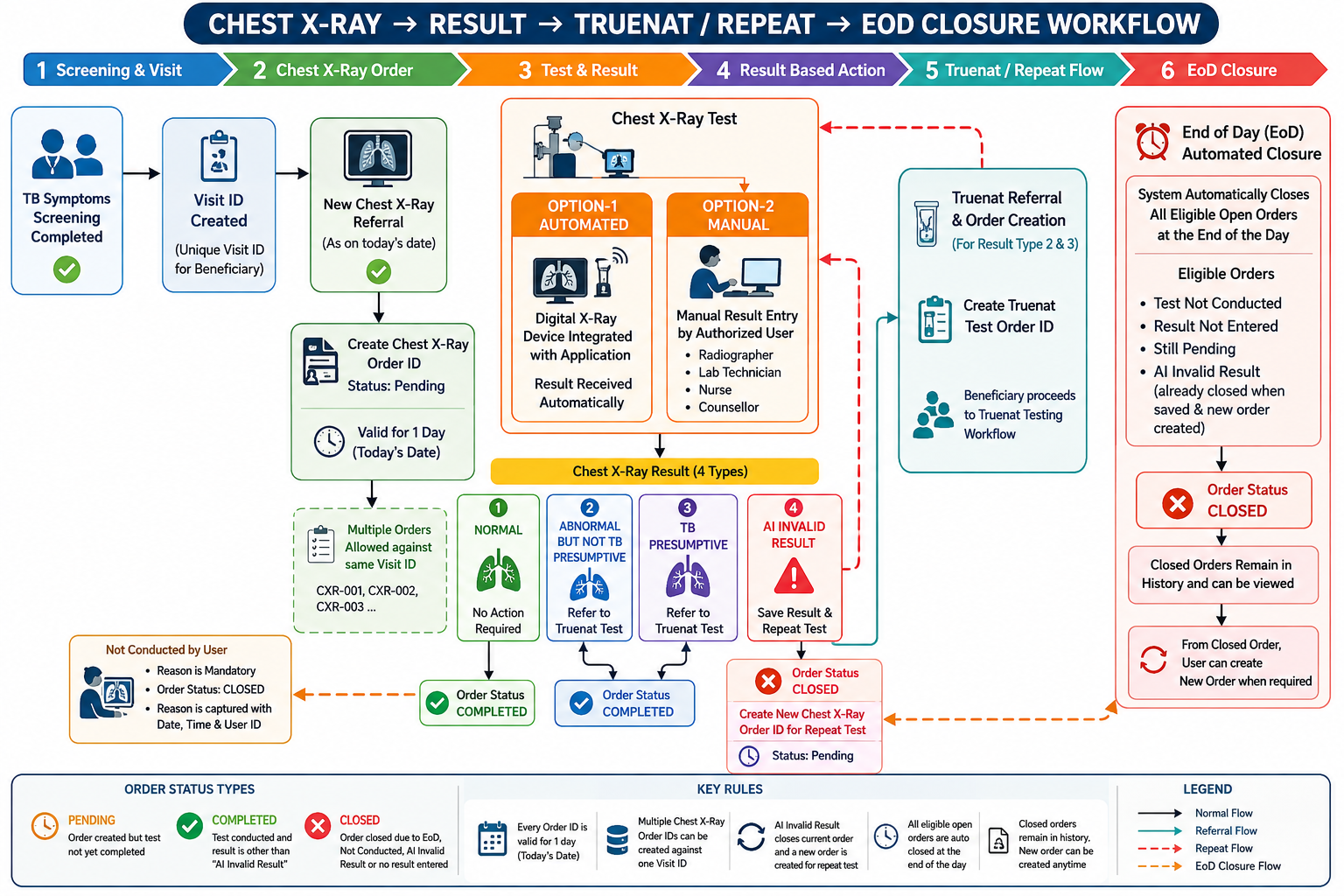
- End-to-End SRS Workflow and EoD Processing Workflow
- Final Acceptance Criteria
The functionality shall be accepted when:
- Visit ID is automatically created after TB Symptoms Screening completion.
- New Chest X-Ray referrals automatically generate an Order ID.
- One Visit ID supports multiple Chest X-Ray Order IDs.
- Order IDs have a one-day validity period.
- Order statuses are correctly maintained as Pending / Completed / Closed.
- Manual result entry is available to authorized users.
- Automated results can be received from integrated Digital X-Ray devices.
- Four Chest X-Ray results are supported.
- Normal results complete the order with no further action.
- Abnormal but not TB Presumptive results create a Truenat referral.
- TB Presumptive results create a Truenat referral.
- AI Invalid results are recorded and the current order is closed.
- A new Order ID is created for repeat testing after AI Invalid.
- Repeat Order IDs retain parent/previous order references.
- Test Not Conducted requires a mandatory reason.
- Test-not-conducted orders are closed.
- Pending/unresolved orders are closed according to EoD rules.
- Closed orders remain available in history.
- A new Order ID can be created from a closed order/beneficiary record when required.
- Every result is traceable through Beneficiary ID → Visit ID → Order ID.
- Manual and automated result paths use the same result-processing rules.
- All important transactions are captured in the audit trail.
Key design principle
Beneficiary ID → Visit ID → Test Order ID → Test Result → Next Action
The Visit ID represents the screening encounter, while each Order ID represents a specific Chest X-Ray test order. This allows multiple orders under one visit while preserving a complete history of repeat tests, invalid results, closures, and final outcomes.