
Part A – Business Requirements Document (BRD)
- Document Purpose
This document defines the business and functional requirements for managing the Truenat testing workflow within the TB Screening Camp application.
The solution shall digitally manage Truenat referrals, test orders, MTB and RIF testing, result capture, repeat testing, clinical referrals, treatment referrals, and End-of-Day (EoD) order closure of an incomplete test order with a mandatory reason.
The workflow shall support both:
- Automated result capture from an integrated Truenat device.
- Manual result entry by authorized camp users.
The overall workflow is:
TB Symptoms Screening → Visit Creation → Truenat Referral → Test Order Creation → MTB Test → MTB Result → RIF / Clinical Assessment / No Action / Repeat → RIF Test → Treatment / Clinical Assessment / Repeat → EoD Closure of an incomplete test order with a mandatory reason.
Use Cases for Digital Chest X-Ray and Truenat Devices in TB Screening Camps
Overview
TB Screening Camps may operate with different combinations of Digital Chest X-Ray and Truenat testing devices, depending on device availability and integration readiness.
The TB Screening Camp Application shall support all applicable device deployment scenarios and shall provide flexibility for both:
- Automated Result Capture – where the testing device is integrated with the TB Screening Camp Application.
- Manual Result Capture – where the testing device is not integrated or automated result retrieval is unavailable.
Supported Camp Use Cases
| Use Case | Description |
|---|---|
| Use Case 1 | Both Digital Chest X-Ray and Truenat Devices Integrated |
| Use Case 2 | Both Devices Available, but Only One Device Integrated |
| Use Case 3 | Digital Chest X-Ray Integrated; Truenat Not Integrated |
| Use Case 4 | Truenat Integrated; Digital Chest X-Ray Not Integrated |
| Use Case 5 | Both Digital Chest X-Ray and Truenat Devices Not Integrated |
Functional Requirement – Dual Result Capture Support
The TB Screening Camp Application shall support both Manual Result Capture and Automated Result Capture for Digital Chest X-Ray and Truenat testing.
The result capture method shall depend on the integration status of the respective diagnostic device.
| Device Integration Scenario | Chest X-Ray Result | Truenat Result |
|---|---|---|
| Both devices integrated | Automated | Automated |
| Only Chest X-Ray integrated | Automated | Manual |
| Only Truenat integrated | Manual | Automated |
| Both devices not integrated | Manual | Manual |
| Both devices available, only one integrated | Automated/Manual based on integration | Automated/Manual based on integration |
Key Business Requirement
The system shall support different device availability and integration configurations at each TB Screening Camp. Manual and automated result capture shall be independently configurable for the Digital Chest X-Ray and Truenat devices, allowing the camp to continue diagnostic operations irrespective of whether one, both, or neither device is integrated with the TB Screening Camp Application.
- Business Objective
The objective is to ensure that every Truenat referral generated during a TB Screening Camp is:
- Uniquely identified and traceable.
- Linked to the correct Beneficiary and Visit.
- Processed through a controlled test-order lifecycle.
- Supported through both manual and automated result capture.
- Automatically routed to the next appropriate action based on the test result.
- Properly managed when testing is repeated or not conducted.
- Manually close the incomplete test-order when applicable.
- Available for subsequent re-ordering when an order has been closed.
- Scope
3.1 In Scope
The solution shall cover:
- Visit ID creation.
- Truenat referral.
- MTB Test Order creation.
- MTB test result capture.
- MTB result-based workflow.
- RIF Test Order creation.
- RIF test result capture.
- RIF result-based workflow.
- Manual result entry.
- Automated result integration.
- Invalid/Error repeat testing.
- Test Not Conducted workflow.
- Closure of an incomplete test order with a mandatory reason.
- New order creation after closure.
- Multiple Test Order IDs under one Visit ID.
- Order and test history.
- Audit trail.
- Key Business Entities
Entity | Description |
Beneficiary | Person registered for TB screening |
Beneficiary ID | Unique identifier assigned to the beneficiary |
Visit ID | Unique identifier for the beneficiary's screening encounter |
Test Order ID | Unique identifier for an individual Truenat test order |
Test Type | MTB or RIF |
Test Result | Result generated for the respective Truenat test |
Referral | Action generated based on the test result |
Test Attempt | Individual testing attempt associated with an order |
Parent Order ID | Previous order reference when a new order is created after closure |
Entity Relationship
Beneficiary
│
▼
Visit ID
│
├───────────────┐
▼ ▼
MTB Order(s) RIF Order(s)
│ │
▼ ▼
MTB Result RIF Result
- Visit ID Requirement
BR-01 – Visit Creation
A unique Visit ID shall be created against the Beneficiary ID once TB Symptoms Screening based on verbal questions has been completed.
The Visit ID shall act as the parent reference for diagnostic investigations performed during the beneficiary's visit.
Business Rules
- Visit ID shall be linked to the Beneficiary ID.
- The Visit ID shall be available for all subsequent diagnostic referrals.
- Multiple test orders may be created against the same Visit ID.
- Test Order IDs shall not replace or overwrite the Visit ID.
- Truenat Test Order Creation
BR-02 – New Truenat Referral
For every new Truenat referral generated on the current date, the system shall automatically create a unique Test Order ID under the applicable Visit ID.
The Order shall contain:
- Beneficiary ID
- Visit ID
- Test Order ID
- Test Type
- Order Date
- Order Time
- Order Status
Initial status:
Pending
- Order Validity
BR-03 – One-Day Order Validity
Every Truenat Test Order ID shall be valid for one calendar day from the date on which it is created.
At EoD, the system shall identify applicable open orders and close them according to the EoD closure rules.
- Order Status
The system shall support the following three statuses:
Status | Definition |
Pending | Test order created but valid final test result has not yet been completed |
Completed | Test conducted and valid final result recorded |
Closed | Order has been closed due to EoD expiry, test not conducted, or applicable repeat/closure condition |
Important Rule
An Invalid / Error result shall not result in Completed status.
For an Invalid/Error result:
- Result is saved.
- Current order is closed.
- A new order is created for repeat testing.
- Test Result Capture
The system shall support two result-capture methods.
Option 1 – Automated Result Capture
Where a Truenat testing device is integrated with the application:
Truenat Device
│
▼
Integration Interface
│
▼
Identify Test Order
│
▼
Validate Result
│
▼
Save Result
│
▼
Apply Business Rules
The result shall be automatically associated with:
- Beneficiary ID
- Visit ID
- Test Order ID
- Test Type
- Result
- Result Date/Time
- Device/Source
Option 2 – Manual Result Entry
Where automated integration is unavailable, an authorized user shall be able to manually enter the result.
Users who may be permitted to enter results
- Lab Technician
- Nurse
- Counsellor
Role-based permissions shall determine which users can perform manual result entry.
Manual Flow
Search Beneficiary
↓
Select Visit
↓
Select Pending Test Order
↓
Select Test Type
↓
Enter Test Result
↓
Save
↓
Apply Business Rules
- Truenat MTB Test
The system shall support the following MTB results:
- TB Positive (Detected)
- TB Negative (Not Detected)
- Invalid / Error
- MTB Result-Based Workflow
BR-04 – MTB Positive
When the MTB result is:
TB Positive (Detected)
the system shall:
- Mark the MTB Order as Completed.
- Record the MTB result.
- Automatically refer the beneficiary for a Truenat RIF Test.
- Create a new RIF Test Order ID.
- Link the RIF Order to the same Beneficiary ID and Visit ID.
- Set the RIF Order Status to Pending.
Workflow
MTB Test
↓
TB Positive
↓
MTB Order = Completed
↓
RIF Referral
↓
Create RIF Order ID
↓
RIF Order = Pending
- MTB Negative + Normal Chest X-Ray
BR-05 – No Further Action
When:
MTB = TB Negative
AND
Chest X-Ray = Normal
the system shall:
- Mark MTB Order as Completed.
- Record the final result.
- Not create a RIF Order.
- Not create a further diagnostic referral through this workflow.
MTB Negative
↓
Check Chest X-Ray
↓
Chest X-Ray = Normal
↓
No Further Action
- MTB Negative + Abnormal Chest X-Ray
BR-06 – Clinical Assessment & Diagnosis
When:
MTB = TB Negative
AND Chest X-Ray result is either:
- Abnormal but not TB Presumptive, OR
- TB Presumptive
the system shall:
- Mark MTB Order as Completed.
- Record the MTB result.
- Refer the beneficiary for Further Clinical Assessment & Diagnosis.
- Record the referral against the Visit ID.
No RIF Order shall be automatically created solely based on this result combination.
- MTB Invalid / Error
BR-07 – Repeat MTB Test
When:
MTB Result = Invalid / Error
the system shall:
- Save the Invalid/Error result.
- Mark the current MTB Order as Closed.
- Create a new MTB Test Order ID.
- Link the new Order to the same Beneficiary ID and Visit ID.
- Store the previous Order ID as the Parent Order ID.
- Set the new MTB Order Status to Pending.
- Make the new order available for repeat testing.
Example
Visit V001
│
├── MTB Order M001
│ │
│ └── Invalid/Error → CLOSED
│
└── MTB Order M002
│
└── Repeat Test → PENDING
- Truenat RIF Test
A RIF Test shall be initiated when the MTB result is:
TB Positive (Detected)
The system shall support the following RIF results:
- DR TB – Rif Resistance Detected
- Non-DR TB – Rif Resistance Not Detected
- Indeterminate
- Invalid / Error
- RIF Result-Based Workflow
BR-08 – DR TB
When RIF Result =
DR TB (Rif Resistance Detected)
the system shall:
- Mark the RIF Order as Completed.
- Record the RIF result.
- Flag the beneficiary as a Confirmed DR-TB Case.
- Generate referral for appropriate TB treatment/DOTS treatment as per program protocol.
- Record the treatment referral against the beneficiary/Visit.
RIF Test
↓
DR TB
↓
RIF Order = Completed
↓
Confirmed DR-TB Case
↓
Treatment Referral / DOTS
- RIF – Non-DR TB
BR-09 – Confirmed TB Case
When RIF Result =
Non-DR TB (Rif Resistance Not Detected)
the system shall:
- Mark RIF Order as Completed.
- Record the RIF result.
- Flag the beneficiary as a Confirmed TB Case.
- Refer the beneficiary for appropriate TB treatment/DOTS treatment.
- Record the referral for follow-up.
- RIF – Indeterminate
BR-10 – Clinical Assessment & Diagnosis
When RIF Result = Indeterminate:
- RIF Order Status = Completed.
- RIF result shall be saved.
- Beneficiary shall be referred for Further Clinical Assessment & Diagnosis.
- Referral shall be recorded against the Visit ID.
- RIF – Invalid / Error
BR-11 – Repeat RIF Test
When RIF Result = Invalid / Error:
- Save the result.
- Close the current RIF Order.
- Create a new RIF Test Order ID.
- Link the new order to the same Beneficiary ID and Visit ID.
- Store the previous RIF Order ID as Parent Order ID.
- Set the new RIF Order Status to Pending.
- Make the new order available for repeat testing.
- Test Not Conducted
BR-12 – MTB Test Not Conducted
The system shall allow an authorized user to mark an MTB Test as Not Conducted.
Business Rules
- Reason shall be mandatory.
- User shall not be allowed to close the order without entering a reason.
- The reason shall be stored against the Test Order ID.
- Order Status shall be changed to Closed.
- No result-based referral shall be generated.
BR-13 – RIF Test Not Conducted
The same rule shall apply to RIF testing.
- Test Not Conducted option shall be available.
- Reason shall be mandatory.
- Reason shall be saved.
- RIF Order Status shall be Closed.
- Test order Closure
BR-14 – Order Closure
The user shall have an option to mark the MTB Test or RIF Test as Not Conducted. This is a manual process.
Business Rules
- There shall be no automatic EoD closure of Truenat test orders.
- A Test Order shall remain Pending until it is either Completed or manually Closed.
- Incomplete orders shall be manually closed by an authorized user.
- A closure reason shall be mandatory when manually closing an incomplete order.
- Invalid / Error results shall be saved, and the current Test Order shall be marked Closed, with an option to create a new Test Order for repeat testing.
- Every Test Order shall ultimately have one of the following statuses:
- Pending
- Completed
- Closed
Closure of an incomplete test order Workflow
END OF DAY
│
▼
Identify Open Orders
│
┌────────┴─────────┐
▼ ▼
MTB Orders RIF Orders
│ │
▼ ▼
Check Order Status Check Order Status
│ │
Pending/Open? Pending/Open?
│ │
└────────┬─────────┘
▼
Close Order manually with a reason
│
▼
Status = CLOSED
- New Order After Closure
BR-15 – Create New Test Order
For any Closed Truenat Test Order, the beneficiary record/card shall provide an option to Create New Test Order where another test is clinically/operationally required.
The new order shall:
- Have a unique Order ID.
- Be linked to the same Beneficiary ID.
- Be linked to the relevant Visit ID.
- Have a new Order Date/Time.
- Have Status = Pending.
- Maintain a reference to the previous Order ID where the new order is a repeat/replacement order.
The closed order shall remain unchanged for historical and audit purposes.
- Multiple Orders Under One Visit
The application shall support multiple test orders against the same Visit ID.
Example:
Visit ID
│
┌────────────┼─────────────┐
▼ ▼ ▼
MTB Order MTB Order RIF Order
M001 M002 R001
│ │ │
Invalid Valid Result
Closed Completed
This ensures that repeat testing and sequential testing are fully traceable.
BR-16 - Handling of Manually Entered Results and Automatically Fetched Results
1. Overview
At camps where diagnostic devices are integrated with the application, the system shall support both:
- Manual entry of test results by an authorized user; and
- Automatic retrieval of test results through integration with the diagnostic device/platform.
Where a result is manually entered while the system is awaiting an automated result, the automated integration process shall continue independently.
2. Manual Result Entry Confirmation
When an authorized user manually enters a test result, the system shall display a confirmation dialog before saving the result.
The confirmation message shall display the selected test result as follows:
“You have entered the result as: <Test Result>. Are you sure you want to confirm?”
The dialog shall provide the following options:
- Yes – Confirm and save the manually entered result.
- No – Cancel the confirmation and return to the result entry screen, allowing the user to review or modify the selected result.
3. Handling of Manual MTB Result Entry
At device-integrated camps, if a user manually enters an MTB test result, the system shall save the manually entered result according to the applicable workflow.
However:
- The system shall not treat the manual result as the final automated result.
- The system shall continue polling the integrated diagnostic platform/server (e.g., Prorad's server) for the corresponding automated result.
- Any pending integration-related result retrieval process shall continue until the automated result is received or processed according to the applicable integration rules.
Where the integrated workflow includes a corresponding RIF test/order, the system shall continue to monitor and retrieve the RIF result through the automated integration process as applicable.
4. Continuous Polling for Automated Results
The system shall continue polling the integrated diagnostic platform/server for automated test results even after a result has been entered manually.
Manual result entry shall not stop, cancel, or terminate the automated result polling process.
The system shall continue polling for:
- MTB test results; and
- RIF test results, where applicable.
5. Automated Result as the Final Result
When an automated result is subsequently received from the integrated diagnostic device/platform:
- The automated result shall be treated as the final and authoritative result.
- The automated result shall overwrite/supersede the previously manually entered result.
- The system shall update the beneficiary's test record with the automated result.
- The source of the final result shall be recorded as Automated/Integrated.
For audit and traceability purposes, the previously manually entered result should be retained in the system's audit/history log along with:
- Manually entered result
- Date and time of manual entry
- User who entered the result
- Confirmation status
- Automatically received final result
- Date and time of automated result receipt
- Result source
6. Result Priority Rule
The system shall follow the following priority:
Manual Result Entered
        │
        ▼
Display Confirmation Alert
        │
   ┌────┴────┐
   │         │
  Yes        No
   │         │
   ▼         ▼
Save Manual   Return to
Result        Result Entry
   │
   ▼
Continue Polling for
Automated Result
   │
   ▼
Automated Result Received?
   │
   ├── No ──► Continue Polling
   │
   └── Yes
        │
        ▼
Automated Result Received
        │
        ▼
Automated Result Supersedes
Manual Result
        │
        ▼
Update Final Test Result
Key Business Rule
A manually entered result shall be treated as a provisional result when automated integration is active. The automated result received from the integrated diagnostic platform shall be treated as the final result and shall supersede the manually entered result, while preserving the manual entry in the audit trail.
High-Level Business Workflow
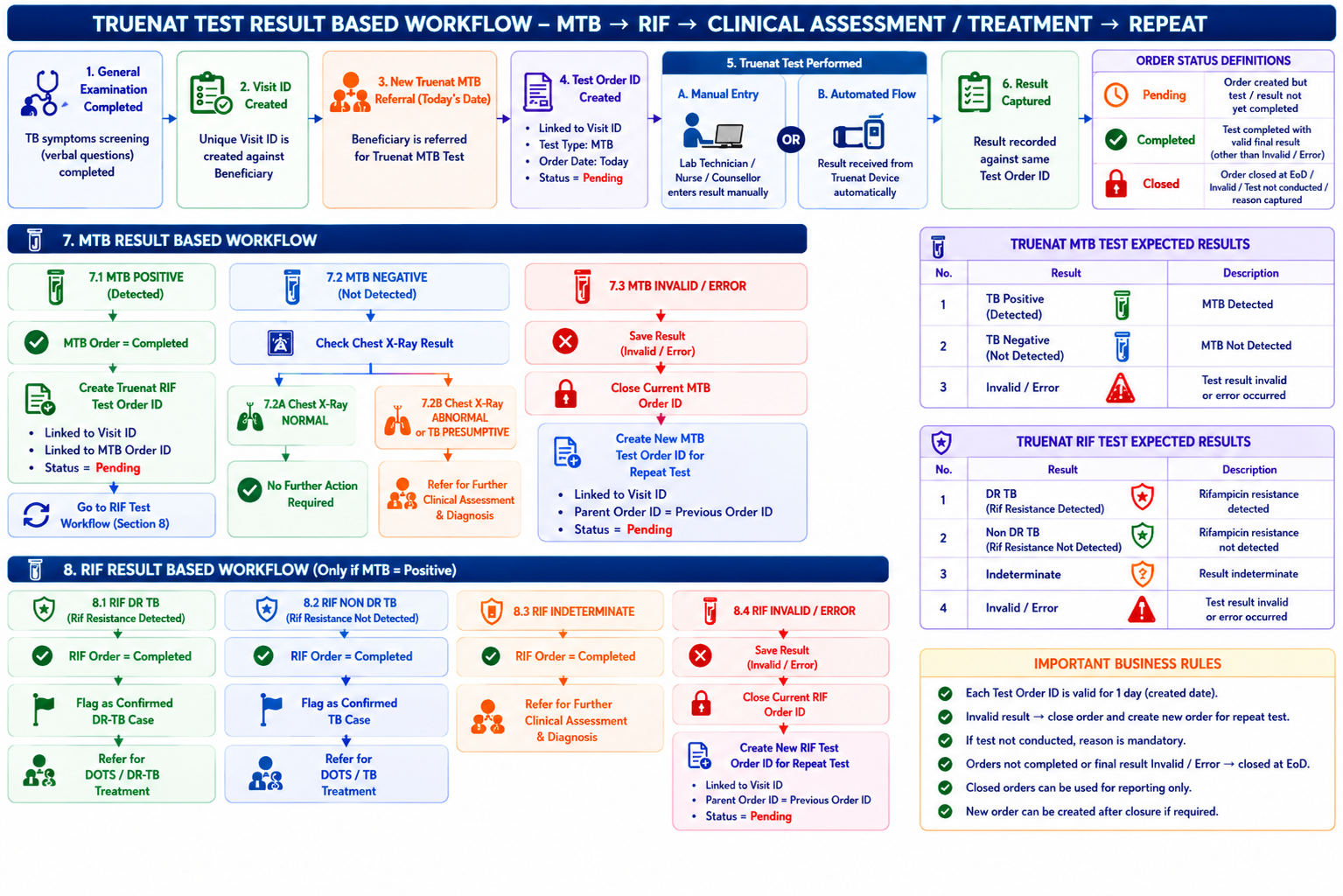
3 Comments
Sehjot Singh
Nov 09, 2026Madhava Ramu N As mentioned
But in updated workflow, no Rif order can be created on prorad server, it will be working on same order Id as MTB's order.
As mentioned in
BR-14 – Closure of an incomplete test order
We do not know when test took place, or did it took place or not, also order will be pending even mtb is received but rif is not, so how can we close it, need little clarity here.
Please update this.
CC : Shivani Garg Rupesh Singh
Sehjot Singh
Nov 10, 2026Madhava Ramu N
Clarifications Required
1. Workflow for camps using government devices
Please clarify which workflow should be followed at camps where government-provided devices are being used. Should the existing workflow continue as it currently operates, or should the newly updated workflow also be applicable to these camps?
2. RIF order creation and result fetching
At camps where Prorad devices are integrated, we will not create a separate RIF order from our end. Instead, the RIF result will be fetched against the MTB order ID itself, as Prorad provides the RIF result under the same order. Please update the PRD accordingly to reflect this workflow.
3. Handling manually entered results and subsequent RIF results
At device-integrated camps, if a nurse manually enters the MTB result, we understand that a separate RIF order will not be created from our end. The RIF order will remain pending, and we will continue polling Prorad's server for the RIF result.
However, we need clarification on how to handle discrepancies between manually entered results and results subsequently received from Prorad.
For example:
A nurse manually enters the MTB result as TB Negative.
The actual result received later from Prorad is TB Positive.
Based on the manually entered negative result, our system may complete the order and trigger the subsequent workflow.
However, the actual positive result may require the RIF result to be processed, and the order should have remained pending.
In such cases, should we overwrite the manually entered result with the result received from Prorad, or should the manually entered result take precedence?
This needs to be clarified because subsequent workflows and order statuses depend on the MTB result, and an incorrect manual entry could trigger an incorrect workflow.
CC : Dr Mithun James Shivani Garg
Madhava Ramu N
Nov 11, 2026Sehjot Singh New business rules is updated for query no 3.
BR-16 - Handling of Manually Entered Results and Automatically Fetched Results.
and updated all Use Cases for Digital Chest X-Ray and Truenat Devices in TB Screening Camps
CC: Shivani Garg