
Epic: Chest X-Ray Order Management and Result-Based Diagnostic Workflow
As a TB Screening Application, I want to create and manage Chest X-Ray test orders against a beneficiary's visit and process Chest X-Ray results through either manual entry or automated integration with a digital Chest X-Ray device, so that the beneficiary is appropriately referred for Truenat testing based on the Chest X-Ray result and all pending orders are closed at the end of the day.
1. User Story
US-01: Create Visit ID
As a TB Screening Application,
I want to create a unique Visit ID against a beneficiary when the General Examination is completed,
so that all investigations and services performed during that visit can be associated with the beneficiary's visit.
Acceptance Criteria
- A unique Visit ID shall be created when General Examination is completed.
- The Visit ID shall be associated with the Beneficiary ID.
- The Visit ID shall be used as the parent reference for diagnostic orders.
- Multiple diagnostic Order IDs may be created against the same Visit ID.
2. Chest X-Ray Order Creation
US-02: Create Chest X-Ray Order
As a TB Screening Application, After TB symptoms screening is done,
I want to automatically create a Chest X-Ray Order ID when a beneficiary is newly referred for Chest X-Ray on the current date,
so that the Chest X-Ray examination can be tracked from referral through completion.
Acceptance Criteria
- A Chest X-Ray Order ID shall be created against the relevant Visit ID.
- The Order ID shall be unique.
- The Order ID shall contain/maintain a reference to:
- Beneficiary ID
- Visit ID
- Order Date
- Investigation Type = Chest X-Ray
- Order Status
- A Visit ID may have multiple Chest X-Ray Order IDs on the same date, where required.
- The Order ID shall initially have status Pending.
- Each Chest X-Ray Order ID shall be valid for one calendar day.
3. Chest X-Ray Result Entry – Manual and Automated
US-03: Capture Chest X-Ray Result
As a Radiographer/authorized user,
I want to record the Chest X-Ray result either manually or receive it automatically from an integrated digital Chest X-Ray device,
so that the application can determine the next appropriate diagnostic action.
Acceptance Criteria
The system shall support two result-entry mechanisms:
A. Manual Result Entry
- Authorized user can search/select the pending Chest X-Ray Order.
- User can enter the Chest X-Ray result manually.
- User shall select one of the four permitted results.
B. Automated Result Entry
- When a Digital Chest X-Ray Device is integrated, the application shall receive the result automatically.
- The automated result shall be mapped to the corresponding Beneficiary ID, Visit ID, and Chest X-Ray Order ID.
- The system shall process the result using the same business rules as manually entered results.
4. Supported Chest X-Ray Results
The system shall support exactly the following four result categories:
Result | Meaning | Next Action |
Normal | No abnormality requiring TB diagnostic referral | No further action |
Abnormal but not TB Presumptive | Abnormal finding, but not suggestive of presumptive TB | Create Truenat Order |
TB Presumptive | Finding is suggestive of presumptive TB | Create Truenat Order |
AI Invalid Result | AI/device result cannot be considered valid | Repeat Chest X-Ray using same Order ID |
5. Result-Based Workflow
US-04: Process Normal Result
As a TB Screening Application,
I want to automatically complete the Chest X-Ray order when the result is "Normal",
so that no unnecessary diagnostic referral is generated.
Acceptance Criteria
- When the Chest X-Ray result is Normal:
- Chest X-Ray Order Status shall be updated to Completed.
- No Truenat Order shall be created.
- No further diagnostic action shall be triggered by this workflow.
Chest X-Ray Result
│
▼
NORMAL
│
▼
Order = COMPLETED
│
▼
No Further Action
6. Abnormal but Not TB Presumptive
US-05: Refer for Truenat
As a TB Screening Application,
I want to automatically create a Truenat Order when the Chest X-Ray result is "Abnormal but not TB Presumptive",
so that the beneficiary can undergo molecular testing for TB.
Acceptance Criteria
- Chest X-Ray Order Status shall become Completed.
- The system shall automatically create a new Truenat Order ID.
- The Truenat Order shall be associated with:
- Beneficiary ID
- Visit ID
- Chest X-Ray Order ID
- The Truenat Order Status shall initially be Pending.
Chest X-Ray
│
▼
Abnormal but
not TB Presumptive
│
▼
X-Ray Order = COMPLETED
│
▼
Create Truenat Order
│
▼
Truenat Order = PENDING
7. TB Presumptive
US-06: Refer TB Presumptive Beneficiary for Truenat
As a TB Screening Application,
I want to automatically create a Truenat Order when the Chest X-Ray result is "TB Presumptive",
so that the beneficiary can undergo confirmatory molecular testing.
Acceptance Criteria
- Chest X-Ray Order Status shall become Completed.
- A new Truenat Order ID shall be created.
- The Truenat Order shall reference:
- Beneficiary ID
- Visit ID
- Chest X-Ray Order ID
- The Truenat Order Status shall be Pending.
Chest X-Ray
│
▼
TB Presumptive
│
▼
X-Ray Order = COMPLETED
│
▼
Create Truenat Order
│
▼
Truenat Order = PENDING
8. AI Invalid Result
US-07: Repeat Chest X-Ray for AI Invalid Result
As a Radiographer/Application,
I want to repeat the Chest X-Ray when the result is "AI Invalid Result",
so that a valid result can be obtained without unnecessarily creating another Chest X-Ray Order.
Acceptance Criteria
- When the result is AI Invalid Result, the existing Chest X-Ray Order ID shall remain active.
- The system shall not create a new Chest X-Ray Order ID for the repeat test.
- The Radiographer shall be allowed to repeat the Chest X-Ray using the same Order ID.
- The application shall maintain the repeat-test information/history against the same Order ID.
- If a subsequent valid result is obtained, the system shall process the result according to the normal result-based workflow.
- If the final result remains AI Invalid Result at EoD, the Order Status shall be changed to Closed.
Chest X-Ray
│
▼
AI Invalid Result
│
▼
Repeat using SAME Order ID
│
┌───────┴────────┐
│ │
Valid Result AI Invalid
│ │
▼ ▼
Process Result Close Order
Accordingly at EoD
9. Chest X-Ray Not Conducted
US-08: Close Order When Test Is Not Conducted
As a authorized user,
I want to record the reason when a referred Chest X-Ray test is not conducted,
so that the system maintains an accurate audit trail of uncompleted investigations.
Acceptance Criteria
- The user shall be able to mark the Chest X-Ray test as Not Conducted.
- A reason shall be mandatory.
- The system shall not allow the user to close the order without entering a reason.
- Once the test is marked as not conducted, the Chest X-Ray Order Status shall be Closed.
- The reason shall be stored against the Order ID.
Example reasons may include:
- Beneficiary unavailable
- Patient refused/ declined
- Long waiting time at the camp
- Fear/Anxiety
- X-ray Machine unavailable
- Power issue
- Connectivity issue
- Technical failure/ issue
- Radiographer unavailable
- Operational constraint
- Other
10. EoD Order Closure
US-09: Automatically Close Open Orders at EoD
As a TB Screening Application,
I want to automatically close all eligible open Chest X-Ray Orders at the end of the day,
so that no expired Order ID remains open beyond its validity period.
Acceptance Criteria
At EoD, the system shall identify all Chest X-Ray Orders created for the current date that remain Pending.
The following orders shall be closed:
- Chest X-Ray not conducted.
- Result not entered.
- Test remains pending.
- Final result remains AI Invalid Result after repeated attempts.
The Order Status shall be changed to:
Pending → Closed
The system shall retain the reason/status information for audit purposes.
11. Re-Order After Closure
US-10: Create New Chest X-Ray Order
As a authorized user,
I want to create a new Chest X-Ray Order when an earlier Order ID has been closed,
so that the beneficiary can undergo another Chest X-Ray examination when clinically or operationally required.
Acceptance Criteria
- A new Order ID shall be generated.
- The new Order ID shall not reuse the previous Order ID.
- The new Order shall reference the same:
- Beneficiary ID
- Visit ID
- The new Order shall have status Pending.
- The previous Order shall remain Closed.
- Multiple Order IDs may therefore exist against the same Visit ID.
12. Order Status
The system shall support the following Chest X-Ray Order statuses:
Pending
Order has been created but the Chest X-Ray test/result is not yet completed.
Completed
Chest X-Ray test has been conducted and a valid final result has been recorded.
Closed
Order has expired or has been closed because the test was not conducted, result was not entered, or the final result remained AI Invalid.
Scenario | Order Status |
New X-Ray referral | Pending |
Test not yet conducted | Pending |
Valid result entered | Completed |
Normal result | Completed |
Abnormal result | Completed |
TB Presumptive | Completed |
AI Invalid – repeat required | Pending |
AI Invalid after repeated attempts at EoD | Closed |
Test not conducted + reason recorded | Closed |
Result not entered at EoD | Closed |
Expired order at EoD | Closed |
New order after previous closure | Pending |
13. End-to-End Functional Flow
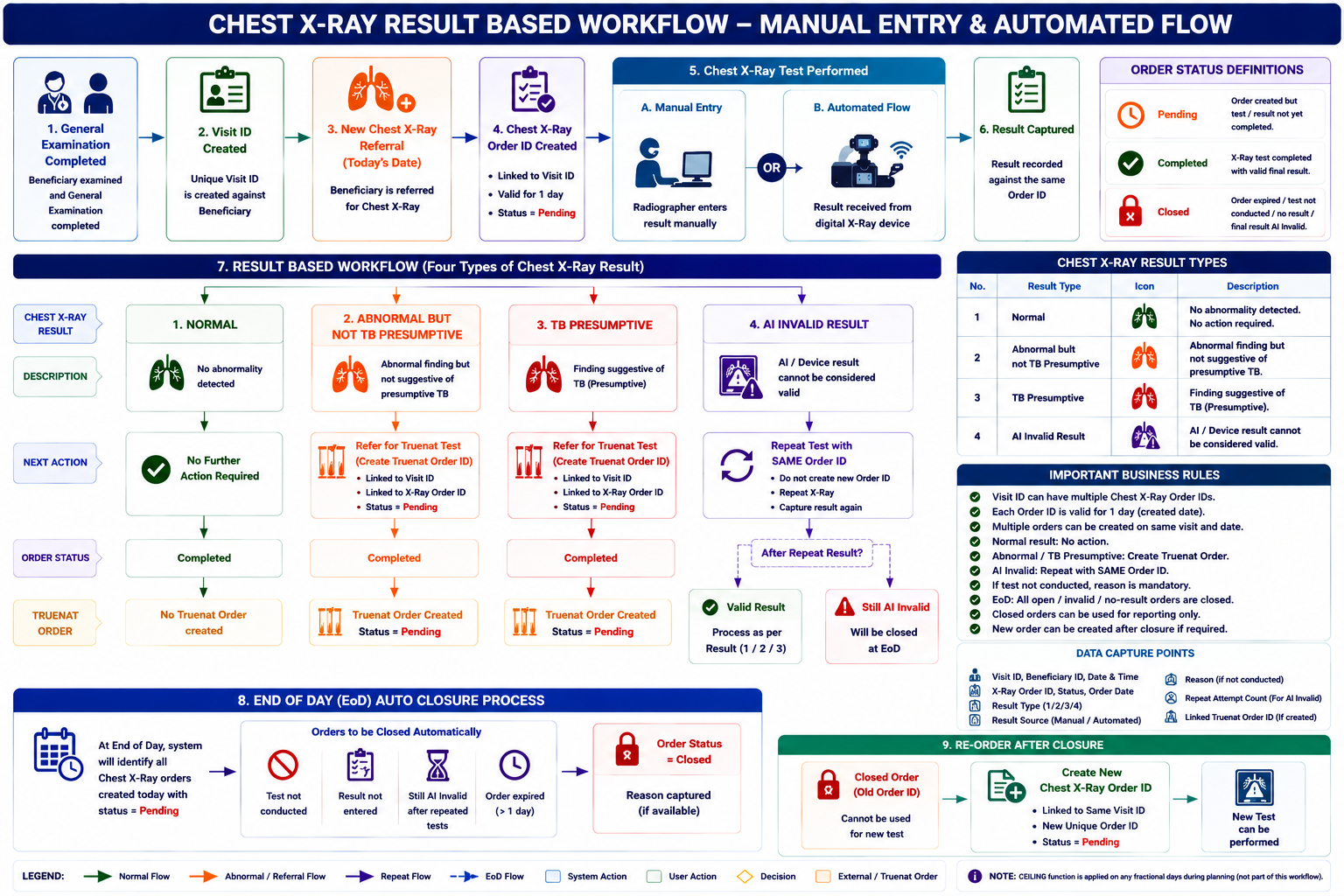
14. Overall Business Rules
ID | Business Rule |
BR-01 | A Visit ID shall be created when General Examination is completed. |
BR-02 | A new Chest X-Ray referral shall generate a Chest X-Ray Order ID for the current date. |
BR-03 | Each Chest X-Ray Order ID shall be valid for one calendar day. |
BR-04 | Multiple Order IDs may be created against the same Visit ID. |
BR-05 | Each Order ID shall be unique. |
BR-06 | An Order ID shall initially have status Pending. |
BR-07 | A valid completed Chest X-Ray test shall change the Order Status to Completed. |
BR-08 | Normal result requires no further diagnostic referral. |
BR-09 | Abnormal but not TB Presumptive result shall trigger a Truenat Order. |
BR-10 | TB Presumptive result shall trigger a Truenat Order. |
BR-11 | AI Invalid Result shall trigger a repeat Chest X-Ray using the same Order ID. |
BR-12 | A new Order ID shall not be created for an AI Invalid repeat. |
BR-13 | If the test is not conducted, a reason shall be mandatory. |
BR-14 | Orders with no completed test/result shall be closed at EoD. |
BR-15 | An Order remaining AI Invalid after repeated attempts shall be closed at EoD. |
BR-16 | A closed Order shall not be reused for another test. |
BR-17 | A new Order ID may be created against the same Visit ID after an earlier Order is closed. |
BR-18 | All order status changes and result updates shall be auditable. |
Key User Story Summary