
Overview
Digital TB Screening App – Device Integration
The Digital TB Screening Camp Solution is designed to support end-to-end tuberculosis (TB) screening activities conducted through village-based health camps. The solution enables seamless integration between the TB Screening Mobile Application, Application Local Server, Diagnostic Devices Platform, Digital X-ray Device, Truenat Device, and the Central Cloud Server.
The platform supports beneficiary registration, TB symptom (verbal) screening, clinical examination, radiological investigation, molecular diagnostic testing, counselling, and treatment follow-up within a completely offline camp environment.
During the screening camp, beneficiaries are registered using the TB Screening Mobile Application. Individuals identified as presumptive TB cases are referred for Chest X-ray examination and Truenat molecular testing within the same camp. All data generated during these activities is exchanged securely through the Local Server and Diagnostic Devices Platform without requiring internet connectivity.
The architecture separates application services from diagnostic device services by introducing a Diagnostic Devices Platform, which acts as an intermediary integration layer between diagnostic devices and the Application Local Server.
At the end of the camp, all beneficiary records, clinical information, diagnostic test results, and counselling data are synchronized from the Local Server to the Central Cloud Server whenever internet connectivity becomes available.
System Architecture Overview
The digital solution comprises the following components:
- TB Screening Mobile Application (Offline)
- Application Local Server (Camp Laptop)
- Diagnostic Devices Platform (Diagnostic Laptop)
- Digital X-ray Device
- Truenat Device
- Central Cloud Server
The architecture supports offline-first operations while ensuring secure data exchange between all applications and diagnostic devices deployed during the camp.
Functional Requirements
- Infrastructure and Device Connectivity
FR-01: Diagnostic Device Connectivity
The Digital X-ray Device and Truenat Device shall be connected to the Diagnostic Devices Platform Laptop for diagnostic data exchange.
FR-02: Mobile Application Connectivity
All TB Screening Mobile Application devices shall connect to the Application Local Server Laptop through the camp's local network.
FR-03: Platform-to-Platform Integration
The Diagnostic Devices Platform Laptop and Application Local Server Laptop shall communicate through a secure local network to exchange beneficiary and diagnostic data.
FR-04: Central Server Connectivity
The Application Local Server shall synchronize data with the Central Cloud Server whenever internet connectivity becomes available.
- Offline Operation
FR-05: Offline Mobile Application
The TB Screening Mobile Application shall function completely in offline mode without dependency on internet connectivity.
FR-06: Offline Local Server
The Application Local Server shall process, store, and exchange data entirely in offline mode during camp operations.
- User Roles and Device Assignment
FR-07: Mobile Application Users
The following users shall access the TB Screening Mobile Application:
- Register User
- Nurse User
- Counsellor User
These users shall exchange data exclusively through the Application Local Server.
FR-08: Diagnostic Device Users
The following users shall operate diagnostic devices:
- Radiographer User
- Laboratory Technician User
The Digital X-ray Device and Truenat Device shall communicate exclusively with the Diagnostic Devices Platform.
- Beneficiary Registration
FR-09: Beneficiary Registration
The Register User shall register beneficiaries by capturing:
- Demographic information
- Village information
- Household details
- Other mandatory registration fields
FR-10: Registration Synchronization
The Mobile Application shall synchronize beneficiary registration details with the Application Local Server.
FR-11: Beneficiary Processing
The Application Local Server shall validate and process all beneficiary registration records received from the Mobile Application.
FR-12: Beneficiary ID Generation
The Application Local Server shall generate a unique Beneficiary ID for every registered beneficiary.
FR-13: Beneficiary ID Synchronization
The generated Beneficiary ID shall be synchronized back to the Mobile Application.
FR-14: Beneficiary Data Distribution
The Application Local Server shall distribute Beneficiary IDs and beneficiary details to:
- Register User
- Nurse User
- Counsellor User
- Diagnostic Devices Platform Laptop
The Diagnostic Devices Platform shall further make beneficiary details available to:
- Radiographer User
- Laboratory Technician User
Each user shall be able to search and select beneficiaries relevant to their assigned workflow.
- TB Symptom and Clinical Screening
FR-15: TB Symptom Screening
The Nurse User shall capture:
- TB symptom (verbal) screening
- Clinical screening
- Physical examination
- Other assessment information
FR-16: Clinical Data Synchronization
The Nurse Module shall synchronize all clinical information to the Application Local Server using the Beneficiary ID as the primary identifier.
- Local Data Exchange
FR-17: Application Local Server
The Application Local Server shall function as the central application data exchange platform for:
- Mobile Application Devices
- Diagnostic Devices Platform
FR-18: Diagnostic Devices Platform
The Diagnostic Devices Platform shall function as the central integration platform for diagnostic devices, including:
- Digital X-ray Device
- Truenat Device
- Digital X-ray Integration
FR-19: Beneficiary Search
The Radiographer User shall retrieve beneficiary details from the Diagnostic Devices Platform.
FR-20: X-ray Examination
Upon completion of the X-ray examination:
- A unique X-ray Test ID shall be generated.
- Multiple X-ray examinations shall be supported for the same beneficiary.
- Each examination shall have a unique Test ID.
FR-21: X-ray Result Synchronization
The Digital X-ray Device shall synchronize the following information to the Diagnostic Devices Platform:
- Beneficiary ID
- X-ray Test ID
- X-ray Result
- X-ray Image
- Examination Metadata
- Truenat Integration
FR-22: Beneficiary Search
The Laboratory Technician shall retrieve beneficiary details from the Diagnostic Devices Platform.
FR-23: Truenat Examination
Upon completion of Truenat testing:
- A unique Truenat Test ID shall be generated.
- Multiple Truenat tests shall be supported for the same beneficiary.
- Every test shall have a unique Test ID.
FR-24: Truenat Result Synchronization
The Truenat Device shall synchronize the following information to the Diagnostic Devices Platform:
- Beneficiary ID
- Truenat Test ID
- Test Result
- Diagnostic Metadata
- Diagnostic Platform Synchronization
FR-25: Diagnostic Platform Data Exchange
The Diagnostic Devices Platform shall synchronize all diagnostic data with the Application Local Server, including:
- X-ray Results
- X-ray Images
- Truenat Results
- Test IDs
- Diagnostic Metadata
- Counselling
FR-26: Counselling and Follow-up
The Counsellor User shall capture:
- Counselling information
- Treatment advice
- Follow-up details
The captured information shall be synchronized to the Application Local Server using the Beneficiary ID.
- Local Data Storage
FR-27: Consolidated Beneficiary Record
The Application Local Server shall maintain a consolidated beneficiary record containing:
- Demographic Details
- Registration Information
- TB Symptom Screening
- Clinical Screening
- X-ray Results
- X-ray Images
- Truenat Results
- Counselling Information
- Treatment Follow-up Information
- Test IDs
- Audit Metadata
All information shall be stored locally throughout camp operations.
- End-of-Day Synchronization
FR-28: Central Server Synchronization
At the End of Day (EoD), the Application Local Server shall synchronize all offline data with the Central Cloud Server whenever internet connectivity becomes available.
The synchronization shall include:
- Beneficiary Registration
- TB Symptom Screening
- Clinical Screening
- X-ray Results
- X-ray Images
- Truenat Results
- Counselling Data
- Treatment Follow-up
- Device-generated Test IDs
- Audit and Synchronization Logs
High-Level Integration Workflow
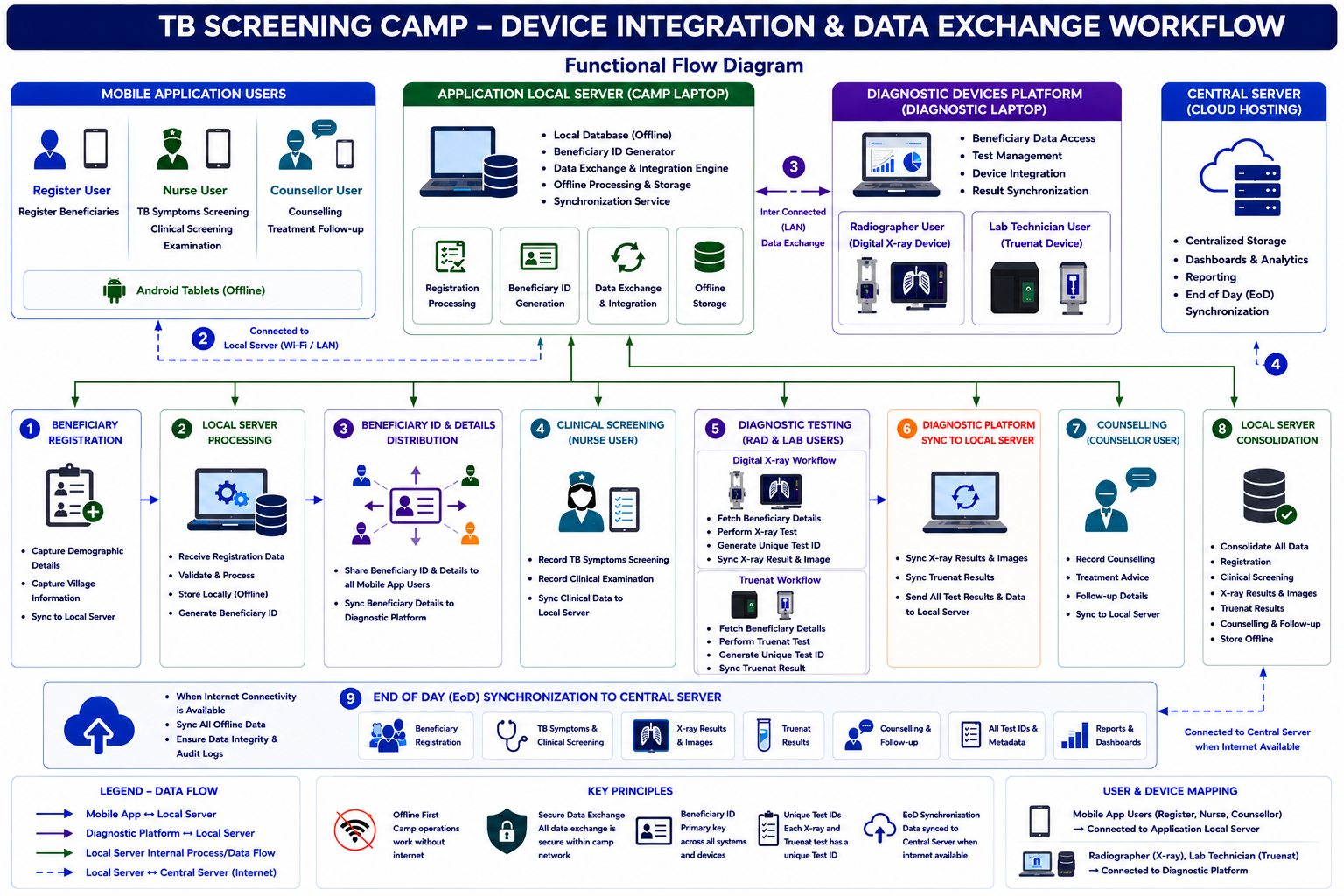
Key Design Principles
- Offline-first architecture ensuring uninterrupted camp operations.
- Separation of application services and diagnostic device integration through a dedicated Diagnostic Devices Platform.
- Beneficiary ID serves as the single primary identifier across all modules and devices.
- Unique Test IDs are generated for every X-ray and Truenat examination, allowing multiple diagnostic tests for the same beneficiary.
- Application Local Server acts as the central repository for all beneficiary, screening, counselling, and diagnostic data.
- End-of-Day synchronization ensures reliable transfer of consolidated records to the Central Cloud Server while preserving offline resilience. This architecture is scalable, modular, and well-suited for inclusion in a PRD, Functional Requirements Specification (FRS), Software Requirements Specification (SRS), or Solution Architecture Document.
2 Comments
Ankit Singh Bish
Jul 13, 2026Hello Madhava Ramu N ,
I have a clarification regarding the offline support requirements in the PRD.
FR-05: Offline Mobile Application
FR-06: Offline Local Server
I have a question about how the device integration would work in the following scenario:
Suppose a screening user creates an X-ray referral while the mobile application is completely offline and not connected to the local server. Since the referral is stored only on the mobile device, the local server will not receive the request and therefore cannot create the X-ray (or Truenat) order for the beneficiary.
Now, if the beneficiary immediately proceeds to the Radiographer or Laboratory Technician, those users will not see any pending order because the local server never received the referral from the mobile application.
In this scenario, it appears that connectivity between the mobile application and the local server is essential for timely order creation. Does this mean that, although internet connectivity is not required, the mobile devices are expected to maintain a reliable connection to the local server over the local network (Wi-Fi/LAN) throughout camp operations? Or is there another mechanism planned to handle this workflow when the mobile application is temporarily disconnected from the local server?
Madhava Ramu N
Jul 16, 2026Hi Ankit Singh Bish,
"The TB Screening Mobile Application shall function completely in offline mode without dependency on internet connectivity." this means without "Internet" but should work in "Intranet".
Yes, your understanding is correct as per this statement: "this mean that, although internet connectivity is not required, the mobile devices are expected to maintain a reliable connection to the local server over the local network (Wi-Fi/LAN) throughout camp operations".
The Local Server shall support secure data exchange between: